Introduction
Customer support teams need more than a shared inbox. You need a system that helps agents organize requests, prioritize urgent issues, automate repetitive work, and give customers faster answers without losing the human side of service.
That is where Freshdesk becomes a strong option. Freshdesk is a customer support and helpdesk platform from Freshworks, built around ticket management, self-service, automation, reporting, and AI-powered support through Freddy AI.
In this Freshdesk review, you’ll learn how the platform works, what it does well, where it falls short, how much it costs, and whether it is the right helpdesk software for your business in 2026.
Freshdesk is especially appealing if you want a helpdesk that is easy to set up, simple for agents to use, and flexible enough to support growing service operations. However, you should also pay close attention to plan limits, Freddy AI costs, and the difference between Freshdesk and Freshdesk Omni before choosing a plan.
At a Glance
Freshdesk Review – Quick Summary
If you want the short version, Freshdesk is a strong helpdesk platform for small and mid-sized teams that need reliable ticketing, automation, self-service, and optional AI. It is easier to adopt than many enterprise-grade platforms, but some advanced features require higher plans or paid add-ons.
| Category | Freshdesk Review Summary |
| Best For | Small to mid-sized customer support teams that need structured ticket management |
| Starting Price | $19/agent/month, billed annually |
| Free Option | Free Program for 1-2 agents for 6 months |
| AI Features | Freddy AI Agent, Freddy AI Copilot, Email AI Agent, and Freddy AI Insights |
| Main Strength | Easy setup, intuitive ticketing, automation, and scalable helpdesk workflows |
| Main Limitation | Advanced AI, reporting, routing, and enterprise controls can increase total cost |
Helpdesk Software Overview
Freshdesk is a cloud-based helpdesk software that helps businesses manage customer conversations from a central support workspace. Instead of handling customer emails, chats, calls, and social messages separately, your team can convert those interactions into tickets, assign them to the right agents, track progress, and measure support performance.
The platform is part of the Freshworks product ecosystem, which also includes tools such as Freshsales, Freshchat, Freshcaller, and Freshservice. This makes Freshdesk particularly useful if you want your customer support function to connect with sales, CRM, phone support, or broader customer engagement workflows.
Freshdesk is not only a ticketing tool. It also includes automation, SLA management, knowledge base tools, customer portals, reporting dashboards, marketplace integrations, and AI-powered assistance through Freddy AI. For teams that are still managing support through Gmail, Outlook, spreadsheets, or disconnected apps, Freshdesk can bring much-needed structure.
Freshdesk vs Freshdesk Omni – What’s the Difference?
One important point to understand is that Freshworks offers both Freshdesk and Freshdesk Omni. Freshdesk is focused mainly on AI-boosted ticketing and helpdesk operations. Freshdesk Omni is the broader omnichannel customer service platform for businesses that need more advanced engagement across channels such as live chat, messaging, SMS, web, email, and AI agents.
If your main goal is to manage tickets, automate routing, track SLAs, and build a knowledge base, Freshdesk may be enough. If you need a more complete omnichannel service suite with stronger real-time engagement, Freshdesk Omni is worth comparing before you buy.
| Feature Type | Freshdesk | Freshdesk Omni |
| Main Use Case | Helpdesk ticketing and customer support workflows | Omnichannel customer service across more engagement channels |
| Best For | Teams that need structured ticket management | Teams that need ticketing, messaging, chat, and AI agents in one suite |
| AI Capabilities | Freddy AI features available by plan and add-on | Broader AI agent and omnichannel automation capabilities |
| Pricing | Lower starting point | Higher starting point |
| Recommendation | Choose it for support ticketing and helpdesk operations | Choose it for full omnichannel customer engagement |
Software Specification
Core Freshdesk Features
Ticketing System
Freshdesk’s core strength is ticket management. The platform helps you convert customer requests into organized tickets, assign them to the right agents, and track each issue until resolution.
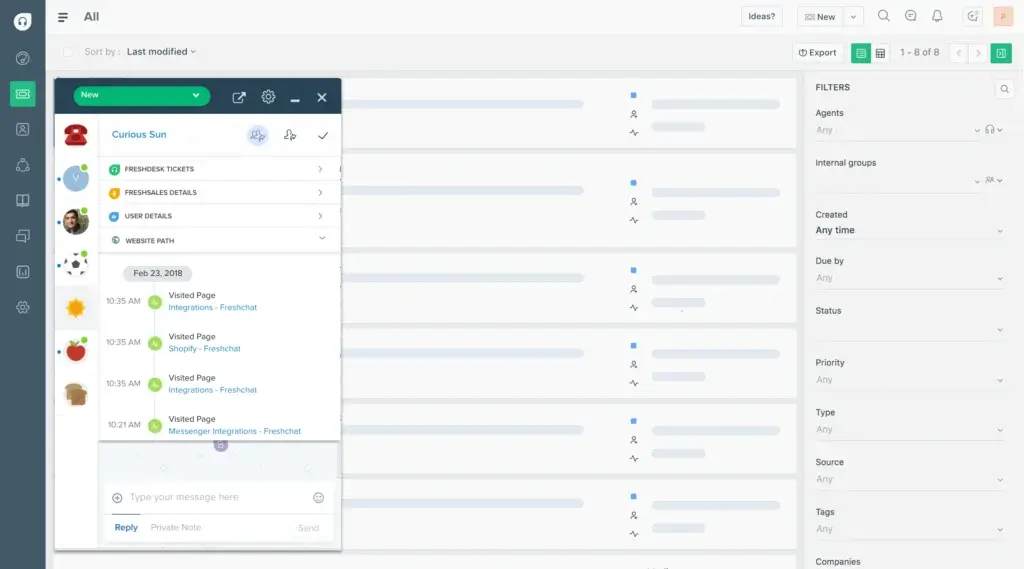
Agents can manage tickets from a shared workspace, add internal notes, collaborate with other team members, and keep customer-facing replies separate from internal conversations. This is useful when support issues require input from sales, product, billing, technical support, or account management.
Freshdesk also supports parent-child ticketing, which helps teams split complex cases into smaller tasks. For example, if a customer reports a billing issue that also involves a technical bug, your team can divide the work while still keeping the full case connected.
Freddy AI
Freddy AI is Freshworks’ AI layer for customer service. In Freshdesk, it can help agents summarize tickets, improve replies, suggest responses, analyze sentiment, recommend solution articles, and reduce repetitive work.
Freshdesk’s AI capabilities are useful, but you should treat them as part of your buying decision, not as an automatic bonus. Some Freddy AI features are plan-dependent, and Freddy AI Copilot is available as a paid add-on. This matters if you plan to give AI assistance to every agent on your team.
Freddy AI can support several service workflows:
- Ticket summaries help agents understand long conversations faster.
- Writing assistance helps agents rephrase, expand, and improve response tone.
- Sentiment analysis helps teams identify frustrated customers earlier.
- Auto triage helps recommend ticket fields such as priority, group, and status.
- Article suggestions help agents respond with relevant knowledge base content.
For growing teams, these AI features can reduce handle time and improve consistency. For smaller teams, the value depends on ticket volume and whether the added cost justifies the productivity gains.
Automation and Workflow Rules
Freshdesk includes automation tools that help remove repetitive admin work from your support process. You can create rules that route tickets, send notifications, update fields, trigger escalations, or assign issues based on conditions such as channel, product, priority, language, or customer type.
This is one of the biggest reasons to move from a shared inbox to a helpdesk platform. Instead of relying on agents to manually sort and prioritize every request, Freshdesk helps your team standardize the workflow.
For example, you can automatically route billing questions to the finance support group, assign enterprise customer tickets to senior agents, or escalate unresolved tickets when an SLA deadline is approaching.
Routing and SLA Management
Freshdesk gives you tools to define service-level agreement policies and make sure tickets are handled within expected response and resolution windows. You can create different SLA rules for different products, customer segments, ticket priorities, or support plans.
This is especially valuable for B2B companies, SaaS businesses, managed service teams, and support organizations that must meet customer commitments. SLA indicators give agents visibility into what needs attention first, while escalation rules help managers intervene before deadlines are missed.
Knowledge Base and Self-Service
Freshdesk includes knowledge base functionality so you can publish help articles, FAQs, tutorials, and troubleshooting resources. A well-built knowledge base can reduce repetitive tickets by helping customers solve common issues on their own.
The knowledge base also supports agent productivity. Agents can reuse approved content, send article links to customers, and rely on documented processes instead of writing every response from scratch.
For best results, your knowledge base should not be treated as a one-time setup task. Review ticket trends regularly and turn frequent questions into clear help articles. This is one of the fastest ways to lower support volume without lowering service quality.
Reporting and Analytics
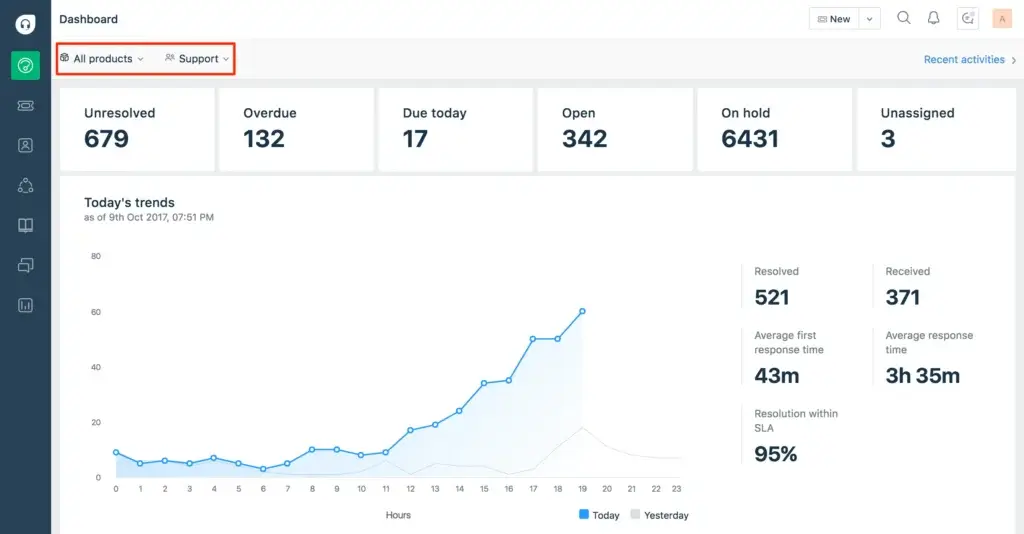
Freshdesk provides reports and dashboards that help you monitor ticket volume, response times, resolution times, SLA performance, customer satisfaction, and agent productivity. These insights help managers understand whether the team is improving or simply staying busy.
The dashboard experience is useful for identifying bottlenecks. For example, if tickets are piling up in one group, you can reassign agents or adjust routing rules. If first response time is increasing, you can review staffing levels or automation coverage.
Integrations and Marketplace
Freshdesk connects with many tools through the Freshworks Marketplace. You can integrate it with CRM platforms, project management tools, ecommerce systems, messaging apps, analytics tools, and developer workflows.
Common integration needs include connecting support tickets to Salesforce, HubSpot, Slack, Microsoft Teams, Shopify, Jira, or collaboration tools. This helps teams reduce manual updates and keep customer context connected across departments.
Freshdesk also offers API access and webhooks, which are useful if your team needs custom automation or integrations with internal systems.
Security and Admin Controls
Freshdesk includes important admin and security features, including role-based access control, agent permissions, single sign-on options, audit logs on higher plans, and IP whitelisting on advanced plans.
These controls matter as your support team grows. A small team may only need basic access permissions, but larger teams need tighter controls over who can view customer data, change workflows, edit knowledge base content, or access admin settings.
Pros and Cons
Benefits and Limitations of Using Freshdesk
Positive
✅ Easy to use
✅ Strong ticketing tools
✅ Helpful automation
✅ Good Freshworks ecosystem
Negatives
❌ Free plan is now limited
❌ AI costs can add up
❌ Advanced reporting needs higher plans
❌ Complex enterprises may need more flexibility
✅ Pros
Freshdesk has several strengths that make it appealing for growing support teams:
- Easy to adopt – Freshdesk is simpler to learn than many enterprise helpdesk platforms.
- Strong ticketing – The platform keeps customer conversations organized and trackable.
- Useful automation – Routing, SLA rules, and workflow automations reduce manual work.
- Good reporting – Dashboards help managers monitor support volume and service performance.
- Freddy AI options – AI tools can help agents summarize, respond, triage, and improve productivity.
- Helpful integrations – Freshdesk connects with many CRM, collaboration, ecommerce, and productivity tools.
- Scalable structure – Teams can start simple and upgrade as support needs become more advanced.
❌ Cons
Freshdesk is not perfect, and some limitations are important to understand before you commit:
- Free Program is limited – Freshdesk’s current free option is not the same as an unlimited forever-free plan.
- Pricing increases by tier – Key features such as advanced reporting, security, and routing require higher plans.
- AI can increase total cost – Freddy AI Copilot and AI Agent sessions may add meaningful costs for large teams.
- Advanced customization has limits – Complex enterprise workflows may require workarounds or a more customizable platform.
- Omnichannel needs may require Omni – Teams needing broader chat, messaging, and engagement should compare Freshdesk Omni.
- Setup still needs planning – Automation, SLA rules, and knowledge base structure require careful implementation.
Overall, Freshdesk offers a strong balance of ease of use and capability. The main question is not whether Freshdesk is good, but whether the plan you choose includes the features your team actually needs.
User Experience
User Interface and Operational Simplicity
Ease of Use
Freshdesk is one of the easier helpdesk platforms to learn. The interface is clean, ticket views are logical, and agents can usually understand the basics without heavy training.
This matters because support software only works if your agents actually use it correctly. A complicated helpdesk can slow down ticket resolution, create inconsistent workflows, and frustrate new team members. Freshdesk avoids much of that by keeping its core experience straightforward.
Agent Workspace
The agent workspace gives support reps access to ticket details, customer information, internal notes, previous conversations, and available actions. This reduces context switching and helps agents respond with more confidence.
Freshdesk also makes collaboration easier. Agents can add private notes, loop in other team members, and break complex issues into related tasks. For teams that handle technical, billing, or product-related support, this can improve internal coordination.
Manager Experience
Managers get visibility into ticket queues, workloads, SLA performance, and agent productivity. This helps them spot overloaded agents, delayed tickets, and common customer issues.
The reporting experience is solid for most small and mid-sized support teams. However, if you need highly customized analytics, complex reporting layers, or enterprise-level data modeling, you should review the available reporting features carefully before choosing a plan.
Mobile Experience
Freshdesk offers mobile access for agents who need to manage tickets on the go. This is useful for quick replies, urgent issue checks, or managers who want visibility while away from their desk.
That said, the desktop version is still the stronger experience for heavy ticket work. If your support team relies heavily on mobile workflows, test the mobile app during the trial before committing.
Pricing and Plans
How Much Does Freshdesk Cost?
Freshdesk pricing has changed, so this section is one of the most important parts of the review to keep updated. Freshdesk currently offers paid plans for Growth, Pro, and Enterprise, plus a Free Program for very small teams.
Pricing can vary by region, billing terms, add-ons, and promotional offers. Always check the Freshworks pricing page before making a final buying decision.
| Plan | Price | Best For |
| Free Program | $0 for 1-2 agents for 6 months | Very small teams testing basic helpdesk features |
| Growth | $19/agent/month, billed annually | Small teams that need ticketing, customer portal, and reports |
| Pro | $55/agent/month, billed annually | Growing teams that need custom objects, advanced routing, and custom reporting |
| Enterprise | $89/agent/month, billed annually | Larger teams that need audit logs, approval workflows, skills-based assignments, and stronger admin controls |
Free Program
Freshdesk’s Free Program is designed for very small teams. It supports 1-2 agents for 6 months and includes essential helpdesk capabilities such as ticketing, a knowledge base, and pre-built reports.
This is a good way to test Freshdesk before paying, but it should not be presented as an unlimited free plan. If your team is growing or needs long-term support operations, you should plan for a paid subscription.
Growth Plan
The Growth plan is Freshdesk’s entry-level paid plan. It includes ticketing, customer portal features, reports, and core helpdesk functionality for small businesses that want a structured support process.
This plan is best if your team is moving away from email-based support and needs a cleaner way to assign, track, and resolve customer issues. It is not the best choice if you need deeper customization, advanced routing, or more complex reporting.
Pro Plan
The Pro plan is better suited for growing support teams that need more control. It adds features such as customized support portals, custom objects, advanced ticketing, custom reporting, and different routing mechanisms.
This is likely the plan many mid-sized teams should evaluate first. It provides more room to build structured workflows without immediately jumping to the highest tier.
Enterprise Plan
The Enterprise plan is built for larger support organizations that need stronger governance, security, and workflow controls. It includes features such as audit logs, approval workflows, skills-based assignments, and additional security capabilities.
If your support team has multiple groups, complex escalation paths, strict permission needs, or higher compliance expectations, Enterprise may be the most practical option.
Freddy AI Costs
Freshdesk’s AI features can be valuable, but they require careful budgeting. Freddy AI Copilot is available as a paid add-on, and Freddy AI Agent sessions may also require separate session packs depending on your usage.
The advantage is that Freddy AI Copilot can be assigned to a subset of agents. This means you do not necessarily need to buy AI Copilot for every support rep. You can start with senior agents, team leads, or high-volume support groups and expand later if the productivity gains are clear.
Freshdesk Free Trial
Freshdesk offers a 14-day free trial. During the trial, users can test Enterprise-level features before choosing a paid plan.
This is useful because many of Freshdesk’s most important differentiators, such as advanced routing, admin controls, and reporting, become easier to evaluate only after you test them with real support workflows.
How Freshdesk Compares to Competitors
Freshdesk vs. Alternatives
Freshdesk competes with several leading helpdesk and customer service platforms, including Zendesk, Zoho Desk, HubSpot Service Hub, Help Scout, and monday service.
The right choice depends on your budget, support complexity, integration needs, and whether you prioritize ease of use or deep customization.
| Feature Type | Freshdesk | Zendesk | Zoho Desk |
| Best For | Small to mid-sized teams that want ease of use and scalable ticketing | Large teams that need enterprise customization and a mature ecosystem | Teams already using Zoho products or looking for strong value |
| Ease of Use | Very approachable for new teams | Powerful but can require more configuration | Generally easy, especially for Zoho users |
| AI Capabilities | Freddy AI tools and add-ons | Advanced AI options depending on plan and add-ons | Zia AI features across the Zoho ecosystem |
| Customization | Good for most teams, stronger on higher plans | Very strong for enterprise workflows | Strong within the Zoho environment |
| Pricing Fit | Good for growing teams, but AI and advanced features add cost | Often more expensive for advanced use cases | Competitive for budget-conscious teams |
Freshdesk vs Zendesk
Zendesk is often the stronger option for large enterprise teams that need deep customization, advanced analytics, and a very mature app ecosystem. Freshdesk is usually easier to set up and more approachable for small and mid-sized teams.
If your team wants a simpler helpdesk with strong ticketing and a faster learning curve, Freshdesk may be the better fit. If your team needs highly complex service operations and is comfortable with a more involved setup, Zendesk is worth considering.
Freshdesk vs Zoho Desk
Zoho Desk is a strong Freshdesk alternative, especially for companies already using Zoho CRM, Zoho Books, or other Zoho tools. It offers good value and a connected ecosystem.
Freshdesk may feel more polished for support teams that want a dedicated helpdesk experience with a strong Freshworks ecosystem. Zoho Desk may be more attractive if your organization is already standardized around Zoho.
Freshdesk vs HubSpot Service Hub
HubSpot Service Hub is a good option if your customer service needs are closely tied to CRM, marketing, and sales workflows. Its main advantage is the unified customer database across the HubSpot ecosystem.
Freshdesk may be better if you want a more dedicated helpdesk platform with strong ticketing, routing, and support operations. HubSpot may be better if your priority is a complete front-office system across sales, marketing, and service.
Freshdesk vs Help Scout
Help Scout is known for simplicity, shared inbox workflows, and a clean customer support experience. It is often a good fit for small teams that want a lightweight support tool.
Freshdesk is stronger if you need more structured ticketing, automation, SLA management, and broader scalability. Help Scout may be better if you want a more minimal support tool with fewer operational layers.
Business Fit
Who Should Use Freshdesk?
Freshdesk is best for companies that want a practical, scalable helpdesk platform without the complexity of a heavy enterprise system. It is particularly strong for teams that need to move from messy support inboxes to organized ticket management.
You should consider Freshdesk if you’re looking for:
- Structured ticket management to organize customer requests in one place.
- Automation to reduce repetitive routing, tagging, and escalation work.
- SLA tracking to improve accountability and response consistency.
- Self-service through a knowledge base and customer portal.
- Optional AI support through Freddy AI Copilot and AI Agent capabilities.
- Integrations with CRM, ecommerce, collaboration, and productivity tools.
Best Fit Use Cases
Freshdesk fits especially well for small businesses, SaaS companies, ecommerce brands, customer success teams, and support departments that need better visibility into tickets and agent performance.
It can also work for larger teams, especially when they need skills-based routing, audit logs, approval workflows, and stricter admin controls. However, enterprise buyers should compare Freshdesk against Zendesk, Salesforce Service Cloud, and Freshdesk Omni before making a final decision.
Who Freshdesk May Not Be Right For
Freshdesk may not be the best fit if you need extremely advanced enterprise customization, complex cross-department service workflows, or a full omnichannel engagement suite without upgrading to Freshdesk Omni.
It may also be less ideal if your team is very price-sensitive and needs advanced AI for every agent. In that case, calculate the full cost of the plan, Copilot licenses, and AI Agent sessions before committing.
Setup and Implementation
Getting Started with Freshdesk
Freshdesk is relatively easy to implement, especially compared with more complex enterprise service platforms. Still, the quality of your setup will affect how much value your team gets from the software.
A basic setup can be done quickly, but a well-optimized setup requires careful decisions around ticket fields, groups, SLA rules, automation, customer portal structure, and reporting.
Step-by-Step Setup Overview
- Create your Freshdesk account – Start with the trial or Free Program and define your main support use case.
- Add agents and groups – Invite team members and organize them by support function, product, region, or customer segment.
- Configure support channels – Connect your support email and any other channels included in your plan.
- Set ticket fields – Define the fields agents need to categorize and resolve tickets consistently.
- Create SLA policies – Set response and resolution targets by priority, product, or customer type.
- Build automation rules – Automate routing, notifications, escalations, and repetitive updates.
- Customize the customer portal – Add your branding, categories, and help center structure.
- Publish knowledge base content – Start with the most common questions your team handles manually.
- Connect integrations – Link Freshdesk with CRM, ecommerce, collaboration, or issue-tracking tools.
- Review reports weekly – Use performance data to improve routing, staffing, and knowledge base coverage.
Implementation Tips
Start simple. Many teams overcomplicate Freshdesk by creating too many fields, groups, and automation rules on day one. Begin with the workflows you already understand, then refine them after you see real ticket patterns.
You should also document your internal support process before configuring the tool. Decide what counts as urgent, when tickets should be escalated, who owns each ticket category, and what response time you expect for different customer segments.
Migrating from Another Helpdesk
If you are moving from another helpdesk system, plan your migration carefully. You may need to import contacts, companies, ticket history, knowledge base articles, tags, macros, and support email settings.
Before migrating, clean your existing data. Remove outdated tags, duplicate contacts, old automation rules, and unused help articles. A cleaner migration makes Freshdesk easier for agents to trust and use.
Data Protection
Security and Compliance
Freshdesk includes security and admin controls that help businesses protect customer data and manage support access responsibly. These include role-based permissions, single sign-on options, audit logs on higher plans, and additional security controls for larger teams.
For small teams, the most important security step is controlling who has agent and admin access. For larger organizations, you should review permissions, SSO, audit logs, IP restrictions, data retention, and compliance documentation before rolling Freshdesk out across departments.
If your company operates in a regulated industry, do not rely only on general product descriptions. Review Freshworks’ compliance documentation and confirm whether your required standards, data residency needs, and internal policies are supported.
Conclusion
Final Thoughts
Freshdesk is a strong helpdesk platform for teams that want reliable ticketing, easy setup, automation, self-service, reporting, and optional AI. It is especially useful if your current support process depends too much on email inboxes, manual routing, or scattered customer conversations.
The platform’s biggest strengths are usability and scalability. You can start with basic ticket management, then add more advanced workflows, reporting, routing, and AI as your support operation matures.
The main drawback is cost complexity. Freshdesk’s Free Program is limited, higher-tier features may be necessary for growing teams, and Freddy AI costs should be reviewed carefully. You should also compare Freshdesk with Freshdesk Omni if you need a broader omnichannel customer service platform.
For small and mid-sized support teams, Freshdesk remains one of the most practical helpdesk software options in 2026. It is easy enough for fast adoption, powerful enough for structured customer service, and flexible enough to support future growth.
Have more questions?
Frequently Asked Questions
Is Freshdesk free?
Freshdesk offers a Free Program for 1-2 agents for 6 months. It includes essential helpdesk features such as ticketing, a knowledge base, pre-built reports, 24×5 support, and no credit card requirement. Growing teams should compare the paid Growth, Pro, and Enterprise plans before choosing a long-term setup.
How much does Freshdesk cost?
Freshdesk pricing starts at $19 per agent per month when billed annually for the Growth plan. The Pro plan is $55 per agent per month, and the Enterprise plan is $89 per agent per month when billed annually. Freddy AI and additional add-ons may increase the total cost.
What is Freshdesk used for?
Freshdesk is used to manage customer support tickets, automate service workflows, track SLAs, publish knowledge base content, monitor support performance, and help agents resolve customer issues from a centralized helpdesk platform.
What is Freddy AI in Freshdesk?
Freddy AI is Freshworks’ AI layer for customer support. In Freshdesk, it can help with ticket summaries, writing assistance, sentiment analysis, auto triage, article suggestions, and AI-powered customer service workflows. Some Freddy AI features require an add-on or specific plan access.
What is the difference between Freshdesk and Freshdesk Omni?
Freshdesk focuses mainly on helpdesk ticketing, automation, self-service, and support workflows. Freshdesk Omni is the broader omnichannel customer service platform, designed for teams that need ticketing, live chat, messaging, SMS, AI agents, and customer engagement across more channels.
Is Freshdesk good for small businesses?
Yes. Freshdesk is a good option for small businesses that want an easy-to-use helpdesk with structured ticketing, a customer portal, knowledge base tools, automation, and reporting. However, small teams should review the Free Program limits and paid plan pricing before committing.
Does Freshdesk support automation?
Yes. Freshdesk supports automation for ticket assignment, routing, notifications, escalations, SLA reminders, and repetitive workflow actions. Automation is one of the main reasons teams move from shared inboxes to Freshdesk.
Can Freshdesk be used for internal support?
Freshdesk can be used for internal support use cases, such as employee requests, IT questions, HR support, or operations tickets. However, companies with more advanced IT service management needs may also want to compare Freshdesk with Freshservice.
Is Freshdesk better than Zendesk?
Freshdesk is often better for teams that want easier setup, straightforward ticketing, and strong value. Zendesk may be better for large enterprises that need deeper customization, a larger app ecosystem, and more complex service workflows. The better choice depends on your team size, budget, and support complexity.
What are the best Freshdesk alternatives?
Popular Freshdesk alternatives include Zendesk, Zoho Desk, HubSpot Service Hub, Help Scout, Intercom, Tidio, and monday service. Zendesk is strong for enterprise support, Zoho Desk is useful for Zoho users, and HubSpot Service Hub is a good fit for CRM-centered service teams.