Introduction
If your team is still managing support requests through shared inboxes, scattered Slack messages, or manual spreadsheets, it is probably time to upgrade to dedicated helpdesk software.
The best helpdesk software helps IT teams and customer support departments organize tickets, automate repetitive work, track service-level agreements, and resolve issues faster. It gives your team one central place to manage requests, communicate with users, prioritize urgent cases, and measure performance.
For IT teams, the right platform can connect ticketing with endpoint management, asset tracking, change management, and remote support. For customer support teams, it can centralize email, chat, phone, social media, self-service, and customer history.
That is why choosing the right tool matters. A simple ticketing system may be enough for a small support team, while a growing IT department may need deeper ITSM workflows, automation, reporting, and security controls.
In this guide, we compare the best helpdesk software for 2026, focusing on usability, ticket management, automation, AI capabilities, scalability, integrations, and overall value.
Here are the top helpdesk software platforms we recommend:
- Freshservice – Best for scalable ITSM helpdesk workflows
- NinjaOne – Best for remote IT teams and MSPs
- monday service – Best for visual internal support workflows
- Zendesk – Best for customer support at scale
- Zoho Desk – Best budget-friendly helpdesk software
Before we break down each platform, here is a quick comparison to help you understand where each tool fits best.
Best Helpdesk Software: Quick Picks
| Software | Best For | Main Strength | Best Fit |
| Freshservice | Scalable ITSM helpdesk workflows | ITIL workflows, AI, CMDB, and automation | Mid-sized and enterprise IT teams |
| NinjaOne | Remote IT teams and MSPs | Ticketing connected to endpoint management | IT teams managing distributed devices |
| monday service | Visual internal service workflows | Flexible boards, forms, SLAs, and automations | Teams that want customizable workflows |
| Zendesk | Customer support at scale | Omnichannel support and agent experience | External customer support teams |
| Zoho Desk | Budget-conscious support teams | Affordable ticketing, AI, and Zoho integrations | Small businesses and growing teams |
What Is Helpdesk Software?
Helpdesk software is a platform that helps teams receive, organize, assign, track, and resolve support requests. These requests can come from employees, customers, partners, or internal departments.
Instead of relying on manual emails or disconnected communication channels, helpdesk software turns every issue into a trackable ticket. Each ticket can include user details, priority, status, conversation history, attachments, internal notes, SLA timers, and resolution steps.
Most modern helpdesk platforms include features such as ticket routing, automation, knowledge bases, reporting, customer portals, and integrations with tools like Slack, Microsoft Teams, CRM software, remote access tools, and project management platforms.
For IT teams, helpdesk software often supports internal support requests like device issues, access problems, software bugs, onboarding tasks, and asset-related tickets.
For customer support teams, it usually focuses on external customer conversations across email, chat, social media, phone, and self-service channels.
Helpdesk Software vs Service Desk vs ITSM
Helpdesk software, service desk software, and ITSM software are often used together, but they are not exactly the same.
Helpdesk Software
Helpdesk software focuses mainly on ticket management. It helps teams capture requests, assign them to the right agents, track progress, and resolve issues efficiently.
This is usually the right choice if your main goal is to improve response times, manage support conversations, and move away from email-based support.
Service Desk Software
Service desk software is broader. It often includes service catalogs, approval workflows, internal portals, SLA management, knowledge bases, and cross-departmental service delivery.
This is a better fit when support is not limited to simple tickets and includes structured service requests from IT, HR, operations, facilities, or finance.
ITSM Software
ITSM software goes deeper into IT service management. It typically includes incident management, problem management, change management, asset management, CMDB, release management, and ITIL-aligned workflows.
If your team needs advanced IT governance, compliance, asset visibility, and structured IT processes, you may also want to compare broader ITSM software options.
The Best Helpdesk Software for 2026
Freshservice

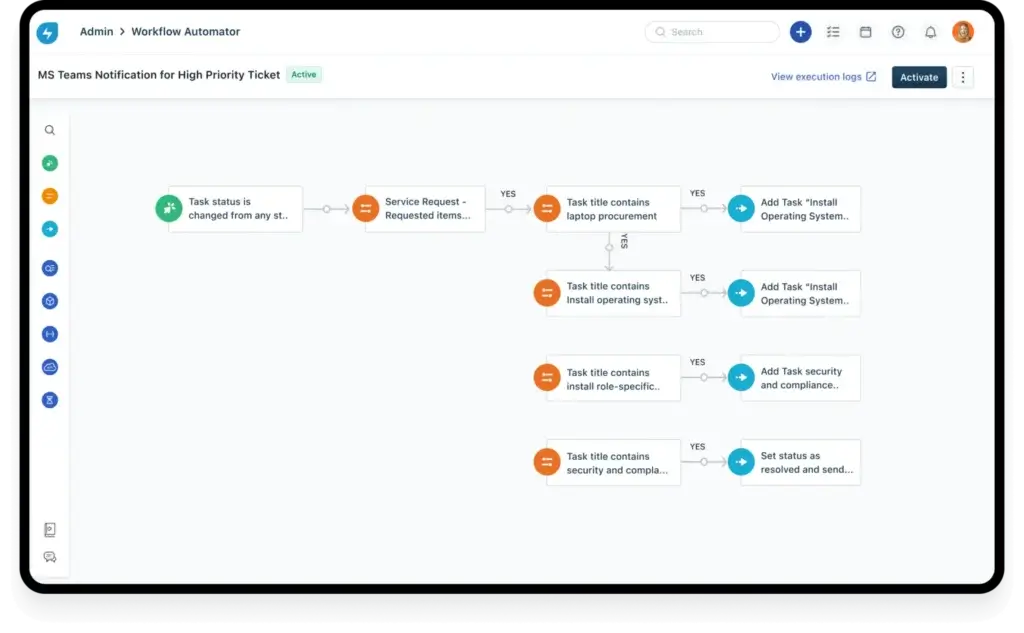
Freshservice is one of the strongest helpdesk software choices for IT teams that need more than basic ticketing. It combines service desk capabilities with ITSM workflows, asset management, automation, AI, analytics, and self-service.
This makes it especially useful for mid-sized and enterprise IT departments that handle incidents, service requests, change approvals, hardware issues, software access, and internal support requests from different departments.
Top Benefits and Features
Freshservice gives IT teams a centralized service desk for managing tickets, incidents, assets, requests, approvals, and knowledge base content. Its clean interface helps agents work faster, while its workflow automation tools reduce repetitive manual steps such as routing, escalation, notifications, and approvals.
One of its biggest strengths is its ITSM depth. Freshservice supports incident management, problem management, change management, release management, asset management, and CMDB functionality. This gives IT teams better control over service operations, especially when support requests are connected to devices, software, systems, or infrastructure changes.
Key Features
- Incident Management: Track, prioritize, assign, and resolve IT issues from one workspace.
- Workflow Automation: Automate approvals, routing, alerts, and repetitive support processes.
- CMDB and Asset Management: Connect assets and configuration items to tickets and incidents.
- Self-Service Portal: Let employees submit requests and find answers independently.
- AI Assistance: Use AI to improve ticket handling, agent productivity, and self-service.
Who Should Use Freshservice?
Freshservice is best for IT teams that need structured support processes, ITIL-aligned workflows, asset visibility, reporting, and automation. It is especially relevant for growing companies that want to mature from basic helpdesk ticketing into a more complete IT service management model.
Who Should Avoid Freshservice?
Freshservice may be more advanced than necessary if your team only needs a simple shared inbox or basic customer support ticketing. It is strongest for internal IT and enterprise service management, not lightweight B2C support.
Pros & Cons
| Pros | Cons |
| Complete ITSM toolkit | Higher cost at scale |
| Strong automation builder | Setup takes planning |
| Built-in CMDB tools | Advanced features cost more |
| Good self-service options | Less ideal for B2C |
Why Choose Freshservice?
Choose Freshservice if your helpdesk needs to support serious IT operations, not just ticket replies. It is the strongest overall choice in this list for IT teams that want incident management, change workflows, CMDB, asset tracking, self-service, and automation inside one platform.
It is also a smart option if your company wants to expand service management beyond IT into departments like HR, facilities, finance, or operations.
NinjaOne
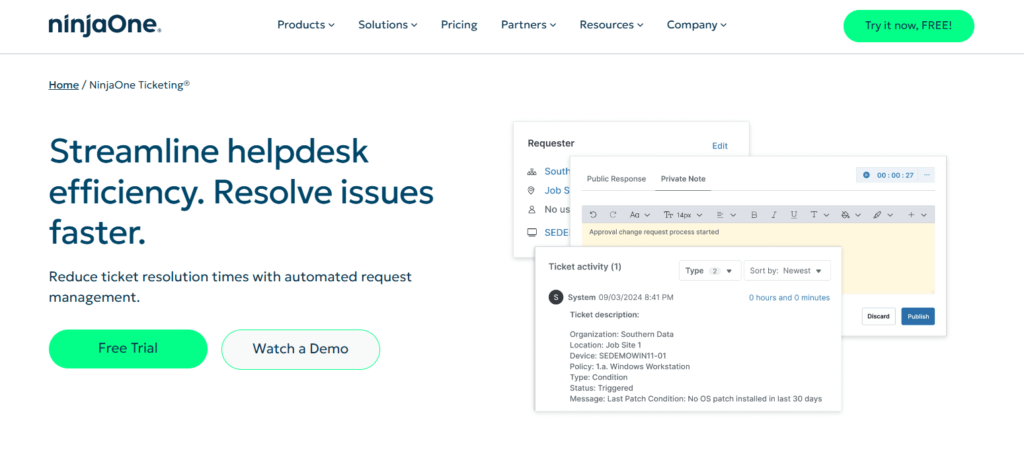
NinjaOne is a strong helpdesk software option for IT teams that manage endpoints, remote users, and distributed devices. Unlike traditional helpdesk platforms that focus only on tickets, NinjaOne connects ticketing with remote monitoring, endpoint management, patching, automation, and remote access.
This makes it a practical choice for MSPs, lean IT teams, and businesses supporting hybrid or remote environments.
Top Benefits and Features
NinjaOne helps technicians resolve IT issues faster by giving them ticket context and endpoint context in the same platform. When a user reports a device issue, the technician can review device details, monitoring alerts, patch status, software information, and remote access options without jumping between separate tools.
This is where NinjaOne stands out from more customer-support-oriented helpdesk tools. It is designed for technical IT support, especially when tickets are connected to laptops, desktops, servers, or remote endpoints.
Key Features
- Integrated Ticketing: Manage IT tickets with connected device and user context.
- Remote Access: Troubleshoot user devices without needing to be onsite.
- Endpoint Monitoring: Track endpoint health, alerts, and device activity.
- Patch Management: Automate patching to reduce risk and manual work.
- IT Automation: Use scripts and policies to resolve recurring issues faster.
Who Should Use NinjaOne?
NinjaOne is best for IT departments and MSPs that need helpdesk ticketing connected to device management. It is a strong fit for teams managing remote endpoints, multiple client environments, or distributed workforces.
Who Should Avoid NinjaOne?
NinjaOne is not the best choice for customer support teams that mainly need live chat, social media support, customer experience workflows, or call center tools. It is built for IT operations first.
Pros & Cons
| Pros | Cons |
| Strong endpoint visibility | Less customer-support focused |
| Built-in remote access | Requires IT knowledge |
| Fast technician workflow | No native call center |
| Great for MSPs | Advanced setup needed |
Why Choose NinjaOne?
Choose NinjaOne if your helpdesk team is responsible for fixing devices, managing endpoints, applying patches, monitoring systems, and supporting users remotely. It is one of the best options when ticket resolution depends on technical visibility, not just message management.
For IT teams that want fewer tools and faster troubleshooting, NinjaOne offers a very practical combination of service desk, endpoint management, and remote support.
monday service

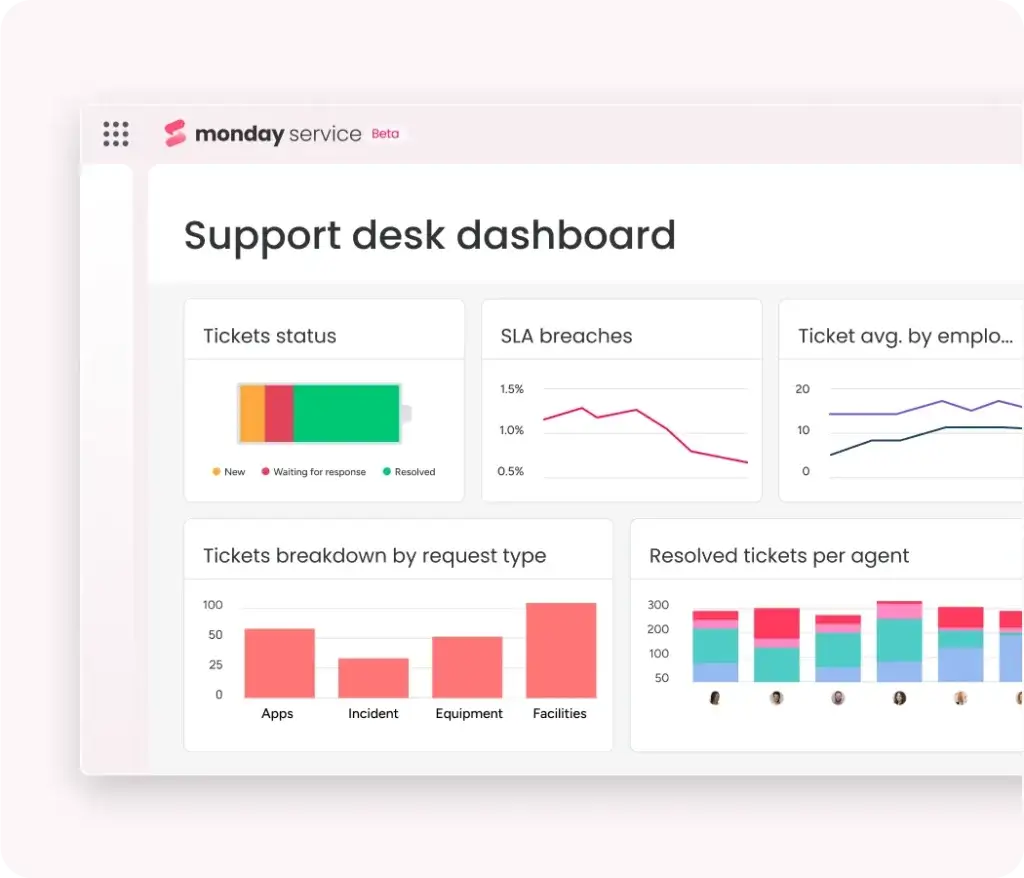
monday service is a flexible helpdesk software option for teams that want visual workflows, customizable boards, easy intake forms, and automation without a rigid service desk structure.
It is built on the monday.com Work OS, which makes it especially appealing for teams already using monday.com for project management, operations, marketing, HR, or cross-functional work.
Top Benefits and Features
monday service gives teams a visual way to manage support requests. Instead of working only from traditional ticket queues, teams can use boards, dashboards, forms, automations, views, and custom workflows to manage service requests in a way that matches how they already work.
It is particularly useful for internal support teams that need to handle IT requests, HR requests, facilities issues, onboarding tasks, equipment requests, approvals, and operational workflows from one shared workspace.
Key Features
- Visual Ticket Boards: Manage support tickets using boards, tables, forms, and dashboards.
- Custom Automations: Automate assignments, status updates, notifications, and escalations.
- Service Request Forms: Capture structured requests from employees or customers.
- SLA Tracking: Monitor service performance and response expectations.
- Team Dashboards: Track workload, bottlenecks, priorities, and performance metrics.
Who Should Use monday service?
monday service is best for teams that want a flexible, modern, and visual helpdesk rather than a traditional ITSM suite. It works well for internal service teams, operations teams, HR teams, and IT departments that need workflow customization.
Who Should Avoid monday service?
monday service may not be the best fit if you need deep ITIL processes, a mature CMDB, advanced IT operations management, or highly structured enterprise IT governance out of the box.
Pros & Cons
| Pros | Cons |
| Very visual interface | Less ITIL depth |
| Highly customizable workflows | No native CMDB focus |
| Great for internal teams | Advanced setup takes planning |
| Strong automation options | Newer service product |
Why Choose monday service?
Choose monday service if your support team values flexibility, visibility, and ease of use. It is one of the best helpdesk software options for teams that want to design their own support process rather than follow a strict ITSM framework.
It is also a strong choice if your company already uses monday.com and wants service management, request handling, and internal support to live in the same work environment.
Zendesk

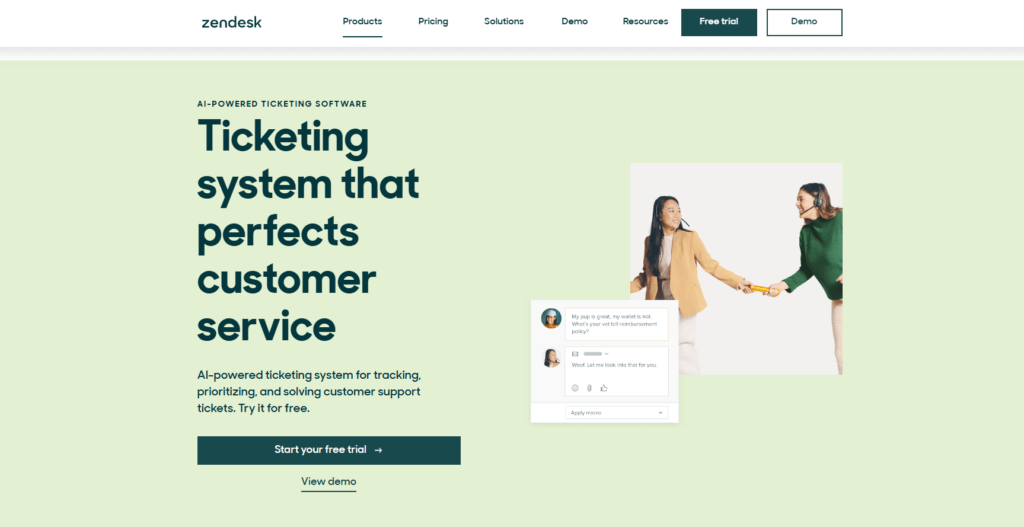
Zendesk is one of the most recognized helpdesk software platforms for customer-facing support teams. It is built to help companies manage conversations across email, chat, messaging, social, voice, help centers, and other customer communication channels.
While tools like Freshservice and NinjaOne are stronger for IT helpdesk use cases, Zendesk is one of the best choices for businesses that need scalable customer support operations.
Top Benefits and Features
Zendesk gives support teams a unified agent workspace for managing customer conversations across multiple channels. Agents can respond faster, view customer context, use macros, trigger workflows, track SLAs, and manage large support volumes from one system.
It is especially strong for teams that need consistent customer experiences across regions, products, departments, and communication channels. Its marketplace and integration ecosystem also make it flexible for sales, ecommerce, product, and customer success teams.
Key Features
- Omnichannel Ticketing: Manage email, chat, social, messaging, and voice support.
- Agent Workspace: Give agents a unified view of customer conversations.
- Macros and Triggers: Automate repetitive replies, routing, and updates.
- Help Center: Build customer-facing knowledge bases and self-service resources.
- Reporting: Track support volume, resolution time, CSAT, and agent performance.
Who Should Use Zendesk?
Zendesk is best for customer support teams that manage high-volume, multichannel customer conversations. It is especially useful for SaaS companies, ecommerce businesses, global support teams, and organizations that care deeply about customer experience.
Who Should Avoid Zendesk?
Zendesk may not be ideal for IT teams that need CMDB, asset management, patching, remote access, or deep ITIL workflows. It can support internal teams, but its strongest use case is customer support.
Pros & Cons
| Pros | Cons |
| Excellent omnichannel support | Can get expensive |
| Strong agent workspace | Limited ITSM depth |
| Large app marketplace | Add-ons increase cost |
| Great for scale | Overkill for small teams |
Why Choose Zendesk?
Choose Zendesk if your main goal is to deliver faster, more consistent customer support across multiple channels. It is a mature platform with strong workflow automation, reporting, and a polished agent experience.
For companies managing external support at scale, Zendesk remains one of the strongest helpdesk software choices available.
Zoho Desk
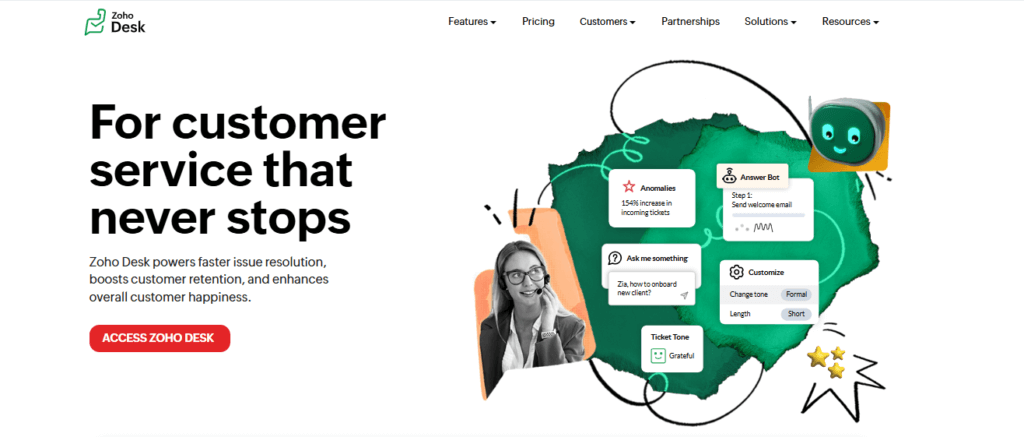
Zoho Desk is a budget-friendly helpdesk software platform for small businesses, growing support teams, and organizations already using the Zoho ecosystem.
It offers a strong mix of ticketing, automation, multichannel support, customer context, AI assistance, and reporting at a price point that is often more accessible than enterprise-focused competitors.
Top Benefits and Features
Zoho Desk helps teams manage support tickets from multiple channels, including email, phone, chat, web forms, and social media. Its context-aware ticketing interface gives agents useful customer information so they can respond with more accuracy and less back-and-forth.
The platform also includes automation tools for assignment, escalation, workflows, and notifications. For teams already using Zoho CRM, Zoho Analytics, or other Zoho products, Zoho Desk can become part of a broader business software environment.
Key Features
- Multichannel Ticketing: Manage customer requests from several support channels.
- Zia AI Assistant: Use AI for suggestions, sentiment, and support productivity.
- Workflow Automation: Automate ticket assignments, alerts, and follow-up actions.
- Knowledge Base: Create self-service articles to reduce repetitive tickets.
- Zoho Ecosystem: Connect support with CRM, analytics, finance, and operations tools.
Who Should Use Zoho Desk?
Zoho Desk is best for small to mid-sized businesses that want capable helpdesk software without paying enterprise-level prices. It is also a natural choice for teams already using Zoho CRM or other Zoho applications.
Who Should Avoid Zoho Desk?
Zoho Desk may not be the best fit for large IT departments that need deep ITSM modules, advanced CMDB functionality, or complex change management workflows.
Pros & Cons
| Pros | Cons |
| Affordable pricing | Less ITSM depth |
| Good AI assistance | Setup can take time |
| Strong Zoho integration | Interface feels less polished |
| Solid automation tools | Best features cost more |
Why Choose Zoho Desk?
Choose Zoho Desk if you want a cost-effective helpdesk platform with solid automation, AI assistance, multichannel support, and self-service features. It is one of the best options for teams moving away from email-based support into a more structured ticketing system.
It is not the most advanced ITSM tool on this list, but it delivers excellent value for customer support teams and smaller organizations.
Helpdesk Software Comparison Table
| Feature Type | Freshservice | NinjaOne | monday service | Zendesk | Zoho Desk |
| Best For | ITSM helpdesk workflows | Remote IT teams | Visual internal support | Customer support at scale | Budget-conscious teams |
| Main Use Case | IT service management | Endpoint-connected ticketing | Custom service workflows | Omnichannel customer support | Affordable ticketing |
| ITSM Depth | High | Medium | Medium | Low | Low |
| Customer Support Depth | Medium | Low | Medium | High | High |
| Automation | Advanced | Advanced | Strong | Advanced | Strong |
| AI Features | Strong | Moderate | Growing | Strong | Good |
| Self-Service | Strong | Basic to moderate | Good | Strong | Good |
| Remote Access | Limited | Strong | Not core focus | Not core focus | Not core focus |
| Best Limitation | Can be costly at scale | Not for B2C support | Less mature ITSM depth | Limited IT asset tools | Less enterprise ITSM depth |
How to Choose the Best Helpdesk Software
Choosing the best helpdesk software depends on what your team supports, how complex your workflows are, and how quickly your organization is growing.
Before comparing prices or feature lists, start with the type of support you provide.
1. Decide Between IT Support and Customer Support
If your team handles employee issues, device problems, access requests, software support, and infrastructure-related tickets, prioritize IT-focused tools like Freshservice or NinjaOne.
If your team supports external customers across email, chat, phone, social media, and self-service, Zendesk or Zoho Desk may be a better fit.
2. Review Ticketing and SLA Requirements
Every helpdesk tool should support ticket assignment, prioritization, status tracking, internal notes, and basic reporting. But not every platform handles SLAs with the same depth.
If SLA compliance is important, look for tools that support response targets, escalation rules, breach alerts, and SLA reporting.
3. Check AI and Automation Features
AI and automation can reduce repetitive work and help agents move faster. Look for features like automatic ticket routing, suggested replies, AI summaries, knowledge base recommendations, sentiment analysis, and workflow automation.
Freshservice and Zendesk are especially strong for AI-supported service operations, while NinjaOne is strong for IT task automation connected to endpoints.
4. Compare Self-Service Options
A strong helpdesk should help users solve simple problems on their own. Knowledge bases, help centers, service catalogs, FAQ pages, and request portals can reduce ticket volume and improve user satisfaction.
This is especially important if your team receives repeated questions about access, passwords, onboarding, product setup, billing, or common troubleshooting steps.
5. Review Security and Access Controls
Helpdesk teams often handle sensitive information, including user data, account access, device issues, internal systems, and customer conversations. That makes security a major buying factor.
Look for role-based permissions, SSO, MFA, audit logs, encryption, admin controls, secure remote access, and compliance support.
6. Calculate the Total Cost
Do not compare helpdesk software only by entry-level price. Some tools charge extra for AI, advanced reporting, automation, additional channels, asset management, or enterprise support.
The right choice is not always the cheapest tool. It is the platform that gives your team the best combination of productivity, scalability, user experience, and long-term value.
Best Helpdesk Software by Use Case
Best for IT Teams: Freshservice
Freshservice is the best fit for IT teams that need structured ITSM workflows, automation, CMDB, asset management, service catalogs, and advanced reporting.
Best for Remote IT Support: NinjaOne
NinjaOne is best for teams that need to troubleshoot devices, manage endpoints, automate patching, and resolve tickets remotely.
Best for Customer Support: Zendesk
Zendesk is the strongest choice for customer-facing support teams that need omnichannel communication, agent productivity tools, and scalable support workflows.
Best for Visual Workflows: monday service
monday service is best for teams that want a flexible, visual, and customizable helpdesk built around boards, dashboards, forms, and automations.
Best for Small Teams: Zoho Desk
Zoho Desk is the best value option for small businesses and growing support teams that need affordable ticketing, automation, and AI features.
Common Mistakes When Choosing Helpdesk Software
Many teams choose helpdesk software based on brand recognition or price alone. That can lead to poor adoption, missing features, or unnecessary complexity.
Choosing a Customer Support Tool for ITSM Needs
Zendesk and Zoho Desk are strong customer support platforms, but they may not cover advanced ITSM needs like CMDB, change management, or asset lifecycle tracking.
Buying Too Much Software Too Early
Smaller teams may not need a full ITSM platform immediately. If your main problem is email overload, a simpler ticketing and automation system may be enough.
Ignoring Agent Experience
A helpdesk tool can have excellent features, but if agents find it difficult to use, adoption will suffer. Always consider interface quality, learning curve, and daily workflow speed.
Forgetting About Reporting
Without reporting, it is difficult to improve support performance. Look for dashboards that show ticket volume, response time, resolution time, SLA breaches, backlog, and agent workload.
Underestimating Implementation Time
Even user-friendly helpdesk software needs setup. You still need to define ticket categories, SLAs, roles, workflows, intake forms, knowledge base content, and escalation rules.
Bonus Tools to Support Your Helpdesk Team
Helpdesk software is the core system, but support teams often use additional tools to improve documentation, communication, security, and productivity.
Canary Mail
Canary Mail can help teams that still rely heavily on email communication. Its secure email experience, AI assistance, and cleaner inbox management can support agents who handle high-volume customer or internal messages.
Hubstaff
Hubstaff can be useful for remote or hybrid support teams that need time tracking, productivity reports, and workload visibility.
Zenzap
Zenzap gives teams a secure communication space for internal collaboration, updates, and support-related discussions.
Notion
Notion can help teams build internal knowledge bases, troubleshooting guides, SOPs, escalation playbooks, and onboarding documentation.
1Password
1Password is useful for IT and support teams that need to manage shared credentials, secure access, and sensitive login information safely.
Conclusion: Which Helpdesk Software Should You Choose?
The best helpdesk software depends on your support model.
If you are an IT team that needs structured service management, automation, asset visibility, and scalable workflows, Freshservice is the best overall choice.
If you manage endpoints, remote devices, patching, and technical support tickets, NinjaOne is the better fit. It gives IT technicians the endpoint context they need to resolve issues faster.
If your main priority is customer support across multiple channels, Zendesk is the strongest option for scale, agent experience, and omnichannel workflows.
If you want a visual, flexible helpdesk that connects service requests with broader work management, monday service is a smart option.
If budget is your main concern and you still want capable ticketing, automation, AI assistance, and multichannel support, Zoho Desk offers excellent value.
For most IT-focused buyers, start by comparing Freshservice and NinjaOne. For customer support teams, compare Zendesk and Zoho Desk. For internal service teams that want more flexibility, monday service is worth serious consideration.
Still comparing broader ITSM platforms? Visit our complete guide to the best ITSM software for a deeper look at service management solutions.
FAQ
What is helpdesk software?
Helpdesk software is a platform that helps support teams receive, organize, assign, track, and resolve user or customer requests. It usually includes ticketing, automation, communication tools, reporting, and self-service options.
What is the best helpdesk software?
Freshservice is the best overall choice for IT teams that need scalable helpdesk and ITSM workflows. NinjaOne is best for remote IT support, Zendesk is best for customer support at scale, monday service is best for visual workflows, and Zoho Desk is best for budget-conscious teams.
What is the difference between helpdesk and ITSM software?
Helpdesk software focuses on managing tickets and support requests. ITSM software includes broader IT service management processes such as incident management, change management, problem management, asset management, and CMDB.
What is the best helpdesk software for IT teams?
Freshservice is a strong choice for IT teams that need ITSM workflows, automation, CMDB, asset management, and service catalogs. NinjaOne is better for IT teams that need endpoint management, patching, and remote support connected to ticketing.
What is the best helpdesk software for customer support?
Zendesk is one of the best helpdesk software platforms for customer support teams because it offers omnichannel ticketing, automation, agent workspaces, reporting, and a strong help center experience.
Which helpdesk software is best for small businesses?
Zoho Desk is one of the best options for small businesses because it offers affordable pricing, multichannel ticketing, automation, AI assistance, and integrations with the broader Zoho ecosystem.
Is Freshservice better than Freshdesk for IT support?
Yes, Freshservice is usually more relevant for IT support because it is built around ITSM workflows, asset management, service requests, change management, and CMDB. Freshdesk is more focused on customer support and external service teams.
Is Zendesk good for IT helpdesk teams?
Zendesk can work for internal support, but it is stronger for customer-facing helpdesk operations. IT teams that need asset management, CMDB, remote access, and ITIL workflows may prefer Freshservice or NinjaOne.
What features should I look for in helpdesk software?
Look for ticket management, SLA tracking, automation, reporting, self-service, knowledge base tools, integrations, role-based permissions, AI assistance, and mobile access. IT teams should also consider asset management and remote support features.
Does helpdesk software include automation?
Yes, most modern helpdesk software includes automation for ticket routing, priority assignment, escalation, notifications, SLA alerts, canned responses, and workflow updates. More advanced platforms also include AI-powered automation.