

Introduction
Choosing the best social media calendar is about more than finding a tool that can publish posts on time. You need a platform that helps you plan campaigns visually, organize content across channels, collaborate with teammates, manage approvals, and keep your publishing schedule consistent without creating extra friction.
That is what separates a real social media calendar tool from a basic scheduler. The best options help you see your strategy at a glance, shift content easily, fill gaps in your posting plan, and coordinate campaigns across multiple networks from one place.
In this guide, you will compare seven leading options: Vista Social, SocialBee, Pallyy, Hootsuite, Sendible, Iconosquare, and SocialRails. These tools all support scheduling, but they do not all offer the same calendar experience. Some are better for agencies, some are better for lean teams, and some are better for buyers who want a cleaner and more visual planning workflow.
How to Evaluate the Best Social Media Calendar Tools
Before choosing a platform, it helps to focus on the features that make a content calendar genuinely useful in daily work, not just impressive on a features page.
Visual planning and calendar usability
The best social media calendar tools let you see scheduled content clearly by week or month, drag and drop posts when priorities change, and quickly spot gaps or overlaps. A good calendar should make planning easier, not more cluttered.
Scheduling flexibility
Strong calendar tools support more than one-time scheduling. You should look for recurring schedules, category-based posting, queue systems, bulk upload, and platform-specific customization. These features save time when you manage a busy publishing schedule.
Collaboration and approvals
If multiple people touch your content, shared calendars and approvals matter. You want a tool that makes it easy to assign work, leave notes, manage drafts, and approve posts before they go live.
Cross-platform publishing
A calendar is only useful if it supports the channels you actually use. The best tools help you plan content for Instagram, Facebook, LinkedIn, X, TikTok, Pinterest, Threads, and other major networks without forcing you to rebuild posts from scratch.
Analytics and optimization
Some tools go beyond publishing and help you improve your calendar with performance data. Best-time suggestions, post insights, and campaign reporting can make your calendar smarter over time.
Pricing and scalability
Pricing structures vary a lot in this category. Some tools are affordable for solo users, while others are designed for agencies or larger teams. Make sure the calendar features you care about are included in the plan you can realistically afford.
Best Social Media Calendar Tools
The tools below are ranked based on how effective their calendar experience is for planning, organizing, and managing social content, not only on how broad their overall social media feature set is.


Features & Benefits
Vista Social earns the top spot because it delivers one of the most complete calendar experiences in this category. The platform is built for teams that need a shared planning environment, not just a posting tool. You can plan, schedule, approve, and manage content through shared calendars while also connecting that workflow to inbox management, review management, AI tools, and social engagement features.
What makes Vista Social especially strong is the balance between calendar usability and platform depth. Many tools offer a decent calendar but feel limited once your workflow grows. Vista Social gives you enough structure for agencies and multi-brand teams without feeling as heavy or enterprise-priced as some older platforms.
If your main priority is building and managing a real content calendar across multiple stakeholders, this is the strongest option in the group.
Pricing & Plans
Vista Social pricing starts at $39 per month. Its official pricing also highlights higher plans for teams and agencies, including an Advanced tier with 30 social profiles and 6 users, plus add-ons for listening and employee advocacy. That makes it a flexible option for teams that expect their calendar workflow to scale over time.
Pros & Cons
Pros
- Excellent shared calendar experience
- Strong approvals and collaboration
- Broad feature depth beyond scheduling
- Good fit for agencies and teams
Cons
- Add-ons can raise total cost
- More than solo users may need
- Not the simplest entry-level tool
SocialBee

Features & Benefits
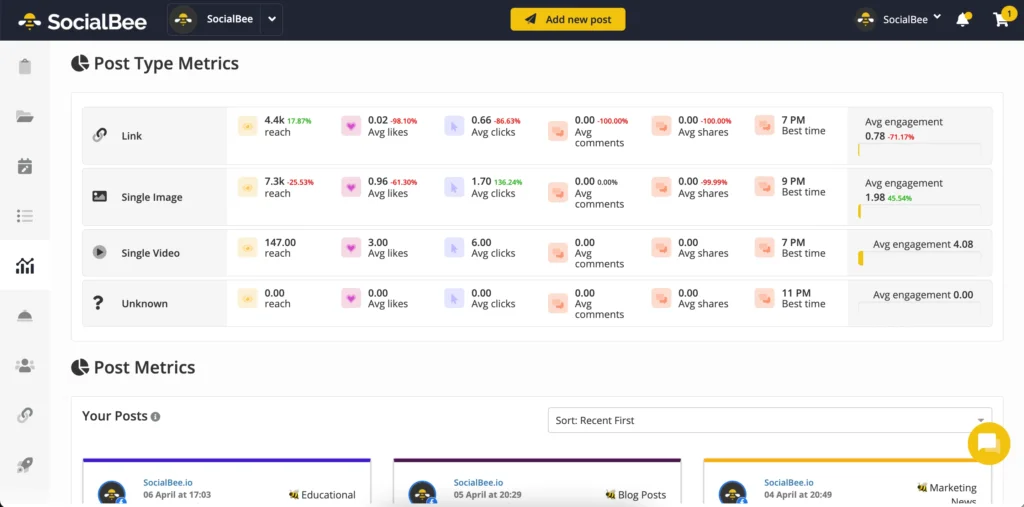
SocialBee is one of the best choices if your calendar workflow depends on structure and repeatability. Its biggest advantage is category-based scheduling. Instead of dropping every post into the calendar manually, you can organize content by category, assign schedules to those categories, and keep your posting mix balanced across time.
That makes SocialBee particularly effective for businesses that repurpose content, run recurring campaigns, or want a more strategic calendar without managing every post one by one. It also includes a visual content calendar, AI support, and helpful scheduling tools that keep the workflow accessible for small and mid-sized teams.
Compared with Vista Social, SocialBee is more focused on publishing rhythm than on broader engagement and agency-style workflows. But if your main question is which tool makes calendar planning easier, SocialBee is one of the strongest answers.
Pricing & Plans
SocialBee pricing starts at $29 per month, with higher tiers for growing teams and businesses that need more profiles, workspaces, analytics, and approval features. A 14-day free trial is also available, which makes it easy to test the calendar workflow before committing.
Pros & Cons
Pros
- Excellent category-based scheduling
- Strong evergreen calendar workflows
- Easy to learn and manage
- Good value for smaller teams
Cons
- Less agency-oriented than Vista Social
- Reporting is not the deepest
- Listening features are lighter

Features & Benefits
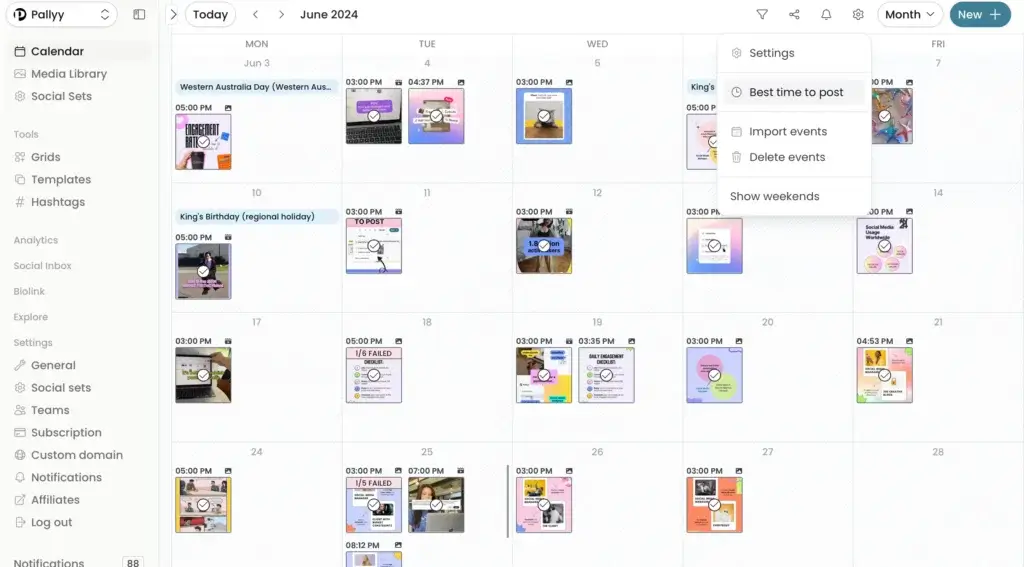
Pallyy ranks high because it delivers a genuinely pleasant calendar experience. While it does not have the broadest enterprise feature set, its visual planning workflow is one of the easiest to use. The platform is built around scheduling, post planning, approvals, shared calendars, and social inbox functionality, all in a lightweight interface.
This is the tool I would recommend to buyers who care most about clarity. If you want to open your calendar, see what is scheduled, drag posts around, manage approvals, and move on with your day, Pallyy does that very well. It is especially appealing for creators, smaller businesses, and lean teams that do not want to pay for a heavier system.
Its weakness is scale. If your social media calendar is tied to more advanced reporting, review management, or large multi-brand structures, Vista Social and Hootsuite offer more depth.
Pricing & Plans
Pallyy starts at $15 per month for lighter use and $25 per month for its Pro plan. The higher tier adds unlimited posts, approvals, a shared calendar, advanced analytics, and inbox tools, which makes it a strong value if your main focus is content planning.
Pros & Cons
Pros
- Very clean visual calendar
- Affordable for creators and SMBs
- Shared calendar and approvals included
- Easy to use day to day
Cons
- Less suited to complex agencies
- Reporting is not very deep
- Fewer advanced workflow layers
Hootsuite


Features & Benefits
Hootsuite remains one of the most capable publishing platforms in this market, and its Planner is still one of the better calendar tools for teams that want everything in one place. It gives you a calendar view of scheduled and live posts, supports team collaboration, and connects the planning process to analytics, inbox management, listening, and AI-assisted content creation.
So why is it not higher? Because this article focuses specifically on the best social media calendar, not the broadest all-in-one platform. Hootsuite is powerful, but it can feel heavier and more expensive than some of the more calendar-focused options above it. For larger teams, that tradeoff is often worth it. For smaller buyers, it can feel like more platform than necessary.
If you need a mature planner tied to strong operations and reporting, Hootsuite is still one of the safest choices.
Pricing & Plans
Hootsuite offers Standard, Advanced, and Enterprise plans. Its pricing structure is built for individuals, small teams, and large businesses, with Enterprise available through custom pricing. That makes it a flexible but often more premium choice than smaller-platform alternatives.
Pros & Cons
Pros
- Strong planner and scheduling tools
- Excellent all-in-one platform depth
- Useful for larger teams
- Strong analytics and inbox features
Cons
- Can be expensive for smaller teams
- Feels heavier than simpler tools
- Not the most calendar-focused UX
Sendible

Features & Benefits
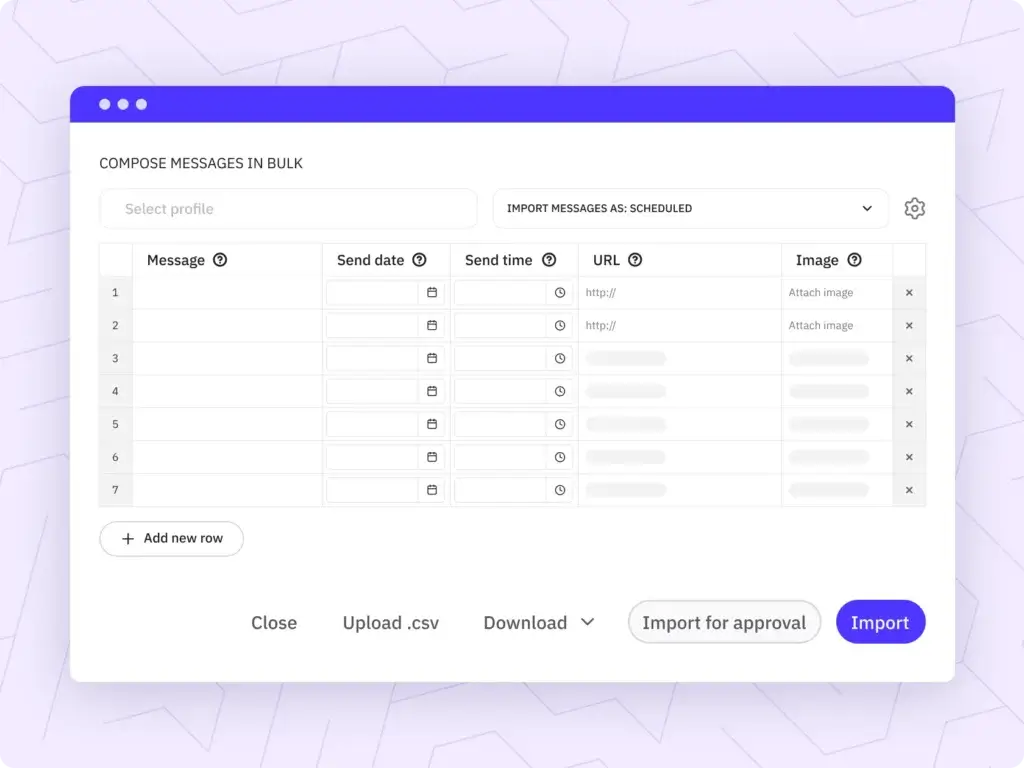
Sendible has long been a reliable agency-focused platform, and its calendar still makes sense for service teams managing multiple client accounts. It combines scheduling, content management, reporting, collaboration, and white label options in a way that supports agency delivery well.
Its biggest strength is context. The calendar is not necessarily the most modern-looking in the group, but it becomes more valuable when paired with client workflows, collaboration, and branded reporting. That makes Sendible a stronger choice for agencies than for solo users or small in-house teams.
If your calendar is part of a client service model, Sendible remains one of the better fits available.
Pricing & Plans
Sendible currently lists Creator, Traction, Scale, Advanced, and Enterprise plans, starting at $29 per month and scaling upward for more advanced reporting, collaboration, and agency features.
Pros & Cons
Pros
- Strong for agency calendar workflows
- Good collaboration and scheduling
- White label options are useful
- Works well for client account management
Cons
- Less appealing for solo teams
- UI feels less modern than some rivals
- Higher tiers get expensive fast
Iconosquare


Features & Benefits
Iconosquare absolutely belongs in this list, but its calendar is not the main reason people choose it. This is a better fit for teams that want a solid publishing workflow supported by stronger analytics, reporting, and performance insights.
The platform offers scheduling, approvals, shared dashboards, and collaboration features, but the experience feels more analytics-first than calendar-first. That is not a weakness if performance reporting is central to your process. It just means that buyers focused mainly on visual content planning may prefer Vista Social, SocialBee, or Pallyy.
If you want a social media calendar that helps you refine strategy with better data, Iconosquare is still a strong contender.
Pricing & Plans
Iconosquare offers Launch, Scale, Excel, and custom plans. Official and recent company materials place entry pricing around $33 per month, with higher tiers designed for growing brands, enterprises, and more advanced reporting needs.
Pros & Cons
Pros
- Strong reporting and analytics
- Good scheduling and collaboration tools
- Useful for data-driven teams
- Better than average publishing workflow
Cons
- More analytics-led than calendar-led
- Not the cheapest simple scheduler
- Less visually focused than top picks
SocialRails

Features & Benefits
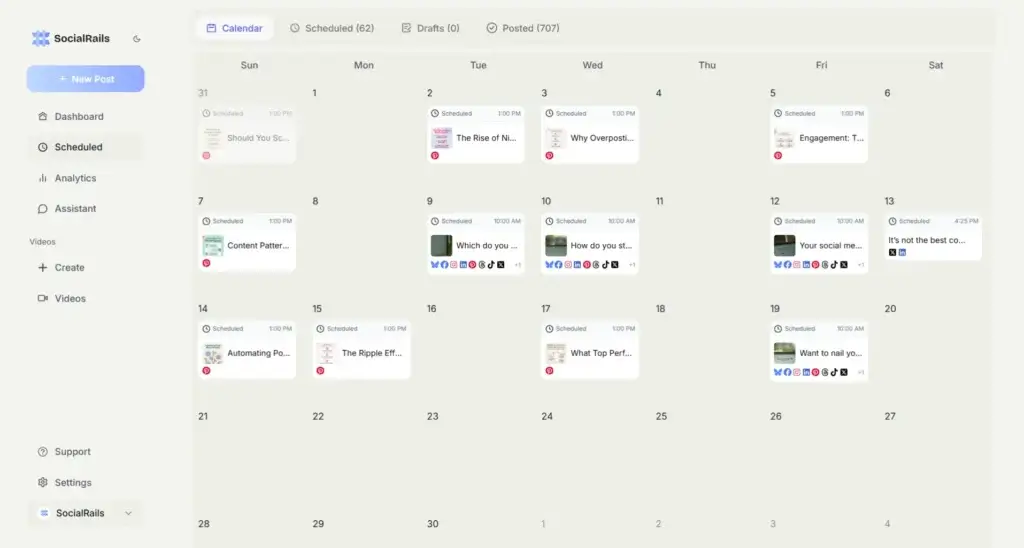
SocialRails is a useful option for buyers who want more than a basic scheduler without paying enterprise-style prices. Its mix of calendar scheduling, AI content support, and short-form video templates gives it a slightly different value proposition than the other tools here.
Where it falls behind is calendar depth. While it supports multi-platform scheduling and multiple workspaces, it feels more content-creation-oriented than planning-oriented. That makes it attractive for smaller businesses and creators that value speed and affordability, but less compelling for teams that want a more advanced shared calendar workflow.
If your content process starts with creation and speed rather than approvals and structured campaign planning, SocialRails can still be worth considering.
Pricing & Plans
SocialRails starts at $29 per month, with higher plans aimed at professionals, growing teams, and agencies. Its positioning is clearly affordability plus built-in AI support, which helps it stand out at the lower end of the market.
Pros & Cons
Pros
- Affordable starting price
- Built-in AI content support
- Includes video template features
- Good for small businesses and creators
Cons
- Lighter calendar depth than rivals
- Less proven than older tools
- Not ideal for complex teams
Comparing the Best Social Media Calendar Tools
When you compare these platforms side by side, the biggest difference is how central the calendar is to the experience. Vista Social, SocialBee, and Pallyy make calendar planning feel like the core workflow. Hootsuite and Sendible offer strong calendars too, but their value is more tied to broader platform functionality. Iconosquare is strongest when reporting matters as much as scheduling, and SocialRails is more creator-focused with AI support built in.
| Feature Type | Vista Social | SocialBee | Pallyy | Hootsuite | Sendible |
| Best for | Teams and agencies | Evergreen content planning | Creators and lean teams | Larger teams and enterprises | Agencies and client work |
| Starting price | $39/month | $29/month | $15/month | Custom by plan | $29/month |
| Calendar strength | Excellent | Excellent | Very strong | Very strong | Strong |
| Shared calendar | Yes | Yes | Yes | Yes | Yes |
| Approvals | Strong | Good | Good | Strong | Strong |
| Analytics depth | High | Moderate | Moderate | High | Moderate to high |
| Standout edge | Best balanced calendar workflow | Category scheduling and evergreen posting | Cleanest visual planning UX | Powerful planner plus operations | Agency workflows and white label support |
How to Choose the Right Social Media Calendar
If you care most about planning content visually and collaborating with a team, Vista Social is the strongest overall choice. It offers the best balance between a capable content calendar and the broader workflow tools that growing teams usually need.
If your strategy depends on evergreen content and recurring posting structures, SocialBee is probably the better fit. Its category-based approach makes ongoing calendar management easier than most alternatives.
If you want the simplest and most affordable visual planning experience, Pallyy is easy to recommend. For larger teams that want more advanced operations around the calendar, Hootsuite is still one of the strongest options. Agencies should also look closely at Sendible, while analytics-heavy teams may prefer Iconosquare.
SocialRails makes sense when AI support and content output matter more than advanced calendar structure. It is not my top recommendation for calendar-led workflows, but it can still be a strong value pick for smaller users.
Conclusion
The best social media calendar depends on how you plan content, who needs to collaborate, and how much structure your workflow requires. For most teams, Vista Social is the best overall option because it combines a strong shared calendar with scheduling, approvals, engagement tools, and enough depth to grow with your process.
SocialBee is a close second, especially if you value category-based scheduling and evergreen publishing. Pallyy is one of the best choices if you want a cleaner, simpler calendar experience at a lower price point. Hootsuite is a stronger fit for larger organizations, while Sendible remains relevant for agencies that manage multiple client accounts.
Iconosquare is worth considering if analytics matter as much as planning, and SocialRails is a budget-friendly option for creators that want AI support built in. The smartest next step is to shortlist two tools based on your workflow, then test how each calendar feels in real use. That will tell you much more than a feature list ever can.
Frequently Asked Questions
What is the best social media calendar overall?
Vista Social is the best overall option in this comparison because it offers the strongest balance of visual planning, shared calendars, approvals, and scalable team workflows.
Which social media calendar is best for evergreen content?
SocialBee is the best option for evergreen content because its category-based scheduling system makes recurring and reusable content much easier to manage.
Which tool has the easiest calendar to use?
Pallyy is one of the easiest tools to use if you want a clean, visual, and low-friction calendar experience.
Is Hootsuite still a good social media calendar tool?
Yes. Hootsuite still offers a strong planner and scheduling system, especially for larger teams that also need analytics, inbox management, and listening features.
Which social media calendar is best for agencies?
Vista Social and Sendible are the strongest agency options here. Vista Social is better for broader modern workflows, while Sendible is especially useful for client-facing operations and white label support.
Which platform is best for small businesses?
SocialBee and Pallyy are especially strong for small businesses because they combine usability, practical calendar tools, and more accessible pricing.
Which calendar tool has the best analytics?
Iconosquare is the strongest option if you want analytics and reporting to play a major role in how you plan and improve your content calendar.
Should I choose a social media calendar based only on price?
No. Price matters, but the real question is whether the calendar saves time, improves consistency, and supports your workflow without creating friction.
Does SocialRails compete well as a calendar tool?
It is a decent option for smaller users, but it is better positioned as an affordable AI-assisted scheduling tool than as the strongest calendar-first platform.
What should you test during a free trial?
You should test how easy it is to build a month of content, move posts around, collaborate with teammates, approve drafts, and publish across all your channels from the calendar view.




