

Introduction
Managing social media at scale gets complicated quickly. You need to plan content across multiple channels, respond to comments efficiently, collaborate with teammates or clients, and still prove performance with reports that make sense. Sendible is built for exactly that kind of workflow. It positions itself as a social media management platform for agencies, small businesses, franchises, and larger teams that need scheduling, engagement, reporting, and client-friendly collaboration in one place.
In this Sendible review, you will get a close look at its key features, pricing, strengths, limitations, and the types of users who are most likely to benefit from it in 2026. By the end, you should have a clear sense of whether Sendible is the right fit for your workflow, or whether another social media tool would serve you better.
Key Features
Sendible’s Software Specification
Sendible is designed to centralize planning, publishing, monitoring, and reporting for social media. Its strongest appeal is for users who handle several brands, clients, or locations and want a platform that balances scheduling power with agency-friendly workflow controls.
Publishing and Scheduling
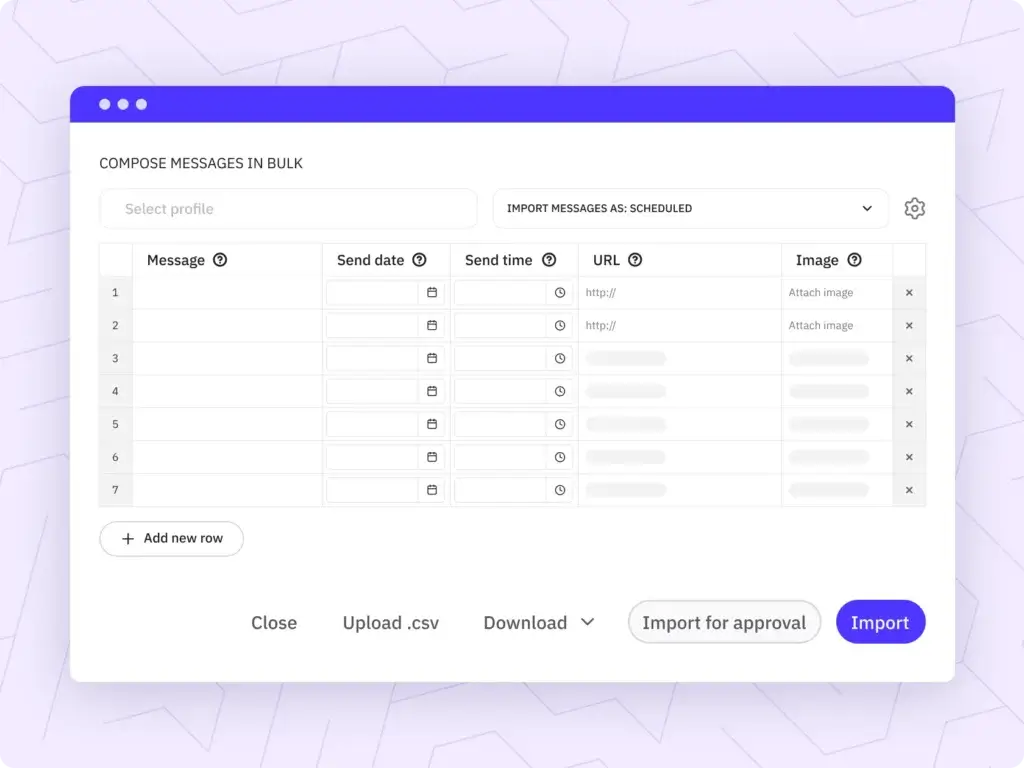
Scheduling is one of Sendible’s core strengths. The platform gives you a centralized compose box, calendar-based planning, bulk import options, smart queues, campaign organization, and publishing support for a broad range of social channels. This makes it practical for marketers who need to plan weeks or months in advance rather than posting manually every day.
- Centralized compose box: Create and customize posts for multiple social profiles from one publishing workflow.
- Smart queues: Keep recurring content flowing with reusable posting slots.
- Bulk import: Upload and schedule content at scale for campaigns or multi-client calendars.
- Campaign planning: Organize related posts under campaigns for easier visibility.
- Optimal times: Schedule content for times that align better with audience activity.
- Instagram publishing: Supports photos, videos, Stories, image carousels, first comments, geotags, and some reminder-based workflows for unsupported formats.
Priority Inbox and Engagement
Sendible includes a Priority Inbox for replying to comments and messages in one place. This is one of the reasons it remains popular with agencies and social media managers who need to stay responsive without jumping between native apps all day.
- Unified engagement: Review and reply to selected comments and messages from supported networks.
- Faster team handling: Reduce context switching when managing multiple client accounts.
- Useful for service brands: Especially helpful when response time matters for community management.
Analytics and Reporting
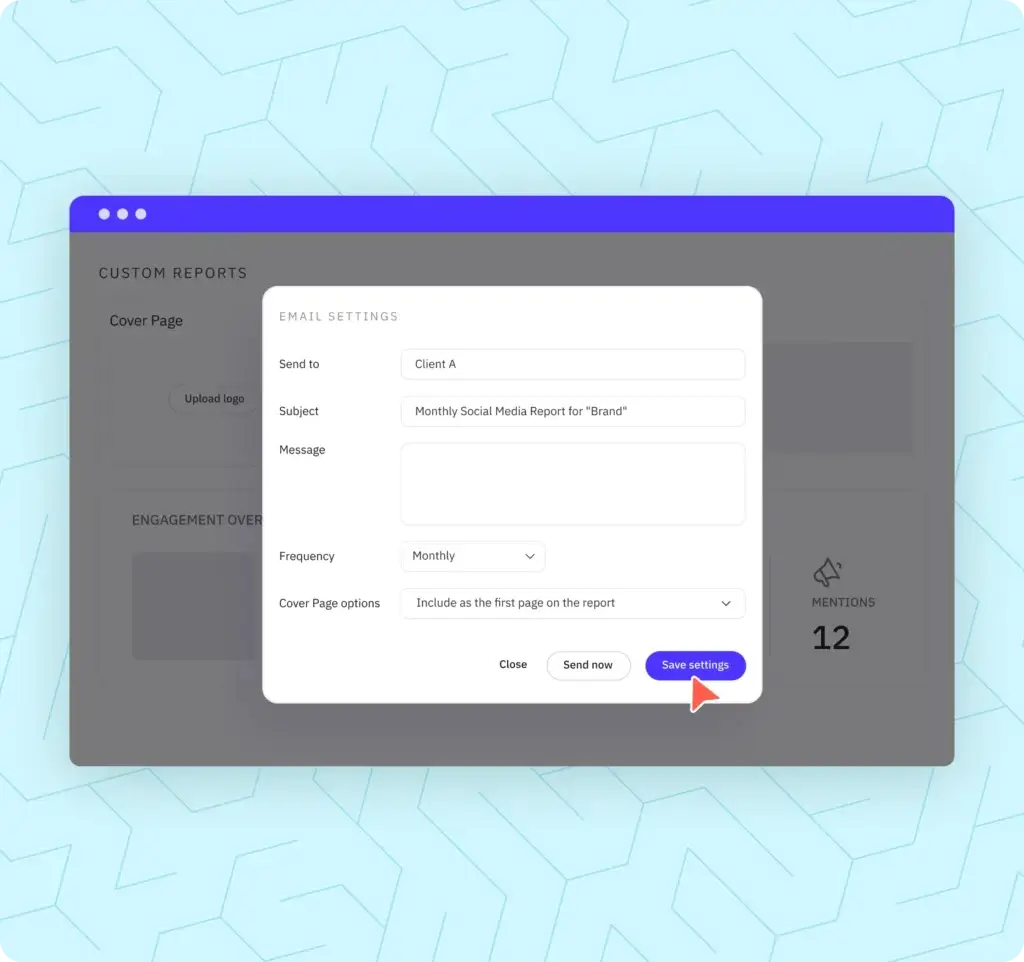
Sendible offers reporting tools that are strong enough for many agencies and service teams, even if they are not the deepest in the category. You can generate reports, connect Google Analytics, track UTM performance, and use client-facing dashboards on higher plans. For many users, this balance works well because the reports are practical without becoming overly technical.
- Automated reports: Save time with recurring reports instead of manual exports.
- Google Analytics integration: Track traffic, UTMs, and ROI more clearly.
- Client dashboards: Useful for agencies that need a clearer reporting layer for customers.
- Performance visibility: Good for campaign monitoring, though less advanced than analytics-first tools.
Content Management and Curation
One area where Sendible stands out is its support for content operations, not just publishing. You can manage assets with a content library, source content from RSS feeds, auto-post from feeds, attach images from URLs, and use tools like Pexels and GIPHY in supported workflows. That makes it more flexible than simpler schedulers that focus mostly on manual post creation.
- Content library: Store and organize reusable assets.
- RSS integrations: Follow blogs and automate content sharing from feeds.
- Creative sourcing: Pull visual assets from supported media integrations.
- Useful for agencies: Helps standardize repeatable content processes across clients.
Collaboration and Client Workflow
Sendible is clearly built with agencies in mind. Team collaboration, approval workflows, user management, client dashboards, client onboarding support, and optional white labeling all reinforce that positioning. If you run a service-based business, these features matter much more than they do in entry-level schedulers.
- Assignment and approval: Useful when content needs internal or client sign-off.
- User management: Better control over who can access what.
- Client Connect: Helps onboard clients more securely.
- White label options: Available as a paid add-on on higher tiers.
AI and Workflow Enhancements
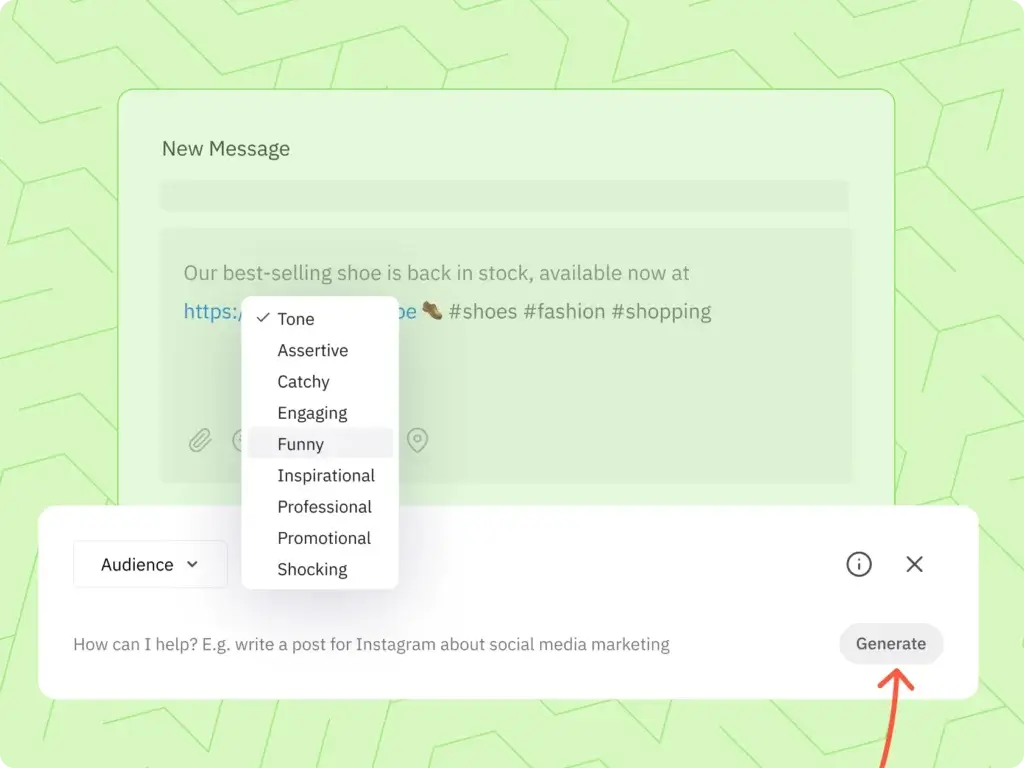
Sendible now includes AI Assist for generating and optimizing social media captions. Lower plans also received notable upgrades in late 2024, including access to AI Assist, Bitly-branded links, UTM parameters, and Google Drive and Dropbox integrations. This matters because older Sendible reviews may not reflect the current value of the Creator and Traction plans.
- AI Assist: Generate or refine captions faster.
- UTM tracking: Better measurement for campaign links.
- Bitly support: Useful for branded links and cleaner tracking.
- Drive integrations: Easier asset access from Dropbox and Google Drive.
Supported Platforms and Integrations
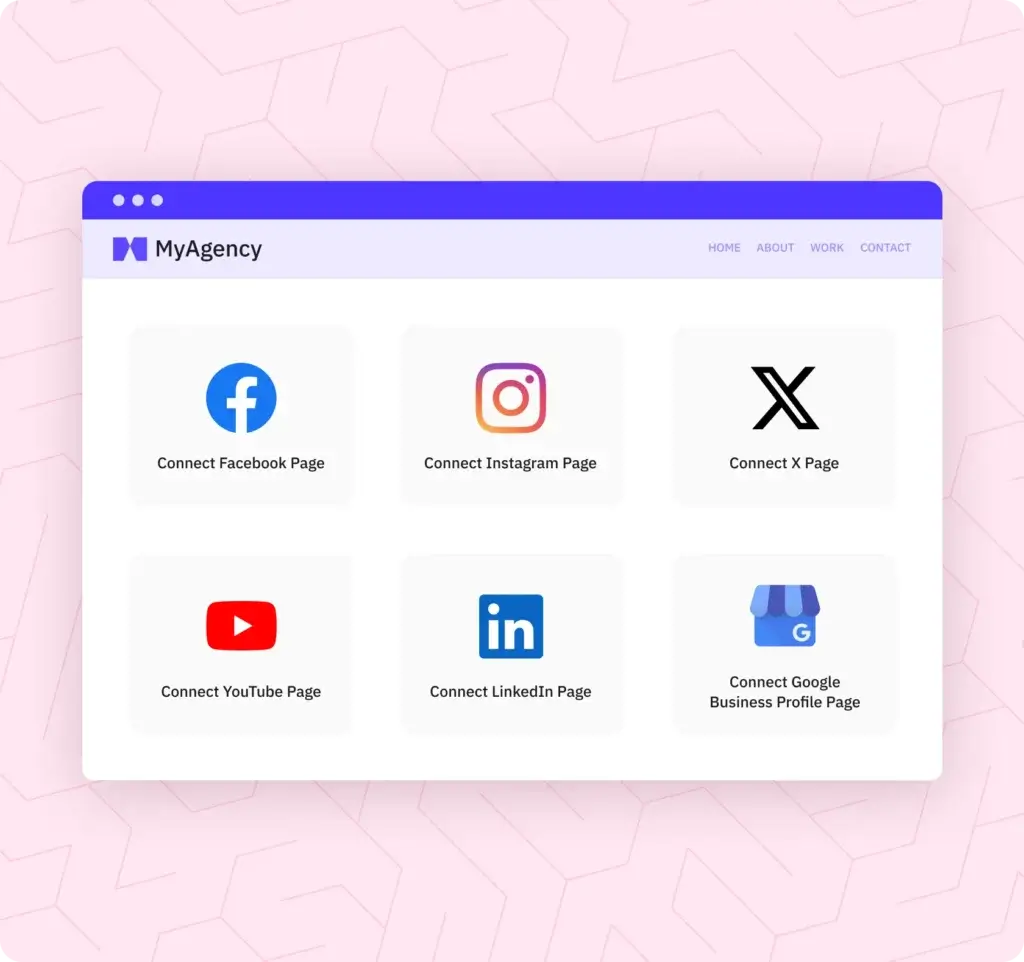
Sendible supports a wide mix of social platforms and related publishing channels. That includes Facebook, Instagram Professional, X, LinkedIn profiles and company pages, Google Business, Threads, TikTok, Bluesky, YouTube, and WordPress publishing. Monitoring support is more selective, with inbox and analytics functionality stronger on some channels than others.
- Social networks: Facebook, Instagram Professional, X, LinkedIn, TikTok, Google Business, Threads, Bluesky, and YouTube.
- Blog publishing: WordPress.org and WordPress.com support.
- Creative and workflow integrations: Canva, Google Drive, Dropbox, Pexels, GIPHY, Chrome extension, and Zapier-related workflow options.
Pros and Cons
Benefits and Limitations of Sendible
Positive
✅ Agency-friendly workflow
✅ Broad publishing support
✅ Useful reporting tools
✅ Strong scheduling flexibility
Negative
❌ Analytics are not category-leading
❌ Inbox depth varies by network
❌ White label costs extra
❌ Interface can feel dated in places
Like most social media management tools, Sendible works very well in some scenarios and less impressively in others. Its value depends heavily on whether you care more about multi-client workflow and scheduling efficiency, or about deeper analytics and social listening.
✅ Pros
- Built for agencies: Client dashboards, approvals, onboarding tools, and optional white labeling make it a strong fit for service teams.
- Flexible scheduling: Smart queues, bulk imports, campaigns, and multi-profile publishing support help you scale content operations.
- Practical reporting: Automated reports and Google Analytics integration are useful for ongoing client reporting.
- Good channel coverage: Supports a wide range of social platforms plus WordPress.
- Improved lower-tier value: Creator and Traction gained meaningful features that used to sit higher in the stack.
- Content workflow tools: RSS posting, media sourcing, libraries, and UTM support make the platform more versatile.
❌ Cons
- Analytics depth is limited: Strong enough for many teams, but not as advanced as analytics-heavy competitors like Sprout Social or Iconosquare.
- Listening is not the main selling point: Sendible is stronger in publishing and workflow than deep listening or sentiment analysis.
- Some platform gaps remain: Monitoring and inbox capabilities vary by network, which is common with API limitations.
- White label is not included by default: It is a paid add-on on Advanced and Enterprise.
- Not the cheapest at scale: It starts affordably, but larger agency needs can push pricing up.
User Experience
User Interface and Experience
Onboarding and Learning Curve
Sendible is easier to get started with than some enterprise social media tools, but it is not as lightweight as ultra-simple schedulers. The platform is manageable for solo users, yet its full value becomes clearer when you are working with several brands, multiple teammates, or approval-based workflows. If you are moving up from a very simple scheduler, there may be a short adjustment period.
Interface, Navigation, and Daily Use
The interface is organized around publishing, content management, reporting, and inbox workflows. In practice, the platform feels function-first rather than especially modern. That is not necessarily a problem, because it helps keep the tool useful for agencies, but visually it can feel less polished than some newer social media platforms. Still, many users appreciate that it focuses on getting real work done instead of over-designing the experience.
Customer Support and Resources
Support is available through Sendible’s support channels, and its help center also lists support hours from Monday to Friday, 9am to 9pm UK time. The company also maintains support documentation, product updates, webinars, templates, case studies, and other educational resources that can help teams get more value from the platform.
Pricing and Plans
How Much Does Sendible Cost?
Sendible currently offers five main pricing tiers, starting with Creator and moving up through Traction, Scale, Advanced, and Enterprise. The biggest differences between plans are the number of users, social profiles, reporting depth, collaboration controls, and agency-specific options.
| Plan | Price (monthly) | Best For |
| Creator | $29/month | Solo creators, freelancers, one-person businesses |
| Traction | $89/month | Small teams with up to 4 users and 24 social profiles |
| Scale | $199/month | Small businesses that need stronger collaboration and reports |
| Advanced | $299/month | Growing agencies, resellers, and larger client operations |
| Enterprise | $750/month | Large agencies, franchises, and multi-location businesses |
The entry plan includes 1 user and 6 social profiles, while Traction includes 4 users and 24 profiles. Scale moves to 7 users and 49 profiles. Advanced starts at 20 users and 100 profiles, while Enterprise starts at 80 users and 400 profiles. Sendible also offers a 14-day free trial with no card required on standard plans, and annual billing reduces pricing by 15%.
If you need white labeling, that is available as a paid add-on on Advanced and Enterprise. That means Sendible can still be a relatively affordable agency platform at the lower end, but the total cost can rise once you add more advanced client-facing functionality.
Use Cases & Suitable Users
Who Should Use Sendible
Sendible is not for every kind of social media user, but it fits several common business scenarios very well.
- Agencies: One of the best fits for Sendible because of approvals, client dashboards, reporting, user controls, and optional white labeling.
- Freelancers and consultants: Good if you manage social content for multiple clients and want a more professional workflow.
- Small businesses: A solid option when you need more than a simple scheduler but do not want enterprise-level complexity.
- Franchises and multi-location brands: Helpful for managing many profiles with more structured content operations.
- Content-heavy teams: Useful when RSS workflows, libraries, campaigns, and asset sourcing matter.
If your main priority is advanced social listening, sentiment analysis, or extremely detailed analytics, Sendible may not be the strongest choice. In those cases, you may get better value from tools that specialize more deeply in those areas.
Comparison with Alternatives
How Does Sendible Compare to Alternatives
Sendible competes in a crowded market, so the right choice depends on what you value most.
Sendible vs Buffer
Buffer is usually the better option if you want simplicity, a lower starting cost, and an easier interface for straightforward scheduling. Sendible is the stronger choice if you need agency-friendly workflow, broader operational tools, more structured collaboration, and more robust reporting. Buffer feels cleaner. Sendible feels more capable for service teams.
Sendible vs SocialBee
SocialBee is excellent for category-based scheduling, evergreen content recycling, and stronger AI-oriented content workflows. Sendible is usually the better fit for agencies that need client dashboards, white-label potential, and a more established multi-client operating model. If your content engine is the main priority, SocialBee has an edge. If your client workflow is the main priority, Sendible is often the better fit.
Sendible vs Sprout Social
Sprout Social is stronger in advanced analytics, reporting sophistication, and broader enterprise-grade social media management. It is also much more expensive. Sendible is the more cost-conscious alternative for agencies and growing businesses that want strong functionality without moving into high enterprise pricing too early.
Sendible vs Iconosquare
Iconosquare is stronger when analytics and benchmark-style reporting are at the center of your strategy. Sendible is more balanced toward publishing operations, agency workflow, and client-facing collaboration. If you live in reports, Iconosquare may suit you better. If you run a multi-client publishing machine, Sendible is often the more practical tool.
Best Use Tips
Tips and Best Practices When Using Sendible
To get the most out of Sendible, focus on the parts of the platform that save time and improve consistency.
- Use smart queues: Build repeatable posting patterns so you are not manually scheduling every slot.
- Organize assets early: Keep client media and captions structured in your content library.
- Set up UTM tracking: This gives your reports more strategic value.
- Automate recurring reports: Save manual work and keep stakeholders updated.
- Group related posts into campaigns: This makes large content calendars much easier to manage.
- Use approvals where needed: Especially important for agencies and regulated industries.
- Test AI Assist carefully: Use it to accelerate drafting, but always refine copy to match your brand voice.
- Review channel limitations: Every social platform has API restrictions, so confirm what is supported before building your workflow around it.
Conclusion
Final Thoughts
⭐ Overall Rating: 8.3/10
Sendible remains one of the more practical social media management platforms for agencies, consultants, and businesses that need more than a lightweight scheduler. Its strongest advantages are not flashy. They are operational. You get structured publishing, sensible collaboration, useful reports, client-friendly workflow tools, and enough flexibility to support real multi-account social media work.
That said, Sendible is not the category leader in everything. If you want the deepest analytics, advanced listening, or a more modern visual experience, there are stronger specialists on the market. But if your goal is to manage multiple brands more efficiently, keep stakeholders aligned, and maintain a scalable social media process, Sendible is still a strong option in 2026.
My take is that Sendible is best for agencies and service-based teams that want strong workflow value without paying premium enterprise prices too early. For those users, it is a genuinely compelling platform.
Have more questions
Frequently Asked Questions
What is Sendible best used for?
It is best used for social media scheduling, multi-account publishing, client reporting, and agency-style collaboration.
Does Sendible support Instagram scheduling?
Yes. It supports Instagram Professional publishing for several post types, including posts, videos, Stories, and image carousels, with some platform-specific limitations.
Does Sendible have a unified inbox?
Yes. Its Priority Inbox helps you manage selected comments and messages from supported networks in one place.
Is Sendible good for agencies?
Yes. Agencies are one of its strongest use cases because of approvals, user controls, reporting, client dashboards, and optional white labeling.
Does Sendible include AI tools?
Yes. Sendible includes AI Assist for generating and optimizing social media captions.
What social platforms does Sendible support?
It supports major platforms including Facebook, Instagram Professional, X, LinkedIn, TikTok, Google Business, Threads, Bluesky, YouTube, and WordPress publishing.
Does Sendible offer a free trial?
Yes. Standard plans include a 14-day free trial with no card required.
How much does Sendible cost?
Pricing starts at $29 per month for Creator and scales up through Traction, Scale, Advanced, and Enterprise depending on your team size and profile needs.
Is Sendible better than Buffer?
It is usually better for agencies and multi-client workflows, while Buffer is often better for simplicity and lower-cost scheduling.
Is Sendible the best option for analytics?
Not necessarily. Its reporting is useful, but if deep analytics and advanced listening are your top priorities, some competitors go further.





