
Introduction
Managing social media at scale is rarely just about publishing posts. You need to coordinate calendars, respond quickly to conversations, prove ROI, spot trends early, and keep your team aligned across multiple channels. Sprout Social positions itself as a premium social media management platform built for brands, agencies, and larger teams that need more than a lightweight scheduler.
In this Sprout Social review, you will get a detailed look at its core features, pricing, strengths, drawbacks, and ideal use cases. You will also see how it compares with several alternatives, so you can decide whether Sprout Social is the right fit for your business in 2026.
Key Features
Sprout Social’s Software Specification
Sprout Social is designed as an all-in-one platform for publishing, engagement, analytics, listening, reputation management, and team workflows. Its broader appeal comes from how these pieces work together, especially for teams that need governance, visibility, and reporting depth.
Publishing and Content Planning
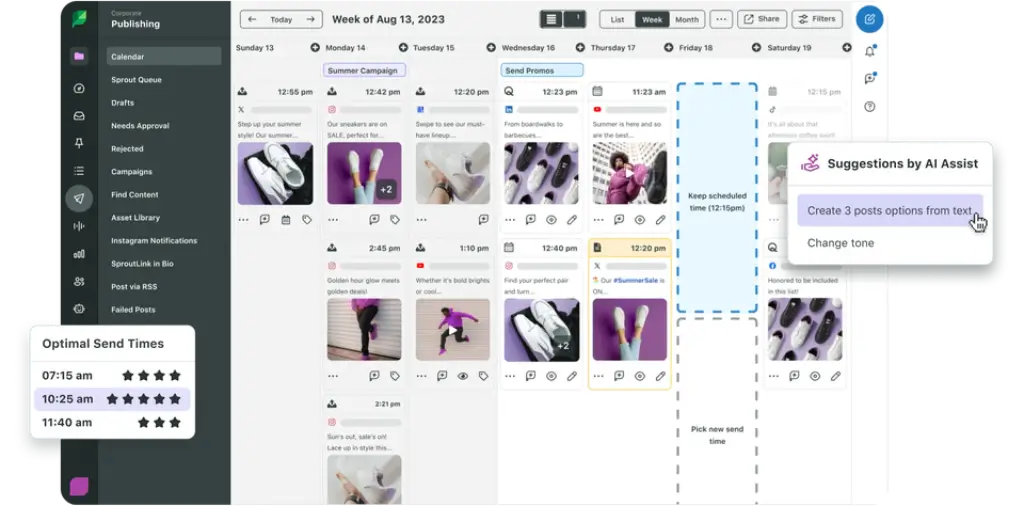
Sprout Social gives you a mature publishing environment that goes well beyond basic scheduling. You can plan posts in a visual calendar, queue content across multiple platforms, collaborate on drafts, and use built-in recommendations to improve timing and reach.
- Cross-network publishing: Schedule content for Instagram, Facebook, LinkedIn, TikTok, Pinterest, X, Threads, Bluesky, and YouTube from one platform.
- Visual content calendar: Organize campaigns by week or month, drag content to new dates, and keep your publishing mix balanced.
- Approval workflows: Route posts through review stages before publishing, which is especially useful for agencies and regulated industries.
- Optimal Send Times: Use audience engagement data to publish when your followers are most likely to respond.
- Asset support: Connect creative sources and streamline post creation with media attachments and collaborative drafting.
Smart Inbox and Engagement
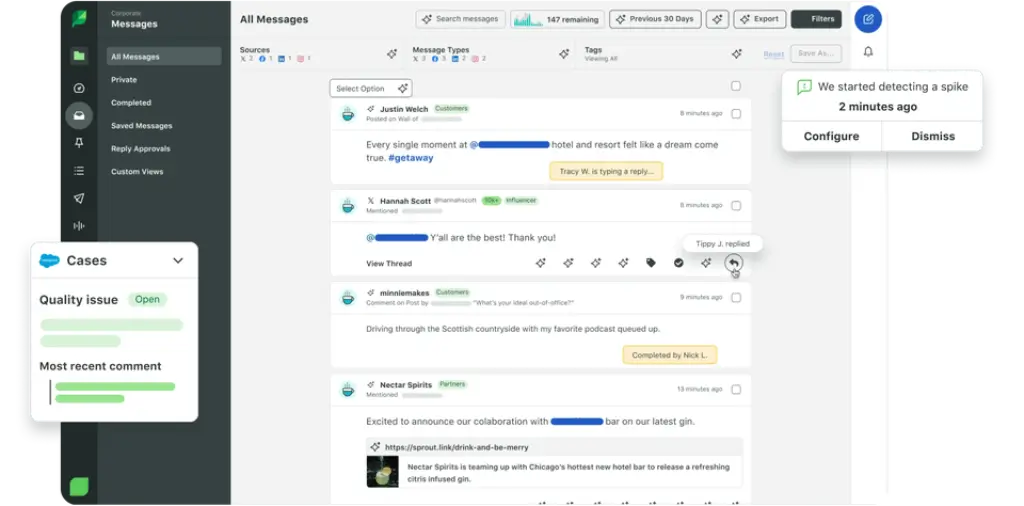
One of Sprout Social’s most valuable strengths is the Smart Inbox. Instead of checking multiple networks separately, you can centralize incoming messages, comments, mentions, and review activity into a more manageable workflow.
- Unified inbox: View and manage incoming interactions across supported channels in one place.
- Reply workflows: Assign messages, add internal context, and route responses to the right team member.
- Message tagging: Categorize conversations to track recurring issues, campaign impact, or sentiment patterns.
- Automated rules: Trigger actions based on criteria such as keywords, message types, or priority.
- Customer care features: Support social support teams with structured reply handling and reporting.
Analytics and Reporting
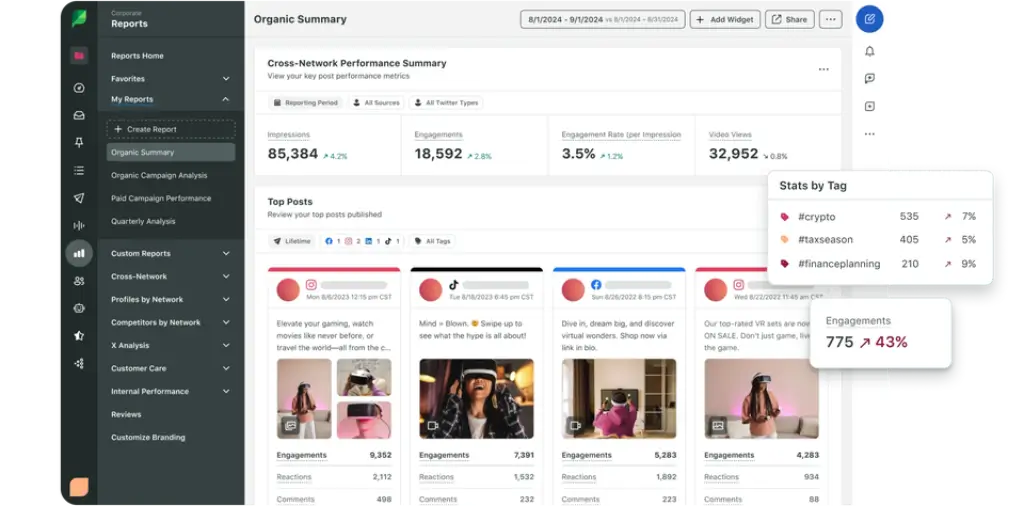
Sprout Social is strongest when you need detailed reporting that is easy to share with stakeholders. It supports profile-level, post-level, and group-level reporting, with more advanced reporting depth unlocked in higher tiers and add-ons.
- Performance dashboards: Track post engagement, audience growth, publishing outcomes, and response metrics.
- Group and profile reporting: Analyze individual accounts or roll data up across brands and teams.
- Custom reporting options: Build presentation-ready reports for internal stakeholders or clients.
- Competitor and paid insights: Professional and higher tiers add more robust insight into competitive and paid performance.
- Scheduled reports: Automate recurring report delivery to save time and standardize reporting.
AI and Automation
Sprout Social has expanded its AI layer significantly. Instead of limiting AI to simple caption generation, it now applies AI across publishing, inbox management, listening, reporting, and accessibility workflows.
- Enhance Post by AI Assist: Refine post copy and tone directly in the publishing workflow.
- Enhance Reply by AI Assist: Improve response quality and tone in engagement workflows.
- AI-generated alt text: Generate image alt text at scale, which is useful for accessibility and workflow speed.
- Translations and subtitles: Support multilingual publishing and video accessibility.
- AI summaries and analysis: Summarize listening topics, inbox activity, and report visuals more efficiently.
Reputation Management and Reviews
Sprout Social is also relevant if your brand depends on public reviews and local reputation signals. Its Reviews section supports monitoring and management across multiple review platforms, which adds another layer of value beyond social publishing.
- Review management: Manage reviews from platforms such as Google, Facebook, Yelp, TripAdvisor, Glassdoor, Apple App Store, and Google Play.
- Response coordination: Bring review workflows into the same operational environment as social engagement.
- Sentiment visibility: Advanced plans improve your ability to prioritize and analyze review trends.
Integrations and Supported Channels
Sprout Social supports a wide range of native profile types and business integrations, which helps it fit into broader marketing and service operations.
- Supported social profiles: X, Facebook, TikTok, LinkedIn, Instagram Business, Pinterest, YouTube, Bluesky, Threads, and WhatsApp.
- Creative and workflow integrations: Canva, Dropbox, Google Drive, Slack, and Bynder.
- Business system integrations: Salesforce, Shopify, Zendesk, Microsoft Dynamics 365, and HubSpot Service Hub.
- Mobile apps: Native iOS and Android apps support teams that need to monitor and engage on the go.
Social Listening and Social Insights
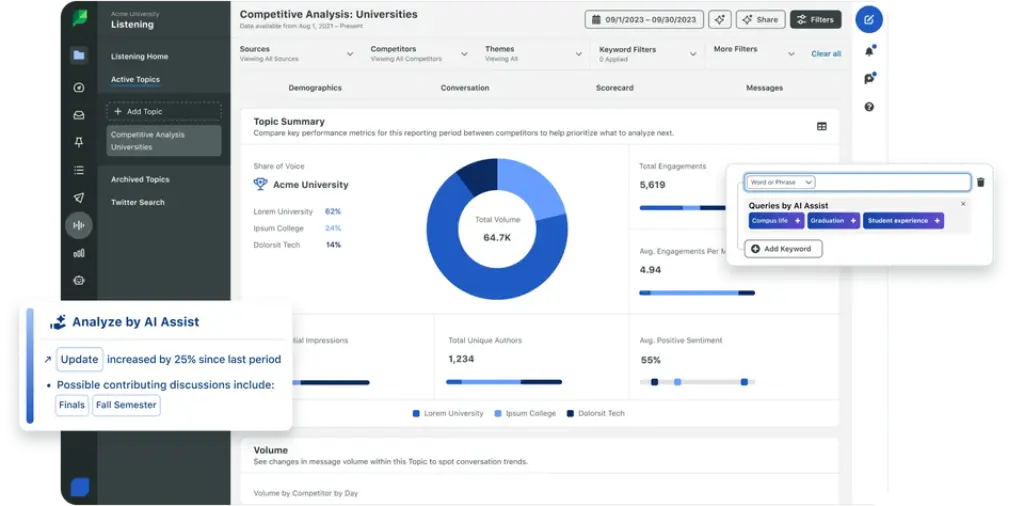
Sprout Social is more than a scheduler. It also invests heavily in listening and intelligence, especially for teams that want to connect social data with broader brand, campaign, and market decisions.
- Keyword and location monitoring: Available even on the Standard plan for basic monitoring use cases.
- Listening add-on: Expand into trend discovery, conversation analysis, share of voice, and deeper market insight.
- Sentiment tools: Higher tiers include sentiment capabilities in Smart Inbox, Reviews, and Listening workflows.
- Spike alerts: Detect unusual activity so your team can react faster during key moments or emerging issues.
- Strategic research value: Listening data is useful not only for social teams, but also for brand, support, PR, and product teams.
Pros and Cons
Benefits and Limitations of Sprout Social
Positive
✅ Excellent reporting depth
✅ Strong engagement workflow
✅ Broad platform support
✅ Mature team features
Negative
❌ High entry price
❌ Per-seat pricing adds up quickly
❌ Best value appears at higher tiers
❌ Potentially oversized for small teams
Sprout Social is one of the most capable platforms in this category, but it is not the right choice for every budget or team size. Its value increases when your social operation is complex enough to justify the premium cost.
✅ Pros
- Excellent reporting depth: Sprout Social stands out for clear, stakeholder-friendly analytics and reporting.
- Strong engagement workflow: The Smart Inbox remains one of the platform’s most compelling features.
- Broad platform support: It now supports a wider social set than many users realize, including Threads, Bluesky, and WhatsApp.
- Mature team features: Approval workflows, message routing, roles, and automation are valuable for larger teams.
- Expanding AI layer: AI Assist is increasingly useful across copy, replies, listening, summaries, subtitles, and accessibility.
- Reputation management included: Review monitoring adds meaningful operational value.
❌ Cons
- High entry price: Sprout Social is significantly more expensive than many social media management alternatives.
- Per-seat pricing adds up quickly: Costs rise fast when multiple users need access.
- Best value appears at higher tiers: Some of the most attractive intelligence and workflow capabilities sit above the Standard plan.
- Add-ons can increase total cost: Listening, Premium Analytics, and other expansions may be essential for some teams.
- Potentially oversized for small teams: Solo marketers and very small businesses may not need this level of depth.

User Experience
User Interface and Experience
Onboarding and Learning Curve
Sprout Social is well designed, but it is not a lightweight tool. The interface is polished and generally intuitive, yet the platform’s real value comes from its more advanced workflows. If you only need a content calendar, it may feel like more software than you need. If you manage engagement, customer care, reporting, and listening together, the depth becomes easier to justify.
Navigation and Daily Usability
The product organizes work clearly around publishing, inbox management, analytics, listening, and reviews. This makes it easier to build repeatable processes across teams. In day-to-day use, Sprout Social feels structured and enterprise-ready rather than minimalistic. That is a strength for operational teams, but some smaller businesses may prefer a simpler UI.
Collaboration and Governance
Sprout Social performs particularly well when several stakeholders are involved in social operations. Approval workflows, content routing, message tagging, and permissions make it easier to scale social without losing control. For agencies and larger internal teams, this is one of the platform’s main selling points.
Mobile Experience
Sprout Social offers mobile apps for iOS and Android, which is useful for monitoring urgent activity and responding quickly. That said, most teams will still get the most value from the desktop experience, especially for reporting, listening analysis, and calendar planning.
Pricing and Plans
How Much Does Sprout Social Cost?
Sprout Social uses premium, per-seat pricing. This is one of the biggest factors to evaluate before you commit, because the cost can rise substantially as your team grows.
| Plan | Price | Best For |
| Standard | $199 per seat/month | Small teams that need core publishing, inbox, reporting, review management, and basic monitoring |
| Professional | $299 per seat/month | Teams managing more profiles and heavier engagement workflows |
| Advanced | $399 per seat/month | Cross-functional teams that need sentiment, helpdesk integrations, API access, and deeper customer care tools |
| Enterprise | Custom pricing | Large organizations that need custom onboarding, priority support, and tailored deployment |
The Standard plan includes 5 social profiles, while Professional and Advanced move to unlimited social profiles. Sprout Social also offers a 30-day free trial with no credit card required on annual billing. Beyond the base plan, your total cost can also depend on users, extra profiles, and add-ons such as Premium Analytics, Listening, Employee Advocacy, and Professional Services.
This pricing model makes Sprout Social a serious investment. In my view, it is usually best suited to organizations that will actually use its analytics, inbox workflows, and intelligence features, not just its scheduler.
Use Cases and Suitable Users
Who Should Use Sprout Social
Sprout Social is not a universal recommendation. It is strongest for teams that treat social as an operational channel, not just a publishing channel.
- Mid-sized and large brands: Best for teams that need governance, visibility, reporting, and customer engagement workflows.
- Agencies: A strong option if you manage multiple client programs and need consistent reporting and approvals.
- Customer care teams: Particularly useful if social messages and reviews play a real service role in your business.
- Data-driven marketers: A better fit for teams that want analytics and social intelligence, not just content planning.
- Multi-stakeholder organizations: Helpful when social touches support, PR, brand, and executive reporting.
Sprout Social may be less suitable for freelancers, solo creators, or small businesses that mainly want affordable scheduling. In those cases, lighter tools often deliver better value.
Comparison with Alternatives
How Sprout Social Compares to Alternatives
Sprout Social competes in the premium tier of social media management software, but not every alternative serves the same audience. The differences often come down to depth, cost, and workflow complexity.
Sprout Social vs Hootsuite
Hootsuite remains one of the most recognized names in social media management, and it covers publishing, inbox management, analytics, and social listening through a broad ecosystem. Compared with Hootsuite, Sprout Social usually feels more polished in reporting and more cohesive in its day-to-day user experience. Hootsuite can be attractive for teams that want a broad platform with flexible ecosystem options, but Sprout Social often feels stronger for organizations that prioritize reporting clarity, workflow consistency, and a cleaner operational experience.
Sprout Social vs Buffer
Buffer is far more lightweight and affordable. It is a very good choice if your priority is simple scheduling, basic engagement, and an approachable interface. Sprout Social is the more powerful platform by a clear margin, especially for inbox workflows, reporting, reputation management, listening, and team operations. The tradeoff is price. If you are a small business with limited social complexity, Buffer often offers better value. If you need social to function as a serious team channel, Sprout Social is in another class.
Sprout Social vs Agorapulse
Agorapulse sits between budget-friendly tools and premium enterprise-style platforms. It offers a strong inbox experience, scheduling, reporting, and collaboration features at a lower cost than Sprout Social. That makes it a compelling option for agencies and growing teams. Still, Sprout Social generally has the edge in enterprise polish, intelligence depth, AI breadth, and overall maturity of reporting and customer care workflows.
Sprout Social vs Vista Social
Vista Social has gained traction by offering strong scheduling, engagement, and collaboration capabilities at a more accessible price point. It is particularly appealing to agencies and social teams that want broad functionality without paying Sprout-level rates. Sprout Social remains stronger when advanced reporting, brand intelligence, governance, and premium workflow depth matter more than price efficiency.
| Feature Type | Sprout Social | Typical Lower-Cost Alternative |
| Analytics Depth | Strong reporting and stakeholder-ready dashboards | Often more limited or less polished |
| Inbox Workflows | Advanced routing, tagging, approvals, and care tools | Usually simpler inbox handling |
| AI Features | Broad AI across publishing, replies, summaries, listening, and accessibility | Often focused mainly on captions or basic assistance |
| Review Management | Included as part of the broader platform | Not always included |
| Pricing | Premium, per-seat pricing | Usually more affordable for small teams |
Best Use Tips
Tips and Best Practices When Using Sprout Social
If you decide to use Sprout Social, you will get the best return by building workflows around its deeper capabilities rather than using it only as a scheduler.
- Standardize your inbox process: Set up message tagging, routing, and ownership rules early.
- Use approvals intentionally: Build clear publishing workflows for compliance, quality control, and client review.
- Automate recurring reports: Save time and create consistency for internal and external stakeholders.
- Leverage AI for productivity: Use AI Assist for reply refinement, content optimization, subtitles, and summaries.
- Track reputation alongside engagement: Do not overlook the Reviews section if public feedback matters to your brand.
- Expand into listening when needed: If social insight is strategic for your business, the Listening layer can add real value.
- Review plan fit regularly: Because the platform is expensive, make sure your team is actively using the features you are paying for.
Conclusion
Final Thoughts
Sprout Social is one of the strongest premium social media management platforms on the market. It combines publishing, engagement, analytics, listening, review management, and AI in a way that feels operationally mature. For larger brands, agencies, and teams that rely on social for both marketing and customer care, it is a serious contender.
Its biggest barrier is price. If you will only use a fraction of what it offers, cheaper tools will almost certainly deliver better value. But if your team needs reporting depth, structured inbox workflows, collaboration controls, and social intelligence in one platform, Sprout Social can justify its premium positioning.
Overall, I would place Sprout Social among the best options for teams that treat social media as a business-critical function, not just a publishing channel. The 30-day trial is worth using, but go into it with a clear plan to test the features that actually justify the cost.
Have more questions