
Introduction
As generative audio becomes mainstream, creators and businesses are searching for tools that make professional‑quality voiceovers, podcasts, and audiobooks accessible. ElevenLabs is a standout platform that blends advanced neural networks, deep learning, and a user‑friendly interface to convert text into lifelike speech, clone voices, translate content, and more. Founded in 2026, the company quickly gained traction by offering human‑sounding voices across more than seventy languages and a flexible API for developers.
In this ElevenLabs review, you’ll explore how the platform works, its core features, pricing tiers, advantages and disadvantages, and practical tips for getting the most from the service. Whether you’re a podcaster, marketer, educator, or developer, understanding ElevenLabs’ capabilities will help you decide if this AI voice solution suits your needs.
Key Features
Core Features & Products
ElevenLabs isn’t just a single tool; it’s a suite of audio generation products designed for different use cases. Below are its key offerings, each with its own strengths.
Text‑to‑Speech (TTS) Engine
ElevenLabs’ flagship product is a high‑fidelity text‑to‑speech engine capable of generating natural, emotive speech in over seventy languages. Unlike older concatenative synthesis methods, the platform uses neural networks that understand context, adding pauses, emphasis, and emotion where appropriate. You can choose from thousands of voices or create your own, and the latest v3 model introduces emotion tags such as cheerful, sad, or dramatic, along with delivery styles like formal, conversational, or storytelling. These options let you tailor the tone of your audio precisely.
Bullet points summarizing TTS highlights:
- Supports 70+ languages and more than 120 preset voices
- Offers emotion and delivery control via tags and sliders
- Produces lifelike, context‑aware speech suitable for podcasts, videos, audiobooks, and training content
- Easily adjustable stability, similarity, and style sliders to tweak performance
Voice Cloning
Voice cloning allows you to create a digital replica of a voice from an audio sample. ElevenLabs offers two modes:
- Instant Voice Cloning creates a basic clone from a one‑ to two‑minute recording. It’s quick but less accurate.
- Professional Voice Cloning requires around thirty minutes of high‑quality audio; results are more faithful and include tone shifts and emotional nuances.
Once cloned, you can generate endless audio with that voice. This feature is popular among creators who want a consistent brand voice without repeatedly recording and for individuals who need to preserve their voice for accessibility reasons.
Voice Changer
The Voice Changer tool transforms any voice recording into a different persona while preserving timing and cadence. This is useful for content creators who need multiple characters in a single project or for filmmakers prototyping character voices. Simply upload your audio, choose a target voice, and ElevenLabs will convert your speech while maintaining the original intonation.
AI Dubbing & Multilingual Translation
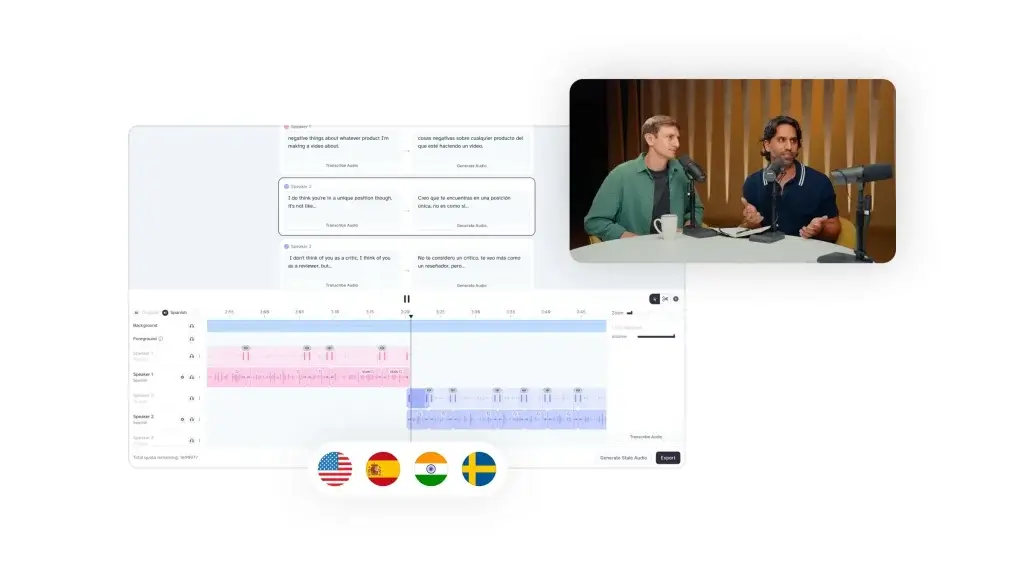
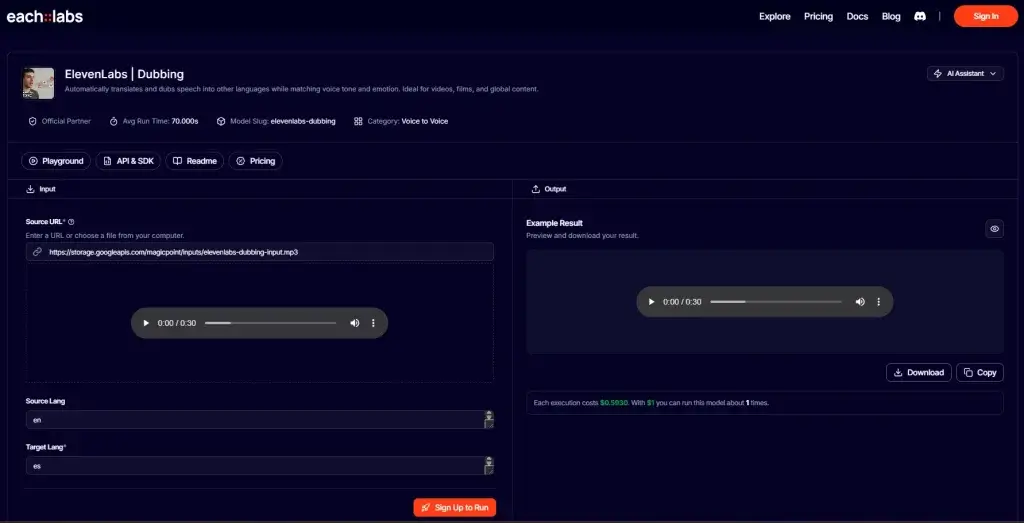
With its dubbing studio, ElevenLabs can translate and dub your video or audio into more than thirty languages while preserving the speaker’s timbre. It automatically synchronizes the dub to match lip movements and emotional tone, making it ideal for international marketing videos, educational materials, and global product launches. You can either use one‑click dubbing for simple projects or the Dubbing Studio for granular control.
Voice Isolator
Background noise can ruin a recording. Voice Isolator uses advanced AI to remove ambient noise, music, and chatter, leaving clean, professional speech tracks. It supports direct recording via your browser or uploads in formats like MP3, WAV, MP4, and MOV. Podcasters and interviewers can enhance audio clarity without complicated mixing or EQ work. Even live streamers can mute background music and reduce mic feedback to avoid copyright strikes.
Key benefits:
- Removes ambient sounds and mic hiss for clearer speech
- Strips out music and overlapping conversation
- No audio engineering experience required; just upload and process
- Supports podcasts, filmmaking, livestreams, and interviews
AI Sound Effects Generator
ElevenLabs includes a Sound Effects Creator that generates custom audio effects from text prompts. For instance, you can request “creepy footsteps from afar” or “waves on a beach” and receive multiple variations. While it’s a fun addition for short sounds, complex prompts may yield mixed results. Sound designers and video editors may find it helpful for quick effects, but professional projects may still require fine‑tuning.
AI Music Generator
Recently launched, Eleven Music moves beyond voice to produce full songs based on natural‑language prompts. You can specify genre, mood, tempo, and even languages for vocals. The service streams audio in real time, allows section‑level editing of intros, verses, and choruses, and supports commercial licensing thanks to partnerships with publishers like Merlin Network and Kobalt Music. It’s billed at a flat rate per minute with a free tier for experimentation.
Studio Editor & Actor Mode
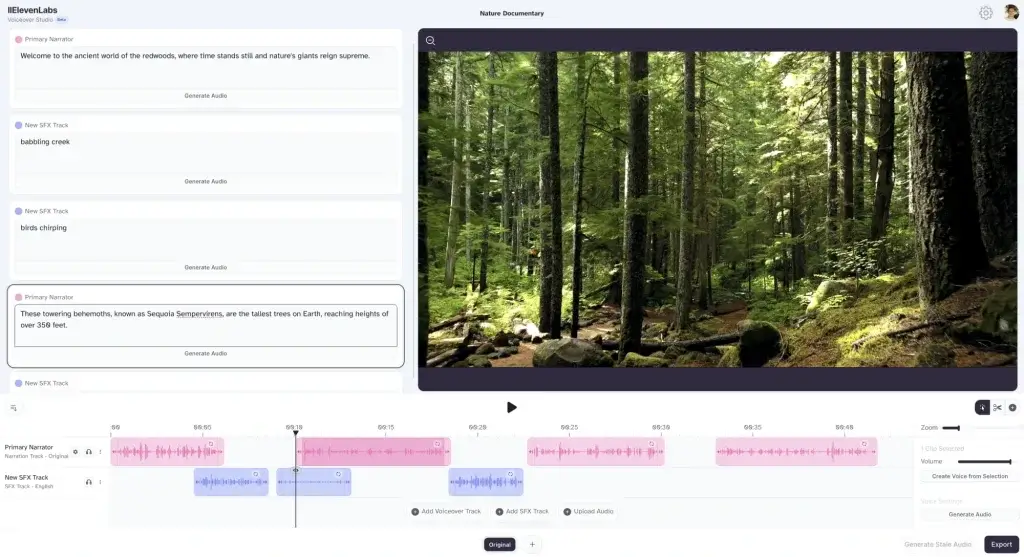
The ElevenLabs Studio is a workspace for creating long‑form audio like audiobooks and podcasts. It allows you to upload chapters or scripts, assign different voices to characters, and fine‑tune pacing and pronunciation. Actor Mode lets you record yourself reading a sentence, and the AI will mimic your delivery for the generated voice. This provides greater control over cadence and emotion, though each regeneration uses credits, so it’s best to polish your script before generating audio.
ElevenReader & Distribution
For authors who create audiobooks with ElevenLabs, ElevenReader offers a dedicated platform to distribute and sell AI‑narrated titles. You retain 60% royalties without exclusivity requirements. The platform supports audiobooks, audio newsletters, and audio articles, but it’s still building its audience and lacks the reach of established distributors. Nonetheless, listing on ElevenReader can supplement your distribution strategy.
Developer APIs
Developers can access ElevenLabs models via APIs and SDKs in Python and TypeScript. Available endpoints include:
- Text‑to‑Speech API for low‑latency speech synthesis (choose between models like Multilingual v2, v3 for emotional expression, or Flash for rapid response)
- Speech‑to‑Text API with speaker diarization, character‑level timestamps, and competitive pricing per hour
- Voice Changer API to alter voices programmatically
- Voice Isolator API for background noise removal
- AI Music API (currently in beta) for generating songs on demand
These APIs are GDPR and SOC II compliant, making them suitable for enterprise integration in customer support, call centers, education technology, and media creation platforms.
Podcasting
Using ElevenLabs for Podcasts & Audiobooks
Podcast Production
ElevenLabs makes it easy to turn scripts into engaging podcast segments. You can generate voiceovers for intros, ads, and entire episodes, then clean up any field recordings with Voice Isolator. To produce a polished podcast:
- Write or import your script. Keep sentences concise and conversational to sound natural when spoken.
- Select a voice. Test different presets to match your show’s tone, whether professional, casual, or dramatic. Consider cloning your voice for consistency across episodes.
- Adjust emotion and style. Use the stability, clarity, and style sliders or emotion tags to refine delivery. Slight exaggeration often makes the audio more engaging.
- Generate and review. Listen closely for mispronunciations or pacing issues. If necessary, regenerate specific paragraphs or use Actor Mode to guide the AI.
- Apply Voice Isolator. Clean up any live recordings or interviews to ensure consistent sound quality.
- Add sound effects or music. Use the Sound Effects Generator or AI Music to create intros, transitions, and ambiance.
- Publish. Export the final mix and distribute it on podcast platforms or host it on your site.
Audiobook Creation
Creating an audiobook follows a similar workflow but requires longer content and multiple voices. When producing your book:
- Work in chapters. Upload one chapter at a time to manage credits and edits efficiently.
- Choose voices for characters. ElevenLabs’ voice library can be filtered by age, gender, accent, and tone. You can assign different voices to narrators and characters, adding depth to fiction.
- Leverage multi‑narrator detection. For fiction, the system can automatically identify characters and assign voices. Review assignments to ensure they match your vision.
- Edit with Actor Mode. If a passage’s pacing feels off, record a sample and let the AI mimic your delivery. Use pauses before and after headings to create smooth transitions.
- Export and distribute. Save your audiobook in MP3 or WAV format and publish through ElevenReader, major audiobook platforms, or your own website.
Pros and Cons
Advantages and Limitations
Positive
✅ Ultra‑realistic voices
✅ Wide language and voice support
✅ Customization
✅ Voice cloning
Negative
❌ Credit burn
❌ Pronunciation quirks
❌ Voice cloning limitations
❌ Language consistency
Choosing an AI voice platform involves weighing advantages against potential drawbacks. Here are the key points to consider:
✅ Pros
- Ultra‑realistic voices: ElevenLabs voices capture emotional nuances, making them sound less robotic than many competitors.
- Wide language and voice support: Over seventy languages, dozens of accents, and thousands of voices provide flexibility for global audiences.
- Customization: Fine‑tune pitch, pace, stability, similarity, and style; use emotion tags and actor mode for precise control.
- Voice cloning: Generate consistent brand voices or clone your own voice for personal projects.
- Comprehensive product suite: Includes text‑to‑speech, voice changer, voice isolator, dubbing, sound effects, and music generation in one platform.
- API access: Developers can integrate advanced voice capabilities into apps and workflows.
- User‑friendly interface: The Studio editor and voice selection tools are intuitive even for beginners.
❌ Cons
- Credit burn: Regenerating sections or correcting glitches consumes credits quickly, increasing costs on large projects.
- Pronunciation quirks: Numbers, dates, or technical terms may be mispronounced, requiring manual adjustments.
- Voice cloning limitations: High‑quality clones need studio‑level audio; low‑quality samples produce robotic results.
- Language consistency: Long pieces may switch accents or languages mid‑generation, particularly in multilingual models.
- Free and low tiers: Lower plans limit credit purchase options and may restrict access to advanced features.
- Customer support: Some users report slow response times and limited self‑service resources.
Pricing and Plans
Pricing Plans and Subscription Options
ElevenLabs’ pricing model uses credits, where one credit generally equals one character for text‑to‑speech or a defined amount of time for other features. Unused credits expire when you cancel your subscription, so choose a plan that matches your output needs.
| Plan | Monthly Price | Credits | Key Features |
| Free | $0 | 10,000 | Limited to a few minutes of TTS, basic voice library, limited dubbing, no commercial license |
| Starter | $5 | 30,000 | Commercial license, dubbing studio, up to 3 custom voices |
| Creator | $11–22 | 100,000 | Professional voice cloning, longer‑form projects, Audio Native for website narration |
| Pro | $99 | 500,000 | Higher‑quality audio, analytics dashboard, additional API capacity |
| Scale | $330 | 2,000,000 | Priority support, lower per‑credit cost, suitable for enterprises |
| Business | $1,320 | 11,000,000 | Maximum credits, multiple voice clones, tailored for large teams |
Best Use Cases
Use Cases & Applications
ElevenLabs’ versatility means it can be applied across many industries and scenarios. Here are a few examples:
Content Creation & YouTube Narration
Creators can convert blog posts, scripts, and product descriptions into engaging narrations without hiring voice actors. The ability to adjust emotion and tone makes videos feel more polished and helps boost audience retention. Adding AI‑generated music or sound effects further enhances production value.
Podcast Production
Podcasters can use ElevenLabs to generate intros, outros, sponsor messages, or entire episodes. The Voice Isolator cleans up interviews recorded outside the studio, while the Sound Effects Creator adds ambiance. Cloning your own voice ensures consistent hosting even when your schedule is tight.
Audiobook Narration
Authors and publishers can produce audiobooks quickly and affordably. Multi‑narrator support allows each character to have a unique voice, and actor mode helps you refine pacing. Distribution via ElevenReader offers generous royalties, though you should still use established platforms for maximum reach.
E‑Learning & Training
Course creators can offer learners audio alternatives to written content. Narrated lessons and quizzes accommodate different learning styles and improve accessibility for people with visual impairments or learning differences. AI dubbing also lets you translate courses into multiple languages without re‑recording.
Customer Service & AI Agents
Enterprises can integrate ElevenLabs with contact center software to build AI voice agents that handle customer inquiries, provide assistance, or even conduct outbound calls. Low‑latency models like Flash support real‑time interactions, and APIs enable developers to incorporate function calling and advanced turn‑taking.
Marketing & Advertising
Marketers can quickly generate voiceovers for advertisements, social media videos, explainer videos, and product demos. Emotional tags help tailor the delivery for persuasive messaging, while voice cloning ensures consistent brand identity across campaigns.
Game Development & Animation
Game developers and animators can prototype character voices without hiring actors. Voice cloning and the voice changer create distinct personas, while AI music and sound effects add immersive audio landscapes.
Accessibility & Assistive Technology
Text‑to‑speech provides an audio alternative for people with visual impairments or reading difficulties. Customizable voices and emotional nuance make digital experiences more engaging and inclusive. Voice Isolator can also enhance clarity for individuals with hearing impairments by reducing background noise.
Best Practices & AI Safety
Tips for Maximizing Your ElevenLabs Experience
Here are some great tips to get the most out of ElevenLabs:
- Polish your script before generation. Each regeneration consumes credits. Minimizing edits reduces costs.
- Use emotion tags sparingly. Over‑exaggerated emotions can sound unnatural. Start with subtle adjustments and test the output.
- Break long texts into segments. For long videos or books, generate audio in sections of 200–400 words to reduce glitches and accent switches.
- Leverage actor mode for key passages. Recording a sample can help the AI replicate your preferred cadence and emphasis.
- Test multiple voices. Don’t settle on the first preset you try. Use filters (age, gender, accent, tone) to find a voice that matches your brand.
- Combine with traditional narration. If budget allows, mix AI voices with human narration for important parts. Human voices add authenticity that AI hasn’t fully mastered.
- Monitor credit usage. Keep track of credits and adjust your workflow. Consider annual plans if you regularly produce large volumes.
- Stay updated on new models. ElevenLabs releases new versions regularly. Upgrading to the latest model (e.g., v3) often improves quality and introduces new features.
- Review ethical guidelines. Always obtain permission when cloning voices and respect legal restrictions on celebrity or political voices.
- Explore API integration. Developers can automate repetitive tasks like bulk audio generation or build custom voice apps by integrating the API.
Ethical Considerations & AI Safety
AI voice technology brings power and responsibility. ElevenLabs has introduced several measures to mitigate misuse:
- Identity verification: Users must verify their identity before uploading samples for voice cloning. This helps prevent unauthorized cloning of celebrities and politicians.
- Permission requirements: You must confirm you have rights to clone a voice, protecting against impersonation and fraud.
- Deepfake detection: The platform is developing tools to detect AI‑generated voices, supporting broader efforts to combat misinformation.
- Regulatory compliance: ElevenLabs adheres to emerging regulations for synthetic media labeling and data protection, such as the EU’s requirements for labeling AI‑generated content.
Despite these safeguards, there are still risks. Bad actors might misuse voice clones for scams or propaganda, and laws are evolving to address these issues. As a responsible user, obtain consent from anyone whose voice you clone, clearly disclose synthetic audio when appropriate, and stay informed about new regulations.
Competitors
Competitor Alternatives & Comparisons
The AI voice space is crowded, and different tools cater to different needs. Here’s how ElevenLabs compares to a few popular alternatives:
- Murf AI: Offers a large voice library and custom voice cloning but lacks the same level of emotional expression. Murf is strong on business‑focused templates and collaboration features.
- Play.ht: Provides hundreds of voice styles in many languages and excels in speed. It may suit users who prioritize quick generation over nuanced emotion.
- LOVO AI (Genny): Known for strong female voices and integrated sound effects and music tools. LOVO’s pricing is comparable, though some voices sound less natural than ElevenLabs.
- WellSaid Labs: High‑quality English voices with a focus on enterprise customers. Pricing is higher, and language support is more limited.
- Synthesia & HeyGen: These tools combine AI voices with video avatars. They’re ideal if you need video presentations or custom avatars along with voice but may not offer as deep voice control.
- Speechify & Descript: Suitable for reading articles aloud or editing podcasts with integrated transcription. They have smaller voice selections and less customization compared to ElevenLabs.
- FineVoice & Fineshare: These platforms include voice cloning and conversion tools but often lack the extensive multilingual support and emotional range of ElevenLabs.
If your priority is the most natural‑sounding voices with flexible customization across many languages, ElevenLabs often leads the pack. However, if you need video avatars, more affordable pricing, or specific languages not supported here, competitors might be a better fit.
Conclusion
Final thoughts
ElevenLabs stands out as a robust and versatile AI audio platform. Its text‑to‑speech engine delivers natural‑sounding speech with emotional depth, while voice cloning, dubbing, voice isolation, sound effects, music generation, and comprehensive APIs make it a one‑stop shop for audio content creation. Pricing is flexible enough for hobbyists and scalable for enterprises, and the user interface is friendly even for beginners.
However, the technology isn’t flawless. Mispronunciations, credit consumption, and occasional glitches mean you’ll still need to invest time in editing. Voice cloning works best with high‑quality samples, and long multilingual passages can introduce inconsistencies. In short, ElevenLabs is a powerful tool that can save time and money, but human oversight and creativity remain essential.
If you’re a content creator, educator, or developer searching for a sophisticated AI voice solution, ElevenLabs is worth exploring. Try the free tier to experiment with its capabilities, then upgrade if it fits your workflow. As AI audio continues to evolve, tools like ElevenLabs will likely become even more integral to how we produce and consume sound.
Have more questions
Frequently Asked Questions
What is ElevenLabs and how does it work?
ElevenLabs is an AI audio platform that uses deep neural networks to convert text into natural-sounding speech, clone voices, translate content, generate music, and remove background noise. You upload text or audio, select your desired voice or feature, and the system generates the output using credits.
How much does ElevenLabs cost?
Plans range from a free tier (10,000 credits) up to business plans with millions of credits. Prices start at $5 per month for the Starter plan and increase to $1,320 per month for enterprise-level access. You can save 16–20% by paying annually.
Can I use ElevenLabs for commercial projects?
Yes, paid plans include commercial licenses allowing you to use generated audio in podcasts, videos, advertisements, audiobooks, and apps. The free tier is limited to personal or non-commercial use.
Is voice cloning legal and ethical?
Voice cloning is legal when you have explicit permission from the person whose voice is cloned. ElevenLabs requires identity verification and permission statements. You cannot clone the voices of celebrities or politicians without authorization.
Does ElevenLabs support multiple languages?
The platform supports more than seventy languages and numerous regional accents. Dubbing and translation features allow you to convert content while preserving voice characteristics.
What are the main limitations of ElevenLabs?
Common challenges include occasional mispronunciations, credit consumption during revisions, inconsistent tone in long texts, and a “use it or lose it” credit system. Quality also depends on the source audio for voice cloning.
Can I integrate ElevenLabs into my app or website?
Yes. Developers can use ElevenLabs’ APIs and SDKs to add text-to-speech, speech-to-text, voice changing, and music generation capabilities to their applications. APIs are secure and comply with industry standards.
How do I clean up noisy recordings with ElevenLabs?
Use Voice Isolator. Upload your audio (MP3, WAV, MP4, MOV) or record directly in your browser. The AI removes ambient noise, music, and chatter, leaving clear speech. Download the cleaned audio for further editing or immediate use.
What alternatives should I consider?
Popular alternatives include Murf AI, Play.ht, LOVO AI, WellSaid Labs, Synthesia, HeyGen, Speechify, Descript, and FineVoice. Each offers different strengths, such as larger language libraries, avatar videos, or simpler pricing.
Is ElevenLabs suitable for beginners?
Yes. The interface is intuitive, and the free tier lets you experiment without financial commitment. However, be prepared to invest time in script preparation and editing to achieve professional results. With practice, even first-time users can produce high-quality audio.