
Introduction
Managing a modern network is no longer just about checking whether devices are online. You need real-time visibility into switches, routers, firewalls, access points, traffic patterns, configuration changes, and performance risks before they turn into business disruptions.
That is where Auvik becomes valuable. It is a cloud-based network monitoring and management platform built for IT teams, managed service providers (MSPs), and network administrators who want to reduce manual work and gain clearer control over distributed infrastructure.
In this Auvik review, you will get a practical look at its key features, pricing approach, pros and cons, user experience, security, integrations, and how it compares with alternatives like NinjaOne, Freshservice, PRTG, LogicMonitor, Domotz, and ManageEngine OpManager.
The main thing to understand is this: Auvik is strongest when your priority is network visibility, automated discovery, topology mapping, traffic analysis, and configuration monitoring. It is not a full ITSM platform, and it is not a traditional RMM replacement. But for network-focused IT operations, it can save a serious amount of time.
Auvik Review Summary
| Review Category | Details |
| Best For | MSPs, internal IT teams, network administrators, and multi-site organizations |
| Main Strength | Automated network discovery, topology mapping, monitoring, and configuration backup |
| Pricing | Custom quote based on managed network devices and requirements |
| Free Trial | 14-day free trial with access to core platform capabilities |
| Key Limitation | Not a full ITSM, help desk, SIEM, or traditional RMM replacement |
| Best Alternative | NinjaOne for unified endpoint management, PRTG for customizable monitoring, Freshservice for ITSM |
Software Specification
Core Features of Auvik
When evaluating network monitoring software, you should look beyond a basic feature checklist. The real question is whether the platform helps you find problems faster, reduce manual documentation, keep configurations under control, and understand what is happening across your network in real time.
Auvik performs well in these areas because it focuses heavily on automation and visibility. Instead of forcing your team to manually maintain network diagrams, chase down device details, or dig through disconnected tools, it centralizes the information you need in one cloud-based interface.
Automated Network Discovery and Topology Mapping
One of the strongest reasons to consider Auvik is its automated network discovery. After you deploy a lightweight collector in your environment, the platform scans the network and identifies connected devices such as switches, routers, firewalls, wireless controllers, and access points.
From there, it builds an interactive topology map that shows how devices are connected. This is especially useful if your documentation is outdated, incomplete, or spread across static diagrams and spreadsheets.
For MSPs, this can be valuable during client onboarding. You can walk into a new client environment and get a clearer view of the network much faster than with manual discovery alone.
Real-Time Network Monitoring
Auvik monitors key network health metrics so you can understand whether your infrastructure is performing as expected. You can track device status, bandwidth usage, interface errors, latency, packet loss, CPU usage, memory usage, and other operational indicators.
This helps you shift from reactive support to proactive network management. Instead of waiting for users to report slow applications or dropped connectivity, your team can identify abnormal behavior early and investigate the root cause.
TrafficInsights for Bandwidth and Application Visibility
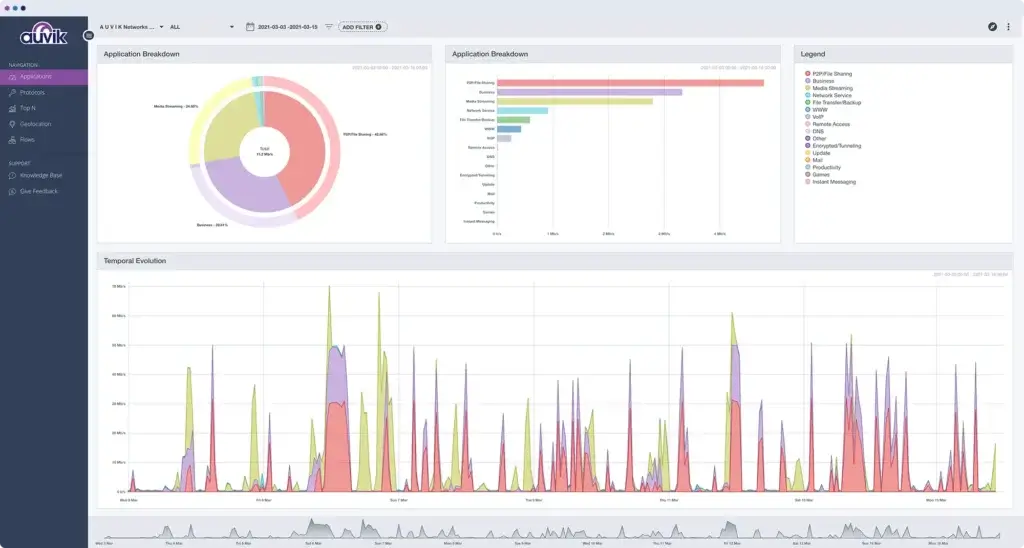
Auvik TrafficInsights gives you deeper visibility into how traffic moves across your network. It can help you identify top talkers, high-bandwidth applications, protocol usage, and traffic patterns that may affect performance.
This is helpful when you need to answer questions such as:
- Which devices are consuming the most bandwidth?
- Which applications are creating traffic spikes?
- Is business-critical traffic being affected by non-essential usage?
- Where is traffic coming from and going to?
- Are there suspicious or unexpected traffic patterns?
TrafficInsights is particularly useful for troubleshooting bandwidth-heavy environments, planning capacity upgrades, and validating network policies.
Configuration Backup and Change Tracking
Network configuration changes are one of the most common causes of outages. A small change to a firewall, switch, VLAN, or routing configuration can create major issues if it is undocumented or difficult to reverse.
Auvik helps reduce that risk by automatically backing up device configurations and tracking changes over time. If a configuration changes, your team can review what changed, when it changed, and whether that change may be connected to a performance issue or outage.
This can also support compliance and internal audit processes, especially for organizations that need a clear record of network configuration activity.
Alerts and Notifications
Auvik includes alerting capabilities that help your team respond to network issues faster. You can receive alerts for hardware failures, offline devices, high latency, configuration changes, performance degradation, and other important events.
The value is not just in receiving alerts. It is in routing the right alert to the right person in the right system. Auvik can work alongside ticketing, PSA, collaboration, and notification tools so network events can become actionable workflows instead of isolated dashboard messages.
Remote Troubleshooting Tools
When a device needs immediate attention, Auvik gives technicians access to troubleshooting context from the same interface. You can review device details, interface activity, traffic patterns, configuration history, and logs without jumping between multiple systems.
For network devices, the ability to move quickly from alert to investigation is important. Auvik gives you the surrounding context needed to understand whether the issue is related to bandwidth saturation, interface errors, device health, misconfiguration, or routing behavior.
MSP and Multi-Site Management
Auvik is especially strong for managed service providers and multi-site organizations. Its multi-tenant design lets MSPs manage separate client environments while maintaining segmentation and access control.
For internal IT teams, the same structure is useful when managing different offices, branches, departments, or distributed environments. Instead of treating every network as a separate manual project, you can centralize monitoring and maintain visibility across locations.
Integrations and API Access
Auvik integrates with several IT operations and MSP tools, including PSA, ticketing, collaboration, and notification platforms. These integrations matter because network monitoring is rarely useful in isolation.
When a network issue appears, your team may need a ticket, a notification in Slack or Microsoft Teams, a PSA workflow, or an update in an ITSM system. Integrations help connect monitoring data to the operational systems your technicians already use.
Pros and Cons
Benefits of Using Auvik
Positive
✅ Fast deployment
✅ Automated network mapping
✅ Strong traffic visibility
✅ Configuration backups
✅ MSP-friendly design
Negative
❌ Quote-based pricing
❌ Not a full ITSM platform
❌ Not a full RMM replacement
❌ Can feel data-heavy at first
❌ Limited value for very small networks
Every IT management platform has trade-offs. Auvik is not designed to solve every IT operations challenge. It is designed to give you better network visibility, faster troubleshooting, and more reliable documentation.
Pros: Why IT Teams Choose Auvik
1. Fast Time to Value
Auvik can be deployed quickly compared with many traditional network monitoring tools. Because it is cloud-based and uses lightweight collectors, your team does not need to build and maintain a heavy monitoring server environment before seeing useful data.
That matters when you are onboarding a new client, documenting a new site, or trying to stabilize a network that already has visibility gaps.
2. Automated Network Documentation
Manual network documentation is one of the first things that becomes outdated in busy IT environments. Auvik helps solve this by automatically discovering devices and creating topology maps that update as the environment changes.
For MSPs, this can reduce onboarding time. For internal IT teams, it reduces dependence on static diagrams that may not reflect the current network.
3. Better Troubleshooting Context
Auvik does more than tell you that something is wrong. It gives you device data, interface data, topology context, configuration history, and traffic visibility that can help you investigate faster.
This is where the platform becomes especially useful for lean IT teams. You can shorten the path between alert, investigation, and resolution.
4. Configuration Backup and Audit Support
Automatic configuration backups are a major advantage for network operations. If a device change causes an issue, your team can compare versions and understand what happened.
This is useful for operational recovery, change control, and compliance-oriented environments where configuration history matters.
5. Strong Fit for MSPs
Auvik’s multi-tenant structure, centralized dashboard, integrations, and network documentation capabilities make it a practical option for MSPs managing several client networks.
Instead of relying on separate toolsets for each client, technicians can work from a centralized view while keeping environments logically separated.
Cons: Auvik Limitations to Consider
1. Pricing Is Not Fully Transparent
Auvik uses custom pricing, so you need to request a quote rather than comparing public plan prices directly. This is common in infrastructure and MSP-focused software, but it does add friction for buyers who want a quick cost estimate.
2. It Is Not a Full ITSM Platform
Auvik does not replace a service desk. It is not built for incident management, change management, service catalog workflows, knowledge base management, or ITIL-based service delivery.
If those capabilities are central to your operation, consider a dedicated ITSM platform such as Freshservice or monday service.
3. It Is Not a Traditional RMM Replacement
Auvik’s core network management product is built around network infrastructure. While Auvik’s broader suite has expanded into areas such as SaaS management and endpoint network monitoring, it should not be confused with a traditional RMM platform that handles patching, scripting, endpoint management, backup, and remote endpoint control.
If you need that broader IT operations layer, NinjaOne may be a better fit.
4. Smaller Teams May Not Need This Depth
If you manage a very small and simple network, Auvik may be more advanced than you need. Its value becomes clearer when you manage multiple devices, multiple locations, client environments, or networks where downtime is expensive.
5. The Interface Can Feel Data-Heavy at First
Auvik presents a lot of technical data, which is useful for experienced IT teams. However, less experienced users may need time to understand which alerts, maps, metrics, and views matter most for their workflow.
User Experience
User Interface and Operational Simplicity
A network monitoring tool should help your team move faster, not create another complicated system to manage. Auvik’s user experience is one of its stronger selling points because it puts discovery, monitoring, alerts, traffic data, and device context in a single web-based platform.
Clean Network Dashboard
The dashboard gives you a practical overview of network status, devices, alerts, and performance data. You can move from a high-level network view into specific devices, interfaces, or traffic patterns without needing to open several separate tools.
This single-pane approach is useful for both MSPs and internal IT teams. MSPs can move between clients, while internal teams can move between sites, network segments, and device groups.
Interactive Topology Mapping
The topology map is one of the most useful parts of the user experience. Instead of forcing you to interpret a long device list, Auvik shows how infrastructure components connect to each other.
This makes troubleshooting easier. If a downstream device goes offline, your team can better understand whether the issue is isolated or connected to an upstream switch, firewall, or connectivity problem.
Device-Level Troubleshooting
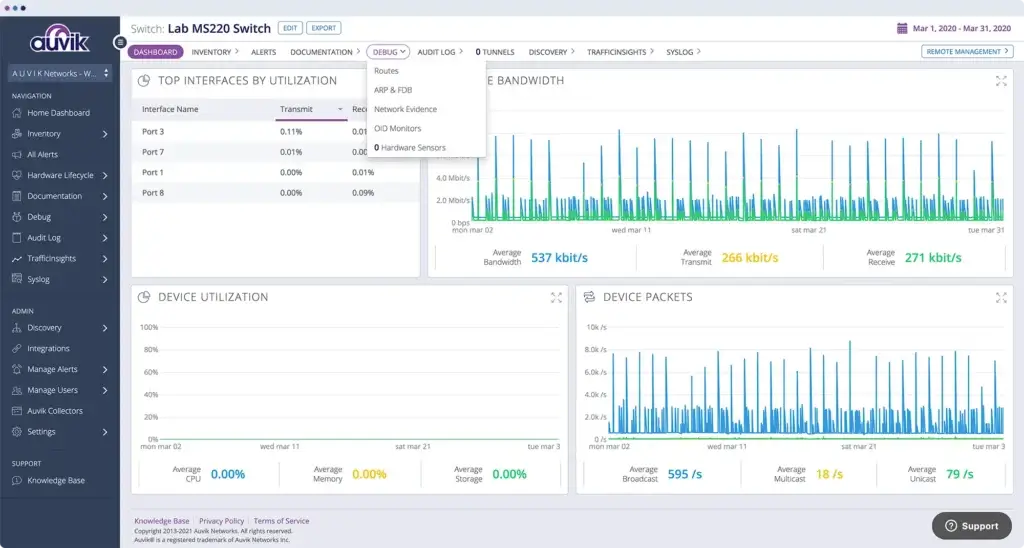
When you click into a device, you can review details such as interface utilization, bandwidth, packets, hardware information, configuration history, and related network activity.
This is helpful when investigating common network problems, including slow performance, recurring disconnects, interface errors, unexpected traffic spikes, or configuration changes.
Learning Curve
Auvik is easier to learn than many traditional network monitoring platforms, especially because it automates much of the discovery and mapping work. However, it is still a technical tool.
New technicians may need some time to understand alert behavior, topology views, device classifications, and traffic analysis. Once the workflow is understood, the platform can reduce the number of manual checks needed during daily operations.
Best User Experience Fit
The platform is best suited for teams that want a practical network operations view without building their own monitoring stack from scratch. It is less suited for teams that only need basic uptime checks or very lightweight device monitoring.
Pricing and Plans
How much does Auvik cost?
Auvik does not publish simple fixed pricing tiers in the same way many SaaS tools do. Pricing is typically quote-based and depends on your environment, the number of managed devices, and your organization’s requirements.
That can make budgeting harder at first, but it also reflects the way network monitoring is usually purchased. The cost of managing a small office network is very different from the cost of monitoring many client sites as an MSP.
Auvik Pricing Summary
| Category | Details |
| Pricing Model | Custom quote, generally based on managed network devices and environment size |
| Free Trial | 14-day free trial available |
| Best For | MSPs, mid-sized IT teams, multi-site organizations, and network-heavy environments |
| Included Capabilities | Network discovery, topology mapping, monitoring, alerts, configuration backups, TrafficInsights, and integrations |
| Important Pricing Detail | Not every discovered device may count as a billable managed device |
| Potential Concern | Smaller teams may find the cost harder to justify if they manage only a few devices |
Is Auvik Worth the Cost?
Auvik is easier to justify when your team spends a lot of time on manual network documentation, troubleshooting, device discovery, configuration checks, or client network onboarding.
If the platform helps your team prevent outages, reduce investigation time, or onboard client networks faster, the return on investment can be strong.
However, if your environment is small and stable, or if you only need simple device uptime monitoring, a lower-cost tool may be enough. The value of Auvik increases as your network complexity increases.
Pricing Advice Before You Buy
Before requesting a quote, create a clear inventory of the network devices you want to monitor. Separate core network infrastructure from endpoints, printers, access points, and other devices that may not be treated the same way for pricing.
You should also define what you want the tool to replace. If Auvik reduces manual documentation, troubleshooting time, and configuration tracking work, the price should be evaluated against operational savings, not just software cost.
Trust and Data Protection
Auvik Security and Compliance
Security matters when you give a platform visibility into your network infrastructure. For MSPs, this is even more important because you may be managing sensitive client environments across multiple tenants.
Auvik includes security controls such as role-based access, secure cloud connectivity, and controlled access to monitored environments. It has also expanded its compliance positioning with SOC 2 Type II coverage across its broader IT management suite.
Why Security Matters for Network Monitoring
Network monitoring tools can collect device details, configuration data, traffic metadata, and operational history. That information is useful for troubleshooting, but it also needs to be protected carefully.
When assessing Auvik, you should evaluate access controls, user permissions, audit expectations, vendor security documentation, and how the tool fits your internal compliance requirements.
Best Security Fit
Auvik is a stronger fit for teams that want cloud-based network visibility but still need vendor transparency around security controls. MSPs should pay particular attention to tenant separation, role-based access, and internal processes for technician permissions.
Auvik vs. Alternatives
How It Compares to Competitors
Auvik is a strong network monitoring platform, but it is not always the right tool for every IT team. The best alternative depends on whether you need endpoint management, ITSM, deeper observability, custom sensor-based monitoring, or lower-cost network visibility.
Auvik vs NinjaOne
NinjaOne is a better fit if you want a unified IT management platform that includes endpoint management, patch management, remote access, scripting, automation, backup, and broader device control.
Auvik is better if your priority is network-specific visibility, topology mapping, device configuration backup, and traffic analysis. The two platforms can also complement each other in environments where you need both endpoint operations and network infrastructure visibility.
Auvik vs Freshservice
Freshservice is not a direct network monitoring competitor. It is an ITSM platform built around service desk workflows, incident management, change management, asset management, CMDB, automation, and employee service delivery.
Choose Freshservice if you need structured service management. Choose Auvik if your main pain point is network monitoring and troubleshooting.
Auvik vs PRTG
PRTG is a strong option for teams that want flexible sensor-based monitoring and more control over what they monitor. It can be very powerful, but it may require more configuration and ongoing tuning.
Auvik is usually the better fit if you want faster setup, automated topology mapping, cloud-based management, and less manual configuration.
Auvik vs LogicMonitor
LogicMonitor is designed for broader infrastructure observability across hybrid environments. It may suit larger enterprises that need advanced monitoring across infrastructure, applications, cloud systems, and complex technology stacks.
Auvik is more focused on network management. It can be easier for MSPs and network-focused teams that do not need the full complexity of an enterprise observability platform.
Auvik vs Domotz
Domotz is often considered by teams looking for affordable remote network monitoring and management. It can be a good fit for smaller networks, AV environments, smart buildings, or service providers that need remote visibility without a heavy platform.
Auvik is better suited when you need deeper topology mapping, configuration backup, traffic analysis, and MSP-scale workflows.
Auvik vs ManageEngine OpManager
ManageEngine OpManager is a mature network monitoring tool with broad infrastructure monitoring capabilities. It can be attractive for teams already using ManageEngine products or those that want a more traditional monitoring suite.
Auvik is usually easier to deploy and more automation-focused for network mapping and MSP workflows. ManageEngine may be stronger for teams that want a broader on-premises or suite-based IT operations approach.
Summary Table: Auvik vs Competitors
| Tool | Best For | Main Strength | Choose Another Tool If |
| Auvik | Network monitoring and infrastructure visibility | Automated discovery, topology mapping, configuration backup, and traffic analysis | You need full ITSM, full RMM, or endpoint patching |
| NinjaOne | Unified endpoint and IT operations management | Patch management, remote access, endpoint automation, backup, and monitoring | You only need advanced network topology and traffic analysis |
| Freshservice | ITSM, service desk, CMDB, and workflow automation | Incident, change, asset, and service management | You need real-time network device monitoring |
| PRTG | Custom sensor-based monitoring | Flexible monitoring configuration | You want faster cloud deployment and automated mapping |
| LogicMonitor | Enterprise infrastructure observability | Hybrid infrastructure monitoring and advanced analytics | You want a simpler MSP-friendly network tool |
| Domotz | Affordable remote network monitoring | Remote visibility for smaller networks and service providers | You need deeper enterprise network documentation and traffic analysis |
| ManageEngine OpManager | Traditional network and infrastructure monitoring | Broad monitoring suite with strong device coverage | You prefer a cloud-native network mapping workflow |
Best Use Cases
Who Should Use Auvik?
Auvik is best for teams that need more than basic uptime monitoring. It becomes especially valuable when your network is complex, distributed, poorly documented, or difficult to troubleshoot with your current tools.
Best Use Cases
- MSPs managing multiple client networks
- Internal IT teams supporting multi-site infrastructure
- Organizations with outdated network documentation
- Teams that need configuration backup and change tracking
- Network administrators troubleshooting bandwidth issues
- IT teams that need visibility into switches, routers, firewalls, and access points
Who Should Choose an Alternative?
You may want a different platform if your main priority is endpoint patching, ticketing, ITIL workflows, SIEM, application performance monitoring, or low-cost basic monitoring.
For endpoint management, NinjaOne is a stronger option. For service desk and ITSM, Freshservice or monday service may be more suitable. For highly customized infrastructure monitoring, PRTG or LogicMonitor may be worth comparing.
Conclusion
Final Recommendation
Is Auvik Right for You?
Auvik is a strong choice if your main challenge is network visibility. It helps you understand what is connected, how devices relate to each other, how traffic moves, and what changes may be affecting performance.
Its biggest strengths are automated discovery, topology mapping, traffic analysis, configuration backup, alerting, and MSP-friendly management. These capabilities make it especially useful for teams that need to reduce manual network documentation and troubleshoot faster.
However, it is important to position it correctly. Auvik is not a full ITSM platform. It is not a full RMM replacement. It is not a help desk, SIEM, or endpoint security platform.
If you need a dedicated network management platform, Auvik is one of the stronger options to consider. If you need broader IT operations, compare it carefully with NinjaOne, Freshservice, PRTG, LogicMonitor, Domotz, and ManageEngine OpManager before making your final decision.
Have more questions?
Frequently Asked Questions
What is Auvik used for?
Auvik is used for cloud-based network monitoring and management. It helps IT teams discover devices, map network topology, monitor performance, analyze traffic, track configuration changes, and troubleshoot infrastructure issues faster.
Is Auvik only for MSPs?
No. The platform is popular with MSPs because of its multi-tenant design, but internal IT teams also use it to monitor distributed networks, reduce manual documentation, and improve troubleshooting visibility.
Does Auvik support SNMP?
Yes. SNMP is one of the core protocols used for network discovery and monitoring. It helps collect device health, interface, and performance data from supported switches, routers, firewalls, and other network devices.
Can Auvik manage endpoints?
Auvik’s core network management product focuses on network infrastructure rather than traditional endpoint management. If you need patching, scripting, remote endpoint control, and full device management, a platform like NinjaOne may be a better fit.
Does Auvik offer a free trial?
Yes. Auvik offers a 14-day free trial, which allows you to test the platform in your own environment before committing to a paid plan.
How does Auvik compare to PRTG?
Auvik is generally easier to deploy and stronger for automated topology mapping, while PRTG offers flexible sensor-based monitoring for teams that want deeper manual configuration.
Is Auvik secure?
Auvik includes security controls such as role-based access and secure cloud connectivity. It has also expanded its SOC 2 Type II compliance coverage across its broader IT management suite.
Does Auvik have a mobile app?
Auvik is primarily web-based. You can access the dashboard through a browser, but teams that require a dedicated mobile app should evaluate this limitation during the trial.
What types of alerts can Auvik send?
Auvik can send alerts for device outages, high latency, hardware failures, configuration changes, bandwidth issues, and other network performance conditions. Alerts can also connect with operational tools through integrations.
How is Auvik deployed?
Auvik is deployed as a cloud-based platform with lightweight collectors installed in the monitored network. These collectors gather network data and send it securely to the cloud dashboard for analysis and visualization.