
Introduction
Freshservice is an IT Service Management (ITSM) platform from Freshworks built for IT teams that want to manage service requests, incidents, assets, workflows, knowledge, and employee support from one centralized system. In this Freshservice review, you’ll get a practical look at how the platform performs for IT service desks, internal support teams, and growing organizations that need more structure than a shared inbox or basic help desk tool can provide.
Freshservice is not only a ticketing system. It has evolved into an AI-powered service operations platform that combines ITSM, IT asset management, workflow automation, self-service, reporting, and enterprise service management. That makes it relevant for IT departments, but also for business teams such as HR, Facilities, Finance, and Operations that want to manage internal requests more efficiently.
If you are comparing platforms for your IT department, Freshservice deserves a place on your shortlist. It is especially strong when you want a modern user experience, fast adoption, practical automation, and a service catalog that employees can actually use. It may not offer the same depth of enterprise customization as ServiceNow, but for many mid-sized and scaling organizations, that is exactly the advantage: you get strong ITSM functionality without unnecessary complexity.
For a broader comparison of similar tools, you can also review our guide to the best IT management software and ITSM platforms.
Freshservice Review Snapshot
Before going deeper into features and pricing, here is a quick summary of where Freshservice fits best. This section is useful if you are comparing several ITSM tools and want to understand the platform’s strongest use cases quickly.
| Review Area | Freshservice Assessment |
| Best For | IT teams that need modern ITSM, workflow automation, service catalog, ITAM, and AI-powered self-service |
| Starting Price | $19 per agent/month, billed annually |
| Strongest Advantage | Easy-to-use ITSM with strong automation, Freddy AI, and service operations features |
| Main Limitation | Advanced AI, ITAM, and enterprise features may increase total cost |
| Best Alternative | Jira Service Management for DevOps-heavy teams, ServiceNow for complex enterprise environments |
Software Specification
Core Features of Freshservice
The core strength of Freshservice is that it brings several IT management functions into one platform. You can manage tickets, requests, approvals, knowledge articles, assets, changes, projects, and reports without forcing your team to switch between disconnected tools.
From my perspective, Freshservice works best for organizations that want mature ITSM processes but do not want the heavy implementation cycle that often comes with larger enterprise platforms. It gives you enough structure to standardize IT service delivery, while still feeling approachable for agents and employees.
Incident Management
Incident management is one of the main reasons teams consider Freshservice. The platform helps you capture issues from different channels, convert them into tickets, categorize them, assign them to the right agents, and track them through resolution.
For IT teams, this creates a cleaner process than relying on email chains, chat messages, or spreadsheets. You can prioritize incidents by urgency, monitor SLA performance, and keep a clear record of what was reported, who handled it, and how it was resolved.
Ticketing System
The ticketing system is clear and practical. Agents can see ticket details, requestor information, status, priority, category, related assets, and conversations in one place. This helps reduce the back-and-forth that usually slows down support work.
For employees, the experience is also simple. They can submit requests through the service portal, email, chat, widget, Microsoft Teams, or Slack, depending on how your organization configures the system.
Automated Workflows
Freshservice allows teams to automate repetitive service desk work, such as routing tickets, setting priorities, triggering approvals, sending notifications, and escalating overdue requests.
This is valuable because IT teams often lose time on small administrative tasks. With the right workflow rules, agents can focus more on resolving problems and less on manually sorting requests.
Service Request Management
Service request management is where Freshservice becomes especially useful for employee support. Instead of asking employees to send vague requests by email, you can create structured forms for common needs such as laptop requests, software access, password resets, onboarding tasks, and equipment changes.
This improves both speed and accuracy. Employees know exactly where to go, while IT teams receive the information they need from the start.
Service Catalog
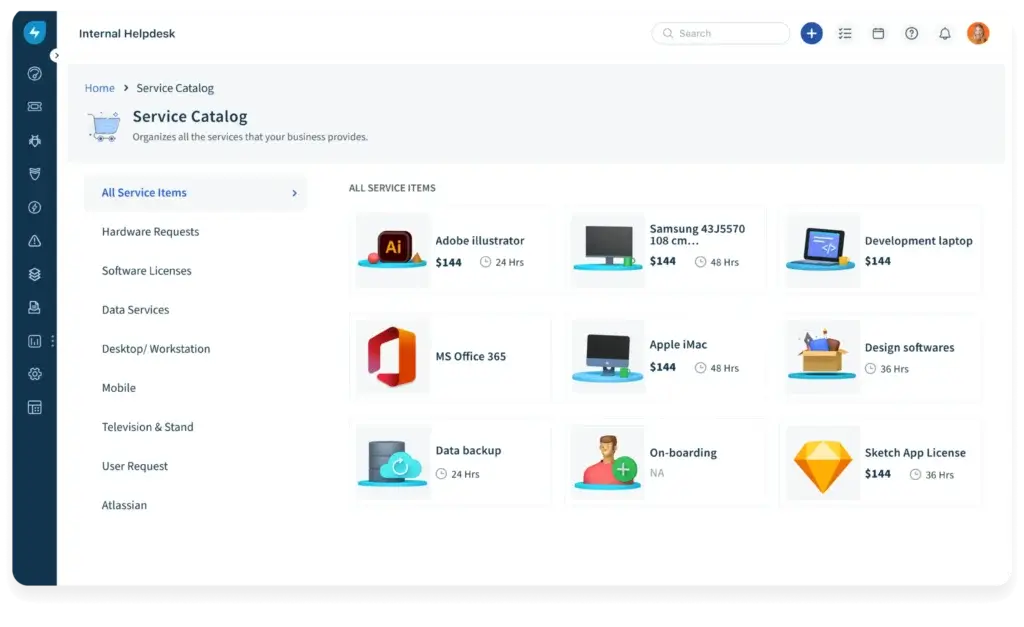
The service catalog is one of the platform’s strongest features. It allows you to create a menu of approved IT services that employees can request through a self-service portal.
For example, your catalog can include items such as new device requests, application access, VPN setup, hardware replacement, onboarding support, and access permissions. Each item can include custom fields, approval flows, and fulfillment tasks.
This is important because a good service catalog reduces confusion. Employees do not need to know who to contact or which process to follow. They simply choose the service they need, submit the request, and the workflow handles the next step.
Knowledge Base and Self-Service
Freshservice includes knowledge base functionality that helps teams document common solutions, internal processes, troubleshooting steps, and employee guidance.
This matters because not every request should become a ticket. If employees can solve common issues through self-service, your IT team can reduce ticket volume and focus on more complex work.
The knowledge base also supports agent productivity. Instead of rewriting the same answer repeatedly, agents can use approved articles to respond faster and keep support quality consistent.
IT Asset Management and CMDB
Freshservice includes asset management capabilities that help you track hardware, software, cloud assets, contracts, ownership, and lifecycle details. This makes the platform more useful than a basic help desk because agents can connect support requests to the assets involved.
The CMDB helps teams understand relationships between assets, services, users, and infrastructure components. This context is useful for incident resolution, change planning, compliance, and risk management.
For example, if a critical application is affected by an outage, IT can see related assets and dependencies instead of investigating from scratch. This is where ITAM and service management become much more valuable together.
Change Management
Change management helps IT teams plan, approve, and track changes to systems, services, and infrastructure. This is important for reducing risk when you introduce updates, deployments, configuration changes, or infrastructure modifications.
Freshservice gives you a structured way to document the change, assess risk, define approvals, schedule implementation, and review the result. For growing IT teams, this can create better governance without making the process too heavy.
Project Management
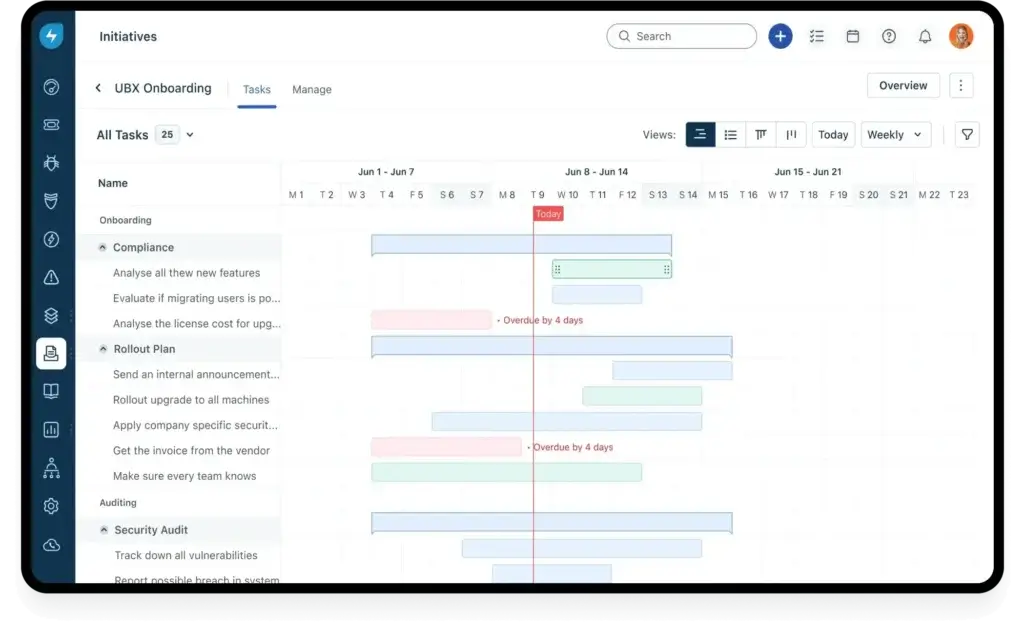
Freshservice also includes project management features, which can be useful when IT teams need to plan initiatives beyond day-to-day support. This may include system rollouts, infrastructure upgrades, migration projects, security improvements, or internal IT transformation work.
The project features are not meant to replace a dedicated project management platform for every organization. However, they are useful for keeping IT work connected to service operations, especially when projects involve assets, tickets, changes, or internal stakeholders.
Reporting and Analytics
Reporting is essential for IT leaders who want to understand service quality, team workload, SLA performance, and recurring issues. Freshservice provides dashboards and reports that help you monitor performance and identify improvement opportunities.
You can track metrics such as ticket volume, response time, resolution time, SLA breaches, agent performance, request categories, and service trends. These insights are useful for operational reviews, staffing decisions, and long-term IT planning.
Freddy AI and Automation
One of the most important updates to Freshservice is the deeper role of Freddy AI. The platform now uses AI to support employees, agents, and IT leaders across different workflows.
Freddy AI can help with self-service, reply suggestions, ticket summaries, writing assistance, similar incident suggestions, related change insights, field suggestions, translations, knowledge generation, and proactive service desk insights.
This is not a reason to remove human oversight. It is better to view Freddy AI as a productivity layer that helps agents respond faster, reduce repetitive work, and surface useful context earlier.
Where Freddy AI Is Most Useful
- Employee self-service: Helps employees find answers before creating tickets.
- Agent productivity: Suggests replies, summaries, and related incidents.
- Knowledge management: Helps generate and improve support content.
- Leadership insights: Identifies trends, outliers, and recurring service issues.
Benefits and Limitations
Freshservice Pros and Cons
Positive
✅ Modern and easy-to-use ITSM interface
✅ Strong service catalog and automation tools
✅ Useful Freddy AI features for agents and employees
✅ Good fit for ITSM, ITAM, and business service teams
Negative
❌ Advanced features may require higher-tier plans
❌ Complex workflows can take time to configure
❌ May be too much for very small teams
❌ Deep enterprise customization may be lighter than ServiceNow
Pros
- Modern and easy-to-use ITSM interface: Freshservice feels more approachable than many traditional ITSM platforms, which can help with faster adoption.
- Strong service catalog and automation tools: The platform makes it easier to standardize requests, approvals, SLAs, and fulfillment workflows.
- Useful Freddy AI features: AI assistance can support self-service, agent responses, ticket summaries, knowledge creation, and operational insights.
- Good fit beyond IT: Freshservice can support HR, Facilities, Finance, and other internal service teams through enterprise service management.
Cons
- Advanced capabilities can raise costs: AI, advanced analytics, enterprise service management, and mature ITAM needs may push you toward higher plans.
- Workflow setup requires planning: The platform is easy to use, but complex approval flows and automations still need careful configuration.
- Small teams may not need all features: If you only need basic ticketing, Freshservice may offer more functionality than you currently require.
- Not the deepest enterprise customization option: Large enterprises with highly specialized processes may still prefer ServiceNow or another enterprise-heavy platform.
Benefits of Using Freshservice
The biggest benefit of Freshservice is that it helps IT teams move from reactive support to structured service operations. Instead of managing requests across emails, chat messages, and informal conversations, your team can centralize work, automate repeatable steps, and measure performance more clearly.
Faster IT Response Times
Freshservice helps teams respond faster by organizing incoming requests, routing tickets automatically, applying SLA policies, and giving agents the context they need. This reduces delays caused by manual assignment or missing information.
For employees, faster response times create a better support experience. For IT leaders, they make service delivery easier to measure and improve.
Better Employee Self-Service
Self-service is one of the most valuable benefits if you configure it properly. A strong knowledge base and service catalog can reduce repetitive tickets and help employees complete routine requests without waiting for an agent.
This is especially useful for common issues such as password resets, software access, device requests, onboarding tasks, and policy questions.
More Consistent IT Processes
Freshservice allows you to standardize how requests, incidents, changes, and approvals are handled. This is important because inconsistency creates delays, confusion, and reporting gaps.
When workflows are clearly defined, teams know what happens next. Managers can see where bottlenecks appear, and employees get a more predictable support experience.
Integrations and Compatibility
Freshservice integrates with commonly used workplace, IT, and business applications. This matters because ITSM rarely operates in isolation. Your support process may need to connect with identity tools, collaboration platforms, monitoring systems, asset discovery tools, project management software, and communication channels.
Freshservice supports marketplace integrations and API access, which gives teams flexibility to connect the platform to their existing technology stack.
Common Integration Use Cases
- Collaboration: Support employees through Slack and Microsoft Teams.
- Identity and access: Connect service requests to user access workflows.
- Monitoring: Turn alerts into incidents for faster response.
- Freshworks ecosystem: Connect with other Freshworks products when relevant.
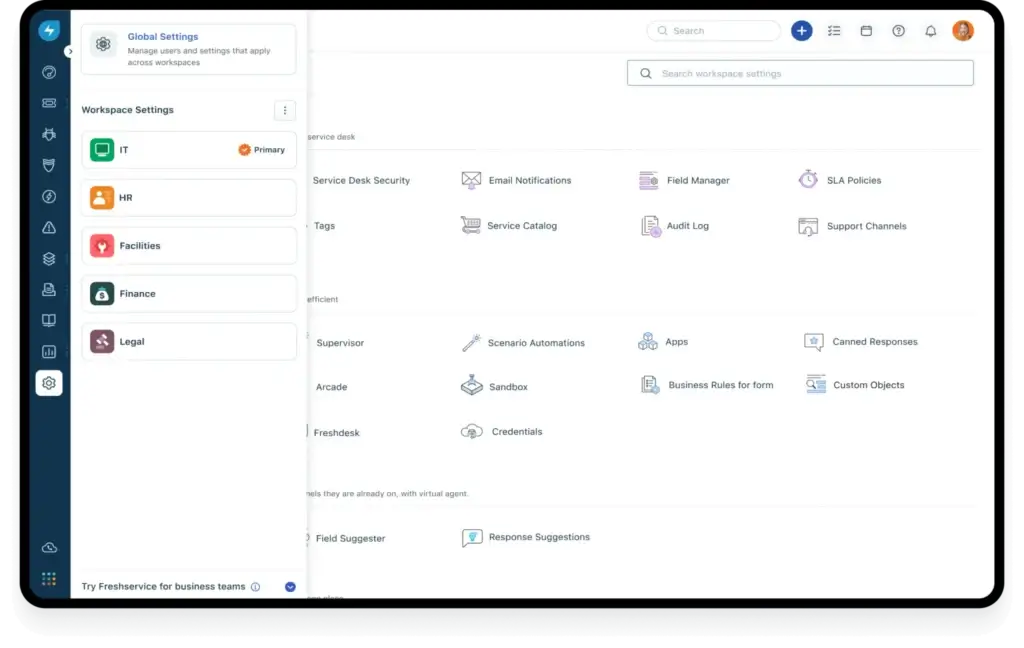
Scalability Across IT and Business Teams
Freshservice is not limited to small IT service desks. It can scale from basic ticketing to broader service management across different departments.
For example, HR can manage onboarding requests, Facilities can track maintenance tasks, Finance can process approval requests, and IT can manage service delivery from the same platform family. This is valuable for organizations that want a unified employee service experience.
User Experience
User Interface and Operational Simplicity
The user experience is one of the main reasons Freshservice is popular with growing IT teams. Many ITSM platforms are powerful but difficult to navigate. Freshservice takes a more modern approach, with a cleaner layout and a service desk experience that feels easier for both agents and employees.
This matters because ITSM adoption is not only about features. If agents find the system confusing, they avoid using it properly. If employees cannot find the right request form, they go back to email or chat. A good interface directly affects service quality.
Agent Experience
For agents, the workspace is organized around tickets, request details, conversations, statuses, priorities, SLAs, and related information. This makes it easier to understand what needs attention and what can wait.
The platform also helps reduce clutter by keeping ticket communication and operational context together. Agents can see the history of an issue, use knowledge articles, check related assets, and update the ticket without losing track of the conversation.
Employee Portal Experience
The employee portal is designed to make support feel less technical for end users. Instead of asking employees to understand internal IT categories, you can present services in simple language, such as request a laptop, reset a password, report an issue, or request software access.
This is one of the platform’s practical strengths. A well-built portal can reduce unnecessary tickets and improve employee satisfaction because users know where to go and what information to provide.
Mobile and Cross-Device Access
Freshservice supports mobile access, which is useful for distributed teams, field teams, and IT staff who need to respond outside their desk. Agents can review and update tickets, while employees can submit and track requests from different devices.
This is not only convenient. In organizations where IT support needs to move quickly, mobile access can help reduce response delays.
Learning Curve
Freshservice is easier to learn than many enterprise ITSM tools. That said, the learning curve depends on how deeply you use the platform.
Basic ticketing and service requests are straightforward. More advanced workflows, automations, SLAs, CMDB relationships, and ITAM processes require planning. This is not a weakness, but it is something teams should prepare for during implementation.
My Opinion on the User Experience
The interface is one of the strongest reasons to choose Freshservice. It is not the most customizable ITSM platform on the market, but it offers a better balance for teams that care about usability, speed, and adoption.
If your IT team has struggled with older, heavier tools, Freshservice will likely feel more approachable. If your organization needs extremely complex process customization, you may need to compare it more carefully with ServiceNow or other enterprise ITSM platforms.
Pricing and Plans
How much does Freshservice cost?
Freshservice pricing is based on different plans for different levels of IT maturity. The official Freshservice pricing page currently lists Starter, Growth, Pro, and Enterprise plans for IT Service Management.
The important point is not only the starting price. You should choose a plan based on the processes you need to manage. A small IT team may do well with Starter, while a growing IT department will usually need Growth or Pro to get more value from automation, reporting, asset management, and broader service management features.
| Plan | Annual Price | Best For |
| Starter | $19/agent/month | Small teams moving away from shared inboxes |
| Growth | $49/agent/month | IT teams building structured service delivery |
| Pro | $99/agent/month | Advancing teams unifying service management across functions |
| Enterprise | Custom pricing | Mature IT organizations needing AI and enterprise-wide service excellence |
Starter Plan
The Starter plan is best for small IT teams that are creating their first structured service desk. It is a good option if your team is still handling requests through email or chat and needs a more organized way to track issues.
This plan makes sense when your main priority is basic ITSM, ticketing, knowledge management, and a cleaner support process. However, it may feel limited if you need deeper automation, advanced reporting, or more mature asset management.
Growth Plan
The Growth plan is usually the more practical starting point for teams that already have regular IT support volume. It is designed for IT teams that want to move from reactive support to more structured service delivery.
This plan is better suited for teams that need stronger workflows, better service management practices, and more operational control. If your organization is growing and you want to standardize processes before things become messy, Growth is likely the better fit than Starter.
Pro Plan
The Pro plan is best for advancing IT teams that need to connect service management across different functions. It is more suitable for organizations with larger support operations, multiple departments, more complex workflows, and stronger reporting needs.
This is where Freshservice becomes more valuable as a service operations platform, not only a help desk. If you need more advanced service management, project work, automation, and cross-functional support, Pro is likely the plan to evaluate carefully.
Enterprise Plan
The Enterprise plan is built for mature IT organizations that need AI, stronger governance, and enterprise-wide service management. Freshworks positions this plan around Freddy AI and broader service excellence.
This plan is best for companies that need advanced AI capabilities, deeper controls, complex service operations, and more strategic IT management. Because it uses custom pricing, larger teams should request a quote and evaluate the total cost based on users, add-ons, ITAM needs, and support requirements.
Which Freshservice Plan Offers the Best Value?
For many growing IT teams, the Growth plan will offer the best balance between cost and capability. It gives you more room to build structured ITSM practices without immediately jumping into a higher-cost enterprise setup.
For organizations that want Freshservice as a broader enterprise service management platform, Pro or Enterprise will usually make more sense. The best choice depends on how much automation, AI, ITAM, reporting, and governance you need.
Security and Compliance
Security and Compliance in Freshservice
Security and compliance are critical when choosing ITSM software because the platform may store employee data, ticket history, service requests, approval details, asset records, and internal operational information.
Freshworks provides a Trust Center where customers can review security, privacy, compliance documentation, certifications, third-party attestations, and reports commonly requested during vendor risk assessments.
Data Protection and Access Controls
Freshservice includes security controls designed to protect sensitive service desk and operational data. This includes role-based access, user permissions, authentication options, and administrative controls that help teams manage who can view, edit, and approve different types of information.
For IT teams, this is important because not every agent should have access to every request, asset, or employee record. Proper access control supports privacy, reduces risk, and helps maintain governance.
Compliance and Vendor Due Diligence
Freshworks provides security and compliance resources that can help IT, procurement, and security teams complete vendor reviews. This is especially useful for organizations in regulated industries or companies that have formal vendor risk assessment processes.
Before purchasing, larger companies should review the latest documentation in the Freshworks Trust Center and confirm whether the available certifications and reports meet internal security requirements.
AI Governance Considerations
Because Freshservice includes Freddy AI features, buyers should also ask how AI is governed, what data is used, what controls are available, and how the platform aligns with internal privacy policies.
This is not a reason to avoid AI. It simply means IT leaders should involve security and compliance stakeholders early, especially if they plan to use AI for ticket summaries, reply suggestions, knowledge generation, or insights.
Reliability and Business Continuity
ITSM software becomes part of your operational backbone. If your service desk is unavailable, employees may struggle to report issues or request help. Freshservice is built as a cloud platform, and Freshworks provides security and reliability resources for customers that need to evaluate continuity, risk, and operational resilience.
For most SMBs and mid-market organizations, this level of documentation is enough to support a standard vendor review. Larger enterprises should request the most recent security documents directly from Freshworks before final approval.
Alternatives and Competitors
Freshservice Compared to Other ITSM Software
Freshservice is a strong ITSM platform, but it is not the right choice for every organization. The best tool depends on your team size, technical environment, budget, customization needs, and whether your IT team works closely with software development teams.
Freshservice vs Jira Service Management
Jira Service Management is usually a better fit for DevOps-heavy teams, software companies, and organizations already using Atlassian tools such as Jira Software and Confluence.
Freshservice is often easier for traditional IT service teams that want a cleaner service desk experience, a practical service catalog, and an ITSM platform that non-technical employees can adopt quickly.
Freshservice vs ManageEngine ServiceDesk Plus
ManageEngine ServiceDesk Plus is a strong option for teams that want detailed IT operations functionality and flexible deployment options.
Freshservice feels more modern and easier to adopt, especially for organizations that care about employee self-service, AI, automation, and a polished cloud-based experience.
Freshservice vs Zendesk
Zendesk is very strong for customer support and external service operations. It can support internal help desk use cases, but it is not built around ITSM in the same way Freshservice is.
If your priority is ITIL-aligned service management, assets, service catalog, and internal IT workflows, Freshservice is usually the more relevant option.
Best Fit
Who Should Use Freshservice?
Freshservice is best for organizations that want a modern ITSM platform with strong usability and enough depth to support growing IT operations.
Freshservice Is a Good Fit If You Need:
- A structured IT service desk that is easier to use than traditional enterprise tools.
- A service catalog for employee requests and standardized fulfillment.
- Workflow automation for ticket routing, approvals, escalations, and notifications.
- IT asset management with service context and CMDB visibility.
- AI features that support agents, employees, and IT leaders.
- A platform that can expand into HR, Facilities, Finance, and other service teams.
Freshservice May Not Be the Best Fit If You Need:
- Only basic ticketing with minimal ITSM structure.
- A very low-cost tool for a small team with simple support needs.
- Highly complex enterprise customization similar to ServiceNow.
- A DevOps-first service platform deeply tied to software development workflows.
Conclusion
Final thoughts
⭐ Overall Rating: 9.8/10
Freshservice is a strong ITSM platform for teams that want to modernize IT support without creating unnecessary complexity. Its biggest strengths are usability, service catalog management, automation, IT asset visibility, and the growing role of Freddy AI across service operations.
I would not position it as the best ITSM tool for every business. Very small teams may find it more advanced than they need, while very large enterprises with highly specialized workflows may prefer a platform like ServiceNow. However, for many SMBs, mid-market companies, and growing IT departments, Freshservice offers one of the best balances between power and usability.
Why Freshservice Stands Out
The main reason Freshservice stands out is that it gives IT teams structure without making the platform feel heavy. You can build a professional service desk, automate routine work, manage assets, create a service catalog, support employees across multiple channels, and use AI to improve productivity.
That combination makes it especially valuable for teams that have outgrown email-based support but are not ready for a long, expensive enterprise ITSM implementation.
Considerations Before Choosing
Before choosing Freshservice, review which plan includes the specific capabilities you need. Pricing can increase as you move into advanced features, AI, ITAM, enterprise service management, and higher levels of governance.
You should also map your key workflows before implementation. The platform is easy to use, but the best results come when your ticket categories, service catalog, approval rules, SLAs, and automation logic are planned properly.
Our Recommendation
Freshservice is a platform I would confidently recommend to IT teams that want a scalable, modern, and practical ITSM solution. It is particularly strong for organizations that care about employee experience, faster support, service automation, and operational visibility.
If you are comparing ITSM platforms, review Freshservice alongside other leading tools in our best IT management software guide. You can also visit the official Freshservice website to explore product details, pricing, and trial options.
Have more questions?
Frequently Asked Questions
What is Freshservice?
Freshservice is an IT Service Management platform from Freshworks. It helps IT teams manage tickets, service requests, incidents, assets, workflows, approvals, knowledge, and employee support from one centralized system.
Is Freshservice only for IT teams?
No. Freshservice is mainly built for ITSM, but it can also support enterprise service management for HR, Facilities, Finance, and other internal business teams that manage employee requests.
Does Freshservice include AI features?
Yes. Freshservice includes Freddy AI capabilities that can support self-service, agent replies, ticket summaries, writing assistance, knowledge creation, similar incident suggestions, and service desk insights, depending on the plan and configuration.
What is Freddy AI in Freshservice?
Freddy AI is Freshworks’ AI layer for Freshservice. It is designed to help employees find answers, assist agents with service work, and give IT leaders proactive insights into trends, ticket patterns, and operational performance.
Is Freshservice good for IT asset management?
Yes. Freshservice can help teams track IT assets, lifecycle details, ownership, software, hardware, cloud resources, contracts, and dependencies. It is strongest when you want asset data connected to tickets, changes, and service operations.
How much does Freshservice cost?
Freshservice pricing starts at $19 per agent per month when billed annually for the Starter plan. Growth is listed at $49 per agent per month, Pro at $99 per agent per month, and Enterprise uses custom pricing.
Which Freshservice plan is best for growing IT teams?
The Growth plan is often the best starting point for growing IT teams because it is designed for organizations moving from reactive support to more structured service delivery. Pro is better for teams that need broader cross-functional service management.
Does Freshservice support Slack and Microsoft Teams?
Yes. Freshservice can support employee service requests and self-service workflows through collaboration channels such as Slack and Microsoft Teams, depending on your setup and plan.
Is Freshservice better than Jira Service Management?
Freshservice is usually better for traditional IT teams that want a modern, easy-to-use ITSM platform. Jira Service Management is often better for DevOps-heavy teams and organizations already using Atlassian products.
Is Freshservice worth it?
Freshservice is worth considering if you need structured ITSM, automation, service catalog, IT asset visibility, and AI-assisted support without the complexity of heavier enterprise platforms. Very small teams with basic ticketing needs may prefer a simpler tool.