
Introduction
Ivanti is a well-known IT management and service management vendor built for organizations that need more than a basic help desk. Its service management product, Ivanti Neurons for ITSM, is designed to help your team manage incidents, requests, changes, assets, knowledge, service workflows, and enterprise support processes from one connected environment.
This Ivanti review is written for IT leaders, service desk managers, operations teams, and technology buyers who want to understand whether Ivanti is the right fit for their organization. If you are comparing ITSM software, the important question is not only whether Ivanti can manage tickets. It can. The better question is whether your team needs a platform that connects IT service management with IT asset management, automation, endpoint visibility, and enterprise service management.
Ivanti is best suited for mid-sized and enterprise organizations with mature IT operations. It is especially relevant if you need structured ITIL-aligned workflows, asset visibility, service catalog management, AI-assisted automation, and stronger governance across IT services.
However, Ivanti is not the simplest tool in the ITSM market. Smaller teams that only need lightweight ticketing may find the platform more advanced than necessary. Pricing is also quote-based, which means you will need to speak with Ivanti to understand the real cost for your use case.
In this Ivanti review, you will learn what Ivanti Neurons for ITSM does well, where it may fall short, how pricing works, how it compares with alternatives, and whether it makes sense for your IT team.
Quick Summary
Ivanti Neurons for ITSM is a strong choice when your organization needs a mature service management platform rather than a simple help desk. It combines ITSM workflows with IT asset management, automation, self-service, analytics, and integrations across the wider Ivanti Neurons ecosystem.
For smaller teams, Ivanti may be more platform than you need. For larger IT teams that want structured service delivery, enterprise workflow control, and deeper operational visibility, it can be a serious option.
| Review Category | Ivanti Neurons for ITSM |
| Best For | Mid-sized and enterprise IT teams with mature ITSM needs |
| Main Strength | Strong ITSM, ITAM, automation, and endpoint visibility in one ecosystem |
| Main Limitation | More complex than lightweight help desk tools |
| Pricing Model | Quote-based pricing, depending on users, modules, deployment, and scope |
| Best Alternatives | Freshservice, NinjaOne, ManageEngine ServiceDesk Plus, Jira Service Management |
Software Overview
What is Ivanti Neurons for ITSM?
Ivanti Neurons for ITSM is an IT service management platform that helps your team manage service requests, incidents, problems, changes, assets, knowledge, workflows, and reporting. It is part of the broader Ivanti Neurons platform, which connects IT service management with endpoint management, IT asset management, automation, exposure management, and security-oriented operations.
This matters because many IT teams no longer manage service desk work in isolation. You may need to understand which device is affected, whether an asset is compliant, which software is installed, whether a patch is missing, and whether the issue is tied to a broader security or endpoint risk. Ivanti’s value is strongest when you want that wider operational context.
Who Is Ivanti Best For?
Ivanti is best for organizations that need more control, more customization, and more IT management depth than a standard ticketing platform can provide. It is especially useful when your IT service desk works closely with asset managers, endpoint teams, security teams, and business operations.
- Enterprise IT teams managing complex service workflows
- Organizations that need ITSM and ITAM together
- Teams with formal change and problem management processes
- Businesses that want enterprise service management beyond IT
- IT departments that need strong workflow customization
Who Should Consider an Alternative?
Ivanti may not be the right choice if your team only needs a simple ticketing queue, fast setup, and transparent self-serve pricing. It can deliver strong results, but it requires planning, configuration, and administrative ownership.
- Small teams that only need basic ticketing
- Startups looking for simple, low-cost help desk software
- MSPs that primarily need RMM and PSA functionality
- Teams without time to configure workflows and service catalogs
- Buyers who prefer public pricing before speaking with sales
Software Specification
Core Features of Ivanti
Ivanti Neurons for ITSM includes the core capabilities you would expect from an enterprise ITSM platform. The strongest value is not just that these features exist, but that they can be connected with asset data, service workflows, automation rules, and reporting.
Incident and Request Management
Incident and request management sit at the center of the Ivanti experience. Your team can capture tickets, categorize work, prioritize issues, route requests, and track progress through defined workflows.
For service desk teams, this helps reduce manual triage and gives agents a clearer path from ticket creation to resolution. You can build processes around priority, category, impact, urgency, assignment groups, service-level expectations, and escalation rules.
This is useful when you manage a high volume of employee requests and need consistency. Instead of relying on informal emails or disconnected spreadsheets, your team can manage service delivery through structured workflows.
Problem Management
Ivanti supports problem management for teams that want to move beyond reactive ticket resolution. If the same incident keeps recurring, your team can investigate the root cause, document known errors, and connect fixes to knowledge articles or change records.
This is where a mature ITSM process starts to show real value. You are not just closing tickets faster. You are reducing repeat incidents, improving stability, and building a better knowledge base for future support.
Change and Release Management
Change management is one of Ivanti’s more important use cases for larger organizations. You can define approval flows, assess risk, document implementation plans, track affected services, and schedule changes with more visibility.
This is especially important if your IT environment includes critical systems, multiple teams, compliance requirements, or frequent infrastructure updates. Poorly managed changes can create downtime, security gaps, and user frustration. Ivanti gives your team a more structured way to control that risk.
For mature IT teams, the benefit is governance. You can create a repeatable process for standard changes, normal changes, emergency changes, approvals, audit history, and post-implementation review.
IT Asset Management and CMDB
Ivanti is stronger than many lightweight help desk tools when it comes to IT asset management. Its ITAM capabilities help your team track hardware, software, lifecycle stages, ownership, usage, and cost-related asset data.
This becomes more valuable when asset records are connected to incidents, changes, and service requests. For example, when a user reports a problem, your team can understand the device, software, owner, location, lifecycle status, and related configuration details.
Ivanti can also support a CMDB, which helps your team map relationships between assets, services, users, and business systems. When implemented properly, a CMDB improves impact analysis, change planning, incident investigation, and service visibility.
Self-Service Portal and Knowledge Management
Ivanti includes self-service capabilities that help employees request help, search for knowledge, follow service catalog processes, and track their own requests. This can reduce repetitive work for your IT team and improve the employee experience.
The self-service portal is most valuable when it is designed around real user needs. A poorly structured portal becomes another place users avoid. A well-designed portal can reduce ticket volume, improve response consistency, and guide employees to the right request path.
Knowledge management also plays an important role. Your team can document solutions, publish common fixes, and connect support content to incident and problem workflows.
AI, Automation, and Workflow Management
Ivanti has been expanding AI and automation across the Neurons platform. For ITSM teams, this can support faster ticket handling, better service routing, knowledge suggestions, AI-assisted writing, email assistance, translation support, and more efficient employee communication.
The practical benefit is not replacing your IT agents. It is helping them reduce repetitive work. AI-assisted capabilities can help your team draft responses, summarize information, improve field content, and support more consistent communication.
Workflow automation is also important. Your team can automate routing, approvals, notifications, escalations, service catalog fulfillment, and recurring administrative steps. This is where Ivanti becomes more powerful than a basic help desk platform.
Reporting, Dashboards, and Digital Experience Insights
Ivanti provides dashboards and reporting tools that help your team monitor service performance, ticket volume, SLA performance, asset activity, and operational trends. For IT leaders, these insights can support better planning and help identify bottlenecks.
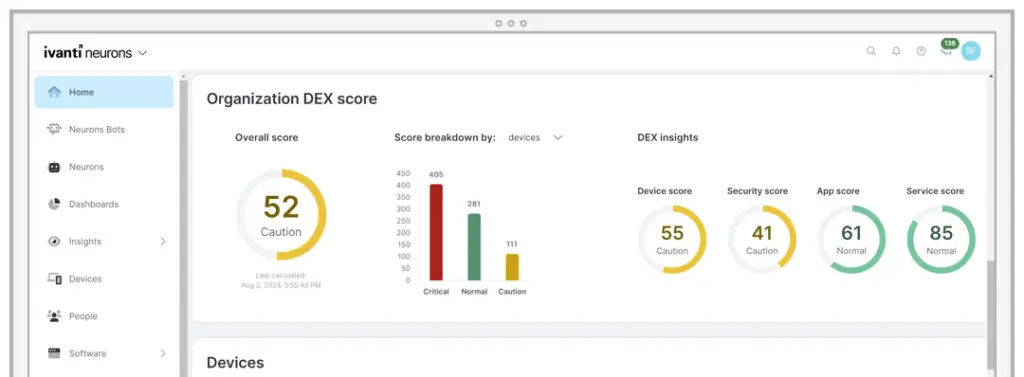
The broader Ivanti Neurons ecosystem can also give teams more context around device health, security posture, and digital employee experience. This helps IT teams move from reactive support to more proactive service delivery.
For example, instead of waiting for users to report poor device performance, your team can use experience and endpoint insights to identify issues earlier and prioritize the work that has the largest operational impact.
Pros and Cons
Benefits of Using Ivanti
Positive
✅ Strong ITSM and ITAM connection
✅ Advanced workflow automation
✅ Scalable for enterprise IT teams
✅ Useful endpoint and security context
✅ Strong service catalog flexibility
Negatives
❌ Quote-based pricing
❌ More complex for small teams
❌ Requires careful implementation
❌ Admin training may be needed
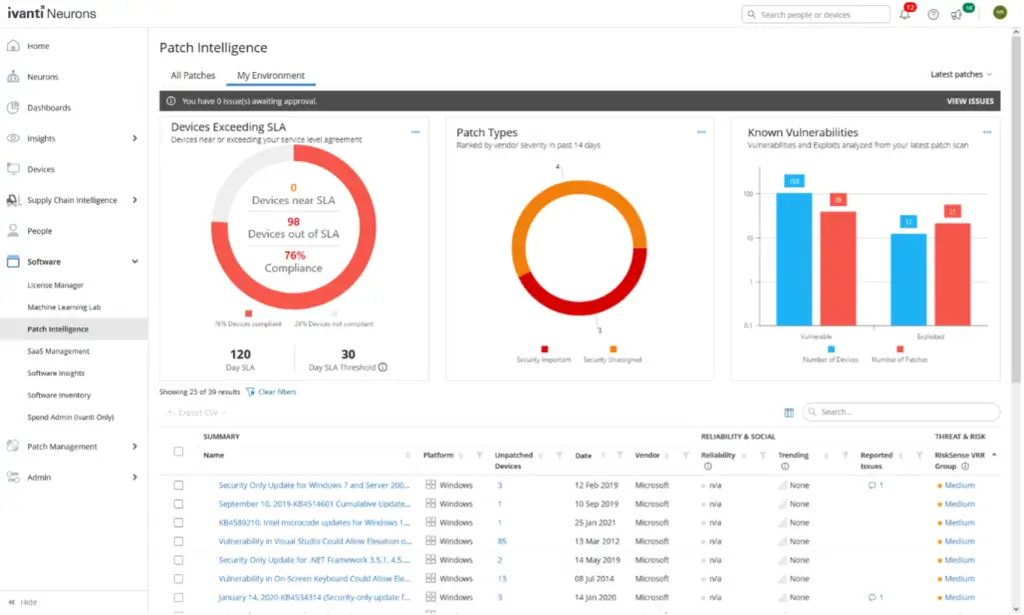
❌ Patch governance is important
Every ITSM platform has trade-offs. Ivanti offers strong depth, but it is not the easiest or lightest tool in the category. Your decision should depend on how mature your IT operations are and how much control you need over workflows, assets, and governance.
Pros
1. Strong ITSM and ITAM Connection
Ivanti is a strong choice if you want IT service management and IT asset management to work together. Many tools manage tickets well, but asset context is often limited. Ivanti gives your team a better foundation for connecting service requests, incidents, changes, devices, users, software, and lifecycle data.
2. Advanced Workflow Automation
Ivanti gives your team flexibility to automate repetitive service management work. You can build workflows for approvals, escalations, routing, notifications, service catalog fulfillment, and recurring operational processes.
This is useful when you want to reduce manual work and enforce consistent service delivery across IT and other departments.
3. Scalable for Enterprise IT Teams
Ivanti is designed for organizations that expect their ITSM platform to grow with them. It can support more complex processes, broader service catalogs, asset-heavy environments, and enterprise service management use cases.
4. Useful Endpoint and Security Context
Because Ivanti has a broader endpoint, patch, asset, and security ecosystem, it can give IT teams more operational context than a standalone service desk platform. This is helpful when service management, device health, and vulnerability awareness need to work together.
5. Strong Service Catalog Flexibility
Ivanti can support structured service catalogs for IT and non-IT teams. This is helpful if you want to standardize employee requests, onboarding tasks, access requests, procurement workflows, and internal service delivery.
Cons
1. Quote-Based Pricing
Ivanti does not provide simple public pricing for every buyer. You typically need to request a quote based on your users, modules, deployment needs, and implementation scope. This can make early-stage comparison harder.
2. More Complex for Small Teams
Ivanti may be too advanced if you only need a basic ticketing system. Small teams may prefer a simpler help desk or a faster-to-deploy ITSM tool with fewer configuration requirements.
3. Implementation Requires Planning
Ivanti can deliver strong results, but the implementation process should not be treated casually. Your team needs to define workflows, service catalogs, roles, automation rules, asset structures, and reporting needs before rollout.
4. Admin Training May Be Needed
Because the platform supports deeper customization, administrators may need training to manage workflows, dashboards, permissions, integrations, and configuration changes effectively.
5. Patch Governance Is Important
Like any enterprise IT platform, Ivanti requires disciplined patch management and security monitoring. This is especially important for organizations using on-premises deployments or broader Ivanti infrastructure.
User Experience
User Interface and Operational Simplicity
Ivanti can deliver a strong user experience, but it is not a plug-and-play SMB help desk. The experience depends heavily on how well your workflows, service catalog, dashboards, permissions, and automation rules are designed.
For IT agents and administrators, the platform can be highly capable. You can configure views, dashboards, forms, workflows, and service processes around your operating model. For end users, the self-service portal can make it easier to submit requests and search for help, as long as the portal is structured clearly.
Agent Experience
Service desk agents can manage incidents, tasks, service requests, approvals, knowledge articles, and asset-related details from the platform. This can improve productivity when agents need context before resolving a request.
The key benefit is that agents can work with more than a ticket description. They can see related assets, user details, workflow status, approval history, and previous activity.
Administrator Experience
Administrators have a high level of control, but that control comes with responsibility. Ivanti works best when an admin or ITSM owner manages configuration, workflow design, role permissions, dashboards, and ongoing improvements.
This is not necessarily a weakness. Enterprise ITSM platforms are supposed to be configurable. But you should plan for ownership, training, and governance before rollout.
End-User Experience
For employees, the main experience is usually the self-service portal. A good portal should help users request the right service, find relevant knowledge, check request status, and avoid unnecessary back-and-forth with IT.
If your organization invests time in designing the portal around real employee needs, Ivanti can improve service accessibility. If the portal is too complex, users may continue sending emails or direct messages instead.
Mobile Access
Ivanti Neurons for ITSM and ITAM also supports mobile access for analysts. This can help IT teams manage incidents, tasks, and service requests when they are away from the desk or supporting distributed users.
Pricing and Plans
How much does Ivanti cost?
Ivanti pricing is not listed as simple public tiers on the main product page. In most cases, you should expect quote-based pricing that depends on your selected products, number of users, modules, deployment model, implementation needs, and support scope.
This makes Ivanti different from tools such as Freshservice or ManageEngine ServiceDesk Plus, which are often easier to evaluate from a pricing page. With Ivanti, the buying process is more consultative.
What Affects Ivanti Pricing?
The final cost can vary significantly because Ivanti is not just one small ticketing product. Your quote may change based on whether you need ITSM only, ITAM, additional Neurons modules, integrations, implementation services, or broader endpoint and security capabilities.
- Users or agents: Pricing may depend on the number and type of users.
- Modules: ITSM, ITAM, automation, endpoint, and security products may affect scope.
- Deployment: Cloud and on-premises requirements can influence cost and maintenance.
- Customization: Complex workflows and service catalogs may require more setup.
- Implementation: Larger rollouts may need professional services or partner support.
Is Ivanti Expensive?
Ivanti is usually better viewed as an enterprise ITSM investment rather than a low-cost help desk. It may cost more than lightweight platforms, but it can provide more depth when you need ITSM, ITAM, automation, and endpoint context together.
The better way to evaluate Ivanti is to compare total value, not just license cost. If your team needs mature change management, stronger asset data, service catalog workflows, and enterprise reporting, Ivanti may justify the investment. If you only need basic ticketing, a simpler tool will likely be more cost-effective.
| Pricing Factor | Details |
| Pricing Model | Quote-based pricing, usually customized by organization size and product scope |
| Main Cost Drivers | Users, modules, deployment model, integrations, customization, and implementation support |
| Public Pricing | Ivanti generally directs buyers to request a quote or speak with a sales specialist |
| Best Fit | Mid-sized and enterprise teams that need advanced ITSM and ITAM capabilities |
| Budget Consideration | Likely more expensive than simple help desk tools, but broader in functionality |
Risk Management
Security, Compliance, and Patch Governance
Security should be part of your Ivanti evaluation, especially if you plan to use on-premises deployments or connect Ivanti with critical IT and endpoint systems.
Ivanti provides enterprise-grade capabilities across IT management, endpoint visibility, asset data, and security-related workflows. At the same time, buyers should follow a disciplined approach to patching, access controls, monitoring, and advisory review.
What to Review Before Deployment
Before adopting Ivanti, your team should define who owns platform administration, how security patches will be reviewed, how quickly updates will be applied, and how privileged access will be controlled.
- Use role-based access control for administrators and agents
- Apply MFA where available for privileged accounts
- Monitor Ivanti security advisories and product updates
- Patch on-premises deployments quickly
- Audit workflow changes and sensitive configuration updates
- Limit admin permissions to users who truly need them
This does not mean Ivanti should be avoided. It means Ivanti should be managed like any other important enterprise IT platform. The more connected the platform becomes to your assets, services, and endpoint data, the more important governance becomes.
Connected IT Operations
Ivanti Integrations and Ecosystem
Ivanti’s integration ecosystem is one of the reasons it can be a strong choice for larger IT teams. The broader Ivanti Neurons platform supports integrations with tools across IT operations, security, cloud, endpoint, and enterprise workflows.
Ivanti’s marketplace and API options can help your team connect service management with other systems. This is important because ITSM rarely works alone. Your service desk may need data from endpoint tools, identity providers, vulnerability scanners, collaboration platforms, asset systems, and security platforms.
Why Integrations Matter
Integrations help reduce context switching and improve operational accuracy. For example, when vulnerability data, endpoint data, or asset information flows into your service management process, your team can prioritize work based on real operational risk.
This is especially useful for larger organizations where service desk, infrastructure, endpoint, security, and asset management teams need to collaborate.
Common Integration Use Cases
- Connecting ITSM tickets with endpoint and patch data
- Linking identity and access workflows to service requests
- Importing vulnerability information for better prioritization
- Connecting service workflows with Microsoft Teams or other collaboration tools
- Using APIs to connect Ivanti with internal business systems
Setup and Rollout
Ivanti Implementation: What to Expect
Ivanti implementation should be approached as an ITSM transformation project, not just a software installation. The more advanced your workflows are, the more planning you need before launch.
Your team should start by defining your service catalog, ticket categories, approval flows, SLAs, reporting needs, roles, asset data model, and integration requirements. If you skip this planning, the platform may feel complicated because the operating model is not clear.
Implementation Planning Checklist
- Define your service desk workflows before configuration
- Clean up asset and CMDB data before connecting processes
- Start with high-value service catalog items first
- Train administrators and service desk agents early
- Test automations before applying them broadly
- Review reporting needs with IT leadership before launch
Ivanti is most effective when your team has a clear process owner. Without ownership, advanced ITSM platforms often become difficult to maintain over time.
Ivanti vs. Alternatives
How It Compares to Competitors
Ivanti competes with several ITSM, help desk, endpoint management, and IT operations platforms. The right alternative depends on what you are trying to solve. Some tools are better for fast help desk deployment. Others are better for DevOps, MSP workflows, or full enterprise ITSM.
NinjaOne
Overview:
NinjaOne is a unified IT management platform with strong remote monitoring, endpoint management, patch management, backup, automation, and ticketing capabilities. It is especially popular with MSPs and internal IT teams that want fast deployment and strong endpoint visibility.
Best For:
NinjaOne is best for MSPs and IT teams that prioritize endpoint management, RMM functionality, patching, monitoring, and automation over deep ITIL-based service management.
Ivanti vs. NinjaOne:
Ivanti is stronger for enterprise ITSM, change management, service catalogs, ITAM, and broader service management governance. NinjaOne is usually a better fit if your main priority is endpoint-first IT operations and rapid deployment.
Freshservice
Overview:
Freshservice, from Freshworks, is a modern ITSM platform known for ease of use, fast adoption, and a clean service desk experience. It is often attractive to small and mid-sized businesses that want ITSM without heavy complexity.
Best For:
Freshservice is best for teams that want an intuitive ITSM tool with ticketing, service catalog, automation, asset management, and reporting in a simpler package.
Ivanti vs. Freshservice:
Freshservice is easier to adopt for many smaller teams. Ivanti is more suitable when you need deeper workflow control, stronger asset management, broader platform depth, and enterprise-level customization.
ManageEngine ServiceDesk Plus
Overview:
ManageEngine ServiceDesk Plus is a popular ITSM platform that combines ticketing, asset management, change management, service catalog, and reporting. It is often chosen by organizations that want strong ITSM functionality with flexible deployment options.
Best For:
ManageEngine ServiceDesk Plus is best for IT teams that want a practical ITSM platform with good value, strong ITAM features, and both cloud and on-premises options.
Ivanti vs. ManageEngine ServiceDesk Plus:
ManageEngine may be easier to evaluate from a pricing and value perspective. Ivanti is stronger for organizations that want a broader enterprise ecosystem around service management, endpoint context, automation, and IT operations maturity.
Jira Service Management
Overview:
Jira Service Management is Atlassian’s ITSM solution. It is especially strong for teams already using Jira Software, Confluence, Bitbucket, or other Atlassian tools.
Best For:
Jira Service Management is best for DevOps-heavy teams, software organizations, and IT teams that want tight alignment between service management and development workflows.
Ivanti vs. Jira Service Management:
Jira Service Management is stronger for agile, DevOps, and software development alignment. Ivanti is stronger for enterprise ITSM, ITAM, endpoint context, and broader service operations.
Quick Comparison Table
| Feature | Ivanti | NinjaOne | Freshservice | ManageEngine ServiceDesk Plus | Jira Service Management |
| Best Suited For | Mid-sized and enterprise IT teams | MSPs and endpoint-first IT teams | Small to mid-sized IT teams | Value-focused ITSM teams | DevOps and Atlassian users |
| Main Strength | ITSM, ITAM, automation, and endpoint context | RMM, patching, monitoring, and endpoint automation | Ease of use and fast deployment | Practical ITSM and asset management | DevOps service management |
| Pricing Transparency | Quote-based | Quote-based | Public plans available | Public plans available | Public plans available |
| Implementation Complexity | Moderate to high | Low to moderate | Low to moderate | Moderate | Moderate |
| Best Reason to Choose | You need mature enterprise ITSM with asset and endpoint context | You need endpoint-first IT operations | You want simple and modern ITSM | You want strong value and flexible ITSM | You already work in the Atlassian ecosystem |
Conclusion
Final thoughts
⭐ Overall Rating: 7.1/10
Ivanti Neurons for ITSM is a strong platform for organizations that need mature IT service management, asset visibility, workflow automation, and enterprise service management capabilities. It is not just a basic ticketing system. It is better suited for teams that want deeper control over service delivery, IT assets, change processes, reporting, and operational governance.
You should consider Ivanti if your IT team has complex workflows, many assets, formal approval processes, and a need to connect service management with endpoint and security context. It can help your organization create more structured, automated, and measurable IT operations.
You may want to choose another tool if your team is small, your workflows are simple, or your top priority is fast setup with transparent pricing. Freshservice may be easier for smaller teams. NinjaOne may be stronger for endpoint-first IT operations. Jira Service Management may be a better fit if your IT and development teams already work inside Atlassian.
Overall, Ivanti is best viewed as an enterprise ITSM and IT operations platform. If your organization has the maturity to implement it properly, it can deliver strong long-term value. If you only need a simple help desk, it may be more than you need.
Have more questions?
Frequently Asked Questions
What is Ivanti Neurons for ITSM?
Ivanti Neurons for ITSM is an IT service management platform that helps organizations manage incidents, requests, changes, problems, assets, knowledge, workflows, and enterprise service delivery.
Is Ivanti a help desk or a full ITSM platform?
Ivanti is a full ITSM platform. It includes help desk ticketing, but it also supports ITIL-aligned processes such as incident management, change management, problem management, service catalog management, IT asset management, and reporting.
Who is Ivanti best for?
Ivanti is best for mid-sized and enterprise IT teams that need mature service management, asset visibility, automation, workflow customization, and stronger governance across IT services.
How much does Ivanti cost?
Ivanti typically uses quote-based pricing. The final cost depends on users, modules, deployment model, integrations, implementation needs, and the overall scope of your ITSM and ITAM requirements.
Does Ivanti offer IT asset management?
Yes. Ivanti offers IT asset management capabilities that help teams track hardware, software, lifecycle data, ownership, usage, and asset relationships across the organization.
Is Ivanti good for enterprise service management?
Yes. Ivanti can support enterprise service management use cases beyond IT, including HR, facilities, procurement, access requests, onboarding, and other internal service workflows.
What are the main drawbacks of Ivanti?
The main drawbacks are quote-based pricing, higher complexity for small teams, implementation planning requirements, potential admin training needs, and the need for disciplined patch governance.
How does Ivanti compare with Freshservice?
Freshservice is generally easier to adopt for smaller teams, while Ivanti is better suited for organizations that need deeper ITSM, ITAM, workflow control, endpoint context, and enterprise-grade customization.
How does Ivanti compare with NinjaOne?
NinjaOne is stronger for endpoint-first IT operations, RMM, monitoring, patching, and MSP workflows. Ivanti is stronger for enterprise ITSM, ITAM, change management, and service governance.
What are the best Ivanti alternatives?
The best Ivanti alternatives include Freshservice for simpler ITSM, NinjaOne for endpoint-first IT management, ManageEngine ServiceDesk Plus for strong value, and Jira Service Management for Atlassian and DevOps teams.