

Introduction
If you are looking for a CRM that does more than manage leads, Odoo CRM deserves serious attention.
Unlike many standalone CRM platforms, Odoo CRM is part of a broader business management suite. That means your sales pipeline can connect with quotations, invoicing, inventory, marketing, subscriptions, helpdesk, accounting, and other operational workflows.
This is where Odoo becomes interesting. It is not just a tool for tracking deals. It is a flexible system for businesses that want their CRM to sit closer to daily operations.
In this Odoo CRM review, you will learn how it performs across features, user experience, pricing, security, business size fit, and overall value. You will also see where it compares well against alternatives like Pipedrive, HubSpot CRM, monday CRM, and Zoho CRM.
Quick take: Odoo CRM is best for businesses that want a customizable CRM connected to sales operations, quoting, invoicing, and other business processes. It may not be the fastest CRM to set up, but it offers impressive long-term flexibility when you need more than a simple sales pipeline.
Key Features
Odoo’s Software Specification
Odoo CRM gives you the core tools you expect from a modern CRM, including lead tracking, pipeline management, sales activity planning, reporting, automation, and quotation management.
The difference is that Odoo connects these CRM features with the wider Odoo ecosystem. This makes it especially useful if your sales process depends on quotes, invoices, inventory, subscriptions, projects, or customer service handoffs.
Lead and Pipeline Management
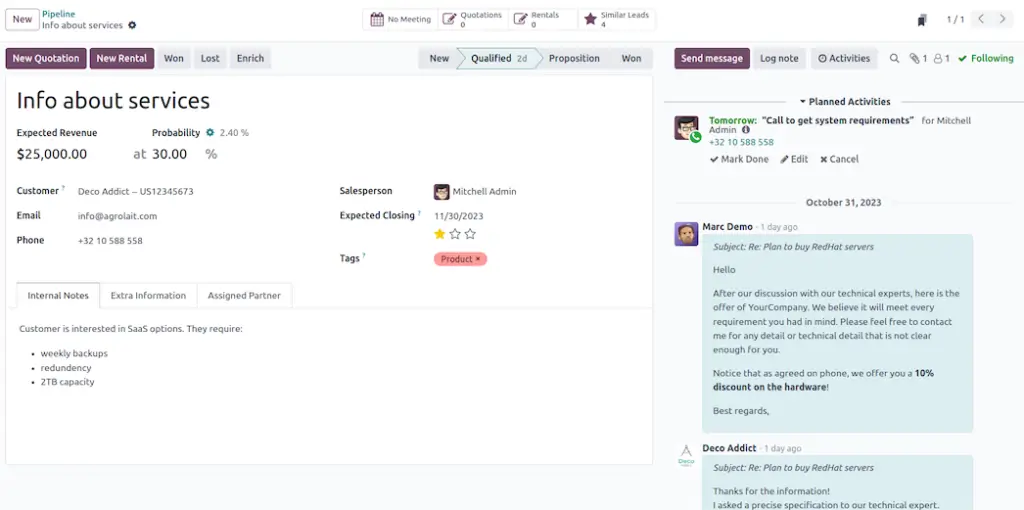
Odoo CRM uses a visual Kanban-style pipeline, which helps you track sales opportunities from the first contact to a closed deal. You can drag and drop deals between stages, assign salespeople, schedule activities, and monitor expected revenue.
This setup works well if your team wants a clear view of active deals without getting lost in spreadsheets or disconnected notes.
- Track leads, opportunities, activities, and expected revenue
- Move deals through custom pipeline stages
- Schedule calls, meetings, emails, and next actions
- Use sales teams and assignments to organize ownership
AI Lead Scoring and Prioritization
One of Odoo CRM’s more useful features is predictive lead scoring. Instead of treating every lead the same, Odoo can calculate the probability of winning a lead based on different signals and past performance.
This helps you focus on the leads most likely to convert. For busy sales teams, that can reduce wasted time and improve follow-up quality.
- Prioritize leads based on conversion potential
- Assign opportunities to the right sales team or salesperson
- Improve follow-up timing with activity planning
- Reduce manual guesswork in lead qualification
Workflow Automation
Odoo CRM can automate several parts of the sales workflow, including lead creation, team assignment, scheduled activities, and follow-up steps. This is helpful when your team manages a high volume of leads or repeatable sales processes.
You can create rules that reduce manual work and keep opportunities moving forward.
- Create leads automatically from forms or emails
- Assign leads by team, region, or probability
- Trigger follow-up activities after key actions
- Keep salespeople focused on the next best step
Reporting and Sales Forecasting
Odoo CRM includes reporting tools that help you understand pipeline performance, activity volume, win and loss patterns, and expected revenue. You can view data in different formats and filter reports by salesperson, team, stage, source, or expected closing date.
This is useful for managers who need more than a list of open deals. You can use the reporting area to identify bottlenecks, forecast revenue, and coach your team based on real sales activity.
- Analyze pipeline movement and deal performance
- Track expected revenue and close probabilities
- Review sales activity by user or team
- Use reports to identify weak stages in the funnel
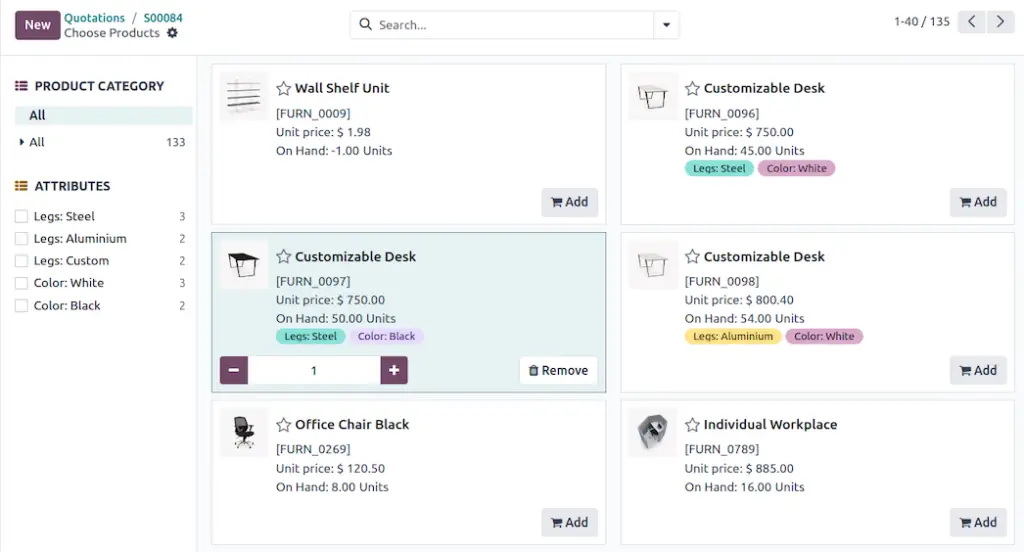
Quotations and Sales Workflow Connection
This is one of Odoo CRM’s biggest advantages over many lightweight CRMs. You can move from opportunity management into quotes, sales orders, invoices, and other business workflows inside the same ecosystem.
For product-based businesses, service firms, distributors, and operational teams, this can save a lot of manual work.
- Create quotations from opportunities
- Connect CRM activity with sales and invoicing
- Use product catalogs inside the quoting workflow
- Reduce duplicate data entry between sales and finance
Native Integration with the Odoo Ecosystem
Odoo CRM becomes more valuable when you connect it with other Odoo apps. For example, you can use CRM with Odoo Sales, Accounting, Inventory, Website, Email Marketing, Helpdesk, Project, and Subscriptions.
This is not always necessary for smaller teams, but it is powerful when your customer journey touches multiple departments.
- Connect CRM with sales, inventory, and accounting
- Use one system for multiple business functions
- Reduce reliance on third-party connectors
- Create smoother handoffs between teams
Lead Deduplication and Data Quality
Duplicate leads are a common problem in growing sales teams. Odoo can help identify similar leads and opportunities, then merge records without losing important context.
This helps keep your CRM cleaner and prevents two salespeople from contacting the same prospect separately.
- Detect similar leads and opportunities
- Merge duplicate records while keeping key information
- Improve CRM data quality over time
- Reduce confusion across the sales team
Customization Capabilities
Odoo is highly customizable, especially when compared with more rigid CRM platforms. You can adjust pipelines, fields, forms, dashboards, workflows, and access rules.
This flexibility is one of the main reasons businesses choose Odoo. It is also one of the reasons setup can take more time.
- Add custom fields and pipeline stages
- Adapt workflows to match your sales process
- Use Odoo Studio on supported plans for deeper customization
- Build a CRM structure around your real business model
User Experience
User Interface and Experience
Odoo CRM has a clean interface, but it is not the simplest CRM on the market. The experience is best when you understand that Odoo is designed as a broader business platform, not only a sales pipeline tool.
If you are moving from spreadsheets, the visual pipeline will feel like a major upgrade. If you are moving from a very simple CRM, Odoo may feel more complex at first.
A Flexible Interface With a Learning Curve
The main pipeline view is easy to understand. You can see opportunities by stage, drag cards across the pipeline, open deal records, and review planned activities.
The learning curve usually appears when you start customizing workflows, connecting apps, managing permissions, or building reports. That is where Odoo becomes powerful, but also more demanding.
- Visual pipeline makes deal tracking easier
- Opportunity cards include useful sales context
- Setup may take longer than plug-and-play CRMs
- Best results often require thoughtful configuration
Sales Communication and Activity Tracking
Each opportunity record can hold emails, notes, activities, files, scheduled calls, and customer details. This gives your sales team one place to understand what happened before and what should happen next.
That context matters. It helps reduce missed follow-ups, duplicated outreach, and unclear ownership.
- Track planned activities inside each opportunity
- Keep notes and communication history in one place
- Schedule follow-ups directly from CRM records
- Improve collaboration between sales and operations
Mobile Access for Sales Teams
Odoo also offers mobile access, which is useful for field sales teams, remote users, and managers who need to check pipeline updates away from the desk.
The mobile experience is not the main reason to choose Odoo, but it supports day-to-day CRM work well enough for most teams.
- Access CRM information from mobile devices
- Update opportunities while away from the office
- Review activities, contacts, and customer details
- Useful for field reps and hybrid teams
User experience summary: Odoo CRM is best for teams that value control over simplicity. If you want the easiest CRM to launch this week, Pipedrive or monday CRM may feel faster. If you want a flexible CRM that can connect with broader business operations, Odoo offers more room to grow.

Key Benefits
Benefits of Using Odoo CRM
The biggest benefit of Odoo CRM is process alignment. Your sales team does not have to work in one system while operations, finance, and delivery teams work somewhere else.
That creates better visibility across the customer journey.
End-to-End Sales Workflow
With Odoo CRM, you can manage a lead, qualify an opportunity, prepare a quote, move the deal forward, and connect it with invoicing or delivery workflows.
This makes Odoo especially useful when sales is closely tied to products, services, stock, subscriptions, or project delivery.
- Move from lead to quote with fewer manual steps
- Keep sales and back-office teams aligned
- Reduce duplicate data entry across tools
- Maintain better customer context after the sale
More Control Over Your CRM Process
Odoo is a strong choice if your sales process does not fit neatly into a standard CRM template. You can build your pipeline around your real qualification steps, approval stages, lead sources, and reporting needs.
- Create custom stages and fields
- Define your own qualification process
- Adjust reports around your KPIs
- Customize permissions by role or team
Better Value for Multi-App Use
If you only need a simple CRM, Odoo may not be the cheapest or fastest path. But if you need CRM plus sales, invoicing, accounting, inventory, website, or helpdesk tools, the value becomes much stronger.
You can reduce SaaS sprawl and manage more business functions in one connected environment.
Scalability for Growing Businesses
As your business grows, your sales process usually becomes more complex. You may need more approvals, more reporting, more segmentation, and better handoffs between teams.
Odoo gives you space to grow into that complexity without replacing your CRM every few years.
Pros and Cons
Advantages and Limitations of Using Odoo CRM
Positive
✅ Strong connection with Odoo apps
✅ Flexible pipeline customization
✅ AI lead scoring and automation
✅ Useful quotation and sales workflows
✅ Strong fit for operational businesses
Negative
❌ Setup can feel complex
❌ Not ideal for very simple CRM needs
❌ Customization may require technical help
❌ Third-party integrations can need extra work
Odoo CRM has a different value proposition from many sales-first CRMs. It is not only trying to help you close more deals. It is trying to connect your sales process with the rest of your business.
That can be a major advantage if your team needs more structure around quotations, order management, customer history, invoicing, inventory, or service delivery.
✅ Pros
- Strong Odoo ecosystem: CRM can connect with Sales, Accounting, Inventory, Website, Email Marketing, Helpdesk, and other apps.
- Highly customizable: You can adapt pipelines, fields, workflows, reports, and access rules to fit your process.
- Good value when using multiple apps: Odoo becomes more attractive when CRM is part of a wider business system.
- AI-supported lead prioritization: Predictive lead scoring helps your team focus on better opportunities.
- Quoting and sales operations: You can connect opportunities to quotations and sales documents more naturally than in many lightweight CRMs.
❌ Cons
- Not the easiest CRM to launch: Odoo can take more planning than tools like Pipedrive or monday CRM.
- Customization can require expertise: More advanced workflows may need an admin, developer, or Odoo partner.
- May feel too broad for small sales teams: If you only need basic lead tracking, Odoo may be more system than you need.
- External integrations may take work: Odoo is strongest inside its own ecosystem, while some third-party connections may require APIs or additional setup.
Business size fit
Who Is Odoo CRM Best For?
Odoo CRM is best for businesses that want CRM to work as part of a larger business system. It is not the strongest choice if you only need a basic contact database or a simple pipeline.
It becomes much more compelling when your CRM needs to connect with sales operations, quotes, invoices, product catalogs, inventory, or internal workflows.
✅ Odoo CRM is a strong fit if you:
- Already use Odoo or plan to use multiple Odoo apps
- Need CRM connected to quotations, invoicing, or inventory
- Want more customization than a basic CRM can provide
- Have internal technical support or an implementation partner
- Run a B2B, product-based, manufacturing, logistics, or service business
❌ Odoo CRM may not be the best fit if you:
- Need a simple plug-and-play CRM with minimal setup
- Have a small sales team that only tracks deals and contacts
- Want the easiest user experience above all else
- Depend heavily on many third-party CRM integrations
- Do not have time to configure workflows properly
Here is a quick overview of how Odoo CRM fits different company sizes and maturity levels:
| Business Size | Fit for Odoo CRM | Why |
| Solo Users | Limited fit | Odoo can be too broad if you only need personal contact or deal tracking. |
| Startups | Good fit if operationally complex | Works well when the startup needs CRM plus quoting, billing, or inventory workflows. |
| Small Businesses | Strong fit | Useful for teams that want a flexible CRM with room to scale beyond sales tracking. |
| Mid-Sized Businesses | Excellent fit | Handles more complex sales processes, reporting, permissions, and cross-team workflows. |
| Large Businesses | Strong fit with implementation support | Powerful enough for advanced workflows, but setup and governance need proper ownership. |
Best Fit Industries
- Manufacturing and distribution
- B2B services and consulting
- Wholesale and product-based companies
- Software and technology companies
- Retail businesses with sales and inventory needs
- Companies already using ERP-style workflows
Expert note: Odoo CRM is not simply a CRM for sales reps. It is better viewed as a sales operations layer inside a wider business system. That is why it can outperform simpler tools for operational companies, even if those simpler tools feel easier at first.
Pricing and Plans
How much does Odoo CRM cost?
Odoo pricing is different from many CRM tools because Odoo is not priced only as a standalone CRM. Its paid plans are built around access to Odoo apps, users, hosting options, and customization needs.
Odoo currently offers paid plans such as Standard and Custom, with all apps included for a single fee. The Custom plan is the more advanced option for companies that need Odoo Studio, multi-company support, external API access, or deployment options such as Odoo.sh or on-premise hosting.
Pricing can vary by region, currency, billing cycle, discounts, hosting setup, and implementation needs. Always confirm live pricing on Odoo’s official pricing page before publishing or updating exact numbers.
💡 When is it worth paying for Odoo CRM?
The free option can be useful if you only want to test one app or run a very small setup. But if your business needs CRM plus other apps, paid plans are usually the more realistic choice.
You should also budget for setup time, data migration, workflow configuration, user training, and possible partner support. These costs can matter more than the monthly software price.
| Plan | Best For | What to Know |
| Free / One App | Testing Odoo CRM or very small usage | Useful for exploring the platform, but limited if you need multiple apps or advanced business workflows. |
| Standard | Teams that want all Odoo apps on Odoo Online | Includes access to all apps for a single fee, making it attractive if you need CRM plus sales, accounting, inventory, or marketing. |
| Custom | Businesses needing deeper customization and deployment flexibility | Adds advanced capabilities such as Odoo Studio, multi-company, external API, and Odoo.sh or on-premise deployment options. |
| Implementation / Success Packs | Teams that need onboarding or expert help | Useful when you need help with configuration, migration, training, workflows, or launch planning. |
Pricing takeaway: Odoo CRM can look very affordable at the subscription level, especially when you use multiple Odoo apps. But the real cost depends on how much setup, customization, migration, and ongoing administration your business needs.
What to Expect
Setup and Implementation
Odoo CRM is powerful, but it should not be treated like a tool you activate in 10 minutes and never configure again. To get good results, you need to set it up around your actual sales process.
This is especially true if you plan to use Odoo CRM with other Odoo apps.
Key setup steps
- Define your sales pipeline stages
- Import leads, contacts, companies, and opportunities
- Set up user roles and permissions
- Configure sales teams and lead assignment rules
- Connect email, website forms, or lead sources
- Create quotation and sales workflows if needed
- Build reports and dashboards for managers
- Train sales users on activities, notes, and follow-ups
When should you use an Odoo partner?
If your needs are simple, you may be able to set up Odoo CRM internally. But if you need data migration, custom workflows, integrations, advanced reporting, or multi-app implementation, working with an Odoo partner can save time.
This is one of the biggest differences between Odoo and simpler CRM tools. With Odoo, the long-term value is often tied to how well the system is configured from the beginning.
Comparison
Odoo CRM vs Other CRM Software
Odoo CRM competes with popular CRM platforms such as Pipedrive, monday CRM, HubSpot CRM, Zoho CRM, and Salesforce. The best option depends on your workflow, budget, technical resources, and sales process.
Odoo is strongest when CRM needs to connect with broader business operations. Pipedrive is easier for sales teams that only need pipeline management. HubSpot is stronger for marketing-led companies. monday CRM is often easier for teams that want flexible collaboration without heavy setup.
| CRM | Best For | Main Strength | Main Limitation |
| Odoo CRM | Businesses connecting CRM with operations | CRM, quotations, invoicing, inventory, and business apps in one ecosystem | Setup can be complex for non-technical teams |
| Pipedrive | Sales-focused teams | Simple visual pipeline and fast adoption | Less powerful for operational workflows beyond sales |
| monday CRM | Teams that need flexible sales workflows and collaboration | Highly visual, customizable, and easy for teams to adopt | Not as deep as Odoo for ERP-style processes |
| HubSpot CRM | Marketing-led sales teams | Strong free CRM, marketing tools, and customer journey tracking | Advanced features can become expensive as you scale |
| Zoho CRM | SMBs that need affordable CRM depth | Strong automation and broad Zoho ecosystem | Setup and interface can feel complex for some users |
Comparison summary: Choose Odoo CRM if you want sales, operations, and business management to work together. Choose Pipedrive if you want the cleanest sales pipeline. Choose HubSpot if marketing is central to your sales process. Choose monday CRM if ease of use and workflow visibility matter most.
Security and Compliance
Protection for Your Data
Security is a serious factor when choosing CRM software because customer records often include emails, phone numbers, deal values, notes, contracts, and sales history.
Odoo offers different levels of control depending on your hosting option. You can use Odoo Online as a managed cloud service, Odoo.sh for more developer flexibility, or on-premise hosting when your organization needs direct infrastructure control.
✅ Data Protection and Privacy
- GDPR support: Odoo provides tools and policies that help businesses manage GDPR-related requirements.
- Access controls: You can manage what users can view, edit, or delete based on roles and permissions.
- Customer database separation: Odoo cloud environments are designed to keep customer databases separated.
- Data hosting options: Businesses can choose managed cloud, Odoo.sh, or on-premise deployment depending on compliance needs.
✅ Backups and Disaster Recovery
- Automated backups: Odoo Cloud includes automated database backups.
- Backup retention: Odoo states that multiple full backups are retained for at least 3 months.
- Recovery planning: Odoo publishes recovery objectives for disaster recovery scenarios.
- Manual backup access: Businesses can download backups when needed, depending on the hosting option.
✅ Hosting and Compliance Flexibility
- Odoo Online: Best for teams that want Odoo to manage hosting, maintenance, and backups.
- Odoo.sh: Better for companies that need staging environments, development workflows, and more control.
- On-premise: Useful for organizations with strict internal IT, hosting, or compliance requirements.
- Audit readiness: Role-based permissions and activity visibility help support internal controls.
Security takeaway: Odoo CRM gives you more deployment flexibility than many SaaS-only CRMs. That is useful if your company has strict data, compliance, or hosting requirements. However, the more control you choose, the more responsibility your team takes on.
Conclusion
Final thoughts
⭐ Overall Rating: 7.4/10
Odoo CRM is a strong option if you want a CRM that connects sales with the rest of your business. It is especially valuable for companies that need quoting, invoicing, inventory, accounting, marketing, or service workflows connected to CRM data.
Its biggest strength is flexibility. You can shape Odoo CRM around your business instead of forcing your team into a rigid sales process.
Its biggest weakness is also connected to that flexibility. Odoo takes more planning, setup, and administration than simpler CRM tools. If you want a CRM that your team can start using almost instantly, Pipedrive or monday CRM may feel easier.
So, should you choose Odoo CRM?
✅ Yes, if you…
- Want CRM connected to sales, finance, inventory, or operations
- Need deep customization and flexible workflows
- Plan to use multiple Odoo apps
- Have technical resources or implementation support
- Want a CRM that can grow into a broader business system
❌ Maybe not, if you…
- Need the simplest CRM for a small sales team
- Want fast setup with almost no configuration
- Do not want to manage customization or system structure
- Rely heavily on many third-party CRM apps
- Only need basic contact and pipeline tracking
Final recommendation: Odoo CRM is best for businesses that see CRM as part of a larger operating system, not just a sales tracker. If your team needs a customizable, scalable CRM connected to business workflows, Odoo is one of the more capable options to consider.
Frequently Asked Questions
Have more questions?
Is Odoo CRM really free?
Odoo CRM can be used for free in certain limited use cases, especially when you use one app. However, most growing teams will need a paid Odoo plan once they require multiple apps, deeper customization, advanced workflows, or implementation support.
What is Odoo CRM best used for?
Odoo CRM is best used for managing leads, opportunities, sales activities, quotations, and connected business workflows. It is especially strong when your CRM needs to work with sales, invoicing, inventory, marketing, or other Odoo apps.
Is Odoo CRM good for small businesses?
Yes, Odoo CRM can be good for small businesses that need flexibility and room to grow. However, very small teams that only need simple contact and deal tracking may find tools like Pipedrive or monday CRM easier to set up.
Is Odoo CRM better than Pipedrive?
Odoo CRM is better than Pipedrive if you need CRM connected to operations, quoting, invoicing, inventory, or other business apps. Pipedrive is usually better if you want a simple, sales-focused CRM with a faster learning curve.
Is Odoo CRM better than HubSpot CRM?
Odoo CRM is usually better for businesses that want operational flexibility and ERP-style workflows. HubSpot CRM is often better for marketing-led teams that need strong lead capture, email marketing, customer journey tools, and a simpler initial setup.
Does Odoo CRM include AI lead scoring?
Yes, Odoo CRM includes predictive lead scoring features that help estimate the probability of winning leads and opportunities. This helps sales teams prioritize higher-value or higher-probability prospects.
Can I use Odoo CRM without other Odoo apps?
Yes, you can use Odoo CRM as a standalone CRM. However, Odoo CRM becomes much more powerful when connected with other Odoo apps such as Sales, Accounting, Inventory, Email Marketing, Website, or Helpdesk.
Is Odoo CRM hard to set up?
Odoo CRM is not extremely difficult, but it does require more setup than simpler CRM tools. You may need to configure pipelines, fields, permissions, lead assignment rules, reports, and integrations before your team gets full value from it.
Does Odoo CRM support quotations and invoicing?
Yes, Odoo CRM can connect with Odoo Sales and invoicing workflows, allowing teams to create quotations and move sales activity closer to order and billing processes. This is one of its biggest advantages over many standalone CRMs.
Is Odoo CRM secure?
Odoo CRM includes security features such as user permissions, access controls, managed hosting options, backups, and deployment flexibility. Businesses with stricter security requirements can also consider Odoo.sh or on-premise hosting for more control.









