
Introduction
Choosing the best CRM for financial advisors is not only about tracking contacts. You need a system that helps you manage client relationships, document conversations, automate review workflows, track referrals, and keep your advisory practice organized.
For financial advisors, every missed follow-up can affect trust. Every scattered note can create operational risk. Every disconnected tool can slow down your team.
The right financial advisor CRM gives you one place to manage prospects, clients, households, tasks, meetings, compliance notes, marketing activity, and team collaboration.
In this guide, you’ll compare the best CRM software for financial advisors in 2026, including advisor-focused platforms like Wealthbox and Redtail CRM, flexible CRMs like monday CRM and Zoho CRM, and enterprise options like Salesforce Financial Services Cloud.
Best CRM for Financial Advisors: Quick Picks
If you want a faster way to compare your options, here are the best financial advisor CRM tools by use case:
- Best overall CRM for financial advisors: Wealthbox
- Best for compliance-focused advisory firms: Redtail CRM
- Best customizable CRM: monday CRM
- Best enterprise CRM for wealth management: Salesforce Financial Services Cloud
- Best budget CRM for small advisory firms: Zoho CRM
- Best free CRM for marketing and prospecting: HubSpot CRM
- Best CRM for lead acquisition: Pipedrive
- Best simple CRM for smaller teams: Nutshell
What Is a CRM for Financial Advisors?
A CRM, or customer relationship management system, is software that helps you organize client data, track communication, manage tasks, and improve follow-up.
For financial advisors, a CRM does more than store names and phone numbers. It becomes your operating system for client relationships.
You can use it to track:
- Client and household details
- Meeting notes and communication history
- Annual review schedules
- Prospect and referral pipelines
- Compliance documentation
- Tasks, workflows, and reminders
- Email, calendar, and planning tool activity
How Financial Advisor CRM Software Differs From a Generic CRM
A generic CRM is usually built around sales pipelines. That can work for prospecting, but advisory firms often need deeper relationship management.
A financial advisor CRM should support long-term client service, household relationships, recurring reviews, referral tracking, account notes, compliance workflows, and integrations with advisor technology.
That is why advisor-specific tools like Wealthbox and Redtail are so important in this category. They are designed around how advisory firms actually operate.
Why Financial Advisors Need CRM Software
You manage more than leads. You manage trust, timing, financial goals, sensitive data, and long-term relationships.
Without a CRM, many advisors rely on spreadsheets, inboxes, calendar reminders, notebooks, and disconnected task lists. That may work when your book is small, but it becomes risky as your practice grows.
Better Client Relationship Management
A CRM helps you see the full client relationship in one place. Before a meeting, you can quickly review notes, past conversations, family details, financial goals, service history, and open tasks.
This makes your client experience more consistent and personal.
Stronger Follow-Up and Retention
Financial advisory relationships depend on timely communication. A CRM helps you create reminders for review meetings, birthdays, policy renewals, onboarding tasks, beneficiary updates, and referral follow-ups.
Instead of depending on memory, you can build repeatable workflows.
More Organized Compliance Documentation
A CRM can help you document client interactions, assign supervisory tasks, manage permissions, and maintain better records.
However, a CRM alone does not automatically make your firm FINRA or SEC compliant. Regulated firms should confirm record retention, archiving, supervision, audit trails, and security requirements with their compliance team before choosing a platform.
Improved Pipeline Visibility
If you rely on referrals, seminars, webinars, paid leads, centers of influence, or outbound prospecting, a CRM gives you a clear pipeline.
You can see which prospects are new, which are waiting for follow-up, which are ready for a proposal, and which are likely to become clients.
Financial Advisor CRM Comparison
Here is a quick comparison of the top CRM platforms for financial advisors:
| CRM Tool | Best For | Advisor-Specific? | Compliance Support | Starting Price |
| Wealthbox | Best overall advisor CRM | Yes | Advisor workflows, records, integrations | From $59/user/month |
| Redtail CRM | Compliance-focused advisory firms | Yes | Strong advisor recordkeeping and workflows | From $39/user/month |
| monday CRM | Custom workflows | No | Configurable logs and permissions | From $10/user/month |
| Salesforce Financial Services Cloud | Enterprise wealth management | Yes | Enterprise controls and governance | From $325/user/month |
| Zoho CRM | Budget-conscious firms | No | Configurable records and permissions | Free, paid from $14/user/month |
| HubSpot CRM | Free CRM and marketing | No | Requires compliance setup or integrations | Free, paid plans available |
| Pipedrive | Lead acquisition | No | Limited native compliance depth | Paid plans |
| Nutshell | Simple CRM for small teams | No | Basic CRM records and permissions | Paid plans |
Wealthbox

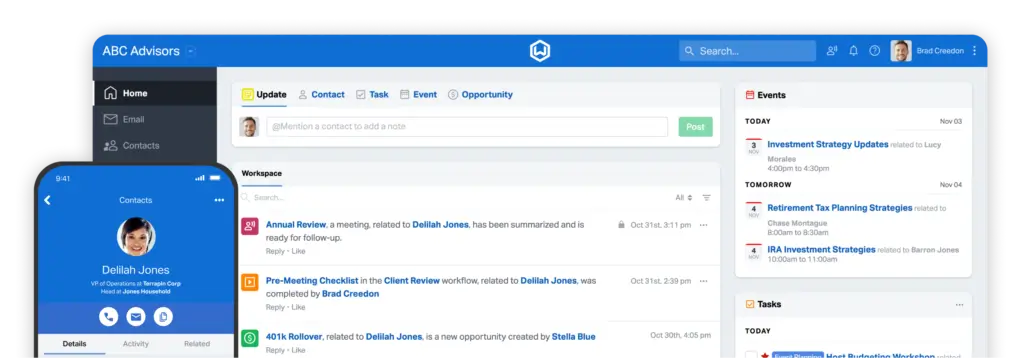
Wealthbox is one of the strongest CRM options for financial advisors because it is built specifically for advisory firms. It combines contact management, household tracking, workflows, collaboration, notes, tasks, email sync, and advisor-focused integrations in a clean interface.
For most independent advisors and RIAs, Wealthbox offers the best balance between usability and industry relevance. It feels more modern than many older advisor CRMs, but it still supports the relationship management depth that financial advisors need.
Key Features
- Advisor-specific contact and household management
- Client notes, tasks, workflows, and activity streams
- Email and calendar sync
- Pipeline tracking for prospects and referrals
- Team collaboration and task assignment
- Integrations with financial planning and advisor tools
Pros
- Designed specifically for financial advisors
- Modern, clean, and easy to adopt
- Strong workflows for client service and prospecting
- Good fit for independent advisors and RIAs
Cons
- Costs more than basic generic CRMs
- Enterprise customization is not as deep as Salesforce
- Some firms may still need separate archiving tools
Pricing Overview
| Plan | Monthly Price | Best For |
| Basic | From $59/user/month | Solo advisors and small teams |
| Pro | From $75/user/month | Growing advisory firms |
| Premier | From $99/user/month | Teams needing advanced CRM features |
| Enterprise | Custom | Larger firms with custom requirements |
Best for: Independent advisors, RIAs, and wealth management teams that want an advisor-native CRM with excellent usability.
Not best for: Enterprise financial institutions that need deep custom development, complex data modeling, or Salesforce-level infrastructure.
Why it ranks #1: Wealthbox is the strongest overall choice because it is built around advisory workflows, not generic sales processes. It gives you the advisor-specific structure you need without overwhelming your team.
Redtail CRM

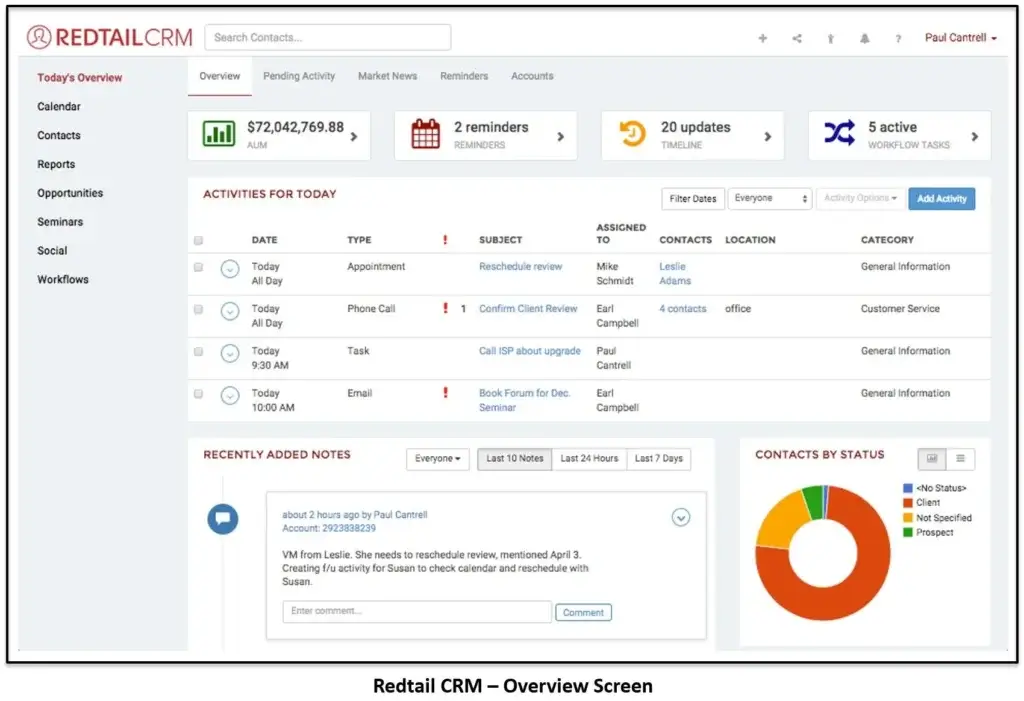
Redtail CRM is one of the most established CRM platforms in the financial advisory market. It is especially popular with RIAs, broker-dealer-affiliated advisors, and firms that want advisor-specific workflows with a stronger compliance orientation.
Redtail is less visually modern than some newer tools, but it has deep industry adoption and a strong ecosystem around advisor operations, contact records, notes, workflows, calendars, and communication tools.
Key Features
- Advisor-specific contact and household management
- Notes, activities, workflows, and calendar tools
- Compliance-focused recordkeeping support
- Email and calendar syncing
- Advisor workflow templates
- Integration options for advisory technology stacks
Pros
- Built specifically for financial advisors
- Strong fit for compliance-conscious firms
- Widely adopted in the advisory industry
- Good workflow and client service tracking
Cons
- Interface can feel more traditional
- May require training for newer team members
- Not as flexible as monday CRM for custom non-advisor workflows
Pricing Overview
| Plan | Monthly Price | Best For |
| Launch | From $39/user/month, billed annually | Small teams needing core CRM tools |
| Growth | From $59/user/month, billed annually | Firms needing more workflow and communication tools |
| Enterprise | Custom | Larger firms and networks |
Best for: Advisory firms that want a proven, advisor-specific CRM with stronger compliance and workflow orientation.
Not best for: Teams that want the most modern user interface or highly visual project-style workflow management.
Why it ranks #2: Redtail deserves a top position because it directly matches financial advisor search intent. If compliance workflows, advisor adoption, and industry-specific structure matter most, Redtail should be on your shortlist.
monday CRM


monday CRM is a strong choice if you want a flexible system you can shape around your advisory firm’s workflow. It is not built only for financial advisors, but its visual boards, automation, dashboards, and custom fields make it useful for firms that want more control.
You can build pipelines for referrals, client onboarding, annual reviews, service requests, insurance cases, estate planning follow-ups, or internal operations.
Key Features
- Highly visual boards and pipelines
- Custom fields, statuses, dashboards, and automations
- Email, calendar, Zoom, and DocuSign integrations
- No-code workflow customization
- Dashboards for tracking activity and team performance
- Permission controls on higher-tier plans
Pros
- Very flexible for custom advisory workflows
- Easy visual interface for teams
- Strong automation and dashboard options
- Good fit for growing firms with multiple processes
Cons
- Not advisor-native
- Requires setup to match financial advisory workflows
- Compliance archiving may require third-party tools
Pricing Overview
| Plan | Monthly Price | Best For |
| Basic | From $10/user/month | Simple contact and pipeline management |
| Standard | From $14/user/month | Automation and integrations |
| Pro | From $24/user/month | Advanced dashboards and workflow control |
| Enterprise | Custom | Security, governance, and large teams |
Best for: Growing advisory firms that want to customize processes across sales, onboarding, client service, and operations.
Not best for: Firms that want an out-of-the-box advisor CRM with native financial services workflows.
Why it ranks #3: monday CRM is not the most advisor-specific option, but it is one of the best choices if you want customization, visual workflow management, and operational flexibility.
Salesforce Financial Services Cloud

Salesforce Financial Services Cloud is built for larger financial services organizations that need enterprise-grade CRM, automation, data modeling, reporting, AI, integrations, and security controls.
It is more expensive and complex than most CRMs on this list, but it can be the right fit for wealth management firms, broker-dealers, banks, insurance organizations, and enterprise advisory teams.
Key Features
- Financial services data model
- Client, household, and relationship mapping
- Workflow automation and AI capabilities
- Advanced reporting and dashboards
- Enterprise security and permission controls
- Large app ecosystem and integration options
Pros
- Best fit for enterprise financial services teams
- Highly customizable and scalable
- Strong reporting, automation, and AI ecosystem
- Supports complex relationship and account structures
Cons
- Expensive compared to other CRM tools
- Requires implementation expertise
- Too complex for many solo advisors and small RIAs
Pricing Overview
| Plan | Monthly Price | Best For |
| Financial Services Cloud for Sales | From $325/user/month | Enterprise sales and relationship management |
| Higher-tier Salesforce packages | Custom or higher-tier pricing | Large firms needing advanced data, AI, and service operations |
Best for: Enterprise wealth management firms, broker-dealers, banks, insurance organizations, and large financial services teams.
Not best for: Solo advisors or small firms that want fast setup and low monthly costs.
Why it ranks #4: Salesforce Financial Services Cloud is one of the most powerful options in the category, but its cost and implementation complexity make it best for larger firms.
Zoho CRM

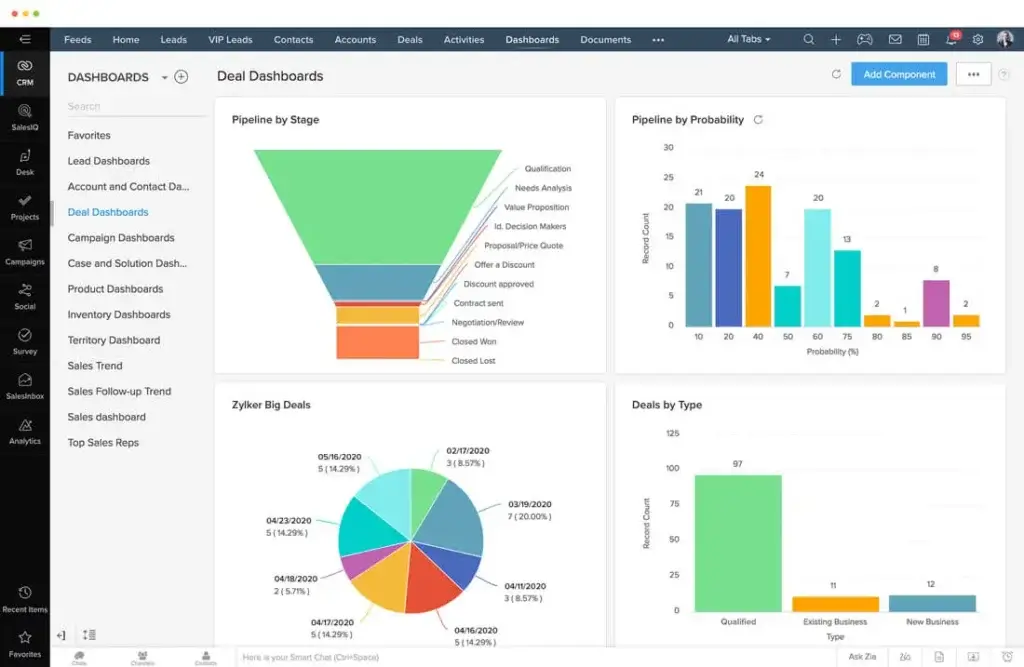
Zoho CRM is a strong option for solo advisors and small firms that want affordable CRM software with contact management, automation, reporting, email integration, and customization.
It is not built specifically for financial advisors, but it gives you a lot of CRM functionality for the price. It is especially attractive if you already use Zoho apps or want a budget-friendly system that can scale over time.
Key Features
- Lead, contact, account, and deal management
- Workflow automation and task reminders
- Email, call, and calendar integrations
- Custom fields, layouts, and dashboards
- Reporting and forecasting
- Zia AI assistant on higher-tier plans
Pros
- Very affordable compared to advisor-native CRMs
- Free plan available for small teams
- Strong customization for the price
- Good fit for budget-conscious firms
Cons
- Not advisor-specific
- Interface can feel complex during setup
- Compliance workflows may require configuration and third-party tools
Pricing Overview
| Plan | Monthly Price | Best For |
| Free | $0 for up to 3 users | Basic CRM needs |
| Standard | From $14/user/month | Small teams needing core CRM features |
| Professional | From $23/user/month | Workflow automation and deeper CRM tools |
| Enterprise | From $40/user/month | Advanced customization and AI |
| Ultimate | From $52/user/month | Advanced analytics and higher usage needs |
Best for: Solo advisors and small advisory firms that want an affordable CRM with good customization.
Not best for: Firms that need out-of-the-box advisor workflows, householding, or deep compliance-oriented features.
Why it ranks #5: Zoho CRM offers strong value. It is not the most advisor-specific CRM, but it is one of the best budget options for smaller firms.
HubSpot CRM

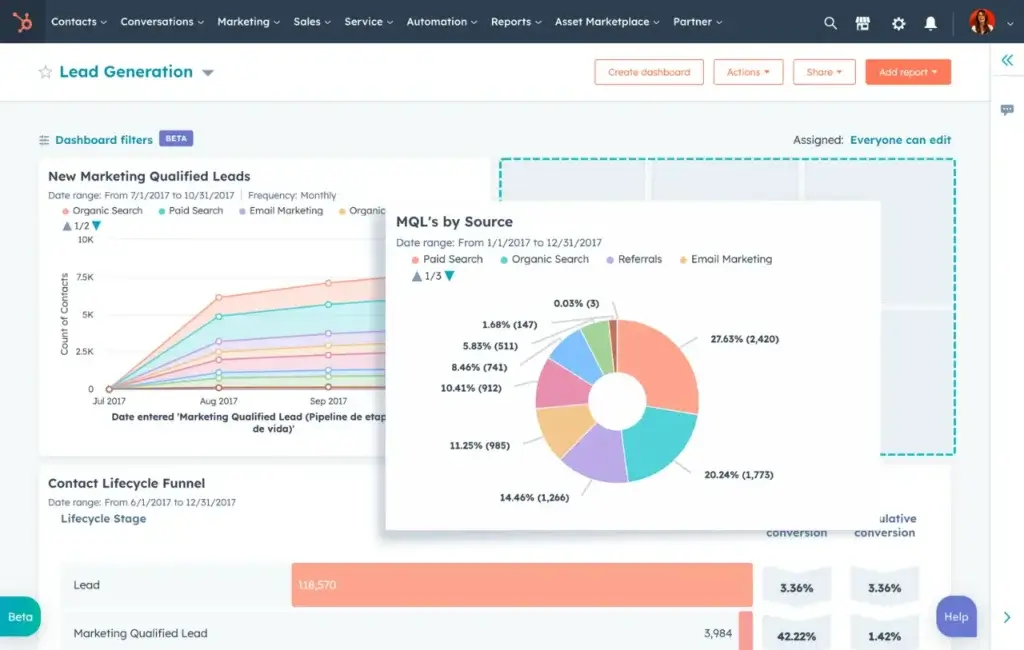
HubSpot CRM is a good option if you want a free CRM to manage prospects, email activity, landing pages, meetings, and basic pipelines. It is especially useful for advisors who are focused on marketing, lead generation, newsletters, webinars, or inbound traffic.
HubSpot is not an advisor-native CRM, so it is not the best choice for householding, advisor compliance workflows, or portfolio-related client records. However, it is one of the easiest CRMs to start with.
Key Features
- Free contact and company management
- Deal pipelines and task tracking
- Email tracking and templates
- Meeting scheduler
- Forms, landing pages, and marketing tools
- Large app marketplace
Pros
- Strong free CRM plan
- Excellent for marketing and prospecting
- Easy to use and quick to launch
- Scales into a larger sales and marketing platform
Cons
- Not built specifically for financial advisors
- Advanced automation can become expensive
- Compliance archiving usually requires additional tools
Pricing Overview
| Plan | Monthly Price | Best For |
| Free CRM | $0 | Basic contact, pipeline, and prospect tracking |
| Starter | Paid plans start at entry-level pricing | Small teams needing more sales and marketing tools |
| Professional | Higher monthly cost | Advanced automation and reporting |
| Enterprise | Higher-tier pricing | Larger teams needing advanced controls |
Best for: Advisors who want a free CRM for prospecting, inbound marketing, email activity, and simple pipeline tracking.
Not best for: Firms that need advisor-specific compliance workflows, household management, or financial planning integrations out of the box.
Why it ranks #6: HubSpot CRM is excellent for marketing and lead management, but it should be positioned as a prospecting CRM rather than a full advisor CRM.
Pipedrive

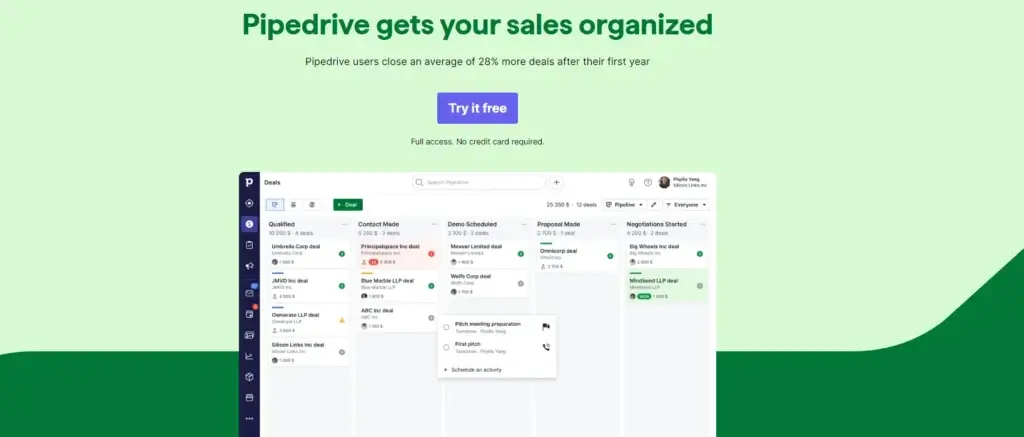
Pipedrive is a good fit if your advisory practice is focused on new client acquisition. It gives you a clean visual pipeline for tracking prospects from first contact to discovery call, proposal, onboarding, and close.
It is not a full advisor-native CRM, and it is less suitable for complex household management or compliance-heavy workflows. But for lead tracking, follow-ups, and sales activity, it is simple and effective.
Key Features
- Visual sales pipelines
- Lead and deal tracking
- Email templates and tracking
- Activity reminders and task scheduling
- Automation on higher plans
- Sales reporting and forecasting
Pros
- Excellent pipeline visibility
- Easy to use for prospect management
- Good mobile experience
- Strong fit for referral and lead follow-up
Cons
- Not built for financial advisors
- Limited compliance and householding depth
- Marketing and lead tools may require add-ons
Pricing Overview
| Plan | Monthly Price | Best For |
| Essential or entry plan | Entry-level paid pricing | Basic lead and pipeline tracking |
| Advanced or growth plan | Higher monthly cost | Email automation and workflow tools |
| Professional or premium plan | Higher monthly cost | Reporting and forecasting |
| Enterprise | Top-tier pricing | Larger teams needing permissions and support |
Best for: Advisors who rely on prospecting, referrals, seminars, webinars, or paid lead generation.
Not best for: Firms that need advisor-specific client service workflows, household management, or deep compliance support.
Why it ranks #7: Pipedrive is valuable for sales pipeline management, but it should be treated as a lead acquisition CRM rather than a complete financial advisor CRM.
Nutshell

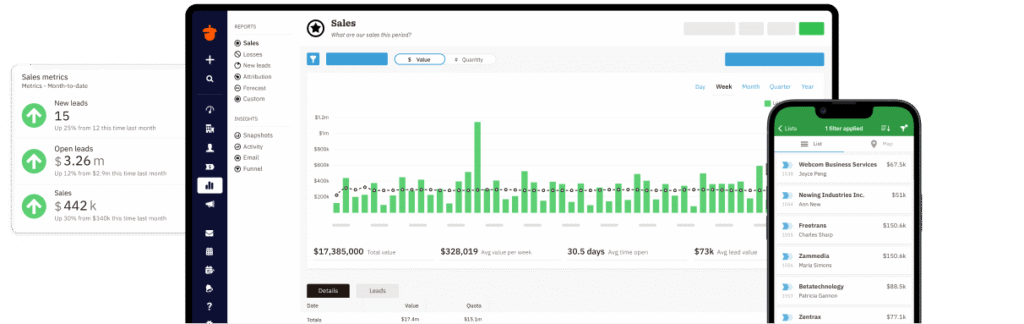
Nutshell is a straightforward CRM for teams that want contact management, pipeline tracking, reporting, automation, and email tools without a complex implementation.
It is not advisor-specific, but it can work well for smaller advisory teams that want a practical CRM for prospects, follow-ups, and team visibility.
Key Features
- Contact and pipeline management
- Email templates and sequences
- Sales automation
- Reporting dashboards
- Team collaboration tools
- Gmail and Outlook integrations
Pros
- Easy to learn and manage
- Good reporting for small teams
- Useful email and pipeline tools
- Transparent CRM structure
Cons
- Not built for advisory firms
- Limited advisor-specific integrations
- Less advanced than Salesforce or monday CRM
Pricing Overview
| Plan | Monthly Price | Best For |
| Foundation | Entry-level paid plan | Basic CRM needs |
| Growth | Higher monthly cost | Teams needing stronger pipeline tools |
| Pro | Higher monthly cost | Automation and reporting |
| Business or Enterprise | Higher-tier pricing | Advanced controls, reporting, and team needs |
Best for: Smaller advisory teams that want a simple, practical CRM for contacts, deals, and follow-ups.
Not best for: Firms that need advisor-native workflows, household management, or compliance-first functionality.
Why it ranks #8: Nutshell is easy to use and reliable, but it is better positioned as a simple CRM for small advisory teams than a specialized financial advisor CRM.
How to Choose the Best CRM for Your Advisory Practice
The best CRM for financial advisors depends on your firm size, service model, compliance requirements, budget, and technology stack.
Start With Your Main Use Case
Ask yourself what problem you are solving first:
- Do you need better client service workflows?
- Do you need stronger compliance documentation?
- Do you need to manage referrals and new leads?
- Do you need advisor-specific household management?
- Do you need team dashboards and operational workflows?
If your priority is advisor-specific relationship management, start with Wealthbox or Redtail. If your priority is flexible operations, consider monday CRM. If your priority is budget, consider Zoho CRM.
Consider Your Firm Size
Solo advisors usually need simplicity and affordability. Small RIAs usually need workflows, integrations, and client service structure. Larger firms need permissions, reporting, supervision, and implementation support.
Do not buy the most advanced system just because it has more features. Buy the system your team will actually use.
Review Compliance Requirements Before Buying
Before choosing a CRM, speak with your compliance officer or consultant. Confirm whether the system supports your firm’s recordkeeping, communication, retention, and supervision requirements.
This is especially important if you are affiliated with a broker-dealer or operate under strict internal policies.
Check Your Integrations
List your current technology stack before buying. Include email, calendar, planning, portfolio management, risk analysis, document signing, marketing, archiving, and reporting tools.
A CRM that does not integrate with your existing tools may create more manual work instead of reducing it.v
Key Features to Look for in a CRM for Financial Advisors
The best CRM software for financial advisors should fit your firm type, service model, regulatory environment, and client acquisition strategy.
Before choosing a platform, prioritize the features that support your daily workflow.
Household and Relationship Management
Financial advisors often serve households, not just individuals. Your CRM should help you connect spouses, children, trusts, business entities, beneficiaries, referral sources, and professional contacts.
This is especially important for estate planning, retirement planning, wealth transfer, and family office relationships.
Client Review Workflows
Look for workflows that support recurring client service tasks, such as annual reviews, quarterly check-ins, portfolio review meetings, tax-season reminders, and onboarding sequences.
The best systems let you standardize these workflows so every client receives a consistent experience.
Compliance Logs and Audit Trails
Your CRM should make it easy to document client communication, meeting notes, task completion, data changes, and approvals.
For regulated advisory firms, look for permission controls, activity history, retention features, and integrations with compliant email or text archiving tools.
Email, Calendar, and Communication Sync
A strong advisor CRM should connect with Gmail, Outlook, Microsoft 365, Google Calendar, and your daily communication tools.
This reduces manual data entry and gives your team better visibility into client interactions.
Integrations With Advisor Technology
Financial advisors often use a connected stack of tools. Your CRM should integrate with platforms for financial planning, portfolio management, risk analysis, document signing, marketing, and communication archiving.
Examples include planning tools, portfolio platforms, DocuSign, Microsoft 365, Google Workspace, Mailchimp, Smarsh, Global Relay, Orion, Black Diamond, Tamarac, and similar advisor technology tools.
Automation and Task Management
Automation can save hours every week. You can create automated reminders, onboarding checklists, lead follow-up tasks, review meeting workflows, and internal assignments.
The goal is not to remove the human side of advice. The goal is to make sure the human side happens consistently.
Security and Permissions
Financial advisors handle sensitive client information. Your CRM should support role-based permissions, multi-factor authentication, secure access controls, data backups, and clear user management.
For larger teams, permission controls are especially important because not every employee should access every client record.

Compliance Features Financial Advisors Should Look For in a CRM
Compliance is one of the biggest differences between a general CRM and CRM software for financial advisors.
A CRM can help you organize records, document client interactions, assign internal tasks, and create better operational discipline. However, you should not assume a CRM is fully FINRA or SEC compliant just because it stores notes or emails.
Important Compliance Capabilities
When evaluating a CRM, look for:
- Activity logs and audit history
- Role-based permissions
- Secure data storage
- Email and text archiving integrations
- Document retention workflows
- Supervisory review capabilities
- Exportable records
- Multi-factor authentication
Why Activity Logs Are Not Enough
Many CRMs can log notes, emails, and tasks. That is helpful, but it is not the same as compliant record retention.
If you are a registered investment advisor, broker-dealer representative, or part of a regulated firm, your compliance team should verify whether the CRM supports your firm’s specific recordkeeping, supervision, archiving, and retention obligations.
CRM and Communication Archiving
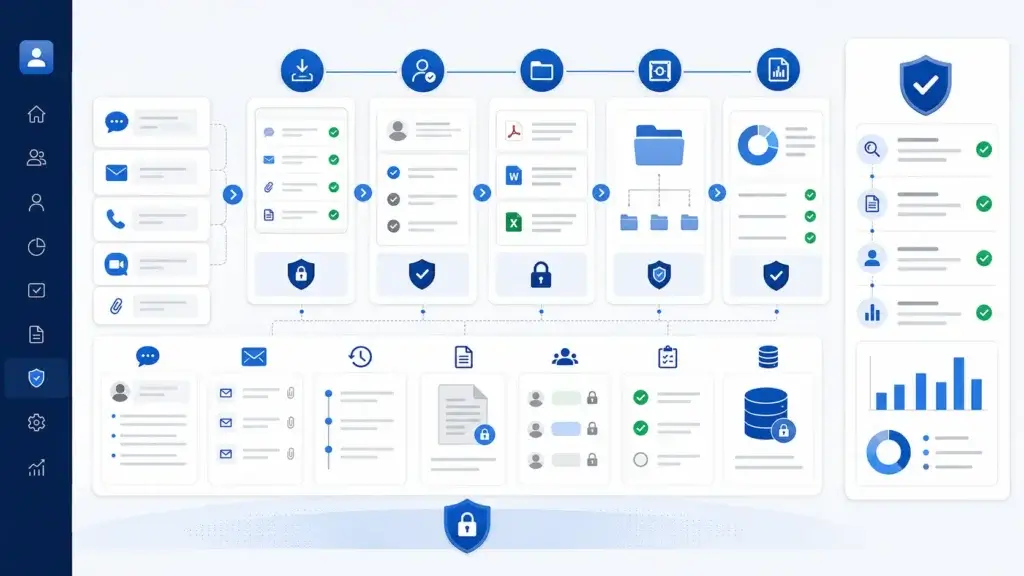
Many advisory firms use separate archiving tools for email, text messages, social media, and other communication channels. Your CRM should either support those tools directly or fit into your compliance technology stack.
Before buying, ask each vendor how they support exports, record retention, audit trails, integrations, and permission controls.
CRM for RIAs vs Broker-Dealers: What’s Different?
Not every advisory firm needs the same CRM. A solo financial planner has different needs than a broker-dealer, RIA, or enterprise wealth management firm.
| Firm Type | CRM Priorities | Best-Fit CRM Options |
| Solo advisor | Ease of use, affordability, reminders, simple contact management | Zoho CRM, HubSpot CRM, Wealthbox |
| Independent RIA | Householding, workflows, compliance notes, integrations | Wealthbox, Redtail CRM |
| Broker-dealer affiliated advisor | Supervision, retention, approval workflows, archiving | Redtail CRM, Salesforce Financial Services Cloud |
| Growing advisory firm | Team collaboration, automation, reporting, permissions | Wealthbox, monday CRM, Redtail CRM |
| Enterprise wealth management firm | Advanced security, custom data models, complex integrations | Salesforce Financial Services Cloud |
If you are a smaller RIA, Wealthbox or Redtail will usually be more practical than Salesforce. If you are running a large financial services organization, Salesforce becomes more compelling because of its enterprise infrastructure.
Important Integrations for Financial Advisor CRM Software
Your CRM should not operate in isolation. It should connect with the tools you already use to plan, communicate, invest, document, and report.
Email, Calendar, and Productivity Tools
Look for integrations with Gmail, Outlook, Microsoft 365, Google Calendar, Zoom, Slack, and similar productivity tools.
These integrations reduce manual updates and help your team see client activity in one place.
Financial Planning and Portfolio Tools
Advisors should also consider how the CRM connects with financial planning tools, portfolio management systems, risk tools, custodians, and reporting platforms.
Examples may include eMoney, MoneyGuidePro, RightCapital, Orion, Black Diamond, Tamarac, Nitrogen, and similar advisor technology platforms.
Archiving and Compliance Tools
For regulated communication, check whether the CRM works with archiving platforms such as Smarsh, Global Relay, Archive Intel, or your firm’s approved compliance system.
This is especially important if you communicate with clients through email, SMS, chat, or social media.

How AI Is Changing CRM Software for Financial Advisors
AI is becoming more common in CRM software. For financial advisors, the most useful AI features are not gimmicks. They are practical tools that reduce administrative work.
AI can help with:
- Meeting summaries
- Follow-up email drafts
- Lead prioritization
- Client segmentation
- Workflow recommendations
- Data cleanup
- Activity summaries
However, financial advisors should be careful with AI-generated notes, recommendations, and client communications. If AI content becomes part of a client record, your firm may need to review how that content is stored, supervised, and approved.
AI can save time, but it should support advisor judgment, not replace it.
CRM Implementation Tips for Financial Advisors
Choosing a CRM is only the first step. The real value comes from implementation, adoption, and process design.
Clean Your Data Before Importing
Before migrating contacts, clean duplicate records, outdated fields, missing emails, inconsistent tags, and old pipeline stages.
Bad data makes even the best CRM harder to use.
Start With Core Workflows
Do not try to build every automation on day one. Start with the workflows that matter most:
- New client onboarding
- Annual review scheduling
- Referral follow-up
- Prospect pipeline tracking
- Client service requests
Once your team adopts the basics, you can add more advanced automations.
Train Your Team Around Real Scenarios
CRM training should not only show buttons and menus. It should show how your firm handles real client scenarios.
Train your team on how to add notes, assign tasks, document calls, update pipelines, and complete client review workflows.
Define Ownership
Every CRM needs an owner. Assign someone to manage fields, workflows, dashboards, data hygiene, and user adoption.
Without ownership, the CRM can slowly become messy and unreliable.
Review Usage Monthly
After implementation, review CRM usage every month. Look at missing data, overdue tasks, abandoned workflows, duplicate records, and unused features.
Your CRM should evolve with your advisory practice.
Conclusion
The best CRM for financial advisors depends on how your firm works.
If you want the best overall advisor-specific CRM, Wealthbox is my top recommendation. It offers the strongest mix of usability, advisor workflows, collaboration, and relationship management.
If your firm is more compliance-focused, Redtail CRM is one of the strongest options because it is deeply established in the advisory industry.
If you want full customization, monday CRM is a strong choice. If you need enterprise infrastructure, Salesforce Financial Services Cloud is the better fit. If you need a lower-cost option, Zoho CRM gives you strong value.
The most important step is to choose a CRM that matches your actual advisory workflow. A good CRM should help you serve clients more consistently, document important activity, automate follow-ups, and grow your practice without adding unnecessary complexity.
FAQ
What is the best CRM for financial advisors?
The best CRM for financial advisors is usually Wealthbox for most independent advisors and RIAs because it is advisor-specific, easy to use, and built around client relationships, workflows, and collaboration. Redtail CRM is also a strong choice for compliance-focused advisory firms.
What is the best CRM for RIAs?
Wealthbox and Redtail CRM are two of the best CRM options for RIAs. Wealthbox is better if you want a modern and user-friendly experience, while Redtail is better if you want an established advisor CRM with strong compliance-oriented workflows.
Is Wealthbox better than Redtail?
Wealthbox is often better for advisors who want a modern interface, simple adoption, and strong collaboration. Redtail may be better for firms that prioritize compliance workflows, industry adoption, and a more established advisor CRM ecosystem.
Is HubSpot CRM good for financial advisors?
HubSpot CRM can be good for financial advisors who need a free CRM for prospecting, marketing, email tracking, and simple pipeline management. However, it is not advisor-specific, so it may not be enough for household management, compliance workflows, or deeper financial planning integrations.
Can financial advisors use a free CRM?
Yes, financial advisors can use a free CRM, especially when starting out. HubSpot CRM and Zoho CRM both offer free options. However, free CRMs may not include the advisor-specific workflows, compliance support, integrations, and permissions that growing advisory firms need.
What CRM features matter most for financial advisors?
The most important CRM features for financial advisors include contact and household management, client review workflows, task automation, compliance notes, audit history, email and calendar sync, permission controls, reporting, and integrations with advisor technology tools.
Can a CRM help with FINRA compliance?
A CRM can help with compliance by organizing client records, logging activity, assigning supervisory tasks, and supporting documentation workflows. However, a CRM is not automatically FINRA compliant. Your firm should verify record retention, archiving, supervision, and communication requirements before choosing a platform.
What is the best CRM for solo financial advisors?
The best CRM for solo financial advisors depends on budget and workflow needs. Wealthbox is a strong advisor-specific option, Zoho CRM is a good budget option, and HubSpot CRM can work well if you want a free CRM for basic prospect and contact management.
How much does CRM software for financial advisors cost?
CRM software for financial advisors can range from free plans to more than $300 per user per month. Advisor-specific CRMs like Wealthbox and Redtail often start around the mid-priced range, while enterprise platforms like Salesforce Financial Services Cloud cost significantly more.
What integrations should a financial advisor CRM have?
A financial advisor CRM should integrate with email, calendar, financial planning software, portfolio management tools, document signing platforms, marketing tools, and compliant communication archiving systems. The right integrations depend on your firm’s technology stack and compliance requirements.