

Introduction
Choosing the right CRM for a financial advisory firm is not only about storing client names, phone numbers, and email addresses. You need a system that helps your team manage relationships, document client activity, track opportunities, assign tasks, prepare for meetings, and keep follow-ups moving without creating unnecessary admin work.
Wealthbox CRM is built specifically for financial advisors and wealth management firms. It combines contact management, household management, workflows, opportunity tracking, email integration, task management, reporting, integrations, and AI-powered meeting support in a clean advisor-focused workspace.
In this Wealthbox CRM review, you’ll get a clear look at its features, pricing, user experience, security, strengths, limitations, best-fit use cases, and how it compares with alternatives like Redtail, Salesforce Financial Services Cloud, HubSpot, and Practifi.
Wealthbox is a strong choice if you want a modern CRM that your advisory team can actually adopt. It is especially useful for RIAs, financial planners, wealth managers, family offices, broker-dealers, banks, credit unions, and growing advisory firms that want better collaboration around client relationships.
It is less ideal if you need a low-cost generic CRM, a free forever plan, advanced enterprise customization, native portfolio accounting, or deep marketing automation without relying on integrations.
Quick Summary
Wealthbox CRM is best understood as an advisor-focused relationship management platform. It helps financial advisory firms centralize client data, manage households, coordinate internal work, track opportunities, run repeatable workflows, and improve meeting preparation through AI-powered notes.
| Category | Wealthbox CRM Review Summary |
| Best For | Financial advisors, RIAs, wealth management firms, family offices, and advisor teams |
| Starting Price | $59/user/month for Basic |
| Free Plan | No free forever plan, but a 14-day free trial is available |
| Core Strength | Advisor-focused CRM with contacts, households, workflows, opportunities, tasks, email, meetings, and integrations |
| Main Limitation | AI Notetaker is an add-on, and advanced features require higher-tier plans |
| Best Alternative | Redtail for advisor CRM familiarity, Salesforce for enterprise customization, HubSpot for marketing-led CRM |
For advisory firms that want a CRM designed around client relationships rather than generic sales pipelines, Wealthbox has a clear advantage. It is not trying to be every piece of your wealthtech stack. It is trying to become the central relationship workspace your team uses every day.
Key Features
Wealthbox CRM Software Specification
Wealthbox’s feature set is centered on advisor-client relationships. Instead of forcing advisors to adapt a generic sales CRM, Wealthbox organizes work around contacts, households, activities, tasks, meetings, workflows, opportunities, and firm-wide collaboration.
Contact and household management
Contact management is the foundation of Wealthbox CRM. You can organize clients, prospects, family members, centers of influence, professional partners, and household relationships in one system.
This is important for advisory firms because client relationships are rarely one-dimensional. You may need to understand spouses, beneficiaries, trustees, attorneys, accountants, children, business partners, and referral relationships.
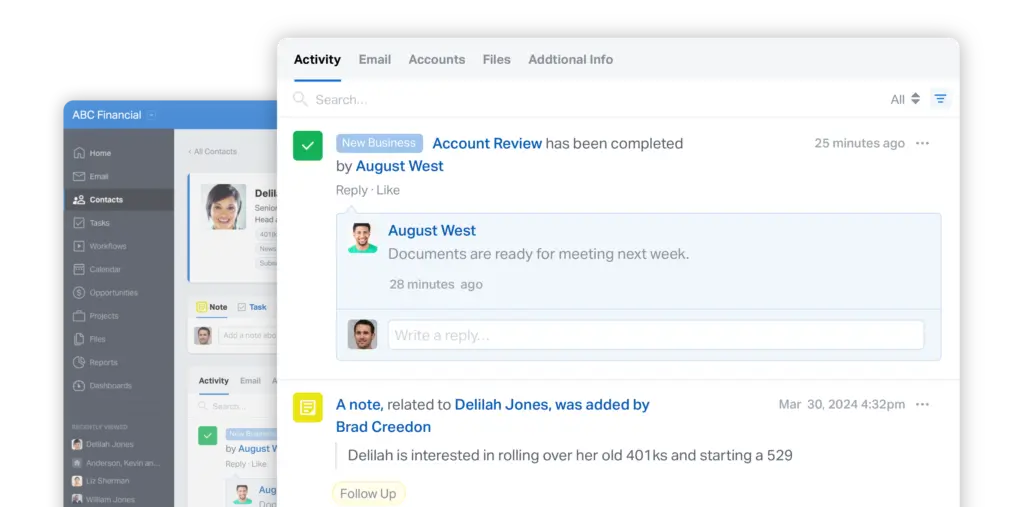
Wealthbox helps you keep this context connected to the client record so advisors and support staff can see notes, files, emails, tasks, workflows, and activity history without searching through disconnected tools.
- Contact records centralize client and prospect information.
- Households help advisors manage family relationships.
- Tags and segmentation support list building and organization.
- Notes and activity streams keep relationship history visible.
- Custom fields help firms track firm-specific client data.
The practical benefit is better context. When your team opens a client record, they can understand the relationship history, current tasks, recent communication, and next steps without relying on memory or scattered notes.
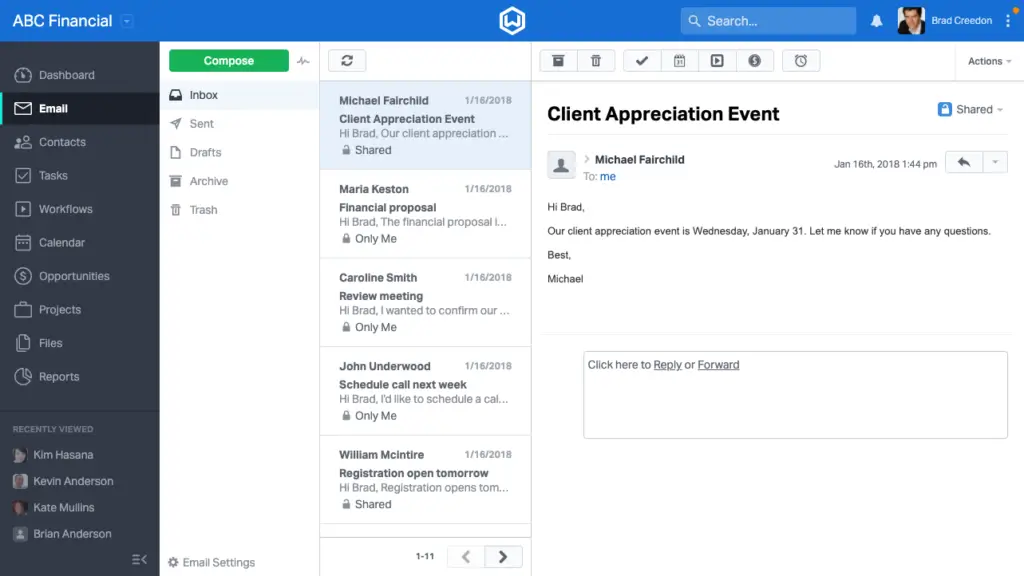
Wealthbox Mail and email sync
Wealthbox Mail connects your email with the CRM so client communication can stay linked to contact records. This is one of the most useful productivity features because email is still one of the primary channels advisors use to communicate with clients and prospects.
With email connected to CRM activity, your team gets better visibility into relationship history. Advisors can review recent messages, track communication patterns, and avoid duplicate or poorly timed follow-ups.
This is especially helpful in firms where multiple team members support the same client. A service advisor, lead advisor, client service associate, and operations team member can all see important context inside the client record.
Tasks and team collaboration
Wealthbox includes task management features that help teams assign work, set due dates, track responsibility, and connect tasks to client records. This makes it easier to manage follow-ups, service requests, meeting preparation, onboarding steps, and internal admin work.
For advisory firms, task management is not only about productivity. It also supports accountability. If a client asks for a beneficiary update, account transfer, planning document, meeting follow-up, or RMD-related action, your team needs a clear owner and deadline.
Wealthbox helps firms reduce the risk of missed follow-ups by keeping tasks connected to the client relationship rather than buried in personal inboxes or separate to-do apps.
Workflows and process templates
Workflows are one of Wealthbox’s most valuable features for advisory firms. They help you standardize repeatable processes such as client onboarding, annual reviews, account opening, prospect follow-up, service requests, compliance tasks, and meeting follow-up.
A strong workflow system matters because advisory firms often perform the same processes many times. Without templates, every team member may handle onboarding or review preparation differently. That creates inconsistency, missed steps, and unnecessary operational risk.
With Wealthbox workflows, you can build repeatable process templates, assign steps to team members, track progress, and make sure work moves through a consistent sequence.
Opportunity management
Wealthbox includes opportunity management for tracking prospects, referrals, assets under management opportunities, new planning engagements, insurance opportunities, rollover opportunities, and business development pipelines.
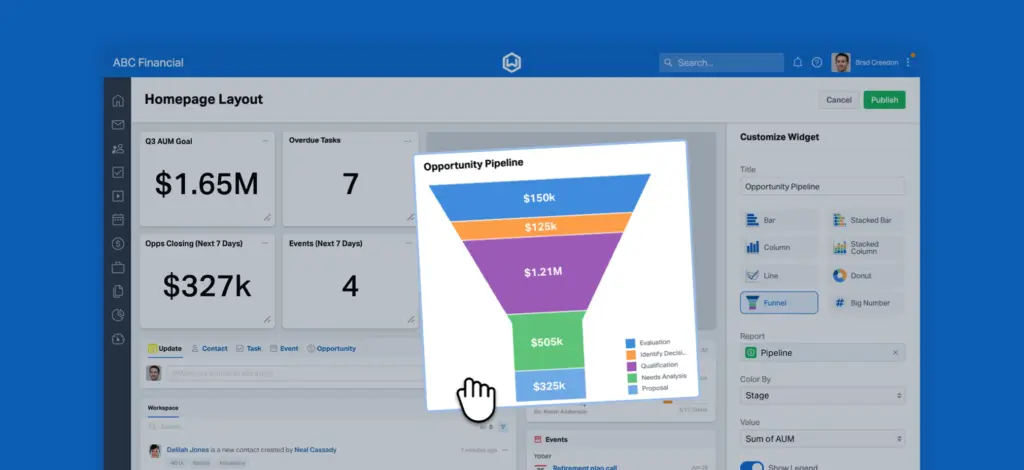
The opportunity view is helpful because it gives advisors and firm leaders visibility into growth activity. You can track where prospects are in the process, what the estimated value may be, and which opportunities need attention.
Compared with generic sales CRMs, Wealthbox feels more natural for advisors because it connects opportunities with household relationships and client records. This makes it easier to move from prospecting to onboarding without losing important context.
AI Notetaker for meetings
One of Wealthbox’s most important recent updates is its AI Notetaker. The feature is designed to help advisors prepare for meetings, summarize conversations, capture action items, and organize follow-ups directly in Wealthbox.
This is a meaningful addition because meetings are central to financial advice. A good advisor CRM should not only store data after the fact. It should help your team turn meeting conversations into structured next steps.
The AI Notetaker can be valuable for review meetings, prospect discovery calls, planning conversations, client onboarding sessions, and internal team meetings. However, it is priced as an add-on, so firms should calculate the total cost before assuming it is included in every plan.
Calendar and meeting management
Wealthbox includes calendar functionality that helps advisors manage meetings, activities, and schedules alongside client records. Calendar visibility is useful when your firm wants a better connection between meetings, prep work, follow-up tasks, and CRM documentation.
For teams, this can reduce friction around scheduling and accountability. When a client meeting is connected to the CRM, it is easier to prepare, assign follow-up actions, and keep the relationship record complete.
Reports, dashboards, and firm visibility
Wealthbox includes reporting features that help firms analyze CRM data, activities, opportunities, tasks, workflows, and team performance. Reporting becomes more valuable as your team grows because leaders need visibility into pipeline movement, client service work, and operational bottlenecks.
Higher-tier plans provide more advanced reporting capabilities, including dynamic and customized reporting options. This makes Wealthbox more useful for firms that want to move beyond basic CRM activity tracking.
Still, firms that need advanced business intelligence across portfolio data, billing, marketing attribution, and revenue operations may need to combine Wealthbox with other tools or exports.
Integrations and API
Wealthbox has a large integrations ecosystem designed around financial advisory technology. This is one of its biggest strengths because most advisory firms use several systems across planning, portfolio management, risk analysis, forms, compliance, marketing, document management, scheduling, and client communication.
Common integration categories include:
- Financial planning: Planning and advice platforms for client strategy work.
- Portfolio management: Tools that help connect investment and client data.
- Risk analysis: Risk tolerance and behavioral assessment tools.
- Marketing tools: Email marketing, lead generation, and seminar tools.
- Communication tools: Email, SMS, voice, and meeting-related platforms.
- Automation: Zapier, API access, and workflow automation tools.
This gives Wealthbox strong flexibility for firms that want CRM at the center of their wealthtech stack. Still, you should test your most important integrations before committing, especially if your firm depends on two-way sync, custom fields, or complex workflows.
Mobile access and ease of use
Wealthbox is known for being easier to use than many advisor CRMs. The interface is clean, modern, and less intimidating than enterprise systems that often require heavy configuration before teams can work effectively.
This matters because CRM adoption is one of the biggest challenges in advisory firms. If advisors and support staff do not update the CRM, the system quickly becomes unreliable.
Wealthbox’s simpler experience makes it easier for teams to log notes, assign tasks, manage opportunities, check activity history, and keep client records updated. That usability is one of the main reasons firms consider Wealthbox over more complex systems.
Pros and Cons
Advantages and Limitations of Using Wealthbox CRM
Positive
✅ Built specifically for financial advisors
✅ Clean and easy-to-adopt interface
✅ Strong contact and household management
✅ Useful workflows for repeatable firm processes
✅ Large advisor-focused integration ecosystem
Negative
❌ No free forever plan
❌ AI Notetaker costs extra
❌ Advanced reporting requires higher plans
❌ Not a full portfolio management system
❌ Less customizable than Salesforce for enterprises
Wealthbox has a clear advantage when your firm wants a CRM that feels built for advisory work. Its limitations become more visible when you need heavy enterprise customization, advanced marketing automation, or a single system that replaces your entire wealthtech stack.
Advantages of Wealthbox CRM
- Advisor-specific design: Wealthbox is built for financial advisors, not generic sales teams.
- Strong client context: Contacts, households, notes, tasks, emails, and activity history stay connected.
- Workflow consistency: Teams can standardize onboarding, annual reviews, and service processes.
- Modern user experience: The interface is clean and easier to adopt than many legacy CRMs.
- Useful AI support: AI Notetaker helps summarize meetings and organize follow-ups.
- Large integration ecosystem: Wealthbox connects with many tools used by advisory firms.
Limitations of Wealthbox CRM
- No free forever plan: Wealthbox offers a free trial, but ongoing use requires a paid plan.
- AI costs extra: AI Notetaker is a paid add-on rather than a standard included feature.
- Plan limits matter: Pipelines, file storage, custom roles, workspaces, and reporting differ by tier.
- Not a portfolio system: Wealthbox manages relationships, but it does not replace portfolio accounting.
- Marketing is integration-led: Advanced marketing automation may require connected tools.
- Enterprise customization is lighter: Salesforce is stronger for deeply customized enterprise CRM architecture.
User Experience
User Interface and Experience
User experience is one of Wealthbox’s biggest strengths. Many CRMs fail inside advisory firms because they feel like compliance-heavy admin systems rather than tools advisors want to use. Wealthbox is more approachable, which can improve adoption across advisors, associates, operations, and client service teams.
Setup and onboarding
Wealthbox is generally easier to set up than heavily customized enterprise CRMs. You can start with contacts, households, tasks, workflows, opportunities, email sync, and integrations without needing a long implementation project.
That said, a clean setup still matters. Before importing data, firms should remove duplicates, standardize naming conventions, decide how households should be structured, define required fields, and agree on workflow ownership.
This step is especially important if you are moving from spreadsheets, Outlook notes, Redtail, Salesforce, or a legacy advisor CRM. Poor migration quality can weaken reporting and make the new CRM feel messy from the start.
Daily advisor workflow
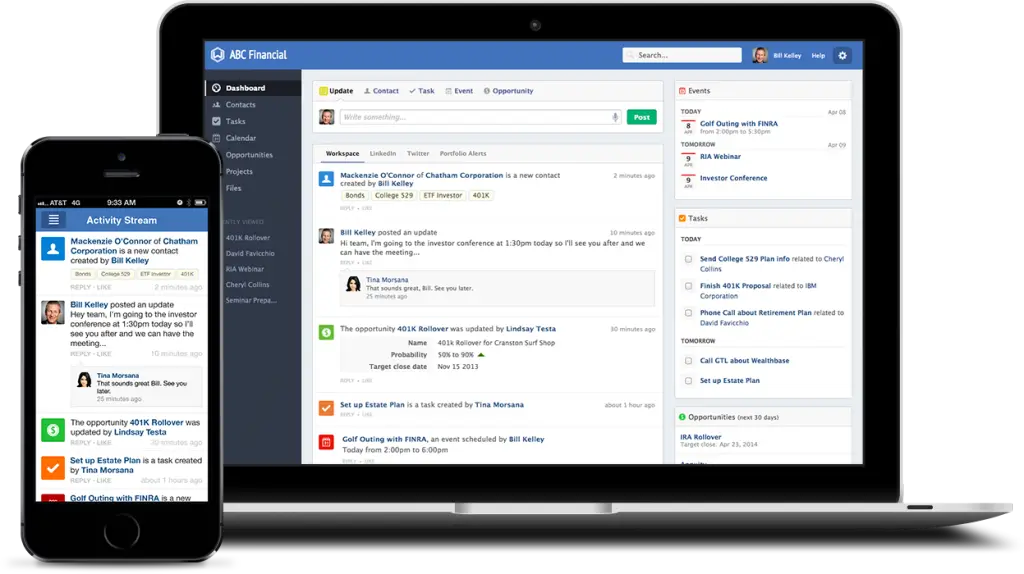
In daily use, Wealthbox works best as the home base for relationship management. Advisors can review client activity, check upcoming tasks, document meetings, manage opportunities, and collaborate with support staff.
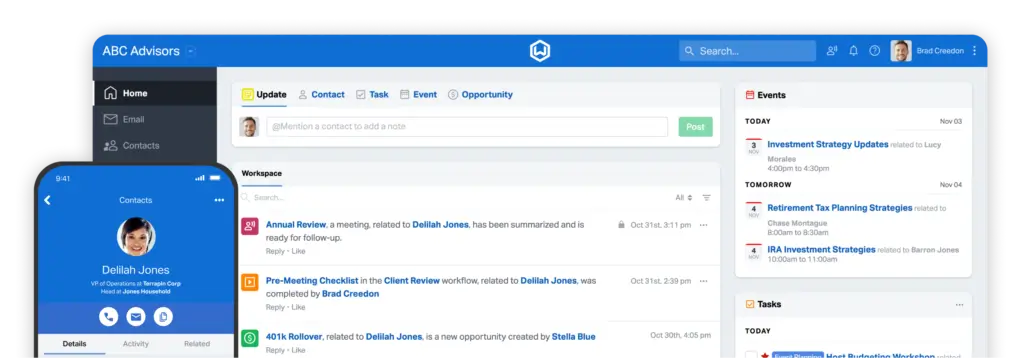
The activity stream is especially useful because it gives your team a chronological view of what has happened with a contact or household. This helps reduce internal confusion and makes handoffs easier.
For example, if a client service associate completes an account form task, the lead advisor can see that update in context. If an advisor logs a meeting note, the operations team can follow up on assigned tasks without waiting for a separate email.
Team collaboration
Wealthbox is built for collaboration. Tasks, notes, workflows, comments, and contact records help team members stay aligned around client work.
This is valuable for multi-advisor firms where different roles support the same household. Instead of keeping relationship knowledge inside personal inboxes, Wealthbox gives your team a shared client workspace.
The benefit becomes more obvious as the firm grows. A solo advisor may mainly need simple contact and task management. A team of advisors, paraplanners, associates, and operations staff needs a system that supports coordination at scale.
Mobile and remote work
Wealthbox can support advisors who need to access CRM information away from their desk. This is helpful for firms with remote teams, hybrid service models, in-person client meetings, and advisors who need quick access to relationship context between appointments.
For many firms, the biggest mobile value is not complex CRM administration. It is the ability to quickly check client notes, see upcoming tasks, review contact details, and stay aware of follow-up responsibilities.
Customer support experience
Wealthbox provides support resources, demos, help documentation, and migration options. Smaller firms can often get started quickly, while larger firms should spend more time evaluating onboarding, training, data migration, permissions, integrations, and workflow design.
If your firm has multiple offices, many advisors, or strict operational processes, you should use the trial and demo process to confirm how Wealthbox will support your rollout.
Business size fit
Wealthbox CRM for Different Business Sizes
Wealthbox can support firms of different sizes, but the value changes based on team structure, service model, and operational complexity.
Wealthbox CRM for solo advisors
Solo advisors can use Wealthbox to manage contacts, tasks, notes, opportunities, emails, meetings, and follow-ups in one place. It is useful if you want a CRM that feels purpose-built for financial advice rather than a generic contact database.
The main consideration is cost. Wealthbox is not the cheapest CRM option, so solo advisors should be clear on whether they need advisor-specific workflows and integrations enough to justify the monthly price.
Wealthbox CRM for small advisory firms
Small advisory firms are likely one of Wealthbox’s strongest fit categories. These firms usually need better organization than spreadsheets or basic contact tools can provide, but they may not want the complexity of Salesforce.
Wealthbox gives these teams a practical balance: enough structure for client management, workflows, and collaboration, without overwhelming users with enterprise-level configuration.
Wealthbox CRM for growing RIAs
Growing RIAs can benefit from Wealthbox because workflows, opportunities, households, reports, and integrations become more important as the firm expands.
At this stage, the CRM is not just a place to store client records. It becomes a system for operational consistency, client service delivery, advisor productivity, and growth management.
Firms in this category should pay close attention to plan selection. Premier or Enterprise may be more relevant if you need more pipelines, workspaces, reporting flexibility, dashboards, storage, and administrative control.
Wealthbox CRM for larger firms and enterprise teams
Wealthbox offers Enterprise options for larger firms that need customizable, multi-workspace CRM capabilities. This makes it more relevant for banks, credit unions, broker-dealers, OSJs, larger RIAs, trust companies, and multi-team firms.
However, larger firms should compare Wealthbox carefully against Salesforce Financial Services Cloud, Practifi, and other enterprise advisor platforms. Wealthbox may be easier to adopt, but Salesforce and enterprise-focused systems may offer deeper customization for complex data models and governance needs.
Who should not use Wealthbox CRM?
Wealthbox is not the right CRM for every business. You may want to consider another option if you need:
- A free forever CRM plan.
- A low-cost CRM for general sales activity.
- Advanced native marketing automation.
- Deep enterprise customization and custom objects.
- Built-in portfolio accounting or performance reporting.
- A CRM for industries outside financial advisory work.
Wealthbox is best when your priority is advisor-client relationship management. If your main need is broad sales automation, marketing automation, or complex enterprise CRM architecture, another platform may be a better fit.
Pricing and Plans
How much does Wealthbox CRM cost?
Wealthbox uses a tiered pricing model. The current public pricing includes Basic, Pro, Premier, and Enterprise plans. A 14-day free trial is available, and the AI Notetaker is listed as a separate add-on.
The pricing below reflects the current public plan structure, but you should always check the official Wealthbox pricing page before purchasing because software pricing, plan limits, and add-ons can change.
| Plan | Basic | Pro | Premier | Enterprise |
| Price | $59/user/month | $75/user/month | $99/user/month | Custom pricing |
| Best For | Solo advisors and simple CRM use | Advisory teams needing core CRM features | Power users and growing firms | Larger firms needing multi-workspace flexibility |
| Contact and Household Management | Included | Included | Included | Included |
| Opportunity Pipelines | 1 pipeline | 3 pipelines | 5 pipelines | Unlimited |
| File Storage | 2 GB | 5 GB | 10 GB | 20 GB |
| Workspaces | 1 | 1 | 5 | Unlimited |
| AI Notetaker | Add-on | Add-on | Add-on | Add-on |
| Best Value | Best for basic CRM needs | Best for most small advisor teams | Best for growing firms needing more flexibility | Best for complex multi-team firms |
Basic plan
The Basic plan is the entry-level Wealthbox plan. It is best for solo advisors, small practices, or firms that mainly need contact management, tasks, opportunities, calendar, email, and simple CRM organization.
The main limitation is scalability. If you need more pipelines, more roles, more storage, more advanced reporting, or more workspace flexibility, you may outgrow Basic quickly.
Pro plan
The Pro plan is likely the better starting point for many advisory teams because it expands the platform beyond the starter CRM use case. It is more relevant for firms that need more roles, more pipelines, and stronger day-to-day collaboration.
If your firm has multiple team members supporting clients, Pro may be easier to justify because CRM value grows when the whole team uses the system consistently.
Premier plan
Premier is designed for power users and growing firms that need more advanced functionality. It is a better fit when your firm wants more pipelines, more workspaces, more file storage, richer reporting, and more customization than the lower tiers provide.
For firms that treat CRM as an operational hub rather than a simple contact database, Premier may provide the best balance of functionality and price.
Enterprise plan
The Enterprise plan is built for larger organizations that need customizable, multi-workspace CRM capabilities. This can include larger RIAs, broker-dealers, OSJs, banks, credit unions, family offices, and enterprise advisory networks.
Enterprise pricing is custom, so you will need to contact Wealthbox directly. During evaluation, ask about implementation support, migration, permissions, data governance, integrations, reporting needs, and workspace structure.
AI Notetaker add-on
Wealthbox lists AI Notetaker as an add-on at a special introductory rate of $49/user/month. This can materially increase your total cost if you want every advisor or team member to use it.
Before adding AI Notetaker across the firm, consider who actually needs it. Advisors who lead client meetings may get the most value, while some operations or admin users may not need the add-on.
Add-ons and total cost considerations
When evaluating Wealthbox pricing, do not look only at the base subscription. Your total cost may also depend on AI Notetaker seats, data migration, integrations, training, implementation support, and connected tools for marketing, compliance, portfolio management, or planning.
The best approach is to calculate the full annual cost based on your team size, required plan, AI needs, and essential integrations.
Security and Compliance
Protection for Your Data
Security is a major part of any CRM decision for advisory firms because your CRM stores client records, personal information, meeting notes, household relationships, tasks, opportunity details, and internal activity history.
Wealthbox says its application is hosted on Amazon Web Services and that it applies security controls across multiple layers. For advisory firms, this provides a stronger foundation than using disconnected spreadsheets, personal inboxes, or informal notes to manage client relationships.
Cloud hosting and infrastructure
Wealthbox hosts its application using AWS infrastructure. AWS data centers are widely used across enterprise software, and Wealthbox states that it applies security controls from the physical layer to the application layer.
This is important because advisory firms need confidence that CRM data is hosted in a professional cloud environment with mature infrastructure controls.
Application security
Wealthbox states that it follows application development best practices and uses vulnerability scanning to help protect its codebase. This matters because CRM platforms are high-value systems that contain sensitive business and client data.
Firms should still conduct their own vendor review. Ask about data retention, access controls, authentication options, breach notification procedures, audit support, and data export rights.
GDPR and privacy
Wealthbox has publicly stated support for GDPR compliance. This is important if your advisory firm handles personal data from clients, prospects, or contacts in the European Union.
However, GDPR compliance is not only a vendor issue. Your firm still needs proper consent practices, data processing agreements, internal access rules, retention policies, and procedures for data subject requests.
Compliance considerations for financial advisors
Wealthbox can help advisory firms organize workflows, tasks, documentation, and relationship history, but CRM software does not replace your compliance program.
If your firm is subject to SEC, FINRA, state, broker-dealer, or internal supervisory requirements, confirm how Wealthbox fits your recordkeeping, supervision, archiving, communication review, and audit processes.
This is especially important for email, meeting notes, SMS, client documentation, and third-party integrations.
Setup
Setup, Migration, and Integrations
Adopting Wealthbox is not only about buying CRM software. The real success depends on clean data, team adoption, consistent workflows, clear ownership, and a well-designed integration strategy.
Migration planning
Before moving to Wealthbox, review your existing CRM or spreadsheet data carefully. Many firms carry years of outdated records, duplicate contacts, inconsistent household structures, old prospect lists, and incomplete notes.
Clean your data before importing it. This will make Wealthbox easier to use, improve reporting accuracy, and reduce frustration for advisors and support teams.
Workflow setup
Workflow design should be one of your first implementation priorities. Start by documenting the processes your firm repeats most often, such as prospect onboarding, new client onboarding, annual reviews, money movement requests, service issues, and meeting follow-up.
Then build workflow templates that reflect how your team actually works. Avoid creating too many workflows at once. It is better to launch a few useful workflows than to overwhelm the team with excessive process design.
Integration strategy
Wealthbox works best when it connects with the rest of your wealthtech stack. Before implementation, decide which tools need to sync with CRM and what data should move between systems.
Common integration priorities include financial planning, portfolio management, risk analysis, email marketing, scheduling, document management, client onboarding, compliance, and communication tools.
Test your most important integrations during the trial or demo stage. Pay attention to whether the sync is one-way or two-way, which fields are supported, how often data updates, and what happens when records conflict.
Best Practices for Implementing Wealthbox CRM
To get the most value from Wealthbox, treat implementation as an operational improvement project, not only a software setup task.
- Clean your data before migration: Remove duplicates, outdated contacts, invalid emails, and inconsistent household records.
- Define your household structure: Decide how spouses, beneficiaries, business owners, and related parties should be organized.
- Standardize workflows: Build templates for onboarding, reviews, service requests, and meeting follow-up.
- Train users by role: Advisors, client service staff, and operations teams should learn the workflows they use daily.
- Connect essential integrations first: Prioritize the tools that directly impact client service and advisor productivity.
- Review CRM usage weekly: Monitor tasks, stale opportunities, incomplete records, and workflow bottlenecks.
The biggest mistake is treating Wealthbox like a passive database. It becomes much more valuable when your firm uses it as the shared operating layer for client relationships.
Comparisons
Wealthbox CRM Alternatives and Competitors
Wealthbox is one of the strongest CRM options for financial advisors, but it is not the only option. The best alternative depends on your firm’s size, budget, tech stack, customization needs, and growth strategy.
| CRM | Best For | Where It Beats Wealthbox | Where Wealthbox Is Stronger |
| Redtail CRM | Advisor firms wanting a familiar industry CRM | Long-standing advisor adoption and industry familiarity | Cleaner interface and more modern user experience |
| Salesforce Financial Services Cloud | Large firms needing enterprise customization | Custom objects, automation, reporting, and enterprise ecosystem | Easier setup and better fit for teams wanting simplicity |
| HubSpot CRM | Marketing-led firms and growth teams | Marketing automation, website tools, forms, and lead nurturing | Advisor-specific workflows, households, and wealthtech integrations |
| Practifi | Large advisory firms and enterprise wealth management teams | Enterprise operating model and deep practice management | Simpler interface and easier adoption for many smaller teams |
Wealthbox CRM vs Redtail CRM
Redtail is one of the most familiar CRMs in the financial advisor market. Many firms choose it because it has been widely used in the industry and supports advisor-specific workflows.
Wealthbox is usually stronger if your firm wants a more modern interface, cleaner collaboration experience, and a CRM that feels easier to adopt. Redtail may still be attractive for firms that already use it heavily or prefer its established advisor ecosystem.
You can also read our CRM for financial advisors guide for a wider advisor CRM comparison.
Wealthbox CRM vs Salesforce Financial Services Cloud
Salesforce Financial Services Cloud is more powerful for enterprise customization, complex automation, custom objects, analytics, and large-scale CRM architecture.
Wealthbox is better if your firm wants faster implementation, easier adoption, and a CRM built specifically for advisor teams without the overhead of a large Salesforce build.
For many small and mid-sized advisory firms, Wealthbox will feel more practical. For large institutions with dedicated administrators and complex workflows, Salesforce may offer more long-term flexibility.
Wealthbox CRM vs HubSpot
HubSpot is better if your firm is heavily focused on inbound marketing, landing pages, forms, email campaigns, lead scoring, and marketing-to-sales handoff.
Wealthbox is better if your main need is advisor relationship management. It is more focused on households, client records, workflows, meetings, and integrations built around financial advisory work.
For broader CRM context, you can also review our HubSpot CRM review and best CRM software guide.
Wealthbox CRM vs Practifi
Practifi is often a better fit for larger advisory firms that need enterprise-grade practice management, complex role structures, deep workflow design, and more advanced operational oversight.
Wealthbox is often easier for smaller and mid-sized advisory firms that want strong CRM functionality without a heavy implementation burden.
If your firm is scaling aggressively and needs deeper enterprise process management, Practifi may deserve a close look. If adoption, simplicity, and advisor usability are your main priorities, Wealthbox may be the better fit.
Conclusion
Final thoughts
Wealthbox CRM is one of the best CRM options for financial advisors that want a modern, collaborative, and advisor-focused platform. Its biggest advantage is that it organizes client relationships, households, tasks, workflows, opportunities, meetings, emails, reports, and integrations in a workspace that feels natural for advisory firms.
That makes Wealthbox especially useful for RIAs, wealth managers, financial planners, family offices, broker-dealers, OSJs, banks, credit unions, and growing advisory teams that want stronger client service coordination.
The platform is not perfect for every firm. You may find Wealthbox limiting if you need a free CRM, deep native marketing automation, advanced portfolio management, or highly customized enterprise architecture. The AI Notetaker also adds cost, so you should evaluate whether it is worth the extra monthly investment for your team.
Still, if your priority is an advisor-specific CRM that is easier to use than many legacy and enterprise systems, Wealthbox deserves serious consideration. It is best for firms that want better relationship visibility, cleaner workflows, stronger collaboration, and a CRM your team can realistically use every day.
Frequently Asked Questions
Have more questions?
What is Wealthbox CRM used for?
Wealthbox CRM is used by financial advisors and wealth management firms to manage client relationships, households, tasks, workflows, opportunities, meetings, emails, and team collaboration from one advisor-focused workspace.
Is Wealthbox CRM only for financial advisors?
Wealthbox is primarily built for financial advisors, RIAs, wealth managers, family offices, broker-dealers, banks, credit unions, and other firms in the financial advice ecosystem. Generic sales teams may prefer a broader CRM like HubSpot, Pipedrive, or Salesforce.
How much does Wealthbox CRM cost?
Wealthbox pricing starts at $59 per user per month for the Basic plan. The Pro plan is $75 per user per month, Premier is $99 per user per month, and Enterprise uses custom pricing. Wealthbox also offers a 14-day free trial.
Does Wealthbox CRM have a free plan?
No. Wealthbox does not offer a free forever plan. It offers a 14-day free trial so your firm can test the CRM before subscribing to a paid plan.
What is Wealthbox AI Notetaker?
Wealthbox AI Notetaker is an add-on meeting assistant that helps advisors capture meeting summaries, action items, and follow-ups directly inside Wealthbox. It is useful for client reviews, discovery meetings, planning conversations, and internal team meetings.
Is Wealthbox CRM good for RIAs?
Yes. Wealthbox is a strong CRM option for RIAs because it supports contact management, household management, workflows, tasks, opportunities, email sync, advisor-specific integrations, and team collaboration.
Does Wealthbox CRM integrate with advisor tools?
Yes. Wealthbox offers a large advisor-focused integration ecosystem, including tools for financial planning, portfolio management, risk analysis, marketing, communication, compliance, scheduling, forms, and automation.
Is Wealthbox better than Redtail CRM?
Wealthbox is often better if your firm wants a cleaner, more modern interface and easier adoption. Redtail may be better for firms that already rely on its familiar advisor CRM environment or prefer its existing workflows.
Is Wealthbox better than Salesforce Financial Services Cloud?
Wealthbox is usually better for advisory firms that want easier setup and a simpler advisor-focused CRM. Salesforce Financial Services Cloud is better for large enterprises that need deep customization, advanced automation, and complex CRM architecture.
Is Wealthbox CRM secure?
Wealthbox states that it hosts its application on AWS and applies security controls across physical, infrastructure, and application layers. Advisory firms should still conduct their own vendor review to confirm security, privacy, compliance, and recordkeeping requirements.








