Introduction
Choosing the right CRM is not only about storing contacts. It is about building a connected system that helps you manage leads, deals, projects, customers, invoices, and follow-ups without spreading your team across too many tools.
That is where this ClearCRM Review becomes interesting. ClearCRM positions itself as an all-in-one CRM for small businesses, agencies, startups, and service teams that want sales, marketing, projects, support, billing, and automation in one workspace.
Instead of competing only as a sales pipeline tool, ClearCRM tries to replace several lightweight business apps at once. You can manage deals, create projects, send invoices, run campaigns, track tickets, and automate repetitive work from the same platform.
This approach makes ClearCRM especially relevant if you want a simpler alternative to larger CRM platforms like Salesforce, HubSpot, Zoho CRM, monday CRM, or Pipedrive. However, it also means you need to evaluate whether the platform has enough depth for your specific workflow.
In this ClearCRM Review, you’ll see what the platform does well, where it still feels limited, how pricing works, which businesses it fits best, and what alternatives are worth comparing before you decide.
What Is ClearCRM?
ClearCRM is a cloud-based customer relationship management platform built for small and growing teams. It combines CRM, sales pipeline management, project tracking, customer support, marketing automation, billing, and AI-assisted productivity tools.
The platform is designed around a simple idea: your customer journey should not be scattered across disconnected apps. A lead can enter the CRM, move through a sales pipeline, become a project, generate an invoice, and later create a support ticket, all inside the same system.
This makes ClearCRM useful for businesses where the same team often handles sales, delivery, support, and billing. For example, agencies, consultants, SaaS startups, local service businesses, and small sales teams can use it to manage the full customer lifecycle in one place.
If you only need a dedicated sales CRM, ClearCRM may feel broader than necessary. But if you want one central platform for customer operations, it offers a practical and affordable way to reduce tool sprawl.
| Review Category | ClearCRM Assessment |
| Best For | Small businesses, agencies, startups, consultants, and service teams |
| Main Strength | Combines CRM, projects, marketing, support, billing, and automation |
| Starting Price | Starter Team starts at $19/month monthly, or $9/month billed yearly |
| Best Plan for Most Teams | Growth Team, because it adds marketing automation, funnels, templates, surveys, and AI tools |
| Main Limitation | Smaller ecosystem and fewer enterprise-level capabilities than mature CRM platforms |
| Good Alternative To | Pipedrive, monday CRM, HubSpot CRM, Zoho CRM, and lightweight project management tools |
Key Features
Sales, Marketing, Projects, Support, and Billing
ClearCRM’s biggest advantage is the number of business functions it brings together. You can use it as a CRM, sales pipeline, project tracker, email marketing system, support desk, and billing workspace.
That does not mean it replaces every advanced tool in each category. Instead, it gives small teams enough functionality to manage customer work from one shared system.
Sales Pipeline and Deal Tracking
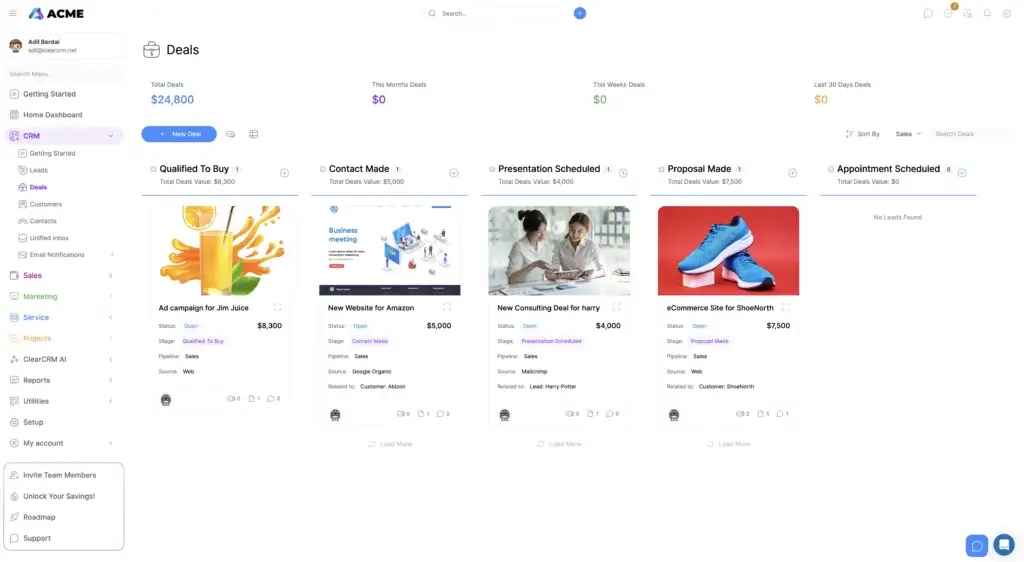
ClearCRM includes visual sales pipelines with customizable stages, deal cards, activity tracking, and drag-and-drop movement. This is one of the most familiar parts of the platform if you have used tools like Pipedrive, monday CRM, or Zoho CRM.
You can create pipelines for different services, teams, or sales processes. Each deal can include value, stage, source, related contact, assigned owner, tasks, files, and communication history.
This makes it easier to see where deals stand, what needs attention, and which opportunities are likely to move forward. For small sales teams, the visual pipeline gives enough structure without creating the complexity of an enterprise CRM.
Lead Capture and Contact Management
ClearCRM helps you capture and organize leads through forms, landing pages, email activity, and manual imports. Once a lead enters the system, you can assign it to a team member, add tags, track the source, and move it through your pipeline.
The contact record acts as a central history of customer activity. You can store notes, tasks, documents, invoices, projects, and tickets under the same customer profile.
This is useful when your sales, delivery, and support teams need shared context. Instead of asking what happened with a client, anyone with access can review the customer timeline and continue the conversation with more confidence.
Marketing Automation and Email Sequences
ClearCRM includes marketing automation features in its higher plans, especially the Growth Team and Scale Team plans. You can create email sequences, use email templates, track opens and clicks, build landing pages, and segment audiences.
This makes ClearCRM a better fit for teams that want simple lead nurturing without paying for a full marketing automation platform. For example, you can capture a lead from a landing page, send a follow-up email, assign a sales task, and update the lead status automatically.
However, if your marketing team needs deep attribution, advanced A/B testing, multi-touch campaign reporting, or enterprise-level segmentation, dedicated tools like HubSpot may still be stronger.
Project and Task Management
ClearCRM includes project and task management tools, which is one of the reasons it stands out from sales-only CRMs. You can create projects, assign tasks, set deadlines, use Kanban-style workflows, and track progress from the same platform where you manage deals.
This is especially helpful for agencies, consultants, service providers, and implementation teams. When a deal closes, you can turn the work into a project instead of moving the customer into a separate project management tool.
For basic to moderate project management, this can save time and improve handoff between sales and delivery. For complex project planning with dependencies, resource management, Gantt charts, and advanced workload views, a dedicated project management tool may still be better.
Billing, Quotes, Invoices, and E-Signature
ClearCRM also includes billing tools, which makes it useful for teams that sell services or recurring work. You can create estimates, send proposals, generate invoices, and manage payment-related records from the customer profile.
This is a practical advantage if you currently use one tool for CRM, another for proposals, another for invoicing, and another for project tracking. ClearCRM’s value is not only feature count, it is workflow continuity.
The Scale Team plan adds stronger document and e-signature capabilities, making it more relevant for teams that manage contracts, approvals, or formal client agreements.
Customer Support and Ticketing
ClearCRM includes customer support tools such as tickets, customer chat, internal notes, and a knowledge base. This gives small teams a simple way to track customer issues without buying a separate help desk platform.
Tickets can be connected to customers, projects, and internal activity, giving support teams useful context. This is valuable if your business needs to support clients after the sale but does not need a full ITSM or enterprise help desk system.
If your support operation requires advanced SLAs, multi-brand help centers, deep reporting, advanced routing, or large-scale agent management, tools like Zendesk, Freshdesk, or HubSpot Service Hub may offer more depth.
AI Tools and Workflow Automation
ClearCRM promotes AI tools for writing, automation, and productivity. These features can help with drafting emails, responding to tickets, generating content, and reducing manual admin work.
The important detail is that some AI capabilities may require your own AI key or credits, depending on the feature and plan. Because AI features are changing quickly, you should confirm what is included before choosing a plan based mainly on AI.
ClearCRM also includes triggered emails, notifications, task automation, lead routing, templates, and workflow tools. This helps your team reduce repeated manual steps, especially in sales follow-ups, onboarding, and service delivery.
Reporting and Dashboards
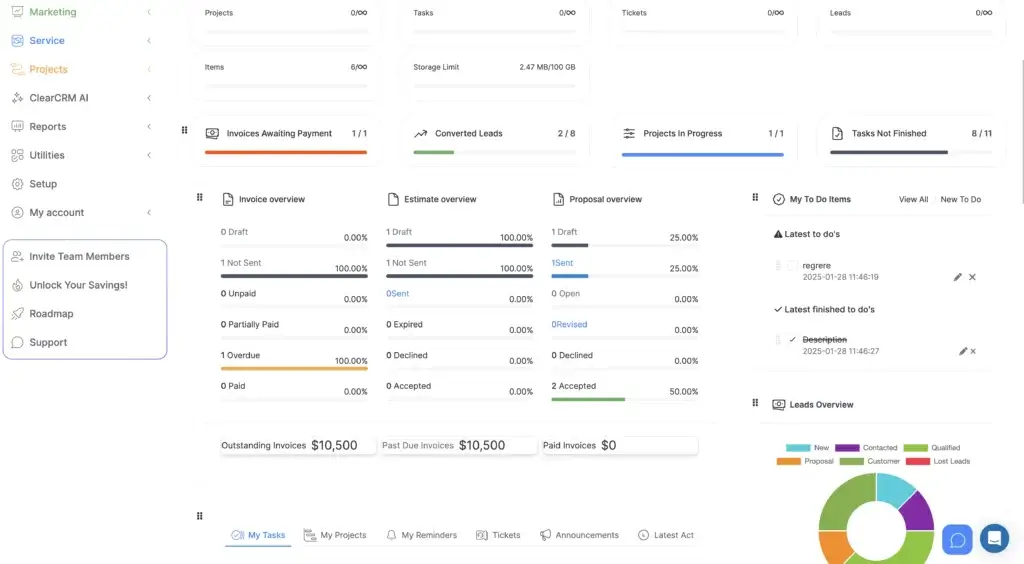
ClearCRM provides dashboards for deals, tasks, invoices, projects, tickets, and lead activity. These reports help you monitor what is happening across your business without jumping between tools.
The reporting experience is useful for small teams that want visibility into pipeline value, overdue work, open invoices, unfinished tasks, and lead status. However, some advanced reporting features may be limited or still developing, so larger teams should test reporting carefully before migrating.
Pros and Cons
ClearCRM Strengths and Limitations
A good ClearCRM Review should not only list features. It should help you understand where the platform creates real value and where you may need a stronger alternative.
ClearCRM is strongest when you want one practical workspace for customer operations. It is weaker when you need a mature ecosystem, advanced enterprise controls, or deep specialization in one category.
Positive
✅ All-in-one CRM workspace
✅ Strong value for small teams
✅ Visual sales and project pipelines
✅ Built-in billing and support tools
✅ Useful marketing automation
Negative
❌ Smaller integration ecosystem
❌ Some advanced features may be roadmap items
❌ Less mature than major CRMs
❌ Not ideal for complex enterprises
❌ AI details should be verified by plan
ClearCRM Pros
- All-in-one platform – Manage CRM, sales, projects, billing, support, and marketing in one workspace.
- Good value for teams – Team-based pricing can be cost-effective compared with per-seat CRMs.
- Visual pipeline experience – Deal, task, and project workflows are easy to scan and update.
- Useful for service businesses – Quotes, projects, invoices, tickets, and customer history stay connected.
- Marketing automation included – Growth and Scale plans add sequences, templates, funnels, surveys, and AI tools.
- Built-in collaboration – Team chat, notes, task assignments, and customer context reduce internal confusion.
- White-label branding – Useful for agencies and service providers that want a branded client-facing experience.
ClearCRM Cons
- Smaller ecosystem – It does not yet have the same app marketplace depth as HubSpot or Salesforce.
- Some features need verification – Advanced reporting, workflow, and AI capabilities may vary by plan or rollout stage.
- Less enterprise depth – Complex governance, advanced customization, and large-scale operations may need a more mature CRM.
- Potential overlap – If you already use strong tools for marketing, projects, billing, and support, ClearCRM may duplicate parts of your stack.
- Reporting may be basic for larger teams – Small teams will likely find it useful, but advanced revenue analytics may require stronger tools.
User Experience
Ease of Use and Interface
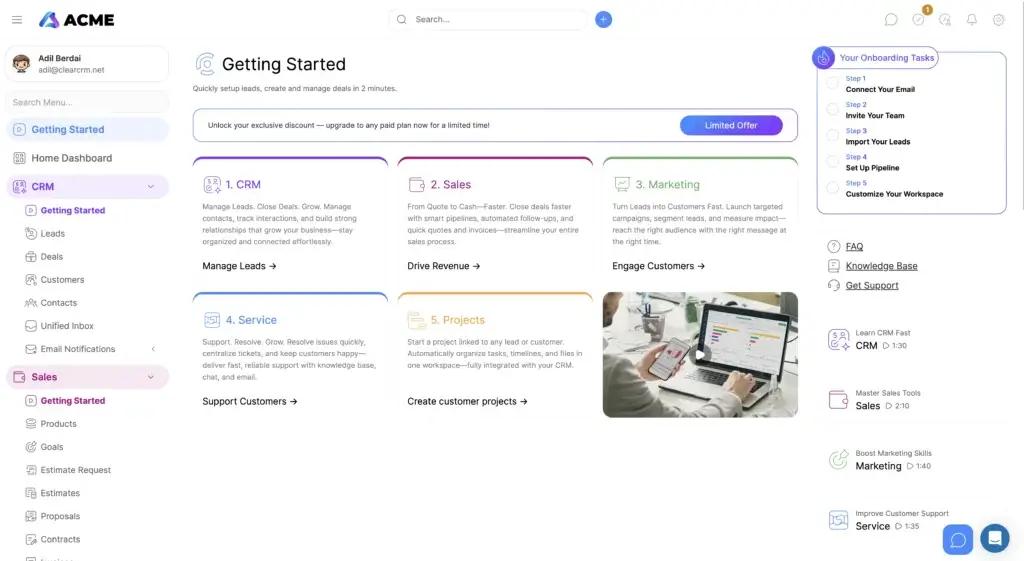
ClearCRM’s interface is built around simplicity. The left-side navigation makes it easy to move between CRM, Sales, Marketing, Service, Projects, Reports, Utilities, and Settings.
The dashboard brings together operational information that usually lives in separate systems. You can see invoices awaiting payment, converted leads, projects in progress, unfinished tasks, proposal status, and lead charts from one place.
This makes the platform approachable for teams that do not want a long CRM implementation. You can start by importing contacts, creating pipelines, setting up forms, and customizing the dashboard around your daily work.
The pipeline layout is especially easy to understand. Deal cards show value, stage, source, related customer or lead, and quick activity indicators. This helps sales teams see the health of the pipeline without opening every record.
The main usability limitation is that the platform covers many areas. If your team only needs a basic contact manager, the number of modules may feel like more than you need. If you want a central business workspace, the breadth becomes a strength.
Pricing and Plans
How Much Does ClearCRM Cost?
ClearCRM pricing is one of the most important parts of this review because the platform now emphasizes team-based pricing rather than a typical per-user model.
That means the price is presented around team capacity, not only individual seats. This can make ClearCRM attractive for small teams that would otherwise pay separately for every user across CRM, project management, invoicing, support, and marketing tools.
Pricing can change due to promotions, annual discounts, and plan updates, so you should always confirm the current details on the ClearCRM pricing page before purchasing.
| Plan | Monthly Price | Yearly Price | Best For |
| Starter Team | $19/month | $9/month, billed yearly | Small teams that need unlimited deals, contacts, leads, projects, sales pipelines, forms, custom fields, and customer chat |
| Growth Team | $39/month | $19/month, billed yearly | Growing teams that need marketing automation, email sequences, templates, landing pages, surveys, funnels, and AI tools |
| Scale Team | $79/month | $39/month, billed yearly | Larger small teams that need document management, e-signature, custom domain options, Zapier support, and more advanced operations |
Which ClearCRM Plan Should You Choose?
Choose Starter Team if you mainly need CRM basics, sales pipelines, lead capture, projects, chat, custom fields, and simple follow-up automation.
Choose Growth Team if you want ClearCRM to also support marketing campaigns. This is likely the best plan for most small businesses because it adds email sequences, landing pages, funnels, templates, surveys, and AI tools.
Choose Scale Team if your team needs document management, e-signature, stronger branding options, Zapier workflows, and more operational flexibility.
The free plan situation should be treated carefully. Some third-party listings still reference a limited free plan, but ClearCRM’s current public pricing is focused on paid team plans and trial access. If a free tier is important to your decision, confirm the latest limits directly during sign-up.
Integrations
Zapier, Email, and Workflow Connections
ClearCRM’s integration story is improving, but it is still not as mature as larger CRM ecosystems. The safest way to evaluate it is to separate public integration paths from plan-specific or use-case-specific claims.
Zapier is the most important integration path to mention because it can connect ClearCRM with thousands of apps. This gives small teams a no-code way to automate workflows between ClearCRM and tools they already use.
For example, you may be able to send form submissions into ClearCRM, create tasks from external apps, sync lead activity, or trigger follow-ups from connected tools. However, the exact workflows available depend on the apps, triggers, actions, and your Zapier plan.
ClearCRM also references popular productivity and communication tools in its broader use-case pages. Still, before you rely on a specific native connector, verify whether it is available on your selected plan.
Integration Questions to Ask Before You Commit
- Does ClearCRM connect natively with your email, calendar, forms, and payment tools?
- Is Zapier included in your plan or only available on higher tiers?
- Can you export your data cleanly if you migrate later?
- Does your team need API access for custom workflows?
- Are accounting, support, or marketing integrations deep enough for your process?
Security and Data Controls
Permissions, Access, and Compliance Questions
CRM security matters because the platform stores customer data, deal history, financial records, project details, and support conversations. ClearCRM includes practical controls such as role-based permissions, audit logs, and user access settings.
For most small teams, these features help prevent accidental access to sensitive information. You can control who can view records, update pipelines, manage financial details, or access admin-level settings.
However, if your business operates in a regulated industry, you should not rely only on general security claims. Ask ClearCRM directly about formal documentation, data residency, data processing agreements, backups, retention, SOC 2, ISO 27001, HIPAA, GDPR, CCPA, and SSO availability.
This does not mean ClearCRM is insecure. It means the right level of due diligence depends on your business risk. A small agency and a healthcare organization do not have the same CRM compliance requirements.
Alternatives
ClearCRM vs Competitors
ClearCRM is best compared with tools that overlap across CRM, sales, marketing, work management, and customer operations. It is not only a Pipedrive competitor, and it is not only a project management tool. It sits between several categories.
If you are still comparing options, you may also want to review our guides to Pipedrive, HubSpot CRM, monday CRM, Zoho CRM, and Salesforce.
| Comparison | ClearCRM | Best Alternative |
| ClearCRM vs Pipedrive | Better if you want sales, projects, billing, support, and marketing in one tool | Pipedrive is stronger if your main priority is focused sales pipeline management |
| ClearCRM vs HubSpot | More affordable for small teams that want a broad all-in-one workspace | HubSpot is stronger for inbound marketing, CRM ecosystem depth, and advanced growth teams |
| ClearCRM vs monday CRM | More CRM-specific with billing, tickets, and customer-focused workflows | monday CRM is stronger if you want customizable work management boards across departments |
| ClearCRM vs Zoho CRM | Simpler for teams that want a modern all-in-one CRM without a large app suite | Zoho CRM is stronger if you want deeper customization and access to the broader Zoho ecosystem |
| ClearCRM vs Salesforce | Much simpler and more affordable for small teams | Salesforce is stronger for enterprise customization, integrations, governance, and reporting |
When ClearCRM Is the Better Choice
ClearCRM is the better choice when your team wants one affordable system that covers the essential customer workflow from lead to invoice to support. It is especially useful when simplicity and connected operations matter more than enterprise-level customization.
When a Competitor Is the Better Choice
Choose a more mature competitor if you need a large marketplace, advanced CRM customization, deep revenue forecasting, advanced compliance, or a highly specialized tool for one function.
Best-Fit Use Cases
Who Is ClearCRM Best For?
ClearCRM is best for teams that want to simplify daily customer operations. It works well when your business needs multiple functions but does not want to manage multiple subscriptions, integrations, and disconnected databases.
Agencies and Studios
Agencies can use ClearCRM to capture leads, manage proposals, turn won deals into projects, assign delivery tasks, track invoices, and support clients after launch.
Consultants and Professional Services
Consultants can manage the full client lifecycle, from inquiry to proposal, contract, project, invoice, and follow-up. This makes ClearCRM useful for service-based businesses that depend on client relationships and repeat work.
Small Sales Teams
Sales teams can use ClearCRM to organize deal stages, track lead sources, schedule follow-ups, and automate reminders. It is a practical option if your sales process is structured but not overly complex.
SaaS Startups
Small SaaS teams can manage leads, customer onboarding, support tickets, billing workflows, and renewal tasks in one system. This is useful before the company is ready for a more expensive CRM stack.
Local Service Businesses
Local service teams can track inquiries, estimates, appointments, tasks, invoices, and customer support from a single platform. ClearCRM can replace several disconnected tools for businesses that want a simpler system.
Who Should Avoid ClearCRM?
ClearCRM is not the best fit for every business. Its strength is simplicity and breadth, not enterprise-level specialization.
You may want to choose another CRM if:
- You need a mature app marketplace with hundreds of native integrations.
- You require advanced compliance documentation before purchase.
- You need complex custom objects, territory management, or enterprise approvals.
- Your marketing team needs advanced attribution and campaign reporting.
- Your support team needs enterprise help desk features and complex SLA management.
- You already use best-in-class tools for CRM, projects, marketing, billing, and support.
Conclusion
Is ClearCRM Worth It?
ClearCRM is worth considering if you want an affordable all-in-one CRM for small business operations. It is especially strong for teams that need to manage sales, projects, billing, marketing, and customer support from one connected workspace.
The biggest reason to choose ClearCRM is not one isolated feature. It is the way those features work together. A lead can become a deal, a deal can become a project, a project can connect to invoices, and the same customer can later appear in support tickets.
That connected workflow is valuable for agencies, consultants, startups, and service businesses that do not want a heavy enterprise CRM or a disconnected stack of tools.
However, ClearCRM is still a better fit for small and growing teams than complex enterprises. If you need deep integrations, advanced customization, strong compliance documentation, or specialized analytics, you should compare it with HubSpot, Zoho CRM, Salesforce, monday CRM, or Pipedrive before making a decision.
Overall, this ClearCRM Review shows a platform with a clear purpose: helping small teams centralize customer work, reduce tool sprawl, and manage the full customer journey without overcomplicating the process.
Frequently Asked Questions
Have more questions?
What is ClearCRM used for?
ClearCRM is used to manage leads, deals, customer relationships, projects, invoices, support tickets, marketing campaigns, and workflow automation from one platform. It is designed for small businesses that want to reduce the number of separate tools they use.
Is ClearCRM good for small businesses?
Yes. ClearCRM is a strong fit for small businesses, agencies, consultants, startups, and service teams that need CRM, project management, billing, support, and basic marketing automation in one workspace.
How much does ClearCRM cost?
ClearCRM currently promotes team-based pricing. Starter Team starts at $19 per month monthly, or $9 per month billed yearly. Growth Team starts at $39 per month monthly, or $19 per month billed yearly. Scale Team starts at $79 per month monthly, or $39 per month billed yearly. Pricing may change, so check the official page before purchasing.
Does ClearCRM have a free plan?
ClearCRM may offer free access or trial options, but its current public pricing focuses mainly on paid team plans. If a free plan is important to your decision, verify the latest limits directly inside the ClearCRM sign-up flow.
Does ClearCRM include project management?
Yes. ClearCRM includes project and task management features such as Kanban-style boards, task assignments, deadlines, project tracking, templates, and collaboration tools. It is best for simple to moderately complex project workflows.
Does ClearCRM include marketing automation?
Yes. ClearCRM includes marketing automation in higher plans, especially Growth Team and Scale Team. You can use email sequences, templates, landing pages, funnels, surveys, and campaign tracking to nurture leads.
Does ClearCRM support invoicing and billing?
Yes. ClearCRM supports quotes, estimates, invoices, billing records, and customer payment workflows. This makes it useful for service businesses that want sales, delivery, and billing connected in one customer profile.
Does ClearCRM integrate with Zapier?
Yes. ClearCRM promotes Zapier workflows as an integration path, which can help connect ClearCRM with many external apps. You should still confirm which triggers, actions, and plan requirements apply to your specific workflow.
Does ClearCRM have AI features?
Yes. ClearCRM includes AI tools in higher plans for productivity, writing, automation, and customer communication. Some AI capabilities may require your own AI key or credits, so verify what is included before choosing a plan based on AI.
What are the best ClearCRM alternatives?
The best ClearCRM alternatives include Pipedrive for sales pipeline management, HubSpot CRM for inbound marketing and ecosystem depth, monday CRM for flexible work management, Zoho CRM for customization, and Salesforce for enterprise-level CRM needs.