Choosing a virtual private network (VPN) can be overwhelming. You want a service that protects your data, maintains fast speeds, and unblocks the content you love, all without emptying your wallet. PrivadoVPN aims to tick those boxes with a generous free plan and affordable premium subscriptions. This review breaks down everything you need to know, from its server network and protocols to real‑world performance, security, pricing, and support.
Server Network & Protocols
Main Capabilities of PrivadoVPN
The backbone of any VPN is its infrastructure. PrivadoVPN takes a quality‑over‑quantity approach by operating physical servers rather than cheaper virtual instances. That choice boosts security and stability but means there are fewer locations than some competitors.
Server network and locations
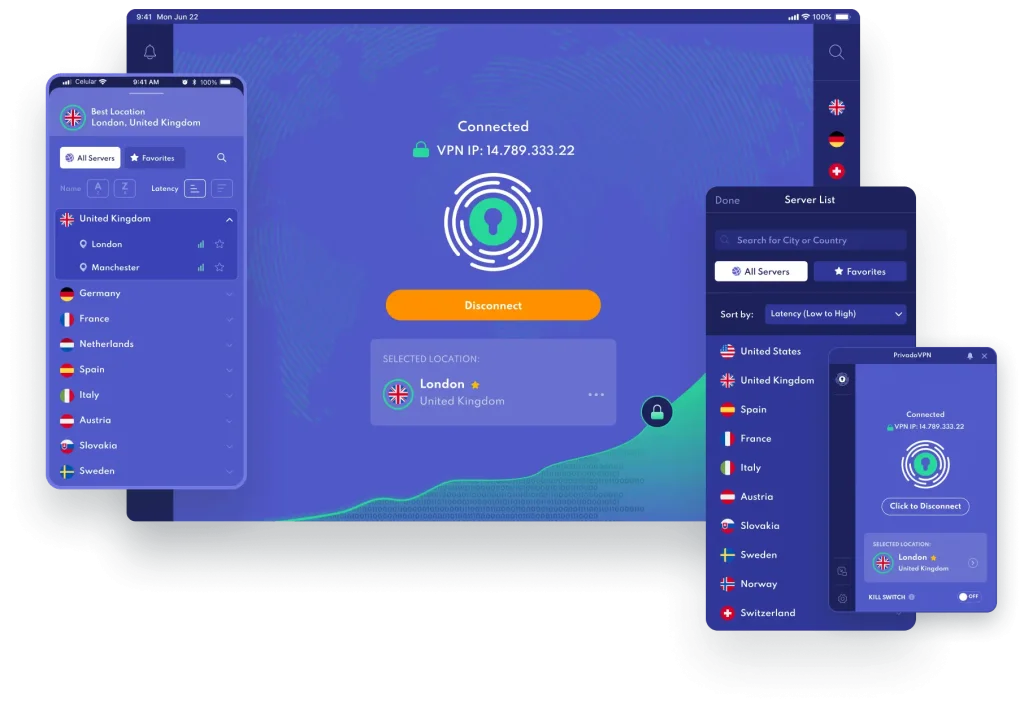
PrivadoVPN manages hundreds of servers across around 50 countries. Paid users can select from all available locations, while free‑tier users are limited to 13 server locations across the United States, Canada, France, Germany, Argentina, Brazil, India, the Netherlands, Mexico, Switzerland, and Spain. Physical servers help reduce the risk of third‑party access and often provide better speeds. However, the network’s size is modest compared to services like NordVPN or ExpressVPN, which offer thousands of nodes worldwide. The smaller pool can lead to occasional congestion or longer pings when connecting from less‑served regions.
VPN protocols and encryption
PrivadoVPN gives you a range of connection protocols:
- OpenVPN (TCP/UDP) – Open‑source and highly secure, ideal when privacy is your priority. The UDP variant is typically faster for streaming and downloading.
- WireGuard – A modern, lightweight protocol that balances speed and security. It’s often the fastest option, but it may require tweaking on macOS due to driver permissions.
- IKEv2/IPSec – Stable and battery‑friendly, well-suited for mobile devices that move between Wi‑Fi and cellular networks.
All protocols use AES‑256‑bit encryption, the same standard trusted by banks and governments. You can switch protocols within the app to optimize performance for specific tasks, OpenVPN for sensitive activities, WireGuard for streaming, or IKEv2 when on the go.
Free plan limitations
PrivadoVPN’s free tier is generous compared to many rivals. You get the same encryption and protocols as paid users and no time limit. The catch is a 10 GB monthly data allowance and only one simultaneous device connection. Once you reach your cap, the service throttles speeds and auto‑selects the nearest server (called “Lite Mode”), which slows to about 1 Mbps. The free plan is great for occasional use, like securing public Wi‑Fi or checking email, but inadequate for binge‑watching or large downloads.
Pros and Cons
Advantages and Disadvantages
Positive
✅ Affordable pricing
✅ Generous free tier
✅ Physical servers
✅ Strong security toolkit
Negative
❌ Small server network
❌ Inconsistent streaming
❌ No independent audit
❌ Limited feature set on free plan
Before diving into detailed tests, here’s a snapshot of what PrivadoVPN does well and where it falls short.
✅ Pros
- Affordable pricing: Long‑term plans drop to around $1.11 per month, making PrivadoVPN one of the cheapest premium VPNs available.
- Generous free tier: The free plan offers 10 GB of data, access to 13 server locations, and the same encryption as the paid version.
- Physical servers: Owning and operating physical hardware reduces risk compared to virtual servers and often improves stability.
- Strong security toolkit: You get AES‑256 encryption, a kill switch, split tunneling (SmartRoute), and customizable auto‑connect options.
- Decent streaming support: PrivadoVPN’s premium servers unblock Netflix and other popular platforms, though success varies by region.
- Unlimited devices on premium: Paid plans support 10 simultaneous connections—above the industry norm of five.
❌ Cons
- Small server network: Hundreds of servers across about 50 countries can cause congestion and latency, especially far from your location.
- Inconsistent streaming: While it works with Netflix and BBC iPlayer, platforms like Hulu, Disney+, and Prime Video detect the VPN on certain servers.
- No independent audit: Unlike top competitors, PrivadoVPN’s no‑logs policy hasn’t been verified by a third‑party security firm.
- Limited feature set on free plan: The 10 GB data cap and single device connection make the free version unsuitable for heavy streaming or torrenting.
- Email‑only support: PrivadoVPN advertises 24/7 support, but there is no live chat. Responses by email are prompt but still slower than real‑time assistance.
Security & Privacy
Built for Peace of Mind
Online security is the primary reason most people invest in a VPN. PrivadoVPN emphasizes privacy, but how does it stack up in practice?
Logging policy and jurisdiction
PrivadoVPN is based in Switzerland, a country known for strong data‑protection laws and independence from the Five‑Eyes and other intelligence‑sharing alliances. Its privacy policy promises not to log browsing history, DNS requests, IP addresses, or connection timestamps. The only data collected is aggregated technical information to maintain the service and track free‑tier data usage. However, PrivadoVPN has not yet undergone an independent audit, so users must rely on its word alone. If third‑party verification is important to you, consider services like NordVPN or ExpressVPN that have been audited multiple times.
Encryption and security features
All plans come with strong AES‑256‑bit encryption. Users can choose between OpenVPN, WireGuard, and IKEv2 protocols, each balancing speed and security differently. Additional security features include:
- Kill switch: Automatically cuts your internet connection if the VPN drops, preventing accidental data leaks. You can customize it to allow local network devices like printers while still blocking internet traffic.
- Split tunneling (SmartRoute): Routes selected apps outside the VPN tunnel. This is handy for bank apps or services that block VPNs. SmartRoute is available on all major platforms except Apple TV.
- Auto‑connect: PrivadoVPN can automatically connect when the app launches or when you join unsecured networks. On Windows and Android, you can pick the country or even a random server from your favorites.
Leak protection and tests
Independent testers have consistently found PrivadoVPN to be leak‑free. DNS and WebRTC leak tests confirm that your real IP address stays hidden when connected. In our research, testers saw only the VPN IP address during DNS and WebRTC checks, indicating solid leak protection. The kill switch further mitigates any risk by blocking traffic if the VPN disconnects.
Threat protection & extras
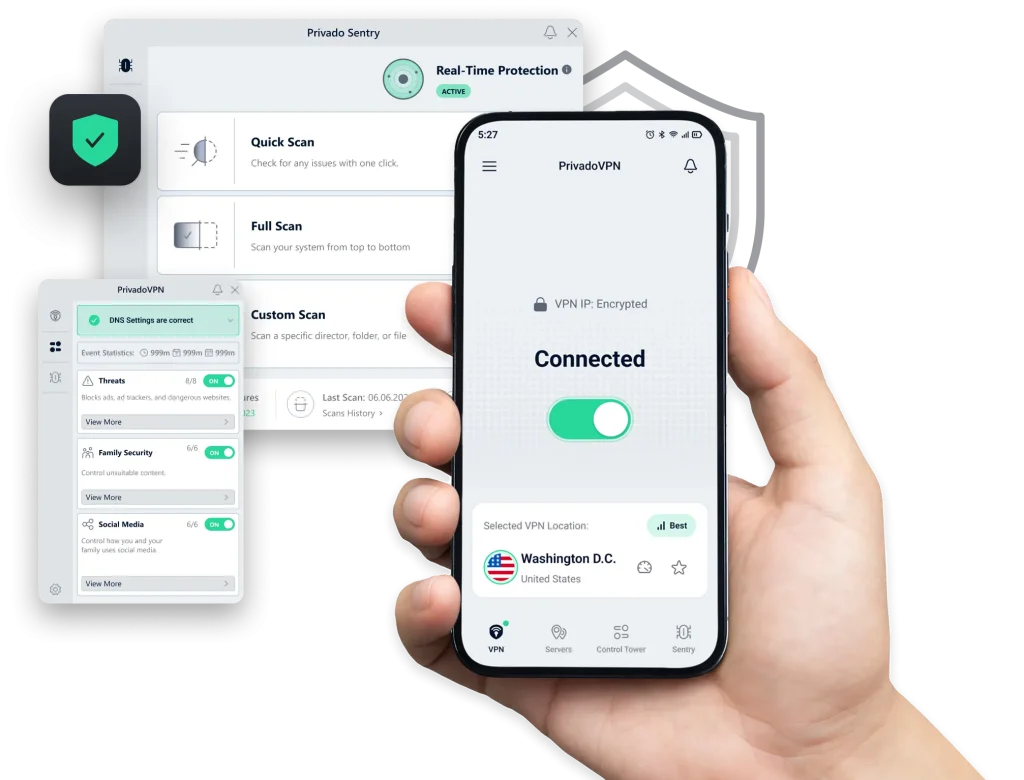
PrivadoVPN’s Control Tower is a DNS‑based blocker included with paid plans. It lets you filter websites by category, blocking malware, ads, adult content, social media platforms, or combining them for parental controls. While effective on many web pages, it doesn’t block YouTube ads or all streaming service ads. There’s also an auto‑refill option for free users who reach their 10 GB cap, though you must log in and manually refresh your allowance each month.
Real-World Performance
Speed, Stability, and Reliability
Theory is one thing; everyday performance is another. We looked at speed tests, streaming ability, torrenting, and gaming to gauge how PrivadoVPN performs.
Speed tests
No VPN is entirely speed‑free. Encrypting data and routing it through remote servers introduces overhead. The question is how much. Independent testing (referencing multiple sources) showed that PrivadoVPN drops download and upload speeds by 10 % to 40 %, depending on server distance and network conditions. On nearby servers, tests recorded roughly the same or even slightly better speeds than the baseline connection, while far‑away servers saw dips up to 44 %. Latency increased from around 6 ms without a VPN to between 112 ms and 148 ms when connected. These numbers place PrivadoVPN in the middle of the pack—fast enough for streaming and light gaming but slower than premium leaders.
Streaming tests
PrivadoVPN performs well for streaming on premium plans. Testers successfully accessed Netflix libraries from Japan, the United States, and the United Kingdom with minimal buffering. BBC iPlayer and Max also worked reliably. Disney+ and Amazon Prime Video were more finicky; some servers were blocked, requiring trial and error to find one that works. The free plan unblocks Netflix and BBC iPlayer but often fails on Hulu and Amazon Prime due to the restricted server list and data cap. If streaming is your priority, the premium plan’s unlimited data and broader server selection are essential.
Streaming compatibility
- Netflix: PrivadoVPN reliably unblocks Netflix libraries in multiple regions on premium servers. You can watch shows from Japan or the U.S. without buffering. The free plan can access Netflix, but often hits the 10 GB data limit after a few episodes.
- BBC iPlayer & Max: Both services generally work well when connected to UK servers. Quality remains high on both free and paid plans.
- Disney+ & Amazon Prime Video: Results are inconsistent. Premium servers sometimes slip past detection, but you may need to try several locations. The free plan rarely works on these platforms.
- Hulu: Access is limited; the service usually detects and blocks connections. Streaming enthusiasts may want to opt for a VPN with specialized streaming servers.
Torrenting & gaming
PrivadoVPN supports peer‑to‑peer (P2P) traffic on all servers. In torrenting tests, download speeds were comparable to unprotected connections when using nearby servers; a 700 MB file downloaded about one minute faster with PrivadoVPN active than without it. However, the free tier’s 10 GB cap and single device limit make it impractical for frequent torrenting. For gaming, latency is more critical than bandwidth. Ping times increased by 80–140 ms depending on server distance, which is tolerable for casual games but not ideal for competitive play. Gamers should look elsewhere or ensure they have a server close by.
Threat Protection & Extras
More Than Just a VPN
Beyond the basics, PrivadoVPN includes extra features that add value.
Control Tower ad and malware blocker
Available only on paid plans, Control Tower lets you block ads, trackers, malicious websites, and even social media platforms. You can choose categories like “Threats,” “Family Security” and “Social” to customize your web experience. It’s effective at blocking banner ads and stopping connections to known malware domains, but doesn’t eliminate all adverts (especially on YouTube). Parents may appreciate its ability to filter adult content, but it shouldn’t replace dedicated parental control software.
SmartRoute split tunneling
Called SmartRoute, PrivadoVPN’s split tunneling feature lets you specify which apps bypass the VPN. This is particularly useful for services that block VPN traffic (like banking apps) or for routing only sensitive applications through the secure tunnel while leaving others on your regular connection. SmartRoute is available on Windows, macOS, Android, and iOS.
Auto‑connect and startup options
PrivadoVPN can automatically connect at startup or when you join untrusted Wi‑Fi networks. On desktops, you can customize auto‑connect to pick the last used server, a recommended server, a random favorite, or a random location. This ensures you’re always protected without manually launching the app.
Pricing, Plans & Deals
PrivadoVPN Pricing 2026
PrivadoVPN keeps its pricing simple with one free plan and three paid tiers. All paid subscriptions include unlimited data, access to the full server network, 10 simultaneous connections, and a 30‑day money‑back guarantee.
Free plan
- Data allowance: 10 GB per month.
- Server locations: 13 (U.S., U.K., Canada, Germany, France, Argentina, Brazil, India, Netherlands, Mexico, Switzerland, Spain).
- Connections: 1 device at a time.
- Features: Kill switch, split tunneling, auto‑connect, and all security protocols. Control Tower (ad blocker) is not available.
Free users must manually refresh their data allowance each month via the PrivadoVPN website. After hitting the limit, the service switches to Lite Mode with very slow speeds and auto‑selected servers.
Premium plans
PrivadoVPN offers three paid options:
| Plan | Price (approx.) | Key Features |
| 1 Month | $10.99/month | Unlimited data, full server access, 10 devices, ad blocker |
| 12 Months + 3 free months | $1.33/month (billed $20) | All premium features, best balance of value and flexibility |
| 24 Months + 3 free months | $1.11/month (billed $30) | Lowest monthly cost, all features included, 30‑day money‑back guarantee |
Prices are subject to promotional changes. The yearly and two‑year plans are some of the cheapest on the market, beating many competitors on cost. Note that the monthly plan does not include the 30‑day money‑back guarantee, and refunds are unavailable once the subscription renews. Payments can be made via major credit cards, PayPal, cryptocurrencies (Bitcoin, Ethereum, Litecoin), and alternative methods like Mint, UnionPay, and Sofort.
Value comparison
PrivadoVPN’s affordability is its standout advantage. At roughly $30 for two years, it undercuts major players like NordVPN and ExpressVPN by a wide margin. However, you sacrifice server variety, third‑party audits, and live chat support. If you prioritize absolute privacy and fastest speeds over cost, investing in a more established VPN might be worthwhile. For budget‑conscious users who need solid basic protection, PrivadoVPN delivers good value.
User Interface & Support
Built for Simplicity, Backed by 24/7 Help
A VPN is only as good as the software that powers it. PrivadoVPN’s apps are clean and intuitive, although there are areas for improvement.
Apps and device compatibility
PrivadoVPN offers full applications for Windows, macOS, Android, and iOS, as well as dedicated apps for Amazon Fire TV, Android TV, and Apple TV. The user interfaces are consistent across platforms, with large connect buttons, search‑able server lists, and easy access to settings. Linux and router users must configure connections manually via OpenVPN or WireGuard configuration files; this limits features like the kill switch and split tunneling. The free version is available on all platforms but restricts you to one device.
Interface and ease of use
Installation is straightforward: download the installer, log in, and connect within minutes. The apps feature a sleek design, with a quick‑connect button on the home page and signal indicators showing server congestion. The settings menu lets you toggle the kill switch, choose a protocol, set up SmartRoute, and enable auto‑connect. One minor annoyance is the connection time: it can take 15–20 seconds for PrivadoVPN to establish a secure tunnel, longer than some competitors. Otherwise, navigation is smooth and bug‑free.
Customer support
PrivadoVPN advertises 24/7 support, but currently only provides email support. There is no live chat or phone service. In tests, email responses arrived within one hour and were detailed and helpful. The website features a searchable knowledge base and FAQs, but new users may miss the reassurance of immediate chat support. This is an area where PrivadoVPN lags behind competitors that offer round‑the‑clock live assistance.
Simultaneous connections
Premium plans allow 10 simultaneous device connections, letting you protect your phone, laptop, tablet, streaming device, and more under a single subscription. During testing, connecting multiple devices at once did not noticeably slow speeds. Free users are limited to a single connection at a time.
Conclusion
Who Should Use PrivadoVPN in 2026
PrivadoVPN positions itself as a budget‑friendly VPN that doesn’t skimp on essential security. It succeeds in many respects: AES‑256 encryption, multiple protocols, a kill switch, split tunneling, and a generous free tier. Premium plans are among the cheapest on the market and allow unlimited data with 10 simultaneous connections. The physical server infrastructure and Swiss jurisdiction inspire confidence, even though the company lacks third‑party audits.
That said, the small server network, inconsistent streaming support, and lack of live chat support mean PrivadoVPN isn’t the best choice for everyone. Power users who need the fastest speeds, specialized servers, or verified no‑logs policies might prefer more established providers like NordVPN or ExpressVPN. On the other hand, if you’re looking for a straightforward VPN that protects your data without breaking the bank, PrivadoVPN is a compelling option.
Have more questions?
Frequently Asked Questions
What is PrivadoVPN’s free plan?
PrivadoVPN’s free tier gives you 10 GB of data per month, access to 13 server locations, strong AES-256 encryption, and support for OpenVPN, WireGuard, and IKEv2 protocols. It limits you to one device and does not include the Control Tower ad blocker.
Does PrivadoVPN keep logs of my activity?
PrivadoVPN has a no-logs policy and claims not to store IP addresses, browsing history, or DNS requests. It only gathers anonymized usage statistics to maintain the service. However, the policy has not been independently audited.
Is PrivadoVPN good for streaming?
The premium version reliably unblocks Netflix, BBC iPlayer, and Max. Disney+, Amazon Prime Video, and Hulu may require trial and error, and the free plan often struggles due to limited servers and a 10 GB data cap.
Can I use PrivadoVPN for torrenting?
Yes. PrivadoVPN allows P2P traffic on all servers and delivers decent download speeds. The free plan’s data cap is restrictive for large downloads, but the premium plan is suitable for regular torrenting.
How many devices can I connect with PrivadoVPN?
Paid plans support 10 simultaneous connections across desktops, mobiles, and smart TVs. The free plan restricts you to one device.
Does PrivadoVPN work in China?
According to company support, PrivadoVPN can work in China by downloading the APK directly and using obfuscation options. Results vary, and it’s essential to stay informed about local regulations.
What payment methods does PrivadoVPN accept?
You can subscribe using major credit cards, PayPal, cryptocurrencies, Bitcoin, Ethereum, Litecoin, and alternative methods such as Mint, UnionPay, and Sofort. The monthly plan is non-refundable once activated, while annual and biennial plans include a 30-day money-back guarantee.
Does PrivadoVPN have a kill switch?
Yes. The kill switch stops your internet connection if the VPN disconnects unexpectedly, preventing unprotected traffic. You can configure it to allow local network access for devices like printers while still blocking the internet.
Is there live chat support?
No. PrivadoVPN offers 24/7 support via email and a knowledge base, but does not provide live chat. Email responses typically arrive within an hour.
Who is PrivadoVPN best for?
PrivadoVPN is ideal for users seeking strong security and reasonable speeds at a low cost. It suits casual streamers, privacy-conscious travellers, and anyone who needs a reliable VPN without premium pricing. Users who want the largest server network, consistently fast speeds, or audited no-logs policies may prefer higher-tier services.