Introduction
If you need webinar software that goes beyond basic live presentations, ClickMeeting is one of the more interesting options on the market. It combines live webinars, automated webinars, paid events, online meetings, and lead generation tools in one browser-based platform. That combination makes it relevant for educators, consultants, sales teams, marketers, and businesses that want both engagement and automation without forcing attendees to install extra software.
In this ClickMeeting review, you will get a practical look at what the platform does well, where it falls short, how its pricing works, and who it is best suited for. By the end, you should have a clear understanding of whether ClickMeeting is the right webinar software for your business, training, or lead generation workflow.
What Is ClickMeeting?
ClickMeeting is a webinar and online event platform designed for live webinars, automated webinars, paid webinars, online meetings, and larger virtual events. One of its biggest differentiators is that it is browser-based, which means hosts and attendees can join without downloading desktop software. That lower friction is important when your registration-to-attendance conversion matters.
Background and Evolution
ClickMeeting has positioned itself as a flexible webinar platform for businesses and educators rather than just a generic video conferencing tool. Over time, it has expanded beyond standard live webinar hosting into automated webinars, on-demand content, paid access events, lead capture tools, and event monetization. It now also emphasizes privacy, compliance, and European infrastructure, which makes it more appealing for organizations that are sensitive to data residency and regulatory expectations.
Target Users and Use Cases
ClickMeeting works for a broad range of audiences, but it is not equally strong for every scenario. It is especially relevant when you want webinars to be part of a repeatable business process rather than just a one-time live presentation.
- Marketers and demand generation teams – You can use ClickMeeting for lead capture, follow-up automation, paid webinars, and webinar funnels.
- Coaches, consultants, and trainers – The platform is strong for workshops, educational sessions, certificates, and recurring automated webinars.
- Small and mid-sized businesses – You get webinar hosting, branding, engagement tools, and monetization in one place.
- Educators and virtual classrooms – Edu mode, polls, whiteboards, and breakout rooms make it useful for structured online learning.
- Privacy-conscious organizations – EU-focused infrastructure and security positioning make it more attractive than some US-centric alternatives.
If your primary need is a simple internal video meeting tool, ClickMeeting may feel more specialized than necessary. But if webinars are part of your marketing, teaching, sales, or revenue model, its feature mix is much more compelling.
How Does It Work?
Key Features of ClickMeeting
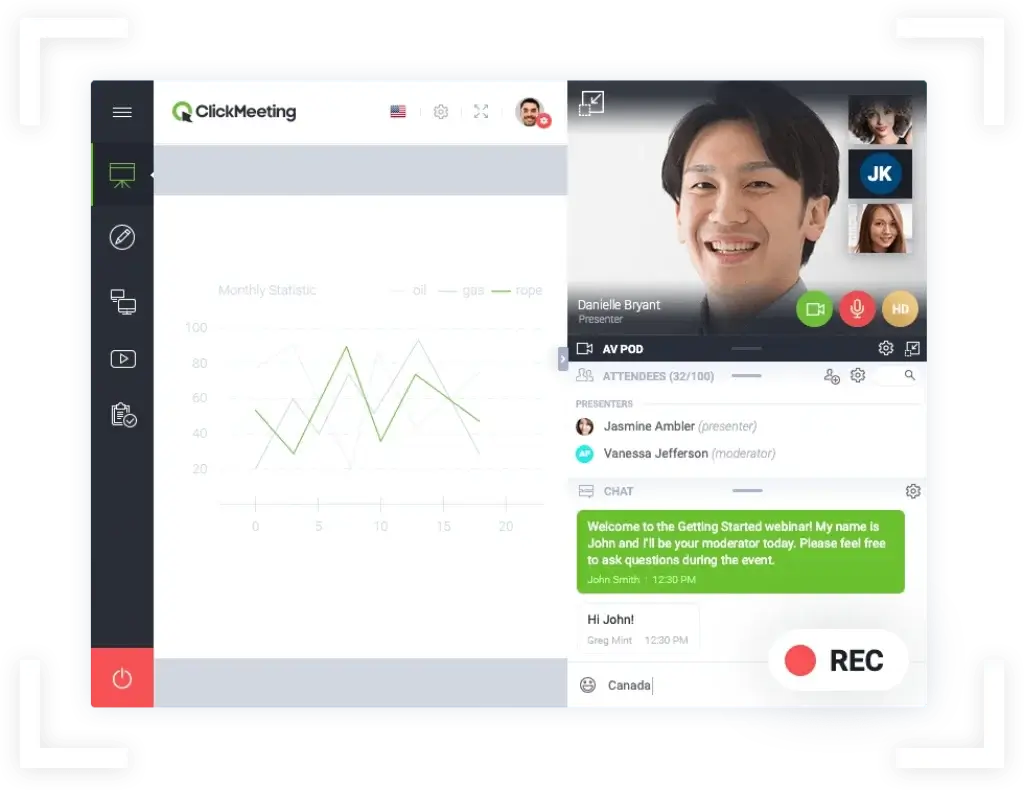
ClickMeeting is more feature-rich than many people expect at first glance. It does not only host webinars, it also helps you promote, automate, monetize, and analyze them.
Browser-Based Webinar Experience
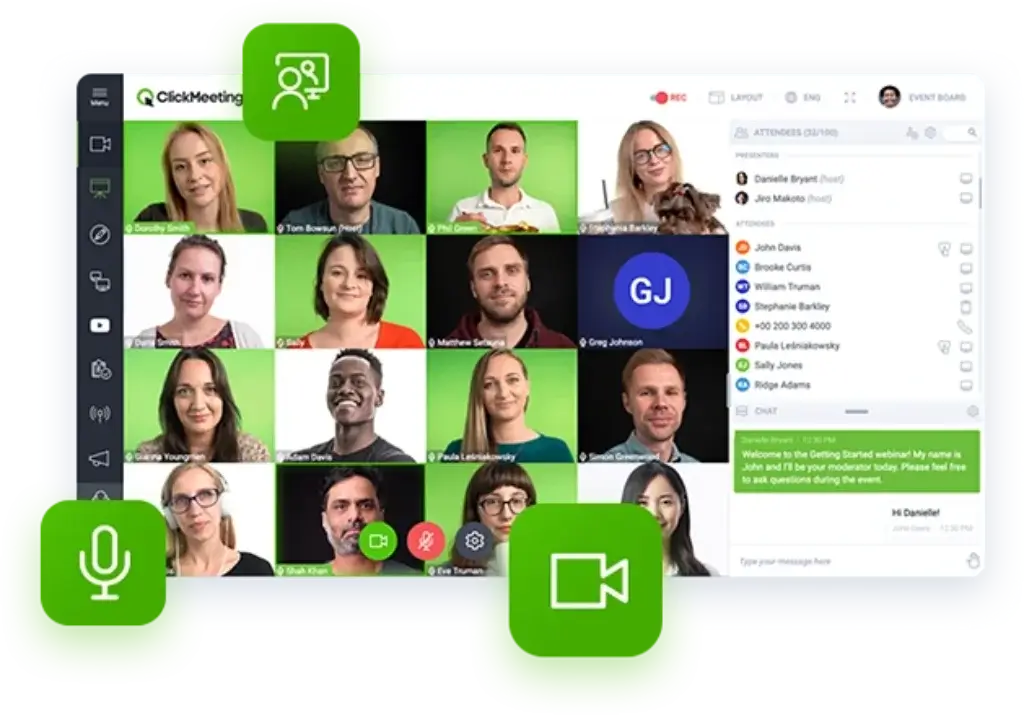
One of ClickMeeting’s biggest strengths is its browser-based experience. Attendees do not need to install software to join, which removes a common source of friction that can hurt attendance rates. That advantage becomes especially important for marketing webinars, external training sessions, and public-facing events where you do not control the attendee’s device setup.
For hosts, this also simplifies onboarding. You can run webinars, meetings, and training sessions from a browser while still accessing key presentation and moderation features. In practice, this makes ClickMeeting easier to deploy than some platforms that still push a native app experience.
Live Webinars, Automated Webinars, and On-Demand Content
ClickMeeting supports several event formats, which is one of the main reasons it stands out in the webinar software category. You can host live webinars, run automated webinars using pre-recorded content, offer on-demand webinar recordings, and manage online meetings from the same account.
This matters because not every webinar strategy should be live. Live webinars are best for engagement and urgency. Automated webinars are better when you want scalability and a repeatable lead generation engine. On-demand content works well for evergreen education and post-event nurturing. ClickMeeting gives you all three, which makes it more versatile than webinar tools that focus almost entirely on live sessions.
Audience Engagement Tools
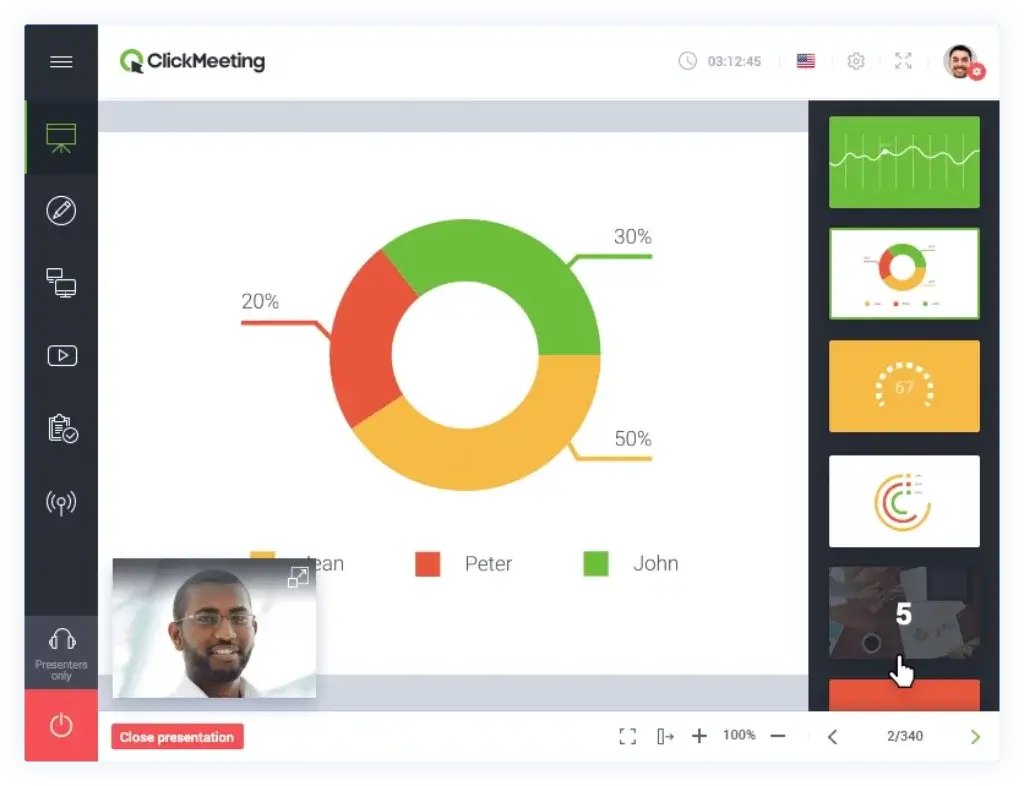
ClickMeeting includes a solid set of engagement tools for keeping attendees active during a session. These include chat, Q&A, polls, surveys, whiteboard functionality, screen sharing, and calls to action. That gives you more control over how interactive your webinar feels.
For marketers, this means you can move people from passive viewing into participation. For educators, it supports a more structured teaching environment. For internal training, it improves retention and involvement. In my view, this is one of the platform’s stronger areas, because the tools are practical rather than just decorative.
Breakout Rooms and Edu Mode
ClickMeeting also supports breakout rooms, which adds flexibility for workshops, smaller group discussions, cohort learning, and virtual classes. Not every webinar platform handles this especially well, so it is a meaningful addition for training-heavy use cases.
Edu mode is another feature worth noting. It is designed for learning environments where presenters need stronger control over visibility and participation. That makes ClickMeeting more appealing to training businesses, tutors, institutions, and companies running structured internal learning sessions.
Paid Webinars and Monetization
ClickMeeting is one of the few webinar platforms that takes monetization seriously as a built-in workflow. You can sell access to webinars through Stripe and PayPal, set ticket prices, and even support discounts or promotions. That is a real advantage if your business model depends on paid workshops, masterclasses, courses, or expert sessions.
This feature makes ClickMeeting stronger than platforms that require third-party tools or awkward workarounds to charge attendees. If you monetize knowledge directly, ClickMeeting deserves extra attention.
Landing Pages, Invitations, and Promotion Tools
ClickMeeting includes features that help you build the webinar funnel around the event itself. You can create branded registration pages, send invitations and reminders, collect leads, and promote events through connected channels like YouTube or Facebook. This is useful because strong webinar performance depends on more than the event room.
Compared with simpler webinar tools, ClickMeeting does a better job of supporting the pre-event and post-event workflow. That can reduce your dependence on extra software, especially if your stack is still relatively lean.
Automation and Follow-Up Workflows
The Automated plan is where ClickMeeting becomes more strategically valuable. You can create automated and on-demand webinars, configure reminders and follow-up messages, issue certificates of attendance, and reuse content more efficiently. That turns webinars from one-off campaigns into reusable assets.
If your goal is to build a repeatable webinar funnel for lead generation, customer education, or product onboarding, this is one of the best reasons to choose ClickMeeting over general-purpose meeting software.
Integrations and Analytics
ClickMeeting offers a wide range of integrations, including Google Analytics, Moodle, Facebook, and Zapier. That helps connect webinar activity with your existing marketing, education, or reporting stack. The platform also provides event statistics and webinar reports so you can measure attendance, engagement, and overall performance.
The analytics are useful, though not best-in-class compared with the deepest enterprise webinar platforms. Still, for most small and mid-sized teams, they are more than sufficient to optimize future sessions and understand what is working.
Pros and Cons
Benefits and Limitations of Using ClickMeeting
Positive
✅ No-download access
✅ Real webinar automation
✅ Built-in monetization
✅ Good training features
✅ Solid EU security positioning
Negative
❌ Interface can feel dated
❌ Not ideal for pure team meetings
❌ Advanced setup takes planning
❌ E2EE limits several features
Strengths & Benefits
ClickMeeting’s biggest strength is that it is designed for webinar outcomes, not just video communication. The no-install entry point is excellent for attendance conversion. The automated webinar functionality adds long-term value. Paid webinars make it viable for knowledge monetization. Breakout rooms and Edu mode improve its fit for training and education. And the platform’s European compliance positioning makes it more attractive for privacy-conscious users.
- No-download access – Browser-based access reduces technical barriers for attendees.
- Real webinar automation – Automated and on-demand formats help you scale content.
- Built-in monetization – Paid webinars support direct revenue generation.
- Good training features – Breakout rooms and Edu mode add real instructional value.
- Solid EU security positioning – EU infrastructure and compliance messaging will matter to many organizations.
Limitations & Drawbacks
ClickMeeting is a strong platform, but it is not perfect. The interface is functional rather than modern. Some users will prefer the cleaner feel of Demio or the familiarity of Zoom. It also becomes more attractive only once you move beyond the lowest-level use case. If all you need is a lightweight webinar room, you may end up paying for capabilities you do not fully use.
- Interface can feel dated – The platform is capable, but not as sleek as some newer webinar tools.
- Not ideal for pure team meetings – Meeting-first platforms may be simpler for that use case.
- Advanced setup takes planning – Registration flows, follow-ups, monetization, and automation require proper configuration.
- E2EE limits several features – Some features are disabled when maximum encryption is enabled.
Use Cases
Who Should Use ClickMeeting?
ClickMeeting is not the best webinar software for every kind of buyer. It is strongest when webinars are tied to education, lead generation, product demos, or monetized expertise.
Small Businesses and Solopreneurs
If you run webinars to generate leads, educate prospects, or sell access to expertise, ClickMeeting is a smart option. The browser-based experience, branded pages, and monetization features are particularly useful for small teams that want one platform to handle multiple parts of the webinar workflow.
If, on the other hand, you only need occasional live sessions with minimal setup, a simpler tool may feel more efficient.
Marketing Teams and Lead Generation Workflows
This is one of ClickMeeting’s best-fit categories. Marketing teams that rely on webinars for lead acquisition, product education, and follow-up nurturing can benefit from its automated webinar features, landing pages, reminder flows, and paid event options. In my opinion, ClickMeeting is stronger than many meeting-based platforms when your webinar is part of a funnel.
Coaches, Trainers, and Educators
ClickMeeting is especially well suited for training-focused organizations. Breakout rooms, polls, certificates, whiteboard tools, and Edu mode make it more useful for structured learning than many webinar competitors. If you run workshops, classes, internal training, or paid learning experiences, ClickMeeting is one of the more complete options in this price range.
Privacy-Focused Businesses and Regulated Use Cases
Organizations that care about European hosting, GDPR alignment, and security certifications will find ClickMeeting more appealing than some mainstream alternatives. It is not just a marketing talking point, it is one of the platform’s clearer differentiators.
When ClickMeeting Might Not Be the Right Fit
ClickMeeting may not be ideal if your main priority is sleek design, ultra-simple webinar setup, or internal collaboration rather than external event delivery. It is also not the most obvious pick for businesses that already run everything through Zoom and want to keep their stack as centralized as possible. In those cases, Demio, Zoom Webinars, or GoTo Webinar may feel more natural depending on your priorities.
Competitors
Competitor Alternatives to ClickMeeting
ClickMeeting competes with several strong webinar platforms, but the right alternative depends on what you value most. Demio is often better for simplicity, Zoom Webinars is stronger for familiarity and scale, and GoTo Webinar remains a solid option for established business webinar programs. ClickMeeting stands out most when you want browser-based access, automation, paid webinars, and stronger European compliance positioning.
| Feature Type | ClickMeeting | Demio | Zoom Webinars | GoTo Webinar |
| Core focus | Webinars, automation, training | Simple marketing webinars | Large-scale familiarity | Business webinar programs |
| Access model | Browser-based | Browser-based | Often app-driven | Web and app mix |
| Automated webinars | Yes | Yes, higher plans | Limited compared to webinar-first tools | Less automation-focused |
| Paid webinars | Built-in | Usually external workflow | Possible, less native | Possible, less native |
| Breakout rooms | Yes | No native standout here | Yes | More limited emphasis |
| Training features | Strong | Moderate | Moderate | Moderate |
| Compliance positioning | Strong EU focus | Standard SaaS positioning | Broad enterprise trust | Established enterprise trust |
| Best for | Training, lead gen, paid webinars | Ease of use | Scale and familiarity | Corporate webinar teams |
My view is that ClickMeeting is the better choice when your webinars need to do more than just go live. Demio is easier to like immediately, but ClickMeeting is more operationally versatile. Zoom Webinars is hard to ignore because of brand familiarity, yet it is not as webinar-specialized in automation and monetization. GoTo Webinar is dependable, but ClickMeeting often feels more flexible for marketers, educators, and smaller businesses that want more built-in functionality.
Pricing
ClickMeeting Pricing & Plans
ClickMeeting structures its offer around Free, Live, Automated, and Enterprise plans. The platform uses attendee count as a key pricing variable, so your cost rises as your webinar capacity increases. That makes sense for webinar software, but it is something you should model carefully before committing.
Free Trial / Free Events
ClickMeeting offers a free trial style entry point that lets you test meetings and webinars for 14 days, with no credit card required. That is helpful because webinar platforms often need hands-on testing before you can judge them properly. You can evaluate the room experience, registration flow, and presenter tools before paying.
Live Plan
The Live plan is designed for recurring live meetings and webinars. It includes branded event elements, paid events and donations, recording storage, extra logins for collaboration, and access to a large integration ecosystem. This is the starting point if your focus is live delivery rather than automation.
Automated Plan
The Automated plan is where ClickMeeting becomes much more strategically useful. It adds automated and on-demand webinars, follow-up automation, certificates of attendance, and more ways to reuse webinar content. If you are serious about webinar funnels or scalable customer education, this is the plan that usually makes the most sense.
Enterprise Plan
The Enterprise plan targets organizations that need high attendee counts, white-label options, personalized support, and more tailored event infrastructure. If you are running very large virtual events or need custom service arrangements, this is the route to explore.
Pricing Table
| Plan | Free | Live | Automated | Enterprise |
| Starting use case | Testing | Live webinars | Evergreen webinars | Custom large events |
| Attendee sizing | 25 attendees | Starts with smaller live tiers | Starts with smaller automated tiers | Up to 10,000 attendees |
| Live webinars | Yes | Yes | Yes | Yes |
| Automated webinars | Limited testing | No | Yes | Yes |
| On-demand webinars | Limited testing | No | Yes | Yes |
| Paid webinars | Testing access | Yes | Yes | Yes |
| Certificates | No | No | Yes | Yes |
| Recording storage | Very limited | Included | More included | Custom |
| Best for | Evaluation | Standard live webinar programs | Lead gen and training automation | Large-scale or tailored needs |
Pricing-wise, ClickMeeting is reasonable if you use the platform for more than occasional webinar hosting. The value improves significantly when you benefit from automation, monetization, and engagement workflows. If you only need simple live presentations, lighter webinar tools may look cheaper. If you plan to build repeatable webinar assets, ClickMeeting becomes far more cost-effective.
Best Practices
Getting Started with ClickMeeting
To get the most value from ClickMeeting, treat it like a webinar system, not just a webinar room. The better your setup, the stronger the results.
Start with Your Webinar Goal
Before building anything, define what success looks like. Are you generating leads, onboarding users, educating customers, selling access, or running internal training? That decision should determine whether you choose a live, automated, or on-demand workflow.
Build the Registration and Reminder Journey
Do not stop at the webinar room itself. Use branded landing pages, invitation emails, reminders, and follow-up messages to improve attendance and conversion. ClickMeeting is more valuable when you use the full funnel around the event.
Use Interactivity Intentionally
Polls, Q&A, whiteboards, breakout rooms, and CTAs should support the session goal rather than appear randomly. A short poll can increase attention. A CTA at the right point can drive conversions. Breakout rooms can turn passive attendance into active participation.
Reuse Your Best Sessions
One of the smartest ways to use ClickMeeting is to turn strong live sessions into automated or on-demand assets. That lets you extend the life of your best content and improve your return on effort.
Match the Plan to Your Growth Path
If your webinar strategy is growing, choose a plan that fits the next stage, not just your current attendee count. It is better to think in terms of scalability, especially if webinars are becoming a repeatable acquisition or education channel.
Review Security Settings for Sensitive Sessions
If you use ClickMeeting for confidential conversations, consultations, or regulated topics, take the time to review passwords, access controls, and encryption options. The platform’s security story is strong, but you still need to configure sessions correctly for your specific use case.
Conclusion
Final Thoughts
ClickMeeting is one of the more underrated webinar software platforms in the market. It does not always get the same attention as Zoom Webinars, Demio, or GoTo Webinar, but it offers a stronger all-around package than many buyers expect. Its browser-based access, automated webinar capabilities, paid event support, training-friendly features, and privacy-focused positioning make it a serious option for marketers, educators, consultants, and growing businesses.
The platform is not the most visually polished, and it may feel like too much if you only need basic webinar hosting. But if you want webinar software that can support live delivery, evergreen content, lead generation, monetization, and training in one system, ClickMeeting is a strong choice. Overall, I would rate it especially highly for organizations that want more than a one-time webinar room and need a platform that can support a broader webinar strategy over time.
Have more questions?
Frequently Asked Questions
What is ClickMeeting used for?
ClickMeeting is used for live webinars, automated webinars, on-demand webinars, online meetings, training sessions, and paid online events. It is especially useful when you want webinars to support marketing, education, or monetization workflows.
Is ClickMeeting a webinar platform or a meeting platform?
It does both, but it is better understood as a webinar-first platform with meeting functionality included. Its strongest use cases are external events, training, lead generation, and recurring webinar programs.
Does ClickMeeting require attendees to download software?
No. One of ClickMeeting’s key advantages is that it is browser-based, so attendees can join without installing extra software. That can reduce friction and improve attendance rates.
Does ClickMeeting support automated webinars?
Yes. ClickMeeting supports automated webinars and on-demand webinars on the relevant paid plan, which makes it useful for evergreen lead generation and scalable training content.
Can you sell access to webinars with ClickMeeting?
Yes. ClickMeeting supports paid webinars and integrates with Stripe and PayPal, making it a strong option for coaches, trainers, consultants, and businesses that monetize expertise.
Is ClickMeeting good for online training?
Yes. It is one of ClickMeeting’s stronger use cases because of features like Edu mode, polls, whiteboard functionality, certificates, and breakout rooms.
How does ClickMeeting compare with Demio?
Demio is often easier and more polished from a user experience perspective, but ClickMeeting is more versatile for training, monetization, and broader webinar workflows. If you want more operational depth, ClickMeeting has the edge.
How does ClickMeeting compare with Zoom Webinars?
Zoom Webinars benefits from brand familiarity and scale, but ClickMeeting is more webinar-specialized in areas like automation, monetization, and browser-based access. The better choice depends on whether you value familiarity or webinar workflow depth.
Is ClickMeeting secure?
ClickMeeting has a strong security and compliance positioning, including ISO/IEC 27001:2022, PCI DSS-related practices, GDPR alignment, EU-based data center positioning, and optional end-to-end encryption for certain meeting scenarios.
Who should choose ClickMeeting?
ClickMeeting is best for marketers, trainers, educators, consultants, and businesses that want webinar software with live delivery, automation, monetization, and stronger compliance positioning in one platform.