Introduction
If you need webinar software that is easy to launch, works directly in the browser, and connects well with a broader business stack, Zoho Webinar is one of the stronger options to consider. It combines live webinars, registration management, audience engagement tools, analytics, and native integrations with Zoho products in one platform. That makes it relevant for marketers, sales teams, educators, consultants, and businesses that want webinars to support lead generation, product education, training, and customer communication.
In this Zoho Webinar review, you will get a practical look at what the platform does well, where it falls short, how its pricing works, and who it is best suited for. By the end, you should have a clear understanding of whether Zoho Webinar is the right webinar software for your business, events, training, or demand generation workflow.
What Is Zoho Webinar?
Zoho Webinar is a browser-based webinar platform built for live online events, virtual training, product demonstrations, customer onboarding, and large internal or external presentations. It is designed to reduce friction for both hosts and attendees, since participants can join through a browser without needing to install desktop software. That matters when you want a smoother registration-to-attendance experience and fewer technical barriers.
Background and Evolution
Zoho Webinar is part of the broader Zoho ecosystem, which gives it a different strategic position from standalone webinar tools. Rather than acting only as an event room, it fits into a larger environment that includes CRM, email marketing, automation, and business communication tools. Over time, Zoho has positioned Webinar as a practical option for organizations that want webinar functionality tied more closely to lead management, nurturing, and operational workflows, rather than just presentation delivery.
Target Users and Use Cases
Zoho Webinar works across several use cases, but it is especially compelling when webinars are part of a repeatable business process rather than a one-off event.
- Marketing and demand generation teams – You can use Zoho Webinar for lead capture, product demos, top-of-funnel events, and audience nurturing.
- Sales and customer success teams – It works well for onboarding webinars, customer education, and product walkthroughs.
- Educators, coaches, and trainers – The platform supports structured sessions with polls, Q&A, moderated participation, and recording.
- Small and mid-sized businesses – It offers a practical balance of affordability, core webinar features, and business integrations.
- Organizations already using Zoho – Native connections with Zoho CRM, Campaigns, and other Zoho apps increase its value significantly.
If you only need a simple internal meeting tool, Zoho Webinar may be more specialized than necessary. But if webinars are part of your marketing, training, onboarding, or customer communication strategy, it becomes a much more interesting option.
How Does It Work?
Key Features of Zoho Webinar
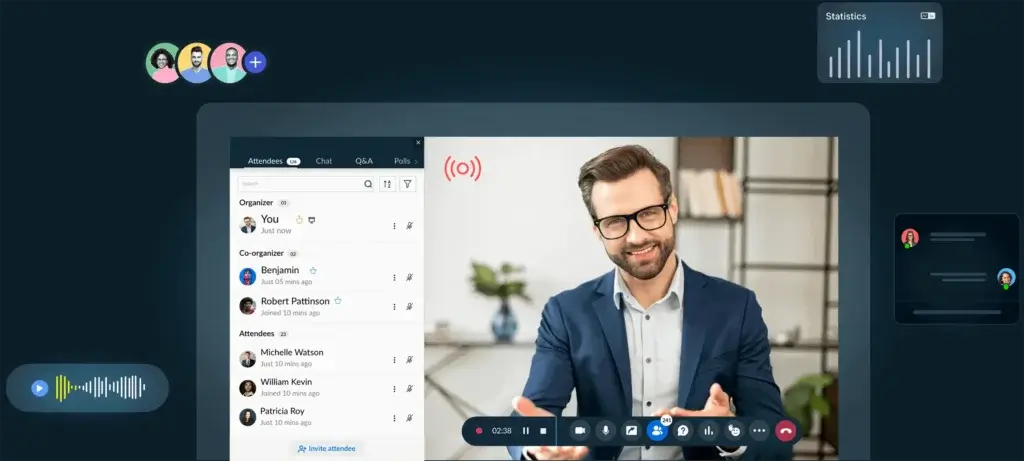
Zoho Webinar is more than a simple broadcast room. It covers most of the webinar workflow, from registration and attendee access to engagement, reporting, and follow-up.
Browser-Based Webinar Experience
One of Zoho Webinar’s biggest strengths is that attendees can join directly from a browser, which lowers friction and reduces the chance of drop-off caused by installation requirements. That is particularly important for public-facing webinars, customer onboarding sessions, and marketing events where every extra step can hurt attendance.
For hosts, the platform is also relatively straightforward to manage. You can schedule a webinar, configure registration, invite co-organizers, and run the event from a clean web-based interface rather than relying on a desktop-first workflow.
Live Webinars and Large Audience Support
Zoho Webinar is built for live online events rather than just internal meetings. It supports everything from small educational sessions to larger company presentations and marketing webinars. That makes it more relevant for teams that want a dedicated webinar environment instead of stretching a meeting platform into something it was not originally designed to do.
The platform is especially useful for recurring webinars, product demonstrations, customer education, and thought leadership sessions where registration, communication, and reporting matter as much as the event itself.
Audience Engagement Tools
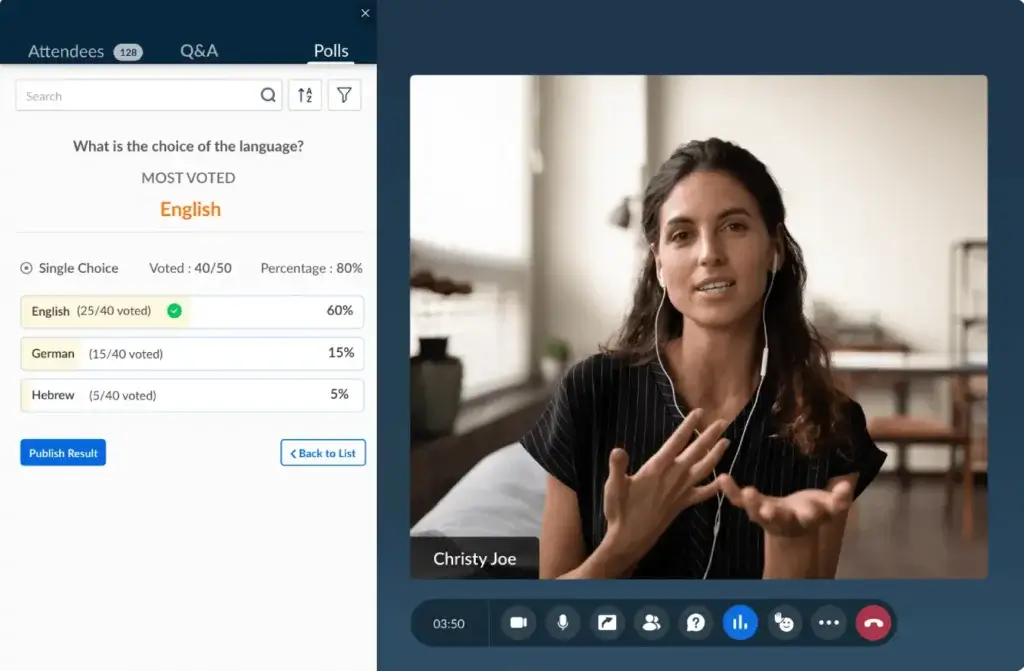
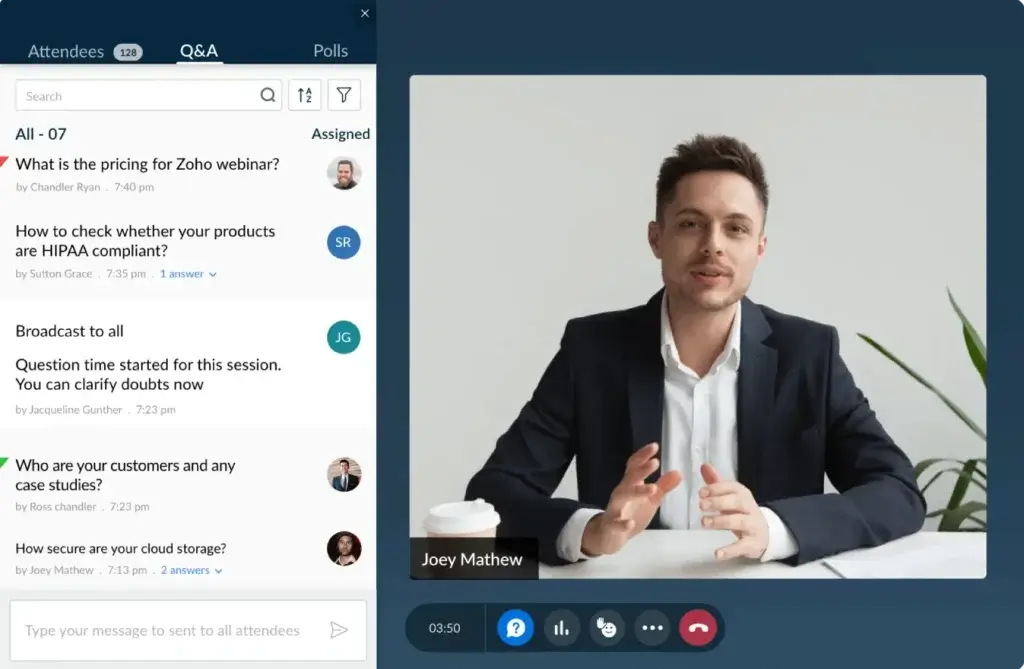
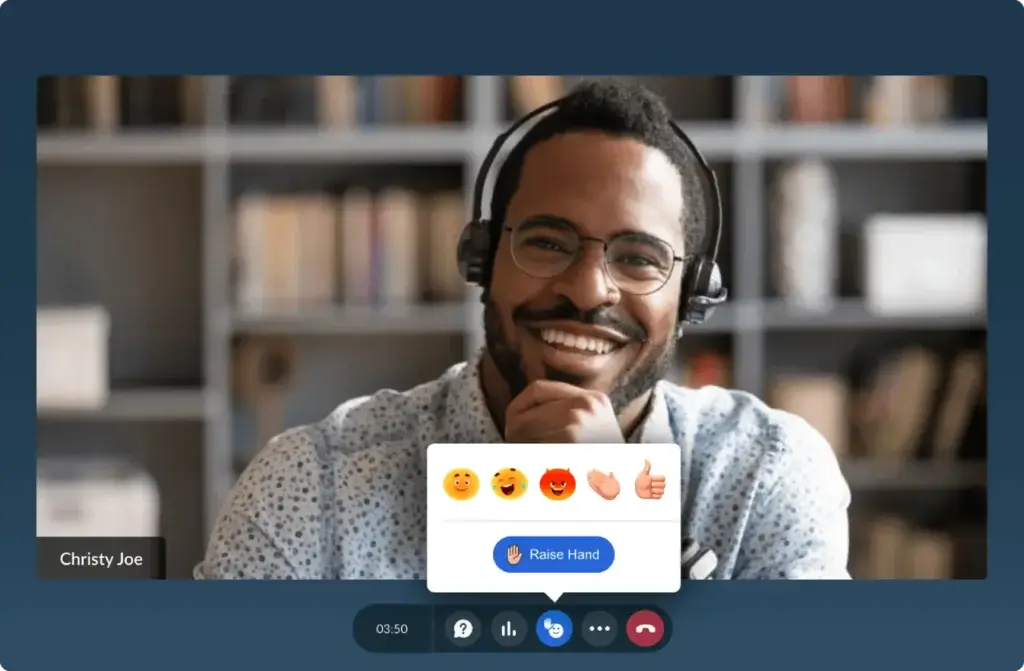
Zoho Webinar includes the core engagement features most businesses need, including polls, moderated Q&A, attendee reactions, chat, hand raises, screen sharing, and presenter controls. These tools help keep sessions interactive rather than passive.
For marketers, this means you can gather feedback and qualify interest during the webinar. For trainers and educators, it supports more structured participation. For internal communications, it helps maintain attention during longer sessions.
Registration Pages and Attendee Management
Zoho Webinar includes registration management tools that are valuable when attendance quality matters. You can build registration pages, collect attendee information, moderate registrants, and manage communication before the event. That is a meaningful advantage over simpler tools that treat registration as an afterthought.
In practice, this makes Zoho Webinar more suitable for lead generation and business workflows than meeting tools that focus primarily on instant access.
Automated Emails and Follow-Up
One of the platform’s more practical strengths is its built-in webinar communication flow. You can send invitations, confirmations, reminders, and follow-up messages without depending entirely on external tools. That helps keep the webinar workflow more centralized.
This is especially useful for small and mid-sized teams that want to improve attendance and nurture registrants without building a complicated tech stack around every event.
Recordings and On-Demand Access
Zoho Webinar supports session recording, which extends the value of each event beyond the live presentation. Recorded sessions can be reused for customer education, internal documentation, post-event follow-up, and evergreen content strategies.
That matters because a webinar often produces more value after the live session than during it, especially when you use recordings to support onboarding, nurture campaigns, or content repurposing.
Analytics and Reporting
Zoho Webinar gives you access to reporting on registrations, attendance, and engagement. That allows you to see how many people registered, how many actually joined, and how they interacted during the session. Those insights are useful for improving attendance rates, webinar structure, and post-event follow-up.
The analytics are practical and business-oriented, even if they are not as deep as some enterprise-grade event platforms. For most small and mid-sized organizations, they are more than sufficient.
Zoho Ecosystem Integrations
This is one of Zoho Webinar’s clearest differentiators. If you already use Zoho CRM, Zoho Campaigns, Zoho Calendar, or related Zoho apps, the platform becomes much more valuable because it fits naturally into your existing workflows. Registrants, leads, reminders, and follow-up processes can be tied more closely to the rest of your business system.
Even outside the Zoho ecosystem, the platform still offers solid value. But if your business already runs on Zoho, the integration story is one of the strongest reasons to choose it over a standalone webinar tool.
Pros and Cons
Benefits and Limitations of Using Zoho Webinar
Positive
✅ Easy attendee access
✅ Good value for the price
✅ Strong Zoho integrations
✅ Solid engagement tools
Negative
❌ Best value is strongest in the Zoho ecosystem
❌ Interface is practical, not premium
❌ Fewer standout automation features
❌ Advanced branding requires higher tiers
Strengths & Benefits
Zoho Webinar’s biggest strength is its balance of usability, pricing, and business integration. It gives you the core webinar features most teams actually need, without pushing you into a heavy enterprise platform. The browser-based access is practical, the registration and reminder workflow is useful, and the native Zoho integrations make it especially attractive for businesses already using Zoho CRM or Campaigns.
- Easy attendee access – Browser-based joining reduces technical friction.
- Good value for the price – It is often more affordable than bigger webinar brands.
- Strong Zoho integrations – Zoho users get more strategic benefit from the platform.
- Solid engagement tools – Polls, Q&A, chat, and moderator controls improve interaction.
Limitations & Drawbacks
Zoho Webinar is a capable platform, but it is not the most visually refined or the most advanced option in every area. If your priority is ultra-slick webinar UX, large-scale event production, or highly specialized funnel automation, other tools may feel more tailored. Its value is also noticeably stronger when you already operate within the Zoho ecosystem.
- Best value is strongest in the Zoho ecosystem – It is most compelling when paired with Zoho tools.
- Interface is practical, not premium – Some newer webinar tools feel more polished.
- Fewer standout automation features – It is solid, but not the strongest automation-first platform.
- Advanced branding requires higher tiers – Some customization features are not available on lower plans.
Use Cases
Who Should Use Zoho Webinar?
Zoho Webinar is not the best webinar software for every buyer. It is strongest when webinars are tied to marketing, education, customer communication, or business operations.
Small Businesses and Growing Teams
If you want webinar software that is affordable, easy to launch, and capable enough for regular use, Zoho Webinar is a smart choice. It gives small and growing teams a solid webinar setup without forcing them into enterprise complexity.
It is particularly useful when you need branded registration, reminders, and post-event reporting without stitching together too many separate tools.
Marketing Teams and Lead Generation Workflows
This is one of Zoho Webinar’s better use cases. Marketing teams can use it for product demos, educational webinars, lead capture, and campaign support. If you also use Zoho CRM or Zoho Campaigns, the platform becomes even more useful because webinar activity fits more naturally into your broader funnel.
Customer Onboarding and Success Teams
Zoho Webinar works well for onboarding and customer education because it combines live presentation, participation tools, and recordings. That makes it practical for recurring training sessions, feature rollouts, and adoption-focused webinars.
Educators, Coaches, and Trainers
If you run structured teaching sessions, workshops, or remote learning experiences, Zoho Webinar is a solid choice. Its engagement tools, moderated environment, and recording capabilities make it a practical fit for instructional use.
Organizations Already Using Zoho
This is arguably the clearest best-fit audience. If your business already uses Zoho apps, Zoho Webinar becomes easier to justify because it is not just a webinar tool, it becomes part of a wider connected workflow.
When Zoho Webinar Might Not Be the Right Fit
Zoho Webinar may not be ideal if your top priority is premium webinar design, heavy-duty event production, or highly advanced evergreen automation. It may also be less compelling if you do not use Zoho at all and prefer a more specialized webinar-first platform like Demio, or a more established large-scale enterprise option like Zoom Webinars or GoTo Webinar.
Competitors
Competitor Alternatives to Zoho Webinar
Zoho Webinar competes with several strong webinar platforms, but the right alternative depends on what matters most. Demio is often stronger for polished marketing webinars, Zoom Webinars is better for scale and market familiarity, and GoTo Webinar remains a dependable option for established business webinar programs. Zoho Webinar stands out most when you want browser-based simplicity, good pricing, and tighter integration with business workflows, especially inside the Zoho ecosystem.
| Feature Type | Zoho Webinar | Demio | Zoom Webinars | GoTo Webinar |
| Core focus | Business webinars and Zoho workflows | Marketing webinars and ease of use | Scale and familiarity | Business webinar programs |
| Access model | Browser-based | Browser-based | Often app-driven | Web and app mix |
| Registration tools | Strong | Strong | Good | Good |
| Engagement features | Solid core set | Polished and marketing-friendly | Strong | Solid |
| Automation depth | Moderate | Stronger for webinar funnels | Moderate | Moderate |
| CRM ecosystem value | Excellent for Zoho users | More standalone | Broad integrations | Broad integrations |
| Best for | Zoho-based businesses, onboarding, marketing | Marketers who want polish | Large-scale and familiar delivery | Established webinar teams |
My view is that Zoho Webinar is the better choice when you want practical webinar software that fits naturally into ongoing business workflows. Demio is more polished from a pure webinar marketing perspective, Zoom Webinars is stronger for scale and familiarity, and GoTo Webinar is still dependable for traditional business webinars. But Zoho Webinar offers a strong mix of affordability, usability, and ecosystem value, especially for companies already invested in Zoho.
Pricing
Zoho Webinar Pricing & Plans
Zoho Webinar offers a free plan alongside paid tiers that scale based on attendee volume and feature access. In general, its pricing is one of the reasons it gets attention, especially from small and mid-sized businesses that want webinar functionality without paying enterprise-level prices from the start.
Free Plan
The free plan is useful for testing the platform or running smaller sessions, but it is best viewed as an entry point rather than a long-term solution for serious webinar programs. It helps you evaluate the interface, attendee flow, and core experience before moving to a paid tier.
Standard Plan
The Standard tier is a practical starting point for businesses that want live webinars, registration tools, recording, and engagement features at a relatively accessible price. If your webinar strategy is still developing, this is often where the platform makes the most sense.
Professional Plan
The Professional plan becomes more appealing when you need stronger webinar operations, including more advanced attendee handling, better reporting, and additional business-oriented capabilities. It is a better fit for teams using webinars regularly as part of marketing, education, or customer communication.
Enterprise Plan
The Enterprise level is designed for larger organizations that need higher attendee limits, more branding control, and a more customized webinar environment. If webinars are a major part of your external communications or event strategy, this is the tier worth exploring.
Pricing Table
| Plan | Free | Standard | Professional | Enterprise |
| Starting use case | Testing and small sessions | Core live webinars | Recurring business webinars | Large branded webinar programs |
| Best for | Evaluation | Small teams and regular webinars | Marketing, onboarding, training | Larger organizations and advanced needs |
| Registration management | Basic | Yes | Stronger controls | Most complete |
| Engagement tools | Core tools | Yes | Yes | Yes |
| Recording | Limited | Included | Included | Included |
| Branding options | Limited | Basic | More flexibility | Most advanced |
| Analytics | Basic | Standard | More advanced | Most complete |
| Zoho ecosystem value | Moderate | Strong | Stronger | Highest |
From a pricing perspective, Zoho Webinar is competitive. It is not the cheapest option in every scenario, but it usually looks attractive when compared with larger webinar brands. The real value improves when you use webinars consistently and take advantage of its registration, communication, and integration capabilities rather than using it only as a basic live room.
Best Practices
Getting Started with Zoho Webinar
To get the most value from Zoho Webinar, you should treat it as part of a process, not just a place to present slides.
Start with a Clear Webinar Objective
Before scheduling anything, define the goal. Are you generating leads, onboarding customers, educating users, or running internal communication? The stronger your objective, the easier it is to design the right registration flow, messaging, and webinar format.
Use Registration Strategically
Do not treat registration as a formality. Use it to collect the information you actually need, segment attendees properly, and prepare better follow-up after the session. This is one of the areas where Zoho Webinar can add real business value.
Improve Attendance with Better Communication
Reminder emails and pre-event communication have a direct effect on attendance. Make sure your invitation, confirmation, and reminder flow is clear and well timed. Zoho Webinar is stronger when you use the full communication path around the event, not just the live session itself.
Make the Webinar Interactive
Polls, Q&A, chat, and moderated engagement should be used intentionally. They are not there just to fill the interface. A well-timed poll or question prompt can improve attention, generate better insight, and increase post-webinar action.
Connect Webinar Data to Your Follow-Up
If you use Zoho CRM or Zoho Campaigns, make sure webinar data is connected to your follow-up process. That is one of the main reasons to choose this platform in the first place. Webinar attendance becomes much more valuable when it feeds directly into sales or customer workflows.
Reuse Your Best Sessions
Recorded webinars should not sit unused. Turn strong sessions into ongoing educational assets, post-event nurture materials, or onboarding resources. That is one of the easiest ways to increase the return on every webinar you run.
Conclusion
Final Thoughts
⭐ Overall Rating: 7.6/10
Zoho Webinar is a strong option for businesses that want practical webinar software without unnecessary complexity. It may not be the flashiest platform in the category, and it is not the most advanced choice for highly produced enterprise events, but it gets many of the important things right. Browser-based access, useful engagement tools, registration workflows, reporting, and native Zoho integrations make it a smart fit for marketing teams, customer success teams, educators, and growing businesses.
The platform becomes even more compelling if you already use Zoho products, because it shifts from being just another webinar tool to becoming part of a broader business workflow. Overall, I would rate Zoho Webinar especially highly for organizations that want cost-effective webinar software with solid business functionality, and for companies that want their webinars to connect more naturally with CRM, campaigns, and customer communication over time.
Have more questions?
Frequently Asked Questions
What is Zoho Webinar used for?
Zoho Webinar is used for live webinars, product demos, customer onboarding, virtual training, marketing events, and online business presentations. It is especially useful when webinars are part of a broader communication or lead generation workflow.
Is Zoho Webinar browser-based?
Yes. One of Zoho Webinar’s main advantages is that attendees can join directly from a browser, which reduces friction and makes access easier for external audiences.
Is Zoho Webinar good for small businesses?
Yes. Zoho Webinar is a strong option for small and mid-sized businesses because it combines practical webinar features, reasonable pricing, and useful registration and reporting capabilities in one platform.
Does Zoho Webinar integrate with Zoho CRM?
Yes. This is one of the platform’s most important strengths. Zoho Webinar works especially well for organizations already using Zoho products, because webinar activity can fit more naturally into CRM and marketing workflows.
Can Zoho Webinar record sessions?
Yes. Zoho Webinar supports recording, which is useful for replays, internal documentation, customer education, and post-event follow-up.
Is Zoho Webinar good for marketing webinars?
Yes. It is well suited for marketing webinars because it includes registration management, attendee communication, engagement tools, and reporting that support webinar-driven campaigns.
How does Zoho Webinar compare with Demio?
Demio is usually more polished and webinar-marketing focused, but Zoho Webinar offers stronger ecosystem value for businesses already using Zoho, and it is often the more practical operational choice in that context.
How does Zoho Webinar compare with Zoom Webinars?
Zoom Webinars has stronger brand familiarity and large-scale event credibility, but Zoho Webinar is often more cost-effective and can be a better fit for businesses that want tighter workflow integration rather than pure scale.
Is Zoho Webinar good for training and onboarding?
Yes. Zoho Webinar works well for onboarding, product education, and training because it supports live delivery, engagement, moderated participation, and recordings.
Who should choose Zoho Webinar?
Zoho Webinar is best for small and mid-sized businesses, marketing teams, onboarding teams, educators, and especially organizations already using Zoho tools and wanting webinar software that fits into a larger business workflow.