Introduction
Running webinars live can be powerful, but it is not always efficient when you want predictable lead generation at scale. EverWebinar is built for that exact use case. It is an automated webinar platform designed to turn recorded presentations into evergreen webinar funnels that keep running without requiring you to be on camera every time. In this EverWebinar review, you will get a detailed look at how the platform works, what features matter most, how it fits under the broader Kartra and Genesis Digital ecosystem, and where it stands against WebinarJam. By the end, you should have a clear picture of whether EverWebinar is the right webinar tool for your business, or whether WebinarJam, or even using both together, would be the better route.
What Is EverWebinar?
EverWebinar is an automated webinar platform created by Genesis Digital, the same company behind WebinarJam. Its main purpose is to let you run pre-recorded webinars that feel scheduled and conversion-focused rather than just offering a plain replay page. Instead of hosting a one-time live event, you can make the webinar available on an ongoing basis, often with recurring time slots or just-in-time sessions that start soon after a visitor registers.
Background and Evolution
EverWebinar has long been positioned as the evergreen counterpart to WebinarJam. WebinarJam focuses on live presentations, while EverWebinar focuses on automated delivery. Over time, the platform has expanded beyond simple replay hosting and now includes registration pages, scheduling controls, reminder emails and SMS, polls, chat simulation, offer timing, analytics, and integrations with marketing tools like Kartra. The product is still best understood as a specialized webinar funnel platform rather than a generic video hosting or meetings tool.
Target Users and Use Cases
EverWebinar is best suited to users who want webinar content working for them continuously:
- Course creators and coaches – You can turn a proven training webinar into an always-available lead and sales asset.
- B2B marketers – You can capture leads through recurring demos or educational webinars without constantly hosting them live.
- Info product sellers – You can pair scarcity, timed offers, and automated follow-up with a webinar funnel.
- Global businesses – You can serve audiences across time zones without needing live availability every time.
If you primarily care about live interaction, audience spontaneity, or real-time Q&A, EverWebinar is usually not the first choice. In that case, WebinarJam is the more natural fit.
How Does It Work?
Key Features of EverWebinar
EverWebinar is built around the idea of making an automated webinar feel structured, intentional, and conversion-ready. The features below are what define the product.
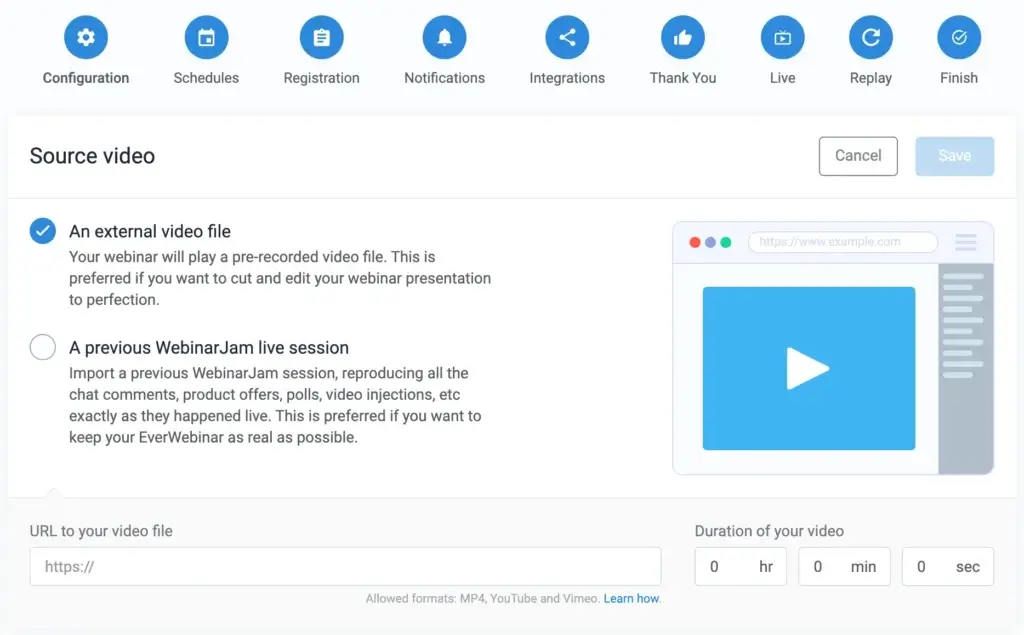
Automated and Just-in-Time Webinar Scheduling
The strongest part of EverWebinar is its scheduling engine. You can set webinars to run at specific times each day, on selected days, or in a just-in-time format where the next session starts shortly after someone registers. This is far more effective than simply sending people to a replay page because it creates a sense of session-based urgency.
For marketers, that matters. A scheduled experience usually converts better than an open-ended recording because the attendee still feels they are joining an event rather than browsing passive content. If your funnel depends on webinar attendance turning into booked calls, course sales, or software demos, this structure is one of EverWebinar’s biggest advantages.
Simulated Live Experience
EverWebinar is not a live webinar tool, but it is designed to feel closer to a live event than a normal video player. You can add timed interactions, offers, polls, and chat elements that make the presentation feel more active and less like a cold replay. That approach works particularly well for sales webinars and educational funnels where you want to guide the audience through a controlled path.
This simulated live experience is one of the platform’s most debated features. Used well, it increases engagement and conversions. Used poorly, it can feel overly manufactured. The difference depends on how honestly and naturally you position the webinar.
Registration Pages and Webinar Room Setup
EverWebinar includes customizable registration pages, thank-you pages, and webinar room settings. You can control messaging, branding, session times, and event flow without needing a separate landing page builder for basic webinar deployment. This makes setup more convenient for users who want a contained webinar workflow.
That said, design flexibility is not the platform’s strongest point. It is functional rather than exceptional. If your brand relies on heavily customized landing pages, you may still prefer using an external page builder and connecting it to the platform.
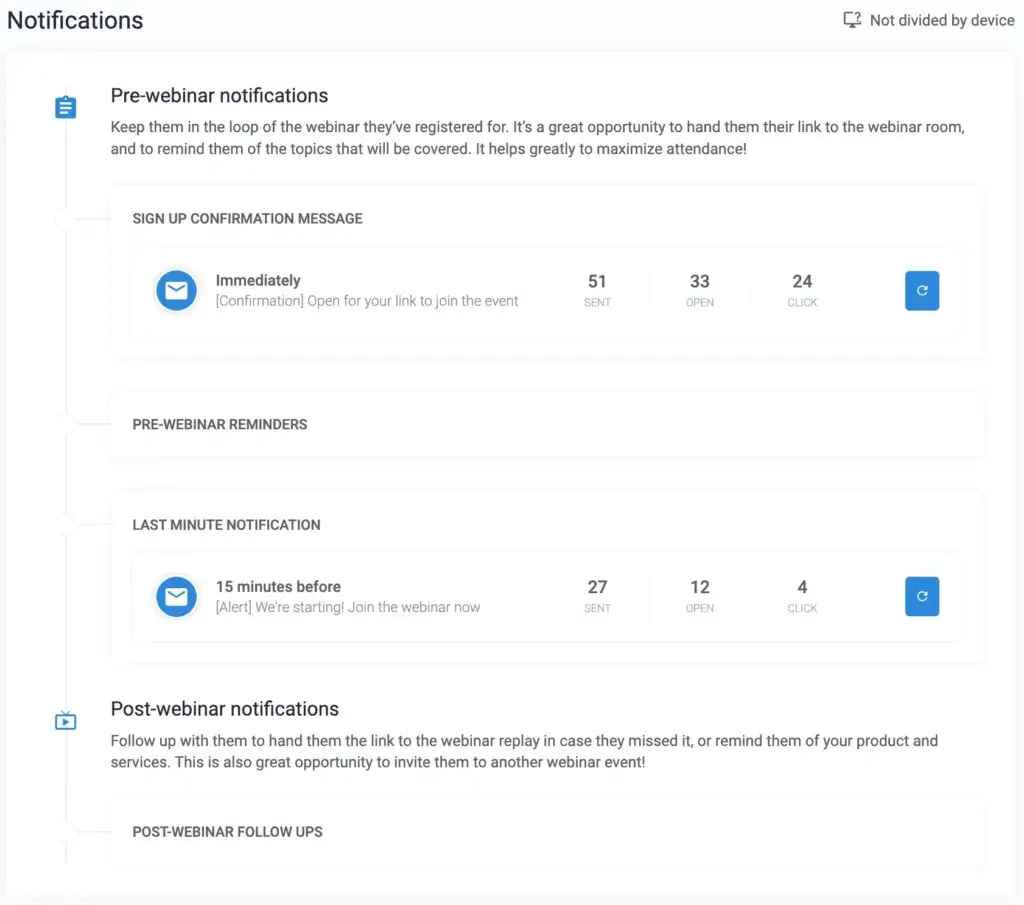
Email and SMS Reminders
Reminder systems are critical for attendance rates, and EverWebinar includes built-in email and SMS tools. These reminders help keep registrants engaged between sign-up and session time. For evergreen funnels, that matters because a strong reminder sequence can significantly improve the percentage of leads who actually show up.
This is also one of the reasons EverWebinar fits well into a broader marketing automation stack. Even if you prefer external email automation, the native reminder support reduces friction during setup.
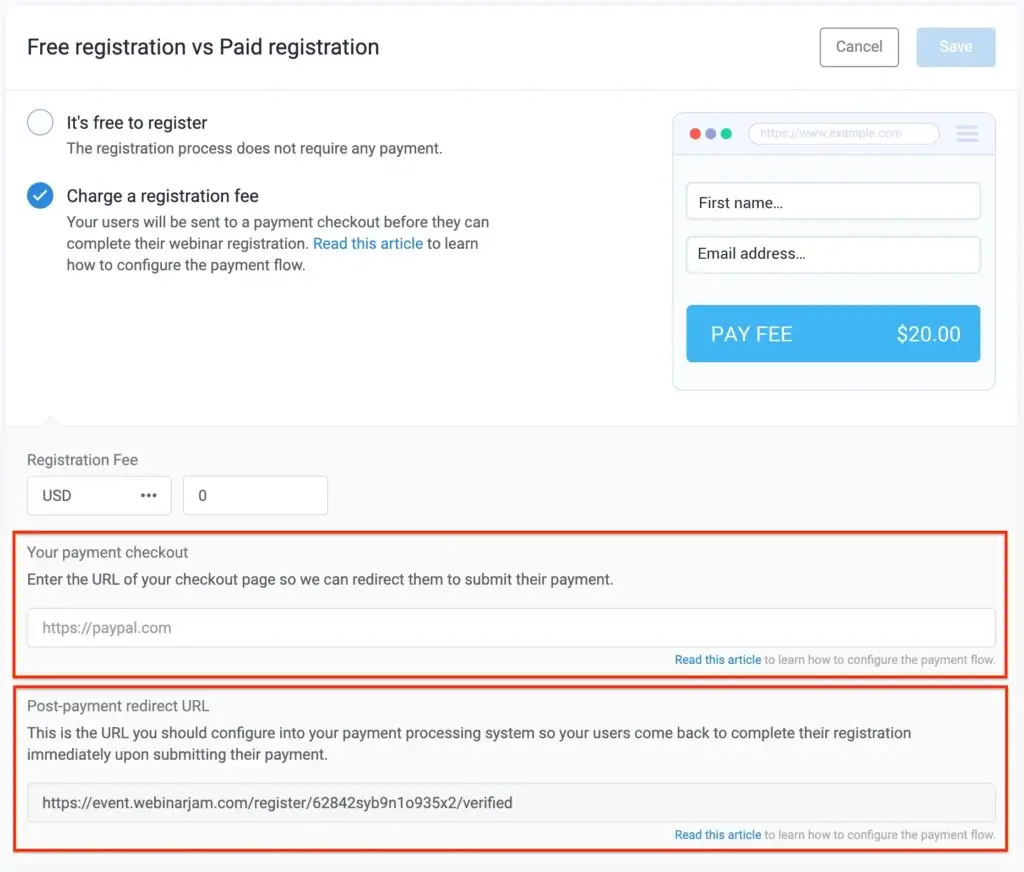
Offers, Calls to Action, and Conversion Controls
EverWebinar is clearly built with marketers in mind. You can present offers during specific moments of the webinar, time your call-to-action, and build urgency into the flow. This is what makes the platform more than a webinar hosting tool. It is really a conversion-focused webinar engine.
If your objective is lead nurturing rather than direct sales, those same features can also be used for booking demos, encouraging consultations, or pushing viewers to the next stage in a funnel.
Analytics and Performance Tracking
The platform includes analytics for registrations, attendance behavior, clicks, and general webinar performance. These insights are useful when you want to improve the funnel over time. You can identify drop-off points, compare attendance patterns, and optimize your offer timing based on actual viewer behavior.
This is important because evergreen webinars are never truly “set and forget.” The best results usually come from watching performance closely and refining the registration page, reminder flow, presentation, and offer sequence over time.

Pros and Cons
Benefits and Limitations of Using EverWebinar
Positive
✅ Strong evergreen automation
✅ Just-in-time scheduling
✅ Good conversion controls
✅ Marketing integrations
Negative
❌ Not real live hosting
❌ Design flexibility is average
❌ Setup still requires strategy
❌ Best value often requires WebinarJam too
Strengths and Benefits
EverWebinar stands out because it focuses on one specific job and does it well: automating webinar funnels. It is not trying to be a general meetings platform or a broad collaboration suite. That focus works in its favor.
- Strong evergreen automation – The platform is far more specialized than a generic replay solution.
- Just-in-time scheduling – This can improve attendance and reduce friction in the funnel.
- Good conversion controls – Timed offers and webinar-based calls to action are valuable for selling.
- Marketing integrations – It fits well into broader lead generation and nurture workflows.
Limitations and Drawbacks
EverWebinar also has clear trade-offs, and these are important if you want an honest review.
- No real live hosting – This is the biggest limitation. EverWebinar is not a substitute for live interaction.
- Design flexibility is average – It gets the job done, but it does not feel as polished as some newer SaaS platforms.
- Setup still requires strategy – The tool can automate a webinar, but it cannot fix a weak webinar funnel.
- Best value often requires WebinarJam too – If you need both live and automated workflows, costs can add up.
Kartra Relationship
How EverWebinar Works with Kartra
One of the most important things to understand is that EverWebinar is not Kartra itself, but it connects closely to Kartra. Both products sit within the broader Genesis Digital ecosystem, and their relationship makes strategic sense for businesses building webinar-based funnels.
How the Integration Works
Kartra can be connected to EverWebinar through API credentials. Once connected, webinar registrants can be passed into Kartra, where you can apply tags, add them to lists, and trigger follow-up campaigns. In practical terms, EverWebinar handles the webinar event layer, while Kartra handles the CRM and marketing automation layer.
This means someone can register for an evergreen webinar in EverWebinar, then enter a Kartra sequence that sends reminders, follow-up emails, upsells, or appointment-booking prompts. That workflow is one of the main reasons marketers still consider EverWebinar relevant.
Why This Matters for Funnel Builders
If your business depends on lead nurturing, webinar segmentation, and automated follow-up, the EverWebinar-Kartra connection is valuable. It lets you move from webinar registration to CRM action without relying entirely on third-party bridges. That reduces setup complexity and keeps your funnel more unified.
For users already invested in Kartra, EverWebinar can feel like a logical extension rather than a disconnected webinar add-on. For users outside the Kartra ecosystem, the benefit is still real, but the strategic fit is less compelling.
Should You Choose EverWebinar Because of Kartra?
If you already use Kartra or plan to, EverWebinar becomes much more attractive. If you do not use Kartra, EverWebinar can still work with other marketing tools, but part of its strategic advantage becomes less important. In that case, you should judge it mainly on its webinar automation quality rather than ecosystem alignment.
What Is the Difference?
EverWebinar vs WebinarJam
When EverWebinar Is the Better Choice
EverWebinar is the better option when you already have a strong webinar presentation and want it running continuously. If your goal is scale, time-zone flexibility, and automated conversion, EverWebinar is usually the better fit. This is especially true for evergreen course sales, recurring demos, and educational funnels.
When WebinarJam Is the Better Choice
WebinarJam is the better tool when the event itself needs to be live. Product launches, live Q&A sessions, audience feedback, and interactive training sessions are stronger in WebinarJam because the real-time nature is the value. If the attendees expect spontaneity, live chat, or host responsiveness, WebinarJam wins.
Should You Use Both Together?
For many businesses, the best answer is yes. You can host a webinar live in WebinarJam, refine the messaging based on real audience feedback, then move the best-performing version into EverWebinar for evergreen use. That gives you the best of both worlds: live testing and ongoing automation.
In my view, this is the smartest setup for serious webinar marketers. EverWebinar is excellent when the webinar has already proven itself. WebinarJam is stronger when you are still actively presenting, testing, and engaging live.
| Feature Type | EverWebinar | WebinarJam |
| Core focus | Automated evergreen webinars | Live webinars |
| Best use case | Ongoing lead and sales funnels | Real-time launches, demos, Q&A |
| Session type | Recorded and scheduled | Live broadcast |
| Just-in-time webinars | Yes | Not core focus |
| True audience interaction | Limited, simulated flow | Yes |
| Evergreen funnel strength | Excellent | Secondary |
| Best for urgency | Timed automation | Live attendance urgency |
| Recommended for | Course creators, funnel marketers | Brands running live events |
Because both products come from the same company, people often confuse them. The cleanest way to understand the difference is this: WebinarJam is for live webinars, while EverWebinar is for automated webinars.
Pricing
EverWebinar Pricing & Plans
EverWebinar keeps pricing relatively simple compared with WebinarJam. Instead of several feature-based tiers, the main difference usually comes down to billing period. That makes the pricing easier to understand, though not necessarily cheap.
Plan Structure
EverWebinar is typically offered with monthly, annual, and longer-term billing options. The effective monthly cost is lower when you commit to a longer billing cycle. Unlike WebinarJam, which scales by attendee limits and host capacity, EverWebinar’s pricing is more about access to the evergreen webinar platform itself.
Value for Money
Whether EverWebinar is worth the price depends less on raw feature count and more on how important webinar automation is to your revenue strategy. If one evergreen webinar can repeatedly drive qualified leads or sales, the platform can justify itself quickly. If you only run occasional webinars, it becomes harder to defend the cost.
Pricing Table
The table below summarizes the current structure at a high level. You should still verify the final checkout details before publishing because webinar software pricing changes more often than most SaaS categories.
| Plan | EverWebinar | WebinarJam Starter | WebinarJam Basic |
| Core model | Evergreen webinars | Live webinars | Live webinars |
| Monthly billing | Higher monthly rate | Lower entry plan | Mid-tier live plan |
| Annual billing | Better effective value | Discounted vs monthly | Discounted vs monthly |
| Ideal buyer | Automation-focused marketers | Small live webinar users | Growing live webinar teams |
| Main buying logic | Ongoing funnel ROI | Affordable live events | More scale for live events |
My view is that EverWebinar is a strong purchase only when webinars are central to your funnel. It is not a casual tool. If webinars are a serious acquisition or sales channel for you, the pricing can make sense. If webinars are occasional experiments, it is probably more tool than you need.
Use Cases
Who Should Use EverWebinar?
EverWebinar is not for everyone, and that is actually part of its strength. It is most useful when your business model aligns with evergreen webinar funnels.
Best for Course Creators and Coaches
If you sell education, training, coaching, or consulting, EverWebinar is a natural fit. You can take a webinar that already performs well, automate it, and keep qualifying leads around the clock. This is one of the clearest use cases for the platform.
Best for B2B Demo and Lead Funnels
B2B teams can also benefit, especially when webinars are used to educate prospects before a demo request or sales conversation. An automated webinar can pre-qualify leads and reduce the amount of repetitive live presentation work your team has to do.
Good for Businesses Operating Across Time Zones
If your audience is global, automated scheduling becomes much more useful. EverWebinar lets you keep the webinar available without forcing your team to host sessions at inconvenient hours.
Not Ideal for Purely Live Community Events
If the heart of your webinar strategy is real-time conversation, audience spontaneity, or community engagement, EverWebinar is not the best fit. In those cases, you are usually better off with WebinarJam or another live webinar platform.
Best Practices
Getting the Most Out of EverWebinar
Like most webinar tools, EverWebinar performs best when it is paired with strategy, not just setup. Here are the practices that matter most.
Start with a Proven Webinar
Do not automate your webinar too early. The best candidates for EverWebinar are presentations that have already worked live. If the message, structure, and offer are weak, automation will only scale weak results.
Use Scheduling to Increase Commitment
A scheduled or just-in-time session usually outperforms a plain replay because it creates a stronger sense of commitment. Use that structure intentionally. It is one of EverWebinar’s biggest strengths.
Refine the Offer Timing
One of the most important optimization areas is when your call-to-action appears. Test when you present the offer, what language you use, and how you handle follow-up for viewers who do not convert immediately.
Connect Your CRM Properly
If you are using Kartra or another marketing platform, make sure your tags, lists, and automation logic are clean from the start. A webinar registration is only valuable if your follow-up process works correctly afterward.
Monitor Performance Like a Funnel, Not Just an Event
Think of EverWebinar as an acquisition funnel. Registration rates, show-up rates, engagement, click behavior, and post-webinar conversion matter more than vanity metrics. The strongest users treat it like a performance channel.
Conclusion
Final Thoughts
EverWebinar is still one of the better-known platforms for evergreen webinar automation, and it remains relevant because it solves a specific problem well. If you want to turn webinar presentations into repeatable, conversion-focused funnels, it gives you the structure, scheduling, reminders, and offer controls to do that effectively. It is not the most modern-looking platform on the market, and it is not the right choice for true live events, but for evergreen webinar strategy it still has a solid place.
The biggest thing to understand is that EverWebinar and WebinarJam are not really direct substitutes. They are sister tools for different jobs. WebinarJam is better for live delivery. EverWebinar is better for scaling a proven webinar. If you use Kartra, EverWebinar becomes even more attractive because the integration makes the funnel more unified. Overall, I would recommend EverWebinar for businesses that already know webinars work for them and want to automate that success. If you are still focused on live engagement, start with WebinarJam first.
Have more questions?
Frequently Asked Questions
What is EverWebinar used for?
EverWebinar is used to run automated, evergreen webinars that keep operating on a recurring schedule. It is best for lead generation, course sales, automated demos, and webinar funnels that do not require a host to be live each time.
Is EverWebinar the same as WebinarJam?
No. WebinarJam is built for live webinars, while EverWebinar is built for automated webinars. They are related products, but they serve different purposes.
Can EverWebinar host live webinars?
Not in the same way as WebinarJam. EverWebinar is designed for recorded and automated webinar experiences, not true real-time hosting.
How does EverWebinar work with Kartra?
EverWebinar can connect with Kartra through API credentials. Once connected, webinar registrants can be passed into Kartra, tagged, added to lists, and entered into automated follow-up campaigns.
Is EverWebinar good for course creators?
Yes. It is particularly strong for course creators, coaches, and consultants who want to turn a high-performing webinar into an ongoing lead and sales funnel.
What is the main advantage of EverWebinar?
Its biggest advantage is evergreen automation. The platform is built to make recorded webinars feel more structured and conversion-focused than a simple replay page.
What is the biggest limitation of EverWebinar?
Its biggest limitation is that it is not a true live webinar tool. If your strategy depends on real-time audience interaction, WebinarJam or another live platform is usually better.
Is EverWebinar worth the price?
It can be, but mainly when webinars are central to your business. If one webinar can generate meaningful leads or sales repeatedly, the ROI can justify the cost. For casual webinar use, it may feel expensive.
Should you use EverWebinar and WebinarJam together?
In many cases, yes. A smart strategy is to run a webinar live in WebinarJam first, then move the best-performing version into EverWebinar for ongoing automated use.
Who should avoid EverWebinar?
Businesses that rarely use webinars, need only occasional live events, or want a highly modern and design-heavy webinar platform may want to look at alternatives before committing.