Introduction
Choosing HR software is no longer just about running payroll on time. It affects how easily your employees access key information, how well managers handle scheduling and approvals, how efficiently HR runs onboarding and compliance, and how clearly leadership can understand workforce trends. In this Paylocity review, you will get a practical look at what Paylocity offers, where it stands out, where it falls short, and which kinds of organizations are most likely to benefit from it.
Paylocity has grown well beyond a basic payroll platform. While payroll remains one of its strongest anchors, the product now spans core HR, time and labor, recruiting, onboarding, benefits, employee experience, analytics, AI support, and even adjacent finance and IT capabilities. That broader scope makes Paylocity one of the more interesting HR software options for mid-sized businesses that want to reduce the number of disconnected systems they rely on.
What Is Paylocity?
Paylocity is a cloud-based HR and payroll platform designed to help businesses manage payroll, HR administration, workforce management, talent processes, employee communications, and workforce insights in one connected system. You can use it to centralize employee records, automate payroll and compliance tasks, streamline hiring and onboarding, manage schedules and attendance, and improve employee self-service.
Its biggest strength is breadth with a modern feel. Many HR platforms are either payroll-first and operational, or broad but harder to use. Paylocity aims to bridge those two worlds by combining payroll depth with a more engaging employee experience layer, mobile access, and stronger collaboration tools than many traditional HCM systems.
Background and Positioning
Paylocity now presents itself as a unified platform for HR, payroll, finance, and IT. For HR buyers, that means the platform is no longer just a payroll engine with a few HR add-ons. It increasingly positions itself as a broader operational hub with capabilities across employee self-service, time tracking, recruiting, onboarding, reporting, engagement, and workflow automation.
Target Users and Use Cases
Paylocity is especially relevant for several buyer types:
- Mid-sized businesses – You get a broad HR and payroll stack without jumping straight to enterprise complexity.
- Organizations that want payroll and HR together – Paylocity is strongest when payroll is central to your buying decision.
- Companies with hourly and shift-based teams – Scheduling, time tracking, time cards, and attendance are meaningful strengths.
- HR teams that value employee self-service – The mobile app and employee portal reduce dependence on HR for everyday tasks.
- Businesses that want culture and communication tools built in – Community, surveys, recognition, and video give it more employee experience depth than many payroll platforms.
That said, Paylocity is not the ideal fit if you want fully transparent public pricing, a very lightweight HR tool for a tiny team, or a platform chosen primarily for advanced global HCM complexity. It is strongest when you want a practical, all-in-one platform that combines payroll reliability with broader HR and workforce management capabilities.
Core Features of Paylocity
How Does Paylocity Work?
Paylocity stands out because it combines payroll, HR operations, workforce management, recruiting, onboarding, employee engagement, and analytics in one platform. The value is not just that it stores employee data. It helps you run day-to-day people operations with fewer separate tools.
Core HR and Employee Data Management
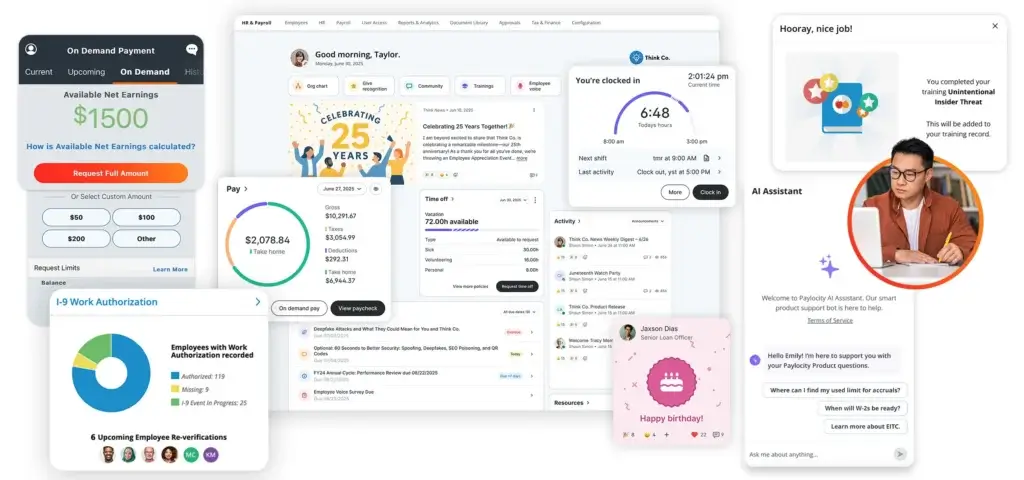
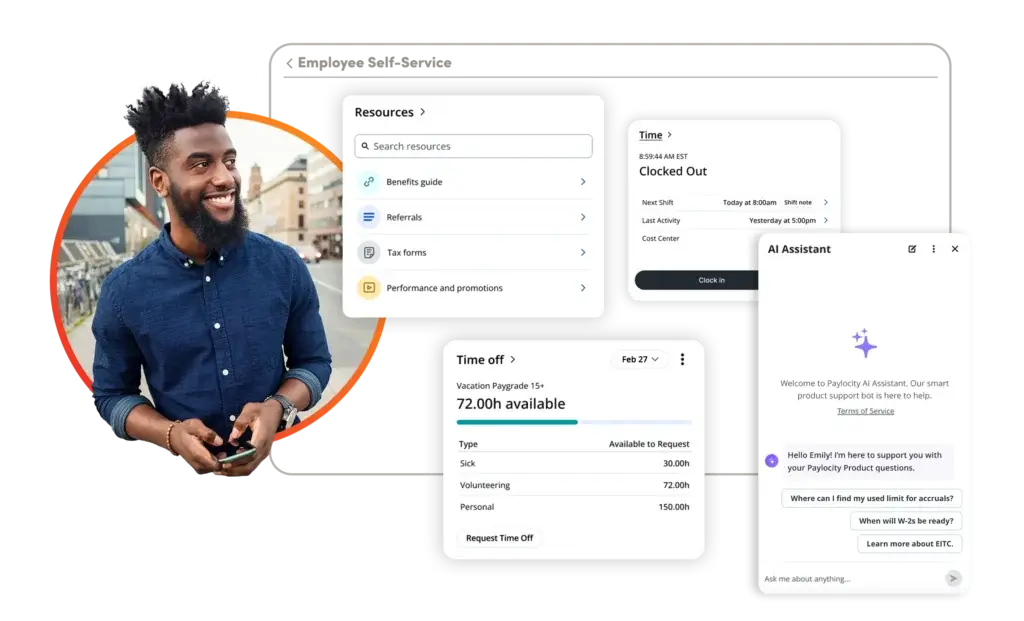
Paylocity includes a core HR layer that gives employees secure, 24/7 access to payroll and HR data through desktop and mobile. Employees can view paystubs and tax forms, request time off, update personal details, and complete common self-service tasks without constantly going through HR. For HR teams, it also provides a centralized record system for employee information and documents.
Time Tracking, Attendance, and Scheduling
Paylocity is a stronger workforce management platform than many HR suites that treat time as an afterthought. The time and attendance functionality covers time cards, hours worked, overtime visibility, approvals, attendance monitoring, and real-time dashboards. It also supports employee scheduling, shift changes, and shift claiming from mobile, which makes it a solid option for organizations with deskless, hourly, or distributed teams.
Payroll and Tax Management
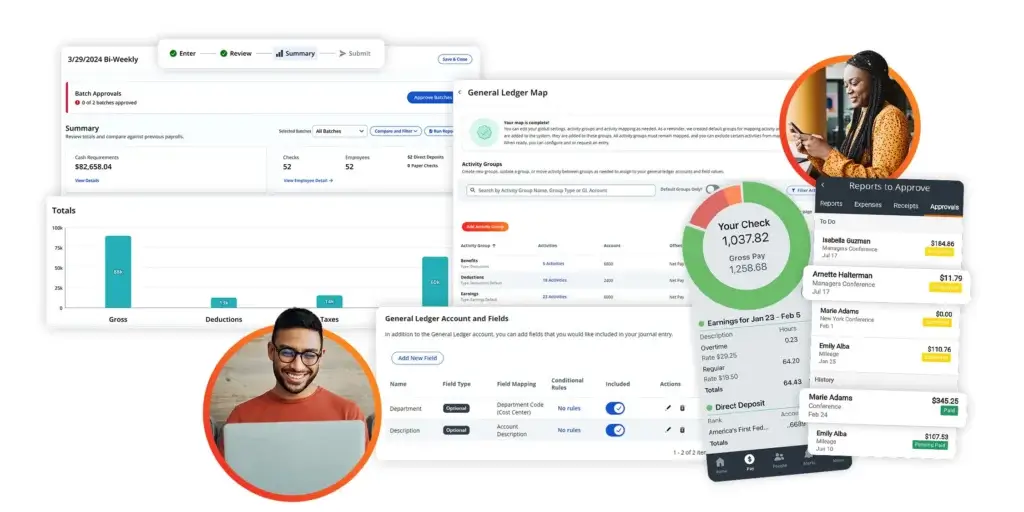
Payroll remains one of Paylocity’s core strengths. The platform is designed to help you automate payroll processes, manage tax and HR compliance, reduce manual work, and give employees reliable access to pay-related information. If payroll accuracy and usability are at the center of your buying decision, this is one of the clearest reasons to consider Paylocity.
Recruiting and Onboarding
Paylocity includes recruiting and onboarding capabilities that go beyond basic applicant storage. Its recruiting module functions as an applicant tracking system, helping you manage the hiring workflow from job postings through candidate movement and offer acceptance. Onboarding helps new hires complete forms, tax information, I-9 steps, and direct deposit tasks digitally, including on mobile, which makes it especially useful for organizations trying to reduce paper-heavy onboarding processes.
Employee Experience and Engagement Tools
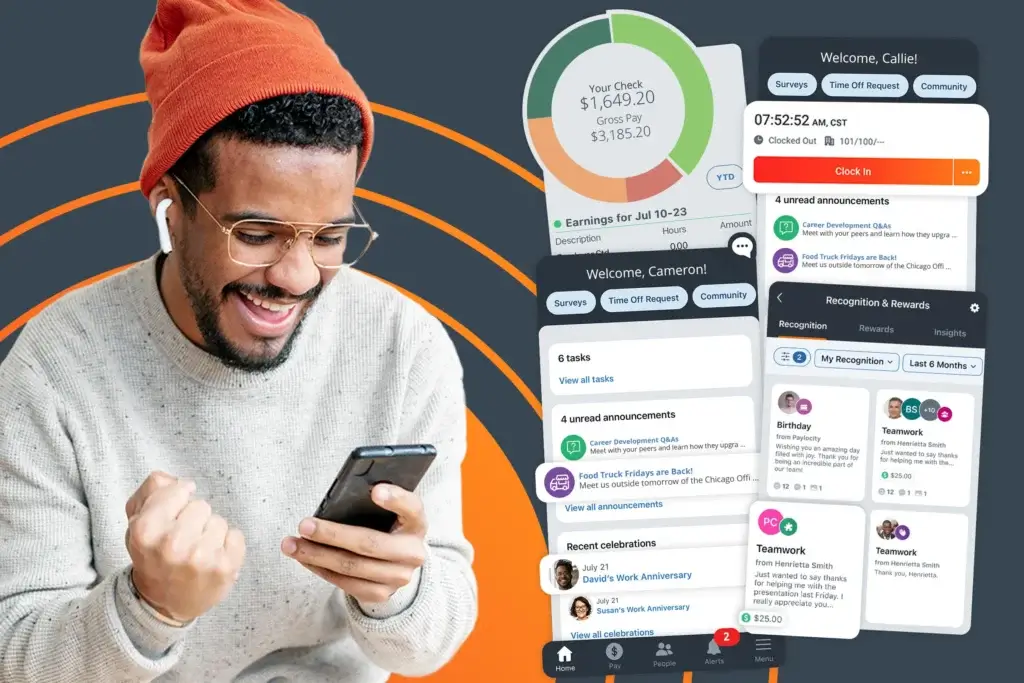
Paylocity also differentiates itself through employee experience tools. Community gives you a social collaboration hub for internal communication, while Employee Voice supports engagement surveys and feedback collection. Recognition and Rewards, video messaging, and communication tools help create a more connected experience than you usually get from a payroll-first platform. This is one of the main areas where Paylocity feels more modern than some traditional HCM alternatives.
Workflows, Reporting, and Analytics
Paylocity includes workflows, reporting, and workforce analytics that help HR teams automate common processes and get better visibility into their workforce. This is important because many companies hit a wall when they rely on payroll software that handles transactions but offers limited insight. Paylocity makes a stronger case as an operational HR platform because it combines payroll data with reporting and workflow automation.
AI Assistant
Paylocity is investing more heavily in AI as well. Its AI Assistant is designed to answer questions, guide users to the right workflows, and support employee self-service with contextual responses on desktop and mobile. The recent product direction suggests Paylocity is moving beyond simple chatbot functionality and trying to make AI more action-oriented inside the platform.
Employee Self-Service and Mobile Access
One of Paylocity’s biggest practical advantages is accessibility. Employees can use the mobile app to check pay, request time off, clock in and out, view schedules, update information, submit expenses, and complete tasks from a single interface. That matters because HR software adoption improves when employees can handle routine actions quickly from their phones.
Business Operations Features
Paylocity Payroll, Workforce Management, and Integrations
One of the most important things to understand about Paylocity is that it is still heavily anchored in payroll and workforce operations, even as the platform broadens into HR, finance, and IT. That is good news if you want a system that feels grounded in real administrative work, not just higher-level HR strategy.
Workforce Management Depth
Paylocity’s workforce management layer is one of its stronger competitive advantages. Time collection, time sheets, scheduling, attendance tracking, and real-time visibility into overtime and approvals make the system more useful for operational teams than HR suites that focus mainly on salaried office environments. If your company runs shifts, tracks hours closely, or depends on mobile time entry, Paylocity deserves serious attention.
Compliance Support
Compliance is built into the broader HR and payroll story. Paylocity positions its platform around helping businesses stay organized, simplify compliance tasks, and manage sensitive employee records in one central place. This does not remove the need for careful internal processes, but it does reduce some of the fragmentation that can create compliance risk.
Integrations and Ecosystem
Paylocity also supports a broad integration ecosystem. The company says it connects with hundreds of HR, finance, and IT solution partners and supports prebuilt integrations, APIs, EDI, and SFTP-based workflows. That matters for buyers who do not want to replace every system at once and need Paylocity to fit into an existing tech stack.
Headcount Planning and Expanded Platform Direction
Paylocity’s positioning has expanded with headcount planning, finance tools, and IT capabilities such as asset management and access management. Not every HR buyer will care about those additions immediately, but they show where the company is heading. The practical takeaway is that Paylocity increasingly wants to be an operational platform that connects people, systems, spend, and access, not just a payroll vendor.
Global and Enterprise Considerations
Paylocity can support growing businesses well, but buyers with more complex multinational requirements should still validate region-specific needs carefully. Its broad feature set is compelling, yet companies with highly complex international payroll, localized compliance layers, or very large enterprise process requirements may still want to compare it against heavier enterprise platforms before making a final decision.
Pros and Cons
Benefits and Limitations of Using Paylocity
Positive
✅ Payroll-first strength
✅ Better workforce management than many HR suites
✅ Employee-friendly experience
✅ Broad HR coverage
Negative
❌ No public pricing
❌ Scope can raise complexity
❌ Authentication can feel heavy
❌ Global complexity should be validated
Strengths & Benefits
Paylocity gets a lot right for organizations that need more than basic payroll software.
- Payroll-first strength – Payroll is still one of the most convincing reasons to choose the platform.
- Better workforce management than many HR suites – Time cards, attendance, time tracking, and scheduling are meaningful advantages.
- Employee-friendly experience – Mobile access and self-service reduce administrative friction.
- Broad HR coverage – Recruiting, onboarding, engagement, analytics, and workflows give you a more complete HCM stack.
Limitations & Drawbacks
Paylocity is a strong platform, but it is not the perfect fit for every buyer.
- No public pricing – You have to contact sales to understand the real cost.
- Scope can raise complexity – Smaller teams may find it broader than they actually need.
- Authentication can feel heavy – Some users find access and password flows more cumbersome than they would like.
- Global complexity should be validated – Larger multinational organizations should confirm region-specific capabilities before committing.
Operational Fit
Paylocity User Experience, Support, and Security
Software fit is not only about features. It also depends on how easy the platform is to adopt, how effectively users can solve routine issues, and whether your company can trust the vendor with sensitive employee data.
Ease of Use
Ease of use is one of the more positive recurring themes in public reviews. Users often highlight that the platform is easy to navigate for everyday tasks like checking hours, viewing pay information, downloading tax forms, and managing basic HR actions. That is especially important in HR and payroll software, where adoption tends to drop if employees need too much training for routine actions.
Implementation Experience
Implementation is likely to be manageable for many mid-sized businesses, but the breadth of the platform means setup decisions matter. If you are rolling out payroll, time and attendance, onboarding, recruiting, surveys, recognition, and integrations all at once, the implementation will still require careful planning. This is not unusual, but it is worth treating Paylocity as a real platform deployment rather than a simple payroll switch.
Customer Support
Paylocity offers support resources through its PEAK Knowledge Base and self-serve help system, and the AI Assistant is also positioned as a support layer inside the product. Review sentiment suggests support is often seen as a positive, though not universally so. As with many SaaS platforms, support quality can depend on issue complexity and internal rollout discipline.
Security and Privacy
Security is a major consideration for any HR buyer, and Paylocity clearly emphasizes it. The company highlights security and privacy controls as a core priority and publicly notes formal protections through its trust and privacy materials. For organizations handling sensitive employee records, that is an important trust signal.
AI Trust and Governance
Paylocity’s newer AI direction also matters from a governance standpoint. The company says its AI Assistant is designed to connect responses back to official sources, records, policies, or data. That does not remove the need for internal oversight, but it is a more credible approach than AI layers that operate like detached assistants with limited context or unclear grounding.
Pricing
Paylocity Pricing & Plans
Paylocity pricing is one of the least transparent parts of the buying process. The company does not publish standard subscription prices on its website. Instead, it promotes flexible pricing tailored to your business needs and directs buyers to request pricing.
What Paylocity Includes
Paylocity’s platform can include payroll, human resources, time and labor, talent management, benefits, employee experience, workflows, reporting, mobile access, AI, integrations, and more. Because of that breadth, pricing is likely shaped by the modules you choose, your employee count, implementation scope, and the complexity of your workflows.
What Affects Total Cost
Your total Paylocity cost will likely depend on headcount, selected products, time and labor requirements, support needs, integrations, and any added capabilities beyond core payroll and HR. That means two companies evaluating Paylocity can receive very different quotes.
What to Ask Before You Buy
If you are considering Paylocity, ask about implementation fees, payroll tax filing support, time and labor packaging, mobile capabilities, integration costs, support levels, and how pricing scales as you add employees or modules. These details matter because custom quotes can make products seem similarly priced at first glance when they are not.
Pricing Table
The table below gives a practical view of how Paylocity’s pricing approach works today.
| Feature Type | Paylocity | What it means for buyers |
| Pricing model | Custom pricing | You need to request a quote from sales |
| Core strength | Payroll and workforce operations | Strong fit if payroll is central to your buying decision |
| Platform breadth | HR, payroll, time, talent, engagement, mobile, AI | Can replace multiple HR tools in one system |
| Integrations | Hundreds of partner integrations plus APIs | More flexibility if you need to connect existing tools |
| Best for | Mid-sized and operationally complex businesses | Better fit for growing teams than very small companies |
For many buyers, the real question is not whether Paylocity can do enough, but whether you need enough of what it offers to justify the likely cost and implementation effort. If you only need basic payroll and employee records, it may be more than necessary. If you want payroll, time, HR, onboarding, and engagement in one platform, the value becomes easier to justify.
Use Cases
Who Should Use Paylocity?
Paylocity is not for every business, but it fits several kinds of buyers especially well.
Mid-Sized Businesses That Need More Than Payroll
If your company has outgrown a basic payroll provider and now needs stronger HR, employee self-service, workforce management, and talent tools, Paylocity is a strong fit. This is one of its clearest sweet spots.
Organizations with Hourly, Deskless, or Shift-Based Teams
If time tracking, scheduling, approvals, and attendance matter to your operation, Paylocity becomes more compelling. It offers more practical depth here than many platforms that focus mainly on salaried knowledge workers.
HR Teams That Want a More Engaging Employee Experience
If you want more than transactional HR software, Paylocity deserves attention. Community, surveys, recognition, video, and mobile communication tools help it feel more employee-centered than many payroll-led alternatives.
Companies Trying to Consolidate Systems
If you want to reduce the number of standalone tools used for payroll, HR, onboarding, time tracking, and internal engagement, Paylocity can simplify your stack. That consolidation benefit is one of its more practical advantages.
When Paylocity Might Not Be Right
Paylocity may not be the best choice if you need very simple software at the lowest cost, if you insist on public pricing before engaging sales, or if your business has highly complex multinational HCM requirements that demand a more enterprise-heavy global platform.
User Feedback
Paylocity Customer Reviews
Paylocity reviews are strong overall. Public review snapshots currently show about 4.5 out of 5 on G2 from more than 5,200 reviews and about 4.1 out of 5 on Capterra from more than 1,300 reviews. That review volume gives Paylocity more credibility than platforms with only a small review footprint.
What Users Like Most
The most common positives in public reviews include ease of use, having payroll and HR information in one place, access to time cards and tax forms, mobile convenience, and strong overall usefulness for payroll and workforce administration. Users also frequently describe the system as straightforward for everyday employee tasks.
Common Complaints
The most common drawbacks are also fairly consistent. Some reviewers mention bugs, slow performance, confusing errors, or delays in completing certain tasks. Others describe password or authentication flows as inconvenient, and some users feel that security and access controls can be more cumbersome than expected.
My Take on the Review Pattern
The review pattern suggests that Paylocity succeeds most when buyers want a practical, full-featured HR and payroll platform that employees will actually use. Its weakness is not lack of functionality. It is that broader platforms naturally create more friction points, especially around navigation, access controls, and module complexity. Overall, the positives outweigh the negatives, but buyers should still validate the parts of the platform that matter most to their daily workflows.
Competitors
Competitor Alternatives to Paylocity
Paylocity is often compared with BambooHR, Rippling, and Workday. The right alternative depends on whether you prioritize simplicity, operational control, enterprise depth, or employee experience.
| Feature Type | Paylocity | BambooHR | Rippling | Workday |
| Core angle | Payroll-led HR and workforce platform | Simpler HR software for SMBs | HR, payroll, IT, and ops automation | Enterprise HCM suite |
| Best for | Mid-sized businesses with payroll and time complexity | Smaller and less complex organizations | Companies wanting one ops control layer | Large enterprises with broad HCM needs |
| Payroll depth | Strong core strength | More limited depending on setup | Strong all-in-one story | Strong enterprise payroll and HCM depth |
| Workforce management | Strong time, attendance, and scheduling | Lighter overall | Strong automation and admin control | Broad but often more complex |
| Employee experience | Good mobile and engagement tools | Clean and approachable | Powerful but more operationally dense | Powerful but less approachable for many mid-sized teams |
| Overall angle | Best balance of payroll operations and broader HR tools | Best for simpler HR needs | Best for deeper system control | Best for large enterprise complexity |
Compared with BambooHR, Paylocity usually makes more sense for businesses that need stronger payroll and workforce management depth. Compared with Rippling, Paylocity often feels more rooted in payroll, time, and employee experience, while Rippling is especially compelling if you want deeper IT and systems control. Compared with Workday, Paylocity is generally easier to adopt for mid-sized companies, while Workday remains the heavier choice for large enterprise environments.
If I had to summarize it simply, Paylocity is one of the better choices for organizations that want payroll at the center of a broader HR platform, especially when workforce management and employee self-service matter.
Best Practices
Getting Started with Paylocity
To get the most out of Paylocity, you should make a few smart decisions early.
Define Your Core Priorities First
Before implementation, decide whether your main priority is payroll, time and attendance, employee self-service, onboarding, recruiting, engagement, or platform consolidation. Paylocity is broad enough that focus matters.
Map Your Workforce Workflows
If you have hourly teams, shift scheduling needs, or attendance policies, spend extra time mapping those workflows before rollout. This is one of the platform’s biggest strengths, so it is worth configuring carefully.
Clarify Module Scope and Pricing Early
Since pricing is custom, make sure you understand exactly which modules are included in your proposal and what costs may increase later as your needs expand.
Invest in Employee Adoption
Paylocity delivers more value when employees use mobile self-service, managers approve tasks in-platform, and HR avoids becoming the manual middle layer for routine actions.
Use the Platform to Consolidate, Not Just Replace
If you choose Paylocity, look beyond replacing your old payroll tool. The bigger value often comes from consolidating payroll, HR, onboarding, time tracking, and communication workflows into one system.
Conclusion
Final Thoughts
⭐ Overall Rating: 8.0/10
Paylocity remains a strong option because it solves a common problem in the HR software market. Many companies want more than payroll, but they do not want to jump into an overly heavy enterprise HCM environment. Paylocity sits in that middle ground quite well.
Its biggest strengths are payroll, workforce management, employee self-service, mobile usability, onboarding, and employee experience features. Its biggest drawbacks are pricing transparency, occasional user-reported friction around bugs or authentication, and the fact that smaller teams may not need everything it offers.
Overall, Paylocity is a strong recommendation for mid-sized businesses that want payroll-led HR software with meaningful operational depth. If your organization needs a platform that can handle payroll, HR, scheduling, onboarding, and employee engagement in one connected environment, Paylocity is well worth considering.
Have more questions?
Frequently Asked Questions
What is Paylocity best used for?
Paylocity is best used for payroll, core HR, employee self-service, time and labor management, onboarding, recruiting, and employee engagement in one platform.
Is Paylocity good for small businesses?
It can work for smaller companies, but Paylocity is generally a better fit for mid-sized businesses that need more than basic payroll software.
Does Paylocity include payroll?
Yes. Payroll is one of Paylocity’s core products and one of the strongest reasons many companies choose the platform.
How much does Paylocity cost?
Paylocity uses custom pricing. The company does not publish standard public plan prices, so you need to request a quote.
Does Paylocity offer employee self-service?
Yes. Employees can securely access paystubs, tax forms, time off, personal information, and other HR tasks through desktop and mobile self-service.
Does Paylocity support time tracking and scheduling?
Yes. Paylocity includes time tracking, attendance, time cards, and employee scheduling with mobile access for shift changes and related actions.
Is Paylocity an applicant tracking system?
Yes. Paylocity’s recruiting product functions as an ATS and helps manage the hiring workflow from job postings through offer acceptance.
Does Paylocity have onboarding tools?
Yes. New hires can complete onboarding tasks digitally, including tax and direct deposit steps, and can do so from mobile devices.
Does Paylocity offer AI features?
Yes. Paylocity includes an AI Assistant designed to answer questions, support self-service, and guide users to relevant tasks and workflows.
Is Paylocity worth it overall?
Yes, for the right buyer. If your organization wants payroll-led HR software with strong workforce management, mobile access, and broader employee experience tools, Paylocity is a compelling option.