Introduction
Choosing recruiting software is no longer just about tracking applicants. It affects how quickly you can publish jobs, how consistently your hiring team evaluates candidates, how well recruiters collaborate with managers, and how smoothly new hires move into your HR process.
In this Workable review, you will get a practical look at what Workable offers, where it stands out, where it falls short, how its pricing works, and which teams are most likely to get strong value from it in 2026.
Workable is especially interesting because it has grown beyond a traditional applicant tracking system. It now positions itself as a complete HR and hiring platform, combining recruiting, sourcing, onboarding, employee records, time off, time tracking, payroll preparation, and performance reviews.
That broader direction makes Workable a strong option if you want more than an ATS, but do not necessarily want to move into a complex enterprise HCM platform.
What Is Workable?
Workable is a cloud-based recruiting and HR platform that helps companies find, hire, onboard, and manage employees from one system. Its core capabilities include job posting, candidate sourcing, applicant tracking, interview scheduling, scorecards, AI screening, offer management, onboarding, employee profiles, time off, time tracking, and HR reporting.
The platform is used by small businesses, growing companies, and mid-market organizations that need a more structured hiring process without adopting a heavy enterprise HR suite. Workable’s biggest advantage is that it combines ease of use with enough depth for serious recruiting operations.
Background and Positioning
Workable started as recruiting software, but its current positioning is broader. The company now describes the platform as an all-in-one HR system for hiring and employee management.
This matters because many companies start by looking for an ATS, then realize they also need onboarding, employee records, document management, approval workflows, and time off tracking. Workable fits that transition well.
Target Users and Use Cases
Workable is most relevant for companies that want a practical, easy-to-adopt hiring system with enough automation to reduce manual recruiting work.
- Small and growing businesses – You get recruiting and HR tools without enterprise complexity.
- Mid-market hiring teams – Workable supports structured pipelines, collaboration, and reporting.
- Recruiters needing sourcing help – The platform includes passive candidate search and AI recommendations.
- HR teams replacing spreadsheets – Workable includes employee profiles, onboarding, files, and time off.
- Companies hiring across multiple roles – Job board distribution and workflow automation save time.
That said, Workable is not the cheapest ATS available. It is also not as deeply enterprise-oriented as platforms like Workday Recruiting, iCIMS, or Greenhouse for highly complex global hiring operations. Its sweet spot is practical, modern hiring and HR management for teams that want speed, usability, and breadth.
Core Features of the Platform
How Does Workable Work?
Workable works by centralizing the hiring process from job creation to candidate sourcing, screening, interviewing, offer management, and onboarding. Its HR features then extend the workflow into employee data, documents, time off, attendance, and performance management.
The product feels more operational than theoretical. It is designed to help hiring teams move faster, reduce repetitive admin work, and give managers a clearer way to participate in hiring decisions.
Job Posting and Job Board Distribution
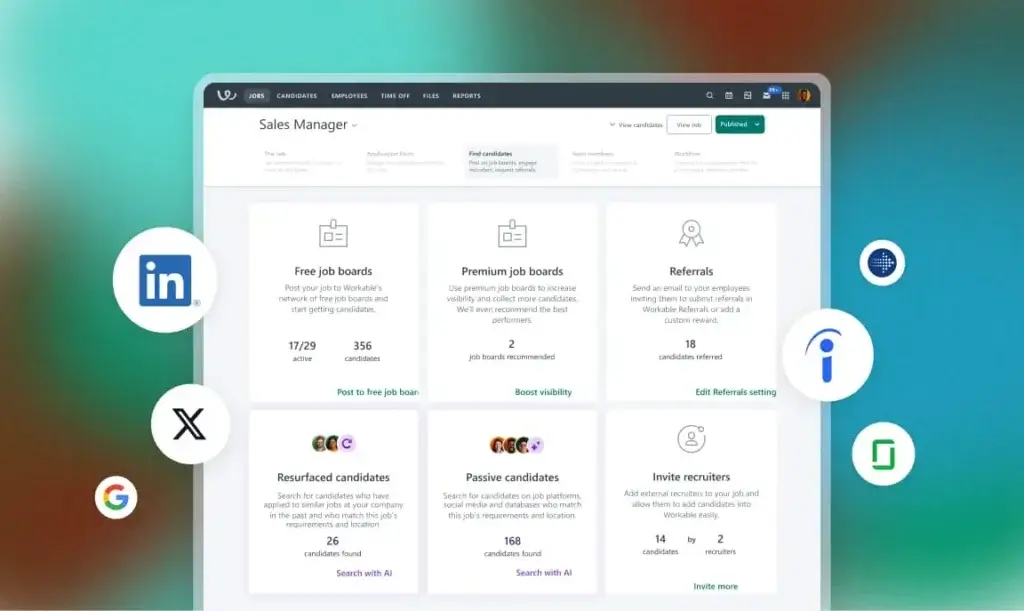
Workable lets you create job posts and publish them across more than 200 free and premium job boards. This is one of the platform’s strongest practical benefits because it reduces the need to manually post the same role across multiple channels.
You can also create branded careers pages, embed job widgets on your website, and support mobile-friendly applications. For growing companies, this helps make recruiting look more polished without requiring a separate careers site build.
Candidate Sourcing and Passive Talent Search
Workable includes candidate sourcing tools that help you search passive talent and build pipelines beyond inbound applicants. The platform promotes access to a large searchable candidate database and uses AI to recommend candidates that may match the role.
This is valuable if you regularly hire for competitive roles where job board applicants alone are not enough. Instead of treating Workable only as an application tracker, you can use it as part of a proactive sourcing workflow.
Applicant Tracking System
Workable’s ATS gives you pipelines, candidate profiles, resume parsing, interview stages, email templates, internal notes, task assignments, and hiring team collaboration. The interface is one of its main strengths because recruiters and hiring managers can understand the system without heavy training.
For teams moving away from spreadsheets, shared inboxes, or disconnected forms, this is a meaningful improvement. It gives you one place to manage applicants, conversations, feedback, and hiring status.
AI Screening and Candidate Matching
Workable includes AI-powered screening tools that can summarize candidate profiles, show match indicators, and help recruiters prioritize applicants. It also supports AI-generated job descriptions and candidate recommendations.
The value here is speed. AI will not replace recruiter judgment, but it can reduce the time spent reading repetitive applications, drafting job posts, and manually identifying potentially relevant candidates.
Interview Scheduling and Calendar Sync
Interview coordination is often one of the most frustrating parts of recruiting. Workable supports self-scheduled interviews, two-way calendar sync with Google and Microsoft 365, and integrations with Zoom, Microsoft Teams, and Google Meet.
This makes Workable particularly useful for companies with multiple interviewers, remote hiring processes, or fast-moving roles where delays can cause candidate drop-off.
Interview Kits and Scorecards
Workable supports standardized evaluation with interview kits and scorecards. This helps hiring teams compare candidates more consistently and reduces the risk of feedback becoming vague or subjective.
Workable is not as deeply associated with structured hiring as Greenhouse, but it still gives you enough tools to create a repeatable evaluation process across roles and departments.
Offer Letters and E-Signatures
Workable includes offer letter templates, approval workflows, document handling, and e-signatures. This helps reduce manual back-and-forth during the final stage of hiring.
For teams that currently prepare offer documents outside the ATS, this can remove friction and make the handoff from recruiting to HR smoother.
Employee Onboarding
Workable’s HR capabilities include onboarding workflows, welcome portals, task tracking, automated notifications, and document e-signatures. This is useful because the hiring process does not end when the candidate accepts the offer.
With onboarding built into the same platform, HR teams can create a more consistent new-hire experience and reduce the amount of manual coordination required before day one.
HRIS, Employee Records, and Org Chart
Workable includes HRIS features such as employee profiles, role history, document management, employee directories, and automated org charts. This makes it more useful than ATS-only tools that stop at recruiting.
For small and mid-sized companies, this can replace several disconnected spreadsheets and basic HR admin systems. For larger organizations with a dedicated HRIS, Workable may still be used mainly for recruiting while syncing employee data elsewhere.
Time Off, Time Tracking, and Payroll Preparation
Workable also supports time off management, time tracking, payroll preparation, payroll integrations, approval workflows, and custom payroll reports. These features strengthen its position as an all-in-one HR and hiring platform.
It is important to understand the scope, though. Workable helps prepare and organize payroll-related data, but it is not positioned as a full payroll provider in the same way as dedicated payroll platforms.
Reporting and Analytics
Workable includes reporting tools for recruiting and HR operations. You can track hiring activity, pipeline movement, candidate sources, team performance, and HR data.
Reporting is useful, but it is also one of the areas where some users want more customization. If your team needs highly advanced recruiting analytics, you should evaluate reporting depth carefully during the trial or demo.
Integrations and API Access
Workable integrates with recruiting, HR, background check, assessment, calendar, video interview, and productivity tools. It also offers API access, which helps companies connect Workable with existing systems.
This is important if your HR stack includes payroll software, background checks, assessments, Slack, Microsoft Teams, LinkedIn, or other tools that need to support your hiring workflow.
Business Operations Features
Workable AI, Recruiting, and HR Capabilities
Workable’s biggest strategic shift is that it is no longer just an ATS. It now combines recruiting and HR tools in one platform, with AI features designed to make hiring workflows faster.
AI Job Description Creation
Workable can generate job descriptions based on a role title and company context. You can refine the tone and adjust the draft to better match your employer brand.
This is useful for teams that create many job posts and want a faster starting point. It should still be reviewed by recruiters and hiring managers to ensure the description is accurate, inclusive, and aligned with the role.
AI Candidate Search
Workable’s AI can recommend passive candidates based on the job description and available profile data. This helps recruiters discover candidates who may not have applied directly.
This is especially relevant for roles where inbound applicant quality is inconsistent or where recruiters need to build talent pipelines more proactively.
AI Screening Assistant
Workable’s AI screening assistant helps summarize applicant profiles and highlight potential matches. This can make the first review stage more efficient, especially when a role receives many applications.
However, AI screening should not be treated as a final decision-maker. The best use case is prioritization and recruiter support, not automated rejection without human review.
Recruiting Automation
Workable includes automated actions that help reduce manual recruiting tasks. You can automate parts of communication, pipeline movement, reminders, approvals, and candidate management.
For busy hiring teams, this is one of the clearest productivity benefits. It keeps the process moving without relying entirely on recruiters to remember every follow-up.
HR Management Beyond Recruiting
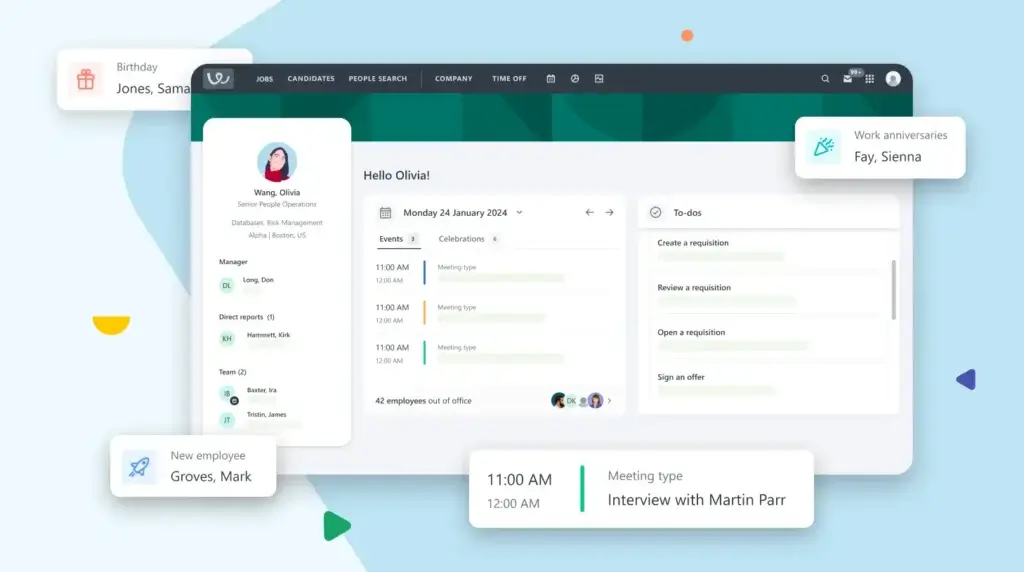
Workable’s HR features make it stronger for companies that want one system for hiring and basic employee management. Employee profiles, onboarding, document storage, org charts, time off, and time tracking can all live in the same environment.
This is not the same as buying a full enterprise HCM suite, but for many small and mid-sized businesses, it may be enough to centralize core HR operations.
Pros and Cons
Benefits and Limitations of Using Workable
Positive
✅ Easy to use
✅ Strong job distribution
✅ Useful AI tools
✅ Recruiting plus HR
Negative
❌ Add-ons increase cost
❌ Reporting can feel limited
❌ Not full enterprise HCM
❌ Advanced features cost more
Strengths & Benefits
Workable is a strong recruiting platform because it balances usability, sourcing, automation, and HR coverage in one product.
- Easy to use – Recruiters and hiring managers can adopt it without heavy training.
- Strong job distribution – Posting to many job boards from one place saves time.
- Useful AI tools – AI job descriptions, sourcing, and screening improve recruiter efficiency.
- Recruiting plus HR – Onboarding, employee records, and time off extend its value.
- Good collaboration – Hiring teams can share feedback, notes, and evaluations in one system.
Limitations & Drawbacks
Workable is polished and practical, but it is not perfect for every buyer.
- Add-ons increase cost – Texting, video interviews, assessments, referrals, and performance reviews may affect total price.
- Reporting can feel limited – Some teams may want deeper customization and analytics flexibility.
- Not full enterprise HCM – It does not replace large-scale HR suites for complex global organizations.
- Advanced features cost more – Premier and Enterprise unlock more built-in value than Standard.
- Customization has boundaries – Some workflows may not be as flexible as highly configurable systems.
Operational Fit
Workable User Experience, Support, and Security
Feature lists are useful, but the real question is whether your team will actually use the software correctly. Workable performs well here because its interface is clean, approachable, and built for collaboration between recruiters and hiring managers.
Ease of Use
Ease of use is one of Workable’s strongest recurring themes in public user reviews. Hiring managers who do not live inside recruiting software every day can still review candidates, leave feedback, and participate in interviews without a steep learning curve.
This matters because many ATS implementations fail when hiring managers avoid the system. Workable reduces that risk by keeping the experience simple.
Implementation Experience
Workable is generally easier to implement than more complex enterprise recruiting platforms. Most teams can configure jobs, pipelines, careers pages, templates, and user permissions without a long technical project.
That said, implementation still deserves planning. You should define pipeline stages, approval workflows, scorecards, candidate communication templates, and reporting needs before launching broadly.
Customer Support
Workable offers support resources, demos, onboarding support, and priority support on higher-tier plans. Public reviews are generally positive about usability, though support experiences can vary depending on complexity and expectations.
If you are evaluating Workable for a larger team, ask what onboarding, migration, support response times, and account management are included in your plan.
Security and Compliance
Workable presents a strong security and privacy profile. Its public materials mention ISO 27001, ISO 27017, SOC 2 Type II, SOC 3, GDPR support, encryption in transit, disaster recovery, web application firewall protection, security logging, third-party assessments, and internal security training.
For recruiting software, this is important because the system stores sensitive candidate and employee data. Companies hiring in Europe, the US, or multiple regions should still review data processing terms, retention settings, permission controls, and compliance requirements during procurement.
Privacy and Hiring Data Controls
Workable includes GDPR automation tools, candidate data retention rules, anonymized screening, access controls, and compliance-related reporting capabilities. These controls are especially important if you manage high hiring volume or operate in regulated markets.
The platform gives you tools to manage compliance, but your team still needs clear internal policies for data retention, equal opportunity reporting, interview documentation, and candidate communication.
Pricing
Workable Pricing & Plans
Workable has more transparent pricing than many recruiting platforms. Its public pricing page lists Standard, Premier, and Enterprise plans, with prices starting from $299 per month for 1-20 employees on the Standard plan when paid annually.
Pricing scales based on employee count and plan level. This is important because a company with 20 employees and a company with 200 employees will not pay the same amount.
Workable Standard
The Standard plan starts at $299 per month for 1-20 employees when paid annually. It includes core recruiting tools, candidate sourcing, applicant tracking, unlimited active jobs subject to fair usage limits, and core HR features.
Standard is best if you want strong recruiting and basic HR coverage, but do not need all premium recruiting tools included by default.
Workable Premier
The Premier plan starts at $599 per month for 1-20 employees when paid annually. It includes the core capabilities of Standard and adds built-in access to tools like texting, video interviews, assessments, referrals, and performance reviews.
Premier makes more sense if you plan to use several premium tools and want them included rather than added individually.
Workable Enterprise
The Enterprise plan starts at $719 per month for 1-20 employees when paid annually. It is designed for companies that need more advanced support, security, permissions, and scalable operating controls.
Enterprise is the better fit if Workable will become a critical hiring and HR system for a larger or more complex organization.
Add-Ons and Total Cost
One of the most important things to understand is that add-ons can change the total cost. On Standard, tools such as texting, video interviews, assessments, and performance reviews may require additional monthly fees.
This does not make Workable overpriced, but it means you should price the exact configuration you need rather than comparing only the entry price.
Pricing Table
The table below summarizes how Workable pricing works at the entry employee band.
| Plan | Starting Price | Best For |
| Standard | From $299/month, paid annually | Teams needing recruiting, ATS, sourcing, and core HR tools |
| Premier | From $599/month, paid annually | Teams that want texting, video interviews, assessments, referrals, and performance reviews included |
| Enterprise | From $719/month, paid annually | Larger teams needing more advanced support, security, and controls |
| Free trial | 15 days | Testing Standard features before purchase |
| Best value | Depends on add-ons | Premier can be better if you need several premium recruiting tools |
My pricing take is simple. Workable is not the lowest-cost ATS, but its pricing is easier to understand than many competitors because the company publishes starting prices. The best value is likely for companies that will use both recruiting and HR features, not teams that only need a very basic candidate pipeline.
Use Cases
Who Should Use Workable?
Workable is a strong fit for companies that want a modern recruiting platform with enough HR functionality to support the employee lifecycle after hiring.
Small Businesses That Hire Regularly
If your company hires only once or twice a year, Workable may be more than you need. But if you are consistently hiring across departments, it can quickly save time by centralizing job posting, applications, scheduling, communication, and onboarding.
Growing Companies Replacing Manual Recruiting
Workable is ideal for companies moving away from email threads, spreadsheets, and disconnected job board accounts. It gives you a more professional recruiting system without forcing you into enterprise complexity.
Recruiting Teams That Need Better Sourcing
If inbound applications are not enough, Workable’s sourcing database, AI candidate recommendations, LinkedIn extension, and talent pools can help recruiters become more proactive.
HR Teams That Want Recruiting and Employee Data Together
Workable is also useful if you want hiring, onboarding, employee profiles, documents, time off, and org charts in the same platform. This can reduce tool sprawl for small and mid-sized organizations.
When Workable Might Not Be Right
Workable may not be the best choice if you need the cheapest ATS possible, deeply customized enterprise recruiting workflows, built-in payroll processing, or a full HCM suite for complex global HR operations.
In those cases, you may want to compare Workable with platforms such as Greenhouse, Lever, iCIMS, BambooHR, Rippling, or Workday Recruiting.
User Feedback
Workable Customer Reviews
Workable reviews are generally strong. Public review patterns frequently highlight ease of use, candidate management, collaboration, automation, and fast job posting as major positives.
The most common criticisms tend to focus on reporting flexibility, limited customization in some areas, missing advanced features for specific use cases, and support experiences that may vary by account.
What Users Like Most
Users often like that Workable is intuitive, clean, and easy for hiring managers to use. This is a major advantage because the best recruiting process still fails if managers do not participate.
Users also praise candidate tracking, job posting, interview scheduling, automation, and integrations. These are practical strengths that directly reduce recruiter workload.
Common Complaints
The most common complaints are not usually about the core usability of the product. They are more about wanting deeper customization, more advanced reporting, or better handling of specific workflows.
Some users also mention limitations around features or support depending on their plan, implementation, or team requirements. This is why it is important to test the actual workflows you rely on during the trial.
My Take on the Review Pattern
The review pattern suggests that Workable delivers very well on usability and everyday recruiting productivity. It is strongest when your goal is to make hiring easier, faster, and more organized.
It becomes less ideal when your team needs highly specialized analytics, unusually complex workflows, or enterprise-level configuration across many business units.
Competitors
Competitor Alternatives to Workable
Workable competes with ATS and HR platforms such as Greenhouse, Lever, Breezy HR, JazzHR, BambooHR, and Workday Recruiting. The right alternative depends on your company size, hiring complexity, HR needs, and budget.
| Feature Type | Workable | Greenhouse | Lever | Breezy HR |
| Core angle | Recruiting plus HR platform | Structured hiring platform | ATS plus CRM | Simple visual ATS |
| Best for | Small to mid-sized teams needing hiring and HR tools | Scaling teams that need hiring discipline | Teams focused on recruiting relationships | Small businesses wanting simplicity |
| Ease of use | Very strong | Strong | Strong | Very strong |
| Sourcing | Strong built-in sourcing and AI recommendations | Strong with ecosystem support | Strong CRM orientation | More basic |
| HR features | Built-in HRIS, onboarding, time off, time tracking | Primarily hiring and onboarding | Primarily recruiting-focused | Limited compared with Workable |
| Best choice when | You want recruiting and HR in one practical platform | You want structured hiring at scale | You want ATS and CRM together | You want a lightweight ATS |
Compared with Greenhouse, Workable is usually better if you want a more accessible recruiting platform with broader HR features. Greenhouse is stronger if your priority is structured hiring discipline at scale.
Compared with Lever, Workable has broader HR coverage, while Lever is often more attractive for teams that prioritize candidate relationship management and sourcing workflows.
Compared with Breezy HR or JazzHR, Workable is more robust and better suited for companies that need recruiting plus HR operations. Breezy HR and JazzHR may be more affordable or simpler for very small teams.
Compared with Workday Recruiting, Workable is much easier to adopt and more focused on practical hiring workflows. Workday is better for large enterprises already committed to the Workday HCM ecosystem.
Best Practices
Getting Started with Workable
Workable is easy to start using, but you will get better results if you configure it around a clear recruiting process instead of simply copying your old workflow into a new system.
Define Your Hiring Pipelines First
Before setting up Workable, define the stages each role type should follow. For example, your sales hiring pipeline may differ from engineering, operations, or executive hiring.
Clear pipelines make reporting more accurate and help hiring managers understand what happens next.
Standardize Scorecards and Interview Kits
Use scorecards and interview kits to make evaluations more consistent. This is especially important when multiple managers interview the same candidate.
Without standard criteria, feedback often becomes subjective and difficult to compare.
Use Automation Carefully
Automation is powerful, but it should support your process rather than hide it. Start with reminders, scheduling, email templates, and stage-based actions that reduce manual work.
Avoid over-automating candidate communication in ways that make your hiring process feel impersonal.
Test AI Screening Before Relying on It
Workable’s AI tools can save time, but you should test them with real roles and real candidate profiles. Review match quality, summaries, and recommendations before making AI part of your standard process.
The best approach is to use AI as recruiter assistance, not as a replacement for human judgment.
Connect Recruiting to HR Early
If you plan to use Workable for onboarding and employee management, configure the handoff from accepted offer to new hire carefully. This includes onboarding tasks, documents, employee profiles, and permissions.
This is where Workable’s combined recruiting and HR model becomes most valuable.
Conclusion
Final Thoughts
Workable is one of the strongest recruiting platforms for companies that want a modern, easy-to-use system with practical HR capabilities built in. It is not just an ATS anymore. It can support sourcing, applicant tracking, AI screening, interviewing, onboarding, employee data, time off, time tracking, and HR reporting.
Its biggest strengths are usability, job distribution, AI-assisted sourcing and screening, hiring team collaboration, and the ability to connect recruiting with core HR operations. Its main weaknesses are add-on costs, reporting limitations for advanced users, and less suitability for highly complex enterprise HCM environments.
Overall, Workable is a strong recommendation for small and mid-sized companies that hire regularly and want one system to manage recruiting and early HR operations. If you want a practical, polished, and scalable hiring platform without enterprise complexity, Workable is well worth considering in 2026.
Frequently Asked Questions
Have more questions?
What is Workable used for?
Workable is used for recruiting, applicant tracking, candidate sourcing, interview scheduling, onboarding, employee records, time off management, time tracking, and HR reporting.
Is Workable an ATS?
Yes. Workable includes a full applicant tracking system, but it also goes beyond ATS functionality with sourcing, AI screening, onboarding, HRIS features, time off, and employee management tools.
How much does Workable cost?
Workable pricing starts at $299 per month for the Standard plan, $599 per month for Premier, and $719 per month for Enterprise for the 1-20 employee band when paid annually. Pricing increases with employee count and add-ons.
Does Workable offer a free trial?
Yes. Workable offers a 15-day free trial with access to the Standard plan feature set. The trial does not require a credit card.
Does Workable have AI features?
Yes. Workable includes AI tools for job description creation, candidate recommendations, passive candidate search, profile summaries, and screening support.
Is Workable good for small businesses?
Yes, Workable can be a strong option for small businesses that hire regularly and want recruiting, onboarding, and HR tools in one platform. Very small teams with occasional hiring may prefer a cheaper ATS.
Does Workable include HR features?
Yes. Workable includes HRIS features such as employee profiles, onboarding, document management, org charts, time off, time tracking, payroll preparation, and reporting.
What are the main Workable alternatives?
Common Workable alternatives include Greenhouse, Lever, Breezy HR, JazzHR, BambooHR, iCIMS, and Workday Recruiting. The best option depends on company size, hiring complexity, HR needs, and budget.
What are Workable’s main drawbacks?
Workable’s main drawbacks are add-on costs, some reporting limitations, limited fit for complex enterprise HCM needs, and less flexibility than highly configurable recruiting platforms.
Is Workable worth it?
Workable is worth it if your company hires regularly and wants an easy-to-use platform for recruiting, sourcing, onboarding, and HR management. It may not be worth it if you only need a very basic low-cost ATS.