

Introduction
Managing business spend becomes more difficult when procurement, invoicing, supplier management, payments, contracts, and expenses are spread across separate systems. That is where Coupa stands out. This Coupa review covers everything you need to know about the platform, including its core features, pricing model, pros, cons, integrations, security, and alternatives.
By the end, you should have a clear understanding of whether Coupa is the right spend management platform for your organization, or whether a more focused AP automation, procurement, or accounting solution would fit better.
Overview of Coupa and Its Role in Spend Management
What Coupa Does for Businesses
Coupa is a cloud-based total spend management platform built to help organizations control how money is requested, approved, committed, paid, and analyzed. It is not traditional accounting software, and it is not a replacement for your ERP. Instead, Coupa works as a spend management layer that connects procurement, accounts payable, supplier workflows, expenses, payments, sourcing, contracts, and spend analytics.
The platform is especially relevant if your finance and procurement teams want more visibility before spend happens, not only after invoices arrive. With Coupa, employees can raise purchase requests, managers can approve them through controlled workflows, suppliers can submit invoices electronically, and finance teams can monitor spend activity across categories, departments, suppliers, and entities.
Why Businesses Choose Total Spend Management
As companies grow, spending often becomes fragmented. Procurement teams manage supplier negotiations, finance teams handle invoices and payments, department managers approve purchases, and executives need reliable spend visibility. When these workflows are disconnected, it becomes harder to control budgets, enforce policies, reduce risk, and forecast cash flow.
Total spend management addresses this issue by connecting the full source-to-pay process. Instead of looking at spending only through the accounting system after transactions are posted, Coupa helps teams manage spending earlier in the workflow, from sourcing and supplier selection to purchase requests, invoice approvals, payments, and analytics.
Software specification
Key Features of Coupa
Procurement and Purchase Requisition Management
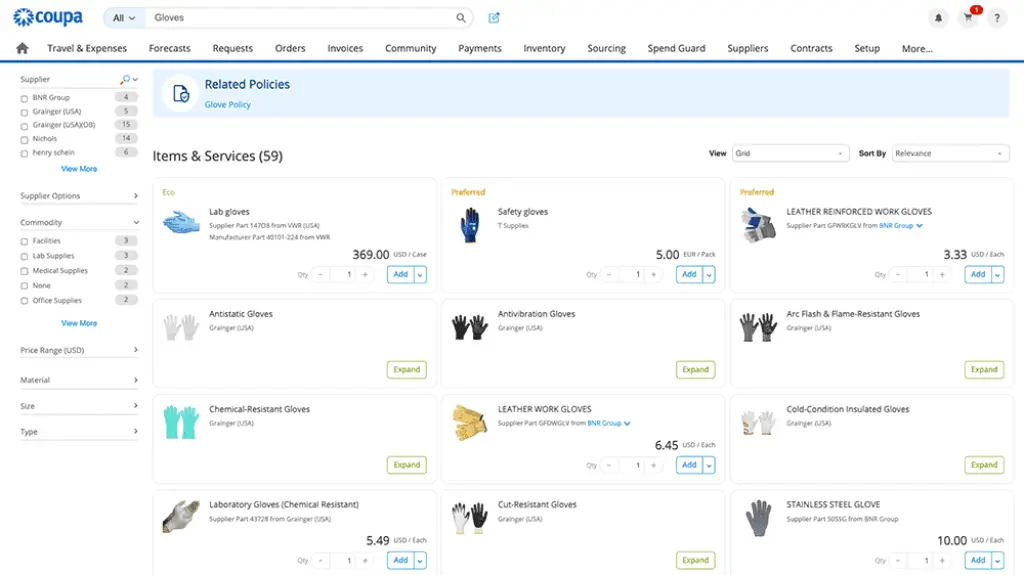
Procurement is one of Coupa’s core strengths. The platform gives employees a guided buying experience, allowing them to request products or services, route approvals, and create purchase orders in line with company policies. For finance leaders, this is important because it creates spend control before money leaves the business.
Key highlights include:
- Guided buying workflows for employee purchase requests
- Approval routing based on budget, category, role, or policy
- Purchase order creation and supplier communication in one flow
Supplier Management and Risk Visibility
Supplier management is another important part of Coupa. The platform helps organizations centralize supplier records, documentation, communication, onboarding steps, and transaction history. That is particularly useful for companies that rely on a large vendor base or need stronger controls over supplier compliance.
Instead of treating suppliers as disconnected records in multiple systems, Coupa helps procurement and finance teams manage supplier activity inside a broader spend management workflow. This can improve vendor visibility, reduce duplicated supplier records, and support better sourcing decisions.
Sourcing and Contract Management
Coupa also supports strategic sourcing and contract management. This expands the platform beyond purchase requests and invoices into earlier stages of spend planning. Procurement teams can use sourcing workflows to manage supplier bids, evaluate options, and connect negotiated terms to downstream purchasing activity.
This is valuable for companies where supplier negotiations, contract terms, and purchasing activity are often disconnected. When contract and sourcing data connect to procurement, teams are better positioned to enforce negotiated pricing and reduce off-contract spend.
Expense Management and Employee Spend
Coupa includes expense management capabilities for travel, employee reimbursements, policy checks, and spend approvals. This helps organizations manage employee-initiated spend alongside supplier payments and procurement workflows.
For larger companies, this matters because business spend rarely comes from one channel. Employees submit expenses, departments request purchases, suppliers send invoices, and finance teams need visibility into all of it. Coupa’s broader approach helps bring these spend categories into a more consistent control environment.
Coupa Pay and Payment Workflows
Coupa Pay helps organizations connect approved spend with payment execution. Instead of managing procurement in one system, invoices in another, and payments somewhere else, Coupa aims to bring more of the payment workflow into the same spend management environment.
This is especially useful for finance teams that want tighter control over supplier payments, virtual cards, and payment reconciliation. Coupa has also expanded its payment capabilities with virtual card workflows, which can help companies manage supplier payments and employee expenses with stronger spend controls.
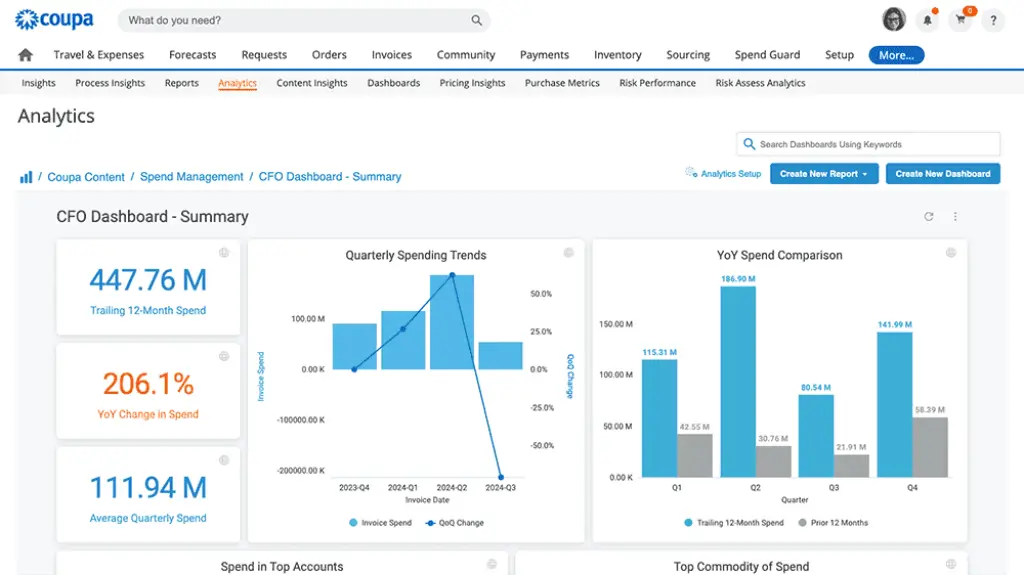
Spend Analysis and Financial Visibility
Spend analysis is one of the most important reasons companies evaluate Coupa. The platform helps procurement and finance teams understand where money is going, which suppliers are used most, where policy exceptions appear, and where savings opportunities may exist.
This is different from simply running reports in accounting software. Accounting systems typically show what has already happened. Coupa’s spend visibility is more useful for proactive control, category management, supplier negotiation, and budget discipline.
AI and Automation Across Spend Workflows
Coupa positions itself as an AI-native spend management platform, and AI is increasingly part of how the product supports approvals, insights, risk detection, and workflow automation. In practical terms, the value of AI in Coupa is not about replacing finance judgment. It is about helping teams identify patterns, reduce manual review, and make faster spend decisions.
For example, AI-driven insights can support better buying recommendations, supplier risk awareness, invoice processing, and spend analysis. The larger your purchasing and supplier data set becomes, the more valuable these capabilities can be.
ERP and Accounting System Integrations
Coupa is designed to integrate with ERP and accounting systems rather than replace them. Common integration scenarios include syncing suppliers, purchase orders, invoices, payments, accounting codes, and approval-related data with systems such as SAP, Oracle, NetSuite, Microsoft Dynamics, and Workday.
This is an important point when evaluating Coupa. Your ERP remains the system of record for accounting and financial reporting, while Coupa becomes the system of control for spend management workflows.
Security, Compliance, and Enterprise Controls
Because Coupa manages sensitive supplier, payment, procurement, and employee spend data, security and compliance are central to the platform. Coupa emphasizes enterprise-grade controls, role-based access, audit trails, privacy governance, and compliance reporting.
For organizations with strict procurement policies, regulated supplier environments, or global operations, this security layer is a major advantage. It helps finance and procurement teams enforce policies while maintaining a clearer record of approvals and spend activity.
Invoice Management and AP Automation
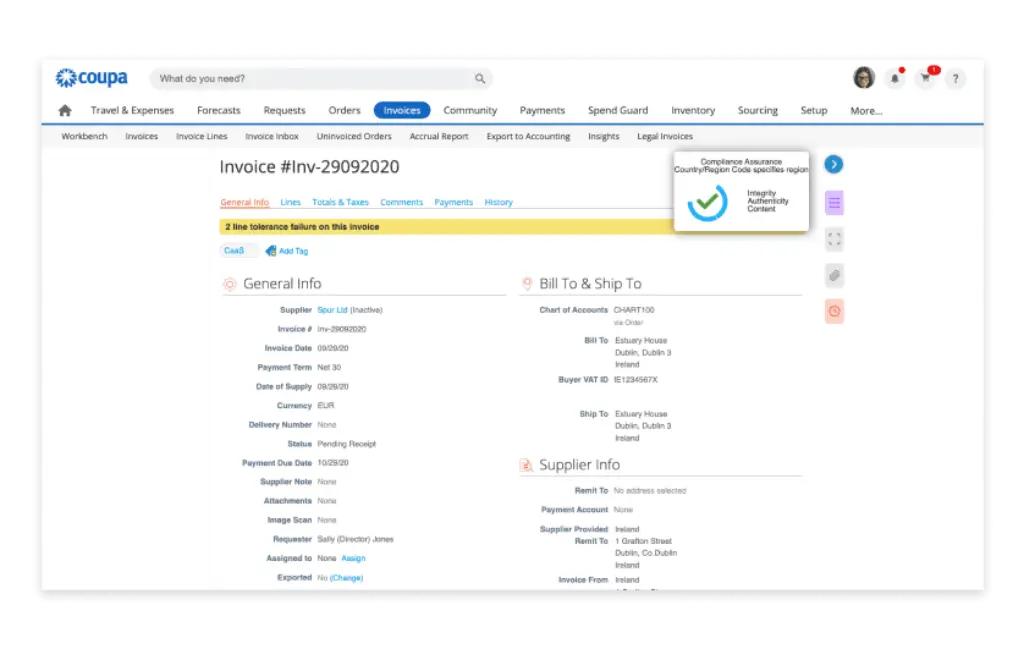
Coupa includes invoice management tools that help finance teams reduce manual invoice handling. Suppliers can submit invoices electronically, invoices can be matched against purchase orders, and approval workflows can be standardized before payment. This makes Coupa useful for companies that want AP automation connected to procurement, not just invoice capture.
The strongest value appears when procurement and accounts payable work together. If a purchase order, supplier record, approval rule, and invoice are all connected, finance teams gain a cleaner audit trail and fewer reconciliation issues.
How Coupa Works
Setup and Uses
Setup and Onboarding
Coupa is not a lightweight tool you should expect to deploy casually in a few hours. It usually requires careful implementation planning because it can touch procurement policies, approval chains, ERP integrations, supplier onboarding, invoice workflows, payments, expense policies, and reporting structures.
For that reason, implementation quality matters. Before rollout, your team should define approval rules, spend categories, supplier data standards, ERP sync requirements, user roles, and exception workflows. The more complex your organization is, the more important this preparation becomes.
From Purchase Request to Payment
A typical Coupa workflow starts when an employee requests a product or service. The request is routed based on approval rules, converted into a purchase order where relevant, sent to the supplier, matched against the invoice, approved by finance, and then processed for payment.
This connected workflow is one of Coupa’s biggest advantages. It reduces the need to manage purchase requests in email, invoices in AP software, approvals in spreadsheets, and payments in a separate banking tool.
Managing Suppliers and Contracts
Coupa can also support suppliers onboarding, supplier updates, documentation, contract visibility, and sourcing workflows. This is useful if your procurement team wants to move beyond transaction processing and build a more strategic supplier management function.
For example, procurement leaders can use Coupa to improve supplier visibility, understand category-level spend, track contract-related purchasing, and identify opportunities for renegotiation or consolidation.
Using Coupa for Finance and Procurement Collaboration
One of Coupa’s strongest use cases is bridging finance and procurement. Procurement teams care about supplier selection, sourcing, contracts, and policy compliance. Finance teams care about approvals, invoices, payments, cash visibility, and controls. Coupa gives both teams a shared operating layer.
That makes the platform especially useful for organizations where procurement and finance are already mature enough to work from a unified spend strategy.
Pros and Cons
A balanced view: what you’ll love and what to consider
Coupa is a powerful spend management platform, but it is not the right choice for every business. Its biggest strength is breadth. It can connect procurement, AP, supplier management, expenses, payments, sourcing, contracts, and spend analysis in one environment.
That same breadth also creates a natural trade-off. Coupa is more complex than standalone AP automation software, and implementation requires a serious process design effort.
Positive
✅ Unifying Procurement, AP, and Payments
✅ Improving Spend Control Before Invoices Arrive
✅ Helping Procurement Become More Strategic
✅ Supporting Enterprise Finance Governance
Negative
❌ It Can Be Too Much for Small Businesses
❌ Pricing Requires a Sales Conversation
❌ Implementation Takes Planning
❌ Best Value Comes at Larger Scale
✅ Benefits of Coupa
Unifying Procurement, AP, and Payments
Coupa’s biggest benefit is that it connects multiple spend workflows into one platform. You can manage purchase requests, supplier activity, invoices, payment workflows, expenses, sourcing, and spend analysis without forcing teams to jump between disconnected tools.
Improving Spend Control Before Invoices Arrive
Many AP tools help after invoices are submitted. Coupa helps earlier in the process by controlling purchase requests, supplier selection, approval rules, and contract alignment. That is a major advantage if your main problem is uncontrolled or non-compliant spend.
Helping Procurement Become More Strategic
Coupa gives procurement teams better data for sourcing, supplier negotiations, category strategy, and contract compliance. Instead of acting only as a request processing function, procurement can use spend insights to influence savings and supplier decisions.
Supporting Enterprise Finance Governance
Coupa’s role-based permissions, approval workflows, audit trails, supplier controls, and compliance capabilities make it a strong fit for companies that need a more formal spend governance model. This is particularly important for multi-entity, regulated, or global organizations.
❌ Potential Drawbacks and Limitations
It Can Be Too Much for Small Businesses
If you only need simple bill payment, basic invoice approvals, or small-business accounting, Coupa is likely more platform than you need. Tools such as BILL, Plooto, or QuickBooks-connected AP solutions may be easier to launch and manage.
Pricing Requires a Sales Conversation
Coupa does not operate like a simple SaaS tool with fixed public plans for every buyer. Pricing typically depends on modules, users, business scope, implementation needs, transaction volume, and integration complexity. This makes the buying process more involved.
Implementation Takes Planning
Coupa can deliver significant value, but only if your workflows are designed properly. If approval rules, supplier records, chart of accounts mappings, and ERP integrations are not carefully planned, the rollout can become slower and more complicated.
Best Value Comes at Larger Scale
Coupa’s strengths are most visible when your organization has meaningful spend complexity. If your company has only a small vendor base, low invoice volume, and basic approvals, the return on investment may be harder to justify.
Pricing and Plans
How much does Coupa cost?
Coupa pricing is not usually presented as a simple monthly plan on the public website. It is generally quote-based and depends on the products, modules, integrations, support requirements, user scope, and implementation complexity your organization needs.
This is common for enterprise spend management platforms. Coupa is not priced like a lightweight SMB bill pay tool because it is designed to support larger workflows across procurement, AP, supplier management, expenses, payments, contracts, and spend analytics.
How the Pricing Model Usually Works
- Product scope – procurement, invoicing, expenses, payments, sourcing, and other modules can affect cost
- User and workflow scale – employee, approver, finance, procurement, and supplier usage can shape pricing
- Integration needs – ERP, accounting, supplier, payment, and data integrations may add implementation effort
- Support and services – training, rollout, configuration, and ongoing support can influence total cost
Who Should Expect Higher Costs
Companies with multiple entities, complex approval workflows, international operations, large supplier bases, advanced procurement needs, or deep ERP integrations should expect a more substantial investment. That does not mean Coupa is overpriced. It means Coupa is built for a more complex operating model than basic AP software.
What to Clarify During Evaluation
When you evaluate Coupa, ask for a full breakdown of software subscription, implementation services, integration scope, support package, payment-related fees, supplier enablement, and any module-specific costs. This will help you understand the real total cost of ownership before committing.
Pricing Comparison Table
| Pricing Element | How Coupa Typically Handles It | What You Should Watch |
| Platform subscription | Quote-based, depending on scope | Costs vary by selected modules |
| Procurement and AP modules | Usually packaged by business need | Confirm which workflows are included |
| Payments and cards | May depend on enabled payment capabilities | Clarify payment fees and reconciliation scope |
| ERP integrations | Implementation-dependent | SAP, Oracle, NetSuite, and Dynamics projects can vary |
| Supplier enablement | May require planning and services | Large supplier bases need rollout support |
Business Fit
Who Should Use Coupa?
Mid-Market and Enterprise Finance Teams
Coupa is best suited for mid-market and enterprise organizations that need stronger control over procurement, AP, supplier management, payments, expenses, and spend analytics. If your company has outgrown email-based approvals and disconnected finance tools, Coupa becomes much more relevant.
Organizations With Mature Procurement Needs
If procurement is a strategic function in your business, Coupa is a strong option. It helps teams manage sourcing, supplier relationships, purchase requests, contract visibility, and spend analysis in a more connected way.
Multi-Entity and Global Businesses
Coupa is also a strong fit for organizations with multi-entity operations, global supplier bases, complex approval structures, and cross-functional spend workflows. These businesses typically need more than invoice automation. They need spend governance across the full buying lifecycle.
Common Industry Use Cases
- Enterprise procurement: strong fit for sourcing, contracts, suppliers, and buying controls
- Finance operations: useful for AP automation, approvals, payments, and reconciliation
- Global organizations: valuable for supplier, policy, and spend standardization
- Complex service businesses: helpful when spend visibility and governance matter
Alternatives
Coupa Alternatives & Competitors
Coupa is a strong platform, but it is not the only option in procurement, AP automation, or spend management. The right alternative depends on whether your priority is global payments, invoice collaboration, supplier payments, procurement depth, or corporate spend control.
Comparison Table: Coupa vs Competitors
| Feature | Coupa | Tipalti | Stampli | SAP Concur |
| Core focus | Total spend management and procurement | AP automation and global payments | AP workflow and invoice collaboration | Travel, expenses, and invoice workflows |
| Procurement depth | Very strong | Moderate to strong | Limited | Moderate, depending on SAP setup |
| AP automation | Strong and connected to procurement | Very strong | Very strong | Strong |
| Global payments | Strong with Coupa Pay | Major strength | More limited | Varies by configuration |
| Best fit | Enterprise spend management | Finance teams with complex payables | Teams focused on invoice approvals | Businesses managing travel and expense-heavy workflows |
Coupa vs Tipalti: Tipalti is usually stronger if your main priority is AP automation, supplier onboarding, tax compliance, and global payments. Coupa is stronger if you need broader procurement, sourcing, contracts, supplier management, and spend analytics.
Coupa vs Stampli: Stampli is easier to understand if your biggest pain point is invoice approval collaboration. Coupa is broader and more strategic, but it also requires a larger implementation effort.
Coupa vs SAP Concur: SAP Concur is often strongest for travel and expense management, especially in SAP-oriented environments. Coupa is more compelling when your goal is wider business spend management across procurement, suppliers, invoices, payments, contracts, and analytics.
Coupa vs BILL: BILL is simpler for SMBs that need AP and AR automation. Coupa is more appropriate for larger organizations that need structured procurement and enterprise-level spend controls.
Integrations and Ecosystem
Connect Coupa to your favourite apps
Getting Started with Integrations
Coupa works best when it is connected properly to your ERP, accounting system, supplier data, payment workflows, and reporting environment. Before implementing it, define which system owns each data type, including suppliers, purchase orders, invoices, payment status, accounting codes, departments, locations, and entities.
ERP and Accounting Connectivity
Coupa supports integration scenarios with major enterprise systems, including SAP, Oracle, NetSuite, Microsoft Dynamics, and Workday. These integrations are important because Coupa does not replace your general ledger. It extends your ERP by adding stronger controls over procurement, invoices, suppliers, and spend activity.
Marketplace and Extension Ecosystem
Coupa also provides an app marketplace and integration ecosystem for extending the platform. Depending on your business needs, this can include connectors for ERPs, tax tools, supplier networks, payments, analytics, and implementation accelerators.
Best Practices for Adoption
- Define ownership first: decide which system owns supplier, invoice, and accounting data
- Start with high-impact workflows: procurement, AP, or supplier onboarding
- Standardize approval rules: avoid recreating messy offline processes
- Measure outcomes: track cycle time, savings, compliance, and user adoption
Security and Compliance
Security and Compliance in Coupa
Security and compliance are major considerations when evaluating Coupa. The platform handles sensitive procurement, supplier, invoice, payment, expense, and business spend data, so it needs to support enterprise-level controls.
Security Certifications and Trust Controls 🔐
Coupa publicly emphasizes trust, security, privacy, and compliance programs, including standards such as SOC I, SOC II, PCI, and ISO 27001. These controls are important for organizations that need confidence in vendor risk, audit readiness, and sensitive finance data protection.
Role-Based Access and Audit Trails
Coupa supports controlled access and approval workflows that help teams enforce segregation of duties. This is important because procurement and finance workflows often involve many users, including employees, managers, finance teams, procurement teams, suppliers, and administrators.
Privacy and Global Compliance
Coupa’s privacy program is designed for global organizations and is mapped to major privacy frameworks and regulatory environments. This matters if your business operates across regions or manages supplier and employee data from multiple jurisdictions.
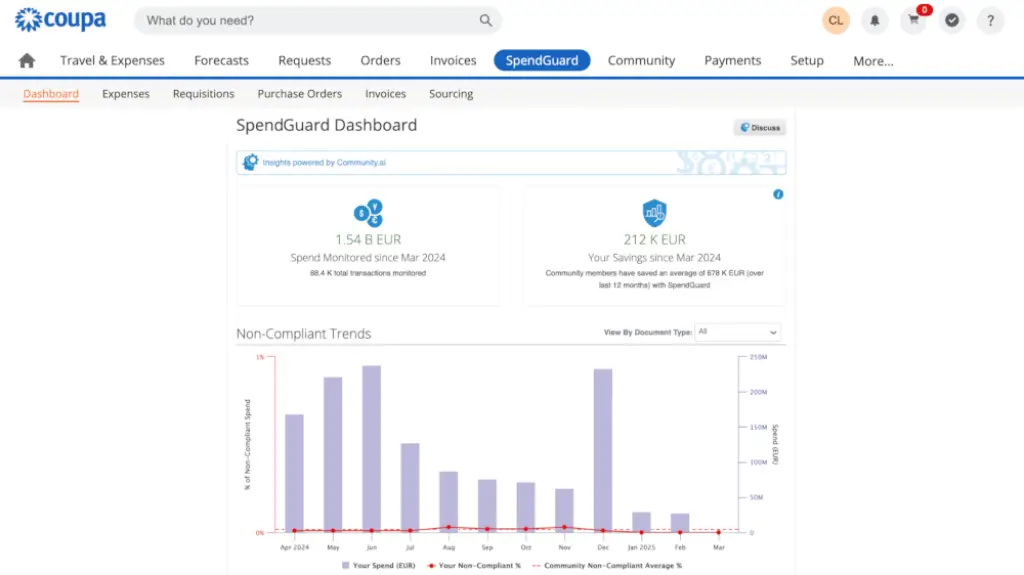
Spend Policy and Fraud Risk Controls
Coupa can help reduce spend leakage by enforcing approval workflows, policy controls, supplier validation, and visibility across purchasing behavior. The platform is especially useful when leadership wants to reduce off-contract purchasing, duplicate supplier usage, and manual approval exceptions.
Conclusion
Final Thoughts
Coupa is best understood as a total spend management platform, not as basic AP software or accounting software. It is built for organizations that want stronger control over procurement, supplier management, invoices, payments, expenses, contracts, sourcing, and spend analytics.
If your finance team only needs simple bill payments or invoice approvals, Coupa may be more than you need. But if your business is dealing with complex supplier relationships, fragmented procurement, global spend, approval bottlenecks, and limited visibility into where money is going, Coupa becomes a much stronger option.
In my view, Coupa is one of the strongest choices for mid-market and enterprise teams that want to manage spend before, during, and after the purchase process. Its real value is not just automation. It is the way it connects procurement strategy, financial control, supplier visibility, and spend intelligence in one platform.
For organizations that have already outgrown basic AP automation and need broader spend governance, Coupa is absolutely worth serious consideration.
Have more questions?
Frequently Asked Questions
What is Coupa?
Coupa is a cloud-based total spend management platform that helps organizations manage procurement, invoicing, expenses, payments, suppliers, contracts, sourcing, and spend analytics in one connected environment.
Is Coupa accounting software?
No. Coupa is not traditional accounting software. It usually works alongside ERP and accounting systems to manage spend workflows before transactions are finalized in the general ledger.
What is Coupa best used for?
Coupa is best used for procurement, AP automation, supplier management, contract visibility, expense workflows, payments, and spend analysis. It is strongest when businesses need better control over company-wide spending.
Who is Coupa best for?
Coupa is best for mid-market and enterprise organizations with complex procurement, supplier, approval, payment, and spend visibility requirements. It is usually more than small businesses need.
Does Coupa include AP automation?
Yes. Coupa includes invoice management and AP automation capabilities, including invoice submission, approvals, PO matching, supplier workflows, and payment-related processes.
Does Coupa support procurement?
Yes. Procurement is one of Coupa’s major strengths. The platform supports guided buying, requisitions, approvals, purchase orders, supplier communication, sourcing, and contract-related workflows.
How much does Coupa cost?
Coupa pricing is typically quote-based and depends on the modules, users, workflows, integrations, support needs, and implementation scope. You should request a tailored quote to understand the full cost.
What systems does Coupa integrate with?
Coupa can integrate with major ERP and finance systems such as SAP, Oracle, NetSuite, Microsoft Dynamics, and Workday, along with other tools through its marketplace and integration ecosystem.
Is Coupa good for small businesses?
Coupa is usually not the best fit for very small businesses with simple accounting or bill payment needs. It is better suited to organizations with mature procurement, finance, and spend management requirements.
What are the best Coupa alternatives?
Strong Coupa alternatives include Tipalti for AP automation and global payments, Stampli for invoice collaboration, SAP Concur for travel and expense workflows, and BILL for simpler SMB payables and receivables.








