
Introduction
Choosing the best accounts payable automation software is no longer just about digitizing invoices. The strongest platforms now help you capture invoice data, route approvals, prevent duplicate payments, sync with accounting systems, manage vendors, strengthen internal controls, and pay suppliers with fewer manual steps.
For finance teams, this matters because manual AP work creates hidden costs. Every invoice that sits in an inbox, every approval that gets delayed, and every payment that requires rekeying adds friction to your month-end close, cash flow visibility, and supplier relationships.
In this guide, you’ll find the best accounts payable automation software to consider in 2026: BILL, Tipalti, Stampli, AvidXchange, SAP Concur Invoice, Coupa, and Plooto. Each platform fits a slightly different type of company, from small businesses that need simple bill pay to enterprise finance teams managing procurement, approvals, compliance, and global supplier payments.
If you want one quick takeaway before diving in, here it is: BILL is one of the strongest choices for global AP automation and supplier payments, Tipalti is excellent for collaborative invoice approvals, Stampli is one of the most practical options for small and mid-sized businesses, AvidXchange is a strong middle-market platform for invoice and payment automation, SAP Concur Invoice makes sense for companies already managing spend through SAP Concur, Coupa is best for enterprise spend management, and Plooto is a simple, accounting-friendly choice for smaller teams and firms.
What to look for in accounts payable automation software
The right AP platform depends on your invoice volume, approval complexity, ERP setup, payment needs, and internal control requirements. Before choosing a vendor, focus on the areas that will have the biggest operational impact.
- Invoice capture: Look for OCR, AI extraction, email intake, duplicate detection, and easy document handling.
- Approval workflows: Make sure you can route invoices by vendor, amount, department, entity, PO, or custom rules.
- Accounting integrations: Prioritize strong sync with QuickBooks, Xero, NetSuite, Sage Intacct, Microsoft Dynamics, SAP, or your ERP.
- Payment automation: Review ACH, virtual card, check, wire, international payments, and payment approval controls.
- PO matching: If you use purchase orders, 2-way and 3-way matching can reduce exceptions and prevent overpayments.
- Vendor management: Supplier onboarding, tax forms, payment details, and fraud controls matter as you scale.
- Audit trails: Finance teams need clear records of invoice edits, approvals, payment releases, and user activity.
- Scalability: A tool that works for 100 invoices per month may not work for multi-entity global AP operations.
BILL
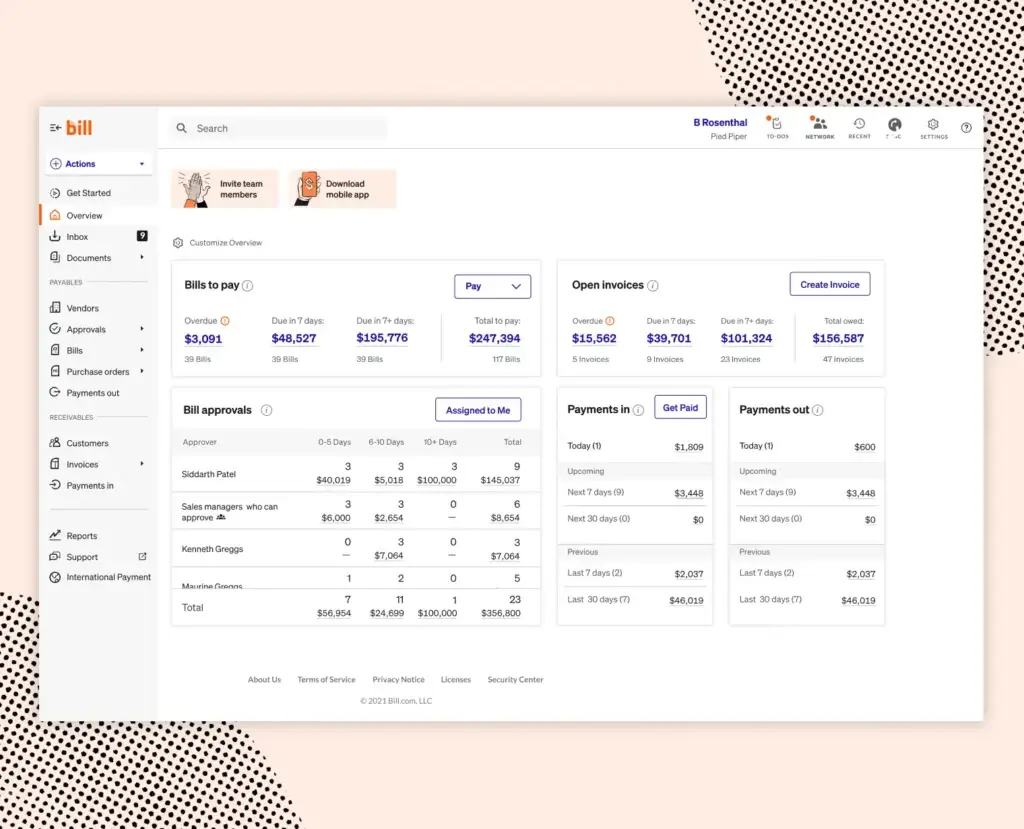
BILL is one of the most practical AP automation platforms for small and mid-sized businesses. It is built around everyday financial operations: creating and paying bills, sending invoices, managing approvals, syncing with accounting software, and reducing manual payment work.
Compared with enterprise AP platforms, BILL is easier to understand and easier to shortlist. It is a strong fit if your finance process revolves around QuickBooks, Xero, Sage Intacct, or NetSuite, and you want a cleaner way to manage bill approvals and vendor payments.
BILL also has a broader platform story because it includes AP, AR, spend, expense, and corporate card capabilities. That makes it useful for companies that want to modernize finance operations without implementing a heavy procurement suite.
Key features
- Bill capture and accounts payable workflows
- Custom approval routing and payment controls
- ACH, check, card, and international payment options
- Accounts receivable tools for invoicing and collections
- Spend and expense management options
- Mobile approvals for business owners and managers
- Integrations with QuickBooks, Xero, NetSuite, Sage Intacct, and Microsoft Dynamics
Pros and cons
Pros
✅ Strong fit for SMB accounting workflows
✅ Combines AP and AR in one platform
✅ Easier to adopt than enterprise AP suites
✅ Good accounting software integrations
Cons
❌ Per-user pricing and transaction fees can add up
❌ Less ideal for complex global AP compliance
❌ Advanced controls may require higher plans
❌ Not as procurement-focused as Coupa or SAP Concur
Pricing
BILL offers user-based AP and AR plans, including Essentials, Team, Corporate, and Enterprise options. BILL also notes that some payment types, such as checks, ACH, instant transfers, and international payments, may include transaction fees. BILL Spend & Expense is positioned separately with no per-user software subscription fee, although card and payment-related fees may apply.
Who should use BILL?
BILL is best for small and mid-sized businesses, accounting firms, and finance teams that want a straightforward way to automate bill approvals, vendor payments, and accounting sync. It is especially strong when you want AP and AR workflows in one practical platform without enterprise-level complexity.
Tipalti

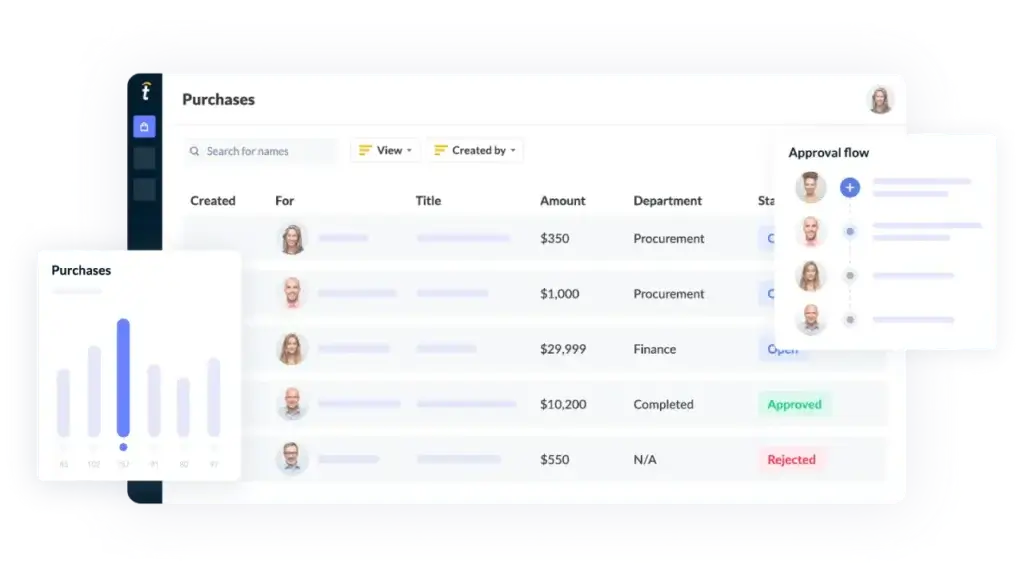
Tipalti is one of the strongest accounts payable automation platforms for companies that have outgrown basic bill pay. It combines invoice automation, approval workflows, supplier onboarding, tax compliance, global payments, and ERP integrations in one finance automation platform.
Where Tipalti stands out most is global scale. If you pay vendors, contractors, creators, partners, or suppliers across multiple countries, you need more than invoice routing. You need payment methods, currency handling, tax documentation, compliance checks, and payment reconciliation that reduce risk across the full payables lifecycle.
Tipalti is especially useful for companies with multiple entities, international suppliers, and finance teams that want stronger visibility over every stage of AP. It is not the simplest option for very small teams, but for scaling companies, SaaS businesses, marketplaces, adtech companies, ecommerce brands, and global finance teams, it is one of the most complete platforms in this category.
Key features
- AI-powered invoice capture and coding
- Approval workflows with routing rules and audit trails
- Supplier onboarding and vendor information management
- Global payments across multiple currencies and payment methods
- Tax compliance workflows for supplier documentation
- ERP integrations with systems such as NetSuite, Sage Intacct, QuickBooks, and Microsoft Dynamics
- Multi-entity support for scaling finance operations
Pros and cons
Pros
✅ Excellent for global supplier payments
✅ Strong tax and compliance controls
✅ Good fit for multi-entity finance teams
✅ Combines AP automation and payment execution
Cons
❌ More advanced than many small businesses need
❌ Pricing is typically quote-based
❌ Implementation requires more planning than lightweight tools
❌ Best value appears when payment complexity is high
Pricing
Tipalti uses a quote-based pricing model. The final cost depends on the modules, invoice volume, payment requirements, entities, currencies, and ERP integrations you need. In most cases, it should be evaluated as a mid-market or enterprise finance automation investment rather than a basic AP tool.
Who should use Tipalti?
Tipalti is best for scaling companies that need AP automation, global payment execution, tax compliance, supplier onboarding, and ERP synchronization in one platform. It is especially strong if your finance team pays vendors across countries, manages multiple entities, or wants tighter controls around supplier data and payment approvals.
Stampli

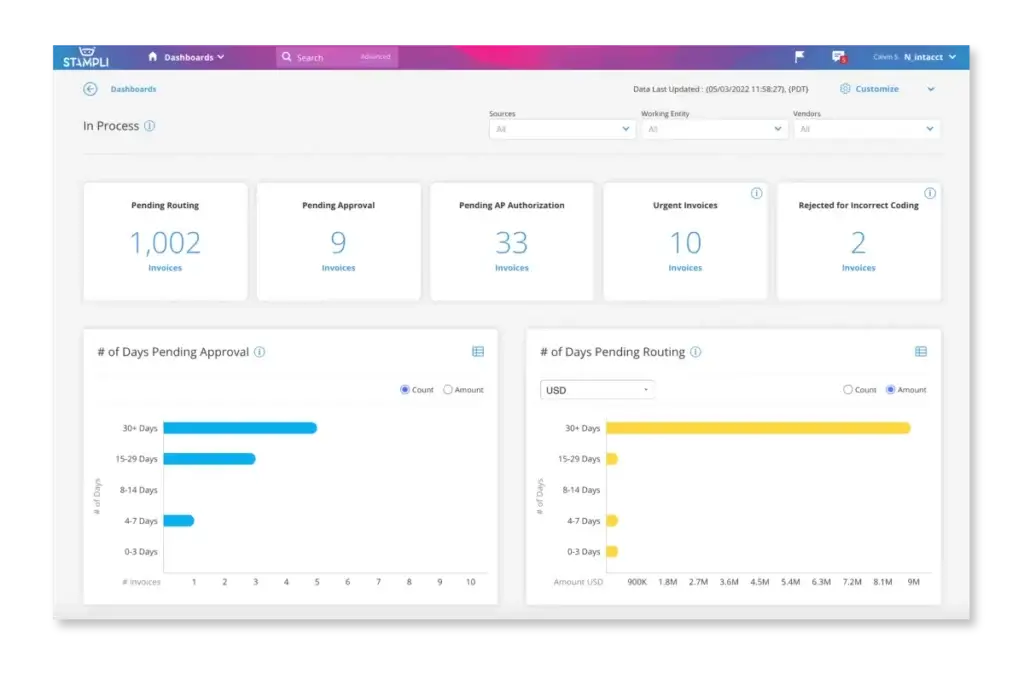
Stampli is one of the best accounts payable automation software options for teams that want better invoice collaboration. Its core idea is simple but powerful: keep invoice conversations, approvals, coding, exceptions, and audit history connected to the invoice itself.
This makes Stampli especially valuable when your AP process gets slowed down by email threads, missing context, unclear approvers, and back-and-forth between finance and department managers. Instead of chasing people across email or Slack, your team can manage invoice-related communication inside the AP workflow.
Another major strength is ERP compatibility. Stampli is built to work with your accounting system or ERP rather than forcing you to rebuild your financial operations around a new platform. For teams that already have an ERP they trust, this can make adoption easier.
Key features
- Automated invoice capture and invoice processing
- Collaborative invoice approval workflows
- AI-assisted coding and approver suggestions
- PO matching and exception handling
- Vendor management and supplier communication
- ERP and accounting system integrations
- Payments, procurement, and card-related expansion options
Pros and cons
Pros
✅ Excellent invoice-level collaboration
✅ Strong fit for approval-heavy AP teams
✅ Works well alongside existing ERPs
✅ Helps reduce email-based invoice confusion
Cons
❌ Pricing is quote-based
❌ Broader spend management depth depends on modules
❌ Not as globally payment-focused as Tipalti
❌ May be more than very small teams need
Pricing
Stampli uses custom pricing. Its pricing page highlights AP automation, invoice capture, entities or locations, vendors, PO matching, insights, onboarding, training, and support as part of the package conversation. Because pricing depends on company size, AP volume, modules, and implementation requirements, you should request a quote based on your workflow.
Who should use Stampli?
Stampli is best for companies that want to improve invoice approvals, reduce back-and-forth, and centralize AP communication without replacing their ERP. It is a strong choice for finance teams that care about invoice visibility, approval accountability, and easier collaboration across departments.
AvidXchange


AvidXchange is a strong accounts payable automation platform for middle-market companies that need more structure than basic bill pay but may not want a full enterprise procurement suite. It focuses on helping finance teams receive, manage, approve, and pay bills with greater efficiency, visibility, and control.
The platform is particularly relevant for industries with recurring invoice complexity, multiple approvers, vendor-heavy operations, and high payment volume. AvidXchange has historically been popular with sectors such as real estate, construction, financial services, healthcare, and community management.
Its value is strongest when your AP process depends on both invoice automation and payment execution. Instead of only capturing invoices and pushing them to your ERP, AvidXchange helps teams manage the broader bill-to-payment process.
Key features
- AI-enhanced invoice automation
- Invoice approval routing and payment workflows
- Purchase automation and PO matching options
- Integrated payment processing
- Supplier network and vendor payment support
- ERP and accounting system integrations
- AP visibility, controls, and audit history
Pros and cons
Pros
✅ Strong middle-market AP automation platform
✅ Good invoice-to-payment workflow coverage
✅ Useful supplier network and payment capabilities
✅ Strong fit for vendor-heavy industries
Cons
❌ Pricing is custom and not fully transparent
❌ May feel too heavy for simple SMB bill pay
❌ Implementation depends on workflow complexity
❌ Reporting depth and support experience can vary by setup
Pricing
AvidXchange uses customized pricing. Cost typically depends on invoice volume, payment needs, modules, integrations, and implementation requirements. This makes it harder to compare directly with simpler AP tools, but it also reflects the fact that AvidXchange is usually evaluated by middle-market businesses with more complex AP workflows.
Who should use AvidXchange?
AvidXchange is best for middle-market companies that process a meaningful volume of invoices and want to automate both invoice approvals and supplier payments. It is especially useful for finance teams that need better visibility, stronger approval controls, and a more scalable AP process across departments or locations.
SAP Concur Invoice


SAP Concur Invoice is a strong option for companies that already use SAP Concur for expense management, travel, or broader spend visibility. It helps finance teams automate invoice intake, approvals, policy checks, and AP visibility within the larger Concur ecosystem.
The main advantage is connected spend management. If employee expenses, supplier invoices, and travel costs are managed separately, finance leaders struggle to get a complete view of commitments and cash outflows. SAP Concur Invoice helps bring invoice processing into a more controlled spend environment.
It is not the lightest AP platform on this list, but it is a logical choice for companies that already rely on SAP Concur or want invoice automation tied closely to compliance, policy enforcement, and enterprise spend governance.
Key features
- Invoice capture and AP process automation
- OCR and invoice data extraction
- Approval routing and policy compliance workflows
- PO matching and exception handling options
- Mobile access for invoice review and approvals
- Spend visibility across invoices, expenses, and travel
- Integration with SAP and other finance systems
Pros and cons
Pros
✅ Strong fit for SAP Concur customers
✅ Connects invoice workflows with broader spend visibility
✅ Good compliance and policy control capabilities
✅ Useful for distributed approval processes
Cons
❌ Pricing is quote-based and subject to package requirements
❌ Best value is strongest inside the SAP Concur ecosystem
❌ May be too complex for smaller AP teams
❌ Setup requires clear process design
Pricing
SAP Concur Invoice uses custom pricing. Cost depends on company size, modules, configuration, integrations, and spend management needs. You should expect a sales-led evaluation rather than a simple self-serve pricing page.
Who should use SAP Concur Invoice?
SAP Concur Invoice is best for organizations that already use SAP Concur or want AP automation connected to travel, expense, and spend compliance. It is a strong fit for mid-sized and enterprise companies with distributed teams, formal approval policies, and a need for better visibility across spend categories.
Coupa

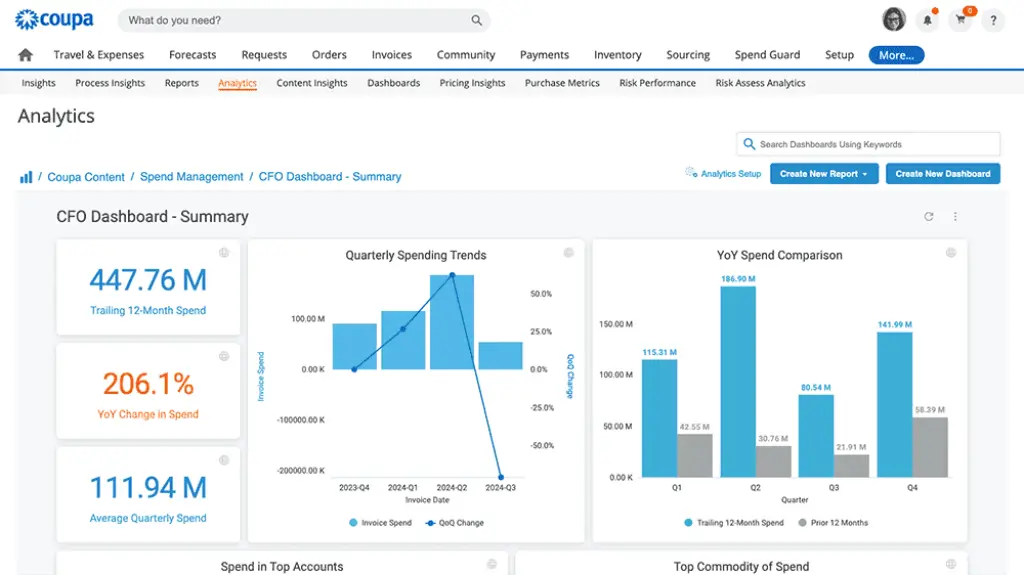
Coupa is best understood as a business spend management platform, not just an accounts payable automation tool. Its AP automation capabilities sit inside a broader environment that includes procurement, invoicing, supplier management, payments, expenses, and spend analytics.
This makes Coupa a strong choice for large companies that want invoice processing tied to upstream purchasing controls. If your AP team constantly deals with PO mismatches, policy exceptions, supplier issues, and decentralized purchasing, Coupa can help connect invoice approvals to the full spend lifecycle.
Coupa is not the simplest or cheapest option on this list. However, for enterprise finance and procurement teams, that is not necessarily the point. Its value comes from stronger governance, better spend visibility, AI-driven insights, supplier collaboration, and control over the complete procure-to-pay process.
Key features
- AP automation and invoice management
- AI-driven invoice visibility and controls
- Approval workflows and duplicate payment prevention
- Procurement and purchasing workflow integration
- Supplier management and collaboration tools
- Payment management and cash visibility options
- Spend analytics across procurement, invoices, and payments
Pros and cons
Pros
✅ Strong enterprise spend management platform
✅ Connects AP automation with procurement controls
✅ Good fit for complex approval and supplier workflows
✅ Strong visibility across spend categories
Cons
❌ Too complex for many small businesses
❌ Pricing is custom and enterprise-oriented
❌ Implementation can be more involved
❌ Best fit is broader spend management, not standalone bill pay
Pricing
Coupa uses custom pricing. Cost depends on modules, business size, users, spend processes, integrations, and implementation scope. It should be evaluated as an enterprise spend management investment rather than a basic AP automation subscription.
Who should use Coupa?
Coupa is best for enterprises and large mid-market companies that want AP automation connected to procurement, supplier management, payments, and spend analytics. It is especially useful when finance and procurement need a shared system of control for purchase requests, approvals, invoices, and supplier payments.
Plooto

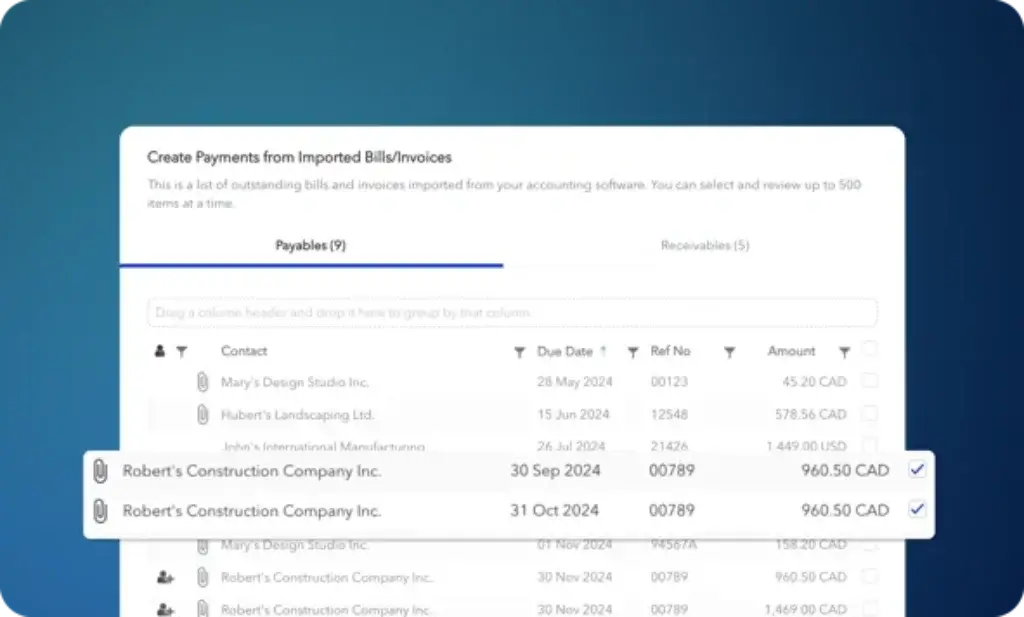
Plooto is a practical accounts payable and receivable platform for small businesses, bookkeepers, and accounting firms. It focuses on simplifying payment operations, approval workflows, and accounting reconciliation without the complexity of larger AP automation suites.
The platform is especially useful if your main goal is to manage payments more cleanly from QuickBooks or Xero. Plooto helps you schedule payments, collect approvals, track payment status, and sync activity back into your accounting software.
Compared with tools like Tipalti, Coupa, or SAP Concur Invoice, Plooto is much simpler. That is exactly why it works well for smaller teams. If you do not need global supplier onboarding, enterprise procurement, or advanced PO matching, Plooto gives you a focused way to bring more control to payables and receivables.
Key features
- Accounts payable payment workflows
- Accounts receivable payment collection
- Basic and advanced approval workflows depending on plan
- Recurring and scheduled payments
- Two-way sync with QuickBooks and Xero
- Audit trails and payment status visibility
- Accounting firm options for managing client payments
Pros and cons
Pros
✅ Simple and easy to understand
✅ Good fit for QuickBooks and Xero users
✅ Useful for accounting firms managing client payments
✅ More affordable than enterprise AP platforms
Cons
❌ Less advanced than full AP automation suites
❌ Not ideal for complex multi-entity global operations
❌ Integrations are narrower than larger competitors
❌ Advanced workflows depend on plan level
Pricing
Plooto publishes plan-based pricing. Its Go plan is listed at $9 per month for low client payment volumes and basic approval workflows. Pricing and transaction fees can vary by plan, payment type, and client setup, so review the current pricing page before choosing a package.
Who should use Plooto?
Plooto is best for small businesses, bookkeepers, and accounting firms that want a straightforward way to manage AP, AR, payment approvals, and accounting sync. It is a smart choice when you need more control than manual bank payments but do not need an enterprise AP automation platform.
Feature comparison table
| Software | Best For | Biggest Strength | Main Tradeoff |
| BILL | Small and mid-sized businesses | Simple AP, AR, payments, and accounting software integrations | Transaction fees and per-user pricing can increase total cost |
| Tipalti | Scaling and global finance teams | Global AP automation, supplier onboarding, tax compliance, and payment execution | More advanced and costly than small teams usually need |
| Stampli | Approval-heavy AP teams | Invoice-level collaboration, AI-assisted coding, and ERP-friendly workflows | Quote-based pricing and less global payment depth than Tipalti |
| AvidXchange | Middle-market businesses | Invoice-to-payment automation and supplier network capabilities | Custom pricing and more involved implementation |
| SAP Concur Invoice | Companies using SAP Concur or SAP ecosystems | Invoice automation connected to travel, expense, and spend compliance | Best value depends on broader SAP Concur adoption |
| Coupa | Enterprise procurement and finance teams | AP automation tied to procurement, supplier management, payments, and spend analytics | Too complex for basic AP or small business bill pay |
| Plooto | Small businesses and accounting firms | Simple AP, AR, approval workflows, and QuickBooks or Xero sync | Limited depth for complex global or enterprise AP needs |
How to choose the best accounts payable automation software for your business
The best accounts payable automation software is not always the platform with the most features. It is the one that removes your biggest AP bottlenecks without creating unnecessary complexity for your finance team.
Start by mapping your current process. How do invoices arrive? Who approves them? How often do invoices get delayed? Do you use purchase orders? How do you pay vendors? Which accounting or ERP system needs to stay in sync?
If you want practical AP software for SMB finance
BILL is one of the best places to start. It is approachable, widely used, and strong for businesses that need AP, AR, payments, approval workflows, and accounting software integrations.
If you need global AP and supplier payments
Tipalti is a strong fit if your business pays suppliers across countries, currencies, and payment methods. It is especially useful when tax compliance, supplier onboarding, and payment reconciliation are major pain points.
If approvals are your biggest bottleneck
Stampli is a strong choice when invoice approvals require collaboration across departments. It keeps conversations, invoice records, approver activity, and exceptions in one place, which helps reduce email-based confusion.
If you are a middle-market company with payment complexity
AvidXchange makes sense when your team processes a high volume of invoices and wants to automate both approvals and supplier payments. It is particularly relevant for vendor-heavy industries.
If you already use SAP Concur
SAP Concur Invoice is the most natural fit if your company already uses SAP Concur for travel and expenses. It gives you a better way to connect invoice workflows with broader spend visibility and policy compliance.
If procurement and AP need to work together
Coupa is the strongest fit when invoice automation is part of a larger spend management strategy. It works best for companies that want purchasing, supplier management, invoicing, and payments connected under one control framework.
If you need simple payment approvals and accounting sync
Plooto is a good option for smaller businesses and accounting firms. It is not trying to be a full enterprise AP suite, but it works well when your priority is simple payment control, approvals, and QuickBooks or Xero synchronization.
Final thoughts
The best accounts payable automation software in 2026 should help your finance team move beyond manual invoice entry, email approvals, spreadsheet tracking, and disconnected payment processes. Good AP automation improves control. Great AP automation also improves visibility, vendor relationships, month-end accuracy, and cash flow planning.
If I had to narrow this list by use case, I would put BILL first for global AP and payment complexity, Stampli first for collaborative invoice approvals, Tipalti first for SMB usability, AvidXchange first for middle-market invoice-to-payment automation, SAP Concur Invoice first for SAP Concur users, Coupa first for enterprise spend management, and Plooto first for simple business payment workflows.
Your final choice should come down to operational fit. If your AP process is simple, avoid buying an enterprise platform you will not fully use. If your AP process is global, multi-entity, approval-heavy, or procurement-driven, do not rely on a lightweight bill pay tool that will become a bottleneck as soon as volume grows.
The right platform should reduce manual work, improve approval accountability, keep your accounting system accurate, and give finance leaders better control over outgoing cash.
Frequently Asked Questions (FAQs)
What is accounts payable automation software?
Accounts payable automation software helps businesses digitize and streamline the AP process. It can capture invoice data, route approvals, match purchase orders, schedule payments, sync with accounting software, and maintain audit trails.
What is the best accounts payable automation software overall?
BILL is one of the strongest overall choices for companies with global supplier payments, tax compliance needs, multi-entity operations, and ERP integrations. For smaller businesses, Tipalti or Plooto may be easier and more affordable.
Which AP automation software is best for small businesses?
BILL and Plooto are usually the best fits for small businesses. BILL is stronger if you want AP, AR, payments, and broader financial operations, while Plooto is simpler for payment approvals and QuickBooks or Xero sync.
Which AP automation tool is best for global payments?
Tipalti is the strongest option on this list for global supplier payments. It combines invoice automation, supplier onboarding, tax compliance, payment methods, currencies, and ERP integration in one platform.
Which AP automation software is best for invoice approvals?
Stampli is one of the best options for invoice approvals because it centralizes invoice conversations, approval activity, coding, exceptions, and audit history around each invoice.
What is the difference between AP automation and bill pay software?
Bill pay software usually focuses on paying vendors. AP automation is broader and may include invoice capture, approval routing, PO matching, vendor onboarding, fraud controls, tax documentation, ERP sync, and payment reconciliation.
Does AP automation software integrate with QuickBooks and Xero?
Yes. Many AP automation platforms integrate with QuickBooks and Xero, including BILL, Plooto, Tipalti, and Stampli. Integration depth varies, so you should confirm whether the sync supports bills, vendors, payments, attachments, and reconciliation.
Is Coupa only for accounts payable?
No. Coupa is a broader spend management platform. Its AP automation capabilities are connected to procurement, supplier management, invoicing, payments, and spend analytics, which makes it better suited to larger organizations.
Is SAP Concur Invoice good for AP automation?
Yes. SAP Concur Invoice is a strong AP automation option for companies that already use SAP Concur or want invoice workflows connected to travel, expense, policy compliance, and broader spend visibility.
How much does accounts payable automation software cost?
Pricing varies widely. SMB tools may use monthly plans plus transaction fees, while mid-market and enterprise platforms usually use custom pricing based on invoice volume, users, modules, entities, payments, and ERP integrations.