
Expensify is one of the most recognizable expense management platforms for businesses that want to reduce manual receipt tracking, streamline employee reimbursements, manage corporate card activity, and sync expenses into accounting software.
It is not a full accounting system like QuickBooks, Xero, Sage Intacct, or NetSuite. Instead, Expensify focuses on the workflows that happen before expenses reach your general ledger, including receipt capture, approvals, expense reports, reimbursements, corporate cards, bill pay, invoicing, travel expenses, and spend visibility.
That distinction is important. If you need bookkeeping, payroll tax filing, financial statements, or full ERP functionality, Expensify will not replace your accounting software. But if your finance team is still chasing receipts, reviewing expense reports manually, reconciling card transactions, or exporting spreadsheets at month-end, Expensify can make your expense process faster and more controlled.
In this Expensify review, you will learn what Expensify does, how it works, which features matter most, how pricing is structured, where it fits best, and how it compares with alternatives like Ramp, SAP Concur, Navan, Zoho Expense, and Emburse.
Expensify Overview and Where It Fits in Your Finance Stack
What Expensify Does for Businesses
Expensify is best described as an expense management and spend automation platform. It helps employees submit expenses, scan receipts, track mileage, use company cards, request reimbursement, book travel, send invoices, pay bills, and communicate about expenses in one place.
For finance teams, Expensify acts as a control layer between employee spending and the accounting system. Employees use it to capture receipts and submit expenses. Managers use it to review and approve reports. Accounting teams use it to code, reconcile, and export approved expenses to systems like QuickBooks, Xero, NetSuite, Sage Intacct, and other finance platforms.
This makes Expensify especially useful for companies that want to move away from spreadsheets, email-based reimbursement requests, and slow month-end expense cleanup.
Expensify vs Traditional Accounting Software
Expensify is not designed to be your official general ledger. It does not replace accounting software, financial reporting systems, tax filing tools, or ERP platforms.
Where Expensify adds value is in the operational expense process. It helps you capture receipts, enforce expense policies, approve reports, reimburse employees, track corporate card transactions, and sync cleaner expense data into your accounting system.
That makes Expensify a practical choice if your current process is slowed down by missing receipts, unclear expense categories, delayed approvals, duplicate submissions, manual reimbursements, or disconnected corporate card activity.
Software specification
Key Features of Expensify
Receipt Scanning and Smart Expense Capture
Receipt capture is still one of Expensify’s strongest features. Employees can scan receipts through the mobile app, upload files, forward email receipts, or create expenses manually.
Expensify’s SmartScan technology helps extract key details such as merchant, amount, date, and category. This reduces the need for employees to type every expense manually and gives finance teams cleaner records to review.
This is especially useful for teams with frequent travel, client meetings, field work, mileage claims, and recurring employee purchases.
Expense Reports and Approval Workflows
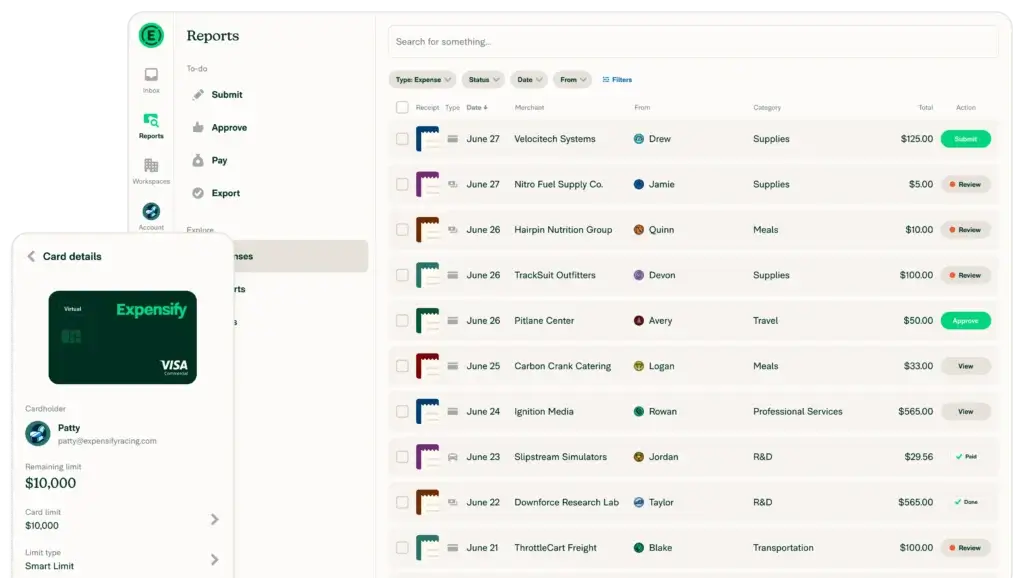
Expensify helps employees submit expense reports while giving managers and finance teams a structured review process. Reports can be routed for approval, checked against company policy, and prepared for reimbursement or accounting sync.
The platform is useful when you want a clearer process than email threads or spreadsheets. Instead of asking employees to collect receipts manually and send them at the end of the month, Expensify creates a guided workflow for submission, review, approval, and export.
Finance teams can also use policies and rules to reduce manual review work. For example, Expensify can help flag potential policy issues, duplicates, missing receipts, or unusual transactions before they become month-end problems.
Corporate Cards and Spend Management
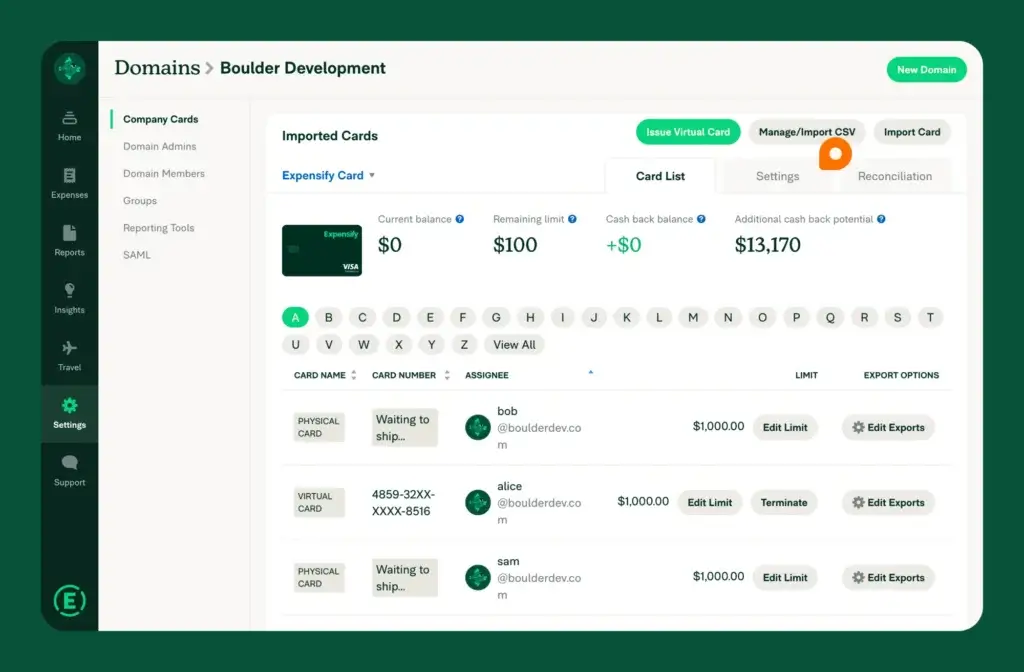
Expensify includes corporate card capabilities through the Expensify Card and can also support businesses that want to bring their own cards. This gives finance teams flexibility if they already have a preferred bank card program but still want better receipt matching and expense reporting.
The Expensify Card can help automate expense creation and receipt matching because card transactions and expenses are connected inside the same platform. That can reduce reconciliation work and improve visibility into employee spend.
Key strengths in this area include:
- Corporate card transaction tracking
- Virtual card support for controlled spend
- Receipt matching and card reconciliation
- Spend visibility across teams and employees
AI-Powered Expense Automation
Expensify uses Concierge AI to help automate parts of the expense process. This includes categorizing expenses, identifying potential policy issues, and reducing repetitive administrative work.
For finance teams, the value is not only speed. The bigger benefit is consistency. When expense categorization, policy checks, and report submission follow a more structured process, accounting teams spend less time cleaning inconsistent data later.
Travel Expenses and Reimbursements
Expensify supports travel-related expense workflows, including receipt capture, travel reimbursement, and expense matching. This is helpful for companies where employees travel often but do not need a heavy enterprise travel management system.
Employees can capture expenses while they travel, instead of waiting until they return. Managers can review travel expenses faster, and finance teams can reimburse approved expenses more efficiently.
For larger travel-heavy organizations, Expensify may still need to be compared carefully with Navan or SAP Concur. But for small and mid-sized teams that want travel expenses connected directly to reimbursements and accounting sync, Expensify is a practical option.
Bill Pay and Invoicing
Expensify has expanded beyond traditional expense reports. It now also supports bill pay and invoicing, which makes it more useful for small businesses that want to handle several finance workflows in the same environment.
Bill pay helps companies capture, approve, and pay vendor bills. Invoicing helps businesses create and send invoices, track payment status, and manage client billing workflows.
These tools will not replace a dedicated AP automation platform for complex supplier management, but they are useful if you want lightweight bill and invoice handling connected to your broader spend workflow.
Accounting and ERP Sync
One of Expensify’s most important advantages is its accounting integration ecosystem. Expensify connects with major systems such as QuickBooks, Xero, NetSuite, Sage Intacct, Workday, and other business platforms.
This is where Expensify becomes more valuable for finance teams. Approved expenses can be exported with receipts, categories, reimbursements, and card transactions, reducing manual entry and improving the month-end close process.
If your accounting team currently exports CSV files, manually attaches receipts, or re-enters employee expenses into the general ledger, Expensify can save time and reduce errors.
How Expensify Works
Setup and Uses
Setup and Onboarding
Expensify is generally easier to implement than enterprise expense platforms. A small team can usually start by creating a workspace, inviting employees, configuring expense categories, setting policies, connecting bank accounts, and linking accounting software.
The onboarding process becomes more involved if you need approval chains, corporate cards, advanced policies, multi-level review, reimbursements, accounting mapping, or ERP sync.
For small businesses, the main setup priority is simplicity. For larger teams, the main setup priority is control. You should define expense categories, approval rules, reimbursement procedures, card policies, and accounting export settings before rolling it out across the company.
Submitting Expenses as an Employee
From an employee perspective, Expensify is built around speed. Employees can scan a receipt, forward a receipt from email, log mileage, submit an expense report, or track card activity from the mobile app or web dashboard.
This matters because expense tools only work when employees actually use them. Expensify’s simple user experience is one of the reasons it remains popular for teams that want quick adoption.
Reviewing and Approving Expenses
Managers can review submitted expenses, approve or reject reports, and ask questions when details are missing. The chat-based experience helps keep expense-related communication closer to the transaction itself.
That is useful for finance teams because it reduces scattered communication. Instead of looking through email threads, Slack messages, and spreadsheet notes, expense context can stay attached to the report.
Closing the Books with Expensify
For accounting teams, Expensify is most useful when it becomes part of the monthly close workflow. Approved expenses, receipts, card transactions, and reimbursements can be synced to the accounting system with less manual work.
The quality of this workflow depends on your setup. If your categories, tax codes, departments, and export rules are configured correctly, Expensify can make expense reconciliation much cleaner. If the setup is weak, your accounting team may still need to spend time correcting data after export.
Pros and Cons
A balanced view: what you’ll love and what to consider
Expensify is a strong option for businesses that want simple expense management, fast receipt capture, mobile-friendly reimbursements, corporate card tracking, and reliable accounting integrations. Its biggest strengths are ease of use, automation, mobile access, and broad fit across freelancers, small businesses, and growing teams.
Its limitations are also clear. It is not a complete accounting system, and larger companies with complex travel, procurement, global compliance, or advanced approval requirements may need a more specialized platform.
Positive
✅ Excellent receipt scanning
✅ Easy employee adoption
✅ Strong accounting integrations
✅ Useful card and reimbursement tools
Negative
❌ Not full accounting software
❌ Support feedback can vary
❌ Advanced workflows need setup
❌ Less deep than enterprise T&E tools
✅ Benefits of Expensify
Excellent receipt scanning
Expensify’s strongest use case is still receipt and expense capture. Employees can quickly scan receipts, forward them by email, or submit them from the mobile app.
This reduces one of the most common problems in finance operations: incomplete expense documentation. Cleaner receipts mean cleaner audits, cleaner reimbursements, and fewer follow-up messages.
Easy employee adoption
Expense software often fails when employees see it as extra work. Expensify has a relatively simple user experience, which makes it easier for employees to submit expenses correctly.
For finance leaders, adoption matters as much as feature depth. A tool with advanced controls is not helpful if employees avoid using it.
Strong accounting integrations
Expensify integrates with widely used accounting and ERP platforms. This makes it a good fit for businesses that want to keep their existing accounting system while improving expense workflows around it.
For QuickBooks and Xero users, Expensify can be a practical expense management layer. For NetSuite and Sage Intacct users, it can help support more structured finance operations as the company grows.
Useful card and reimbursement tools
Expensify can support corporate card workflows, out-of-pocket reimbursements, and card transaction matching. This is useful for businesses that manage both company-paid and employee-paid expenses.
When configured well, Expensify helps finance teams see employee spend more clearly and reimburse approved expenses faster.
❌ Potential Drawbacks and Limitations
Not full accounting software
Expensify does not replace your accounting system. You still need a platform such as QuickBooks, Xero, NetSuite, Sage Intacct, or another ERP to manage your official books.
This is not a weakness if you understand the category. Expensify is an expense management platform, not a general ledger.
Support feedback can vary
Some users praise Expensify for being easy to use, while others report frustration with support response times or issue resolution. This is important to consider if your finance process is time-sensitive.
If your company has complex accounting, travel, or reimbursement requirements, you should test support responsiveness during the trial period, not after rollout.
Advanced workflows need setup
Expensify can handle policies, approvals, accounting exports, reimbursements, and card workflows, but these features need proper configuration.
If your categories, accounting mapping, approval chains, or policies are not set up carefully, your team may still experience cleanup work at month-end.
Less deep than enterprise T&E tools
Expensify is easier to adopt than many enterprise platforms, but it may not be as deep as SAP Concur or Navan for large global travel programs, complex compliance workflows, or mature enterprise procurement environments.
For many SMBs and mid-market teams, that simplicity is an advantage. For large enterprises, it may be a limitation.
Pricing and Plans
How much does Expensify cost?
Expensify pricing depends on whether you are using it as an individual, a small business, or a company with more structured finance workflows. The official site states that individuals can use Expensify for free, while company plans start at $5 per member.
Expensify also promotes a 30-day free trial, which gives teams a practical way to test receipt scanning, policies, approvals, integrations, and reimbursement workflows before committing.
Free Individual Use
Expensify can be used by individuals who want to track receipts and expenses for personal budgeting, taxes, or reimbursement requests. This is useful for freelancers, contractors, consultants, and employees whose company does not formally use Expensify.
Collect Plan
The Collect plan is generally positioned for smaller teams that need expense tracking, approvals, reimbursements, and accounting integrations without a heavy enterprise setup.
This plan is a good fit if your company wants to move away from spreadsheets and basic manual processes but does not require advanced multi-level controls.
Control Plan
The Control plan is better suited for companies that need stronger policy enforcement, advanced approvals, accounting controls, and more detailed administration.
This is likely the better fit for growing finance teams that need to standardize employee expense workflows and reduce manual review across departments.
Pricing Takeaway
Expensify can be affordable for smaller teams, but the true cost depends on the number of active members, the plan selected, card usage, reimbursement needs, and whether you need advanced workflows.
The best way to evaluate pricing is to map your required workflows first. If you only need basic receipt capture and expense submissions, Expensify can be cost-effective. If you need advanced approvals, ERP sync, custom policies, and corporate card controls, compare the full plan cost with Ramp, SAP Concur, Navan, and Zoho Expense.
Pricing Comparison Table
| Plan | Pricing | Best For |
| Individual use | Free | Freelancers, contractors, and employees tracking personal or reimbursable expenses |
| Collect | Starts at $5/member/month | Small teams that need expense reports, reimbursements, and accounting integrations |
| Control | Higher-tier company plan | Growing businesses that need advanced approvals, policy control, and stronger administration |
| Enterprise-style setup | Depends on configuration | Larger teams needing ERP sync, card controls, reimbursement rules, and structured finance workflows |
Business Fit
Who Should Use Expensify?
Freelancers and Contractors
Expensify is useful for freelancers and contractors who need to organize receipts, track deductible expenses, invoice clients, or submit reimbursement documentation.
It is especially helpful if you want a simple mobile app instead of manually storing receipts in folders or spreadsheets.
Small Businesses
Small businesses are one of Expensify’s strongest fits. If your team has a basic expense approval process, uses QuickBooks or Xero, and wants a simple way to manage receipts and reimbursements, Expensify is easy to justify.
It can help replace manual expense forms, shared inboxes, and spreadsheet-based reimbursement tracking.
Growing Finance Teams
Expensify can also work well for growing companies that need more structure around employee spend. As teams expand, expense policies become harder to enforce manually.
With approval workflows, card tracking, reimbursement tools, and accounting sync, Expensify gives finance teams a more repeatable process.
Accounting Firms and Bookkeepers
Expensify can be useful for accounting firms that support clients with messy expense processes. Clean receipt capture and accounting exports can reduce the amount of manual follow-up required during bookkeeping and month-end close.
For firms working with QuickBooks, Xero, NetSuite, or Sage Intacct clients, Expensify can help improve source document quality before transactions reach the books.
Who Might Need Something Else
If your company needs deep enterprise travel management, SAP Concur or Navan may be stronger options. If your finance team wants broader procurement, AP automation, and card controls in one platform, Ramp may be a closer fit.
If you primarily need full accounting software, start with QuickBooks, Xero, Zoho Books, Sage Intacct, or NetSuite first. Expensify should then be evaluated as an expense layer that connects to your accounting system.
Alternatives
Expensify Alternatives & Competitors
Expensify competes in expense management, travel and expense, corporate card tracking, receipt scanning, reimbursement automation, and spend management. The best alternative depends on your company size and finance workflow.
Comparison Table: Expensify vs Competitors
| Feature | Expensify | Ramp | SAP Concur | Zoho Expense |
| Primary focus | Expense reports, receipts, reimbursements, cards, travel, bill pay, and invoices | Spend management, cards, procurement, AP, and finance automation | Enterprise travel and expense management | Expense management inside the Zoho ecosystem |
| Ease of use | Strong for employees and small teams | Modern finance interface | More complex but enterprise-grade | Simple for Zoho users |
| Corporate cards | Expensify Card and bring-your-own-card support | Strong corporate card controls | Available through enterprise workflows and partners | More limited than card-first platforms |
| Accounting integrations | QuickBooks, Xero, NetSuite, Sage Intacct, and more | Strong accounting and ERP integrations | Strong enterprise ERP integrations | Best with Zoho Books and Zoho apps |
| Best fit | Freelancers, SMBs, and growing teams needing simple expense automation | Finance teams wanting broader spend control and AP depth | Large enterprises with complex travel and compliance needs | Zoho-based small businesses |
Ramp is a strong alternative if you want modern spend management, corporate cards, AP automation, procurement workflows, and deeper finance controls. Expensify is often easier for straightforward expense reporting, while Ramp may be stronger for broader spend control.
You can read our Ramp review for a deeper comparison.
SAP Concur: SAP Concur is better suited for large companies with mature travel and expense programs, complex compliance needs, and enterprise ERP environments. Expensify is usually easier to deploy and more accessible for smaller teams.
Navan: Navan is a strong option when travel management is a major part of the finance workflow. If your company books frequent flights, hotels, and business travel, Navan may offer more depth than Expensify for travel-first operations.
Zoho Expense: Zoho Expense is a logical choice if your company already uses Zoho Books, Zoho CRM, or the broader Zoho ecosystem. Expensify has broader name recognition and strong receipt capture, while Zoho Expense can be more attractive for Zoho-based businesses.
Emburse: Emburse is a strong alternative for organizations seeking expense management, invoice automation, payment cards, and spend controls, with more enterprise-style options.
Integrations and Ecosystem
Connect Expensify to your favourite apps
Accounting and ERP Integrations
Expensify integrates with many of the accounting platforms finance teams already use, including QuickBooks, Xero, NetSuite, Sage Intacct, and Workday.
This matters because Expensify is most valuable when expense data flows cleanly into your system of record. The goal is not only to collect receipts, but to reduce manual accounting work.
Payroll, HR, and Business App Integrations
Expensify also connects with payroll, HR, travel, tax, and business applications. Integrations can help keep reimbursement, employee, travel, and finance data more connected.
For example, a company using Expensify with accounting software and payroll tools can create a smoother workflow from expense submission to reimbursement and reporting.
Best Integration Use Case
Expensify is strongest when your business already has an accounting platform but lacks a clean front-end expense process.
If you use QuickBooks, Xero, NetSuite, or Sage Intacct and still manage expenses manually, Expensify can become the missing expense management layer.
Security and Compliance
Security and Compliance in Expensify
Security matters when evaluating Expensify because the platform touches receipts, employee data, card transactions, reimbursement details, accounting integrations, and payment workflows.
Security Audits and Compliance
Expensify states that it undergoes SOC 1 Type 2 and SOC 2 Type 2 audits, maintains PCI-DSS compliance, uses annual penetration testing, and applies security training and privacy controls.
These are important signals for finance teams because expense management platforms handle sensitive financial and operational data.
GDPR and Data Controls
Expensify also states that it is committed to GDPR requirements and provides tools for exporting data, managing preferences, and closing accounts.
If your company operates in the EU, UK, or handles personal data from employees in regulated regions, you should review Expensify’s privacy and data processing documentation before rollout.
Controls and Auditability
From an accounting perspective, Expensify’s value depends on its ability to show who submitted an expense, who approved it, what receipt was attached, what policy applied, and how the transaction was exported.
This audit trail can make expense review easier and reduce the risk of undocumented reimbursements.
Conclusion
Final Thoughts
Expensify is a strong expense management platform for businesses that want to simplify receipt capture, expense reports, reimbursements, corporate card tracking, bill pay, invoicing, travel expenses, and accounting sync.
Its biggest strength is usability. Employees can submit expenses quickly, managers can approve reports more easily, and finance teams can reduce manual receipt chasing and accounting cleanup.
The platform is especially compelling for freelancers, small businesses, accounting firms, and growing companies that use QuickBooks, Xero, NetSuite, or Sage Intacct and want a cleaner way to manage employee expenses before they reach the books.
Expensify is less ideal if you need a full accounting platform, deep enterprise travel management, advanced procurement workflows, or complex global compliance controls. In those cases, you may want to compare it with Ramp, SAP Concur, Navan, or Emburse.
Overall, Expensify remains one of the easiest expense management tools to recommend for teams that want fast adoption, reliable receipt capture, flexible expense workflows, and strong accounting integrations without moving directly into a heavy enterprise system.
Frequently Asked Questions
Have more questions?
What is Expensify?
Expensify is an expense management platform that helps businesses manage receipts, expense reports, reimbursements, corporate card transactions, bill pay, invoicing, travel expenses, and accounting sync.
Is Expensify accounting software?
No. Expensify is not full accounting software. It works alongside accounting platforms like QuickBooks, Xero, NetSuite, and Sage Intacct to manage expenses before they reach the general ledger.
Who is Expensify best for?
Expensify is best for freelancers, small businesses, accounting firms, and growing teams that need easier receipt capture, employee reimbursements, expense approvals, and accounting integrations.
Does Expensify integrate with QuickBooks?
Yes. Expensify integrates with QuickBooks Online and can sync expense reports, receipts, card transactions, reimbursements, and accounting data to reduce manual entry.
Does Expensify work with Xero?
Yes. Expensify integrates with Xero, which makes it useful for businesses that want to manage receipts and reimbursements in Expensify while keeping their accounting records in Xero.
How much does Expensify cost?
Expensify offers free individual use, while company plans start at $5 per member. Final cost depends on the plan, active members, card usage, integrations, and workflow requirements.
Does Expensify offer a corporate card?
Yes. Expensify offers the Expensify Card and also supports bring-your-own-card workflows, allowing businesses to track card activity, match receipts, and manage spend in one platform.
Is Expensify good for small businesses?
Yes. Expensify is a strong option for small businesses that want to replace spreadsheet-based expense tracking with receipt scanning, approvals, reimbursements, and accounting sync.
What are the main drawbacks of Expensify?
The main drawbacks are that Expensify is not a full accounting system, advanced workflows need careful setup, and some larger organizations may need deeper travel, procurement, or compliance features.
What are the best Expensify alternatives?
The best Expensify alternatives include Ramp, SAP Concur, Navan, Zoho Expense, and Emburse. Ramp is strong for broader spend management, while SAP Concur and Navan are stronger for complex travel programs.