

Introduction
Choosing the right CRM is not just about storing contacts. It is about giving your sales team a system that helps them manage leads, follow up faster, understand deal quality, and close revenue with fewer manual steps.
Freshsales CRM, built by Freshworks, is an AI-powered sales CRM designed for teams that want pipeline management, contact management, email, phone, automation, and reporting in one place. It is especially appealing if you want a CRM that feels easier to adopt than enterprise-heavy platforms, while still giving you room to scale.
In this Freshsales review, you will get a practical look at the platform’s features, pricing, pros and cons, user experience, security, integrations, and best-fit use cases. The goal is simple: help you decide whether Freshsales is the right CRM for your team.
Key Features
Freshsales’ Software Specification
Freshsales is a sales-focused CRM built around lead management, deal tracking, communication, automation, and AI-assisted selling. It is not just a digital address book. It is designed to help your sales team know who to contact, when to follow up, and which deals deserve the most attention.
Here are the most important Freshsales features to understand before choosing it.
Sales Automation
Freshsales helps you automate repetitive sales tasks, so your team can spend less time updating records and more time speaking with prospects. This is especially useful when your team handles a steady flow of inbound leads, demo requests, outbound campaigns, or follow-up sequences.
- Basic workflows are available in the Growth plan
- Advanced workflows are available in the Pro plan
- Sales sequences help automate multi-step outreach
- Auto-assignment rules help route leads to the right sales reps
- Time-based workflows help trigger actions after specific delays or conditions
The key is to use automation carefully. A good CRM automation setup should support your sales strategy, not make your outreach feel robotic. Freshsales gives you enough flexibility to automate routine work while keeping personal selling at the center.
Freddy AI and Predictive Sales Insights
Freddy AI is Freshworks’ AI layer, and it is one of the main reasons Freshsales feels more modern than many traditional CRM tools. Instead of asking your team to manually judge every lead and deal, Freddy AI helps identify signals that deserve attention.
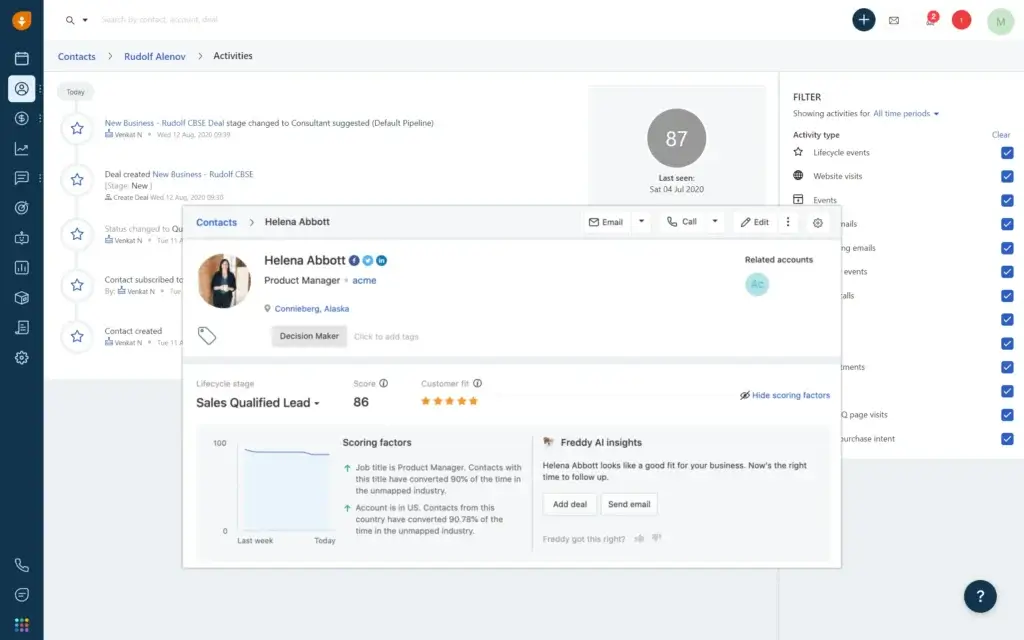
- Contact scoring by Freddy AI helps prioritize higher-quality leads
- Deal insights help your team understand deal health and likely outcomes
- Sales emails by Freddy AI can help draft and improve outreach
- Text assistance can rephrase, expand, and enhance written communication
- Forecasting insights are available on the Enterprise plan
In practical terms, Freddy AI is most useful when your CRM already contains enough clean data. If your team logs calls, updates deal stages, tracks emails, and maintains accurate records, the AI layer becomes more valuable over time.
Built-In Email, Phone, and Chat
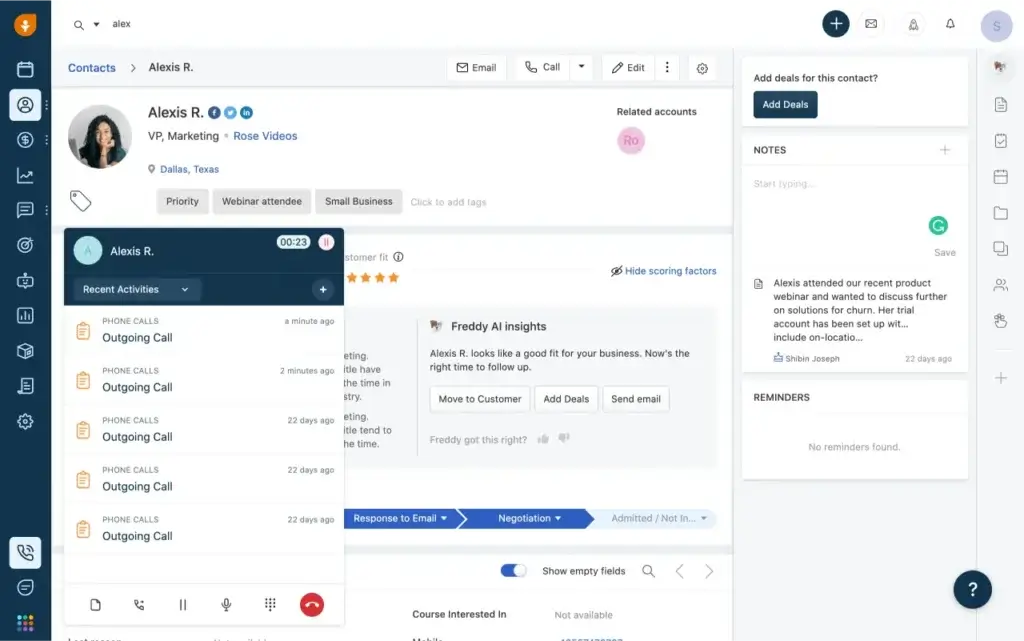
One advantage of Freshsales is that communication tools are built into the CRM experience. Your reps can work with email, phone, and chat without constantly switching between disconnected systems.
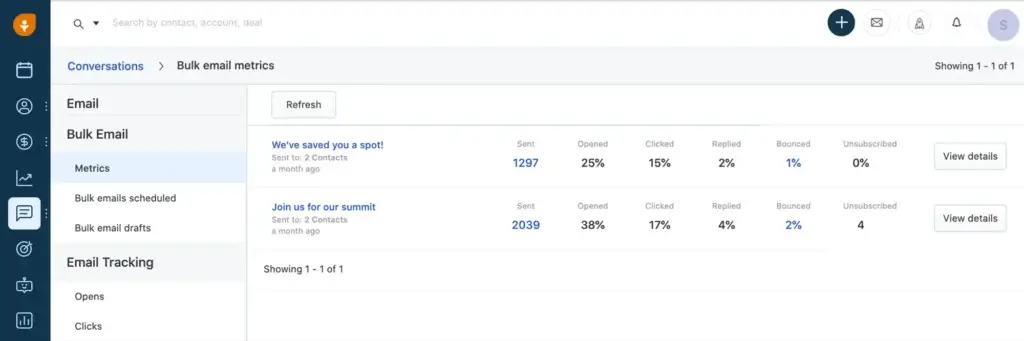
- Built-in email helps send and track sales communication
- Email templates reduce repetitive writing
- Built-in phone helps teams call and log conversations inside the CRM
- Live chat helps capture and engage prospects from your website
- Bring Your Own Carrier is available on the Pro plan
This is especially useful for teams that want a practical sales hub rather than a CRM that only stores data after conversations happen elsewhere.
Customizable Sales Pipelines
Not every business sells the same way. A SaaS company may track demos and trials. A consulting firm may track discovery calls and proposals. A real estate business may track property inquiries and viewings.
Freshsales lets you adjust the CRM around your sales process instead of forcing every team into the same structure.
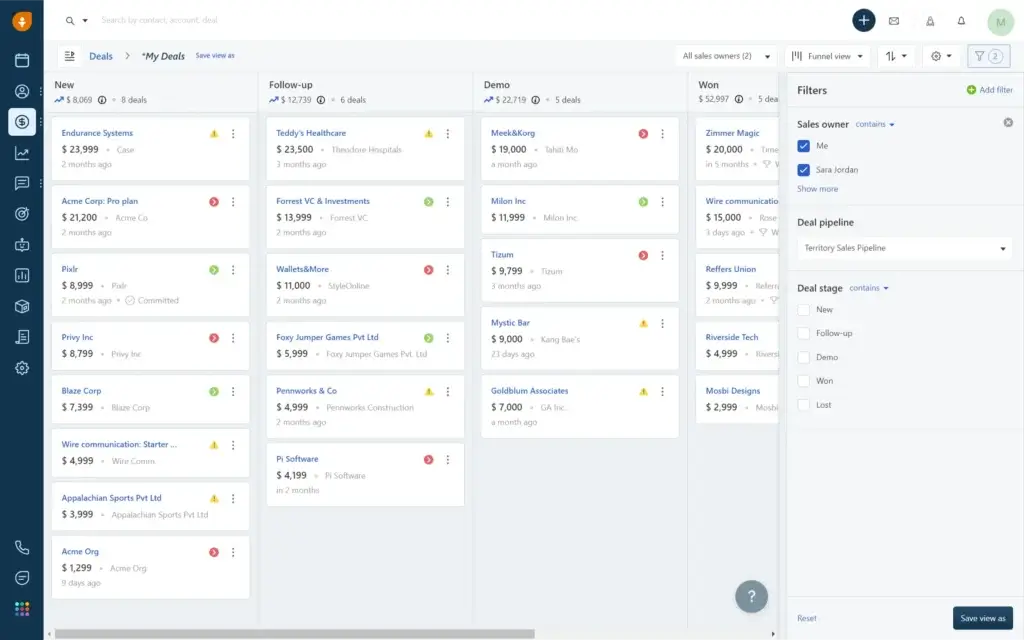
- Custom deal stages help match your real sales process
- Multiple sales pipelines support different products, regions, or teams
- Deal probability helps estimate potential revenue more accurately
- Custom modules on Enterprise support more advanced data structures
This flexibility is valuable for growing teams. You can start with a simple pipeline, then add more complexity as your sales motion becomes more mature.
Integrations and Freshworks Ecosystem
Freshsales connects with popular tools, but its biggest integration advantage is the Freshworks ecosystem. If you already use Freshdesk for support or Freshmarketer for campaigns, Freshsales can help bring sales, marketing, and customer service closer together.
- Google Workspace and Microsoft 365 for email and calendar workflows
- Slack for contextual collaboration
- Freshdesk for customer support alignment
- Freshmarketer for marketing workflows
- Freshworks Marketplace for additional apps and extensions
- APIs for custom integrations and more advanced use cases
That said, if your business depends on a very large third-party marketplace, HubSpot or Salesforce may still give you broader native app coverage.
Mobile CRM and On-the-Go Access
The Freshsales mobile app is useful for field reps, founders, account executives, and managers who need CRM access outside the office. You can update records, check tasks, log calls, and keep deal information current while you are on the move.
- View and update contacts, accounts, and deals
- Log notes after meetings and calls
- Receive reminders and notifications
- Access sales information from iOS and Android devices
This matters more than many teams realize. CRM adoption often improves when reps can update information immediately, instead of waiting until the end of the day.
Support, Training, and Resources
Freshsales includes 24×5 support and offers a 21-day free trial, which makes it easier to test the platform before committing. You also get access to documentation, support content, product tours, and onboarding resources.
For teams moving from spreadsheets or a basic CRM, this support layer can make adoption smoother. For larger teams, onboarding planning is still important, especially if you want to migrate historical data, rebuild workflows, or train multiple departments.
Lead and Contact Management
Freshsales gives you a centralized place to manage leads, contacts, accounts, deals, tasks, emails, calls, and notes. This matters because sales performance often breaks down when customer data is scattered across inboxes, spreadsheets, calendars, and personal notes.
- Contact lifecycle stages help you understand where each person is in the buyer journey
- 360-degree contact views show emails, calls, meetings, tasks, and notes in one profile
- Kanban views help you organize contacts, accounts, and deals visually
- Custom fields let you track business-specific data without forcing your process into a generic template
For sales teams, this is one of the biggest practical benefits. When every rep has the same context, follow-ups become more relevant, handoffs become smoother, and managers get a clearer picture of pipeline health.
Key Benefits
Benefits of Using Freshsales
What You Gain by Using Freshsales
The main benefit of Freshsales is that it gives your sales team a more organized and repeatable way to work. You can capture leads, qualify opportunities, automate follow-ups, monitor deal progress, and manage communication from one place.
Better Lead Management
Freshsales helps you reduce scattered sales data. Instead of relying on spreadsheets and individual inboxes, your team can view customer details, interactions, tasks, and deal status from a single CRM record.
- Capture and organize new leads more easily
- Track full customer history in one place
- Use scoring to prioritize better-fit opportunities
Faster Sales Follow-Up
Speed matters in sales. With workflows, sales sequences, reminders, and auto-assignment rules, Freshsales helps your team respond faster and avoid missed opportunities.
- Assign leads to the right reps automatically
- Send structured follow-up sequences
- Trigger reminders when deals need attention
Better Sales Visibility
Freshsales gives managers clearer insight into deal movement, revenue forecasts, rep activity, and pipeline bottlenecks. This is important because sales leaders need to coach based on data, not guesswork.
- Track sales performance and pipeline value
- Identify slow-moving deals
- Build custom reports on higher plans
More Flexible Sales Processes
As your business grows, your sales process often becomes more complex. Freshsales supports custom fields, multiple pipelines, territory management, account hierarchy, custom modules, and role-based controls.
This makes it easier to adapt the CRM to your process instead of forcing your team to work around rigid software limitations.
Pros and Cons
Advantages and Limitations of Using Freshsales
Positive
✅ Easy to use for sales teams
✅ Strong built-in phone, email, and chat
✅ Helpful Freddy AI features on higher plans
✅ Good value for SMBs and growing teams
Negative
❌ Advanced features require Pro or Enterprise
❌ Setup can take time if workflows are complex
❌ Native marketplace is smaller than HubSpot or Salesforce
❌ AI value depends on clean CRM data
Freshsales gives you the most value when you use it as a full sales operating system, not just a contact database. Its strongest benefits come from combining pipeline visibility, automation, communication tools, and AI-driven prioritization.
✅ Pros of Freshsales CRM
- It is easy for sales teams to adopt
Freshsales has a clean interface that helps reps focus on leads, deals, tasks, and conversations without feeling buried inside a complex system. - It combines CRM and communication tools
Built-in phone, email, chat, and activity tracking help your team manage customer conversations without switching between too many platforms. - It supports smarter selling with Freddy AI
AI-powered contact scoring, deal insights, and sales email assistance help reps focus on better opportunities and improve follow-up quality. - It offers strong value for growing teams
The pricing is competitive, especially for SMBs that need more than a basic CRM but are not ready for the cost or complexity of Salesforce.
❌ Cons of Freshsales CRM
- Some important features are only on higher plans
Multiple pipelines, advanced workflows, AI-powered contact scoring, deal insights, and custom reports are not included in the entry-level plan. - Complex customization requires planning
If you need multiple pipelines, advanced permissions, custom modules, and automation rules, you should map your sales process before implementation. - The app marketplace is not the largest
Freshsales covers many common integrations, but it does not offer the same depth of native third-party apps as HubSpot or Salesforce. - AI depends on CRM data quality
Freddy AI becomes more useful when your team consistently logs activities, updates deal stages, and maintains clean customer records.
User Experience
< class="mt0 mb10 font200" style="color:#111;"> User Interface and ExperienceA CRM only works if your team actually uses it. This is where Freshsales performs well. The interface is clean, the core sales tools are easy to find, and the platform does not feel as heavy as many enterprise CRMs.
For sales reps, that means less friction. For managers, it means faster adoption and better data consistency.
Clean Interface That Keeps Sales Work Focused
The Freshsales interface is built around practical sales activities: leads, contacts, accounts, deals, tasks, conversations, and reports. You do not need to dig through unnecessary menus just to see what needs attention.
- Navigation feels logical for first-time CRM users
- Deal and contact views are easy to scan
- Kanban boards help teams manage pipeline movement visually
- Dashboards give managers a quick view of performance
If your team has resisted CRMs in the past because they felt too complicated, Freshsales has a better chance of gaining consistent adoption.
Strong Cross-Device Experience
Sales work does not always happen at a desk. Freshsales supports iOS and Android, making it easier for field reps, hybrid teams, and managers to stay connected.
- Add or update leads while traveling
- Log notes after a meeting
- Check deal status before a call
- Receive task and follow-up reminders
- Make and log calls from the mobile app
This mobile functionality is valuable because CRM data is most accurate when reps can update it immediately.
Performance and Reliability
Freshsales feels responsive in normal day-to-day use. For most small and mid-sized teams, the system is fast enough to support regular lead updates, pipeline reviews, workflow automations, and communication tracking.
As with any CRM, performance will depend on your setup, data volume, integrations, and workflow complexity. Larger teams should test key workflows during the free trial before rolling it out across the organization.
Onboarding and Ease of Use
Freshsales is easier to learn than many advanced CRMs, but that does not mean setup should be rushed. You should still define your sales stages, required fields, lead routing rules, and reporting needs before importing your full database.
- Simple teams can get started quickly
- Data imports are manageable with planning
- More advanced workflows require thoughtful setup
- Role-based permissions help control access as the team grows
The best implementation approach is to start with a clean pipeline, train reps on daily usage, then add automation and AI features once the team is comfortable.
Customer Support and Resources
Freshsales includes 24×5 support and provides self-service resources for setup, training, and troubleshooting. This is helpful for teams that want to test the platform without relying immediately on paid consultants.
Enterprise customers also get access to more advanced support resources, which can be valuable for larger implementations or more complex sales operations.
User Feedback and Common Complaints
Freshsales is commonly praised for ease of use, built-in communication tools, and value for growing teams. Users often like that the platform feels lighter than Salesforce while still offering meaningful automation and AI features.
The most common complaints usually relate to advanced configuration, feature availability by plan, and the smaller native integration marketplace compared with larger CRM ecosystems.
In summary: Freshsales delivers a user experience that balances simplicity with sales depth. It is not the most advanced CRM on the market, but it is one of the more practical options for teams that want strong CRM functionality without unnecessary complexity.
Business Size Fit
Freshsales for Different Business Sizes
Freshsales can work for different business sizes, but the best plan and setup depend on how complex your sales process is. A small team may only need basic contact management and pipeline tracking, while a larger organization may need territories, custom modules, audit logs, and stronger governance.
Here is a simple breakdown of where Freshsales fits best.
| Business Size | What You Usually Need | How Freshsales Fits |
| Small Businesses 1-20 employees | Affordable CRM, simple pipeline, lead tracking, email templates | The Free and Growth plans are useful for basic sales organization, communication, and pipeline visibility |
| Mid-Sized Teams 20-200 employees | Automation, multiple pipelines, team reporting, lead assignment | The Pro plan is usually the best fit because it adds stronger automation, AI scoring, sales sequences, and custom reports |
| Large Organizations 200+ employees | Permissions, governance, custom modules, audit logs, forecasting control | The Enterprise plan adds field-level permissions, sandbox, audit logs, custom modules, and advanced AI forecasting insights |
If you are a small team, start simple. If you are a growing sales organization, the Pro plan is likely where Freshsales becomes most valuable. If you are a larger company with strict governance requirements, Enterprise is the plan worth evaluating.
Product Difference
Freshsales vs Freshsales Suite
One common point of confusion is the difference between Freshsales and Freshsales Suite. They sound similar, but they are not exactly the same.
Freshsales is primarily the sales CRM. It focuses on contacts, accounts, deals, pipelines, phone, email, automation, AI-powered sales insights, and reporting.
Freshsales Suite brings sales and marketing closer together. It is better suited if you want one connected platform for customer journeys, lead capture, marketing engagement, and sales handoff.
- Choose Freshsales if your main need is sales pipeline and deal management
- Choose Freshsales Suite if you want sales and marketing in one broader CRM solution
For many sales-led SMBs, Freshsales is enough. For teams that need stronger marketing alignment, Freshsales Suite may be the better long-term fit.
Pricing and Plans
How Much Does Freshsales Cost?
Freshsales has a transparent pricing structure with a free plan and three paid plans: Growth, Pro, and Enterprise. The paid plans are priced per user, per month, when billed annually.
The most important thing to know is that the Pro plan is where many of the stronger sales features become available, including Freddy AI contact scoring, sales sequences, multiple pipelines, deal insights, advanced workflows, and custom reports.
| Plan | Annual Price | Best For | Key Features |
| Free | $0 for 3 users | Very small teams testing CRM basics | Contact and account management, Kanban views, email templates, built-in phone, live chat, 24×5 support |
| Growth | $9/user/month | Startups and SMBs needing pipeline management | Contact lifecycle stages, built-in chat, email and phone, custom fields, basic workflows, product catalog, curated reports, mobile app |
| Pro | $39/user/month | Growing sales teams needing automation and AI | Contact scoring by Freddy AI, auto-assignment rules, sales sequences, multiple pipelines, deal insights, advanced workflows, custom reports |
| Enterprise | $59/user/month | Mid-sized and larger teams needing governance | Field-level permissions, custom modules, forecasting insights by Freddy AI, workflows for custom modules, sandbox, audit logs |
From a value perspective, Growth is a good entry point, but Pro is the strongest plan for serious sales teams. Enterprise is best if you need governance, customization, and more advanced control.
Competitor Comparison
Freshsales vs Other CRM Software
Freshsales is a strong CRM, but it is not the right choice for every company. To understand where it fits, it helps to compare it with other leading CRM platforms.
| CRM | Freshsales Is Better For | The Alternative Is Better For |
| Freshsales vs HubSpot CRM | Teams that want built-in phone, pipeline tools, AI sales features, and affordable scaling | Teams that need a larger marketing ecosystem, broader app marketplace, and stronger inbound marketing tools |
| Freshsales vs Pipedrive | Teams that want built-in communication tools, AI insights, and Freshworks ecosystem connections | Teams that want a very simple pipeline-first CRM with minimal setup complexity |
| Freshsales vs Zoho CRM | Teams that want a cleaner sales-focused experience with easier adoption | Teams that need broader business customization across many departments |
| Freshsales vs Salesforce | SMBs and mid-sized teams that want faster setup and lower complexity | Large enterprises that need deep customization, huge app coverage, and advanced CRM architecture |
My view: Freshsales is one of the stronger options if you want a practical sales CRM that your team can adopt quickly. It is not as broad as Salesforce or HubSpot, but it gives many sales teams the right mix of usability, automation, and value.
Connecting Freshsales to Your Workflow
Integrations
Freshsales works best when it becomes part of your daily sales workflow. That means connecting it with your email, calendar, communication tools, marketing stack, and customer support systems.
Important integration areas include:
- Email and calendar: Gmail, Outlook, Google Workspace, and Microsoft 365 workflows
- Collaboration: Slack for contextual updates and internal sales coordination
- Customer support: Freshdesk for better visibility between support and sales teams
- Marketing: Freshmarketer and Freshsales Suite for stronger sales and marketing alignment
- Marketplace apps: Freshworks Marketplace for additional extensions
- Custom connections: APIs for more advanced integrations
If your company already uses Freshworks products, Freshsales becomes more attractive. If your stack depends on niche third-party tools, review the marketplace and API options before committing.
Security and Compliance
Protection for Your Data
Your CRM stores sensitive customer and business information, so security should be part of your buying decision. Freshsales benefits from Freshworks’ broader security and compliance practices, including independent audits, risk-based controls, and security resources available through Freshworks’ trust materials.
For most SMBs and growing teams, the security setup is strong enough for everyday CRM operations. Larger companies should still review Freshworks’ security documentation, compliance reports, data processing terms, and internal governance requirements before deployment.
🛡️ Key Security and Governance Features
- Role-based access controls: help limit what users can view and manage
- Field-level permissions: available on Enterprise for stronger data control
- Audit logs: available on Enterprise for tracking user activity
- Sandbox: available on Enterprise for safer testing and configuration changes
- Security testing: Freshworks states that application security assessments are performed periodically
- Independent audits: Freshworks states that it is audited for ISO 27001, SOC 2, and other compliance areas
- Data protection readiness: Freshworks provides resources related to privacy and compliance obligations
One important note: avoid assuming every compliance requirement is automatically covered for your specific business. If you operate in a regulated industry, confirm your requirements directly with Freshworks before implementation.
Best-Fit Use Cases
Who Should Use Freshsales?
Freshsales is a good fit if you want a sales CRM that is structured, modern, and not overly complicated. It is especially useful for teams that want to improve pipeline visibility, automate follow-ups, and centralize communication.
✅ Freshsales Is Best For
- Small businesses moving away from spreadsheets
- Growing B2B sales teams that need automation and reporting
- Sales-led companies that want built-in phone, email, and chat
- Freshworks users who already use tools like Freshdesk or Freshmarketer
- Teams that want AI assistance without adopting a very complex enterprise CRM
⚠️ Freshsales May Not Be Ideal For
- Companies that need the largest app marketplace and deep third-party integrations
- Large enterprises with highly complex CRM architecture and heavy customization requirements
- Marketing-first teams that need advanced marketing automation more than sales pipeline tools
- Teams that want all AI features on entry-level plans
If your main priority is fast sales adoption, Freshsales is a strong choice. If your priority is massive enterprise customization or a very large ecosystem, compare it carefully with Salesforce, HubSpot, and Zoho CRM.
Other CRM Tools to Consider
Freshsales Alternatives
Freshsales is worth considering, but you should compare it with a few alternatives before making a final decision.
- HubSpot CRM: better if you need strong marketing tools and a larger app ecosystem
- Pipedrive: better if you want a very simple deal-focused CRM
- Zoho CRM: better if you need broad customization across many business functions
- Salesforce: better for large enterprises with complex CRM architecture
- monday CRM: better if you want a visual, flexible work management-style CRM
You can also compare more options in our guide to the best CRM software.
Conclusion
Final Thoughts
⭐ Overall Rating: 8.5/10
If you have made it this far, you are clearly serious about choosing the right CRM for your business, and that is a smart move.
Picking a solution like Freshsales is not just about tracking contacts. It is about building a system that helps your team manage opportunities, follow up with confidence, and turn sales activity into predictable revenue.
🔍 What You Are Really Getting
Here is a quick recap of what Freshsales brings to the table:
- A centralized view of leads, contacts, accounts, and deals
- Built-in phone, email, and chat for sales communication
- Workflow automation to reduce repetitive admin work
- Freddy AI insights for scoring, deal guidance, email assistance, and forecasting on higher plans
- Custom pipelines and fields to match your sales process
- Mobile CRM access for reps and managers on the move
- Scalable plans for small teams, growing businesses, and larger organizations
If you configure it properly, Freshsales becomes more than a CRM. It becomes the operating system for your sales team.
👥 Is It the Right Fit?
If you are a startup or small team, the Free and Growth plans can help you organize leads, manage contacts, and build a cleaner sales process without a major upfront investment.
If you are a growing sales team, the Pro plan is likely the strongest option because it unlocks the features that make the platform more powerful: Freddy AI contact scoring, sales sequences, multiple pipelines, advanced workflows, deal insights, and custom reports.
If you are a larger organization, Enterprise is worth evaluating for custom modules, audit logs, sandbox access, field-level permissions, and forecasting insights.
🧠 Final Word from a CRM Expert
After reviewing and comparing many CRM tools, my opinion is clear: the best CRM is not always the one with the longest feature list. It is the one your team can use consistently, trust daily, and scale with over time.
Freshsales does a strong job here. It is approachable enough for smaller teams, capable enough for growing sales operations, and modern enough to support AI-assisted selling.
If you want a CRM that combines ease of use, sales automation, built-in communication tools, and practical AI features, Freshsales deserves serious consideration.
Frequently Asked Questions
Have More Questions?
What is Freshsales CRM used for?
Freshsales CRM is used to manage leads, contacts, accounts, deals, tasks, sales communication, workflows, and reporting. It helps sales teams organize customer data, automate follow-ups, and track pipeline performance from one platform.
Is Freshsales CRM good for small businesses?
Yes. Freshsales CRM is a strong option for small businesses because it has a free plan for up to 3 users, an affordable Growth plan, built-in communication tools, and a clean interface that is easier to adopt than many complex CRM platforms.
How much does Freshsales CRM cost?
Freshsales CRM offers a free plan for up to 3 users. Paid plans start with Growth at $9 per user per month, Pro at $39 per user per month, and Enterprise at $59 per user per month when billed annually. Pricing may change, so check Freshworks before purchasing.
What is the difference between Freshsales and Freshsales Suite?
Freshsales focuses mainly on sales CRM features such as contacts, deals, pipelines, phone, email, automation, and sales reporting. Freshsales Suite combines sales and marketing capabilities for teams that want a broader customer journey platform.
Does Freshsales CRM include AI features?
Yes. Freshsales CRM includes Freddy AI features on higher plans, such as contact scoring, deal insights, sales email assistance, text enhancement, and forecasting insights. These tools help sales teams prioritize better opportunities and improve follow-up quality.
Does Freshsales integrate with email and calendar tools?
Yes. Freshsales integrates with common email and calendar workflows, including Google Workspace and Microsoft 365. Sales teams can send emails, use templates, track conversations, and manage follow-up activities directly from the CRM.
Is Freshsales CRM secure?
Freshsales CRM benefits from Freshworks’ broader security program, including access controls, security testing, audit and compliance processes, and enterprise governance features such as audit logs, field-level permissions, and sandbox access on higher plans.
Can Freshsales CRM be customized?
Yes. Freshsales CRM supports custom fields, custom deal stages, multiple pipelines, product catalogs, workflows, and custom modules on the Enterprise plan. This makes it flexible enough for different sales processes and business models.
Is Freshsales better than HubSpot CRM?
Freshsales may be better if you want a sales-focused CRM with built-in phone, email, chat, AI-powered sales insights, and lower complexity. HubSpot CRM is usually better if you need a larger marketing ecosystem and broader third-party app marketplace.
Who should not use Freshsales CRM?
Freshsales CRM may not be ideal for companies that need the largest app marketplace, extremely deep enterprise customization, or advanced marketing automation as the main priority. In those cases, HubSpot, Salesforce, or Zoho CRM may be worth comparing.









