
Introduction
Choosing the right CRM is not only about storing contacts. You need a system that helps your team manage leads, track deals, plan activities, send quotes, follow up on opportunities, and understand where revenue is likely to come from.
Onpipeline is a sales CRM designed for small and growing teams that want a practical way to manage the sales process without the complexity of larger enterprise CRM platforms. It combines pipeline management, contact records, activities, lead capture, quote management, invoicing, subscriptions, reporting, integrations, and AI-powered sales insights in one workspace.
In this Onpipeline review, you’ll get a clear look at its features, pricing, user experience, security, integrations, strengths, limitations, and best-fit use cases. You’ll also see how Onpipeline compares with alternatives like Pipedrive, HubSpot CRM, Zoho CRM, and monday CRM.
Onpipeline is a strong choice if you want a sales-focused CRM with visual pipelines, multiple pipelines, unlimited contacts, built-in quotes, web forms, invoicing, call and SMS features, email tracking, appointment booking, and useful automation. It is less ideal if you need a free CRM forever, enterprise-level customization, advanced marketing automation, or a large app marketplace like HubSpot or Salesforce.
Quick Summary
Onpipeline is best understood as a practical sales CRM for teams that want to organize their pipeline, standardize follow-ups, centralize communication, and manage quote-to-invoice workflows without adding multiple disconnected tools.
| Category | Onpipeline Review Summary |
| Best For | Small and growing sales teams, agencies, distributors, service businesses, real estate teams, software sales teams, and businesses with quote-based sales processes |
| Starting Price | $25/user/month for the Pipeline plan, billed monthly |
| Free Plan | No permanent free plan, but a 30-day free trial is available without a credit card |
| Core Strength | Simple sales pipeline management with activities, quotes, invoicing, subscriptions, automation, and AI sales insights |
| Main Limitation | Less suitable for enterprise CRM customization, advanced marketing automation, and complex multi-department CRM programs |
| Best Alternative | Pipedrive for sales pipeline simplicity, HubSpot for CRM plus marketing automation |
For teams that mainly need a clean sales operating system, Onpipeline has a clear purpose. It is not trying to be a heavy enterprise CRM. It is trying to help you capture leads, manage opportunities, plan follow-ups, create quotes, and close deals with fewer manual steps.
Key Features
Onpipeline Software Specification
Onpipeline’s feature set is centered on sales execution. Instead of focusing only on contact storage, it helps you move from lead capture to deal management, quote creation, invoicing, recurring revenue, and sales reporting.
Sales pipeline management
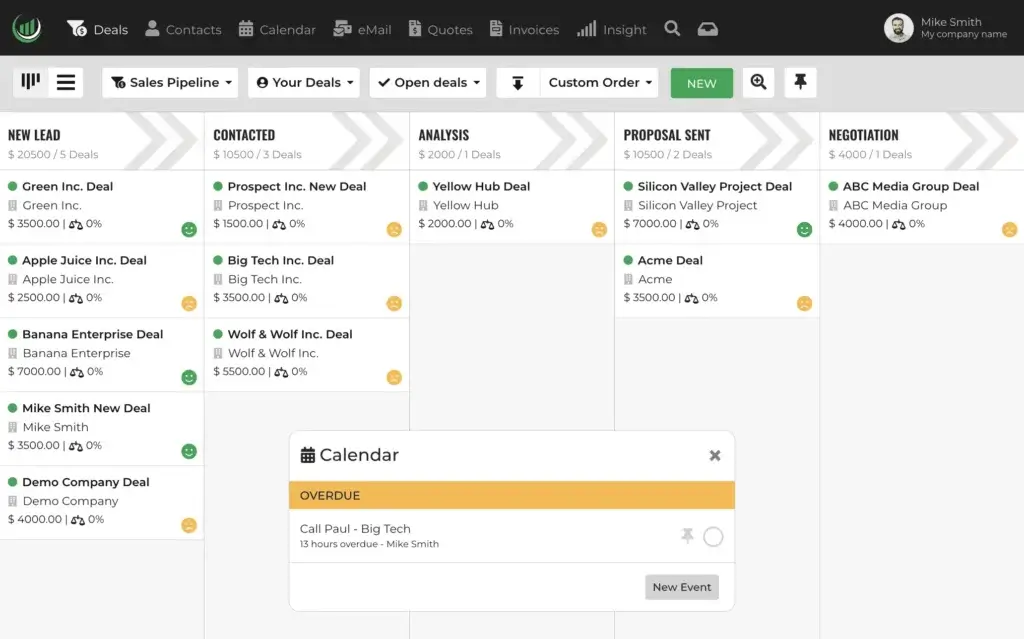
Pipeline management is the foundation of Onpipeline. You can create visual pipelines, customize stages, manage deals, filter opportunities, and understand where each prospect sits in your sales process.
This is important because sales teams often lose momentum when deal stages are unclear. With Onpipeline, you can define your own stages and create multiple pipelines for different teams, products, regions, or sales motions.
- Build visual pipelines for different sales processes.
- Create unlimited deals and custom pipeline stages.
- Assign pipelines to teams for better ownership.
- Track deal progress, value, activities, and expected movement.
- Use pipeline data to identify bottlenecks and missed follow-ups.
The practical value is simple: your team can see which opportunities need attention, which deals are moving, and where the sales process is slowing down.
Contact and company management
Onpipeline gives you a central place to manage contacts, prospects, companies, customer details, and interaction history. You can use custom fields to adapt the database to your business, which is especially useful if you sell across different markets or need to track industry-specific information.
Unlike lightweight contact managers, Onpipeline connects contacts to deals, activities, emails, calls, quotes, invoices, and communication history. This gives your team better context before every follow-up.
- Store people, organizations, prospects, and customers.
- Use custom fields to match your sales process.
- Link contacts to deals, activities, emails, and quotes.
- Track important customer interactions in one record.
- Segment contacts for follow-up and outreach.
For sales teams, this reduces the risk of working from scattered notes, inboxes, spreadsheets, and disconnected tools.
Activities, tasks, calls, and meetings
Onpipeline includes activity management for tasks, calls, emails, meetings, deadlines, and custom activity types. This is useful because a CRM only becomes valuable when it helps your team take the next action, not just record what already happened.
You can link activities to deals and contacts, making it easier to understand what needs to happen next in each opportunity. Your team can also create custom activity types so the CRM matches the way you actually sell.
This is especially helpful for teams with longer sales cycles, where missed callbacks, delayed meetings, or forgotten follow-ups can reduce close rates.
Lead management and web forms
Onpipeline supports lead capture through web forms, APIs, partner sources, and lead routing. New leads can enter a dedicated review layer before they are converted into contacts or deals.
This matters when you receive leads from multiple channels, such as website forms, paid campaigns, referral partners, Facebook Lead Ads, Google Ads, or third-party lead sources. Instead of manually copying each lead into the CRM, you can bring the lead data into Onpipeline and assign it to the right person.
- Create web forms for lead generation.
- Track lead sources and partner IDs.
- Receive leads through forms, APIs, and integrations.
- Review leads before importing them into your CRM database.
- Automate deal creation and assignment based on conditions.
For growing teams, this can improve speed-to-lead and give managers better visibility into which channels generate pipeline.
Email, SMS, calling, and communication tracking
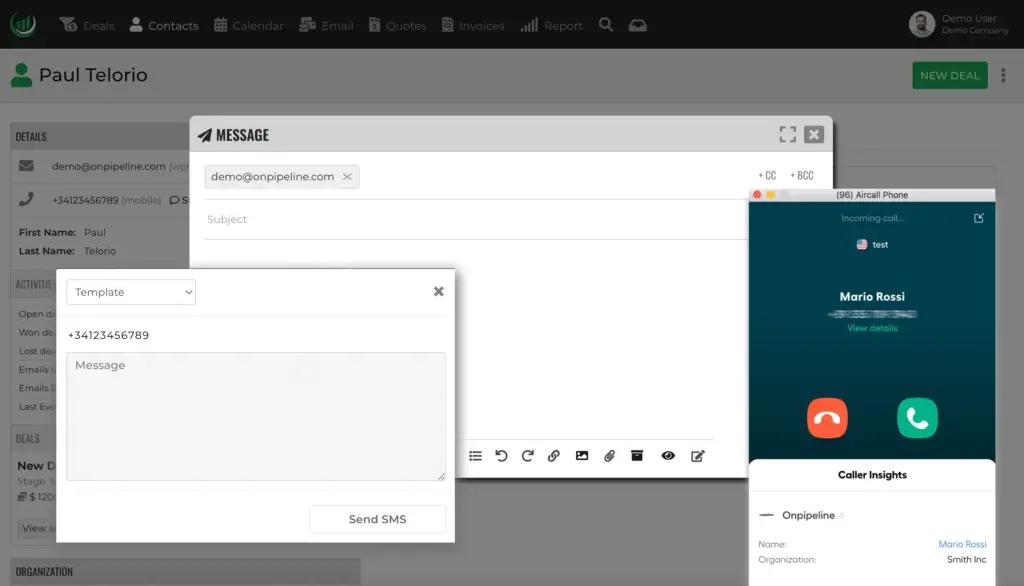
Onpipeline brings several communication tools into the CRM. You can start emails, phone calls, and SMS messages from contact or deal records, then track communication history in the right place.
The platform also supports integrated personal and team email, email tracking, templates, signatures, bulk email, bulk SMS, click-to-call, and call recording through supported phone integrations.
This is useful because sales follow-up is often spread across inboxes, call tools, and messaging apps. Centralizing communication gives managers and reps a clearer record of what happened with each prospect.
Quote management and eSignature
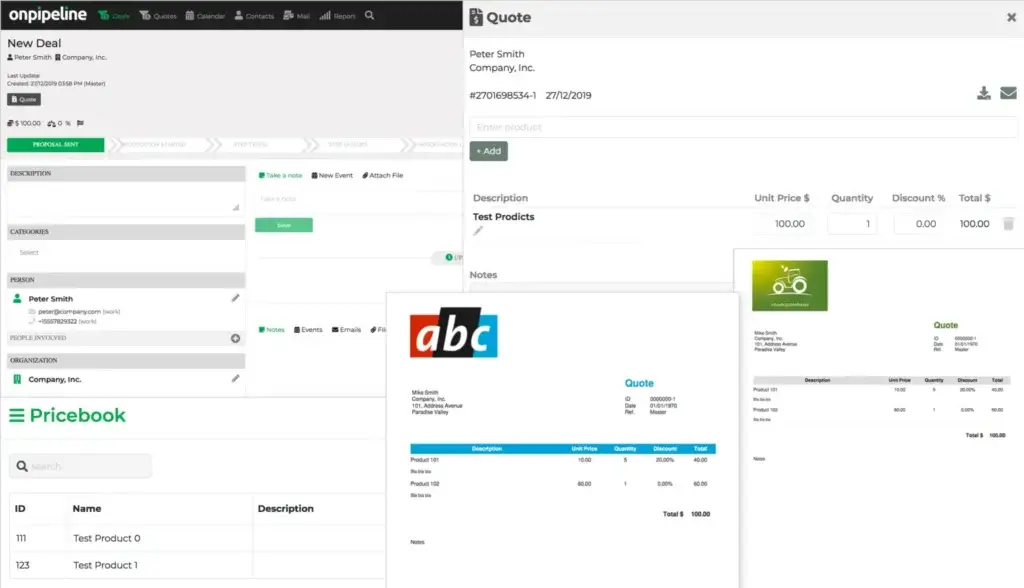
Quote management is one of Onpipeline’s most useful differentiators compared with basic sales CRMs. You can create custom quotes, use pricebooks, manage quote revisions, request approvals, export quotes as PDFs, send them by email, and collect customer signatures.
This makes Onpipeline especially relevant for service businesses, agencies, distributors, wholesalers, manufacturers, real estate businesses, software sales teams, and B2B companies that rely on proposals or quote-based selling.
- Create sales quotes from CRM data.
- Use templates for different teams or businesses.
- Track quote revisions and history.
- Use manager approval workflows where needed.
- Collect customer signatures to speed up acceptance.
If your team still creates quotes manually in documents or spreadsheets, this feature can remove friction from the sales process.
Invoicing and recurring revenue
Onpipeline includes invoicing features inside the CRM. You can create invoices manually, generate them from quotes, send reminders, track payment status, create credit notes, and use multiple business templates.
The platform also supports recurring revenue workflows. This allows you to create subscription-style revenue from a deal and track recurring purchases on a weekly, monthly, quarterly, or yearly basis.
This gives Onpipeline an advantage for businesses that do not want the CRM to stop at “deal won.” Instead, your workflow can continue into billing, recurring revenue tracking, and customer account management.
Sales automation
Onpipeline includes automation tools that help reduce repetitive sales tasks. You can automate follow-up activities, email sending, event creation, and actions triggered by deal movement.
This is valuable because many small sales teams do not need complex enterprise workflow builders. They need simple automations that keep deals moving and reduce manual admin work.
Examples include creating a follow-up task when a deal reaches a specific stage, sending an email after a quote is created, or generating internal reminders when an opportunity has been inactive for too long.
AI sales insights
Onpipeline includes AI features across its plans. Its Sentiment AI analyzes sales-related text, customer interactions, and notes to help identify emotional tone and purchase readiness.
The AI functionality is not a replacement for salesperson judgment. It is better understood as a guidance layer that helps you prioritize communication, understand customer mood, and tailor your next message.
This can be useful when you manage many open deals and need faster insight into which opportunities may need reassurance, urgency, or a more personalized approach.
Reports and sales goals
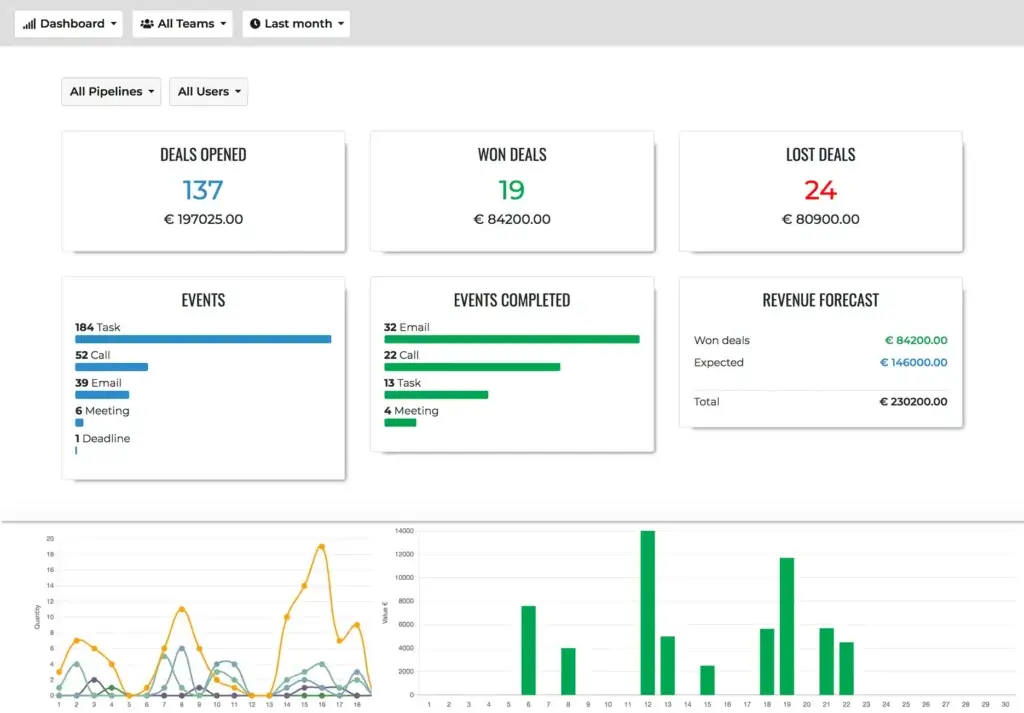
Onpipeline includes reporting tools to help managers track deals, activities, sales revenue, pipeline value, sales growth, average deal size, win rate, sales velocity, and stage duration.
On the Advanced plan, sales goals become more useful for managers who want to assign targets by rep, team, category, or pipeline. This helps turn pipeline visibility into performance management.
For teams that are moving from spreadsheets, this reporting layer can be a major improvement. For enterprise revenue operations teams, however, the reporting may still feel lighter than what you get from Salesforce or advanced BI-connected CRM environments.
Integrations, API, and widgets
Onpipeline offers native integrations and developer options. Native integrations include Google Calendar, Microsoft Calendar, Mailchimp, Zapier, Aircall, JustCall, CloudTalk, QuickBooks, Calendly, email, Facebook Lead Ads, Google Ads Leads, WPForms, Ninja Forms, and Typeform.
The platform also provides API access, webhooks, actions, and widgets. This is helpful if you need to connect Onpipeline with external databases, billing systems, internal tools, lead sources, or other business applications.
The integration ecosystem is practical, but not as broad as larger CRM marketplaces. If you depend heavily on niche integrations, check availability before committing.
Mobile browser access
Onpipeline does not position its mobile experience around a traditional app-first workflow. Instead, it offers a responsive web experience that you can access from a mobile browser.
This can work well for checking deals, contacts, and activities on the go. However, if your team strongly prefers a dedicated mobile app with offline features and native mobile workflows, you should test the trial carefully before purchasing.
Pros and Cons
Advantages and Limitations of Using Onpipeline
Positive
✅ Easy sales pipeline management
✅ Built-in quotes, invoicing, and subscriptions
✅ Useful lead capture and activity tracking
✅ AI insights included across plans
✅ API, webhooks, and practical native integrations
Negative
❌ No permanent free plan
❌ Mobile experience is browser-based
❌ Advanced features require higher plans
❌ Smaller app ecosystem than HubSpot or Salesforce
❌ Not ideal for complex enterprise CRM architecture
Onpipeline has a clear advantage when you want a simple sales CRM that also handles quotes, invoices, recurring revenue, activities, and lead management. Its limitations become more visible when you need enterprise customization, advanced marketing automation, or a large marketplace of specialized CRM apps.
Advantages of Onpipeline
- Easy sales pipeline management: Onpipeline gives sales teams a clear way to manage deals, stages, and follow-ups.
- Built-in quotes, invoicing, and subscriptions: You can continue the workflow beyond deal tracking into quote-to-cash activities.
- Useful lead capture and activity tracking: Web forms, lead sources, tasks, meetings, calls, and emails are connected to CRM records.
- AI insights included across plans: Sentiment AI can help reps understand tone, purchase readiness, and next-step communication.
- API, webhooks, and practical native integrations: You can connect Onpipeline with calendars, email, phone tools, lead forms, accounting software, and automation platforms.
Limitations of Onpipeline
- No permanent free plan: Onpipeline offers a 30-day trial, but long-term use requires a paid subscription.
- Mobile experience is browser-based: Teams that want a native mobile app may prefer another CRM.
- Advanced features require higher plans: Inventory, audit logs, sales goals, bulk email, bulk SMS, and automatic invoices are tied to the Advanced plan.
- Smaller app ecosystem than HubSpot or Salesforce: The native integration list is useful, but not as broad as enterprise CRM marketplaces.
- Not ideal for complex enterprise CRM architecture: Larger organizations may need more advanced objects, permissions, analytics, and governance.
User Experience
User Interface and Experience
Onpipeline’s user experience is built around clarity and sales activity. The CRM focuses on deals, activities, contacts, quotes, invoices, calendars, and sales progress rather than overwhelming users with too many modules.
Setup and onboarding
Onpipeline is easier to start with than a large enterprise CRM. You can begin with the free trial, create pipelines, import contacts, add users, configure stages, connect email or calendar tools, and start tracking opportunities.
Still, a clean setup matters. Before importing data, clean duplicates, standardize contact fields, define pipeline stages, and decide which deal categories, lead sources, and activity types your team should use.
A well-planned setup will make reporting, automation, and follow-up tracking much more useful later.
Daily sales workflow
The daily workflow in Onpipeline typically revolves around the pipeline, open deals, upcoming activities, customer communication, quote status, and follow-up tasks.
This makes the platform useful for sales reps who need a simple system for knowing what to do next. Managers can also use the CRM to understand where deals are stuck and which reps need support.
For teams that struggle with inconsistent follow-up, this daily activity structure can create better accountability.
Learning curve
Onpipeline should be approachable for teams that are new to CRM software. The platform is not as complex as Salesforce, Microsoft Dynamics, or heavily customized enterprise systems.
The learning curve comes from process discipline. Your team needs to agree on how deals are created, which stages mean what, when tasks should be assigned, how quotes are approved, and how notes should be recorded.
If your team follows those rules, Onpipeline can become a practical sales operating system rather than just another database.
Mobile access
Onpipeline is accessible from mobile devices through the browser. You can check contacts, deals, and sales activity while away from your desk.
This is helpful for field sales, client meetings, trade shows, and travel. However, teams that depend heavily on native app workflows should test the mobile browser experience during the trial.
Customer support and help resources
Onpipeline provides online documentation and support resources. Its pricing page also lists 24/7 customer support as part of the platform’s feature comparison.
For smaller teams, self-service documentation and support should be enough for setup and daily use. Larger teams should still document internal CRM rules so every rep uses the system consistently.
Business Size Fit
Onpipeline for Different Business Sizes
Onpipeline can support different business sizes, but the fit depends on your sales process, customization needs, reporting expectations, and quote-to-invoice requirements.
Onpipeline for solo users
Onpipeline can work for solo sales professionals, consultants, brokers, and small service providers who need a more structured way to manage contacts, deals, follow-ups, quotes, and invoices.
The main question is cost. Since Onpipeline does not offer a permanent free plan, solo users who only need basic contact management may prefer a free CRM. However, if you need quotes, recurring revenue, activities, and built-in sales tracking, the entry plan can still be practical.
Onpipeline for small sales teams
Small sales teams are one of the best fits for Onpipeline. You can create shared visibility across contacts, deals, activities, pipelines, quotes, emails, and lead sources without building a complex CRM implementation.
This is useful when your team has grown beyond spreadsheets but does not need a heavy enterprise platform. Managers get visibility, reps get structure, and the business gets a more consistent sales process.
Onpipeline for growing businesses
Growing businesses can use Onpipeline to standardize sales workflows, manage multiple teams, create repeatable quote processes, track recurring revenue, and improve accountability.
At this stage, the Standard or Advanced plans may be more relevant because automation, web forms, emails, SMS, quotes, recurring revenue, sales goals, audit logs, bulk messaging, and inventory become more important.
Onpipeline for enterprise teams
Onpipeline can support larger user groups, but it is not the same type of platform as Salesforce Sales Cloud, Microsoft Dynamics 365 Sales, or HubSpot Enterprise.
If your organization needs advanced custom objects, complex permission layers, territory management, multi-brand governance, advanced analytics, and a large implementation partner ecosystem, a larger CRM platform may be a better fit.
Who should not use Onpipeline?
Onpipeline is not the right CRM for every business. You may want to consider another option if you need:
- A permanent free CRM plan.
- A native mobile app as a core requirement.
- Advanced marketing automation and CMS tools.
- Enterprise-level customization and governance.
- A very large third-party app marketplace.
- Deep customer support, service desk, or ecommerce workflows.
Onpipeline is best when your main priority is sales execution. If your CRM needs are broader than pipeline, quotes, activities, and sales operations, compare it carefully with more comprehensive CRM suites.
Pricing and Plans
How Much Does Onpipeline Cost?
Onpipeline uses a per-user pricing model with three public plans: Pipeline, Standard, and Advanced. The pricing below reflects the latest public pricing available at the time of writing, but you should always confirm final costs directly with Onpipeline because SaaS pricing can change.
| Plan | Pipeline | Standard | Advanced |
| Monthly Price | $25/user/month | $39/user/month | $58/user/month |
| Best For | Beginners and small teams needing contact, deal, pipeline, and activity management | Teams needing lead management, email, SMS, automations, web forms, quotes, and recurring revenue | Teams needing sales goals, bulk messaging, automatic invoices, audit logs, inventory, and advanced controls |
| Free Trial | 30 days | 30 days | 30 days |
| Unlimited Contacts | Included | Included | Included |
| Unlimited Deals | Included | Included | Included |
| Multiple Pipelines | Included | Included | Included |
| Lead Management | Limited compared with Standard | Included | Included |
| Workflow Automations | Not the strongest plan fit | 50 automations | 100 automations |
| Quote Management and eSignature | Not the strongest plan fit | Included | Included |
| Inventory Module | Not included | Not included | Included |
| Audit Logs | Not included | Not included | Included |
| Best Value | Best entry point | Best fit for most sales teams | Best for teams needing billing, inventory, and management controls |
Pipeline plan
The Pipeline plan is the entry-level plan. It is best for beginners and smaller teams that need contact management, multiple pipelines, unlimited deals, activities, custom fields, file storage, and sales process visibility.
This plan is a good starting point if you mainly need to replace spreadsheets with a real CRM. It is less ideal if you need lead automation, quote workflows, web forms, bulk communication, or advanced sales management.
Standard plan
The Standard plan is likely the best fit for many sales teams. It includes everything in Pipeline, plus lead management, emails, SMS, automations, web forms, quotes, and recurring revenue features.
If your sales process includes lead capture, structured follow-ups, quote creation, customer communication, and subscription-style revenue, Standard will usually make more sense than the entry-level plan.
Advanced plan
The Advanced plan is designed for teams that need more control and operational depth. It adds VIP Data Center, sales goals, bulk emails, bulk SMS, automatic invoices, audit logs, inventory, and higher invoice limits.
This plan is most relevant if your CRM needs to support more than opportunity tracking. It is better for companies that manage inventory, send larger campaigns, need audit visibility, track rep goals, or want more advanced billing automation.
Is Onpipeline worth the price?
Onpipeline is worth considering if you need a sales CRM that also includes quote, invoice, appointment, lead, email, SMS, and recurring revenue features. Buying separate tools for these workflows can easily create more cost and more admin work.
However, if you only need basic contact storage and a simple pipeline, cheaper or free CRM tools may be enough. The value of Onpipeline becomes stronger when you use more of its connected sales workflow, not only the contact database.
Security and Compliance
Protection for Your Data
Security matters because your CRM may contain customer details, email conversations, call records, quotes, invoices, payment-related context, and internal notes. Onpipeline’s public security materials describe several controls designed to protect business data.
Encryption and secure access
Onpipeline states that it supports encryption for data in transit and at rest, uses TLS 1.2, and has received an A+ rating for its SSL/TLS configuration. This is important for protecting customer data as it moves between the browser and the platform.
The platform also supports two-factor authentication, account lockout after repeated failed login attempts, biometric authentication through user devices, IP restrictions, and session timeout controls.
Data access and account control
Onpipeline states that customer data is stored in the customer’s own account and that its team does not log into customer accounts without permission. This is relevant for businesses that need vendor due diligence and internal controls around CRM data access.
As with any CRM, you should still configure permissions carefully. Admins, team leaders, sales reps, finance users, and operations users should not always have the same level of access.
Backup, availability, and hosting
Onpipeline states that it aims for 99.9% uptime, monitors availability, replicates data across multiple locations in real time, and backs up data to support recovery. It also states that Onpipeline data is hosted on Amazon Web Services.
For most small and mid-sized teams, this security posture will be sufficient. Larger companies should request current security documentation, data processing details, compliance documentation, and contractual terms before purchasing.
Data retention
Onpipeline states that if a client leaves, CRM data is permanently deleted after 30 days. This is useful to know before cancellation, especially if you need to export records, invoices, quotes, activity history, or customer communication before closing the account.
Setup
Setup, Migration, and Integrations
Successful CRM adoption depends on more than choosing the right plan. Your results will depend on data quality, process design, team adoption, integrations, and how clearly you define your sales workflow.
Migration and data cleanup
Before moving into Onpipeline, clean your existing data. Remove duplicates, standardize contact names, confirm email addresses, review company records, and define which fields matter.
If you import messy data, your pipeline, reporting, search, and automation will be less reliable. A cleaner migration gives your team better results from the first week.
Pipeline setup
Start by defining the sales stages your team actually uses. Avoid creating too many stages at the beginning. A simple pipeline that your team follows consistently is better than a complex pipeline nobody maintains.
Good starting stages might include new lead, qualified, discovery scheduled, quote sent, negotiation, won, and lost. You can then create additional pipelines for renewals, onboarding, partnerships, or different product lines.
Automation setup
Automation should support your sales process without making it harder to understand. Start with simple automations like follow-up task creation, stage-based reminders, and internal notifications.
Once your team is comfortable, you can add more automation around email templates, lead assignment, quote workflows, and recurring activity creation.
Integrations and connected systems
Onpipeline works best when it connects with your calendar, email, website forms, lead sources, calling system, and accounting tools. Google Calendar, Microsoft Calendar, Mailchimp, Zapier, Aircall, JustCall, CloudTalk, QuickBooks, Calendly, Facebook Lead Ads, Google Ads Leads, WPForms, Ninja Forms, and Typeform are among the integrations listed by Onpipeline.
Before implementation, map your lead sources and decide which systems should send data into the CRM. This will help you avoid duplicate work and missing leads.
Best Practices for Implementing Onpipeline
To get the most value from Onpipeline, treat it as a sales process project, not only a software setup task.
- Clean your CRM data first: Remove outdated contacts, duplicates, and irrelevant fields.
- Define pipeline stages clearly: Every rep should understand what each stage means.
- Standardize activity rules: Decide when calls, meetings, reminders, and follow-ups should be created.
- Use quote templates: Create consistent quote formats for each team or business line.
- Connect lead sources: Bring web forms, ads, and partner leads into the CRM where possible.
- Review pipeline weekly: Check stalled deals, missing activities, and quote follow-ups.
The biggest mistake is treating Onpipeline as a passive database. The best results come when your team uses it daily to drive actions, follow-ups, quotes, and decisions.
Comparisons
Onpipeline Alternatives and Competitors
Onpipeline is a strong option for sales teams that want practical pipeline management with quotes, invoicing, communication tracking, and automation. Still, the best CRM depends on your priorities.
| CRM | Best For | Where It Beats Onpipeline | Where Onpipeline Is Stronger |
| Pipedrive | Sales teams that want a very polished visual pipeline CRM | Cleaner interface, strong sales adoption, larger marketplace | Built-in quotes, invoices, subscriptions, and broader quote-to-cash workflow |
| HubSpot CRM | Teams that need CRM, marketing, forms, email, content, and automation | Free CRM, marketing tools, marketplace, reporting scale | Simpler paid CRM experience for teams focused on sales execution and quotes |
| Zoho CRM | Small businesses needing affordable customization across many functions | Broader app suite, lower-cost entry options, custom modules | More focused sales workflow with built-in quote and invoice simplicity |
| monday CRM | Teams that want visual workflows and flexible work management boards | Highly flexible boards, project-style workflows, visual customization | More traditional sales CRM structure with quotes, invoices, subscriptions, and calling workflows |
Onpipeline vs Pipedrive
Pipedrive is one of the strongest alternatives if your main priority is visual pipeline management. It is polished, intuitive, and widely used by sales teams that want a simple CRM focused on deals.
Onpipeline is stronger if your sales workflow includes quote management, invoices, subscriptions, appointment booking, lead routing, and built-in communication tools. Pipedrive may feel smoother for pure pipeline selling, while Onpipeline offers more built-in quote-to-cash functionality.
Choose Pipedrive if you want the cleaner sales CRM experience. Choose Onpipeline if you want pipeline management plus quotes, invoicing, and recurring revenue in one system.
Onpipeline vs HubSpot CRM
HubSpot CRM is better if you need a free CRM, marketing automation, landing pages, forms, campaigns, content tools, customer service features, and a large app ecosystem.
Onpipeline is better if you want a simpler paid CRM focused on sales execution, quotes, invoices, SMS, calls, lead sources, and pipeline activity without the complexity that can come with HubSpot’s expanding suite.
HubSpot is the better growth platform for marketing-led teams. Onpipeline is more practical for sales teams that want a focused operating system for selling.
Onpipeline vs Zoho CRM
Zoho CRM is better if you want broad customization, a large business software ecosystem, and a lower-cost path into CRM software.
Onpipeline is better if you want a simpler sales workflow with built-in quote management, invoicing, activity tracking, lead capture, and pipeline visibility. Zoho can be more flexible, but that flexibility can also require more configuration.
Choose Zoho if you need a broader business software suite. Choose Onpipeline if your main need is sales process clarity.
Onpipeline vs monday CRM
monday CRM is a strong option for teams that want flexible boards, custom workflows, visual dashboards, and CRM connected to work management.
Onpipeline is a better fit if you prefer a traditional sales CRM structure with built-in quotes, invoices, subscriptions, activity tracking, communication tools, and sales pipeline management.
monday CRM is more flexible. Onpipeline is more sales-specific out of the box.
Conclusion
Final Thoughts
Onpipeline is a practical sales CRM for teams that want pipeline visibility, lead management, activities, quotes, invoices, subscriptions, communication tracking, integrations, and AI sales insights in one platform.
Its strongest advantage is focus. Onpipeline is not trying to become a full enterprise CRM suite or a broad marketing platform. It is designed to help sales teams manage opportunities, follow-ups, quotes, and revenue workflows with less friction.
The platform is not perfect for every business. It does not offer a permanent free plan, its mobile access is browser-based, and larger organizations may need deeper customization, reporting, governance, and app marketplace options.
Still, if your priority is a straightforward CRM that connects pipeline management with quotes, invoicing, activity tracking, lead capture, and sales automation, Onpipeline deserves serious consideration in 2026. It is best for small and growing sales teams that want a clear sales process without the weight of a complex enterprise CRM.
Frequently Asked Questions
Have More Questions?
What is Onpipeline used for?
Onpipeline is used for sales CRM management. It helps teams manage contacts, leads, deals, activities, quotes, invoices, subscriptions, communication history, automations, and sales reporting from one platform.
Is Onpipeline a CRM?
Yes. Onpipeline is a cloud-based sales CRM built for managing pipelines, contacts, deals, follow-ups, quotes, invoices, recurring revenue, and sales team activity.
How much does Onpipeline cost?
Onpipeline pricing starts at $25 per user per month for the Pipeline plan. The Standard plan costs $39 per user per month, and the Advanced plan costs $58 per user per month based on current public pricing.
Does Onpipeline have a free plan?
No. Onpipeline does not offer a permanent free plan. It offers a 30-day free trial with no credit card required, so you can test the platform before choosing a paid plan.
Who is Onpipeline best for?
Onpipeline is best for small and growing sales teams that need pipeline management, lead capture, activity tracking, quote management, invoicing, subscriptions, and practical sales automation.
Does Onpipeline include AI features?
Yes. Onpipeline includes AI features, including Sentiment AI, which analyzes sales-related text and customer interactions to help estimate emotional tone and purchase readiness.
Can Onpipeline create quotes and invoices?
Yes. Onpipeline includes quote management and invoicing features. Depending on the plan, you can create quotes, manage revisions, collect eSignatures, generate invoices, send reminders, and track payments.
Does Onpipeline integrate with other tools?
Yes. Onpipeline integrates with tools such as Google Calendar, Microsoft Calendar, Mailchimp, Zapier, Aircall, JustCall, CloudTalk, QuickBooks, Calendly, Facebook Lead Ads, Google Ads Leads, WPForms, Ninja Forms, Typeform, and email systems.
Is Onpipeline secure?
Onpipeline provides security features such as data encryption, TLS 1.2, two-factor authentication, biometric authentication, IP restrictions, session timeouts, backups, and AWS hosting. Businesses should still review current security documentation before purchase.
Is Onpipeline better than Pipedrive?
Onpipeline may be better if you need built-in quotes, invoices, subscriptions, lead routing, and sales communication tools. Pipedrive may be better if you want a very polished visual pipeline CRM with a larger marketplace and broader sales adoption.