Introduction
If you are looking for a customer support platform that combines live chat, email, WhatsApp, social messaging, AI automation, help center content, and team collaboration in one place, Deskwoot is a tool worth reviewing closely. It is positioned as a modern help desk for teams that want the core power of Zendesk, Freshdesk, and Intercom without the same pricing complexity or add-on-heavy structure.
In this Deskwoot review, you will see how the platform works, which features stand out most, how its pricing is structured, where it performs well, and where it may still feel less mature than larger customer service platforms. You will also see how Deskwoot compares with Zendesk, Freshdesk, Intercom, and Chatwoot so you can decide whether it fits your support team, e-commerce business, SaaS company, or growing service operation.
Deskwoot is especially interesting because it focuses on three things many teams now care about: unified customer conversations, built-in AI support, and predictable pricing. That combination makes it a strong option for small and mid-sized businesses that want modern customer communication software without paying enterprise-level prices from day one.
Key Features
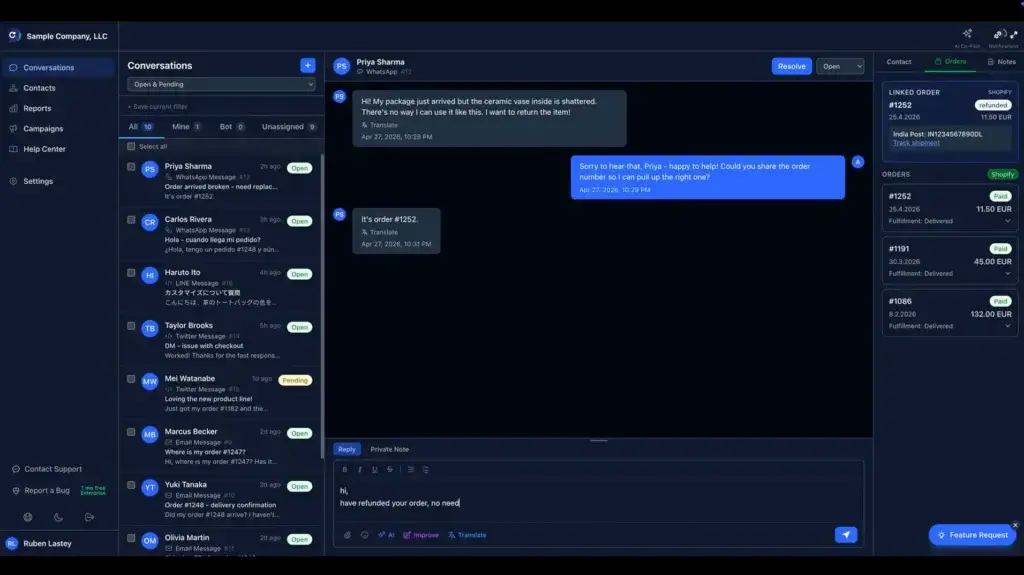
How Deskwoot Works
Deskwoot is best understood as an AI-powered customer support platform rather than a basic shared inbox. It brings several support channels, customer context, workflow automation, and self-service tools into one workspace. Below are the areas where it stands out most.
Multi-channel inbox for customer conversations
Deskwoot’s main workspace is a shared inbox where your team can manage customer conversations from multiple channels. This includes website live chat, email, WhatsApp, Telegram, SMS, X, LINE, and API-based channels.
That matters because many support teams no longer deal with only email tickets. A customer may start with live chat, follow up on WhatsApp, and later send an email. Without a unified inbox, agents lose context and customers repeat themselves. Deskwoot is designed to reduce that fragmentation by keeping conversations, customer details, and team actions in one system.
For smaller teams, the biggest benefit is simplicity. Instead of using one tool for chat, another for email, and another for messaging apps, Deskwoot gives you one operational layer for customer communication. For growing teams, the advantage is consistency because conversations can be assigned, labeled, prioritized, and tracked more reliably.
Live chat and website messaging
Deskwoot includes a website live chat widget that can be customized for your brand. You can use it to answer visitor questions, support existing customers, collect contact details, and start conversations before someone leaves your website.
The live chat feature is especially useful for SaaS companies, e-commerce stores, agencies, and service businesses that want to capture high-intent visitors. Deskwoot also supports proactive messaging through chat triggers, which means you can start targeted conversations based on visitor behavior such as page URL, time on page, or scroll depth.
This is one of the areas where Deskwoot feels more like a modern customer communication tool than a traditional ticketing system. It is not only waiting for support tickets. It can also help your team engage visitors when they are actively evaluating your product or service.
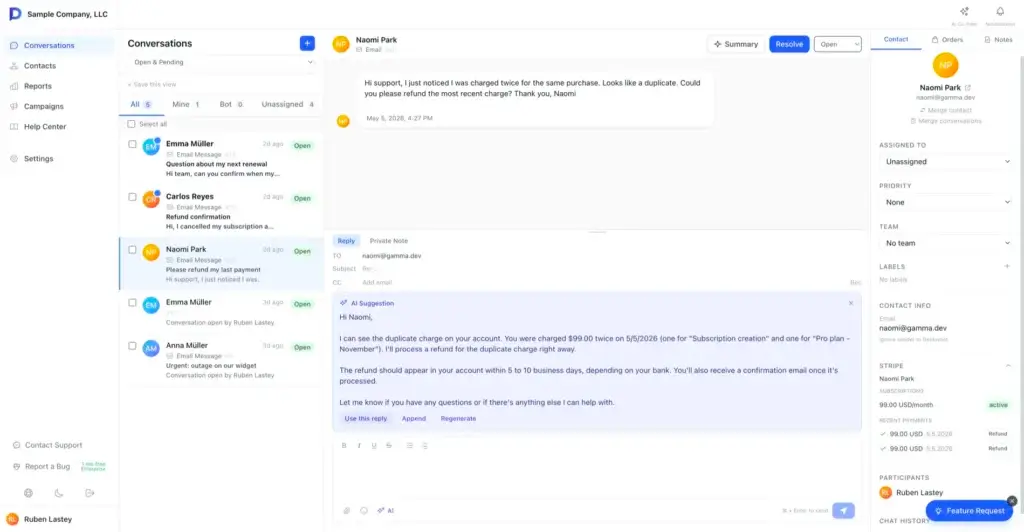
AI Bot and AI Copilot
AI is one of Deskwoot’s most important product pillars. The platform includes a customer-facing AI Bot that can answer questions from your help content, website pages, FAQs, and uploaded documents. It also includes an AI Copilot on higher tiers to help agents draft replies, summarize conversations, and respond faster.
The AI Bot is useful for repetitive questions such as pricing, shipping, onboarding, product setup, refunds, account access, and common troubleshooting. When the bot cannot resolve the issue confidently, the conversation can be handed to a human agent.
The Copilot side is more agent-focused. It helps your support team work faster by suggesting responses and summarizing long threads. In practice, this can reduce the time agents spend reading conversation history or writing the same answer repeatedly.
Deskwoot’s AI approach is especially attractive for teams that want automation but do not want to pay expensive per-resolution fees. You still need to review plan limits and AI usage costs carefully, but the model is easier to understand than many enterprise AI support pricing structures.
Help center and knowledge base
Deskwoot includes help center functionality on selected paid plans, allowing you to publish articles, guides, FAQs, and self-service resources. This is important because the best support teams do not only answer tickets faster. They also reduce unnecessary tickets by making answers easier to find.
A help center also improves AI performance because the bot needs reliable content to answer from. If your documentation is weak, any AI support system will struggle. If your knowledge base is organized and updated, Deskwoot’s AI Bot becomes more useful because it can ground its responses in your actual support content.
For SaaS and e-commerce businesses, this can make a real difference. You can document setup steps, refund policies, order processes, account settings, billing questions, and troubleshooting workflows, then use that content both for self-service and AI-assisted support.
Automation rules, macros, and SLA policies
Deskwoot includes workflow automation features that help your team reduce repetitive manual work. You can use automation rules to trigger actions when conversations are created or updated, macros to apply repeated actions quickly, and SLA policies on higher tiers to define response and resolution expectations.
For example, you might automatically assign WhatsApp conversations to a specific sales support team, mark urgent billing questions as high priority, notify agents when an SLA is close to breaching, or use macros to resolve standard requests faster.
This is where Deskwoot becomes more useful for growing teams. A simple inbox may work when you have low volume. Once support volume increases, you need routing, prioritization, service targets, and repeatable processes. Deskwoot gives you those building blocks without making the system feel overly complex.
E-commerce integrations and customer context
Deskwoot is particularly relevant for e-commerce teams because it supports integrations with tools such as Shopify, WooCommerce, and Stripe. This allows agents to view order, payment, and customer details next to the conversation instead of switching between multiple tabs.
For support teams handling refunds, order status questions, subscription issues, failed payments, or product inquiries, this context is valuable. It reduces response time and helps agents solve issues without asking customers for information they should already have.
This makes Deskwoot a stronger fit for online stores than a generic shared inbox. If your support team frequently needs order and billing context, Deskwoot’s commerce-focused integrations are a major advantage.
Reporting, CSAT, and performance tracking
Deskwoot includes reporting features for tracking conversation volume, response time, resolution time, agent performance, and CSAT surveys. These features are important once customer support becomes a measurable business function rather than an informal inbox process.
The reporting tools are not likely to be as deep as enterprise analytics platforms from Zendesk or Salesforce Service Cloud, but they cover the core metrics many small and mid-sized teams need. You can understand how many conversations your team handles, how quickly agents respond, and how customers rate the support experience.
For teams that need operational visibility but not heavy enterprise BI, Deskwoot’s reporting depth should be enough to start making better support decisions.
Pros and Cons
Advantages and Disadvantages
Pros
✅ Strong value for multi-channel support
✅ Built-in AI Bot and AI Copilot
✅ Useful e-commerce integrations
✅ EU-ready privacy and security focus
Cons
❌ Less mature than legacy enterprise platforms
❌ Free plan is very limited
❌ Advanced features depend on higher tiers
❌ Smaller ecosystem than Zendesk or Freshdesk
Deskwoot offers an impressive feature set for the price, especially if you need several customer communication channels and built-in AI. However, it is not automatically the best choice for every support team. Its value is strongest for modern SMBs and scaling teams, while larger enterprise organizations may still prefer a more established platform.
✅ Strong value for multi-channel support
Deskwoot’s strongest advantage is value. Paid plans include multiple channels, and the pricing is far lower than many better-known help desk platforms. This makes it attractive for businesses that need live chat, email, WhatsApp, and social messaging but cannot justify expensive enterprise support software.
✅ Built-in AI Bot and AI Copilot
Deskwoot does a good job of making AI part of the core support workflow. The AI Bot can help customers directly, while AI Copilot supports agents with summaries and reply suggestions. This gives smaller teams access to automation features that were previously more common in premium enterprise platforms.
✅ Useful e-commerce integrations
The Shopify, WooCommerce, and Stripe connections make Deskwoot especially useful for online stores and subscription businesses. Agents can see order and billing context while responding, which helps reduce unnecessary tab switching and improves resolution speed.
✅ EU-ready privacy and security focus
Deskwoot puts noticeable emphasis on EU data residency, encryption, cookieless chat, DPA availability, malware scanning, and AI data controls. This makes it more appealing for European companies or any business that wants a privacy-conscious customer communication platform.
❌ Less mature than legacy enterprise platforms
Deskwoot is newer than Zendesk, Freshdesk, Intercom, and Salesforce Service Cloud. That does not make it weak, but it does mean buyers should evaluate its product maturity, roadmap, support resources, and integration coverage carefully before moving a large operation.
❌ Free plan is very limited
The free plan is useful for testing or solo use, but it does not include the full Deskwoot experience. It is limited to one agent, one inbox, website live chat, and a monthly conversation cap. Most real support teams will need a paid plan.
❌ Advanced features depend on higher tiers
Deskwoot is affordable, but not every important feature is available on the lowest paid plan. Help center, AI Copilot, unlimited conversations, CSAT surveys, SLA policies, audit logs, and custom roles require higher tiers. This is still normal for the category, but you should choose based on workflow requirements rather than only the entry price.
❌ Smaller ecosystem than Zendesk or Freshdesk
Deskwoot has useful integrations, APIs, and webhooks, but it does not yet have the same marketplace scale as Zendesk or Freshdesk. If your support stack depends on a large number of niche integrations, you should confirm compatibility before switching.
Overall, Deskwoot is a strong option if you want affordable, AI-powered, multi-channel customer support. It is less ideal if you need the deepest enterprise reporting, a massive integration marketplace, or a vendor with decades of large-scale service platform maturity.
Pricing
How Much Does Deskwoot Cost?
Deskwoot’s pricing is one of its most compelling selling points. It uses a simple per-agent model, with a free plan and three paid plans. The annual pricing is significantly lower than many established customer support platforms, which makes Deskwoot especially attractive for startups, small businesses, e-commerce teams, and lean SaaS companies.
Hacker
The Hacker plan is free forever and is designed for individuals getting started. It includes one agent, one inbox, 500 conversations per month, 30-day data retention, website live chat, canned responses, and Slack integration.
This plan is useful for testing Deskwoot or running very basic chat support, but it does not include email, social channels, AI Bot, AI Copilot, help center, reports, automations, or email support. Most businesses should treat it as a starter plan rather than a full support solution.
Startup
The Startup plan starts at $4.50 per agent per month when billed annually. It includes 1,000 conversations per month, 6-month data retention, all channels, 100 AI chatbot conversations per month, custom views and filters, business hours, basic automations, reports, and email support.
This is the lowest realistic plan for a small team that wants to use Deskwoot as a real multi-channel support platform. It is especially good for teams that need email, live chat, WhatsApp, Telegram, or SMS support at a low cost.
Business
The Business plan starts at $7.50 per agent per month when billed annually. It includes unlimited conversations, 1-year data retention, AI Copilot, 200 AI chatbot conversations per month, help center, advanced automations, teams, custom attributes, pre-chat forms, full reporting, CSAT surveys, and priority email support.
For most growing teams, Business is likely the best Deskwoot plan. It adds the features that make the platform more complete, especially AI Copilot, help center, advanced automation, and unlimited conversations.
Enterprise
The Enterprise plan starts at $12.50 per agent per month when billed annually. It adds unlimited data retention, SLA policies, 300 AI chatbot conversations per month, AI-powered live translation, API access with granular permissions, audit logs, custom roles, permissions, and white-labeling.
This plan is best for larger teams, privacy-conscious organizations, agencies managing client support, and companies that need tighter control over permissions, auditability, and branding.
AI usage and extra costs
Deskwoot includes AI chatbot conversations on paid plans. If you exceed the included limit, additional AI chatbot conversations can be charged from a prepaid balance. You can also connect your own OpenAI or Anthropic API key for AI usage, which gives teams more control over AI costs and data flow.
Deskwoot states that it does not hide platform costs, but some channel costs may still come from third parties. For example, WhatsApp and SMS can involve provider fees from Meta, Twilio, or another messaging provider. This is normal in customer communication software, but it should be part of your budget review.
Pricing overview table
| Plan | Annual Price | Best For |
| Hacker | $0 | Solo users testing basic website live chat |
| Startup | $4.50 per agent/month | Small teams needing all channels at a low cost |
| Business | $7.50 per agent/month | Growing teams needing AI Copilot, help center, and reporting |
| Enterprise | $12.50 per agent/month | Larger teams needing SLAs, audit logs, custom roles, and white-labeling |
How to choose the right plan
If you only need a basic live chat tool, Hacker may be enough to test the product. If you need customer support across several channels, Startup is the better starting point. If you want Deskwoot to serve as a complete help desk with help center, unlimited conversations, AI Copilot, and stronger reporting, Business is the most practical choice.
Enterprise is best when service operations become more structured and you need SLA policies, audit logs, live translation, custom roles, or white-labeling. In my opinion, Business is the strongest balance of price and functionality for most small and mid-sized customer support teams.
User Experience
Ease of Use and Setup
Dashboard and daily use
Deskwoot is designed to be easier to adopt than heavy enterprise support platforms. The main workflow is centered around conversations, inboxes, customer context, assignments, labels, and replies. This should feel familiar if your team has used shared inbox tools, live chat software, or modern help desk platforms before.
The interface is likely to be most comfortable for teams that want a fast, focused support workspace. It is not overloaded with enterprise configuration options, which makes it easier for small teams to start quickly. At the same time, it includes enough structure to support assignment, automation, reporting, and role-based controls as your team grows.
Onboarding and setup process
Deskwoot promotes quick setup, especially for live chat and core inbox configuration. You can start with one channel, then add email, WhatsApp, Telegram, SMS, social messaging, or API channels over time.
The smartest implementation approach is to begin with your highest-volume channels first. For many teams, that means live chat and email. E-commerce businesses may prioritize WhatsApp and order-related integrations. SaaS companies may focus on help center content and AI Bot training early because product questions are often repetitive.
What may limit the experience
Deskwoot’s usability depends heavily on your team’s preparation. If your help center content is weak, the AI Bot will be less useful. If your support processes are unclear, automation rules and SLAs will be harder to configure. If you depend on niche integrations, you may need API or Zapier work rather than a ready-made marketplace app.
The product itself is relatively approachable, but successful setup still requires a clear support workflow, clean customer data, and well-structured knowledge content.
Integrations and Compatibility
How Deskwoot Integrates with Other Tools
E-commerce and payment integrations
Deskwoot’s most useful native integrations are in e-commerce and payments. Shopify, WooCommerce, and Stripe support make it easier for agents to view order data, customer spending, subscriptions, and payment details while handling customer conversations.
This is especially useful for online retailers, digital product companies, and subscription businesses. Instead of asking customers for order numbers or switching between dashboards, agents can resolve more issues directly from the support workspace.
Team and workflow integrations
Deskwoot also supports integrations with tools such as Slack and Zapier. Slack notifications help teams stay aware of new conversations, assignments, and support activity. Zapier expands connectivity to a larger software ecosystem, allowing teams to connect Deskwoot with CRMs, project management tools, databases, marketing systems, and internal workflows.
This makes Deskwoot flexible enough for many SMB stacks, although it still does not match the massive native app marketplaces offered by larger platforms.
API, webhooks, and custom channels
Deskwoot includes REST API support and webhooks, which are important for teams that want custom workflows or internal system connections. Developers can build custom channels, connect product data, trigger events, or sync support activity with other tools.
This gives Deskwoot more long-term flexibility than a basic help desk. However, non-technical teams should check whether the integrations they need are already available before assuming everything can be connected easily.
Customer Support
How Good Is Deskwoot Support?
Support availability by plan
Deskwoot’s support level depends on the plan you choose. The free Hacker plan does not include email support, while Startup includes email support. Business adds priority email support, making it the better choice if your team wants stronger vendor assistance during setup and daily operations.
This is important because support software is operationally sensitive. If your chat, email, WhatsApp, or AI support workflows are not configured correctly, customer experience can suffer quickly. Paying for a plan with better support may be worth it if Deskwoot becomes central to your customer communication stack.
Documentation and self-service resources
Deskwoot provides a help center, documentation, API reference, and setup resources. These are useful for teams that want to configure inboxes, connect channels, manage integrations, and understand platform behavior without relying on direct support for every question.
The documentation side is especially important for technical teams using APIs, webhooks, custom channels, or AI configuration. If you plan to build Deskwoot into a broader support workflow, review the documentation before implementation.
Support experience in practice
Because Deskwoot is newer than several major competitors, you should evaluate vendor responsiveness during the trial. Test real questions, ask about migration, check integration support, and review response quality before committing fully.
My recommendation is to treat the trial as both a product test and a support test. The product may look strong on features, but the real question is how well Deskwoot helps your team when something needs configuration, troubleshooting, or migration support.
Best Use Cases
Ideal Use Cases and Industries
Best use cases
Deskwoot is best for teams that need a modern customer support platform with multi-channel communication, AI assistance, and simple pricing. It is especially relevant for businesses that want more than a basic inbox but do not want the cost or complexity of legacy enterprise tools.
- Small and mid-sized support teams: Deskwoot gives growing teams live chat, email, WhatsApp, automation, and reporting without enterprise pricing.
- E-commerce businesses: Shopify, WooCommerce, and Stripe integrations make Deskwoot useful for order, refund, and payment support.
- SaaS companies: AI Bot, help center, live chat, and product support workflows make it relevant for software teams.
- European companies: EU data residency, cookieless chat, and DPA availability are useful for privacy-conscious teams.
- Lean teams adopting AI support: Deskwoot is attractive if you want AI assistance without building a custom chatbot stack.
Who may want a different tool
Deskwoot may not be the best fit for large enterprises that need very advanced reporting, complex governance, mature marketplace integrations, or deep CRM alignment. Those teams may prefer Zendesk, Salesforce Service Cloud, or Freshdesk depending on their existing stack.
It may also be less ideal for teams that want a conversation-led growth platform with sophisticated in-app product messaging. In that case, Intercom may still feel more mature. For teams that want open-source ownership and self-hosting, Chatwoot may be a better alternative to evaluate.
Alternatives and Competitors
How Deskwoot Compares to Alternatives
Deskwoot competes in a crowded customer support software market. The right alternative depends on whether you care most about pricing, enterprise maturity, chat-first engagement, open-source control, or a large integration marketplace.
Deskwoot vs Zendesk
Zendesk is more established, more mature, and stronger for larger support organizations that need enterprise-grade workflows, reporting, integrations, and governance. It is also much more expensive once you move into full Suite plans and advanced AI or contact center functionality.
Deskwoot is the better choice if you want a lower-cost, faster-to-adopt support platform with AI and multiple channels included. Zendesk is the better choice if your company needs proven enterprise scale, a larger marketplace, and deeper operational controls.
Deskwoot vs Freshdesk
Freshdesk is one of the strongest traditional help desk alternatives because it offers good usability, ticketing, automation, and broader brand maturity. It is a safer choice for teams that want a well-known platform with a more established ecosystem.
Deskwoot competes by being simpler and more aggressive on value. If you need a modern multi-channel inbox with built-in AI at a low price, Deskwoot is very compelling. If you want a more established vendor with broader help desk maturity, Freshdesk may feel safer.
Deskwoot vs Intercom
Intercom is stronger for product-led SaaS companies that prioritize in-app messaging, lifecycle communication, proactive support, and a polished chat-first customer experience. It is one of the best-known platforms for conversational customer engagement.
Deskwoot is more attractive if you want a lower-cost help desk with practical AI, ticket handling, help center functionality, and broad messaging channels. Intercom is more mature for product engagement, but Deskwoot may be better for teams that want predictable support operations without premium pricing.
Deskwoot vs Chatwoot
Chatwoot is especially relevant if you want an open-source customer support platform with self-hosting options. It is attractive for technical teams that want control over infrastructure and data.
Deskwoot is different because it focuses on a hosted, AI-powered, ready-to-use support experience with simple pricing and EU-ready infrastructure. If you want open-source ownership, Chatwoot deserves consideration. If you want faster hosted deployment with built-in AI and less operational maintenance, Deskwoot may be the more practical choice.
Deskwoot alternatives comparison table
| Provider | Best For | Main Advantage | Best Fit |
| Deskwoot | Affordable AI-powered multi-channel support | Low pricing with AI, channels, and automation | SMBs, SaaS teams, e-commerce stores |
| Zendesk | Scalable enterprise customer service | Mature ecosystem, reporting, and workflow depth | Mid-market and enterprise support teams |
| Freshdesk | Traditional help desk with strong value | Established product and user-friendly ticketing | Small to mid-sized support teams |
| Intercom | Conversation-led support and product messaging | Excellent chat-first and in-app engagement | SaaS and product-led companies |
| Chatwoot | Open-source customer support | Self-hosting and infrastructure control | Technical teams needing ownership |
Trust and Data Protection
Security, Privacy, and Compliance
EU data residency and encryption
Deskwoot places strong emphasis on EU-ready security. The platform highlights EU data hosting, TLS encryption in transit, AES-256 encryption at rest, and privacy controls designed for teams that care about GDPR requirements.
This is an important differentiator because customer support platforms often handle sensitive information: names, emails, order details, billing questions, account access requests, attachments, and sometimes personal complaints. A privacy-first architecture is valuable when your support system becomes a central customer data hub.
Cookieless chat and DPA availability
Deskwoot also promotes cookieless chat and a self-serve GDPR Article 28 Data Processing Agreement. For European websites, this can reduce friction around consent and vendor review, although you should still verify your own legal requirements before implementation.
AI data controls
AI support tools create new data questions. Deskwoot addresses this by highlighting prompt injection protection, no vendor AI training on customer conversations, and the option to bring your own AI key. This can be useful for teams that want more control over how AI processes support content and customer messages.
From a buying perspective, this makes Deskwoot more credible than lightweight chatbot tools that do not clearly explain data handling. Still, teams in regulated industries should perform their own vendor security review before using AI on sensitive customer conversations.
Conclusion
Final Thoughts
Deskwoot is one of the more interesting newer tools in the customer support software category. It combines a multi-channel inbox, live chat, email, WhatsApp, social messaging, help center tools, AI Bot, AI Copilot, automation, reporting, and EU-focused security in a pricing model that is much more accessible than many established competitors.
Its biggest strength is value. If your team wants modern customer communication software without the cost curve of Zendesk or Intercom, Deskwoot deserves serious consideration. It is especially strong for small and mid-sized businesses, e-commerce teams, SaaS companies, and European organizations that care about privacy and predictable pricing.
However, Deskwoot is not the deepest enterprise platform in the market. Zendesk, Freshdesk, Salesforce Service Cloud, and Intercom still have advantages in maturity, ecosystem depth, enterprise reporting, or product-led engagement, depending on the use case.
My overall view is that Deskwoot is best for teams that want to move beyond a shared inbox and adopt AI-powered, multi-channel support without overpaying. If your support operation is growing but not yet enterprise-level, Deskwoot is a very practical tool to test.,
Frequently Asked Questions
Have More Questions?
What is Deskwoot?
Deskwoot is an AI-powered customer support platform that combines live chat, email, WhatsApp, Telegram, SMS, X, LINE, API channels, automation, help center tools, and team collaboration in one workspace.
What is Deskwoot used for?
Deskwoot is used to manage customer conversations, automate support replies, organize team workflows, publish help center content, track support performance, and centralize communication across multiple channels.
Is Deskwoot a help desk?
Yes. Deskwoot is a help desk and customer support platform, but it is more modern than a basic ticketing tool because it includes live chat, messaging channels, AI automation, and customer context.
How much does Deskwoot cost?
Deskwoot has a free Hacker plan and paid plans that start at $4.50 per agent per month when billed annually. Higher plans add unlimited conversations, AI Copilot, help center, SLAs, audit logs, and custom roles.
Does Deskwoot have a free plan?
Yes. Deskwoot has a free Hacker plan for one agent, one inbox, website live chat, canned responses, Slack integration, and 500 conversations per month. It is best for testing or very small use cases.
Does Deskwoot include AI?
Yes. Deskwoot includes a customer-facing AI Bot on paid plans and AI Copilot on higher plans. The AI Bot can answer customer questions, while Copilot helps agents with summaries and suggested replies.
Which channels does Deskwoot support?
Deskwoot supports website live chat, email, WhatsApp, Telegram, SMS, X, LINE, and API channels. Paid plans include all main communication channels.
Is Deskwoot good for e-commerce?
Yes. Deskwoot is a good fit for e-commerce teams because it supports integrations such as Shopify, WooCommerce, and Stripe, helping agents view order and payment context while replying to customers.
What are the best Deskwoot alternatives?
The best Deskwoot alternatives include Zendesk, Freshdesk, Intercom, and Chatwoot. Zendesk is stronger for enterprise scale, Freshdesk for traditional help desk maturity, Intercom for chat-first engagement, and Chatwoot for open-source control.
Is Deskwoot worth it?
Deskwoot is worth considering if you need affordable, AI-powered, multi-channel customer support. It is especially attractive for SMBs, SaaS companies, e-commerce stores, and teams that want modern support software without enterprise pricing.