
Introduction
Plaky is a project management and task management platform designed for teams that want a simple, visual, and affordable way to organize work. Instead of overwhelming you with complex portfolio management layers from day one, Plaky focuses on the essentials: boards, tasks, statuses, deadlines, assignees, comments, files, and flexible views.
Its biggest advantage is the generous free plan. Plaky offers unlimited users, projects, tasks, and files, which makes it especially attractive for small businesses, startups, agencies, nonprofits, and internal teams that need structure without adding another expensive SaaS subscription. For teams that have outgrown spreadsheets but are not ready for a heavier system, Plaky gives you a clean entry point into organized project collaboration.
That said, Plaky is not trying to be the most advanced work management platform on the market. It is better understood as a lightweight and flexible project management tool with strong value for the price. If you need advanced resource planning, deep reporting, enterprise-grade workflow automation, or a more mature app marketplace, a platform like monday.com will usually be the stronger long-term choice.
In this Plaky review, we will look at its core features, pricing, pros and cons, user experience, integrations, security, best use cases, and how it compares with monday.com, ClickUp, Asana, and Trello.
Software Specification
Plaky Core Features
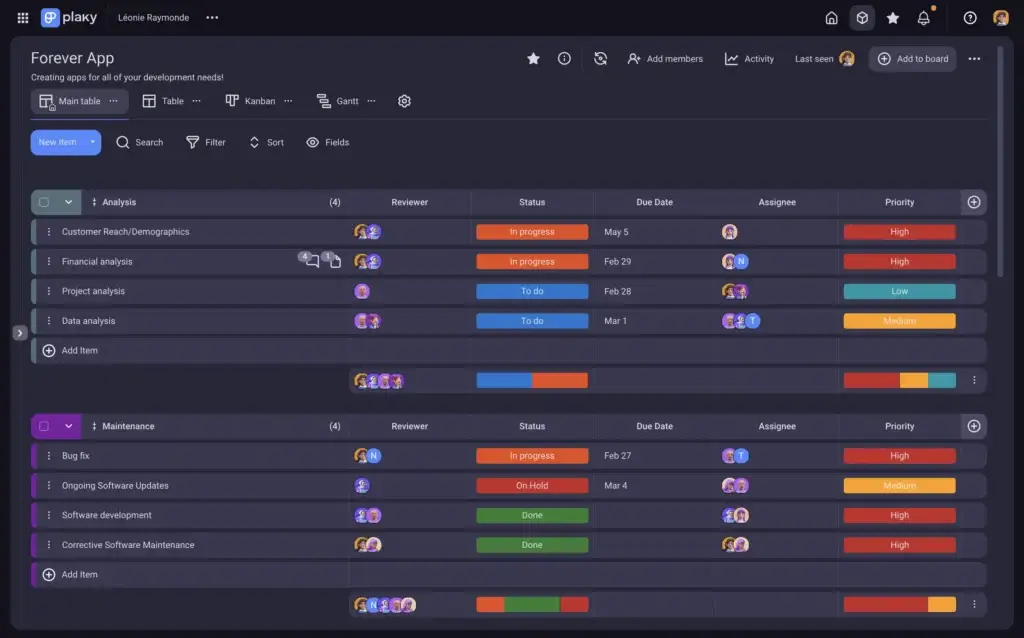
Plaky gives you a practical set of project management features built around visual boards. You can create workspaces, spaces, boards, item groups, tasks, subtasks, fields, views, comments, and files, then structure them around the way your team works.
The product feels most useful when you need one shared place to track ownership, deadlines, status changes, and project progress. It is not overloaded with advanced project controls, but that simplicity is exactly what makes it easy to adopt.
1. Boards, Items, and Flexible Project Structures
Plaky uses boards as the central place where work is organized. Each board can represent a project, process, department, campaign, client account, sprint, content calendar, or operational workflow.
Inside each board, you can create items for tasks, bugs, deliverables, requests, milestones, approvals, or any other unit of work. This makes Plaky flexible enough for marketing teams, software teams, HR, sales, operations, and client service teams.
2. Table, Kanban, Chart, and Gantt Views
Plaky supports different ways to visualize work, including table and Kanban views. These are useful for teams that want to switch between spreadsheet-style planning and more visual workflow tracking.
Paid plans add more advanced visibility, including Gantt view and richer chart widgets. This helps you move beyond simple task lists and start understanding timelines, workload flow, and project progress more clearly.
3. Custom Fields for Better Task Tracking
Custom fields are one of Plaky’s most important features because they let you define what information matters on each board. You can track assignees, dates, statuses, labels, priorities, text details, numbers, files, and other project data.
The free plan includes a limited number of fields per board, while paid plans unlock unlimited fields. That matters if you want to build more detailed workflows for approvals, client work, bug tracking, sales pipelines, or production management.
4. Comments, Mentions, Files, and Activity Tracking
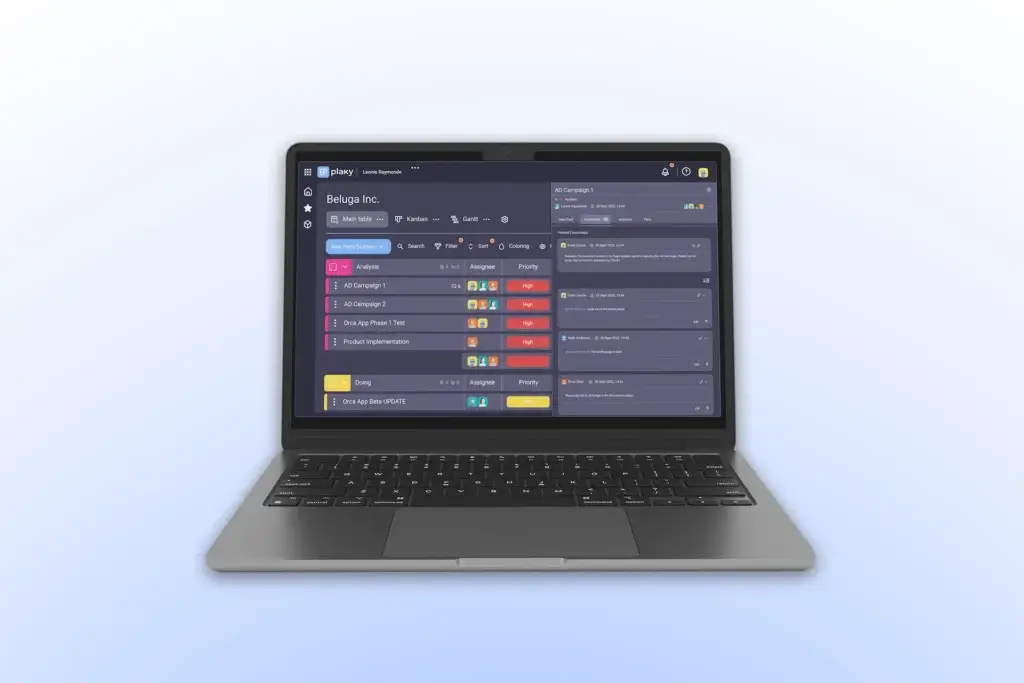
Plaky includes collaboration features directly inside tasks. You can add comments, mention teammates, attach files, and keep updates connected to the work they belong to.
This is a major improvement over managing project updates through scattered email threads or separate chat messages. When the task discussion stays inside the task card, context is easier to find later.
5. Automations on Paid Plans
Plaky’s Pro plan includes automation actions, while the Enterprise plan offers unlimited automations. Automations can help reduce repetitive admin work by triggering updates, moving items, changing statuses, or notifying teammates based on workflow rules.
This is helpful, but Plaky’s automation ecosystem is still more limited than monday.com. If automation is a central part of how your team manages work, monday.com remains the more mature option.
6. Templates for Faster Setup
Plaky includes templates for different use cases, such as marketing, HR, sales, software development, construction scheduling, work logs, product roadmaps, and resource planning.
Templates are useful because they reduce setup time. Instead of building every board from scratch, you can start with a structure and customize it to match your workflow.
Overall, Plaky’s feature set is strongest for teams that need clarity, accountability, and a shared task management system without the complexity of enterprise project portfolio management.
Pros and Cons
Advantages and Disadvantages
Positive
✅ Generous Free Plan
✅ Easy to Use
✅ Flexible Boards and Views
✅ Strong Value for Growing Teams
Negative
❌ Limited Advanced Reporting
❌ Smaller Integration Ecosystem
❌ Automation Is Not as Deep as monday.com
❌ Not Ideal for Complex Enterprise Portfolios
Pros
✅ Generous Free Plan
Plaky’s free plan is one of its strongest selling points. You can add unlimited users, projects, tasks, and files, which makes it far more accessible than many project management tools that quickly restrict collaboration behind paid seats.
✅ Easy to Use
Plaky is simple enough for non-technical teams to adopt quickly. The board-based layout, clear task structure, and straightforward navigation make it a good fit for teams that do not want a long onboarding process.
✅ Flexible Boards and Views
You can use Plaky for task lists, Kanban boards, content calendars, client workflows, issue tracking, and internal operations. The flexibility is useful for teams that need structure but do not want a rigid methodology forced on them.
✅ Strong Value for Growing Teams
The paid plans are priced competitively, especially compared with many leading project management platforms. If your main priority is affordability, Plaky offers a strong balance between functionality and cost.
Cons
❌ Limited Advanced Reporting
Plaky includes chart views and widgets, but it is not as strong as more mature platforms when it comes to executive dashboards, portfolio reporting, cross-project analytics, and advanced resource insights.
❌ Smaller Integration Ecosystem
Plaky integrates well with CAKE.com products like Clockify and Pumble, but it does not yet offer the same broad integration marketplace as monday.com, Asana, ClickUp, or Jira.
❌ Automation Is Not as Deep as monday.com
Plaky’s automations are useful for basic workflow rules, especially on paid plans. However, monday.com offers a more advanced automation builder, more integration-based automation options, and more mature workflow logic for complex teams.
❌ Not Ideal for Complex Enterprise Portfolios
Plaky works well for task and project visibility, but larger organizations may outgrow it if they need budget tracking, advanced resource planning, portfolio dependencies, approval chains, and highly customized enterprise dashboards.
User Experience
A Simple and Visual Workspace
Plaky’s user experience is clean, practical, and easy to understand. The platform is built around the idea that project management should be visible, not hidden inside disconnected spreadsheets or long email threads.
When you create a board, you can organize tasks into groups, add relevant fields, assign people, set due dates, and update progress. This makes it easy for team members to understand what needs to be done, who owns each task, and what is currently blocked.
Clean Navigation for Everyday Work
Plaky does not feel intimidating when you first open it. The workspace structure is logical, and the core actions are easy to find: create a board, add tasks, assign owners, update statuses, and discuss work in comments.
This matters for adoption. Many project management tools fail not because they lack features, but because teams never fully use them. Plaky reduces that risk by keeping the experience approachable.
Good Fit for Teams Moving Away from Spreadsheets
If your team currently uses Google Sheets, Excel, email, or chat messages to manage work, Plaky will feel like a meaningful upgrade. It keeps the familiar structure of rows and columns but adds collaboration, ownership, task history, notifications, and multiple views.
This makes it especially useful for marketing calendars, production schedules, HR workflows, agency task tracking, customer onboarding, and internal project planning.
Mobile Access for On-the-Go Updates
Plaky offers mobile apps for iOS and Android, allowing users to access tasks, assign members, discuss work, share files, and receive updates while away from the desktop.
The mobile experience is useful for quick updates and simple task tracking. However, like most project management tools, more complex board setup and workflow design are easier to handle on desktop.
Where the Experience Falls Short
Plaky’s simplicity is a strength, but it can also become a limitation. If you manage highly complex projects with multiple dependencies, budget layers, capacity planning, and executive reporting needs, the platform may feel too lightweight.
For many small and mid-sized teams, that tradeoff is acceptable. For larger organizations, monday.com offers a more scalable experience with stronger dashboards, automation, permissions, integrations, and workflow customization.
Integrations and Compatibility
How Plaky Connects With Other Tools
Plaky’s integration strategy is centered mainly around the CAKE.com productivity suite. This includes Plaky for project management, Clockify for time tracking, and Pumble for team communication.
This is useful if you want an affordable stack for managing tasks, tracking time, and discussing work without relying on several disconnected vendors.
Clockify Integration for Time Tracking
Plaky integrates with Clockify so teams can track time directly from Plaky tasks, items, and boards. This is especially helpful for agencies, consultants, creative teams, software teams, and client-facing service teams that need to understand how much time work actually takes.
With this setup, project planning and time tracking become more connected. You can manage the task in Plaky and use Clockify to support timesheets, billing, productivity analysis, and future planning.
Pumble Integration for Team Communication
Plaky also connects with Pumble, CAKE.com’s team communication platform. This allows teams to receive Plaky notifications inside Pumble, helping updates reach the communication channel where people are already working.
This is valuable because many project management tools fail when people forget to check them. Notifications in Pumble can reduce missed updates and help teams respond faster to project changes.
CAKE.com Bundle for Project Management, Chat, and Time Tracking
The CAKE.com Bundle combines Plaky, Clockify, and Pumble in one subscription. This can be appealing for teams that want project management, time tracking, and team messaging together at a predictable price.
For smaller teams, this bundle can reduce software costs and simplify vendor management. For larger teams, the decision depends on how deeply you need each product to perform compared with best-in-class alternatives.
Integration Limitations
The biggest limitation is that Plaky does not yet match the broader integration ecosystems of platforms like monday.com, ClickUp, Asana, or Trello. If your workflow depends on Salesforce, HubSpot, Jira, Slack, Microsoft Teams, Google Workspace, finance tools, help desk tools, and custom reporting systems, you may find Plaky more limited.
For teams that mainly need task management plus time tracking and communication, Plaky’s ecosystem is practical. For teams that need a central work operating system connected to dozens of business apps, monday.com is the better choice.
Compare with Others
Alternatives to Plaky
Plaky vs. Competing Project Management Tools
Plaky competes in a crowded category that includes lightweight Kanban apps, spreadsheet-style work tools, and full work management platforms. Its main advantage is value. Its main limitation is depth.
Here is how Plaky compares with some of the most common alternatives.
| Tool | Best For | Main Strength | Main Limitation |
| Plaky | Small teams, startups, agencies, and teams needing affordable task management | Generous free plan and simple visual boards | Less advanced reporting, automation, and integrations |
| monday.com | Growing teams and organizations that need scalable work management | Best balance of flexibility, automation, dashboards, and usability | Advanced features require paid plans |
| ClickUp | Teams that want many features in one workspace | Highly feature-rich with docs, tasks, goals, and dashboards | Can feel crowded and harder to configure |
| Asana | Teams that need structured task and project execution | Clean task management and strong project workflows | Higher-tier features can become expensive |
| Trello | Simple Kanban boards and lightweight task tracking | Very easy to use for visual task boards | Less suitable for complex project management |
Plaky vs. monday.com
Plaky is more affordable and easier to start with, especially for small teams that need unlimited users on a free plan. It is a strong option when your main goal is to replace spreadsheets with a cleaner shared task system.
monday.com, however, is the better platform for teams that need to scale. It offers stronger dashboards, more advanced automations, broader integrations, better workflow customization, and more mature enterprise capabilities. If you are building a long-term work management system across departments, monday.com is the stronger recommendation.
Plaky vs. ClickUp
ClickUp offers more features than Plaky, including docs, goals, dashboards, whiteboards, sprints, and more advanced productivity tools. It is a better fit for teams that want one platform to centralize many types of work.
Plaky is simpler and easier to adopt. If ClickUp feels too complex or too feature-heavy, Plaky may be a more comfortable choice for straightforward task and project tracking.
Plaky vs. Asana
Asana is stronger for structured project execution, dependencies, goals, approvals, and cross-functional coordination. It also has a more mature ecosystem and more advanced workflow management features.
Plaky wins on affordability and simplicity. For teams that mainly need boards, tasks, fields, comments, and basic progress tracking, Plaky may deliver enough functionality at a lower cost.
Plaky vs. Trello
Trello is one of the easiest Kanban tools to use. It is great for personal productivity, small teams, editorial boards, and lightweight workflows.
Plaky feels more structured for teams that want board data, fields, views, activity logs, and a more project-management-oriented workspace. Trello is simpler, while Plaky gives you more room to organize work beyond basic cards.
Why monday.com Is Still the Best Choice for Scalable Project Management
Plaky is a strong value tool, but monday.com is the better choice if you are serious about building a scalable work management system. It gives you a more mature platform for automation, dashboards, cross-team workflows, templates, reporting, integrations, and enterprise governance.
If your team only needs simple task tracking, Plaky is attractive. If your team needs a project management platform that can grow with marketing, sales, operations, HR, product, and leadership teams, monday.com is the safer and more powerful long-term investment.
Pricing
Free vs Paid
Plaky’s pricing is one of the most compelling parts of the product. It offers a free plan with unlimited users, projects, tasks, and files, then paid plans for teams that need more fields, views, automations, permissions, and administrative control.
Pricing can change over time, so you should always check Plaky’s official pricing page before purchasing. Based on the current public pricing, the main plans are Free, Pro, Enterprise, and the CAKE.com Bundle.
- Free Plan: $0 for unlimited users, with unlimited spaces, boards, items, and views, plus basic fields, activity log, chart view, user roles, and file storage limits.
- Pro Plan: $3.99 per seat per month billed annually, adding Gantt view, private boards, unlimited fields, viewer roles, chart widgets, automations, templates, and expanded activity history.
- Enterprise Plan: $8.99 per seat per month billed annually, adding board permissions, ownership management, unlimited automations, unlimited activity log, SSO, custom subdomain, and higher file limits.
- CAKE.com Bundle: $12.99 per seat per month billed annually, combining Plaky Enterprise features with Pumble for communication and Clockify for time tracking.
| Feature | Free | Pro | Enterprise | CAKE.com Bundle |
| Price | $0 | $3.99/user/mo billed annually | $8.99/user/mo billed annually | $12.99/user/mo billed annually |
| Unlimited Users | ✔ | ✔ | ✔ | ✔ |
| Unlimited Boards and Items | ✔ | ✔ | ✔ | ✔ |
| Fields Per Board | 6 | Unlimited | Unlimited | Unlimited |
| Gantt View | ✘ | ✔ | ✔ | ✔ |
| Automations | ✘ | 1,000 actions/mo | Unlimited | Unlimited |
| Activity Log | 7 days | 6 months | Unlimited | Unlimited |
| Private Boards | ✘ | ✔ | ✔ | ✔ |
| Board Permissions | ✘ | ✘ | ✔ | ✔ |
| SSO | ✘ | ✘ | ✔ | ✔ |
| Clockify and Pumble Included | ✘ | ✘ | ✘ | ✔ |
Plaky’s free plan is excellent for teams that want to centralize tasks without committing to paid software. The Pro plan is the best fit for growing teams that need Gantt view, unlimited fields, private boards, and automations. The Enterprise plan is the better option if you need SSO, board permissions, unlimited automations, and stronger administrative control.
The CAKE.com Bundle is worth considering if you also need time tracking and team chat. However, if your project management needs are more advanced than your time tracking and chat needs, you may still get more strategic value from monday.com as your central work management platform.
Security and Compliance
What About Security?
Security matters in project management because boards often contain client information, internal plans, project documents, budgets, comments, and operational details. Plaky provides several security-related controls, especially on higher-tier plans.
On the Enterprise plan, Plaky includes features such as board permissions, board ownership management, custom subdomain, Single Sign-On, and unlimited activity log. These features are important for larger teams because they help control access, reduce account risk, and maintain better visibility into changes.
Security and Admin Controls
Plaky’s security approach is strongest when you use the Enterprise plan. Board permissions help determine who can access or modify specific board structures and content. SSO helps reduce password-related risks by allowing employees to log in through a centralized identity provider.
Unlimited activity logs are also useful because they allow teams to review historical changes without losing visibility after a short retention window. This can help managers investigate mistakes, understand project changes, and maintain accountability.
Data Protection Considerations
Plaky states that data is encrypted and that the platform follows global and regional data safety standards. For many small and mid-sized teams, this will be enough for general project management use.
However, if you operate in a highly regulated industry, you should ask Plaky directly about compliance documentation, data processing terms, regional data hosting, access controls, retention rules, and any legal requirements that apply to your organization.
When You May Need a More Mature Enterprise Platform
If security, compliance, governance, and auditability are central requirements, you should compare Plaky closely with monday.com Enterprise. monday.com provides a broader enterprise-grade work management environment, with more mature controls for larger organizations and more complex workflows.
Plaky is good for teams that need practical controls at a lower cost. monday.com is better when governance, scale, automation, and cross-department control are part of the buying decision.
The Genesis of Plaky
The Company and Product Evolution
Plaky is part of the CAKE.com productivity suite, alongside Clockify and Pumble. This matters because the product is not positioned as a standalone task tracker only. It is part of a broader ecosystem for project management, time tracking, and team communication.
This ecosystem approach gives Plaky a clear strategic direction. Instead of trying to be everything at once, it focuses on managing work, while Clockify supports time tracking and Pumble supports communication.
How Plaky Has Evolved
Plaky has expanded from a simple task and project management tool into a more capable workspace with Gantt views, chart widgets, automations, permissions, templates, activity logs, private boards, and Enterprise controls.
The platform is still younger and lighter than monday.com, Asana, or ClickUp, but it is improving in the areas that matter most to growing teams: visibility, automation, collaboration, and administrative control.
Where Plaky Fits in the Market
Plaky sits between basic Kanban tools and full work management platforms. It is more structured than a simple board app, but not as advanced as monday.com or ClickUp.
That position gives it a clear audience: teams that want better project organization without the price, setup time, or complexity of larger platforms.
Best Use Cases
Who Should Use Plaky?
Small Businesses and Startups
Plaky is a strong fit for small businesses and startups because the free plan removes one of the biggest barriers to adopting project management software: user-based cost.
You can invite the whole team, create boards for different workflows, and start organizing tasks without worrying about seat limits immediately.
Marketing and Content Teams
Marketing teams can use Plaky to manage campaigns, content calendars, SEO tasks, design requests, approvals, publishing schedules, and recurring workflows.
The ability to use boards, fields, deadlines, owners, and status columns makes it useful for keeping campaigns visible and reducing missed handoffs.
Agencies and Client Service Teams
Agencies can use Plaky to manage client projects, deliverables, requests, content production, creative workflows, and internal responsibilities.
The Clockify integration is especially useful here because agencies often need to connect tasks with billable time, workload planning, and profitability analysis.
Software and IT Teams
Software and IT teams can use Plaky for sprint boards, bug tracking, feature requests, support workflows, and internal technical tasks.
However, highly technical software teams that need advanced issue tracking, releases, code integrations, and DevOps workflows may still prefer Jira or a more specialized platform.
Teams That Need a monday.com Alternative on a Lower Budget
Plaky can work well if your team likes the idea of visual work management but cannot justify monday.com pricing yet.
That said, if your business is scaling quickly, monday.com will usually be the better long-term choice because it gives you more room to build advanced workflows, dashboards, automations, and cross-functional systems.
Conclusion
Final Thoughts
Plaky is a capable and affordable project management tool that delivers strong value for teams that want visual task tracking, unlimited users, flexible boards, collaboration features, and practical workflow organization.
Its free plan is the main reason it stands out. Many project management tools limit users, boards, tasks, views, automations, or collaboration features early. Plaky gives small teams much more room to work before they need to upgrade.
Is Plaky a Good Project Management Tool?
Yes, Plaky is a good project management tool if you need a simple, affordable, and flexible way to organize team tasks. It is especially strong for small businesses, agencies, startups, nonprofits, and operational teams that want to move away from spreadsheets.
It is less ideal for larger organizations that need advanced portfolio reporting, deep integrations, complex automations, mature resource planning, or enterprise-level workflow orchestration.
Best Fit
✅ Small Teams That Need Structure Without Cost
Plaky’s free plan makes it easy to create a shared project workspace without immediately increasing software spend.
✅ Agencies and Service Teams
With Clockify integration, Plaky can help agencies connect tasks with time tracking and client delivery workflows.
✅ Teams Already Using CAKE.com Tools
If you already use Clockify or Pumble, Plaky fits naturally into that ecosystem.
✅ Teams That Want a Simple monday.com Alternative
Plaky is a good lower-cost alternative if you only need basic project visibility and task collaboration. However, monday.com is still the stronger option for teams that want a more scalable and powerful work management system.
Overall Rating: 8.5/10
Plaky earns a strong score because it delivers excellent value, a generous free plan, simple usability, and practical project management features. It is not the most advanced platform, but it does not need to be for its target audience.
If your priority is affordability and fast adoption, Plaky is worth considering. If your priority is long-term scalability, automation, integrations, reporting, and cross-team work management, monday.com remains the better overall recommendation.
For a broader comparison, visit our best project management software guide.
Frequently Asked Questions
Have more questions?
What is Plaky?
Plaky is a project management and task management platform that helps teams organize work through boards, items, views, fields, comments, files, and task updates.
Is Plaky free?
Yes. Plaky offers a free plan with unlimited users, projects, tasks, and files. Paid plans add advanced features such as Gantt view, private boards, automations, permissions, and SSO.
Who is Plaky best for?
Plaky is best for small businesses, startups, agencies, marketing teams, HR teams, and internal operations teams that need affordable and easy-to-use project management software.
Does Plaky have Gantt charts?
Yes. Plaky offers Gantt view on paid plans, making it easier to visualize timelines, task durations, and project schedules.
Does Plaky support automations?
Yes. Plaky supports automations on paid plans. The Pro plan includes a set number of automation actions, while the Enterprise plan offers unlimited automation actions.
Does Plaky integrate with Clockify?
Yes. Plaky integrates with Clockify so teams can track time from Plaky tasks and connect project work with timesheets, billing, and productivity analysis.
Does Plaky integrate with Pumble?
Yes. Plaky integrates with Pumble, allowing teams to receive project and task notifications inside their communication workspace.
Is Plaky better than Trello?
Plaky may be better if you want more structured project management with fields, boards, views, activity logs, and affordable paid plans. Trello is better for very simple Kanban-style workflows.
Is Plaky better than monday.com?
Plaky is more affordable and easier for simple task management. monday.com is better for scalable project management, advanced automation, dashboards, integrations, and cross-team workflows.
Is Plaky good for agencies?
Yes. Plaky can work well for agencies managing client tasks, content calendars, design requests, approvals, and delivery workflows, especially when paired with Clockify for time tracking.