The biggest project management software updates in Q1 2026 were not small feature refreshes. Across the market, leading vendors pushed deeper into AI execution, connected workflows, and more unified work environments. That shift matters because buyers are no longer only comparing task boards, docs, and dashboards. They are now comparing which platform can reduce manual work, surface better context, and help teams move from planning to execution faster.
In this roundup, you will find six of the most important Q1 2026 updates from ClickUp, monday.com, Miro, Notion, Asana, and Smartsheet. Each company made a different kind of move. Some focused on AI agents, others on workspace unification, and others on enterprise AI connectivity. Together, these releases give a strong picture of where the project management software market is heading next.
For the broadest market significance, monday.com made the strongest Q1 move because it pushed AI agents closer to real operational work inside the platform. But the best update depends on what your team values most, whether that is an all-in-one workspace, visual AI workflows, structured collaboration, or enterprise data access.
Top 6 project management software updates in Q1 2026
The most important update depends on what kind of work system you want to build. Some teams will care most about agentic AI. Others will care more about workspace consolidation or better integration with external AI tools. Here is the short version before we break each one down.
| Tool | Main Q1 2026 Update | Core Theme | Best For |
| monday.com | AI agent infrastructure and agent builder momentum | Agentic work execution | Teams wanting AI agents inside live workflows |
| ClickUp | ClickUp 4.0 rollout | Workspace convergence | Teams wanting tasks, chat, docs, and AI in one experience |
| Miro | AI Workflows and MCP support | Visual AI workflows | Teams turning ideas into deliverables visually |
| Notion | Notion 3.2 and custom agents | AI-enabled workspace expansion | Teams combining docs, knowledge, and AI workflows |
| Asana | Winter 2026 Release | Structured AI collaboration | Teams wanting AI inside disciplined execution |
| Smartsheet | MCP Server and Claude connector | Enterprise AI connectivity | Teams needing AI access to live project data |
monday.com

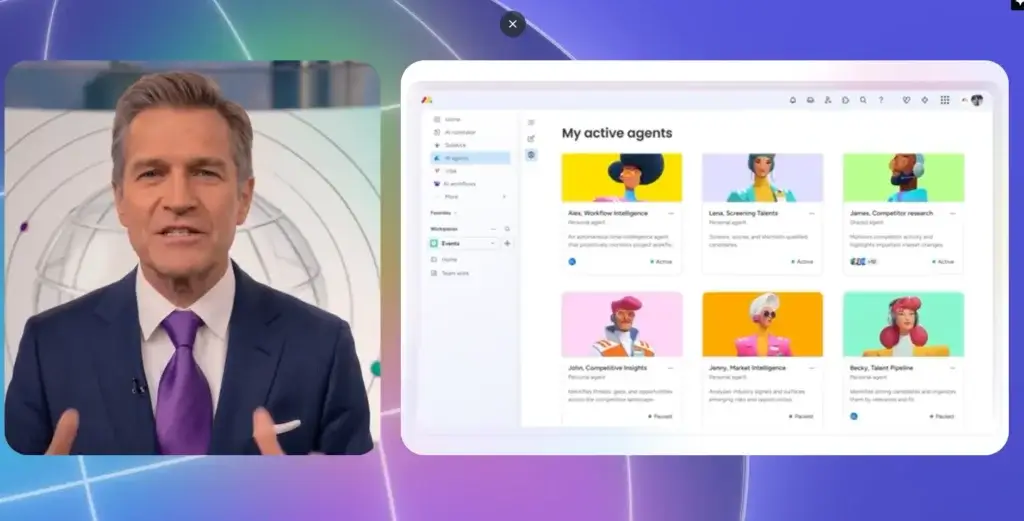
monday.com had the most forward-looking Q1 2026 product story. In March, the company announced new infrastructure that allows AI agents to sign up, authenticate, and operate directly inside the monday.com platform. That means AI is no longer positioned only as an assistant that suggests copy or summarizes information. It is being positioned as an active operational participant inside workflows.
This is a meaningful shift for the broader work management market. monday.com is essentially betting that teams will increasingly work alongside AI agents that can organize projects, update workflows, trigger automations, generate reports, and coordinate work across departments. That is a larger strategic move than a typical feature rollout, because it changes how users think about the platform itself.
For readers of a news article, this is probably the single biggest Q1 2026 development among the tools covered here. It suggests that monday.com wants to define the next stage of work management around agent-enabled execution, not just automation rules and AI assistance.
Top Benefits & Features:
- AI agent infrastructure built for authentication and platform access.
- Agent-based execution inside real workflows and boards.
- Operational actions like updates, reporting, and automation triggers.
- Clear AI work visibility alongside human teams.
- Strong strategic direction around agentic work, not only productivity aids.
Why this Q1 2026 update matters:
monday.com’s release matters because it pushed the category conversation forward. Many vendors are adding AI, but fewer are making AI agents feel native to the platform itself. If monday.com executes well, this could become one of the most influential moves in project management software this year.
Considerations:
- Some teams may see the strategy as ambitious before it feels fully mainstream.
- Its long-term impact depends on how widely enterprises adopt AI agents in live work.
ClickUp


ClickUp’s biggest Q1 2026 development was the broader rollout of ClickUp 4.0. According to ClickUp’s official documentation, the new version connects tasks, Docs, Chat, and AI tools in one converged workspace, and ClickUp 3.0 was set to be deprecated on March 27, 2026. That makes this more than a cosmetic redesign. It is a major product-level shift in how users experience the platform.
The logic behind this move is clear. ClickUp has long positioned itself as an all-in-one productivity platform, but Q1 2026 gave that positioning a more concrete form. The 4.0 experience brings together communication, collaboration, planning, and execution more tightly through features like the Chat sidebar, Planner, Personal Lists, updated Hubs, and a new task view experience.
For teams, this matters because workspace fragmentation remains one of the biggest problems in project delivery. ClickUp’s Q1 story was not about one standout AI moment. It was about making the entire workspace feel more unified and operationally connected.
Top Benefits & Features:
- Converged workspace connecting tasks, Docs, Chat, and AI.
- New navigation model designed for faster switching between work layers.
- Planner and Personal Lists for clearer individual work organization.
- Updated Hubs for easier workspace access and coordination.
- Major platform shift rather than an isolated feature launch.
Why this Q1 2026 update matters:
ClickUp’s move matters because it strengthens its best long-term differentiator: consolidation. Teams that want fewer disconnected systems may find ClickUp 4.0 more compelling than before, especially if they already juggle planning, communication, and documentation across multiple apps.
Considerations:
- Some existing users may need time to adjust to the new navigation and experience.
- This is a broader product evolution, not a single headline-grabbing AI launch.
Miro

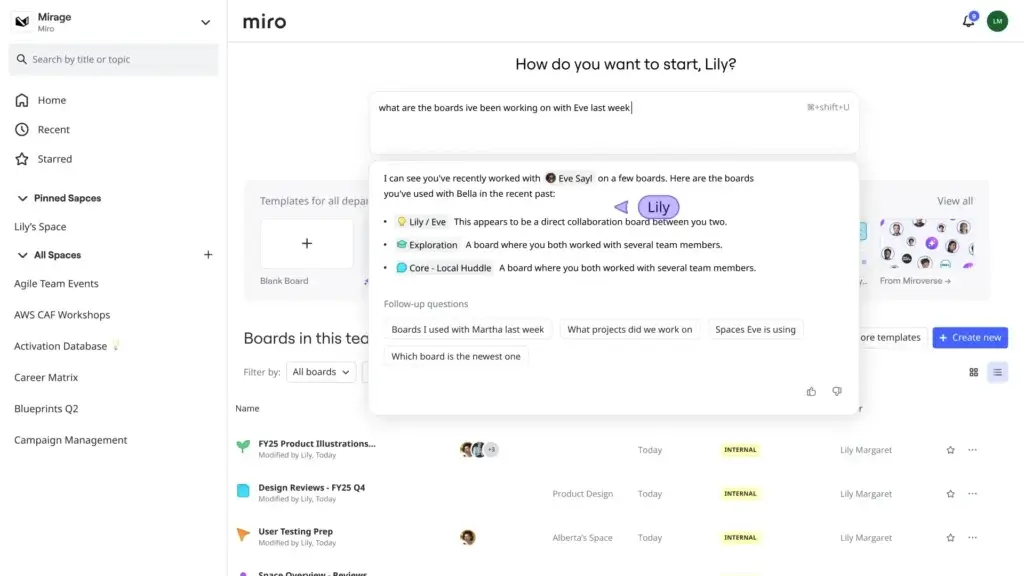
Miro had one of the busiest Q1 release cycles on this list. In January, it launched AI Workflows for enterprise customers, with Flows and Sidekicks helping teams turn rough inputs into deliverables such as strategy documents, prototypes, diagrams, and roadmaps. Then in February, Miro expanded its AI story with MCP support, allowing external AI systems to connect with Miro boards more directly.
The important story here is that Miro is moving well beyond digital whiteboarding. Its Q1 updates show a stronger push into execution-oriented collaboration, where visual workspaces become part of the path from idea to outcome. That makes Miro more relevant not only to facilitators and design teams, but also to broader cross-functional teams doing product discovery, strategy work, and workflow design.
In practical terms, Miro’s Q1 releases strengthened its role as a visual system for structured AI-assisted work. That is a more serious category position than “best brainstorming board,” and it makes Miro one of the more interesting vendors to watch this year.
Top Benefits & Features:
- AI Workflows for turning board inputs into real deliverables.
- Flows and Sidekicks for guided, multi-step AI collaboration.
- MCP support for external AI connectivity.
- Stronger execution value beyond ideation and facilitation.
- Visual-first experience that still supports more structured output.
Why this Q1 2026 update matters:
Miro’s update matters because it changes the scope of what the product can represent in a team’s stack. It is becoming more than a whiteboard. It is becoming a visual work layer where AI helps move teams from brainstorming to tangible outputs much faster.
Considerations:
- Miro still feels strongest when work begins visually rather than in structured task systems.
- Some teams may still need another platform for deeper task and portfolio execution.
Notion

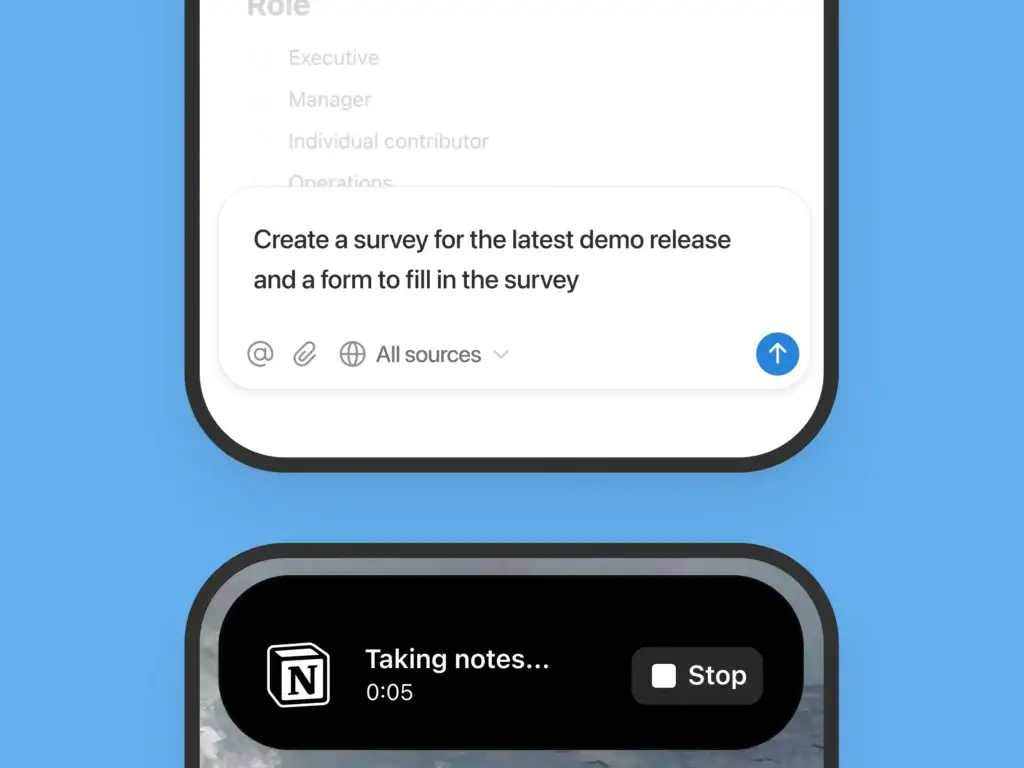
Notion’s most important Q1 2026 release came on January 20 with Notion 3.2, which introduced AI notes on mobile, mobile access to Notion Agent capabilities, new model choices, AI usage analytics for admins, a People Directory, and improved Jira integration. Later in the quarter, Notion also introduced Custom Agents that can automate recurring work across Notion and connected tools.
This is important because it shows Notion deepening its AI strategy across multiple layers of the product at once. Rather than treating AI as a separate mode, Notion is weaving it through note-taking, admin oversight, integrations, and ongoing workflows. That makes the workspace feel more operational and less limited to documentation alone.
For teams that already use Notion as a hub for knowledge and planning, these Q1 releases make the platform more useful in motion, especially on mobile and in connected workflows. Notion may not present the same overt “AI agent infrastructure” story as monday.com, but it is clearly moving in a similar direction.
Top Benefits & Features:
- AI notes on mobile for summaries, action items, and docs on the go.
- Mobile agent support that extends AI workflows beyond desktop.
- Custom Agents for recurring work across Notion and connected apps.
- Jira-connected planning with broader operational context.
- Admin visibility into AI usage and value.
Why this Q1 2026 update matters:
Notion’s Q1 story matters because it reinforces the platform’s long-term ambition to be more than a notes-and-database tool. It is increasingly becoming a flexible operating system for team knowledge, planning, and AI-supported execution.
Considerations:
- Notion’s strength is breadth and flexibility, which can feel less opinionated than more structured PM tools.
- Some buyers may prefer more rigid workflow systems for execution-heavy teams.
Asana


Asana’s major Q1 2026 moment was its Winter 2026 Release, published on March 24. The update focused on prebuilt AI Teammates, customizable automations, and more structured goal tracking, all with a clear message around reducing the time from planning to delivery.
That positioning fits Asana very well. Unlike some vendors that are trying to turn AI into a broad workspace layer, Asana is applying it to the structured, process-oriented environment it already owns. AI Teammates are designed to support campaign planning, IT workflows, creative production, and strategic work without losing the accountability and clarity that Asana users expect.
From a category perspective, Asana’s Q1 updates are compelling because they make AI feel practical rather than experimental. The release did not try to reinvent what Asana is. It extended Asana’s existing strengths, especially around organized collaboration and measurable execution.
Top Benefits & Features:
- Prebuilt AI Teammates for common team workflows.
- Customizable automations that reduce repetitive work.
- Stronger goal tracking with more structure and clarity.
- AI built into disciplined workflows rather than floating outside them.
- Clear planning-to-delivery story for operational teams.
Why this Q1 2026 update matters:
Asana’s release matters because it shows how AI can strengthen structured teamwork without creating chaos. For many mid-market and enterprise teams, that may be more valuable than a looser, more open-ended AI workspace model.
Considerations:
- Teams wanting a broader all-in-one workspace may still lean toward ClickUp or Notion.
- Asana’s AI direction feels more controlled than radical, which some buyers will see as a strength.
Smartsheet

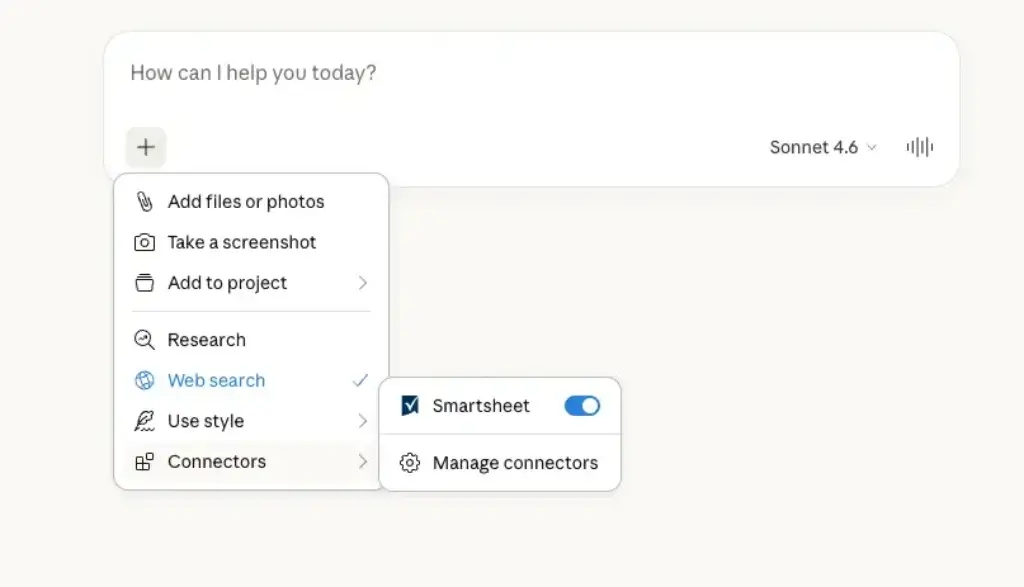
Smartsheet’s Q1 2026 updates were especially important for enterprise teams. In March, the company announced that its connector for Claude was generally available and that the Smartsheet MCP Server was also generally available. These releases give AI tools more direct access to live Smartsheet data, which can help teams analyze project health, surface risks, and take action conversationally.
This is a strong enterprise play. Smartsheet is focusing less on the consumer-style AI excitement cycle and more on governed access to operational data. That is likely to resonate with organizations that care deeply about reporting, portfolio visibility, and the ability to connect AI to real work systems without losing control over access and structure.
Among the products in this article, Smartsheet’s Q1 story may be the most infrastructure-oriented. It is not the flashiest, but it could be one of the most valuable for large organizations that want AI to work with real project data in a controlled way.
Top Benefits & Features:
- Claude connector for real-time conversational access to project data.
- MCP Server for broader AI tool compatibility.
- Action-oriented AI that can analyze and work with live sheet data.
- Enterprise-ready direction focused on governed connectivity.
- Stronger operational insight without relying only on manual dashboards.
Why this Q1 2026 update matters:
Smartsheet’s release matters because AI value in enterprise project management will depend heavily on live data access. Smartsheet is positioning itself where that conversation is likely to go next.
Considerations:
- This is a more enterprise-oriented story than a mass-market product redesign.
- Some smaller teams may find the implications less immediately visible than AI features in more consumer-facing tools.
Which Q1 2026 project management update is best for your team?
All six vendors made meaningful moves, but they solve different strategic needs. The easiest way to choose is to ask what kind of future workflow you are trying to build.
| Need | Best Tool | Why |
| Most important AI story in Q1 2026 | monday.com | It pushed AI agents directly into operational workflows |
| Best all-in-one workspace direction | ClickUp | ClickUp 4.0 unified tasks, docs, chat, and AI more clearly |
| Best visual AI workflow story | Miro | AI Workflows and MCP expanded Miro beyond whiteboarding |
| Best AI-enabled workspace breadth | Notion | Mobile AI, custom agents, and connected workflows broadened its role |
| Best structured AI teamwork update | Asana | AI Teammates and automations fit disciplined execution well |
| Best enterprise AI connectivity update | Smartsheet | MCP and Claude connectivity brought AI closer to live project data |
Choose monday.com if your article wants to emphasize where the market is heading next. Its Q1 release was the strongest signal that AI agents may become embedded in everyday project operations.
Choose ClickUp as the strongest example of platform consolidation. It made the clearest case for a more unified work environment in Q1 2026.
Choose Miro if you want to highlight how visual collaboration tools are evolving into AI-assisted workflow systems.
Choose Notion if your angle is about workspace breadth and AI becoming embedded across documentation, planning, and recurring work.
Choose Asana if your audience values disciplined execution and wants AI to strengthen structure rather than disrupt it.
Choose Smartsheet if your readership includes enterprise buyers focused on AI access to live work data and operational governance.
Conclusion
The top project management software updates in Q1 2026 showed a market that is changing quickly. These were not only interface refreshes or isolated feature drops. They reflected a broader shift toward AI-supported execution, more connected systems, and platforms that aim to do more than organize work.
For the strongest overall news angle, monday.com had the most important quarter because it moved AI agents closer to real workflow participation. ClickUp made the best case for workspace unification. Miro showed how visual collaboration is becoming more execution-oriented. Notion continued expanding into a broader AI-enabled workspace. Asana made AI more practical for structured teamwork. Smartsheet strengthened its position around enterprise AI connectivity.
If your goal is to write a strong news article, the best framing is not simply that these tools released new features. It is that Q1 2026 made one trend much clearer: project management software is becoming a system for coordinated AI-assisted work, not just task tracking.
FAQs
What were the biggest project management software updates in Q1 2026?
The biggest updates included monday.com’s AI agent infrastructure, ClickUp 4.0, Miro AI Workflows and MCP support, Notion 3.2 and custom agents, Asana’s Winter 2026 Release, and Smartsheet’s Claude connector plus MCP Server.
Which project management tool had the biggest Q1 2026 update?
monday.com had the biggest strategic update because it positioned AI agents as active participants in operational workflows, not only as assistants.
Did ClickUp release a major update in Q1 2026?
Yes. ClickUp 4.0 was the company’s major Q1 update, centered on a converged workspace that connects tasks, Docs, Chat, and AI.
What changed in monday.com in March 2026?
monday.com introduced infrastructure that lets AI agents sign up, authenticate, and operate directly inside the platform.
What was new in Miro in Q1 2026?
Miro launched AI Workflows for enterprise customers and expanded MCP support so AI tools could connect more directly with Miro boards.
What was Notion’s biggest Q1 2026 update?
Notion 3.2 was the biggest early-quarter release, with mobile AI notes, mobile agent capabilities, new model options, and stronger admin analytics. Later in Q1, Notion also introduced Custom Agents.
What did Asana launch in Q1 2026?
Asana launched its Winter 2026 Release, focused on prebuilt AI Teammates, customizable automations, and stronger goal tracking.
What was Smartsheet’s key Q1 2026 update?
Smartsheet made its Claude connector and MCP Server generally available, strengthening AI access to live project data.
Are AI agents becoming a major trend in project management software?
Yes. Q1 2026 showed a clear move toward AI agents, AI workflows, and AI systems that can work with live operational data rather than only generate content.
What is the best angle for a news article on these updates?
The strongest angle is that Q1 2026 marked a shift from productivity software toward AI-assisted execution platforms. That makes the article more useful than a simple feature roundup.