
Introduction
If your team has outgrown simple app-to-app automation, Tray.ai deserves a serious look. The platform is built for companies that need more than basic triggers and actions. It helps you connect systems, automate complex workflows, build AI agents, govern MCP access, and manage data movement across business-critical processes.
This Tray.ai review for 2026 takes a practical look at what the platform does well, where it may feel too complex, how pricing works, and which teams get the most value from it.
Tray.ai is especially relevant if your company has technical RevOps, IT, business systems, product, or engineering teams that need flexible automation without building every integration from scratch. It sits between lightweight workflow tools like Zapier or Make and heavier enterprise integration platforms like MuleSoft, Boomi, and Workato.
My practical recommendation: Tray.ai is best for teams that need a governed automation layer for data, workflows, integrations, APIs, embedded integrations, and AI agents. It is not the best fit if you only need a few simple automations between common SaaS apps.
| Category | Tray.ai Review Summary |
| Best For | RevOps, IT, business systems, SaaS product teams, engineering, support, and enterprise automation teams |
| Main Strength | Flexible orchestration for integrations, automation, AI agents, MCP governance, and embedded integrations |
| Main Weakness | Pricing is quote-based and advanced workflows may require technical ownership |
| Best Alternative | Workato for broader enterprise automation, Zapier for simple workflows, MuleSoft for API-led enterprise architecture |
| Overall Recommendation | Best for companies that need scalable, governed, and AI-ready automation across many systems |
Overview
What Is Tray.ai?
Tray.ai is an enterprise orchestration platform for data, AI, integrations, and automation. It helps you connect cloud apps, databases, APIs, internal systems, and AI tools in one governed environment.
The company was previously known as Tray.io. In 2024, Tray.io became Tray.ai to reflect a stronger focus on AI-ready integration, AI-assisted development, and agentic automation. You may still see older reviews refer to Tray.io, but the current product branding is Tray.ai.
At its core, Tray.ai gives teams a low-code workflow builder, a large connector library, API capabilities, data integration tools, AI development features, and governance controls. Its current positioning is clear: it is not only an iPaaS platform. It is designed to help enterprises orchestrate automation and AI agents across real business systems.
For example, Tray.ai can help you automate a lead routing process that checks enrichment data, updates Salesforce, sends a Slack alert, creates a sales task, logs activity in a warehouse, and lets an AI agent summarize the account context for the sales rep.
That makes Tray.ai most useful when workflows are multi-step, cross-functional, and too important to be managed through scattered point solutions.
How Tray.ai Works
Tray.ai uses a workflow-based model. You build automations by selecting a trigger, adding actions, applying logic, mapping data, and connecting each step to the right app, API, database, or AI service.
- Trigger: The event that starts a workflow, such as a new CRM record, webhook, schedule, or API request.
- Action: A step that performs work, such as creating a record, querying a system, calling an API, or sending a message.
- Connector: A pre-built connection to an app, database, service, or API.
- Workflow: The full automation that coordinates triggers, actions, logic, and data movement.
- Task: A usage unit that can apply when workflows, integrations, MCP tools, or agents run actions.
The platform is flexible because it supports both low-code building and technical customization. Business systems teams can move quickly with visual workflows, while developers can add code or use APIs where more control is needed.
This balance is one of Tray.ai’s strongest selling points. It is approachable enough for automation teams, but it does not force technical teams into overly simplified workflow patterns.
Software Specification
Tray.ai Core Features
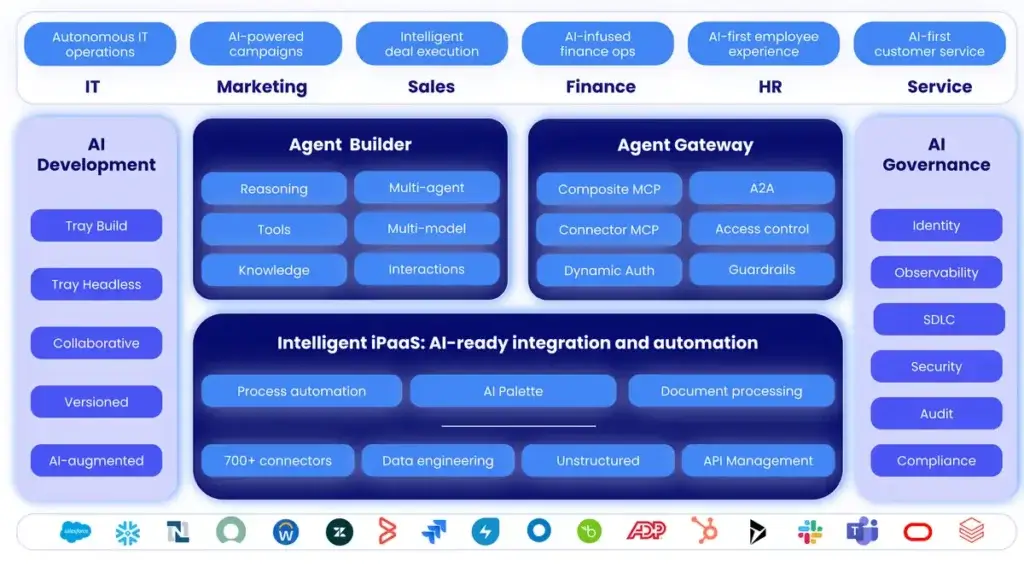
Tray.ai’s feature set is broad. The platform combines intelligent iPaaS, process automation, API management, AI-assisted development, AI agent building, MCP governance, and embedded integrations.
That breadth is useful, but it also means you should evaluate Tray.ai through the lens of your automation maturity. If your company has clear integration problems, high-value workflows, or AI agent initiatives, Tray.ai can be powerful. If your team only needs basic task automation, it may be more platform than you need.
Intelligent iPaaS and 700+ Connectors
Tray.ai offers 700+ connectors for business applications, databases, APIs, AI tools, productivity apps, CRMs, data warehouses, marketing platforms, support tools, and HR systems. You can review the official Tray.ai platform page and pricing page for the current connector and platform positioning.
The connector library matters because enterprise automation often breaks down when teams rely on custom scripts, manual exports, or fragile one-off integrations. Tray.ai gives teams a reusable way to connect tools such as Salesforce, HubSpot, Slack, Snowflake, Workday, Jira, Zendesk, Marketo, NetSuite, Microsoft Teams, and many more.
However, the real value is not just the number of connectors. It is the ability to combine connectors with branching logic, APIs, error handling, data transformations, governance, and AI actions in one workflow environment.
Low-Code Workflow Builder
Tray Build is the platform’s visual workflow builder. It lets you create workflows using a drag-and-drop interface while still supporting technical control where needed.
You can design automations with triggers, actions, conditions, loops, branches, data mapping, retries, and service calls. This makes Tray.ai stronger than basic no-code tools when your process needs advanced logic.
For example, you can build a lead routing workflow that scores a lead, enriches company data, checks territory rules, assigns ownership, creates CRM tasks, and alerts the correct sales team in Slack.
The builder is still not something you should treat as a casual personal productivity tool. Tray.ai is better suited for teams that are comfortable thinking through process logic, data structures, dependencies, and edge cases.
Custom Code and Developer Flexibility
Tray.ai is low-code, but it does not lock you into only visual configuration. Developers can use code where the workflow needs custom logic, more advanced transformations, or API-specific behavior.
This is one reason Tray.ai often appeals to technical RevOps and business systems teams. They can move faster than a traditional engineering queue, but they are not trapped when a workflow becomes too complex for a purely no-code builder.
This flexibility is valuable for companies with messy SaaS stacks, custom objects, internal services, or API-based products. You can standardize most of the automation visually, then use custom code only where it adds value.
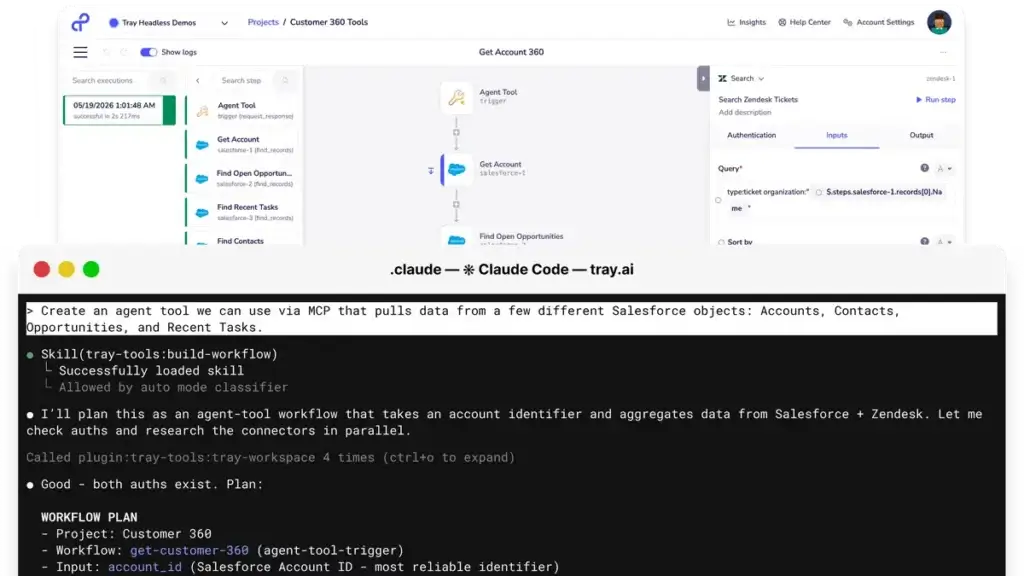
Merlin Agent Builder
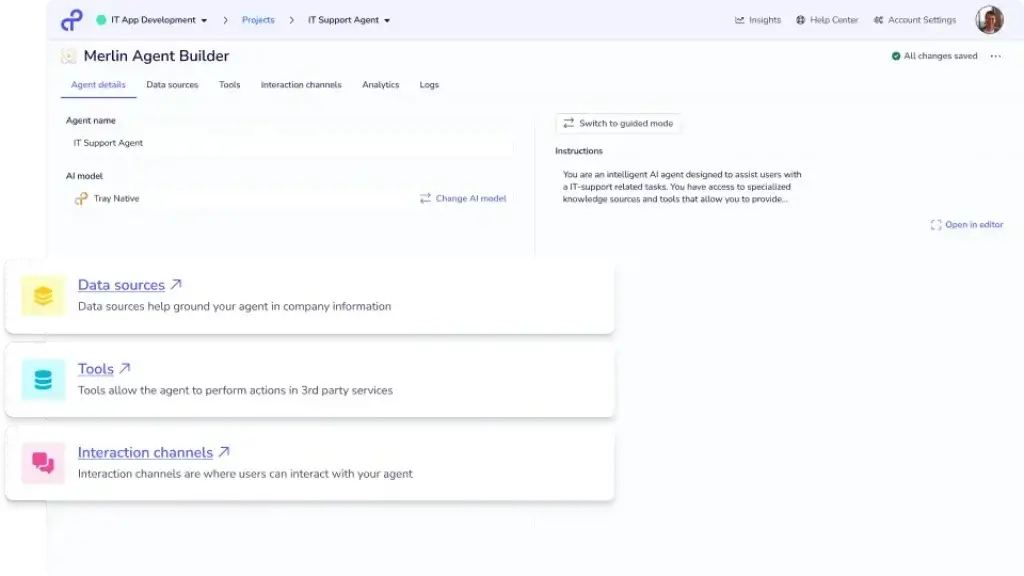
Merlin Agent Builder is Tray.ai’s no-code AI agent builder. It is designed to help teams create agents that can reason, use knowledge, call tools, and take action through Tray workflows.
The key distinction is that Tray.ai focuses on agents that do work, not just agents that answer questions. A support agent can retrieve customer context, summarize an issue, route a ticket, or trigger a workflow. An IT agent can check policies, create tickets, notify the right team, and initiate approved actions.
According to Tray.ai’s Merlin Agent Builder page, the product includes a visual builder, multi-agent orchestration, guardrails, audit logs, Smart Data Sources, multi-channel deployment, and 700+ app connections.
This makes Merlin especially relevant for enterprises that want to move AI agents from prototype to production with better control over data, permissions, and actions.
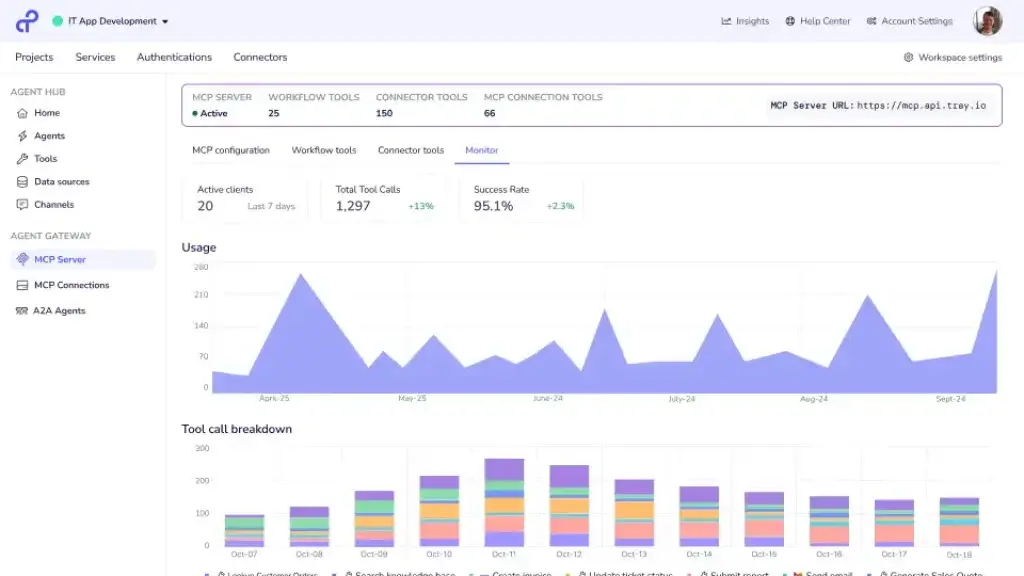
Agent Gateway for MCP
Tray.ai also offers Agent Gateway for MCP. MCP stands for Model Context Protocol, and it helps AI systems access tools and context. The challenge is that MCP can become risky when every team creates separate tool access without governance.
Tray.ai’s Agent Gateway for MCP is designed to make MCP services governed, observable, authenticated, and controlled. The pricing page describes capabilities such as publishing composite MCP tools, exposing 700+ connectors as MCP tools, built-in governance, flexible authentication, observability, and access control.
This is an important feature if your company is experimenting with AI agents across departments. Without governance, AI tool access can become another shadow IT problem. With a controlled gateway, you can define what agents can access, who can use them, and which actions require approval.
Embedded Integrations for SaaS Products
Tray Embedded lets SaaS companies offer integrations inside their own product experience. Instead of asking your engineers to build and maintain every customer-facing integration, Tray.ai can power white-labeled integration flows behind the scenes.
According to Tray.ai’s embedded integration page, teams can use 700+ pre-built connectors, an HTTP client, self-serve activation, and branded configuration flows.
This is a strong use case for SaaS companies where integrations affect retention, onboarding, expansion, and sales velocity. Customers increasingly expect native integrations, but product teams rarely have unlimited engineering capacity to build every connector request.
API Management and Data Integration
Tray.ai includes API management and data integration capabilities. This helps teams expose workflow logic through APIs, connect internal systems, move data between cloud apps, and automate data preparation steps.
You should not treat Tray.ai as a full replacement for every data engineering platform. If your main need is large-scale warehouse ELT, you may still compare tools like Fivetran, Airbyte, Matillion, or custom pipelines.
But if your use case combines business process automation with operational data movement, Tray.ai can be a strong fit. It is especially useful when data needs to be validated, enriched, routed, and acted on across systems.
Observability, Audit Trails, and Governance
Tray.ai includes observability and audit trails as part of its platform. This matters because automation becomes risky when workflows run without monitoring, ownership, or change visibility.
For production workflows, you need to understand what ran, why it ran, which systems were affected, and whether errors occurred. Tray.ai is designed for teams that need that level of operational visibility.
Governance becomes even more important when AI agents are involved. If an agent can take action in Salesforce, Jira, Zendesk, Workday, or NetSuite, you need permissions, audit logs, rate limits, approval rules, and data boundaries.
Tray.ai reports on its Trust page that its platform processes 150B+ integrations per year. This is a useful statistic for an infographic about the scale of enterprise automation and integration workloads.
Pros and Cons
Advantages and Disadvantages
Positive
✅ Strong AI orchestration direction
✅ 700+ app connections
✅ Flexible low-code and code options
✅ Strong fit for technical operations teams
Negative
❌ Public pricing lacks exact costs
❌ More technical than beginner tools
❌ Requires process ownership
❌ May be too broad for simple use cases
Tray.ai is powerful, but it is not a universal answer for every automation need. Its strengths show up when workflows matter operationally. Its weaknesses show up when teams expect a simple, low-cost tool for lightweight automations.
✅ Pros
- AI-ready platform: Tray.ai is built around automation, integration, AI agents, MCP governance, and data orchestration.
- Large connector library: 700+ connectors help teams connect modern SaaS apps, databases, APIs, and business systems.
- Flexible builder: Low-code workflows and custom code support give technical teams room to scale.
- Strong embedded use case: SaaS companies can deliver customer-facing integrations without building every connector in-house.
- Governance for AI actions: Agent Gateway for MCP, audit trails, access controls, and observability support safer agent deployment.
- Good fit for RevOps and business systems: Tray.ai works well for lead routing, enrichment, CRM automation, support routing, and operational workflows.
❌ Cons
- No simple public price list: Tray.ai uses quote-based pricing, so you need a sales conversation to estimate real cost.
- Not ideal for beginners: The platform is flexible, but advanced workflows still require technical thinking.
- Implementation needs planning: High-value automations require process mapping, testing, ownership, and monitoring.
- Usage can scale quickly: Task-based usage means workflow design and volume planning matter.
- Overkill for simple automations: Zapier, Make, or n8n may be more practical for basic app-to-app workflows.
- AI features require governance discipline: Agent workflows should be deployed with clear permissions, approval rules, and audit controls.
Common Use Cases
What Is Tray.ai Good For?
Tray.ai is best for workflows that involve multiple systems, conditional logic, data mapping, approvals, API calls, or AI-assisted actions. It is less compelling when the workflow is simple enough for a basic automation tool.
RevOps and Go-To-Market Automation
Tray.ai is a strong fit for revenue operations teams that need to connect marketing automation, CRM, sales engagement, enrichment, billing, customer success, and support systems.
Common RevOps use cases include lead routing, account enrichment, territory assignment, inbound handoff, demo request routing, customer onboarding, and renewal workflows.
For example, when a high-intent lead fills out a demo form, Tray.ai can enrich the account, check routing logic, update Salesforce, assign the right owner, notify Slack, create a sales task, and trigger a personalized nurture workflow.
This is where Tray.ai can be more useful than simpler tools. GTM processes often need rules, exceptions, fallbacks, and clean data movement between systems.
IT Service Desk and Internal Operations
IT teams can use Tray.ai to automate ticket routing, access requests, employee onboarding, incident notifications, software provisioning, and internal service workflows.
With Merlin Agent Builder, an internal IT agent can use knowledge sources, approved tools, and workflows to help resolve requests. The value is not just answering an employee’s question. The value is taking approved action across systems while keeping audit visibility.
For example, an employee could ask for access to a tool in Slack. A Tray.ai agent could check eligibility, create an approval request, update an ITSM ticket, and trigger provisioning after approval.
Embedded Integrations for SaaS Products
Tray.ai is especially useful for SaaS companies that need to offer customer-facing integrations. Instead of building each integration from scratch, product teams can use Tray Embedded to power branded integration experiences.
This is valuable when customers expect integrations with CRMs, marketing tools, ticketing systems, HR platforms, data warehouses, and communication apps.
Embedded integrations can support onboarding, retention, product stickiness, and expansion. They also reduce the engineering burden of maintaining dozens of third-party APIs over time.
AI Agent Deployment
Tray.ai is increasingly relevant for companies that want AI agents to do operational work. Many AI tools can summarize information, but fewer can safely take action across systems with governance.
Merlin Agent Builder helps teams create agents that can use knowledge, reason through requests, and run Tray workflows as tools. This makes it possible to build agents for HR, IT, RevOps, support, finance, and customer operations.
The most useful AI agent use cases usually combine three things: context, governed actions, and human-in-the-loop controls. Tray.ai is designed around that pattern.
Data Synchronization and Operational Data Flows
Many teams use automation platforms to keep records consistent across tools. Tray.ai can help sync customer data, lead data, employee records, ticket updates, subscription status, product usage events, and operational alerts.
This is especially useful when different teams rely on different systems. Sales may work in Salesforce, support in Zendesk, product in Snowflake, finance in NetSuite, and leadership in dashboards.
Tray.ai can help automate the handoffs between those systems so teams spend less time reconciling records manually.
Customer Support and Success Workflows
Support and success teams can use Tray.ai to automate escalations, customer health alerts, ticket routing, account summaries, SLA notifications, and renewal preparation.
For example, a high-priority support ticket from a strategic customer can trigger a workflow that checks contract value, pulls product usage data, alerts the account owner, summarizes the issue, and creates an escalation task.
When combined with AI, Tray.ai can help summarize account context or recommend next steps. But the strongest setup still uses human review for sensitive customer actions.
Finance, Procurement, and Approval Workflows
Finance and procurement teams can use Tray.ai for vendor onboarding, approval routing, invoice handling, payment checks, renewal alerts, and ERP updates.
These workflows benefit from governance because they often involve sensitive data, approvals, and compliance concerns. Tray.ai’s audit trails, access controls, and log visibility can help reduce the risk of unmanaged automation.
UX and Support
Ease of Use and Support Options
Tray.ai is easier than building integrations from scratch, but it is more advanced than beginner no-code tools. You should expect a learning curve if your team has never built multi-step automations before.
The visual builder is helpful, but the real challenge is not dragging steps onto a canvas. The challenge is understanding the business process, the systems involved, the data structure, the exception handling, and the ownership model.
Who Will Find Tray.ai Easy?
Tray.ai is easiest for technical operators. RevOps, business systems, IT operations, engineering, data operations, and automation teams are usually good candidates.
These users already understand field mapping, APIs, CRM objects, error handling, and business logic. For them, Tray.ai can reduce dependency on custom engineering while still allowing technical depth.
Non-technical users can participate, especially when workflows are templated or well documented. But Tray.ai is not the simplest tool for someone building their first automation.
Where Tray.ai Can Feel Difficult
Tray.ai can feel complex when workflows have many branches, large data payloads, custom API behavior, high-volume runs, or unclear process ownership.
For example, a quote-to-cash workflow might touch Salesforce, CPQ, billing, ERP, Slack, customer success, and finance systems. The platform can support that kind of workflow, but your team still needs a clear process design before building.
The complexity is not a flaw by itself. It is the cost of building automation that is reliable enough for real business operations.
Support and Professional Services
Tray.ai’s pricing page lists support and professional services options, including Tray Advantage, Tray Advantage Plus, documentation, community access, Tray Academy, live workshops, launch co-development, adoption acceleration, solution architecture, and access to implementation partners.
Before buying, ask Tray.ai what support level is included in your plan, whether enhanced support is available, how implementation help works, and how your team should estimate usage.
Tips for Getting More Value from Tray.ai
- Start with high-value workflows: Prioritize automations that reduce manual work, delays, and operational risk.
- Document the process first: Map systems, triggers, owners, fields, conditions, and exception paths before building.
- Estimate task usage: Consider how often workflows run and how many actions each run performs.
- Use governance early: Set access controls, workspace standards, approval rules, and naming conventions from the beginning.
- Design for errors: Add alerts, retries, fallbacks, and monitoring for production workflows.
- Review automations quarterly: Business rules, APIs, and system fields change over time.
For broader comparison planning, you may also find our guide to best workflow automation software useful. If your evaluation is more AI-focused, see our guide to best AI agent tools.
AI and Agentic Automation
Tray.ai AI Capabilities
Tray.ai’s biggest strategic shift is its move from workflow automation into AI orchestration. The platform is increasingly built around helping companies connect AI agents to real systems while maintaining governance.
This is a meaningful difference. A chatbot can answer a question. A governed agent can check context, choose approved tools, perform a workflow, and leave an audit trail.
Merlin Agent Builder
Merlin Agent Builder helps teams create AI agents using knowledge sources, tools, reasoning, guardrails, and workflow actions.
Tray.ai’s documentation explains that agents can understand context from multiple data sources, reason about problems, take concrete actions through connected systems, and adapt based on outcomes.
In business terms, this means you can build agents that operate across systems instead of staying trapped inside one app. For example, a revenue operations agent could retrieve CRM data, check account status, summarize open issues, and initiate a handoff workflow.
AI Palette and Built-In AI Tools
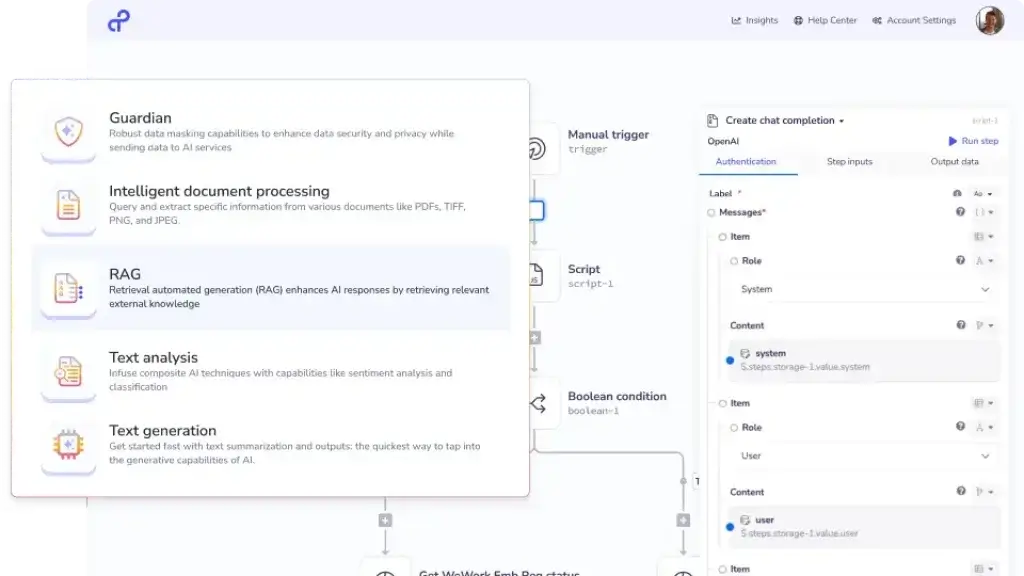
Tray.ai includes AI capabilities such as AI Palette, VectorTables, and built-in AI tools across its plans. These features support AI-assisted workflow development, data preparation, and workflow-level intelligence.
Use cases may include summarization, classification, extraction, PII handling, routing decisions, and agent context retrieval.
These capabilities are most useful when AI is part of an operational process. If you only need a writing assistant, Tray.ai is more than you need. If you need AI embedded in systems and workflows, the platform becomes more relevant.
Agent Gateway for MCP
Agent Gateway for MCP is one of Tray.ai’s most important AI governance features. It helps teams expose tools to agents while keeping access controlled, observable, and authenticated.
This matters because AI agents need tools to be useful. But unmanaged tool access can create risk. A well-designed MCP governance layer helps you define what agents can do, who can use them, and how actions are logged.
How Tray.ai Handles AI Data Use
Tray.ai’s documentation says Merlin Agent Builder inputs and outputs are stored in customer workflow logs according to existing log retention settings, and Tray does not use that data for other purposes except to provide the service or technical support if the customer grants access.
The documentation also explains that Merlin Chat and Build is powered by OpenAI for certain building tasks, and that OpenAI does not receive personal data from APIs by default unless users opt into additional features that may send data.
This is an important buying consideration. AI automation tools can touch sensitive operational data, so you should review your data retention, hosting, model, and opt-out options before deploying AI workflows.
Security and Compliance
What About Security?
Security is one of the main reasons to consider Tray.ai over lightweight automation tools. Enterprise automation platforms often touch CRM data, customer records, HR information, finance systems, internal tickets, and API credentials.
Tray.ai’s Trust page highlights enterprise security, compliance, reliability, data residency, and AI governance controls.
Tray.ai says it completes SOC 1 and SOC 2 Type 2 audits, conducts annual penetration tests, runs a bug bounty program, and supports compliance standards including GDPR, CCPA, and HIPAA. It also states that customers can host data in the US, EU, or APAC.
The Trust page also references encryption at rest and in transit, SSO, phishing-resistant two-factor authentication, role-based permissions, monitoring, audit logs, customer-controlled support access, and log streaming.
Security Best Practices for Tray.ai
Even with strong platform controls, your internal governance still matters. Most automation risk comes from poor permissions, unclear ownership, weak testing, and workflows that move data without enough review.
- Use least-privilege access: Give users and connectors only the permissions required.
- Separate testing and production: Validate workflows before they affect live systems.
- Monitor workflow errors: Use alerts, logs, and ownership rules for production automations.
- Add approvals for sensitive actions: Use human review for finance, HR, security, and customer-impacting workflows.
- Review AI tool permissions: Define exactly what agents can access and change.
Security becomes especially important when using AI agents. If an agent can call tools, retrieve records, or update systems, you need auditable controls before deployment.
Compare with Others
Alternatives to Tray.ai
Tray.ai is a strong platform, but it is not always the best choice. The right alternative depends on your workflow complexity, budget, technical resources, app stack, AI roadmap, and governance needs.
| Tool | Best For | Main Advantage Over Tray.ai | Main Limitation |
| Zapier | Simple SaaS automation and SMB workflows | Easier setup and a broader app directory for basic workflows | Less suited for complex enterprise orchestration and governed AI agents |
| Make | Visual workflow automation for operations teams | Highly visual builder and accessible pricing for many teams | Less enterprise-focused for complex governance and embedded use cases |
| Workato | Enterprise automation across departments | Strong governance and mature enterprise automation positioning | Can be expensive and may feel broad for technical GTM teams |
| MuleSoft | API-led enterprise architecture | Deep API management and Salesforce ecosystem alignment | More technical and heavier than Tray.ai for business-led workflows |
| Boomi | Traditional iPaaS, B2B, and enterprise integration | Mature integration heritage and enterprise data connectivity | May feel less flexible for fast-moving RevOps and SaaS product teams |
| n8n | Developer-friendly workflow automation and self-hosting | More control for technical teams that want open deployment options | Requires more self-management, especially for security and scale |
Tray.ai vs Zapier
Zapier is better for quick, simple, and self-serve automation. It supports a very large app ecosystem and is usually easier for non-technical users to learn.
Tray.ai is better when workflows need advanced logic, API flexibility, governance, AI agent execution, embedded integrations, or operational reliability at scale.
Choose Zapier if you want fast setup for basic workflows. Choose Tray.ai if automation is part of your business infrastructure.
Tray.ai vs Make
Make is a strong visual automation platform for operations teams, agencies, and technical creators. It is often easier to adopt than Tray.ai for mid-complexity scenarios.
Tray.ai is stronger when you need enterprise governance, embedded integration capabilities, MCP control, and agentic automation tied to production systems.
Choose Make for flexible visual automation. Choose Tray.ai for deeper orchestration across apps, APIs, data, and AI agents.
Tray.ai vs Workato
Workato is one of Tray.ai’s closest enterprise competitors. It is often better for larger organizations that need broad cross-department automation, mature governance, and a highly established enterprise automation program.
Tray.ai may be more attractive for technical RevOps teams, SaaS companies, product teams, and engineering-led organizations that want flexible automation and embedded integration options.
Choose Workato for broad enterprise process automation. Choose Tray.ai when your team values technical flexibility, AI-ready orchestration, and embedded integrations.
Tray.ai vs MuleSoft
MuleSoft is best for API-first enterprise architecture, large IT teams, and organizations deeply invested in API governance and Salesforce infrastructure.
Tray.ai is usually more approachable for business systems and operations teams that need to automate across SaaS tools without building every integration through a traditional API program.
Choose MuleSoft for enterprise API strategy. Choose Tray.ai for faster workflow, data, and AI orchestration across modern business systems.
Tray.ai vs Boomi
Boomi is a mature enterprise integration platform with strong iPaaS, data, API, B2B, and enterprise integration capabilities.
Tray.ai feels more aligned with modern SaaS automation, agentic AI, MCP governance, and technical operations workflows. Boomi may be a better fit for traditional enterprise integration teams.
Choose Boomi for mature enterprise integration needs. Choose Tray.ai for AI-ready automation and flexible orchestration.
Pricing
How Much Does Tray.ai Cost?
Tray.ai does not publish simple fixed monthly prices on its main pricing page. Instead, it uses plan-based and usage-based pricing that requires a customized quote.
The official Tray.ai pricing page lists three main plans: Pro, Team, and Enterprise. It also lists add-ons for Agent Development, Agent Gateway for MCP, Merlin Agent Builder, HIPAA, SSO, regional hosting, log retention, insights visibility, Tray IDP, data engineering, and log streaming.
| Plan | Best For | Key Details Listed by Tray.ai |
| Pro | Specific use cases | 3 workspaces, 7-day insights, 7-day log retention, 700+ connectors |
| Team | Multiple use cases within a department | 20 workspaces, 30-day insights, expandable log retention, add-ons available |
| Enterprise | Multiple departments and partner integrations | Unlimited workspaces, 180-day insights, advanced on-premise, SSO, HIPAA, regional hosting, log streaming, data engineering |
What Is Included in All Plans?
Tray.ai’s pricing page says all plans include automation and integration features, connectors and development capabilities, AI capabilities, observability and governance, Tray Build, and Tray Headless.
This includes process automation, data integration, API management, 700+ connectors, connector development, AI-assisted development, AI Palette, VectorTables, built-in AI tools, observability, audit trails, low-code development, drag-and-drop building, pre-built templates, Claude Code and Codex plugins, Headless MCP, and full API access.
How Tray.ai Usage Works
Tray.ai says customers can scale on demand with Tasks that handle usage across integration, automation, MCP, and agents.
This means pricing is not only about the plan name. Your actual cost may depend on workflow volume, task consumption, add-ons, support, environments, log retention, hosting requirements, and AI agent usage.
Before committing, ask Tray.ai to model cost around your real workflow volume. Count how often each workflow runs, how many steps it performs, whether loops are involved, and whether AI or MCP calls add additional usage.
| Pricing Factor | Why It Matters | Question to Ask Tray.ai |
| Plan tier | Controls workspace limits, insights, retention, and enterprise capabilities | Which plan matches our use case and governance needs? |
| Task usage | Workflow volume can affect total cost | How are tasks counted across workflows, MCP, and agents? |
| Agent Development | Merlin Agent Builder and Agent Gateway for MCP may require add-on packaging | Which AI agent features are included in our quote? |
| Security add-ons | SSO, HIPAA, regional hosting, and log streaming may affect package requirements | Which security features are included by default? |
| Support | Advanced deployments may need enhanced support or professional services | What implementation help and SLAs are included? |
Is Tray.ai Expensive?
Tray.ai is usually more expensive than lightweight automation tools, but that comparison is not always fair. Zapier, Make, and n8n are often better for simple workflows. Tray.ai is designed for higher-value automation programs where governance, scale, and technical flexibility matter.
If Tray.ai automates a few low-volume tasks, the cost may be difficult to justify. If it supports lead routing, embedded integrations, customer onboarding, IT service workflows, AI agents, or business-critical data movement, the value can be much clearer.
The best way to evaluate Tray.ai pricing is to compare it against the cost of manual work, custom engineering, integration maintenance, operational errors, and delayed customer-facing integrations.
Conclusion
Final Thoughts
Tray.ai is one of the more interesting automation platforms to evaluate in 2026 because it is no longer just an iPaaS tool. It is positioning itself as an orchestration layer for integrations, data, workflows, MCP, and AI agents.
That makes Tray.ai a strong fit for teams that need automation to become part of their operating system. If your company is connecting many SaaS tools, building customer-facing integrations, automating RevOps workflows, or deploying AI agents that need to act across systems, Tray.ai should be on your shortlist.
Its biggest strengths are flexibility, technical depth, embedded integration support, AI agent direction, and governance around actions. It gives teams a way to move faster than custom development while keeping more control than basic no-code automation tools.
Its main drawbacks are pricing transparency and complexity. Tray.ai is not the easiest or cheapest way to automate a simple workflow. It works best when your team has enough automation maturity to design, test, govern, and maintain production workflows.
My recommendation is straightforward: choose Tray.ai if you need governed automation across apps, APIs, data, and AI agents. Skip it if your needs are basic, low-volume, or mostly personal productivity. Tray.ai is most valuable when workflow complexity is real and the business impact is measurable.
Frequently Asked Questions
Have more questions?
What is Tray.ai?
Tray.ai is an enterprise orchestration platform for data, AI, integrations, and automation. It helps teams connect apps, automate workflows, manage APIs, build AI agents, govern MCP access, and coordinate data across business systems.
Is Tray.ai the same as Tray.io?
Yes. Tray.io rebranded to Tray.ai to reflect its stronger focus on AI-ready integration, automation, and agentic orchestration. Older reviews may still use the Tray.io name, but the current product branding is Tray.ai.
Who is Tray.ai best for?
Tray.ai is best for RevOps, IT, business systems, engineering, SaaS product, support, and enterprise automation teams that need governed workflows across many apps, APIs, data sources, and AI tools.
Is Tray.ai easy to use?
Tray.ai is easier than building integrations from scratch, but it is more advanced than beginner automation tools. Technical operators, RevOps teams, IT teams, and business systems teams will usually find it easier than non-technical beginners.
How much does Tray.ai cost?
Tray.ai uses quote-based pricing. Its public pricing page lists Pro, Team, and Enterprise plans, but exact cost depends on usage, tasks, add-ons, security needs, support, workspaces, hosting, and AI agent requirements.
What is Merlin Agent Builder?
Merlin Agent Builder is Tray.ai’s no-code AI agent builder. It helps teams create agents that use knowledge, reasoning, approved tools, guardrails, and Tray workflows to take action across connected business systems.
What is Agent Gateway for MCP in Tray.ai?
Agent Gateway for MCP helps teams expose tools to AI agents through a governed MCP layer. It supports access control, observability, authentication, auditability, and controlled use of Tray.ai connectors as MCP tools.
Is Tray.ai secure?
Tray.ai provides enterprise security and compliance features such as SOC 1 and SOC 2 Type 2 audits, encryption, SSO, two-factor authentication, role-based permissions, audit logs, log streaming, regional hosting, GDPR, CCPA, and HIPAA support.
Is Tray.ai better than Zapier?
Tray.ai is better than Zapier for complex enterprise automation, AI agents, embedded integrations, API workflows, and governance. Zapier is better for simple, fast, and affordable app-to-app automation for smaller teams.
What is the best Tray.ai alternative?
The best Tray.ai alternative depends on your needs. Workato is strong for enterprise automation, Zapier is better for simple workflows, Make is strong for visual automation, MuleSoft is better for API-led architecture, and Boomi is strong for traditional iPaaS.