Introduction
If your business runs on several systems, integration quickly becomes more than a technical task. It becomes the foundation for clean data, reliable operations, faster workflows, and safer AI adoption. That is where Boomi becomes relevant.
Boomi is an enterprise integration and automation platform that helps companies connect applications, APIs, data, B2B transactions, workflows, and AI agents. It is often compared with MuleSoft, Workato, SnapLogic, Informatica, Tray.ai, Jitterbit, Make, and Zapier, but it fits best in the enterprise iPaaS category.
This Boomi review for 2026 will help you understand what Boomi does, who it is best for, how its pricing works, where it performs well, and when another integration platform may be a better choice.
My recommendation: Boomi is best for mid-market and enterprise companies that need a mature integration platform with strong hybrid deployment, API governance, data readiness, B2B/EDI capabilities, and growing AI agent management features. It is not the best option if you only need a few simple no-code automations between popular SaaS apps.
| Category | Boomi Review Summary |
| Best For | Mid-market companies, enterprises, IT teams, integration teams, data teams, RevOps, finance operations, HR operations, and B2B teams |
| Main Strength | Mature iPaaS with application integration, API management, data management, B2B automation, and AI agent governance |
| Main Weakness | Pricing can be difficult to estimate and implementation may require technical planning |
| Best Alternative | Workato for business-led automation, MuleSoft for API-first enterprises, SnapLogic for data-heavy integration, Zapier for simple workflows |
| Overall Recommendation | Best for organizations that need scalable, governed, and enterprise-ready integration infrastructure |
Overview
What Is Boomi?
Boomi is a cloud-native enterprise platform for integration, automation, API management, data management, B2B/EDI, and AI agent governance. The company now describes itself as a data activation company, which reflects a broader shift from basic system integration to enterprise data movement, governance, and AI readiness.
In practical terms, Boomi helps your systems communicate. You can connect CRM, ERP, HRIS, ITSM, finance, supply chain, marketing, data warehouse, legacy, and custom applications, then create automated processes between them.
For example, when a customer places an order, Boomi can update your ERP, sync the customer record in your CRM, trigger fulfillment, notify finance, expose order data through an API, and send B2B transaction updates to a trading partner.
Boomi is especially useful when integration is not a side project. If your company relies on many systems, high transaction volumes, external partners, regulatory controls, or AI workflows that need trusted data, Boomi becomes much more relevant than basic automation tools.
How Boomi Works
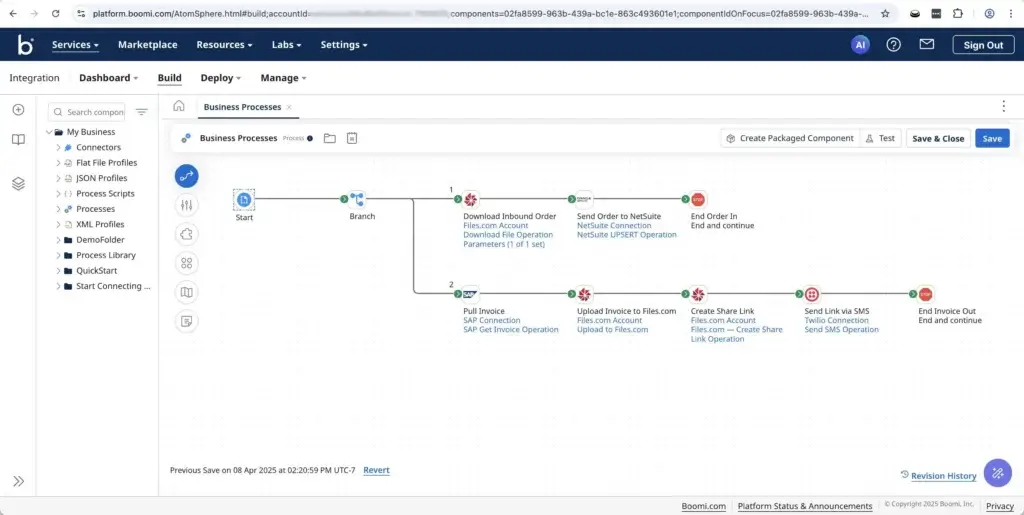
Boomi uses a low-code visual development model. You build integration processes by combining connectors, logic, data maps, transformations, decision steps, and runtime environments.
The platform is built around several important concepts:
- Connectors: Pre-built connections to SaaS apps, databases, APIs, files, and enterprise systems.
- Processes: Automated integration workflows that move, transform, and route data.
- Atoms: Runtime engines that execute Boomi processes in cloud, on-premises, or hybrid environments.
- Molecules: Clustered runtime setups used for higher availability and scalability.
- Mappings: Data transformation steps that convert fields and formats between systems.
- APIs: Managed endpoints that expose business logic and data securely.
This structure is one of Boomi’s biggest advantages. You can run integrations in the cloud, behind your firewall, or across hybrid architectures while still managing them through a unified platform.
That makes Boomi different from simpler app automation tools. Zapier and Make are easier for lightweight workflows, but Boomi is designed for governed integration programs that need reliability, monitoring, permissions, and enterprise deployment options.
Software Specification
Boomi’s Core Features
Boomi’s main value is that it combines several integration categories into one platform. Instead of buying separate tools for app integration, API management, B2B/EDI, data movement, workflow automation, and agent governance, you can manage many of these needs from one environment.
This does not mean Boomi is always the simplest tool. It means Boomi becomes more valuable when your integration requirements are broad, complex, and connected to core business operations.
Enterprise Integration and Automation
Boomi’s integration platform lets you connect applications and data sources using pre-built connectors, visual workflows, mappings, transformations, conditions, and deployment runtimes. You can explore its official integration and automation page to understand its current positioning.
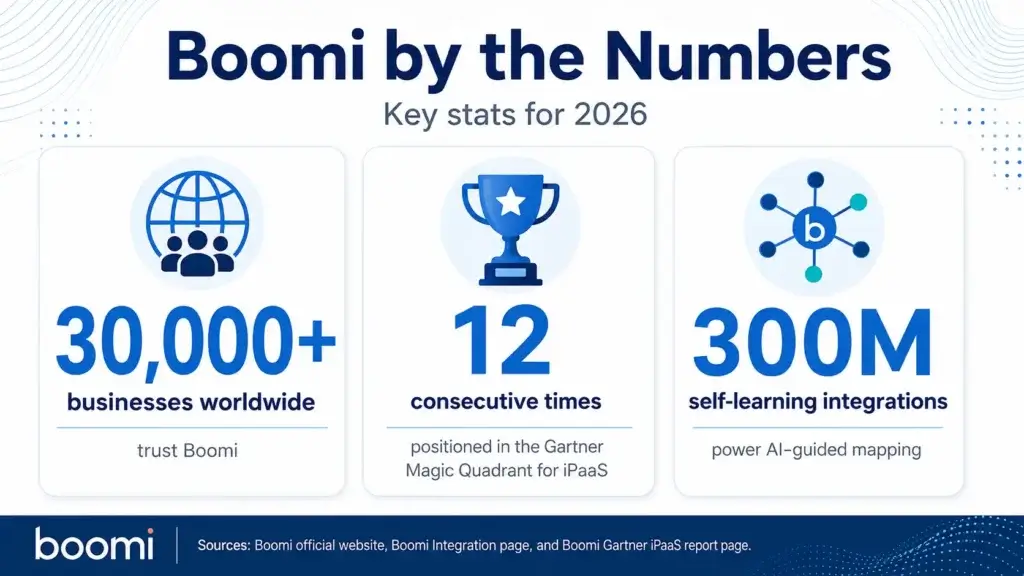
One of the strongest official proof points is Boomi’s AI-guided integration capability. Boomi says it uses more than 300M self-learning integrations to simplify entity mapping between applications.
That matters because data mapping is often one of the slowest parts of integration work. When you connect systems like Salesforce, NetSuite, Workday, SAP, ServiceNow, Snowflake, and Zendesk, the challenge is not only the connection. It is making sure the right fields, formats, rules, and business logic are aligned.
Hybrid Runtime with Atoms and Molecules
Boomi’s runtime architecture is a major reason enterprises choose it. You can run integrations in Boomi’s cloud, in your own cloud, on-premises, or across hybrid environments.
This is useful for companies that still rely on legacy systems, private databases, regional infrastructure, or applications that cannot be fully exposed to the public cloud.
For example, a manufacturer may need to connect a cloud CRM with an on-premises ERP and a warehouse management system. Boomi’s runtime model can support that type of hybrid integration pattern better than many lightweight automation tools.
API Management
Boomi includes API management features for designing, securing, governing, publishing, monitoring, and productizing APIs. This makes the platform more useful for companies that want integration and API governance together.
API management is important because APIs are no longer only developer assets. They are now part of how teams expose customer data, partner services, internal workflows, product capabilities, and AI-ready business actions.
Boomi’s API management features include API discovery, developer portals, policy management, API gateway capabilities, security scoring, analytics, and Model Context Protocol support for agentic workflows.
This is one of the areas where Boomi is becoming more interesting in 2026. Instead of treating APIs as isolated technical endpoints, Boomi positions API governance as part of a larger AI-ready enterprise foundation.
Data Management and Data Readiness
Boomi’s data management capabilities are designed to help companies move, synchronize, govern, and prepare data for operational, analytical, and AI use cases.
This is important because many organizations want to use AI, but their data is fragmented across CRM, ERP, support, finance, HR, product, warehouse, and custom systems. If the data is inconsistent, AI outputs become less reliable.
Boomi Data Hub, Data Integration, and related data management capabilities help create a more trusted foundation. You can use Boomi to synchronize records, improve data quality, support governance, and keep business systems aligned.
B2B/EDI and Partner Integrations
Boomi is also strong for B2B and EDI workflows. This matters for companies that exchange structured business documents with suppliers, retailers, logistics partners, healthcare organizations, financial institutions, or distributors.
Common examples include purchase orders, invoices, shipping notices, acknowledgments, inventory updates, and partner transaction files.
If your business has many external trading partners, Boomi can be more relevant than newer SaaS automation tools because it was built with traditional enterprise integration patterns in mind.
Workflow Automation and Flow
Boomi includes workflow and user experience capabilities through Boomi Flow. This can help you build lightweight applications, approval flows, forms, and guided processes that connect with your integrations.
For example, you could create an internal request flow that collects information from a user, validates it, triggers an integration process, updates a backend system, and sends a notification to the right team.
This is not the same as a full project management tool or advanced app builder, but it is useful when your integration process needs a human-facing workflow layer.
AI Agent Management, Agentstudio, and MCP
Boomi has moved strongly into AI agent management. Its Agent Management positioning focuses on helping companies connect, contextualize, and control agentic workflows at scale.
Boomi Agentstudio helps teams design, govern, and orchestrate AI agents. Boomi Connect gives AI tools governed access to enterprise applications, while Boomi MCP helps expose integrations, APIs, and tools through a governed Model Context Protocol layer.
The practical value is simple: AI agents need safe access to business systems. Boomi can act as the controlled infrastructure layer that lets agents use approved tools, retrieve trusted context, and trigger actions without bypassing IT governance.
For more tools in this space, you can also compare options in our guide to best AI agent tools.
Pros and Cons
Advantages and Disadvantages
Positive
✅ Mature enterprise iPaaS
✅ Strong hybrid deployment options
✅ Broad integration and API coverage
✅ Useful AI agent governance layer
Negative
❌ Pricing requires evaluation
❌ Can feel complex for beginners
❌ Implementation planning is important
❌ Not ideal for simple automations
Boomi is powerful, but it is not the right integration platform for every company. Its biggest strengths appear when you need enterprise-grade connectivity, hybrid runtime, governance, API control, and operational scale.
✅ Pros
- Mature enterprise integration platform: Boomi has a long track record in iPaaS and is designed for serious business integration.
- Strong hybrid architecture: Atoms and Molecules help teams run integrations across cloud, on-premises, and hybrid environments.
- Broad platform coverage: Boomi covers app integration, API management, B2B/EDI, data management, workflow, and AI agent governance.
- Useful for complex enterprise systems: It fits companies with ERP, CRM, HRIS, supply chain, finance, and legacy environments.
- Strong API governance direction: API discovery, policy management, developer portals, and MCP support make Boomi more relevant for AI-ready enterprises.
- AI agent infrastructure is improving: Agentstudio, Boomi Connect, and MCP features help teams govern agent access to enterprise tools.
❌ Cons
- Pricing is not simple: Boomi offers flexible pricing, but buyers often need sales conversations to estimate real costs.
- Learning curve for new teams: The platform is low-code, but advanced integration logic still requires technical understanding.
- Implementation can take planning: Large deployments need process mapping, runtime strategy, governance, testing, and ownership.
- May be too advanced for simple use cases: If you only need basic SaaS automations, Zapier or Make may be easier.
- UI can feel enterprise-heavy: Teams used to modern no-code automation tools may need time to adapt.
- Specialized tools may win in narrow cases: Dedicated ETL, RPA, API, or workflow tools may be better if your need is very specific.
Common Use Cases
What Is Boomi Good For?
Boomi is best for processes that depend on multiple systems working together reliably. It is especially valuable when integrations affect revenue, finance, operations, compliance, employee lifecycle, customer experience, or partner transactions.
ERP and CRM Integration
Boomi is commonly used to connect CRM and ERP systems. For example, sales teams may work in Salesforce while finance and operations rely on NetSuite, SAP, Microsoft Dynamics, or Oracle.
Without integration, teams often copy data manually, work from outdated records, or create duplicate customer information. Boomi helps synchronize accounts, orders, invoices, products, customer status, contracts, and financial records.
This is one of Boomi’s strongest use cases because CRM and ERP data touches revenue, customer experience, billing, and reporting.
Order-to-Cash Automation
Order-to-cash workflows often involve CRM, CPQ, ERP, billing, tax, fulfillment, support, and customer success systems. If one handoff breaks, invoices can be delayed, orders can be misrouted, and customer onboarding can suffer.
Boomi can help automate the movement of order data through these systems. It can validate records, transform fields, trigger downstream actions, expose APIs, and notify teams when exceptions occur.
This makes Boomi a strong choice for companies that want to reduce revenue operations friction and manual finance handoffs.
Hire-to-Retire and Employee Lifecycle Automation
HR and IT teams can use Boomi to connect HRIS, payroll, identity, ITSM, learning, collaboration, and access management tools.
For example, when a new employee is created in an HR system, Boomi can trigger onboarding workflows, create IT tickets, provision access, notify managers, update payroll, and keep employee data synchronized.
The same logic can support role changes, department transfers, offboarding, compliance checks, and equipment requests.
Source-to-Pay and Procurement Workflows
Procurement and finance teams often manage vendors, purchase orders, invoices, approvals, payments, and ERP updates across disconnected systems.
Boomi can help automate vendor onboarding, invoice processing, approval routing, purchase order synchronization, and spend-related data movement.
This is useful when finance teams need better control, auditability, and fewer manual updates across procurement and ERP tools.
B2B and EDI Transactions
Boomi is a strong fit for organizations that exchange structured business documents with partners. This includes retailers, distributors, suppliers, logistics providers, healthcare networks, manufacturers, and financial institutions.
Common B2B workflows include purchase orders, invoices, shipping notices, inventory updates, payment files, and acknowledgments.
If partner transactions are central to your operations, Boomi’s B2B/EDI capabilities may be more important than its no-code automation features.
API Modernization and Governance
Many companies have APIs spread across different gateways, teams, products, and legacy systems. That creates security, documentation, reuse, and visibility problems.
Boomi API Management helps teams manage APIs through a more governed lifecycle. You can discover APIs, apply policies, publish APIs through portals, monitor usage, and align APIs with business workflows.
This becomes especially important when APIs are used by AI agents, partners, customer portals, mobile apps, and internal systems.
AI Readiness and Agentic Workflows
Boomi is increasingly relevant for AI readiness. AI agents need access to trusted enterprise data, approved tools, and governed execution paths.
Instead of letting AI tools connect directly to sensitive systems, Boomi can act as a controlled layer that exposes only approved actions, logs tool usage, and applies governance.
This is where Boomi’s long-term value may grow. The more companies adopt AI agents, the more they will need infrastructure that connects data, APIs, workflows, permissions, and audit trails.
UX and Support
Ease of Use and Support Options
Boomi is easier than custom-coded integration projects, but it is more complex than lightweight automation tools. That balance is important to understand before you buy.
The visual builder helps teams design processes without writing every integration from scratch. You can use connectors, drag-and-drop components, field mapping, transformations, conditions, and deployment options to build integration workflows.
However, Boomi still requires integration thinking. You need to understand source systems, target systems, field formats, error handling, runtime environments, data volume, security, and process ownership.
Who Will Find Boomi Easy?
Boomi is easiest for IT teams, integration specialists, business systems teams, RevOps teams, data teams, and technically capable operations teams.
Users with experience in APIs, databases, SaaS administration, ERP systems, or workflow logic will usually adapt faster.
Non-technical users can participate, especially in simpler workflows, but Boomi is not a beginner-first automation tool. If your team has never built integrations before, training and implementation support will matter.
Where Boomi Can Feel Difficult
Boomi can feel difficult when workflows involve multiple systems, custom APIs, legacy applications, large data volumes, B2B formats, complex transformations, or strict compliance requirements.
The platform itself is not the only challenge. The bigger challenge is designing an integration process that will be stable, secure, and maintainable over time.
For example, an ERP integration may require careful error handling, duplicate prevention, data validation, retry logic, role-based permissions, and monitoring. These are not tasks you should treat casually.
Support and Learning Resources
Boomi provides documentation, training, certification, community resources, customer success, professional services, partner support, and managed services. For complex deployments, using Boomi services or an experienced implementation partner may be worth the investment.
Before choosing Boomi, ask about onboarding, support level, admin training, implementation services, partner availability, runtime design, and long-term governance.
Tips for Getting More Value from Boomi
- Start with a business-critical workflow: Choose integrations with clear operational or financial value.
- Map the process before building: Define systems, fields, triggers, owners, exceptions, and success metrics.
- Plan runtime architecture: Decide where Atoms and Molecules should run before production deployment.
- Build governance early: Set roles, naming conventions, environments, testing standards, and release rules.
- Monitor errors carefully: Integration failures can affect customers, finance, operations, and reporting.
- Document every production process: Clear documentation reduces risk when team members change.
For a broader comparison of tools in this category, you can also review our guide to best workflow automation software.
AI
Latest AI Innovations
Boomi’s AI direction is one of the most important parts of this review. The platform is no longer only about connecting systems. Boomi is positioning itself as infrastructure for agentic enterprises, where AI agents can safely use data, APIs, and business workflows.
This is a meaningful shift because most companies do not struggle with AI demos. They struggle with production AI. The hard part is giving AI systems the right access, context, permissions, monitoring, and controls.
Boomi Agentstudio
Boomi Agentstudio is designed to help teams build, govern, and orchestrate AI agents at scale.
It focuses on templates, memories, tools, governance, activity logs, and orchestration. In plain language, it helps companies create agents that can do work inside business processes rather than only answer questions.
This is useful for use cases such as customer support triage, finance assistance, integration monitoring, HR requests, procurement workflows, and internal operations.
Boomi Connect
Boomi Connect gives AI tools governed access to enterprise applications through managed MCP connectivity. Boomi says Connect supports 1,000+ IT-governed tools across major enterprise applications.
This is important because many teams want employees to use AI tools like Claude, Copilot, Gemini, or other assistants with company data. But IT teams need control over who can access what, which actions can be taken, and how usage is logged.
Boomi Connect is designed to solve that access layer. It gives employees a path to use enterprise data in AI tools while giving IT visibility, governance, identity control, and auditability.
Boomi MCP
Boomi MCP helps expose integrations, APIs, connectors, and recipes as governed tools that AI agents can use through Model Context Protocol.
This matters because MCP alone is not enough for the enterprise. Companies also need authentication, access control, lifecycle management, monitoring, governance, and audit trails.
Boomi’s approach is useful because it treats MCP as part of the integration stack, not as a separate AI experiment.
AI-Guided Integration
Boomi also uses AI to simplify integration building. Its AI-guided integration capabilities help recommend mappings and reduce manual configuration when connecting applications.
This can be helpful for integration teams because mapping fields between systems is repetitive and error-prone. AI assistance does not remove the need for validation, but it can speed up the process.
When Boomi AI Makes Sense
Boomi’s AI features make the most sense when your organization already has real integration needs. If your data is fragmented, APIs are uncontrolled, and workflows span many systems, Boomi can provide a stronger foundation for agentic AI.
It is less useful if your only goal is general content generation, meeting summaries, or simple AI chat. Boomi’s AI value is tied to governed enterprise execution.
If your roadmap includes AI agents that need to retrieve business data, call APIs, update systems, or trigger workflows, Boomi deserves serious consideration.
Security and Compliance
What About Security?
Security is one of the strongest reasons to consider Boomi over lighter automation tools. Integration platforms often touch sensitive customer, employee, financial, partner, and operational data, so governance cannot be an afterthought.
Boomi’s official Trust Center highlights security, compliance, privacy, data flow, infrastructure, AI principles, and financial services considerations.
Boomi states that it has more than two decades of experience and is a FedRAMP Authorized iPaaS vendor. Its Trust Center also references HIPAA, PCI DSS, SOC, IRAP, privacy, shared responsibility, and other controls.
For regulated industries, this matters. Healthcare, finance, government, manufacturing, SaaS, logistics, and enterprise services companies need integration platforms that can support security reviews and compliance requirements.
Security Best Practices for Boomi
Boomi can provide strong controls, but your internal setup still matters. Most integration risks come from poor access management, weak testing, missing documentation, or unclear workflow ownership.
- Use least-privilege access: Give connections only the permissions required for the workflow.
- Separate environments: Use development, test, and production controls where available.
- Secure runtime deployment: Plan where Atoms and Molecules run and who can manage them.
- Monitor process errors: Create clear alerts for failed, delayed, or duplicate transactions.
- Audit AI actions: Add governance when agents can access data, tools, APIs, or workflows.
Security becomes even more important when AI enters the workflow. If agents can access enterprise systems, you need strong identity, logging, permissions, and approval rules.
Compare with Others
Alternatives to Boomi
Boomi is a strong enterprise integration platform, but it is not always the best choice. The right alternative depends on your technical resources, API strategy, automation needs, data stack, Microsoft footprint, budget, and governance requirements.
| Tool | Best For | Main Advantage Over Boomi | Main Limitation |
| Workato | Business-led enterprise automation and workflow orchestration | More modern experience for business automation teams | May be less appealing for traditional B2B/EDI-heavy integration teams |
| MuleSoft | API-first enterprises and Salesforce-centered architectures | Stronger fit for deep API-led connectivity strategies | Can require more technical expertise and development resources |
| SnapLogic | Data-heavy integration, app integration, and analytics workflows | Strong visual integration experience for data and app pipelines | May not match Boomi’s B2B/EDI heritage for partner transactions |
| Informatica | Enterprise data management, governance, and cloud data integration | Stronger brand recognition in enterprise data management | Can feel heavy if your main need is app integration |
| Tray.ai | Technical RevOps, SaaS operations, and API-driven automation | Flexible platform for API-oriented GTM automation | Requires stronger technical workflow design |
| Zapier | Small teams and simple SaaS workflow automation | Much easier and faster for basic workflows | Not designed for deep enterprise integration governance |
Boomi vs Workato
Workato is often a better fit for business-led automation across RevOps, finance, HR, support, and IT. Its user experience feels more aligned with modern automation teams, and it has strong AI orchestration positioning.
Boomi is stronger when your integration needs include hybrid deployment, B2B/EDI, traditional iPaaS patterns, data synchronization, and enterprise architecture requirements.
Choose Workato if your priority is business workflow automation. Choose Boomi if your priority is mature enterprise integration across apps, APIs, data, runtime environments, and partners.
You can also read our full Workato review for a deeper comparison.
Boomi vs MuleSoft
MuleSoft is a strong choice for API-led architecture, developer-heavy integration teams, and enterprises already invested in Salesforce. It is especially relevant when APIs are the center of your integration strategy.
Boomi is usually more approachable for teams that want low-code integration, hybrid runtime, B2B/EDI, and broader operational integration in one platform.
Choose MuleSoft for deep API-led enterprise architecture. Choose Boomi when you want a broader iPaaS that balances integration, data, APIs, partner transactions, and AI governance.
You can also read our full MuleSoft review for a deeper comparison.
Boomi vs SnapLogic
SnapLogic is strong for app and data integration, especially when analytics, pipelines, and data movement are important. It offers a modern visual experience and strong positioning around agentic integration.
Boomi is stronger for teams that need mature iPaaS coverage, hybrid runtime, B2B/EDI, API management, and long-standing enterprise integration capabilities.
Choose SnapLogic for data-heavy integration. Choose Boomi for broader enterprise integration programs that include operations, B2B, APIs, and hybrid systems.
Boomi vs Informatica
Informatica is a major enterprise data management platform. It is often strongest when your organization prioritizes data governance, data quality, master data management, and cloud data integration.
Boomi is usually more attractive when integration is more operational and workflow-oriented. It can connect apps, APIs, files, partners, data, and AI tools without focusing only on data management.
Choose Informatica for enterprise data governance depth. Choose Boomi for a more balanced integration platform across business systems and processes.
Boomi vs Tray.ai
Tray.ai is a strong option for technical automation teams, especially in SaaS companies, RevOps, and GTM operations. It is flexible, API-oriented, and well-suited for teams that want more control than basic automation tools.
Boomi is broader and more enterprise-integration oriented. It is usually a better fit when integration spans ERP, B2B, legacy systems, cloud apps, APIs, data governance, and AI control.
Choose Tray.ai for technical GTM automation. Choose Boomi for larger enterprise integration programs.
You can also compare our Tray.ai review if you are evaluating modern automation platforms.
Pricing
How Much Does Boomi Cost?
Boomi pricing is flexible, but it is not fully transparent in the way many SMB SaaS tools are. Its official pricing page lists subscription plans, pay-as-you-go options, and a free 30-day trial.
Boomi’s subscription pricing is organized by capability areas such as Integration, API Management, Data Hub, and Data Integration. The page also directs buyers to talk to sales for plan details.
This approach makes sense for enterprise buyers because pricing often depends on deployment scale, connections, runtime needs, environments, support, data volume, API capacity, and specific platform capabilities.
| Pricing Area | What It Means | Why It Matters |
| Subscription Plans | Boomi offers plan-based access across integration, API management, Data Hub, and data integration | Useful when you know which platform capabilities you need |
| Pay-as-You-Go | Boomi offers usage-based pricing options | Useful for smaller teams or variable workloads |
| Free Trial | Boomi offers a 30-day free trial of platform capabilities | Helpful for testing fit before a larger commitment |
| Enterprise Features | Advanced governance, deployment, support, runtime, and capacity options may affect cost | Important for large or regulated organizations |
| Implementation Cost | Setup, training, partner help, and process design may add cost | Complex integrations usually require planning beyond license fees |
Boomi Integration Pricing Structure
For integration plans, Boomi lists tiers such as Professional, Professional Plus, Enterprise, and Enterprise Plus. Higher tiers add capabilities such as API-enabling integrations, advanced user management, clustered runtime support, more connections, message queuing, and higher scale.
This means pricing is not only about the number of users. It can also depend on the sophistication of your integration environment.
Boomi API Management Pricing Structure
Boomi’s API Management plans are designed for teams that need API design, security, governance, developer portals, policy enforcement, analytics, and scalable API capacity.
If your organization uses APIs heavily, you should evaluate API transaction volume, gateway needs, developer portal requirements, security policies, and analytics needs before discussing price.
Boomi Data Hub and Data Integration Pricing Structure
Boomi Data Hub focuses on trusted data operations, synchronization, stewardship, and governance. Boomi Data Integration focuses more on extracting and loading data from different sources into analytics or data warehouse environments.
If your main use case is data movement or data readiness for analytics and AI, ask Boomi which data product best fits your needs. Do not assume the standard integration plan covers every data pipeline requirement.
Is Boomi Expensive?
Boomi can be expensive compared with tools like Zapier, Make, or n8n. However, that is not always a fair comparison because Boomi is built for more complex enterprise integration requirements.
If you only need to connect a form to a CRM, Boomi is probably more than you need. If you need to connect ERP, CRM, B2B partners, APIs, data warehouses, on-premises systems, and AI agents, Boomi’s value becomes easier to justify.
The best way to evaluate Boomi pricing is to calculate total cost of ownership. Include license cost, implementation effort, partner services, support, maintenance, manual work removed, errors reduced, compliance risk reduced, and custom development avoided.
Questions to Ask Before Buying
- Which capabilities are included? Confirm integration, API, B2B, data, and AI features before signing.
- How is usage measured? Ask about connections, processes, API calls, runtime, data volume, and capacity.
- What support is included? Check whether your plan includes the support level your team needs.
- How many environments are available? Development, testing, and production separation can matter.
- What implementation help is required? Budget for setup, migration, training, and governance design.
Conclusion
Final Thoughts
Boomi is one of the most established enterprise integration platforms to consider in 2026. It is best for organizations that need more than simple workflow automation. If your company depends on many systems, APIs, partner transactions, data flows, and governed AI initiatives, Boomi is a serious contender.
The platform’s biggest strength is its breadth. You can use Boomi for application integration, hybrid runtime, API management, data management, B2B/EDI, workflow automation, and AI agent governance. That makes it especially valuable for IT, enterprise architecture, operations, finance, HR, supply chain, and revenue operations teams.
Boomi is not the best choice for every buyer. If you only need simple SaaS automation, Zapier or Make will usually be easier. If your organization is deeply API-first and developer-led, MuleSoft may be stronger. If your team wants business-led automation with a modern workflow experience, Workato deserves a close look.
However, if you need a mature platform that can connect cloud apps, legacy systems, APIs, B2B partners, data environments, and AI agents under one governed integration layer, Boomi is one of the strongest options in the market.
My practical recommendation is simple: shortlist Boomi when integration is business-critical. Skip it if your workflow needs are basic, low-volume, or mostly personal productivity. Boomi performs best when complexity, governance, hybrid architecture, and scale are real business concerns.
Frequently Asked Questions
Have more questions?
What is Boomi?
Boomi is an enterprise integration platform that helps companies connect applications, APIs, data, B2B transactions, workflows, and AI agents. It is commonly used as an iPaaS for cloud, on-premises, and hybrid integration needs.
Who is Boomi best for?
Boomi is best for mid-market and enterprise organizations that need governed integration across many systems. It is especially useful for IT, enterprise architecture, operations, finance, HR, supply chain, RevOps, and B2B teams.
Is Boomi easy to use?
Boomi is easier than building custom integrations from scratch, but it is more complex than simple no-code automation tools. Technical users, integration teams, and business systems teams will usually find it easier than complete beginners.
How much does Boomi cost?
Boomi pricing depends on the capabilities, usage, deployment needs, support, and scale required. Its official pricing page lists subscription plans, pay-as-you-go options, and a 30-day free trial, but many buyers need to contact sales for accurate pricing.
What is Boomi used for?
Boomi is used for application integration, API management, B2B and EDI transactions, data synchronization, workflow automation, ERP and CRM integration, employee lifecycle automation, order-to-cash workflows, and AI agent governance.
What is a Boomi Atom?
A Boomi Atom is a runtime engine that executes integration processes. It can run in the cloud, on-premises, or in hybrid environments, allowing companies to connect both modern cloud apps and internal systems.
Is Boomi better than MuleSoft?
Boomi is often better for low-code enterprise integration, hybrid connectivity, B2B/EDI, and broad operational workflows. MuleSoft is often better for API-led architecture, developer-heavy integration teams, and Salesforce-centered enterprise ecosystems.
Is Boomi better than Workato?
Boomi is usually stronger for traditional enterprise integration, hybrid runtime, B2B/EDI, and broad iPaaS needs. Workato is often stronger for business-led workflow automation, modern operations teams, and cross-department automation programs.
Is Boomi secure?
Boomi provides enterprise security and compliance resources through its Trust Center. It references controls and frameworks such as FedRAMP authorization, HIPAA, PCI DSS, SOC, IRAP, privacy, shared responsibility, and AI governance practices.
What is the best Boomi alternative?
The best Boomi alternative depends on your use case. Workato is strong for business-led automation, MuleSoft is strong for API-first enterprises, SnapLogic is strong for data-heavy integration, Informatica is strong for data governance, and Zapier is best for simple SaaS automation.