
Introduction
If your company runs on Salesforce, ERP systems, databases, legacy applications, APIs, and cloud tools, basic automation will eventually hit a wall. Simple workflow builders can move data between apps, but they usually struggle when you need security, reuse, governance, hybrid deployment, and API lifecycle management.
That is where MuleSoft becomes relevant. MuleSoft is an enterprise integration, automation, and API management platform owned by Salesforce. Its flagship product, Anypoint Platform, helps organizations connect systems, build reusable APIs, manage integrations, govern services, and support AI-driven operations across complex technology environments.
This MuleSoft review for 2026 will help you decide whether MuleSoft is the right fit for your team. You will learn how the platform works, what its strongest features are, how pricing is structured, where it performs best, and when alternatives like Workato, Boomi, Tray.ai, Zapier, or Microsoft Power Automate may be more practical.
My recommendation: MuleSoft is best for enterprises and technically mature mid-market companies that need API-led integration at scale. It is not the easiest or cheapest option for simple SaaS automation, but it is one of the strongest choices when integration becomes part of your core architecture.
| Category | MuleSoft Review Summary |
| Best For | Enterprises, IT teams, integration architects, Salesforce-heavy organizations, regulated industries, and API-led businesses |
| Main Strength | Enterprise-grade API management, integration governance, reusable assets, hybrid deployment, and Salesforce ecosystem alignment |
| Main Weakness | High complexity, quote-based pricing, and stronger dependency on technical implementation skills |
| Best Alternative | Workato for business-led automation, Boomi for traditional iPaaS, Tray.ai for technical RevOps, Zapier for simple automation |
| Overall Recommendation | Best for companies that treat APIs, integrations, data access, and AI agent governance as strategic infrastructure |
Overview
What Is MuleSoft?
MuleSoft is an enterprise platform for integration, API management, automation, and agent connectivity. It helps companies connect applications, data, devices, APIs, and AI agents through a governed architecture.
The core product is MuleSoft Anypoint Platform. Salesforce describes it as a unified solution for iPaaS and full lifecycle API management that helps teams securely develop, deploy, and manage APIs and integrations at scale.
In practical terms, MuleSoft helps your systems communicate in a structured way. Instead of building one-off point-to-point integrations, teams can create reusable APIs, publish assets, secure access, monitor performance, and manage integration logic across the business.
For example, an enterprise might use MuleSoft to connect Salesforce with SAP, NetSuite, ServiceNow, Workday, Snowflake, custom databases, payment platforms, and legacy systems. Instead of every department building separate connections, MuleSoft can create reusable integration layers that other teams can consume.
How MuleSoft Works
MuleSoft is based on API-led connectivity. This means you connect systems through reusable APIs and integration services rather than building isolated connections for every project.
- System APIs: Expose core systems such as ERP, CRM, HRIS, databases, and legacy apps.
- Process APIs: Combine business logic across systems, such as order processing or customer onboarding.
- Experience APIs: Deliver data to front-end channels like portals, mobile apps, partner apps, or AI agents.
- Anypoint Exchange: Acts as a catalog for reusable APIs, connectors, templates, and internal assets.
- API Manager: Secures, monitors, and manages APIs through policies, access control, and analytics.
This structure is MuleSoft’s biggest advantage. It allows large companies to reduce duplicate integration work, create consistent governance, and build a more reusable foundation for future projects.
That also explains why MuleSoft is not the same as Zapier or Make. Those tools are better for fast no-code automation. MuleSoft is stronger when integration needs to support enterprise architecture, security, compliance, and long-term reuse.
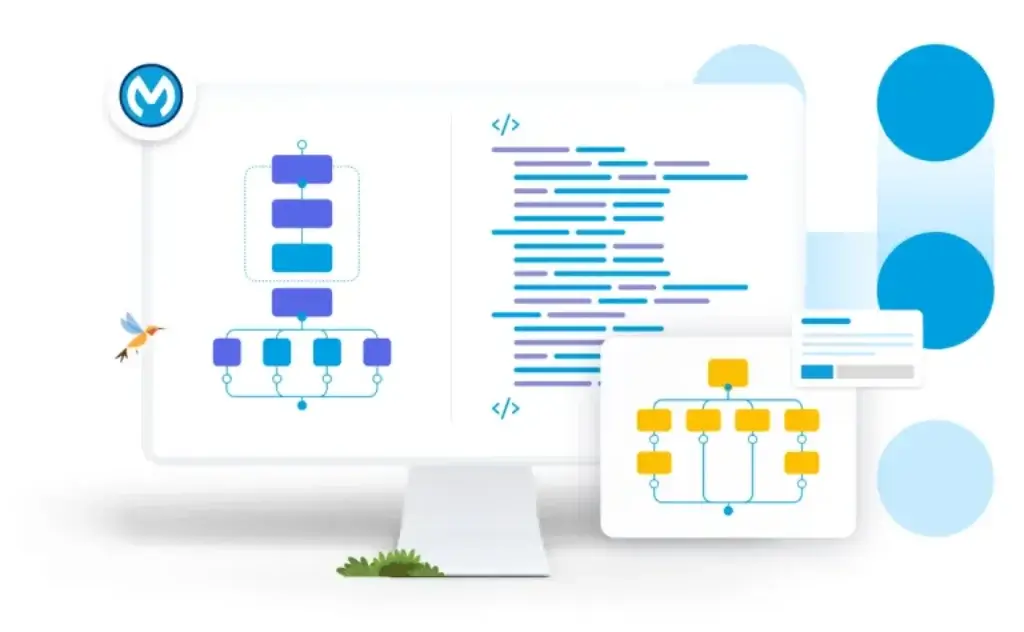
Software Specification
MuleSoft’s Core Features
MuleSoft’s strongest value is not a single feature. It is the way the platform brings integration development, API management, deployment, monitoring, governance, and reuse into one enterprise system.
That makes it especially relevant for IT, enterprise architecture, digital transformation, data, security, operations, and Salesforce platform teams.
Anypoint Platform for Enterprise Integration
Anypoint Platform is the foundation of MuleSoft. It supports the design, development, deployment, management, and monitoring of APIs and integrations.
You can use it to connect cloud apps, on-premise systems, databases, SaaS tools, partner systems, legacy applications, and internal services. The platform is designed for simple integrations, but its real strength appears in complex enterprise environments.
Salesforce states that Anypoint Platform can help teams deliver projects 5 times faster with reuse compared with custom code. This supports MuleSoft’s core value proposition: reusable integration assets can reduce repeated development work and help teams scale integration delivery more efficiently.
API-Led Connectivity
MuleSoft’s API-led approach is one of the main reasons enterprises choose it. Instead of creating brittle integrations between individual systems, you create APIs that can be reused across multiple projects.
This model is especially valuable when different teams need access to the same data. For example, customer data may be needed by a mobile app, a partner portal, a support workflow, an AI agent, and a sales dashboard.
With API-led connectivity, you can expose that data once through a secure service and reuse it across many experiences. This reduces duplication and gives IT stronger control over access, security, and lifecycle management.
Anypoint API Manager
Anypoint API Manager helps you manage, secure, and monitor APIs from one place. You can apply policies, manage client access, group APIs as products, and track API health and performance.
This is one of the biggest differences between MuleSoft and lighter automation platforms. MuleSoft is not only moving data between tools. It is helping your company manage APIs as governed business assets.
API Manager is useful when you need authentication, rate limiting, policy enforcement, analytics, access control, and consistent API management across different environments.
Anypoint Exchange and Reusable Assets
Anypoint Exchange is MuleSoft’s marketplace and internal catalog for connectors, templates, examples, APIs, and reusable assets.
This is where MuleSoft becomes more strategic than a standard integration builder. Your teams can publish APIs, connectors, templates, and best practices so other teams can discover and reuse them.
For large organizations, this matters because the same integration problems appear repeatedly. Without a shared catalog, teams rebuild similar connections again and again. Exchange helps turn integration work into reusable infrastructure.
Anypoint Code Builder and Developer Experience
Anypoint Code Builder is MuleSoft’s modern development environment for building APIs and integrations. MuleSoft describes it as an AI-powered IDE available in the browser and as a local Visual Studio Code extension.
This is important because MuleSoft is still developer-centered. While it includes low-code and automation features, the platform performs best when experienced builders can design reliable integration logic, API contracts, transformations, and deployment pipelines.
Anypoint Code Builder improves the developer experience by supporting API design, implementation, testing, source control, and publication to Exchange.
CloudHub, Runtime Fabric, and Hybrid Deployment
MuleSoft gives you several deployment options. CloudHub 2.0 is MuleSoft’s fully managed cloud iPaaS environment for deploying APIs and integrations as lightweight containers.
For companies that need more control, Anypoint Runtime Fabric lets you deploy Mule applications and API proxies to Kubernetes infrastructure that you create and manage. This is useful for hybrid, private cloud, or compliance-sensitive environments.
This flexibility is one reason MuleSoft is popular with large enterprises. If your integration strategy spans cloud systems, on-premise systems, legacy applications, and regulated infrastructure, deployment flexibility becomes a major buying factor.
Anypoint Monitoring and Operational Visibility
Anypoint Monitoring gives teams visibility into application and API performance. It helps you monitor integrations, troubleshoot issues, create dashboards, and move from reactive support to proactive health management.
This is critical because enterprise integrations often support customer-facing processes, revenue operations, supply chains, finance, employee workflows, and compliance activity.
When an integration fails, the impact can be operational, not just technical. Monitoring helps teams detect problems faster and understand where performance or reliability issues appear.
MuleSoft RPA and Automation
MuleSoft also includes automation capabilities such as MuleSoft RPA and MuleSoft Composer for Salesforce. These tools are designed to help teams automate manual tasks, data synchronization, and process steps across applications.
RPA is useful when a process depends on legacy screens or systems without modern APIs. Composer is more relevant for Salesforce users who want no-code data integration between Salesforce and other systems.
However, MuleSoft’s strongest value is still integration and API architecture. If your main need is simple business-user automation, Workato, Zapier, Make, or Power Automate may feel more accessible.
Agent Fabric and AI Agent Governance
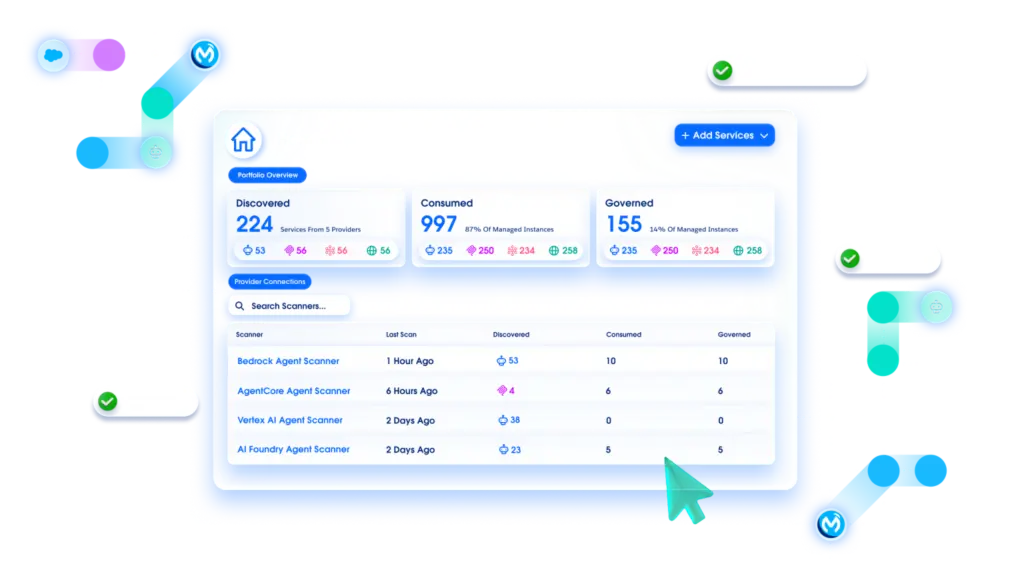
MuleSoft is now positioning itself as a control layer for the agentic enterprise. MuleSoft Agent Fabric is designed to help companies discover, govern, orchestrate, and observe AI agents from a single control plane.
This is a timely direction because companies are moving from AI experimentation to AI operations. Once AI agents can call tools, access data, and trigger actions, governance becomes essential.
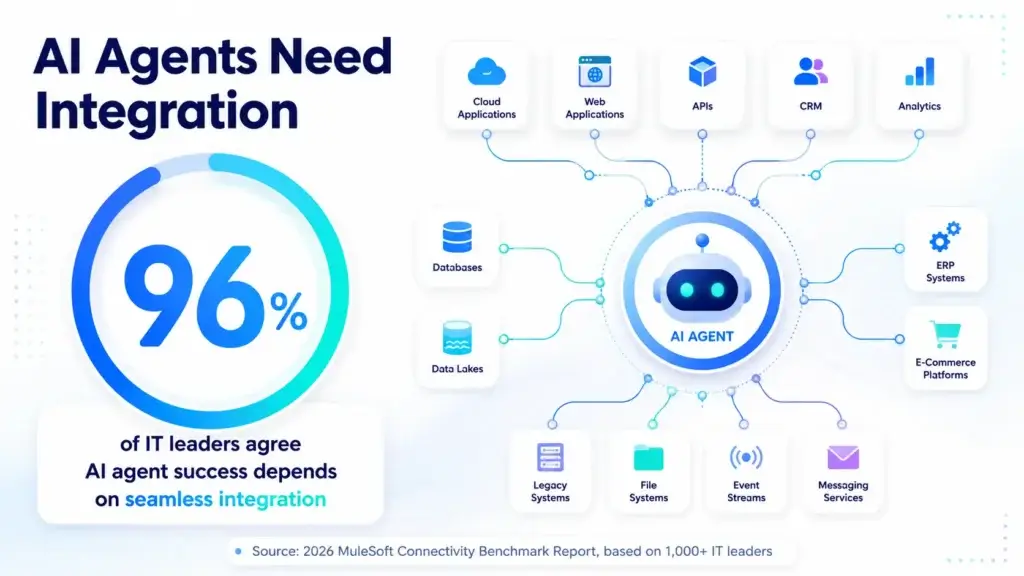
MuleSoft’s 2026 Connectivity Benchmark Report reports that 96% agree AI agent success depends on seamless integration. That statistic makes MuleSoft’s positioning clearer: AI agents are only useful at scale if they can safely connect to the systems where real work happens.
Pros and Cons
Advantages and Disadvantages
Positive
✅ Strong API management
✅ Excellent enterprise governance
✅ Reusable integration assets
✅ Strong Salesforce alignment
Negative
❌ Pricing is not transparent
❌ Technical learning curve
❌ Heavy for simple automation
❌ Implementation needs planning
MuleSoft is a powerful platform, but it is not the right integration tool for every company. It works best when integration is complex enough to justify architectural planning, governance, and skilled implementation.
✅ Pros
- Strong API-first architecture: MuleSoft is excellent for companies that need reusable APIs instead of disconnected point-to-point integrations.
- Enterprise-grade governance: API policies, access control, monitoring, reuse, security, and lifecycle management are central to the platform.
- Flexible deployment options: CloudHub, hybrid deployment, private cloud, and Runtime Fabric support different enterprise requirements.
- Deep Salesforce ecosystem fit: MuleSoft is especially attractive if Salesforce is a major part of your CRM, service, data, or AI strategy.
- Useful asset reuse: Anypoint Exchange helps teams publish and reuse APIs, templates, connectors, and internal best practices.
- Relevant AI agent governance: Agent Fabric gives MuleSoft a stronger role in governing AI agents, APIs, tools, and agent interactions.
❌ Cons
- Not beginner-friendly: MuleSoft requires more technical skill than simple no-code automation tools.
- Pricing requires sales contact: Public pricing does not give small teams an easy way to estimate total cost quickly.
- Implementation can be heavy: Larger deployments often need architecture, documentation, testing, governance, and partner support.
- Overkill for simple workflows: If you only need a few SaaS automations, MuleSoft is usually more platform than you need.
- Requires ongoing ownership: APIs and integrations need lifecycle management, versioning, monitoring, and maintenance.
- Best value appears at scale: Smaller teams may not get enough reuse or governance value to justify the investment.
Common Use Cases
What Is MuleSoft Good For?
MuleSoft is best for business processes that depend on multiple systems, strong security, reusable APIs, and reliable data movement. It is especially useful when integrations must be governed by IT but consumed by many departments.
Salesforce Integration
MuleSoft is a natural choice for companies that run important workflows in Salesforce but need to connect Salesforce with external systems.
For example, you can connect Salesforce Sales Cloud with SAP, Oracle, NetSuite, ServiceNow, Snowflake, Workday, payment platforms, custom apps, and legacy systems. This allows teams to create a more complete customer view while keeping core systems synchronized.
If Salesforce is your central CRM, MuleSoft can help you connect sales, service, marketing, commerce, finance, and operations data without relying only on basic connectors.
API Management and API Programs
MuleSoft is especially strong for companies that want to build an API program. This includes designing APIs, publishing them, securing them, applying policies, monitoring usage, and making them discoverable through a central catalog.
This is valuable for businesses that treat APIs as products. Instead of building APIs only for one internal project, teams can design reusable assets that serve mobile apps, partner portals, customer experiences, internal tools, and AI agents.
If your organization has many teams building APIs without consistent standards, MuleSoft can help bring structure and governance to the API lifecycle.
Legacy System Modernization
Many enterprises still depend on legacy systems that are difficult to replace. MuleSoft can help expose legacy data and business functions through APIs so modern applications can use them.
This is often more realistic than replacing every legacy platform at once. By creating API layers, your teams can modernize experiences while keeping critical back-end systems in place.
For example, a bank, insurer, manufacturer, healthcare organization, or government agency may use MuleSoft to connect older systems with new digital portals, mobile apps, partner platforms, or AI-driven workflows.
Hybrid and Regulated Environments
MuleSoft is a strong fit for organizations that cannot move every workload to a public cloud platform. Runtime Fabric and hybrid deployment options give teams more control over where integrations run.
This matters in industries with strict security, data residency, compliance, or infrastructure requirements. Healthcare, finance, public sector, manufacturing, and telecom companies often need more deployment control than lightweight SaaS automation platforms provide.
MuleSoft’s architecture is well-suited to these environments because it can support cloud, private cloud, on-premise, and hybrid integration patterns.
Data Synchronization Across Systems
MuleSoft can synchronize data across enterprise systems such as CRM, ERP, HRIS, ITSM, data warehouses, finance platforms, and custom applications.
For example, when a customer record changes in Salesforce, MuleSoft can update billing, support, data warehouse, and account management systems. When an order changes in ERP, MuleSoft can update CRM, logistics, finance, and customer portals.
The key value is consistency. When every department works from different data, operational errors increase. MuleSoft helps create a more controlled flow of information across the business.
AI Agent Connectivity and Governance
MuleSoft is becoming more relevant for AI agent operations. AI agents need access to systems, tools, APIs, data, and workflows. Without governance, that access can create security and reliability risks.
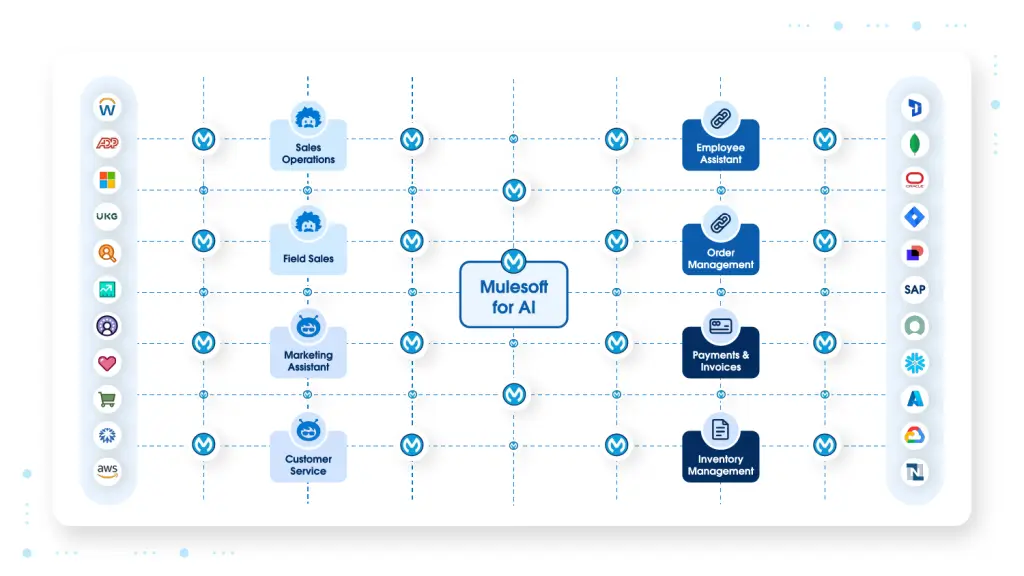
Agent Fabric is designed to help organizations discover, govern, orchestrate, and observe agents from a single control plane. This is useful when companies are using multiple AI platforms, internal agents, third-party agents, and Salesforce Agentforce.
If your AI roadmap includes agents that take action across business systems, MuleSoft is worth evaluating as a governed connectivity layer.
UX and Support
Ease of Use and Support Options
MuleSoft is easier than building every integration from scratch, but it is not a lightweight no-code tool. It is a professional integration platform that requires technical planning, integration knowledge, and platform ownership.
The platform includes tools for API design, development, management, deployment, monitoring, and governance. That breadth is valuable, but it also means new users need time to understand MuleSoft’s terminology and architecture.
Who Will Find MuleSoft Easy?
MuleSoft is easiest for integration developers, API architects, Salesforce architects, enterprise architects, and IT teams that already understand system integration.
If your team has experience with APIs, data mapping, authentication, middleware, cloud deployment, and enterprise governance, MuleSoft will feel powerful and structured.
Business users can benefit from MuleSoft Composer, Salesforce Flow integration, and automation features. However, the core Anypoint Platform experience is still more technical than tools built only for business users.
Where MuleSoft Can Feel Difficult
MuleSoft can feel difficult when teams expect it to behave like a simple automation builder. The platform is designed for reusable integration architecture, not only quick trigger-action workflows.
Common challenges include learning API-led connectivity, managing environments, designing reusable assets, handling transformations, estimating usage, setting governance standards, and maintaining integrations over time.
The complexity is not necessarily a weakness. It is the cost of building integration infrastructure correctly. But it does mean MuleSoft should be adopted with a clear plan.
Support and Learning Resources
MuleSoft provides documentation, Trailhead learning, certification paths, community resources, partner services, and Salesforce support options. The broader Salesforce ecosystem also makes it easier to find implementation partners and certified professionals.
Before buying, ask about onboarding, training, architecture support, success plans, partner availability, migration support, and internal enablement. These areas can have a major impact on your time to value.
Tips for Getting More Value from MuleSoft
- Start with a high-value integration domain: Choose a process where reuse will matter across future projects.
- Define API standards early: Set naming, versioning, authentication, documentation, and governance rules before scaling.
- Use Anypoint Exchange actively: Publish reusable assets so teams do not rebuild the same integrations.
- Plan deployment architecture: Decide where workloads should run based on compliance, latency, cost, and control.
- Monitor production integrations: Use dashboards, alerts, logs, and ownership rules to keep integrations reliable.
- Train both IT and business stakeholders: MuleSoft works best when technical and operational teams understand the model.
For broader comparison, you may also want to read our guide to best workflow automation software and our list of best AI agent tools.
AI
Latest AI Innovations
MuleSoft’s newer AI strategy is focused on connecting, governing, and orchestrating agents. This is different from AI tools that mainly help with writing, summarization, or chat.
The more important question for enterprises is whether AI agents can safely interact with business systems. That requires APIs, permissions, monitoring, identity, policy enforcement, and clear control over what agents can do.
MuleSoft Agent Fabric
Agent Fabric is MuleSoft’s agent control plane. It is designed to help companies discover, govern, orchestrate, and observe AI agents, AI assets, and agentic workflows from a single place.
This matters because many companies will not use only one AI platform. They may have Salesforce Agentforce, Microsoft Copilot Studio, Amazon Bedrock agents, Google Vertex AI agents, custom internal agents, and third-party AI tools.
Without a control layer, agent sprawl can become difficult to manage. Agent Fabric is MuleSoft’s answer to that problem.
Omni Gateway and Agent Interactions
MuleSoft Omni Gateway is designed to govern interactions between AI, agents, APIs, and enterprise systems. The goal is to apply security, cost controls, and compliance policies across agent and API activity.
This is important because AI agents can create new operational risks. If an agent can call an API, retrieve data, create records, or trigger a workflow, your company needs clear visibility and control.
MuleSoft’s AI positioning is strongest for organizations that already understand the risk of unmanaged access across systems.
MCP and A2A Support
MuleSoft is also aligning with agent interoperability trends such as MCP and A2A support. These capabilities are designed to make APIs and agents usable across agentic workflows.
In plain language, MuleSoft wants to help your AI agents use business systems without exposing those systems in an uncontrolled way.
This is where MuleSoft can become valuable for AI operations. It does not replace the AI model or agent builder. Instead, it gives the organization a governed connectivity foundation.
When MuleSoft AI Features Make Sense
MuleSoft’s AI features make the most sense when your organization is already building or planning multiple agents that need access to business systems.
They are less relevant if your team only wants AI writing, meeting summaries, or basic chatbot features. MuleSoft’s AI value is in governance, connectivity, and action, not general productivity.
If AI agents are part of your enterprise roadmap, MuleSoft deserves attention because it connects the agent layer to the systems where real business execution happens.
Security and Compliance
What About Security?
Security is one of the main reasons companies choose MuleSoft over lighter automation tools. Enterprise integrations often touch sensitive customer data, employee data, financial records, regulated systems, and internal infrastructure.
MuleSoft’s Trust Center states that the platform is certified for global and industry-specific standards including ISO 27001, SOC 2, PCI DSS, and HIPAA. It also states that MuleSoft is GDPR compliant.
For regulated industries, this matters. An integration platform should not be evaluated only by connector count or interface design. You should also evaluate authentication, encryption, access control, monitoring, auditability, data privacy, and compliance documentation.
API Security and Access Control
Anypoint API Manager supports security policies, client access management, authentication, rate limiting, and API access control. This helps organizations expose APIs without losing control over who can use them and how they are consumed.
You can use identity providers, SSO, OAuth policies, and security rules to manage access across API consumers. This becomes especially important when APIs are used by partners, apps, internal teams, and AI agents.
Governance and Auditability
MuleSoft’s governance features help teams apply standards across the API lifecycle. This includes design standards, security policies, lifecycle rules, and asset management through Exchange.
Governance is not only about compliance. It also improves consistency. When teams follow shared API standards, integrations become easier to discover, reuse, monitor, and maintain.
Security Best Practices for MuleSoft
MuleSoft provides strong platform capabilities, but your internal configuration still matters. Many integration risks come from poor access control, weak ownership, inconsistent API standards, or unmanaged production changes.
- Use least-privilege permissions: Limit access for users, applications, connectors, and API consumers.
- Standardize API policies: Apply consistent authentication, rate limits, logging, and security controls.
- Document every reusable asset: Make ownership, purpose, and lifecycle status clear in Exchange.
- Separate development and production: Test integrations before they affect live systems.
- Monitor sensitive integrations: Add dashboards and alerts for finance, HR, customer, and security workflows.
Security becomes even more important with AI agents. If agents can use APIs or trigger processes, your organization needs policy enforcement, logging, approval rules, and visibility into agent actions.
Compare with Others
Alternatives to MuleSoft
MuleSoft is a strong enterprise integration platform, but it is not always the best choice. The right alternative depends on your technical maturity, budget, Salesforce dependency, workflow complexity, and governance requirements.
| Tool | Best For | Main Advantage Over MuleSoft | Main Limitation |
| Workato | Enterprise automation across IT and business teams | More approachable for business-led workflow automation | Not as API-architecture-focused as MuleSoft |
| Boomi | Traditional iPaaS, B2B integration, and hybrid integration | Mature integration platform with broad enterprise use cases | May feel less aligned with Salesforce API-led architecture |
| Tray.ai | Technical RevOps and API-based SaaS automation | Flexible for GTM operations and technical workflow builders | Less suited for deep enterprise API governance |
| Zapier | Small businesses and simple app automation | Much easier and faster for basic no-code automations | Not built for complex enterprise API programs |
| Make | Visual workflow automation and operations teams | Flexible visual builder and easier entry point | Less enterprise governance and API lifecycle depth |
| Microsoft Power Automate | Microsoft 365 and Dynamics ecosystems | Strong fit for Microsoft-heavy organizations | Less natural for broad API-led architecture outside Microsoft |
MuleSoft vs Workato
Workato is better for business-led enterprise automation. It is more approachable for RevOps, finance, HR, support, IT operations, and business systems teams that want to automate workflows across apps.
MuleSoft is better for API-led connectivity, integration architecture, reusable services, hybrid environments, and companies with strong technical integration teams.
Choose Workato if your priority is workflow automation across departments. Choose MuleSoft if your priority is API management and enterprise integration architecture.
MuleSoft vs Boomi
Boomi is a strong iPaaS platform with mature capabilities for cloud, hybrid, B2B, EDI, and data integration. It is often a serious alternative for enterprise integration teams.
MuleSoft is typically stronger when API-led architecture, Salesforce integration, reusable APIs, and API lifecycle governance are central to the strategy.
Choose Boomi for a broad traditional iPaaS approach. Choose MuleSoft when APIs, reuse, governance, and Salesforce ecosystem alignment matter more.
MuleSoft vs Tray.ai
Tray.ai is a strong option for technical revenue operations, SaaS companies, and teams that want flexible API-driven workflow automation. It can be very effective when GTM teams have technical operators.
MuleSoft is broader and more enterprise-architectural. It is better suited for large-scale integration programs that involve many systems, governed APIs, and hybrid deployment.
Choose Tray.ai for technical GTM automation. Choose MuleSoft for enterprise integration and API management.
MuleSoft vs Zapier
Zapier is easier, faster, and better for small businesses or teams that need simple app-to-app automation. It is much more accessible for non-technical users.
MuleSoft is stronger when integrations become mission-critical. It gives IT teams more control over APIs, security, reuse, deployment, governance, and monitoring.
Choose Zapier for simple workflow automation. Choose MuleSoft when integration has architectural and compliance requirements.
MuleSoft vs Microsoft Power Automate
Microsoft Power Automate is a strong option if your organization is deeply invested in Microsoft 365, Teams, SharePoint, Dynamics, Power Platform, and Azure.
MuleSoft is usually more flexible for heterogeneous enterprise environments where Salesforce, ERP, legacy systems, APIs, partner systems, and non-Microsoft platforms all need to connect.
Choose Power Automate for Microsoft-first automation. Choose MuleSoft for broader enterprise integration and API-led connectivity.
Pricing
How Much Does MuleSoft Cost?
MuleSoft pricing is quote-based. The official MuleSoft Anypoint Platform pricing page lists packages such as MuleSoft Integration Starter and MuleSoft Integration Advanced, but pricing is shown as “Contact for pricing.”
This makes MuleSoft harder to evaluate for smaller teams, but it is common in enterprise integration software. Your cost will depend on deployment scope, usage, capacity, features, support, and the complexity of your integration program.
Salesforce explains that Anypoint integration packages are charged on a subscription basis and measured by Mule Flow and Mule Message capacity. Mule Flows indicate the breadth of your integration deployment, while Mule Messages measure intensity of usage across deployments.
| Pricing Area | What It Means | Why It Matters |
| Contact for Pricing | MuleSoft does not publish simple fixed public prices for Anypoint Platform packages | You need a sales conversation to estimate budget accurately |
| Mule Flows | Used to measure the breadth of your integration deployment | More integration deployments can affect package requirements |
| Mule Messages | Used to measure usage intensity across integrations | High-volume processes may require more capacity |
| API Management | API Manager, Flex Gateway, API Governance, and related features may affect packaging | Important for companies with many APIs or external consumers |
| Implementation Services | Architecture, partner support, migration, and enablement may be needed | Professional services can affect total cost of ownership |
Is MuleSoft Expensive?
MuleSoft is usually considered an enterprise investment. It will often cost more than tools like Zapier, Make, n8n, or basic automation platforms.
However, the comparison is not always fair. MuleSoft is designed for a different level of integration complexity. It is meant for organizations where APIs and integrations support core operations, customer experiences, compliance, and data access.
If your integration work is low-volume and simple, MuleSoft may be too expensive. If your company repeatedly builds complex integrations across many departments, MuleSoft’s reuse model can make more sense.
How to Evaluate MuleSoft Pricing
Do not evaluate MuleSoft only by license cost. Look at total cost of ownership and the value of reusable architecture.
You should estimate the number of integrations, APIs, environments, users, messages, flows, deployment needs, support requirements, and implementation services. You should also estimate the cost of custom development if you do not use a platform like MuleSoft.
Before signing, ask MuleSoft or your implementation partner to clarify capacity, add-ons, API management limits, environment structure, support level, deployment architecture, and future scaling costs.
Who Should Consider MuleSoft Pricing?
MuleSoft pricing makes the most sense when integration is strategic. If your organization needs governed connectivity across Salesforce, ERP, legacy systems, partner systems, data platforms, and AI agents, MuleSoft can justify a deeper investment.
It is less attractive if you only need basic automation between common SaaS tools. In that case, Workato, Make, Zapier, Tray.ai, or Microsoft Power Automate may be easier to justify.
Conclusion
Final Thoughts
MuleSoft is one of the strongest integration and API management platforms to consider in 2026 if your company needs governed connectivity across enterprise systems. It is especially valuable when integrations are not just helpful automations, but part of your operating architecture.
The platform’s biggest strength is its API-led model. MuleSoft helps teams build reusable services, manage APIs as products, secure access, monitor performance, and reduce repeated integration work over time.
It is also becoming more relevant for AI agent governance. As more companies deploy agents that need access to enterprise systems, MuleSoft’s ability to govern APIs, tools, agents, and interactions from a central layer becomes more important.
That said, MuleSoft is not the right fit for every company. It is technical, implementation-heavy, and quote-based. If your team only needs simple workflows, a lighter automation tool will be easier and more cost-effective.
My practical recommendation is clear: shortlist MuleSoft if your organization has complex integration needs, strong Salesforce dependency, API governance requirements, hybrid architecture, or an AI roadmap that depends on secure system access. Skip it if your automation needs are basic, your team lacks technical resources, or you do not yet need enterprise-level integration governance.
For the right organization, MuleSoft is not just an integration tool. It is a connectivity foundation for APIs, data, automation, and AI-driven operations.
Frequently Asked Questions
Have more questions?
What is MuleSoft?
MuleSoft is an enterprise integration, automation, and API management platform owned by Salesforce. It helps companies connect applications, data, devices, APIs, legacy systems, and AI agents through a governed connectivity layer.
What is MuleSoft Anypoint Platform?
MuleSoft Anypoint Platform is the core MuleSoft product for designing, building, deploying, managing, and monitoring APIs and integrations. It combines iPaaS, API management, governance, reusable assets, deployment tools, and monitoring in one platform.
Who is MuleSoft best for?
MuleSoft is best for enterprises and technically mature mid-market companies that need complex integrations, API governance, Salesforce connectivity, hybrid deployment, legacy modernization, and secure access to business systems.
Is MuleSoft easy to use?
MuleSoft is easier than building every integration from scratch, but it is not a beginner automation tool. It is best suited for integration developers, API architects, Salesforce architects, and IT teams with technical experience.
How much does MuleSoft cost?
MuleSoft pricing is quote-based. Salesforce lists MuleSoft Integration Starter and MuleSoft Integration Advanced packages as contact-for-pricing options. Pricing depends on usage, Mule Flow capacity, Mule Message capacity, features, deployment needs, and support requirements.
What is API-led connectivity in MuleSoft?
API-led connectivity is MuleSoft’s approach to connecting systems through reusable APIs. It typically separates APIs into system APIs, process APIs, and experience APIs so teams can reuse integration logic across many projects.
What is Anypoint Exchange?
Anypoint Exchange is MuleSoft’s marketplace and internal catalog for connectors, templates, examples, APIs, and reusable assets. It helps teams discover, share, and reuse integration assets across the organization.
Is MuleSoft better than Workato?
MuleSoft is better for API-led enterprise integration, hybrid architecture, reusable services, and technical API governance. Workato is often better for business-led workflow automation across departments with a more approachable low-code experience.
Is MuleSoft secure?
MuleSoft provides enterprise security and compliance capabilities. Its Trust Center lists certifications and standards such as ISO 27001, SOC 2, PCI DSS, HIPAA, and GDPR compliance, along with independent audit practices.
What is MuleSoft Agent Fabric?
MuleSoft Agent Fabric is an agent control plane designed to help organizations discover, govern, orchestrate, and observe AI agents, AI assets, and agentic workflows across enterprise environments.