Introduction
MRP systems help manufacturers plan materials, manage inventory, schedule production, control purchasing, and keep bills of materials aligned with real demand.
For growing manufacturers, spreadsheets eventually become too fragile. You may have sales orders in one place, inventory counts in another, supplier lead times in someone’s inbox, and production schedules updated manually by different people.
That creates a familiar problem. Your team thinks materials are available, but production discovers a shortage too late. Purchasing orders too much of one component and not enough of another. Sales promises delivery dates without reliable visibility into shop floor capacity.
The right MRP system helps you bring those moving parts into one planning workflow. It connects demand, inventory, BOMs, purchase orders, work orders, production schedules, and costing so you can make better manufacturing decisions.
In this guide, we compare seven of the best MRP systems for 2026: Katana, MRPeasy, Fishbowl, Odoo Manufacturing, NetSuite MRP, SAP Business One, and Epicor Kinetic. Each platform is strong for a different type of manufacturer, so the best choice depends on your company size, production model, accounting stack, and how much ERP depth you need.
Why Choosing the Right MRP System Matters
MRP is not only about calculating what materials you need. It is about improving the reliability of your entire production process.
A small batch manufacturer needs a different system than a global industrial company. A food and beverage producer may care about lot traceability and expiry dates, while an electronics manufacturer may need multi-level BOMs, serial tracking, and supplier lead time control.
When comparing MRP software, consider:
- Production model: Does it support make-to-stock, make-to-order, batch, discrete, or mixed-mode manufacturing?
- BOM management: Can it handle multi-level BOMs, revisions, variants, and substitutes?
- Inventory planning: Does it show raw materials, WIP, finished goods, and committed stock clearly?
- Purchasing: Can it generate purchase recommendations based on demand and lead times?
- Scheduling: Does it help you plan work orders, capacity, labor, and machine availability?
- Traceability: Does it support lot numbers, serial numbers, expiry dates, and recalls?
- Accounting: Does it integrate with QuickBooks, Xero, or a full ERP finance module?
- Ease of use: Can your team adopt it without a long enterprise implementation?
- Total cost: Does the software, implementation, and support model fit your budget?
The best MRP system should help you reduce stockouts, prevent overbuying, improve production visibility, and give your team a more reliable way to plan manufacturing work.
Top 7 MRP Systems for 2026
| MRP System | Best For | Key Strength | Best Fit |
| Katana | Modern small and midsize manufacturers | Real-time inventory, production planning, purchasing, sales order management, and ecommerce integrations | Product businesses that want a clean, modern MRP workflow |
| MRPeasy | Small manufacturers that need affordable MRP | Production planning, BOMs, inventory, purchasing, CRM, WMS, and accounting features | Manufacturers with roughly 10-200 employees |
| Fishbowl | QuickBooks and Xero manufacturing teams | Raw materials, work orders, BOMs, production costs, inventory control, and accounting sync | Small and midsize manufacturers that want strong inventory plus accounting integration |
| Odoo Manufacturing | Flexible ERP and open-source MRP workflows | Modular ERP apps, BOMs, work orders, work centers, inventory, quality, maintenance, and purchasing | Teams that want customizable ERP software with manufacturing modules |
| NetSuite MRP | Scaling manufacturers that need cloud ERP | MRP, demand planning, supply planning, inventory, financials, procurement, and reporting | Growing companies that need MRP inside a broader ERP platform |
| SAP Business One | SMBs that want SAP-based ERP and MRP | MRP wizard, production orders, purchase recommendations, inventory, finance, CRM, and analytics | Small and midsize businesses that want an established ERP system |
| Epicor Kinetic | Mid-market and industrial manufacturers | Forecasting, MRP, advanced planning and scheduling, sourcing, finance, CPQ, and shop floor visibility | Manufacturers with complex production, supply chain, and operational requirements |
Katana

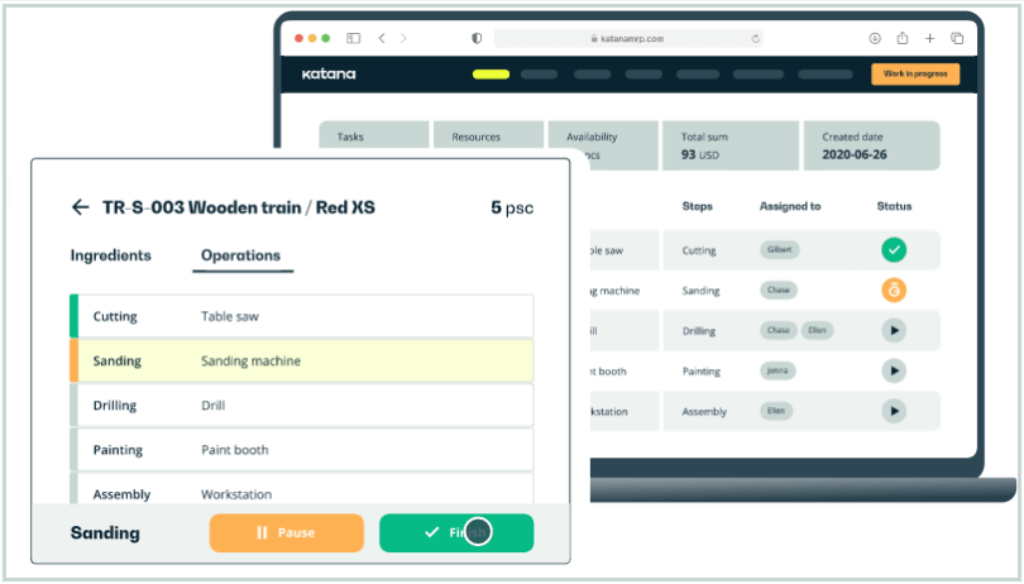
Overview:
Katana is one of the best MRP systems for small and midsize manufacturers that want a modern, visual, and easier-to-adopt platform. It is built around real-time inventory control, production management, purchasing, order management, warehousing, and forecasting.
The platform is especially strong for product businesses selling across multiple channels. If you manufacture goods while also selling through ecommerce, wholesale, retail, or marketplace channels, Katana helps you keep sales, stock, and production connected.
Katana is not a heavy enterprise ERP. That is part of its appeal. It gives manufacturers a practical way to move away from spreadsheets without taking on the complexity of a full ERP implementation.
Top Features:
Real-time inventory: Track raw materials, finished goods, committed stock, and available stock across locations.
Production management: Manage manufacturing orders, ingredients, materials, and production status.
Purchasing: Plan replenishment based on inventory levels, demand, and supplier activity.
Sales order management: Sync orders from multiple sales channels and avoid overselling.
Integrations: Connect with ecommerce, accounting, shipping, automation, and reporting tools.
Top Benefits:
Katana’s biggest benefit is operational visibility. It gives your team one shared view of what is in stock, what is in production, what needs to be purchased, and which orders are affected by material availability.
This matters when production and sales need to work from the same numbers. Instead of checking spreadsheets or asking different team members for updates, you can see how orders, materials, and production plans connect.
Katana is also easier to approach than many ERP-based MRP systems. That makes it a strong option if your team needs production control but does not want a long, expensive implementation project.
Why It’s Recommended:
Katana is recommended as the best overall MRP system for modern small and midsize product businesses. It balances usability, inventory control, production planning, purchasing, and integrations better than most lightweight MRP tools.
If you are moving away from spreadsheets and want a system your operations team can actually use, Katana should be high on your shortlist.
Pros and cons
Pros
Strong real-time inventory visibility
Modern interface and easier adoption
Good fit for ecommerce-connected manufacturers
Useful production, purchasing, and order workflows
Cons
Not as broad as full enterprise ERP systems
Advanced customization may require higher-tier support
May not fit highly complex industrial environments
Usage-based pricing needs careful review as volume grows
MRPeasy

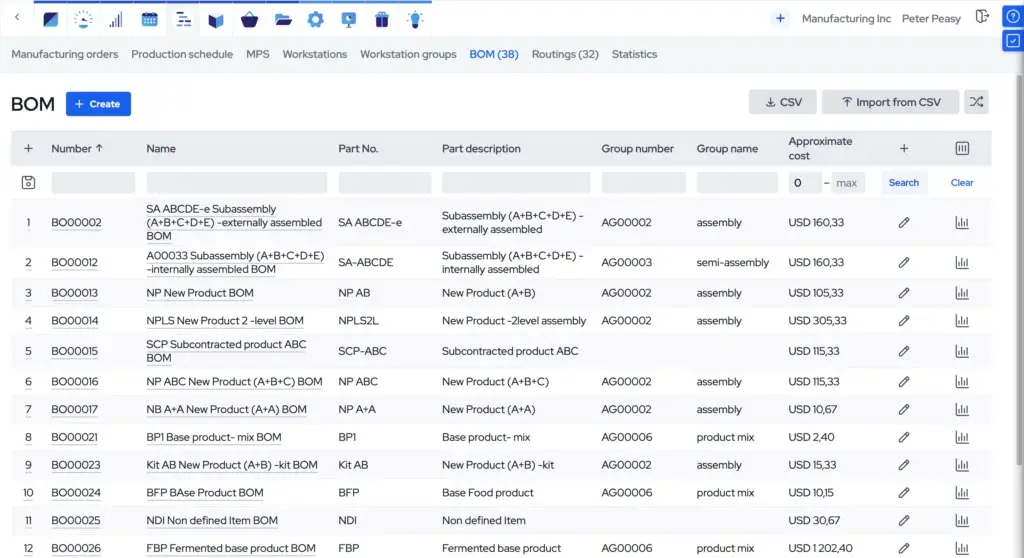
Overview:
MRPeasy is cloud-based MRP and manufacturing ERP software designed for small manufacturers. It is especially relevant if your business has outgrown spreadsheets but is not ready for a large ERP deployment.
The platform covers production planning, BOM management, inventory, purchasing, warehouse management, workforce planning, CRM, standard accounting, and integrations. That makes it broader than a simple production scheduler.
MRPeasy is best suited for manufacturers that want an affordable, structured, and complete system for managing production and materials without building a custom ERP environment.
Top Features:
Production planning: Plan production orders, schedules, routing, and manufacturing activity.
BOM management: Manage bills of materials, product structures, and production requirements.
Inventory and purchasing: Track stock, plan material needs, and manage purchasing activity.
Warehouse management: Support stock control, warehouse processes, and traceability.
Business tools: Includes CRM, standard accounting, reporting, and integrations with tools such as QuickBooks, Xero, Shopify, and WooCommerce.
Top Benefits:
MRPeasy’s main advantage is value for small manufacturers. You get many of the core features needed to manage manufacturing operations without the cost and complexity of an enterprise ERP system.
It is also practical for teams that want a more complete manufacturing system, not just an inventory app. You can connect production planning with purchasing, inventory, sales, and reporting, which helps reduce manual work between departments.
The pricing model is more transparent than many ERP vendors, which is useful when you are comparing MRP software on a tight budget.
Why It’s Recommended:
MRPeasy is recommended for small manufacturers that need serious MRP capabilities at a more accessible price point.
If your company needs production planning, BOM control, inventory management, purchasing, and basic business management in one system, MRPeasy is one of the strongest options to evaluate.
Pros and cons
Pros
Strong feature depth for the price
Built specifically for small manufacturers
Transparent public pricing
Good mix of MRP, inventory, CRM, WMS, and accounting functions
Cons
Interface may feel more operational than modern visual tools
May be less flexible than open-source ERP systems
Not ideal for very large enterprise manufacturing groups
Advanced features depend on the selected plan
Fishbowl

Overview:
Fishbowl is inventory and manufacturing software built for businesses that need stronger inventory control, BOM management, work orders, and accounting integration. It is especially popular with small and midsize companies that use QuickBooks or Xero.
The manufacturing product supports raw material tracking, work orders, configurable BOMs, production scheduling, capacity-related workflows, WIP visibility, and production cost syncing.
Fishbowl is a good fit if your biggest issue is manufacturing inventory accuracy. It gives you more structure around materials, assemblies, production costs, and warehouse activity without forcing you to abandon your accounting system.
Top Features:
Manufacturing inventory: Track raw materials, WIP, finished goods, and stock movement.
BOM and work orders: Manage configurable BOMs, manufacturing orders, and production steps.
Accounting sync: Connect production costs and inventory activity with QuickBooks or Xero.
Warehouse workflows: Support receiving, picking, staging, and inventory movement.
Production visibility: Monitor order status, workstations, production activity, and inventory availability.
Top Benefits:
Fishbowl’s biggest benefit is inventory control for manufacturers that already have accounting in place. If QuickBooks or Xero is still the financial system, Fishbowl can add the manufacturing and inventory layer you are missing.
This is useful when accounting software alone cannot handle BOMs, work orders, raw material planning, production costs, and WIP visibility well enough.
Fishbowl also gives operations teams a more practical way to manage production activity without switching immediately to a full ERP platform.
Why It’s Recommended:
Fishbowl is recommended for manufacturers that need a stronger inventory and production system around QuickBooks or Xero.
If your company is struggling with stock accuracy, manual work orders, or disconnected production costs, Fishbowl can be a strong middle step before a broader ERP implementation.
Pros and cons
Pros
Strong QuickBooks and Xero alignment
Good fit for inventory-heavy manufacturers
Supports BOMs, work orders, and production costing
Useful warehouse and inventory workflows
Cons
Not as modern in feel as some newer cloud-first tools
Pricing can become meaningful for smaller teams
Not a full enterprise ERP replacement
Implementation still requires clean inventory data
Odoo Manufacturing

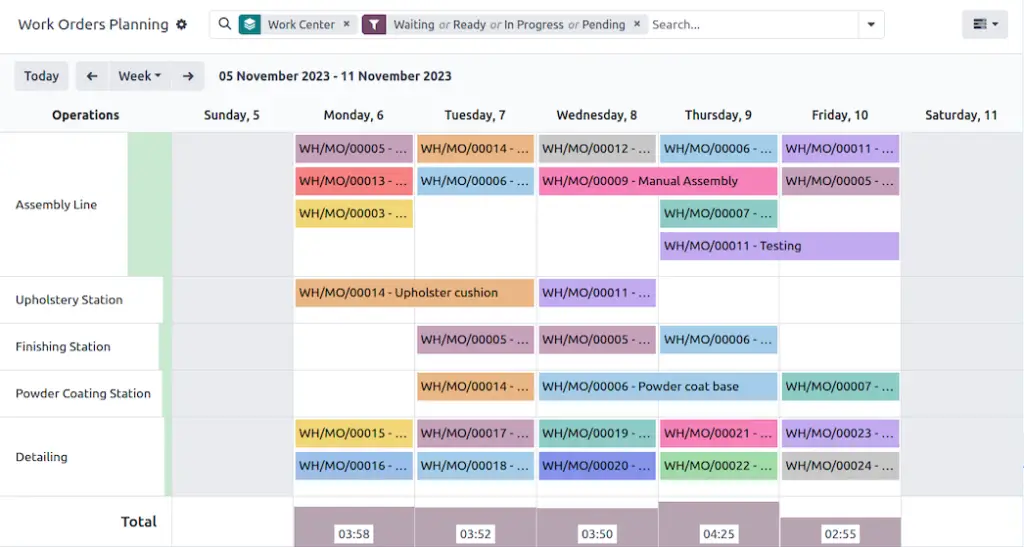
Overview:
Odoo Manufacturing is part of the broader Odoo ERP ecosystem. It is a strong option if you want MRP capabilities but also need the flexibility to connect manufacturing with inventory, purchasing, sales, accounting, quality, maintenance, PLM, and other business apps.
The platform supports bills of materials, manufacturing orders, work orders, work centers, operations, by-products, quality checks, maintenance workflows, and inventory movement.
Odoo is different from tools like Katana or MRPeasy because it is more modular and customizable. That flexibility can be a major advantage, but it also means implementation quality matters.
Top Features:
BOM management: Create bills of materials with operations, components, by-products, and manufacturing details.
Work orders: Manage production tasks through work centers and operational steps.
Inventory integration: Connect manufacturing with stock moves, replenishment, warehouse operations, and purchasing.
Quality and maintenance: Add quality checks, preventive maintenance, and equipment workflows.
Modular ERP: Extend into CRM, sales, accounting, ecommerce, projects, and reporting.
Top Benefits:
Odoo’s main benefit is flexibility. You can start with manufacturing and inventory, then expand into other ERP modules as your business grows.
This makes it a good choice if you want one connected system across operations instead of separate software for sales, accounting, inventory, and production.
Odoo can also fit unique workflows better than rigid SaaS tools, especially when you have the right implementation partner or internal technical support.
Why It’s Recommended:
Odoo Manufacturing is recommended for teams that want customizable MRP inside a broader ERP ecosystem.
If you value flexibility, modularity, and the ability to connect manufacturing with many other business functions, Odoo is a strong contender. If you want a simpler out-of-the-box MRP system, Katana or MRPeasy may be easier to adopt.
Pros and cons
Pros
Highly flexible and modular ERP platform
Strong manufacturing, inventory, quality, and maintenance ecosystem
Good fit for teams that want one connected business suite
Can be customized for unique workflows
Cons
Implementation quality can vary significantly
Customization can add cost and complexity
May require more configuration than lightweight MRP tools
Not always ideal for teams that want a plug-and-play system
NetSuite MRP
Overview:
NetSuite MRP is part of Oracle NetSuite’s ERP platform. It is built for companies that need manufacturing planning connected with inventory, procurement, demand planning, supply planning, financials, reporting, and multi-entity operations.
NetSuite’s MRP capabilities help determine which raw materials, components, and subassemblies are needed, and when they are required, based on demand and bills of materials.
This makes NetSuite a stronger fit for scaling manufacturers than for very small teams. It is best when MRP is only one part of a larger ERP requirement.
Top Features:
Material requirements planning: Plan raw materials, components, subassemblies, and timing based on demand and BOMs.
Demand and supply planning: Improve planning across demand forecasts, supply needs, and inventory requirements.
ERP financials: Connect manufacturing activity with financial management and reporting.
Inventory visibility: Track stock levels, locations, and supply chain activity in one system.
Scalability: Support growing organizations with broader ERP, analytics, and multi-entity capabilities.
Top Benefits:
NetSuite’s biggest benefit is that it connects MRP with the rest of your business. Instead of running production planning separately from finance, procurement, and reporting, you can manage those workflows in one ERP environment.
This is important for companies that are growing beyond small-business software. As manufacturing becomes more complex, decision-makers need better visibility into demand, inventory, purchasing, production costs, and margins.
NetSuite is also a strong option if your company needs a cloud ERP platform that can support multiple locations, entities, currencies, and operational teams.
Why It’s Recommended:
NetSuite MRP is recommended for growing manufacturers that need more than standalone MRP software.
If your main need is simple production planning, NetSuite may be too much. If your company needs MRP, finance, procurement, inventory, reporting, and scalability in one system, it becomes much more compelling.
Pros and cons
Pros
Strong cloud ERP foundation
Good fit for scaling manufacturers
Connects MRP with finance, inventory, procurement, and reporting
Useful for multi-location and multi-entity operations
Cons
More expensive and complex than lightweight MRP tools
Implementation usually requires expert support
May be too much for small manufacturers
Module licensing and configuration should be reviewed carefully
SAP Business One
Overview:
SAP Business One is an ERP solution designed for small and midsize businesses. It covers finance, purchasing, inventory, sales, CRM, reporting, analytics, and manufacturing-related workflows.
For MRP, SAP Business One includes planning functionality that helps you create MRP scenarios and generate recommendations for production orders, purchase orders, and inventory transfer requests.
This makes it a good fit for SMB manufacturers that want an established ERP system with MRP capabilities, but do not need the scale of SAP S/4HANA.
Top Features:
MRP wizard: Plan material requirements and generate production, purchasing, and transfer recommendations.
Inventory management: Manage stock levels, item data, warehouse activity, and availability.
Production orders: Support manufacturing workflows and production execution.
ERP foundation: Connect accounting, purchasing, inventory, CRM, reporting, and analytics.
Customization: Extend and configure the platform as your business grows.
Top Benefits:
SAP Business One’s main benefit is ERP maturity. It gives smaller companies access to a structured business management system that includes MRP, rather than using separate tools for production, accounting, purchasing, and sales.
This can be valuable if you want one system for core business operations and prefer an established vendor ecosystem.
It is also a good fit for companies that expect to grow and need better controls around inventory, finance, purchasing, and reporting.
Why It’s Recommended:
SAP Business One is recommended for small and midsize manufacturers that want ERP-backed MRP with a well-known software ecosystem.
If you need lightweight production planning, it may feel heavier than necessary. If you want MRP plus finance, purchasing, CRM, inventory, and analytics in one system, SAP Business One is worth evaluating.
Pros and cons
Pros
Established ERP platform for SMBs
MRP, inventory, finance, purchasing, CRM, and reporting in one system
Good fit for businesses that want stronger operational control
Broad partner and implementation ecosystem
Cons
Requires implementation planning
Pricing is typically quote-based
Can be more complex than standalone MRP software
Best results often depend on partner quality and configuration
Epicor Kinetic
Overview:
Epicor Kinetic is a manufacturing-focused ERP platform built for companies with more advanced production, supply chain, financial, and operational requirements.
It is especially relevant for mid-market and industrial manufacturers that need forecasting, MRP, advanced planning and scheduling, sourcing, CPQ, ecommerce, financial reporting, and multi-site visibility.
Epicor Kinetic is not the simplest system on this list. It is designed for manufacturers that need depth, structure, and control across more complex operations.
Top Features:
MRP and forecasting: Manage demand against supply with forecasting and material requirements planning tools.
Advanced planning and scheduling: Improve production scheduling and capacity planning.
Sourcing: Support supplier and procurement workflows across manufacturing operations.
Financial reporting: Connect operational performance with finance and analytics.
Manufacturing ERP: Support more complex production environments with ERP-level controls.
Top Benefits:
Epicor Kinetic’s biggest benefit is manufacturing depth. It is built for companies that need serious production planning, sourcing, analytics, financial control, and operational visibility.
That makes it a strong option for manufacturers that have outgrown entry-level MRP tools and need a platform that can support more complex workflows.
It is also useful for teams that want a system designed around manufacturing rather than a generic ERP that later adds manufacturing modules.
Why It’s Recommended:
Epicor Kinetic is recommended for mid-market manufacturers that need advanced ERP and MRP capabilities.
If you are a small manufacturer looking for a simple system, Katana or MRPeasy will likely be easier. If you need manufacturing ERP depth, planning sophistication, and stronger operational controls, Epicor Kinetic is one of the strongest options in this category.
Pros and cons
Pros
Strong manufacturing ERP depth
Good fit for complex industrial operations
Includes forecasting, MRP, APS, sourcing, and financial analytics
Designed specifically around manufacturing needs
Cons
More complex implementation than lightweight tools
Pricing is typically quote-based
May be too advanced for smaller manufacturers
Requires careful planning, data preparation, and change management
How to Choose the Best MRP System
The best MRP system depends on how your manufacturing business works. A tool that is perfect for a 20-person furniture manufacturer may not be right for a multi-site industrial supplier.
Before choosing software, map your workflow from sales demand to purchasing, production, inventory movement, quality control, shipping, and accounting. Then choose the system that removes the most friction from that workflow.
1. Start With Your Manufacturing Type
Your production model should guide the entire decision.
If you produce standard products for stock, you need strong inventory planning, demand forecasting, reorder points, and finished goods visibility. If you manufacture custom products, you need better routing, work orders, capacity planning, and job costing.
Batch manufacturers should prioritize lot tracking, expiry dates, quality checks, and traceability. Discrete manufacturers should look closely at multi-level BOMs, serial tracking, engineering changes, and supplier lead times.
2. Decide Whether You Need MRP or Full ERP
Some businesses need focused MRP software. Others need ERP software with MRP included.
If your biggest problems are inventory accuracy, BOM planning, purchase recommendations, and production schedules, a dedicated MRP system like Katana, MRPeasy, or Fishbowl may be enough.
If you also need finance, procurement, CRM, multi-entity reporting, advanced analytics, and broader business controls, NetSuite, SAP Business One, Odoo, or Epicor Kinetic may be a better fit.
3. Review Your BOM Complexity
BOM complexity is one of the most important MRP buying factors. A simple one-level BOM is much easier to manage than a multi-level BOM with variants, substitutes, by-products, revisions, and different routing options.
If your products have many components, subassemblies, or engineering changes, choose a system with strong BOM management and version control.
Odoo, NetSuite, SAP Business One, and Epicor Kinetic are generally stronger when BOM structures and ERP complexity increase. Katana and MRPeasy are easier for simpler to moderately complex manufacturing workflows.
4. Check Inventory Visibility Across Locations
Inventory visibility is central to MRP. If your stock numbers are wrong, your material plan will also be wrong.
Look for a system that can show raw materials, WIP, finished goods, committed stock, available stock, on-order stock, and inventory across multiple warehouses or production sites.
This is especially important if you sell across multiple channels or operate more than one warehouse, production facility, or subcontracting location.
5. Evaluate Purchasing and Supplier Planning
A good MRP system should help you decide what to buy, when to buy it, and which demand each purchase supports.
Review whether the system can create purchase recommendations, account for supplier lead times, manage reorder points, track incoming materials, and connect purchasing activity with production demand.
This is where MRP can create immediate value because purchasing mistakes often lead to stockouts, overstocking, production delays, and cash tied up in unnecessary inventory.
6. Compare Implementation Effort
MRP implementation is not only a software decision. It is a data decision.
You need clean item records, accurate BOMs, realistic lead times, clear inventory counts, reliable supplier data, and production workflows that your team understands.
Lightweight systems can often be deployed faster, while ERP-based systems require more planning. However, a larger ERP project may be worth it if your business needs deeper operational control.
7. Look Beyond Monthly Pricing
MRP system cost includes software subscriptions, implementation, data migration, training, support, integrations, customization, and internal team time.
A lower-cost tool can be the best choice for a small manufacturer. A higher-cost ERP can be the better investment if it replaces several disconnected systems and improves financial visibility.
Compare total cost based on your expected users, locations, transaction volume, implementation needs, and future growth.
Key Features to Look For in MRP Software
MRP systems can vary widely, but most manufacturers should evaluate a few core capabilities before choosing.
Material Requirements Planning
The core purpose of MRP is to calculate what materials are needed, how much is needed, and when those materials must be available.
This calculation depends on demand, inventory levels, bills of materials, lead times, production schedules, and open purchase orders.
Bill of Materials Management
BOM management is one of the most important features in manufacturing software. Look for support for components, subassemblies, by-products, variants, revisions, and instructions.
If your BOMs are inaccurate, your purchasing and production plans will also be inaccurate.
Inventory Management
MRP software should give you accurate inventory visibility across raw materials, WIP, finished goods, committed stock, available stock, and on-order stock.
Strong inventory management reduces guesswork and helps your team plan purchasing and production more confidently.
Production Planning and Scheduling
Production planning helps you organize manufacturing orders, due dates, routing, labor, machine time, and production steps.
More advanced systems may include capacity planning, finite scheduling, work center planning, and advanced planning and scheduling.
Purchase Order Recommendations
MRP software should help your purchasing team identify what needs to be ordered and when.
This is especially valuable when supplier lead times are long or when materials are shared across multiple products.
Lot and Serial Traceability
Traceability is essential for regulated or quality-sensitive manufacturers. This includes food, beverage, cosmetics, pharmaceuticals, electronics, medical products, and industrial components.
Look for lot tracking, serial tracking, expiry dates, recall support, and audit-ready material history.
Costing and Financial Visibility
Manufacturers need to understand product costs, labor costs, material costs, WIP value, and margin impact.
Some MRP systems integrate with accounting tools, while ERP-based systems include finance modules directly.
Reporting and Analytics
Reporting helps you understand production performance, inventory value, material shortages, supplier reliability, order delays, and operational bottlenecks.
As your business grows, these insights become more important for improving margins and reducing waste.
Which MRP System Should You Choose?
If you want the best overall MRP system for a modern small or midsize product business, choose Katana. It is clean, practical, and strong for real-time inventory, purchasing, production, and sales channel alignment.
If you want affordable MRP software built specifically for small manufacturers, choose MRPeasy. It offers strong manufacturing depth for the price and covers production, BOMs, inventory, purchasing, WMS, CRM, and standard accounting.
If you use QuickBooks or Xero and need better manufacturing inventory control, choose Fishbowl. It is especially useful for raw materials, work orders, BOMs, production costs, and warehouse workflows.
If you want a flexible ERP with manufacturing modules, choose Odoo Manufacturing. It is best when you value customization and want manufacturing connected with other business apps.
If you need MRP inside a scalable cloud ERP, choose NetSuite MRP. It is best for growing companies that need planning, finance, procurement, inventory, and reporting in one platform.
If you want an established SMB ERP system with MRP, choose SAP Business One. It is a good fit when you need production planning, finance, purchasing, inventory, CRM, and analytics in one system.
If you are a mid-market industrial manufacturer with complex needs, choose Epicor Kinetic. It is best for advanced manufacturing ERP, forecasting, MRP, advanced planning and scheduling, sourcing, and operational analytics.
Conclusion
The best MRP system for 2026 depends on your production model, company size, inventory complexity, purchasing needs, and ERP requirements.
Katana is the strongest overall choice for modern product businesses. MRPeasy is best for small manufacturers that want affordable MRP depth. Fishbowl is best for QuickBooks and Xero users. Odoo Manufacturing is best for flexible ERP workflows. NetSuite MRP is best for scaling cloud ERP needs. SAP Business One is best for SMBs that want established ERP functionality. Epicor Kinetic is best for complex mid-market manufacturers.
If you are just starting, choose a system that improves inventory accuracy and production planning without overwhelming your team. If you are scaling, prioritize BOM control, purchasing automation, capacity planning, traceability, reporting, and ERP integration.
The right MRP system should help you plan materials more accurately, reduce production delays, improve inventory control, and make manufacturing decisions with better data.
FAQ
What is an MRP system?
An MRP system is software that helps manufacturers plan material requirements based on demand, inventory, bills of materials, lead times, and production schedules. It helps determine what materials are needed, how much is needed, and when materials should be available.
What does MRP stand for?
MRP usually stands for material requirements planning. It refers to the process of calculating material needs for manufacturing. MRP II stands for manufacturing resource planning, which expands planning into broader resources such as capacity, labor, finance, and production control.
What is the best MRP system for small manufacturers?
Katana and MRPeasy are two of the best MRP systems for small manufacturers. Katana is best for modern product businesses that need real-time inventory and production visibility, while MRPeasy is best for small manufacturers that want affordable manufacturing ERP and MRP features.
Is Katana better than MRPeasy?
Katana is usually better if you want a modern, visual MRP system with strong inventory, production, purchasing, and ecommerce workflows. MRPeasy is usually better if you want more traditional manufacturing ERP depth at a lower entry price for small manufacturers.
Is MRP software the same as ERP software?
No. MRP software focuses mainly on materials, inventory, BOMs, purchasing, and production planning. ERP software is broader and may include finance, HR, CRM, procurement, reporting, and other business functions. Many ERP systems include MRP as a manufacturing module.
Which MRP system is best for QuickBooks users?
Fishbowl is one of the best MRP and manufacturing inventory systems for QuickBooks users. It helps manage raw materials, BOMs, work orders, production costs, warehouse activity, and inventory control while syncing relevant financial data with QuickBooks.
Which MRP system is best for larger manufacturers?
NetSuite MRP, SAP Business One, and Epicor Kinetic are strong options for larger or more complex manufacturers. NetSuite is best for cloud ERP scalability, SAP Business One is best for SMB ERP needs, and Epicor Kinetic is best for manufacturing-focused ERP depth.
What features should I look for in MRP software?
Look for material requirements planning, BOM management, inventory tracking, purchase recommendations, production scheduling, work orders, lot and serial traceability, costing, reporting, accounting integration, and support for your manufacturing type.
Can MRP software reduce inventory costs?
Yes. MRP software can reduce inventory costs by improving material planning, lowering excess stock, reducing emergency purchases, preventing stockouts, and helping purchasing teams order based on real demand and supplier lead times.
How do I choose the right MRP system?
Choose an MRP system based on your manufacturing type, BOM complexity, inventory locations, purchasing needs, production scheduling requirements, accounting stack, implementation resources, user count, and long-term ERP strategy.