Introduction
Manufacturing scheduling systems help manufacturers plan production, allocate resources, manage work orders, sequence jobs, track materials, and improve delivery performance.
When production schedules are managed in spreadsheets, whiteboards, or disconnected ERP reports, small changes can create major problems. A delayed material delivery, overloaded work center, urgent order, labor shortage, or machine issue can quickly disrupt the entire shop floor.
The right manufacturing scheduling system gives you a clearer way to manage production demand, available capacity, raw materials, labor, machines, tooling, priorities, and deadlines in one workflow.
For manufacturers, this is not just about creating a calendar. It is about building a production plan your team can actually execute.
In this guide, we compare seven of the best manufacturing scheduling systems for 2026: MRPeasy, Katana, Siemens Opcenter APS, DELMIAWorks, PlanetTogether, Global Shop Solutions, and JobBOSS².
Why Choosing the Right Manufacturing Scheduling System Matters
Manufacturing scheduling is one of the most important parts of production control. If the schedule is inaccurate, your team may commit to unrealistic delivery dates, overbook machines, miss material shortages, or waste time manually rebuilding plans.
However, not every manufacturing scheduling system is built for the same type of manufacturer.
A small assembly business needs a different tool than a multi-site manufacturer with finite-capacity scheduling requirements. A job shop needs flexible job sequencing, while a process manufacturer may need batch planning, changeover control, and material feasibility checks.
When comparing manufacturing scheduling systems, consider:
- Production type: Does it support make-to-order, make-to-stock, batch, job shop, or mixed-mode production?
- Capacity planning: Can it schedule around machines, labor, work centers, shifts, and constraints?
- Material availability: Does it connect the schedule with inventory, BOMs, purchasing, and MRP?
- Shop-floor visibility: Can your team track job progress in real time?
- Rescheduling: Can planners adjust priorities quickly when production changes?
- ERP integration: Does it work as a full manufacturing ERP or connect with your current ERP?
- Ease of use: Can planners and operators adopt it without excessive training?
- Scalability: Will it support more users, work centers, locations, and complexity later?
- Total cost: Does the pricing match your company size and operational needs?
The best manufacturing scheduling system should help you create more realistic schedules, reduce planning friction, improve resource utilization, and give customers more reliable delivery dates.
Top 7 Manufacturing Scheduling Systems for 2026
| Software | Best For | Key Strength | Pricing Model |
| MRPeasy | Small and mid-sized manufacturers | MRP, production scheduling, Gantt views, inventory, purchasing, and shop-floor reporting | Starts at $49/user/month |
| Katana | Product businesses and growing manufacturers | Visual production scheduling, live inventory, BOMs, sales orders, and shop-floor control | Free plan, Core from $299/month |
| Siemens Opcenter APS | Enterprise manufacturers with complex scheduling constraints | Advanced planning, finite-capacity scheduling, sequencing, and constraint modeling | Quote-based |
| DELMIAWorks | Mid-market manufacturers needing ERP, MES, and scheduling together | Production scheduling, MRP, MPS, APS, real-time ERP data, and shop-floor visibility | Quote-based |
| PlanetTogether | Manufacturers needing standalone APS and what-if planning | Constraint-based scheduling, capacity planning, bottleneck management, and scenario planning | Quote-based |
| Global Shop Solutions | Discrete manufacturers needing ERP scheduling and shop-floor control | Finite/infinite scheduling, capacity planning, AI-enabled ERP, and workcenter visibility | Quote-based |
| JobBOSS² | Job shops and make-to-order manufacturers | Shop-floor scheduling, quoting, job costing, inventory, and visual capacity planning | Tailored pricing |
MRPeasy

Overview:
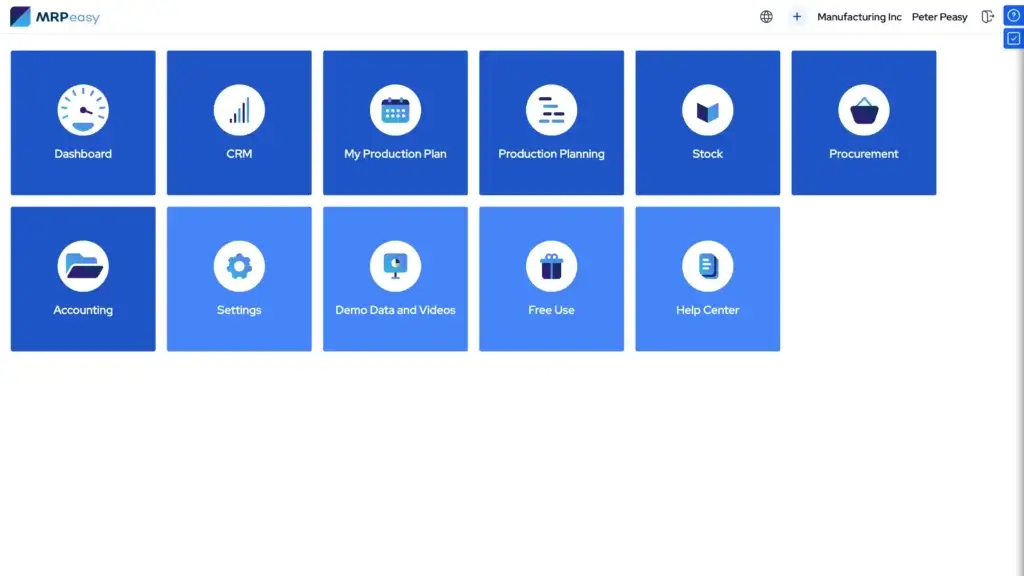
MRPeasy is one of the strongest manufacturing scheduling systems for small and mid-sized manufacturers that want a practical MRP and ERP platform without enterprise-level complexity.
It helps you manage production planning, production scheduling, BOMs, inventory, purchasing, CRM, warehouse workflows, and shop-floor reporting from one cloud-based system.
MRPeasy is especially useful if your team has outgrown spreadsheets but does not want to implement a heavy enterprise ERP. It gives you enough structure to manage production properly while still keeping the system accessible for smaller teams.
Top Features:
✅ Production planning and reporting for small manufacturers.
✅ Dynamic calendars, Gantt charts, and drag-and-drop rescheduling.
✅ BOM management, routing, workstations, and manufacturing orders.
✅ Material requirements planning, purchasing, and warehouse management.
✅ Shop-floor reporting through Internet-Kiosk and production tracking.
Top Benefits:
MRPeasy’s biggest benefit is balance. It gives you production scheduling, MRP, inventory, purchasing, and reporting in one system, without pushing you into the cost and complexity of a large ERP project.
You can schedule manufacturing based on incoming orders, raw material availability, and production capacity. When priorities change, the Gantt-style view and drag-and-drop rescheduling tools make it easier to adjust the plan.
For small manufacturers, this can reduce manual planning work, improve purchasing accuracy, and help your team understand what should be produced, when, and with which materials.
Why It’s Recommended:
MRPeasy is recommended as the best overall option for small and mid-sized manufacturers because it covers the core scheduling workflow from order to production to inventory.
It is not the most advanced APS system in this list. Siemens Opcenter APS and PlanetTogether are stronger for complex finite-capacity optimization. However, MRPeasy is often a better first choice when you need a complete, affordable manufacturing management system that your team can realistically adopt.
Pros and cons
Pros
✅ Strong MRP and scheduling depth
✅ Transparent starting pricing
✅ Good fit for small manufacturers
✅ Combines production, inventory, and purchasing
Cons
❌ Not ideal for large enterprise plants
❌ Advanced configuration takes planning
❌ Interface may feel dense at first
❌ Some deeper scheduling functions depend on plan level
Katana

Overview:
Katana is a modern cloud-based manufacturing ERP and inventory platform built for product businesses that need better visibility across sales, inventory, purchasing, and production.
It is a strong fit for small and growing manufacturers that sell through multiple channels, manage raw materials and finished goods, and need a cleaner way to plan production around actual demand.
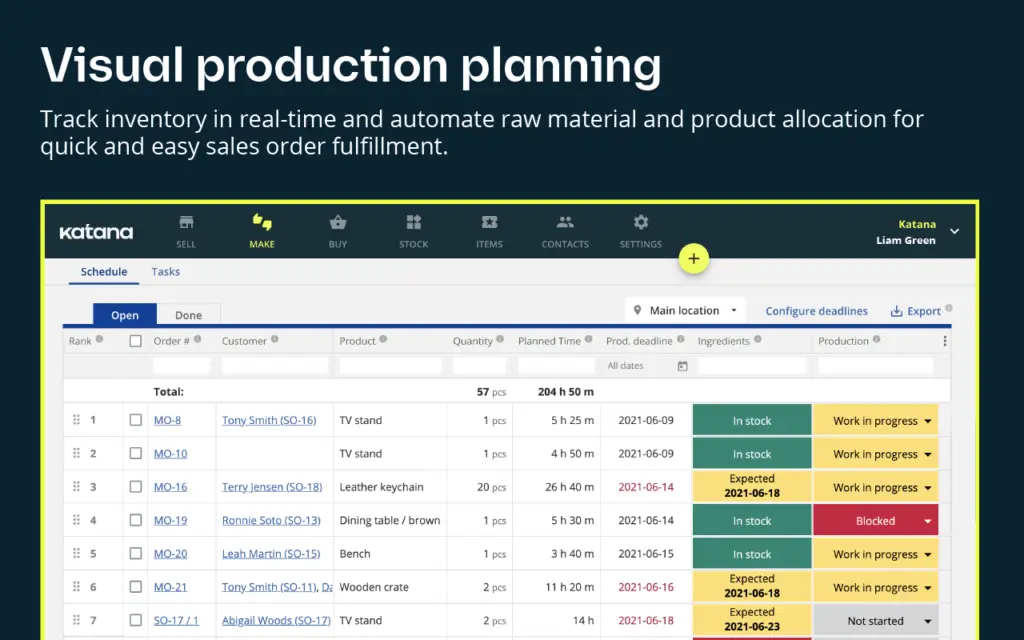
Katana is especially useful if your production team needs visual scheduling and real-time inventory alignment rather than a heavy enterprise scheduling engine.
Top Features:
✅ Visual production planning and scheduling for manufacturing orders.
✅ BOM-based deadlines, cost estimates, and planned completion times.
✅ Live inventory tracking across raw materials and finished goods.
✅ Shop-floor control, task tracking, and operator assignment.
✅ Integrations with ecommerce, accounting, CRM, and reporting tools.
Top Benefits:
Katana’s biggest benefit is real-time operational visibility. You can connect sales orders, materials, inventory, purchasing, and production planning so the schedule reflects what your business can actually produce.
The platform is easier to approach than many traditional manufacturing ERP systems. For teams moving from spreadsheets, that matters because scheduling software only creates value if planners and operators actually use it.
Katana is also useful for businesses that sell online. When production demand is connected to orders and inventory, you can reduce the risk of overselling, stockouts, and production delays.
Why It’s Recommended:
Katana is recommended for product businesses that need manufacturing scheduling, inventory control, and sales order visibility in one cloud platform.
Compared with MRPeasy, Katana feels more modern and commerce-friendly. MRPeasy is stronger if you want deeper traditional MRP structure at a lower starting price. Katana is stronger if you want a visual, connected system for inventory-driven production workflows.
Pros and cons
Pros
✅ Modern and user-friendly interface
✅ Strong inventory and production visibility
✅ Good for ecommerce-connected manufacturers
✅ Free plan and no per-user fees on Core
Cons
❌ Core plan starts higher than MRPeasy
❌ Not a deep enterprise APS system
❌ Complex manufacturers may need custom setup
❌ Best value depends on order and location volume
Siemens Opcenter APS
Overview:
Siemens Opcenter APS is an advanced planning and scheduling system designed for manufacturers with complex production environments.
It supports long-term strategic planning, medium-term tactical planning, and detailed sequencing. This makes it a strong fit for manufacturers that need more than a basic work order calendar.
Opcenter APS is especially relevant when production depends on many constraints, including machine availability, materials, run speeds, setup times, resource conflicts, order priorities, and customer delivery commitments.
Top Features:
✅ Advanced planning and scheduling across multiple planning horizons.
✅ Multi-constraint order-based production scheduling.
✅ Resource availability, materials, setup times, and sequencing logic.
✅ Finite and advanced scheduling for complex manufacturing environments.
✅ Strong fit with broader Siemens manufacturing operations management tools.
Top Benefits:
Siemens Opcenter APS is built for scheduling environments where simple ERP dates are not enough. It helps planners create more realistic schedules based on actual production constraints.
This is important for manufacturers with high-value equipment, complex routings, tight delivery promises, multiple product families, or frequent schedule changes.
Instead of relying only on rough capacity estimates, Opcenter APS gives planning teams a more detailed way to model what can be produced, when it can be produced, and how schedule changes affect the plant.
Why It’s Recommended:
Siemens Opcenter APS is recommended for enterprise and upper mid-market manufacturers that need serious scheduling power.
It is likely too complex for a small manufacturer that mainly needs basic MRP and a visual schedule. However, if you operate a complex plant and need advanced sequencing, finite-capacity logic, and constraint-based planning, Siemens Opcenter APS deserves a place on your shortlist.
Pros and cons
Pros
✅ Strong enterprise APS capabilities
✅ Handles complex constraints and sequencing
✅ Supports multiple planning horizons
✅ Good fit for larger manufacturing operations
Cons
❌ More complex implementation
❌ Quote-based pricing
❌ May be too advanced for small manufacturers
❌ Requires strong master data and planning discipline
DELMIAWorks
Overview:
DELMIAWorks, formerly IQMS, is a manufacturing ERP and MES system designed for small-to-mid-sized and mid-market manufacturers.
Its scheduling strength comes from the way it connects production planning with ERP, manufacturing execution, MRP, master production scheduling, and real-time shop-floor information.
This makes DELMIAWorks a strong option for manufacturers that want scheduling to be part of a larger operational system rather than a standalone planning tool.
Top Features:
✅ Manufacturing scheduling and production planning modules.
✅ MRP, MPS, APS, forecasting, and production planning.
✅ Real-time updates from ERP and supply chain events.
✅ Capacity and labor planning capabilities.
✅ ERP and MES in one shared manufacturing database.
Top Benefits:
DELMIAWorks’ biggest benefit is connected execution. Production scheduling is not isolated from inventory, orders, resources, materials, quality, and shop-floor activity.
When production data changes, the planning environment can reflect those changes more effectively. This helps teams adjust to material constraints, customer demand changes, capacity issues, and shop-floor events.
For manufacturers that need ERP and MES capabilities together, DELMIAWorks can reduce the need to manage several disconnected systems.
Why It’s Recommended:
DELMIAWorks is recommended for mid-market manufacturers that want scheduling, ERP, and MES in a manufacturing-focused platform.
It is not the lightest system in this article. If you only need affordable production scheduling, MRPeasy or Katana may be easier to adopt. But if your operation needs a deeper manufacturing ERP foundation, DELMIAWorks is one of the more complete options.
Pros and cons
Pros
✅ Strong ERP and MES connection
✅ Good for real-time shop-floor visibility
✅ Supports MRP, MPS, APS, and forecasting
✅ Suitable for complex mid-market manufacturing
Cons
❌ Quote-based pricing
❌ Larger implementation than lightweight tools
❌ May be too much for very small manufacturers
❌ Best fit requires process maturity
PlanetTogether
Overview:
PlanetTogether is an advanced planning and scheduling system built for manufacturers with complex production planning needs.
It focuses on capacity planning, schedule optimization, bottleneck management, what-if scenario planning, analytics, and inventory planning.
PlanetTogether is especially useful when your current ERP does not provide realistic scheduling or when planners spend too much time manually rebuilding schedules after production changes.
Top Features:
✅ Capacity planning across machines, crews, tooling, and resources.
✅ Schedule optimization around constraints, changeovers, priorities, and due dates.
✅ Bottleneck management for machines, work centers, labor, tools, and materials.
✅ What-if scenario planning for rush orders, delays, downtime, and labor changes.
✅ Inventory planning and ERP/MES data alignment.
Top Benefits:
PlanetTogether’s biggest benefit is realistic scenario planning. You can test schedule changes before committing them to the shop floor.
This is valuable when rush orders, material shortages, labor constraints, supplier delays, or downtime can change the production plan quickly.
For larger or more complex manufacturers, PlanetTogether can help reduce planning chaos by making constraints visible and giving planners a structured way to compare schedule options.
Why It’s Recommended:
PlanetTogether is recommended for manufacturers that need advanced scheduling but do not necessarily want to replace their ERP.
It is a strong standalone APS choice when you want to connect planning with ERP, MES, inventory, labor, and shop-floor data. It is less suitable if you want a simple all-in-one MRP system for a very small operation.
Pros and cons
Pros
✅ Strong standalone APS capabilities
✅ Useful what-if scenario planning
✅ Good for constraint-heavy environments
✅ Helps connect scheduling with ERP and MES data
Cons
❌ Quote-based pricing
❌ Requires clean operational data
❌ More advanced than small teams may need
❌ Implementation depends on ERP and process complexity
Global Shop Solutions
Overview:
Global Shop Solutions is a manufacturing ERP platform with planning and scheduling tools for managing employees, workcenters, materials, outside processes, job forecasting, capacity planning, and production visibility.
It is designed for manufacturers that want scheduling inside a broader ERP system rather than a standalone scheduling product.
The platform is especially relevant for discrete manufacturers that need to connect estimating, quoting, jobs, materials, workcenters, and shop-floor execution.
Top Features:
✅ Planning and scheduling inside a manufacturing ERP.
✅ Forward and backward scheduling.
✅ Finite and infinite scheduling options.
✅ What-if scheduling, capacity planning, and real-time reporting.
✅ Visual schedules by department, workcenter, project, work order, and BOM.
Top Benefits:
Global Shop Solutions is useful when your scheduling process depends on many ERP data points. It helps planners consider jobs, materials, employees, workcenters, outside processes, and production capacity from one connected environment.
The system can also help manufacturers estimate lead times more accurately because scheduling is connected to available resources and production constraints.
For manufacturers that want a long-term ERP platform with built-in scheduling depth, Global Shop Solutions can be a strong alternative to using separate planning tools.
Why It’s Recommended:
Global Shop Solutions is recommended for discrete manufacturers that need scheduling and ERP together.
It may not be the fastest system to deploy if you only need a lightweight production calendar. However, if your shop needs better workcenter visibility, capacity planning, and quote-to-cash manufacturing control, it is a strong option to evaluate.
Pros and cons
Pros
✅ Strong ERP-based scheduling
✅ Supports finite, infinite, and what-if scheduling
✅ Good shop-floor and workcenter visibility
✅ Helpful for lead-time and capacity planning
Cons
❌ Quote-based pricing
❌ More complex than lightweight systems
❌ Best for manufacturers ready for ERP depth
❌ Implementation requires accurate production data
JobBOSS²
Overview:
JobBOSS² is a job-shop ERP and shop management system from ECI Software Solutions. It is built for job shops, machine shops, make-to-order manufacturers, and custom manufacturers.
The platform centralizes quoting, job costing, shop-floor scheduling, inventory control, and modular manufacturing capabilities.
JobBOSS² is especially relevant for manufacturers that deal with short-run production, changing priorities, custom jobs, and flexible scheduling needs.
Top Features:
✅ Shop-floor scheduling for job shops and make-to-order manufacturers.
✅ Real-time visibility into occupied and idle machines.
✅ Scheduling by work center, employee, month, week, day, or hour.
✅ Finite and infinite scheduling for capacity questions.
✅ What-if scenarios, lead-time visibility, and hot-job prioritization.
Top Benefits:
JobBOSS² is built around the reality of job shops. Schedules change often, customer requests are urgent, and production teams need to understand what can be done with available machines, people, and materials.
The platform helps you connect scheduling with quoting, costing, job management, inventory, and shop-floor activity. This makes it more useful than a standalone calendar for custom manufacturing work.
For job shops that need better control over margins and production timing, JobBOSS² can provide a practical scheduling and ERP foundation.
Why It’s Recommended:
JobBOSS² is recommended for job shops and make-to-order manufacturers because it is designed around short-run, custom, and flexible production workflows.
It is not the best fit for every production environment. If you are a process manufacturer or need complex multi-plant APS optimization, PlanetTogether or Siemens Opcenter APS may be stronger. But for job shops, JobBOSS² is one of the most relevant systems in this article.
Pros and cons
Pros
✅ Built specifically for job shops
✅ Strong scheduling and job costing connection
✅ Supports finite and infinite scheduling
✅ Useful for custom and make-to-order production
Cons
❌ Pricing is tailored, not fully public
❌ Less suitable for process manufacturing
❌ Setup depends on job-shop data accuracy
❌ May be too specialized for simpler production teams
How to Choose the Best Manufacturing Scheduling System
The best manufacturing scheduling system depends on your production model, planning complexity, shop-floor constraints, and current software stack.
Before choosing a system, map how production moves from customer demand to work order creation, material availability, machine assignment, labor planning, execution, and delivery.
Then choose the system that removes the most friction from that workflow.
1. Start With Your Manufacturing Type
Your production model should guide your software choice.
If you run a small make-to-order or make-to-stock operation, MRPeasy or Katana may give you the right balance of scheduling, inventory, and production control.
If you run a job shop or machine shop, JobBOSS² may be more relevant because it is built around quoting, job costing, flexible capacity, and changing job priorities.
If you run a complex plant with many constraints, Siemens Opcenter APS or PlanetTogether will usually offer stronger advanced scheduling capabilities.
2. Decide Whether You Need MRP, APS, ERP, or MES
Manufacturing scheduling systems often overlap with MRP, APS, ERP, and MES software, but these categories are not identical.
MRP helps you plan materials and production requirements. APS helps you create realistic schedules around capacity and constraints. ERP connects broader business operations. MES helps monitor and execute production on the shop floor.
MRPeasy and Katana are stronger for MRP-style production planning. Siemens Opcenter APS and PlanetTogether are stronger for advanced scheduling. DELMIAWorks and Global Shop Solutions are stronger when you want scheduling inside a full manufacturing ERP environment.
3. Review Capacity Planning Depth
Capacity planning is where many basic systems struggle. A schedule is only useful if it reflects real constraints such as machines, labor, tooling, shifts, material availability, setup times, and outside processes.
If you only need light planning, a simpler scheduling tool may be enough.
If your team constantly deals with overloaded work centers, late jobs, material gaps, or setup-heavy sequencing, prioritize APS functionality and finite-capacity scheduling.
4. Check Material and Inventory Integration
Production scheduling should not happen separately from materials. If the system schedules work before raw materials are available, the plan can fail before production starts.
Look for BOM management, inventory tracking, purchasing, material availability checks, and MRP workflows.
MRPeasy and Katana are strong choices when material planning and inventory control are central to your scheduling needs.
5. Evaluate Rescheduling and What-If Planning
Manufacturing schedules change constantly. Rush orders, supplier delays, downtime, and labor shortages can all force rescheduling.
Good scheduling software should help planners understand the impact of changes before they disrupt the plant.
PlanetTogether, Siemens Opcenter APS, Global Shop Solutions, and JobBOSS² are especially relevant when what-if planning and capacity-aware rescheduling matter.
6. Consider Ease of Adoption
A powerful scheduling system can fail if the team does not use it properly.
Before choosing a platform, consider how easy it will be for planners, supervisors, purchasing teams, sales teams, and operators to adopt the workflow.
MRPeasy and Katana are generally more approachable for smaller teams. Siemens Opcenter APS, DELMIAWorks, PlanetTogether, and Global Shop Solutions are better suited to organizations that can support a deeper implementation.
7. Compare Total Cost and Implementation Effort
Manufacturing scheduling software cost includes more than the subscription or license.
You should also consider onboarding, implementation, data cleanup, ERP integration, reporting setup, training, process redesign, and ongoing maintenance.
A lower-cost tool can be the best choice for a smaller manufacturer. A more expensive APS or ERP system may be worth it if it prevents late deliveries, improves capacity utilization, and reduces manual planning work across a larger operation.
If you are still comparing broader production platforms, you can also review our best production management software guide, our Katana review, our MRPeasy review, and our Odoo Manufacturing review.
Key Features to Look For in Manufacturing Scheduling Systems
Manufacturing scheduling systems vary significantly, but most manufacturers should evaluate a few core capabilities before choosing.
Production Calendar and Gantt Scheduling
A visual production calendar or Gantt chart helps planners see work orders, deadlines, dependencies, and capacity issues more clearly.
This is especially useful when your team needs to adjust job priorities quickly.
Finite Capacity Scheduling
Finite capacity scheduling helps create more realistic schedules by accounting for actual production limits.
This may include machine availability, labor capacity, tooling, shifts, setup times, materials, and other constraints.
Material Requirements Planning
MRP connects production demand with raw materials, components, purchasing, inventory, and BOMs.
This helps reduce the risk of scheduling work that cannot be completed because materials are unavailable.
Work Order Management
Work order management helps you convert demand into production tasks. It should support routings, operations, BOMs, statuses, notes, and production reporting.
Shop-Floor Reporting
Shop-floor reporting helps managers see what is actually happening in production.
When operators can update progress, time, scrap, and job status, planners can respond faster to delays and bottlenecks.
What-If Scheduling
What-if scheduling lets you test changes before committing them to production.
This is valuable when you need to evaluate rush orders, machine downtime, supplier delays, overtime, subcontracting, or alternative sequencing.
Inventory and Purchasing Integration
Scheduling should connect with inventory and purchasing. Otherwise, your team may create a production plan that ignores material shortages or supplier lead times.
Reporting and Analytics
Reporting helps you track schedule adherence, utilization, late jobs, bottlenecks, production efficiency, and capacity trends.
As your manufacturing operation grows, these insights become more important for improving delivery performance and profitability.
Which Manufacturing Scheduling System Should You Choose?
If you want the best overall manufacturing scheduling system for small and mid-sized manufacturers, choose MRPeasy. It combines MRP, production scheduling, inventory, purchasing, and shop-floor reporting at a transparent starting price.
If you want modern scheduling and inventory control for a product business, choose Katana. It is especially strong for growing manufacturers that need visual production planning, sales order alignment, and live inventory visibility.
If you need enterprise-grade advanced planning and scheduling, choose Siemens Opcenter APS. It is the strongest option in this list for complex finite-capacity scheduling and multi-constraint sequencing.
If you want ERP, MES, and scheduling in one manufacturing-focused system, choose DELMIAWorks. It is a strong fit for mid-market manufacturers that need real-time production data connected to ERP workflows.
If you need a standalone APS system for constraint-based planning and what-if scenarios, choose PlanetTogether. It is best for manufacturers that want better scheduling without necessarily replacing their ERP.
If you want ERP-based scheduling for discrete manufacturing, choose Global Shop Solutions. It is especially useful when you need workcenter visibility, capacity planning, and finite/infinite scheduling inside an ERP system.
If you run a job shop or make-to-order operation, choose JobBOSS². It is purpose-built for short-run production, custom jobs, quoting, job costing, and flexible shop-floor scheduling.
Conclusion
The best manufacturing scheduling systems for 2026 depend on how your production environment works.
MRPeasy is the best starting point for many small and mid-sized manufacturers because it combines scheduling, MRP, inventory, purchasing, and reporting in a practical platform. Katana is best for product businesses that want modern production scheduling and live inventory control. Siemens Opcenter APS is best for enterprise-grade advanced scheduling. DELMIAWorks is best for ERP and MES-driven manufacturing scheduling. PlanetTogether is best for standalone APS and what-if planning. Global Shop Solutions is best for ERP-based planning and scheduling. JobBOSS² is best for job shops and make-to-order manufacturers.
If your current process depends on spreadsheets, manual whiteboards, or disconnected ERP reports, the right manufacturing scheduling system can make production more predictable.
Focus on the system that matches your production type, capacity complexity, material planning needs, shop-floor visibility requirements, and implementation readiness.
The right choice should help you plan more accurately, react faster to disruption, and deliver work on time with fewer scheduling surprises.
FAQ
What are manufacturing scheduling systems?
Manufacturing scheduling systems are software platforms that help manufacturers plan, sequence, assign, and track production work. They can manage work orders, machines, labor, materials, capacity, deadlines, and shop-floor progress.
What is the best manufacturing scheduling system for small manufacturers?
MRPeasy is one of the best manufacturing scheduling systems for small manufacturers because it combines production scheduling, MRP, inventory, purchasing, BOMs, and shop-floor reporting in a practical cloud platform.
Is Katana good for manufacturing scheduling?
Yes. Katana is a strong option for product businesses and growing manufacturers that need visual production scheduling, live inventory, BOM management, sales order alignment, and shop-floor control.
What is APS software in manufacturing?
APS stands for advanced planning and scheduling. APS software helps manufacturers create realistic production schedules by considering capacity, materials, machines, labor, tooling, setup times, priorities, and constraints.
What is the difference between MRP and APS?
MRP focuses mainly on material requirements, production needs, BOMs, inventory, and purchasing. APS focuses more deeply on capacity-aware scheduling, sequencing, constraints, bottlenecks, and realistic production plans.
Which manufacturing scheduling system is best for enterprise companies?
Siemens Opcenter APS is one of the best options for enterprise manufacturers that need advanced planning, finite-capacity scheduling, multi-constraint sequencing, and detailed production scheduling.
Which manufacturing scheduling system is best for job shops?
JobBOSS² is a strong choice for job shops, machine shops, and make-to-order manufacturers because it connects quoting, job costing, shop-floor scheduling, inventory, capacity planning, and flexible job priorities.
Can manufacturing scheduling software improve on-time delivery?
Yes. Manufacturing scheduling software can improve on-time delivery by helping teams create realistic production plans, identify bottlenecks, check material availability, manage capacity, and adjust schedules when priorities change.
Do manufacturers need ERP and scheduling software?
Some manufacturers need both. ERP manages broader business operations, while scheduling software focuses on production planning and execution. Some platforms, such as DELMIAWorks and Global Shop Solutions, include scheduling inside a manufacturing ERP.
How do you choose manufacturing scheduling software?
Choose manufacturing scheduling software based on your production type, scheduling complexity, capacity constraints, material planning needs, ERP integration requirements, shop-floor visibility, ease of use, pricing, and implementation effort.