Introduction
Odoo Manufacturing and Supply Chain is a connected ERP environment for companies that want to manage inventory, manufacturing, purchasing, product lifecycle changes, equipment maintenance, and quality control from one system.
Instead of treating production planning, stock movements, procurement, and quality checks as separate workflows, Odoo brings them together through a modular suite of apps. For manufacturers, distributors, wholesalers, and product-based businesses, this is the main reason Odoo is worth considering.
You can start with one operational need, such as inventory or manufacturing, and expand into other modules as your process becomes more complex. That makes Odoo especially attractive if you want ERP depth without buying a rigid, single-purpose manufacturing platform.
In this Odoo Production and Supply Chain review, we will cover its core capabilities, including Inventory, Manufacturing, PLM, Purchase, Maintenance, and Quality. You will also see where Odoo performs well, where it may require careful setup, and which businesses should consider it over more specialized production management software.
If you are comparing several platforms before making a decision, you can also read our guide to the best production management software.
Overview of Odoo Production and Supply Chain
Odoo Production and Supply Chain is not a single isolated tool. It is a group of connected Odoo apps that support the operational flow from purchasing materials to producing finished goods and delivering them to customers.
The core supply chain apps include Inventory, Manufacturing, PLM, Purchase, Maintenance, and Quality. Together, they help you control stock, plan manufacturing orders, manage bills of materials, approve engineering changes, automate replenishment, track equipment, and enforce quality checks.
This structure gives Odoo a major advantage over lightweight inventory systems. You are not only tracking products, you are connecting demand, materials, production capacity, procurement, and quality in the same database.
For growing manufacturers, that can reduce duplicate data entry and improve visibility across departments. Sales teams can see product availability, procurement teams can react to replenishment needs, production teams can plan work orders, and finance teams can connect operational activity to accounting.
Software Specification
Odoo Production and Supply Chain Core Features
Inventory Management
Odoo Inventory is the operational foundation of the supply chain suite. It helps you manage stock levels, product movements, warehouses, routes, replenishment, reservations, inventory valuation, and traceability.
The strongest part of Odoo Inventory is how deeply it connects with other apps. Inventory activity can be linked to sales orders, purchase orders, manufacturing orders, quality checks, and accounting entries. This is valuable when your business needs a clear view of what is available, what is reserved, what is being purchased, and what is being produced.
Odoo also supports warehouse operations such as barcode scanning, batch picking, cluster picking, packing, shipping labels, product tracking, and smart routes. These features make it more useful for companies that have moved beyond basic spreadsheet inventory.
For production teams, the inventory app helps answer practical questions quickly: Do you have enough raw materials to start production? Which stock is reserved? Where is the product located? Which lots or serial numbers were used?
Manufacturing and MRP
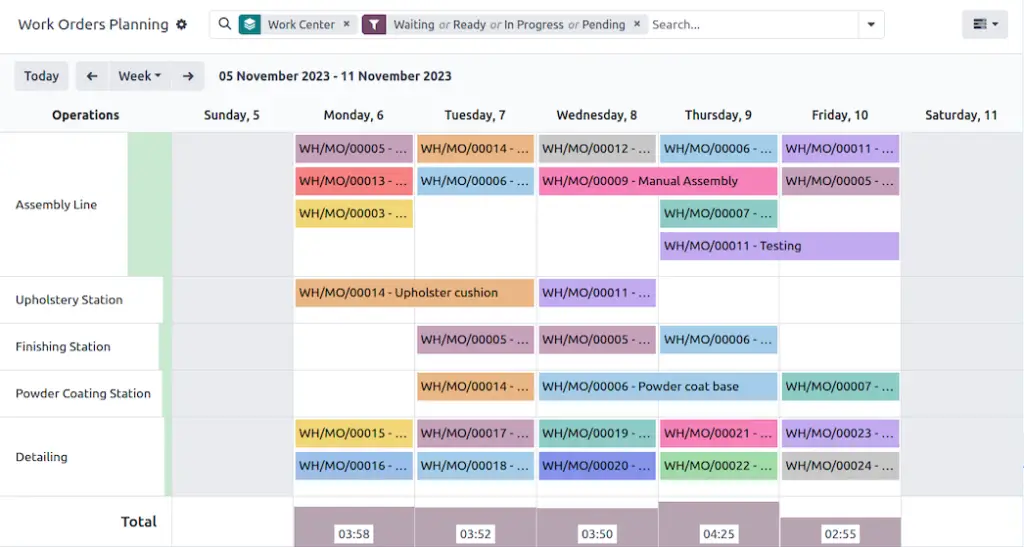
Odoo Manufacturing is built for companies that need to plan, schedule, execute, and monitor production. It supports bills of materials, manufacturing orders, work orders, routings, work centers, kits, production planning, and reporting.
The system can help you convert demand into production activity. When used with Inventory, Purchase, and Sales, Odoo can support a more connected flow from customer demand to material planning and shop floor execution.
Manufacturing teams can use BoMs to define the components needed to create finished products. Routings and work centers help define how production should be completed, where work happens, and how operations are sequenced.
This makes Odoo useful for discrete manufacturing, assembly-based production, make-to-stock workflows, and make-to-order processes. However, the level of fit depends heavily on how well the system is configured around your actual production model.
PLM for Product Lifecycle Management
Odoo PLM helps engineering and production teams manage product changes without disrupting live production. It supports engineering change orders, BoM versioning, document management, change comparison, and controlled approvals.
This is especially useful when your products evolve frequently. Instead of updating a BoM manually and risking confusion on the shop floor, Odoo PLM allows changes to move through a structured review and approval process.
Engineering change orders help you isolate proposed changes until they are approved. Teams can compare changes, review design updates, attach documents, and decide when a new version should be released.
For manufacturers with compliance needs, product documentation requirements, or frequent design updates, PLM is one of the most important reasons to consider Odoo over simpler inventory-first platforms.
Purchase and Procurement
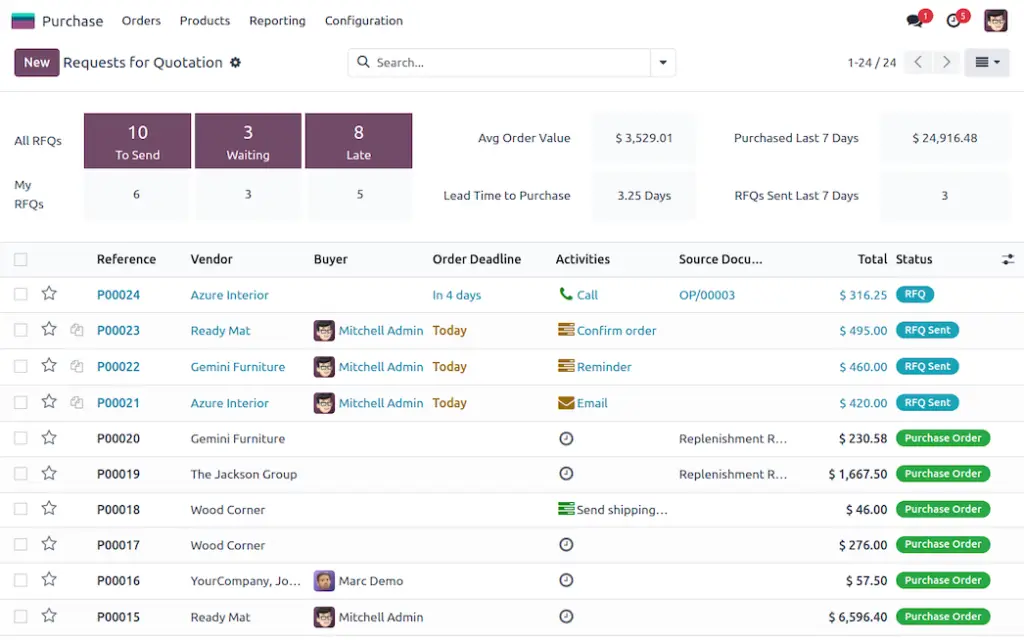
Odoo Purchase supports the procurement side of the supply chain. It allows you to manage requests for quotations, purchase orders, receipts, vendor bills, product variants, vendor information, and procurement workflows.
The app is particularly helpful when connected to Inventory and Manufacturing. If stock drops below a required level or materials are needed for production, Odoo can help streamline replenishment and purchasing activity.
Odoo Purchase also supports 3-way matching, which compares the purchase order, vendor bill, and receipt. This helps reduce billing errors and gives your finance team better control over supplier payments.
For companies that deal with multiple suppliers, recurring replenishment, and production-related procurement, this integration is more useful than managing purchasing through email threads or spreadsheets.
Maintenance Management
Odoo Maintenance helps manufacturers manage equipment, maintenance requests, preventive maintenance schedules, and equipment performance. It is designed to reduce downtime and improve visibility into machine reliability.
The app can track maintenance activities through kanban and calendar views. Teams can manage requests, assign work, monitor status, and connect maintenance activities with production work centers.
Odoo also supports equipment statistics such as mean time between failure and mean time to repair. These KPIs can help maintenance managers understand which machines require attention and where preventive maintenance rules should be improved.
This is valuable for production environments where downtime can delay orders, increase costs, and reduce customer satisfaction.
Quality Management
Odoo Quality helps you create quality control points, perform quality checks, manage quality alerts, and analyze defects. It can be used during receiving, production, and final inspection depending on how your workflow is configured.
The ability to trigger quality checks automatically is important for manufacturers that need consistent inspection steps. Instead of relying on informal reminders, Odoo can embed quality control into operational workflows.
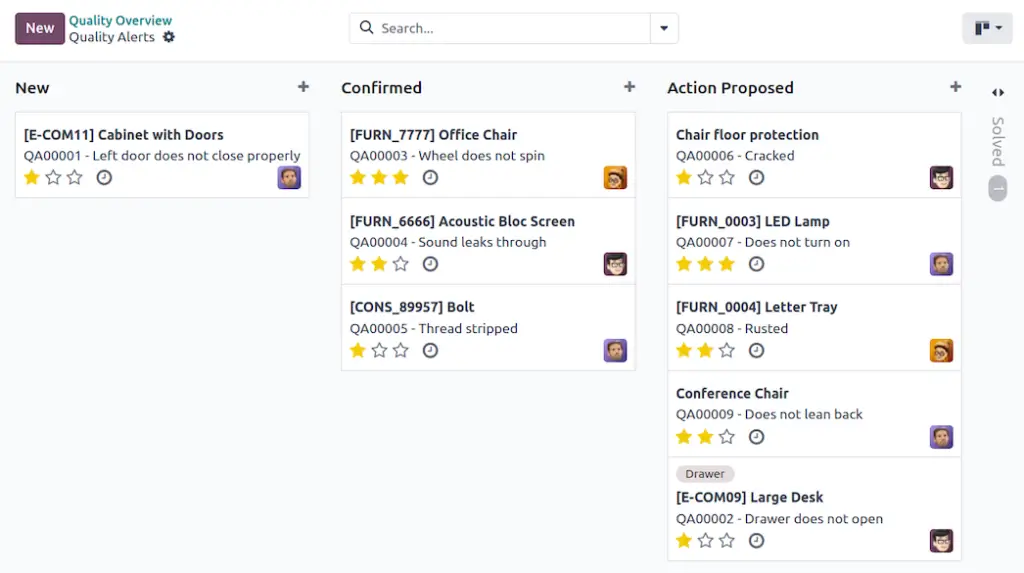
Quality alerts help teams track defects, identify root causes, suggest corrective actions, and monitor non-conformities. The kanban view makes it easier to move issues through review stages.
For companies that want to connect quality management with manufacturing, maintenance, and inventory traceability, Odoo Quality provides a practical layer of operational control.
Pros and Cons
Advantages and Disadvantages
Positive
✅ Fully integrated ERP
✅ Strong inventory control
✅ Built-in MRP tools
✅ Scales across departments
✅ Flexible app structure
Negatives
❌ Requires careful setup
❌ Implementation can grow
❌ Not manufacturing-only
❌ Customization needs expertise
❌ Pricing depends on users
Odoo has a strong value proposition for businesses that want one connected ERP instead of several disconnected tools. However, it is not a plug-and-play system for every manufacturer.
Pros:
Integrated supply chain ecosystem: Odoo connects Inventory, Manufacturing, Purchase, PLM, Maintenance, and Quality in one platform. This gives you a more complete operational view than standalone inventory or MRP tools.
Strong inventory and warehouse control: Odoo Inventory supports barcode scanning, smart routes, picking workflows, traceability, reservations, and valuation. This makes it suitable for businesses that need better warehouse discipline.
Useful manufacturing depth: Odoo Manufacturing supports BoMs, routings, work centers, work orders, kits, production planning, and reporting. It can support both simple and moderately complex production workflows.
PLM and quality are built into the ecosystem: Many smaller systems stop at inventory and production. Odoo goes further by supporting engineering change control, quality checks, quality alerts, and document management.
Flexible growth path: You can expand into additional Odoo apps such as Accounting, Sales, CRM, eCommerce, Documents, and Field Service. This makes Odoo appealing if you want to centralize more than production.
Cons:
Implementation quality matters: Odoo can become powerful, but only if it is configured properly. Poor setup can create confusion around inventory routes, BoMs, reordering rules, and production workflows.
Not always the fastest system to launch: A simple inventory tool may be quicker to deploy. Odoo usually requires more planning because it touches multiple departments and business processes.
Customization can require expert help: Odoo is flexible, but deeper customization often requires an experienced Odoo partner, developer, or internal admin who understands the platform.
Manufacturing specialists may go deeper in narrow areas: Some dedicated production systems may offer stronger out-of-the-box features for advanced scheduling, capacity planning, MES execution, or industry-specific compliance.
Costs are not only subscription-based: Licensing is only one part of the total cost. You should also consider implementation, migration, training, support, and custom development.
User Experience
User Interface and Usability
Odoo’s interface is cleaner than many traditional ERP systems, but it still has the depth of an ERP. That means usability depends on the user’s role and how well the workspace is configured.
Ease of Use
For everyday users, Odoo can feel straightforward once the main workflows are configured. Inventory users can work with transfers, receipts, deliveries, and barcode operations. Production users can manage manufacturing orders, work orders, and shop floor tasks.
The challenge is not usually the visual design. The challenge is understanding the logic behind routes, BoMs, operations, work centers, replenishment rules, and quality control points.
For this reason, Odoo is best implemented with a clear process map. Before going live, you should define how materials move, how products are manufactured, how purchasing is triggered, and how quality checks are enforced.
Dashboards and Operational Visibility
Odoo gives teams visibility through dashboards, kanban views, list views, calendars, reporting screens, and activity tracking. This helps users monitor operational status without moving between several disconnected systems.
Manufacturing managers can review production activity, inventory managers can follow stock movements, procurement teams can track purchase orders, and maintenance teams can monitor equipment requests.
The main benefit is shared data. When every department works inside the same system, there is less need to reconcile spreadsheets or ask other teams for manual updates.
Mobile and Shop Floor Access
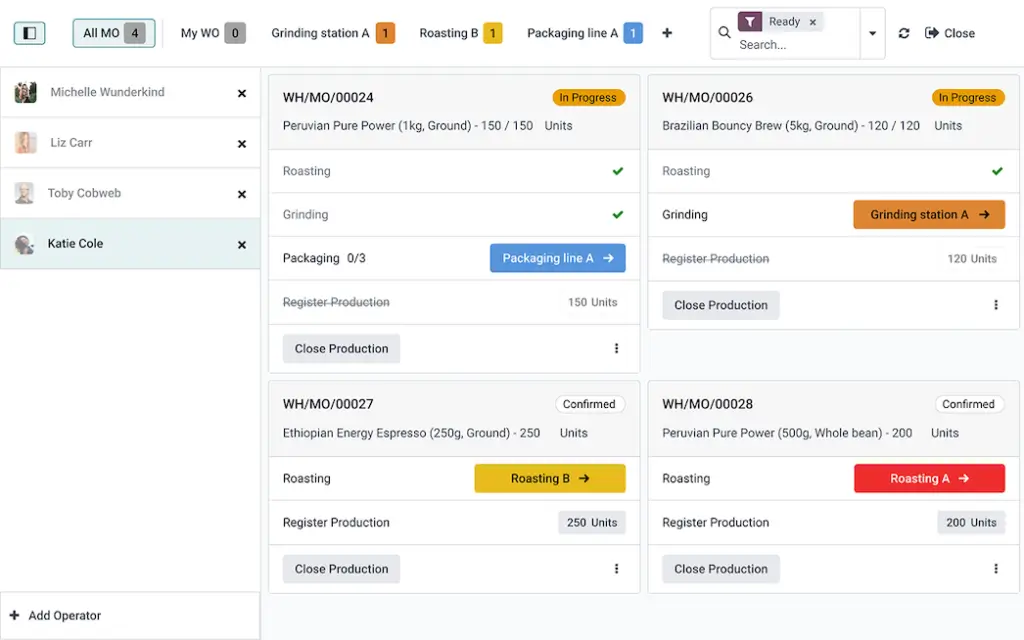
Odoo can be used across devices, which helps teams access operational workflows from offices, warehouses, and shop floor environments. Barcode workflows and shop floor screens can reduce paper-based updates and improve real-time production reporting.
This is particularly useful when operators need to record completed work, scrap, time, or quality checks without waiting until the end of a shift.
Learning Curve
Odoo has a moderate learning curve. It is easier to navigate than many legacy ERP systems, but more complex than simple inventory tools.
Users who only need to receive stock or complete work orders can usually be trained quickly. Admins, production planners, and operations leaders need deeper training because they must understand the structure behind the workflows.
Top Benefits
How Odoo Improves Production and Supply Chain Workflows
The biggest benefit of Odoo Production and Supply Chain is operational alignment. It helps you connect what you sell, what you buy, what you stock, what you produce, and what you inspect.
End-to-End Supply Chain Visibility
When Odoo is implemented properly, teams can follow the operational flow from demand to delivery. A sales order can affect stock reservations, procurement needs, manufacturing activity, delivery preparation, and invoicing.
This is a major improvement over disconnected tools, where sales, inventory, purchasing, and production often operate with different data.
Better Material Planning
Manufacturing depends on material availability. Odoo helps you connect BoMs, inventory levels, purchase activity, and manufacturing orders so you can see whether production can start on time.
This helps reduce last-minute purchasing, missing components, and manual stock checks. It also gives planners better information before committing to production dates.
Improved Engineering Change Control
Product changes can create costly mistakes if they are not controlled. Odoo PLM gives engineering and production teams a structured way to approve BoM changes, attach documents, compare versions, and release updates.
This is useful when your business has frequent design updates, custom product variations, or a formal approval process before production changes go live.
More Consistent Quality Processes
Quality management is easier when inspections are built into operational workflows. Odoo can trigger quality checks at defined stages, helping teams inspect incoming materials, in-process work, or finished goods.
Quality alerts also create accountability. Instead of defects being discussed informally, they can be tracked, investigated, and resolved inside the system.
Reduced Equipment Downtime
Maintenance is often overlooked until a machine fails. Odoo Maintenance helps teams schedule preventive maintenance, track requests, and monitor equipment KPIs.
For manufacturers, this can improve production reliability because maintenance activity is connected to the same operational environment as manufacturing.
Pricing and Plans
Odoo Pricing: Is It Worth the Investment?
Odoo pricing is based mainly on the plan, number of users, hosting choice, and whether you need customization. Because pricing can vary by region, billing period, and implementation scope, you should confirm the latest price on Odoo’s official pricing page before making a final decision.
Odoo generally offers a One App Free option, a Standard plan, and a Custom plan. For production and supply chain teams, the most important question is not only the subscription cost. You also need to consider implementation, data migration, training, configuration, and potential custom development.
| Plan | Best For | Production and Supply Chain Fit |
| One App Free | Testing one operational need | Useful for trying one app, but limited for connected supply chain workflows |
| Standard | Companies using Odoo Online with multiple apps | Good for teams that need integrated apps without advanced customization |
| Custom | Companies needing Studio, custom modules, API, multi-company, or advanced hosting | Best fit for manufacturers with complex workflows, integrations, or customization needs |
One App Free
The One App Free option can be helpful if you want to test one Odoo app with minimal risk. For example, you may want to evaluate Inventory or Manufacturing before expanding.
However, production and supply chain work usually requires multiple connected apps. If you need Inventory, Manufacturing, Purchase, Quality, PLM, and Maintenance together, you will likely outgrow a single-app setup quickly.
Standard Plan
The Standard plan is typically the better starting point for companies that want access to multiple Odoo apps in a hosted Odoo Online environment.
For many small and mid-sized companies, this plan can cover the core operational need: inventory, procurement, manufacturing, quality control, and basic business management. It is best when your workflows can be configured mostly with standard Odoo functionality.
Custom Plan
The Custom plan is more relevant when your business needs deeper flexibility. This may include Odoo Studio, external API access, multi-company support, custom modules, Odoo.sh, or on-premise deployment.
Manufacturers with complex production models, advanced integrations, multiple entities, or highly specific workflows should evaluate the Custom plan carefully. It may cost more, but it can also prevent operational limitations later.
Is Odoo pricing worth it?
Odoo can be cost-effective when you use it as a broader ERP system rather than only a manufacturing tool. The value increases when you connect production with purchasing, inventory, accounting, sales, documents, and customer workflows.
However, Odoo is not always the cheapest path if you only need basic production tracking. If your business has a small team and a simple workflow, a dedicated inventory or MRP tool may be easier and faster to launch.
For growing manufacturers that want one scalable business system, Odoo can offer strong long-term value. Just make sure your budget includes implementation and training, not only licenses.
Odoo Alternatives
How Does Odoo Compare to Other Production Software?
Odoo competes with both manufacturing ERP systems and production management tools. Its biggest advantage is breadth. Its biggest challenge is that broader ERP flexibility can require more setup than a focused manufacturing platform.
Odoo vs Katana
Katana is often easier for small manufacturers that want a modern inventory and production system without a broader ERP implementation.
Katana is a strong fit for product-based SMBs, eCommerce manufacturers, and companies that want a clean manufacturing-focused experience. Odoo is better when you want manufacturing to connect with accounting, procurement, CRM, sales, maintenance, PLM, quality, and other departments.
Choose Katana if simplicity and fast adoption matter most. Choose Odoo if your priority is a broader ERP foundation.
Odoo vs MRPeasy
MRPeasy is a strong option for small manufacturers that need MRP, production planning, inventory, and shop floor control in a more manufacturing-focused package.
Compared with MRPeasy, Odoo offers a much broader business application ecosystem. That can be a major advantage if you want to manage more departments in one system.
MRPeasy may be easier to evaluate as a manufacturing system. Odoo may be more scalable as an all-in-one ERP.
Odoo vs inFlow Inventory
inFlow Inventory is best for businesses that need strong inventory management, order management, barcode scanning, and warehouse control without the complexity of a full ERP.
Odoo is stronger when inventory is only one part of a larger operational workflow. If you need manufacturing, purchasing, quality, maintenance, and PLM in one place, Odoo offers more depth.
Choose inFlow for inventory-first operations. Choose Odoo for integrated supply chain and production management.
Odoo vs NetSuite
NetSuite is a more enterprise-oriented ERP platform with strong financials, inventory, procurement, and operational capabilities. It is often considered by larger companies that need mature ERP governance and advanced reporting.
Odoo can be more flexible and accessible for small and mid-sized businesses. It also has a modular app structure that can feel easier to expand gradually.
NetSuite may be a better fit for larger organizations with complex financial controls. Odoo is often more attractive for companies that want ERP power with more customization flexibility.
Who is it for?
Is Odoo Production and Supply Chain Right for You?
Odoo is best for companies that want production and supply chain management to be part of a broader ERP strategy. It is less ideal if you only want a simple manufacturing tracker with minimal setup.
Who Should Use Odoo?
- Growing manufacturers: Teams that need inventory, MRP, purchasing, and quality in one system.
- Product-based businesses: Companies managing stock, suppliers, assemblies, and fulfillment.
- Multi-department teams: Businesses that want sales, finance, purchasing, and production connected.
- Companies with changing products: Teams that need PLM, ECOs, BoM versioning, and documentation.
- Operations teams planning ERP expansion: Companies that want to add more Odoo apps over time.
Who Might Look for Alternatives?
- Very small workshops: Teams that only need simple inventory and order tracking.
- Companies without implementation resources: Odoo needs planning, ownership, and training.
- Highly specialized manufacturers: Some industries may need niche MES or compliance features.
- Teams wanting instant deployment: A focused production tool may launch faster.
In my opinion, Odoo is one of the strongest options when you want production management and supply chain control inside a broader business operating system. It is not always the easiest solution, but it can be one of the most scalable.
The best-fit user is a small or mid-sized business that has outgrown spreadsheets and disconnected apps, but does not want to jump into a heavy enterprise ERP implementation.
Conclusion
Final Thoughts
Odoo Production and Supply Chain is a powerful choice for businesses that want to connect inventory, manufacturing, purchasing, PLM, maintenance, and quality management in one ERP ecosystem.
Its biggest strength is integration. You can manage materials, suppliers, manufacturing orders, BoM changes, quality checks, maintenance requests, and stock movements without relying on disconnected systems.
Its main weakness is implementation complexity. Odoo can be highly effective, but you need to configure it properly and train your team around the right workflows.
For manufacturers and product-based businesses that want a scalable ERP foundation, Odoo deserves serious consideration. For very small teams that need only basic production tracking, a simpler tool may be more practical.
If you are still comparing options, review our best production management software guide to see how Odoo compares with other platforms.
Frequently Asked Questions
Have more questions?
What is Odoo Production and Supply Chain?
Odoo Production and Supply Chain refers to the connected Odoo apps used to manage inventory, manufacturing, purchasing, PLM, maintenance, and quality control. It helps product-based businesses plan production, manage stock, procure materials, track equipment, and control quality in one ERP system.
Is Odoo good for manufacturing?
Yes. Odoo is a strong manufacturing option for small and mid-sized businesses that need MRP, bills of materials, work orders, routings, work centers, inventory, purchasing, quality checks, and maintenance in one connected platform.
Does Odoo include inventory management?
Yes. Odoo Inventory supports stock moves, warehouses, barcode scanning, smart routes, picking workflows, reservations, inventory valuation, and traceability. It also connects with Manufacturing, Purchase, Sales, Quality, and Accounting.
What manufacturing features does Odoo offer?
Odoo Manufacturing supports bills of materials, manufacturing orders, work orders, routings, work centers, kits, planning, production reporting, and shop floor workflows. It can be used for make-to-stock, make-to-order, and assembly-based production processes.
Does Odoo support PLM?
Yes. Odoo PLM supports engineering change orders, BoM versioning, document management, change comparison, approvals, and controlled product updates. It is useful for manufacturers that frequently update product designs or production specifications.
Can Odoo manage purchasing and suppliers?
Yes. Odoo Purchase helps you manage RFQs, purchase orders, receipts, vendor bills, vendor information, and procurement workflows. It also supports 3-way matching between purchase orders, receipts, and vendor bills.
Does Odoo have maintenance management?
Yes. Odoo Maintenance helps teams manage equipment, maintenance requests, preventive maintenance, calendars, kanban workflows, and equipment performance statistics such as mean time between failure and mean time to repair.
Does Odoo support quality control?
Yes. Odoo Quality supports quality control points, quality checks, quality alerts, defect tracking, corrective actions, and reporting. It can be connected with manufacturing and inventory workflows to improve inspection consistency.
Is Odoo easy to implement?
Odoo is easier to use than many legacy ERP systems, but implementation still requires planning. You need to configure products, BoMs, routes, warehouses, purchasing rules, work centers, quality checks, and user permissions correctly.
Who is Odoo Production best for?
Odoo Production is best for growing manufacturers, distributors, wholesalers, and product-based businesses that want integrated inventory, manufacturing, procurement, PLM, maintenance, and quality workflows inside a broader ERP system.