Introduction
Manufacturing management software helps manufacturers plan production, manage materials, track inventory, control shop floor activity, coordinate purchasing, monitor costs, and deliver finished goods on time.
For small manufacturers, it often replaces spreadsheets and disconnected accounting workflows. For growing manufacturers, it becomes the operational system that connects sales orders, bills of materials, work orders, inventory, suppliers, machines, labor, and reporting.
When production data is scattered across spreadsheets, emails, warehouse systems, and accounting tools, your team can lose visibility fast. Materials may be ordered too late, inventory may be overstated, production schedules may shift without warning, and customer delivery dates may become harder to trust.
The right manufacturing management software solves these problems by giving you one reliable view of your production workflow. It helps you understand what needs to be made, what materials are required, where inventory sits, which jobs are in progress, and whether your team can meet demand profitably.
In this guide, we compare seven of the best manufacturing management software platforms for 2026: Katana, MRPeasy, Fishbowl, NetSuite Manufacturing ERP, Odoo Manufacturing, Microsoft Dynamics 365 Supply Chain Management, and Epicor Kinetic.
Each tool fits a different type of manufacturer. Some are best for small businesses that need a practical MRP system. Others are better for scaling manufacturers that need ERP, shop floor control, quality management, supply chain planning, and deeper financial visibility.
Why Choosing the Right Manufacturing Management Software Matters
Manufacturing software is not just another operations tool. It affects your production speed, inventory accuracy, cash flow, delivery reliability, and customer satisfaction.
A small batch manufacturer needs different functionality than a multi-location enterprise. A make-to-order business needs different controls than a high-volume make-to-stock company. A manufacturer using QuickBooks may need a different path than a business ready to replace its full ERP system.
When comparing manufacturing management software, consider:
- Production planning: Can it plan jobs, work orders, capacity, and deadlines?
- MRP: Can it calculate material needs from demand, BOMs, and stock levels?
- Inventory control: Can it track raw materials, WIP, finished goods, lots, and serials?
- Shop floor visibility: Can operators report progress, time, scrap, and production status?
- Purchasing: Can it create purchase orders and manage supplier requirements?
- Cost tracking: Can it connect labor, materials, overhead, and production costs?
- Quality control: Can it support inspections, nonconformance, recalls, or compliance?
- Integrations: Does it connect with accounting, ecommerce, CRM, shipping, or BI tools?
- Scalability: Can it support more products, locations, users, and complexity?
The best manufacturing management platform should reduce manual work, improve operational visibility, and help your team make better production decisions.
Top 7 Manufacturing Management Software for 2026
| Software | Best For | Key Strength | Best Fit |
| Katana | Growing product businesses and SMB manufacturers | Real-time inventory, production tracking, sales channel sync, purchasing, forecasting, and warehouse workflows | Manufacturers that want modern inventory-led production management |
| MRPeasy | Small and mid-sized manufacturers | MRP, production planning, inventory, procurement, CRM, shop floor reporting, and finance tools | Manufacturers replacing spreadsheets with a practical MRP system |
| Fishbowl | QuickBooks and Xero users | Inventory control, manufacturing support, barcode scanning, lot tracking, reorder automation, and accounting integration | Inventory-heavy manufacturers that want operations software without full ERP complexity |
| NetSuite Manufacturing ERP | Scaling manufacturers that need cloud ERP | ERP, inventory, MRP, scheduling, shop floor control, quality, financials, and supply chain management | Growing companies that need manufacturing and finance in one system |
| Odoo Manufacturing | Modular ERP users and flexible manufacturing teams | Manufacturing orders, work orders, BOMs, barcode, PLM, quality, maintenance, and connected business apps | Manufacturers that want a flexible modular ERP approach |
| Microsoft Dynamics 365 Supply Chain Management | Complex manufacturers and enterprise supply chains | Demand planning, supply planning, shop floor management, warehouse management, procurement, asset management, and AI-supported planning | Manufacturers already invested in Microsoft or scaling into complex operations |
| Epicor Kinetic | Manufacturing-focused ERP users | Job management, advanced production, lean manufacturing, MES, quality, data collection, and production control | Manufacturers that need deep industry-specific ERP capabilities |
How We Selected the Best Manufacturing Management Software
To build this list, we focused on software that can support real manufacturing workflows, not only generic task management or basic inventory tracking.
Each platform was evaluated based on how well it helps manufacturers manage production planning, inventory, bills of materials, purchasing, work orders, shop floor visibility, reporting, integrations, and scalability.
We also considered fit by company size. A small manufacturer does not always need a large ERP implementation. At the same time, a manufacturer with multiple locations, advanced quality requirements, or complex supply chains may outgrow lightweight MRP tools quickly.
This is why the list includes both practical SMB systems and deeper ERP platforms. The goal is to help you choose software that fits your current operation while giving you enough room to grow.
Katana
Overview:
Katana is a strong choice for growing product businesses that need better control over inventory, sales orders, purchasing, production, and fulfillment. It is especially useful when your team sells across multiple channels and needs production activity to stay aligned with live stock levels.
The platform is built around real-time visibility. Instead of planning production from static spreadsheets, you can see stock, materials, sales orders, purchase requirements, and manufacturing activity in one system.
Katana is a particularly good fit for modern manufacturers, ecommerce-connected brands, food and beverage makers, cosmetics companies, furniture brands, electronics businesses, and other product companies that need inventory and production to work together.
Top Features:
✅ Real-time inventory visibility across products, materials, and locations.
✅ Production management for work orders, materials, and finished goods.
✅ Sales order management across ecommerce, wholesale, and retail channels.
✅ Purchasing, demand forecasting, warehouse workflows, and API support.
✅ Lot and serial tracking for traceability-focused manufacturers.
Top Benefits:
Katana’s biggest benefit is clarity. It gives manufacturers a live view of what is available, what is committed, what needs to be purchased, and what is moving through production.
This is valuable for teams that have outgrown spreadsheets but do not want the complexity of a traditional enterprise ERP implementation. You can connect inventory, production, purchasing, sales, and fulfillment without forcing every workflow into a rigid system.
Katana also works well for teams that need stronger inventory discipline. If your production planning depends on accurate stock levels, reserved materials, reorder timing, and incoming purchase orders, Katana gives you the operational visibility needed to make better decisions.
Why It’s Recommended:
Katana is recommended as the best overall manufacturing management software for growing product businesses because it combines usability with strong production and inventory workflows.
It is not the deepest enterprise ERP in this list, but that is part of its appeal. It gives SMB manufacturers the features they need most without overwhelming them with unnecessary implementation complexity.
Pros and cons
Pros
✅ Strong real-time inventory visibility
✅ Excellent fit for growing product businesses
✅ Good production and purchasing workflows
✅ Useful ecommerce and accounting integrations
Cons
❌ Not as deep as enterprise ERP platforms
❌ Advanced workflows may require onboarding
❌ Less suited for highly complex global manufacturing
❌ Best fit depends on inventory-led production needs
MRPeasy
Overview:
MRPeasy is one of the most practical manufacturing management software options for small and mid-sized manufacturers. It is designed for teams that need MRP, production planning, inventory, purchasing, sales, CRM, shop floor reporting, and basic financial visibility without moving into a heavy ERP system.
The platform is especially relevant if your current process relies on spreadsheets, disconnected inventory records, or manual production planning. MRPeasy gives you a structured way to plan production, calculate material requirements, estimate lead times, manage purchase orders, and track jobs.
It is a strong fit for make-to-order, make-to-stock, batch, and mixed-mode manufacturers that need better control over day-to-day production.
Top Features:
✅ MRP and production planning based on demand, inventory, and capacity.
✅ Real-time inventory overview with lot, batch, barcode, and serial tracking.
✅ Procurement tools for purchase requirements and supplier management.
✅ Shop floor reporting for labor, materials, and order progress.
✅ Sales, CRM, invoicing, shipping, and finance workflows.
Top Benefits:
MRPeasy’s biggest benefit is that it gives smaller manufacturers a complete manufacturing system without the size and cost of enterprise ERP.
You can create production plans, understand material requirements, issue purchase orders, track stock, manage customers, estimate lead times, and monitor work in progress from one platform.
This helps reduce the operational gap between sales, production, purchasing, inventory, and finance. For manufacturers that struggle with manual coordination, that alone can create a major improvement.
Why It’s Recommended:
MRPeasy is recommended for small manufacturers that want a serious MRP system but do not want a complicated ERP implementation.
If your priority is production planning and material control, MRPeasy should be one of the first tools you evaluate. Katana is usually better for inventory-led product businesses with strong ecommerce or multi-channel sales needs, while MRPeasy is often stronger for traditional MRP-focused production planning.
Pros and cons
Pros
✅ Strong MRP functionality for SMB manufacturers
✅ Good production, inventory, and procurement coverage
✅ Practical fit for spreadsheet replacement
✅ Supports several manufacturing workflows
Cons
❌ Interface may feel more operational than modern ecommerce tools
❌ Enterprise manufacturers may need deeper ERP controls
❌ Implementation still requires clean production data
❌ Best value depends on manufacturing process complexity
Fishbowl
Overview:
Fishbowl is manufacturing and inventory software built for businesses that want stronger operational control while keeping their accounting system, especially QuickBooks or Xero.
It is a good fit for inventory-heavy manufacturers, distributors, wholesalers, and product businesses that need better stock accuracy, warehouse management, barcode scanning, reorder automation, lot and serial tracking, and manufacturing support.
Fishbowl is not the same as a full ERP replacement for every company. Its strength is acting as a powerful operations layer that connects inventory, manufacturing, warehouse workflows, and accounting.
Top Features:
✅ Inventory and manufacturing workflows for small and mid-sized businesses.
✅ QuickBooks Online, QuickBooks Desktop, and Xero integration.
✅ Lot, serial, expiry, landed cost, and recall-ready traceability.
✅ Barcode scanning, mobile inventory workflows, and multi-warehouse support.
✅ Reorder automation, forecasting, ecommerce, shipping, CRM, and CAD integrations.
Top Benefits:
Fishbowl’s biggest benefit is inventory control. If your manufacturing problems are caused by inaccurate stock levels, manual receiving, poor reorder timing, or weak warehouse visibility, Fishbowl can help create a more reliable operational foundation.
The accounting integration is also important. Many small and mid-sized manufacturers are not ready to replace QuickBooks or Xero, but they still need more manufacturing and inventory functionality than accounting software can provide on its own.
Fishbowl gives those businesses a middle path: better operations without immediately forcing a full ERP migration.
Why It’s Recommended:
Fishbowl is recommended for manufacturers that are inventory-heavy and accounting-led. It is especially relevant when your finance team wants to keep QuickBooks or Xero, but your operations team needs stronger inventory, warehouse, and production workflows.
If you need deep production scheduling, MRPeasy or Epicor may be a better fit. If you need multi-channel product business visibility, Katana may be stronger. If inventory accuracy and accounting integration are the priority, Fishbowl is one of the best options in this list.
Pros and cons
Pros
✅ Strong QuickBooks and Xero fit
✅ Excellent inventory and warehouse controls
✅ Useful barcode and traceability features
✅ Good for inventory-heavy manufacturers
Cons
❌ Not always a full ERP replacement
❌ Production planning depth may not fit complex manufacturers
❌ Setup depends on clean inventory data
❌ Best for teams that prioritize accounting integration
NetSuite Manufacturing ERP
Overview:
NetSuite Manufacturing ERP is a cloud ERP platform for manufacturers that need stronger financial, operational, inventory, production, and supply chain control in one system.
It is best suited for scaling businesses that have outgrown lightweight inventory or MRP tools. If your manufacturing operation now requires more formal planning, multi-location inventory, cost control, financial reporting, quality management, procurement, and supply chain visibility, NetSuite becomes a serious option.
Compared with SMB-first tools like Katana and MRPeasy, NetSuite is broader and more enterprise-oriented. It can support more complexity, but it also requires more implementation planning.
Top Features:
✅ Manufacturing ERP with inventory, planning, scheduling, and MRP.
✅ Shop floor control and production management workflows.
✅ Quality and compliance management for controlled operations.
✅ Supply chain management and procurement visibility.
✅ Cost and financial control across manufacturing operations.
Top Benefits:
NetSuite’s biggest benefit is unified business management. It helps connect manufacturing operations with finance, inventory, procurement, sales, and reporting.
This matters when production decisions affect cash flow, margins, purchase commitments, fulfillment, and revenue recognition. Instead of relying on separate systems, NetSuite gives leadership a more connected view of business performance.
For scaling manufacturers, this can reduce manual reconciliation and improve decision-making across finance and operations.
Why It’s Recommended:
NetSuite is recommended for manufacturers that need cloud ERP rather than only a production planning tool.
It is not usually the fastest or simplest choice for a very small manufacturer. However, for growing companies with complex financials, multiple departments, and more advanced operational requirements, NetSuite offers the broader ERP foundation needed to scale.
Pros and cons
Pros
✅ Strong cloud ERP foundation
✅ Good finance and manufacturing connection
✅ Useful for scaling multi-department operations
✅ Covers inventory, MRP, quality, and supply chain
Cons
❌ More complex than SMB manufacturing tools
❌ Implementation requires planning and budget
❌ May be too much for early-stage manufacturers
❌ Customization can increase long-term cost
Odoo Manufacturing

Overview:
Odoo Manufacturing is part of the wider Odoo business app ecosystem. It is a strong option for manufacturers that want modular ERP functionality without starting with a traditional enterprise ERP stack.
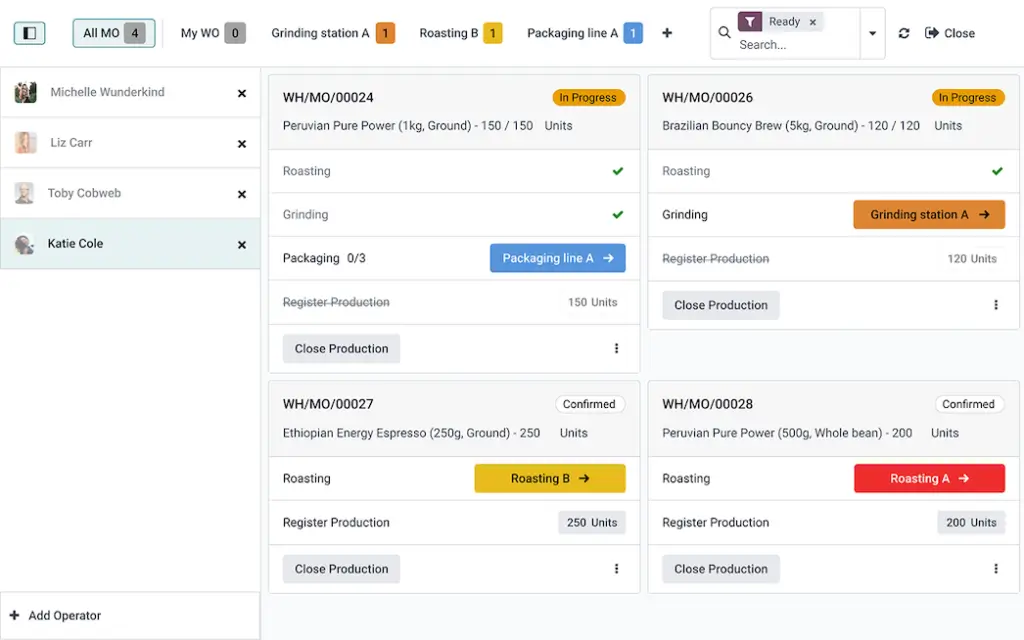
The platform supports manufacturing orders, work orders, bills of materials, work centers, routing, barcode workflows, quality checks, maintenance, PLM, and shop floor control panels.
Odoo is especially useful if you want manufacturing software that can connect naturally with accounting, inventory, purchasing, sales, ecommerce, CRM, project management, and other business functions over time.
Top Features:
✅ Manufacturing orders, work orders, routings, and work centers.
✅ Multi-level bills of materials and flexible master data.
✅ Barcode workflows for lot, serial, and production activity tracking.
✅ PLM, engineering changes, document management, and version control.
✅ Quality control, maintenance, tablets, and shop floor workflows.
Top Benefits:
Odoo’s biggest benefit is flexibility. You can start with manufacturing and inventory, then add other apps as your business needs change.
This modular approach is useful for manufacturers that want to build an integrated operating system gradually. You can connect production with purchasing, sales, accounting, maintenance, quality, and PLM without buying a separate tool for every function.
Odoo can be especially appealing to teams that value customization and want more control over how their system is configured.
Why It’s Recommended:
Odoo Manufacturing is recommended for manufacturers that want a flexible, modular ERP approach.
It may require more configuration than a simpler MRP tool, but that flexibility is valuable if your company wants an adaptable platform that can cover more than production alone.
Pros and cons
Pros
✅ Very flexible modular ERP structure
✅ Strong manufacturing, quality, PLM, and maintenance coverage
✅ Good fit for connected business workflows
✅ Useful for companies that want customization
Cons
❌ Configuration quality matters a lot
❌ May require implementation support
❌ Can become complex if too many apps are added too quickly
❌ Not always as simple as SMB-first MRP tools
Microsoft Dynamics 365 Supply Chain Management
Overview:
Microsoft Dynamics 365 Supply Chain Management is built for more complex manufacturing and supply chain environments. It combines planning, procurement, production, shop floor management, warehouse operations, order management, asset management, and analytics in a scalable enterprise system.
It is especially relevant for manufacturers already invested in Microsoft products such as Microsoft 365, Teams, Power BI, Azure, and the broader Dynamics 365 ecosystem.
Compared with smaller manufacturing tools, Dynamics 365 is more powerful but also more complex. It is best for manufacturers that need a scalable system for multi-site operations, more advanced planning, and cross-functional supply chain visibility.
Top Features:
✅ Demand planning with AI, machine learning models, and external signals.
✅ Supply planning and rapid MRP runs for demand changes.
✅ Shop floor management, order management, and warehouse management.
✅ Procurement, sourcing, asset management, and fulfillment optimization.
✅ Microsoft ecosystem integration across Teams, Power BI, and Dynamics 365 apps.
Top Benefits:
Dynamics 365 Supply Chain Management’s biggest benefit is enterprise visibility. It helps manufacturers coordinate demand, supply, inventory, production, warehouse activity, procurement, and assets across complex operations.
This is valuable when production planning is not only about one workshop or warehouse. If your business has multiple facilities, changing demand, complex replenishment cycles, or global supply chain pressure, a deeper system can help planners react faster.
The Microsoft ecosystem is another advantage. Teams that already use Microsoft tools may benefit from connected reporting, collaboration, automation, and data workflows.
Why It’s Recommended:
Dynamics 365 Supply Chain Management is recommended for complex manufacturers that need more than standard MRP.
It is not the best fit for a small manufacturer that wants a quick setup. However, for enterprise manufacturers, Microsoft-led companies, and organizations that need advanced supply chain and production planning, it is one of the strongest options in this category.
Pros and cons
Pros
✅ Strong enterprise supply chain functionality
✅ Good fit for Microsoft ecosystem users
✅ Supports planning, procurement, shop floor, warehouse, and assets
✅ Scales well for complex operations
Cons
❌ Too complex for many small manufacturers
❌ Requires implementation expertise
❌ Costs can be significant at scale
❌ Best value comes when integrated into the Microsoft stack
Epicor Kinetic
Overview:
Epicor Kinetic is a manufacturing-focused ERP platform designed for companies that need deeper production control than a lightweight MRP system can provide.
It is especially relevant for discrete manufacturers, make-to-order manufacturers, engineer-to-order businesses, job shops, industrial manufacturers, and companies with complex shop floor requirements.
Epicor Kinetic covers job management, advanced production, lean manufacturing methods, data collection, MES, scheduling, quality management, and production control. This makes it one of the more specialized manufacturing ERP platforms in this list.
Top Features:
✅ Job management for planning, costing, tracking, and production control.
✅ Advanced production for scheduling, batching, reporting, and shop floor visibility.
✅ Lean manufacturing support with Kanban and pull-based workflows.
✅ Data collection, MES, real-time alerts, and operator interfaces.
✅ Quality management for inspections, supplier returns, and process control.
Top Benefits:
Epicor Kinetic’s biggest benefit is manufacturing depth. It is built for companies where production complexity, job costing, scheduling, quality, and shop floor execution matter every day.
Unlike more general business systems, Epicor is strongly oriented around manufacturing operations. This makes it useful when your team needs to connect quoting, orders, jobs, materials, labor, machines, quality, and costing in a structured ERP environment.
It is a particularly good option for manufacturers that need more formal production discipline and industry-specific ERP functionality.
Why It’s Recommended:
Epicor Kinetic is recommended for manufacturers that want a dedicated manufacturing ERP rather than a lighter manufacturing app.
If you need shop floor control, MES, advanced production tracking, job costing, lean manufacturing support, and quality workflows, Epicor is one of the strongest platforms to evaluate.
Pros and cons
Pros
✅ Deep manufacturing ERP functionality
✅ Strong job management and production control
✅ Good fit for complex manufacturing operations
✅ Supports MES, lean methods, and quality workflows
Cons
❌ More complex than SMB MRP tools
❌ Requires serious implementation planning
❌ May be too heavy for very small manufacturers
❌ Best suited to companies with clear ERP requirements
How to Choose the Best Manufacturing Management Software
The best manufacturing management software depends on your production model, company size, inventory complexity, accounting setup, and growth plans.
A small manufacturer replacing spreadsheets does not need the same system as a multi-location enterprise with advanced supply chain requirements. Before choosing a platform, map your current workflow from customer demand to production planning, material purchasing, shop floor execution, inventory movement, quality checks, shipping, and financial reporting.
1. Start With Your Manufacturing Type
Your production model should guide your software choice. Make-to-order manufacturers need accurate quoting, lead times, work orders, and job costing. Make-to-stock manufacturers need demand planning, inventory forecasting, replenishment, and finished goods control.
Batch manufacturers may need lot tracking, expiry tracking, traceability, and quality controls. Engineer-to-order manufacturers may need stronger BOM versioning, document control, PLM, and change management.
MRPeasy is strong for small manufacturers that need structured MRP. Katana is strong for inventory-led product businesses. Epicor Kinetic is better for more complex production environments.
2. Decide Whether You Need MRP or Full ERP
MRP software focuses mainly on materials, production planning, inventory, purchasing, and work orders. ERP software covers manufacturing plus broader business functions such as finance, procurement, CRM, HR, reporting, and supply chain management.
If your biggest problem is production planning, material availability, and stock accuracy, an MRP-focused platform like MRPeasy or Katana may be enough.
If your business needs manufacturing, financials, procurement, quality, supply chain, and reporting in one connected system, NetSuite, Odoo, Dynamics 365, or Epicor Kinetic may be a better fit.
3. Review Your Accounting Workflow
Accounting integration is a major decision. If your business is committed to QuickBooks or Xero, Fishbowl may be a strong choice because it strengthens inventory and manufacturing workflows while keeping accounting connected.
Katana and MRPeasy can also support accounting integrations, but Fishbowl is especially known for its accounting-first inventory and manufacturing positioning.
If your team wants to move accounting and manufacturing into one ERP system, NetSuite, Odoo, Dynamics 365, or Epicor may be more appropriate.
4. Check Inventory and Traceability Requirements
Inventory accuracy is one of the most important reasons to invest in manufacturing software. Look at how each tool handles raw materials, components, work in progress, finished goods, multi-location inventory, lot numbers, serial numbers, expiry dates, barcode scanning, and recalls.
If your industry has compliance, food safety, pharmaceutical, electronics, aerospace, or regulated product requirements, traceability becomes even more important.
Katana and Fishbowl are strong options for inventory visibility. Odoo and NetSuite offer broader ERP-connected inventory and traceability workflows. Epicor Kinetic is stronger when traceability must connect deeply with production and quality.
5. Evaluate Shop Floor Adoption
Manufacturing software only works if the shop floor actually uses it. Operators need simple ways to view tasks, report progress, track materials, record time, flag quality issues, and update job status.
If the system is too difficult, your data will become unreliable. This can create the same problems you were trying to solve with software.
For smaller teams, usability matters more than feature volume. For larger teams, shop floor data collection, role-based access, barcode workflows, MES, tablets, and operator dashboards may become essential.
6. Compare Implementation Effort
Implementation is often the hidden cost in manufacturing software. Your team must clean item data, build bills of materials, define routing, set inventory locations, confirm cost assumptions, train users, and decide how production data should move through the system.
Lightweight tools can be faster to implement, but they may not support every advanced requirement. Enterprise ERP systems offer more control, but they usually require more planning, budget, and change management.
Choose software your team can realistically implement, maintain, and use consistently.

Key Features to Look For in Manufacturing Management Software
Manufacturing platforms vary by size and target market, but most manufacturers should evaluate a few core features before choosing.
MRP and Material Planning
MRP helps you calculate what materials are needed, when they are needed, and whether current stock can support production demand.
This is one of the most important features for avoiding stockouts, overbuying, rushed purchasing, and production delays.
Bill of Materials Management
Bill of materials management helps you define the components, quantities, costs, versions, and production requirements for each finished good.
If your products have multiple levels, variations, or engineering changes, strong BOM control becomes essential.
Production Planning and Scheduling
Production planning helps you decide what to make and when. Scheduling helps you understand how work should move through machines, people, work centers, and production stages.
Manufacturers with limited capacity should prioritize software that improves planning visibility and reduces schedule conflicts.
Inventory Management
Inventory management should cover raw materials, components, work in progress, finished goods, warehouses, bins, lots, serials, and stock movements.
The goal is to create one trusted inventory record that production, purchasing, sales, and finance can rely on.
Shop Floor Control
Shop floor control helps operators report job progress, material usage, labor time, scrap, downtime, and quality issues.
This improves visibility and helps managers understand what is actually happening in production, not only what was planned.
Purchasing and Supplier Management
Good manufacturing software should help generate purchase requirements from production demand and inventory levels.
This makes it easier to plan purchasing, compare supplier terms, avoid shortages, and reduce manual purchase order creation.
Quality Management
Quality features can include inspections, checklists, quality alerts, nonconformance workflows, supplier returns, traceability, and compliance reporting.
Quality management becomes especially important for regulated industries and manufacturers with strict customer requirements.
Reporting and Cost Control
Reporting should help you understand production cost, inventory value, job profitability, material usage, supplier performance, and delivery reliability.
Strong cost visibility helps you price products better and understand where margins are being lost.
Manufacturing Management Software vs MRP vs ERP vs MES
Manufacturing software terms can be confusing because vendors often use them differently. The key is to understand what problem each system solves.
MRP Software
MRP software focuses on material requirements, production planning, inventory levels, purchasing, and work orders.
It is usually best for small and mid-sized manufacturers that need better control over materials and production without implementing a full ERP system.
ERP Software
ERP software covers manufacturing plus broader business management. This can include finance, procurement, inventory, supply chain, CRM, HR, reporting, and compliance.
ERP is usually better for companies that need one connected system across multiple departments.
MES Software
MES software focuses on shop floor execution. It helps track production activity, machine data, operator actions, downtime, quality, and real-time manufacturing performance.
MES becomes more important when you need detailed production execution data, not only planning data.
Manufacturing Management Software
Manufacturing management software is the broader category. It can include MRP, ERP, MES, inventory management, production planning, quality, purchasing, and reporting.
The best option depends on whether your biggest challenge is planning materials, managing the shop floor, connecting finance, improving inventory, or scaling the full operation.
Which Manufacturing Management Software Should You Choose?
If you want the best overall manufacturing management software for a growing product business, choose Katana. It is especially strong for real-time inventory, production visibility, purchasing, sales order sync, and modern operational workflows.
If you are a small manufacturer that needs structured MRP, choose MRPeasy. It gives you production planning, inventory, procurement, sales, shop floor reporting, and finance tools in a practical system for SMB manufacturers.
If your business runs on QuickBooks or Xero and needs better inventory and manufacturing control, choose Fishbowl. It is one of the best options for inventory-heavy manufacturers that want better operations without replacing accounting immediately.
If you need cloud ERP for a scaling manufacturing company, choose NetSuite Manufacturing ERP. It is better for companies that need manufacturing, finance, inventory, quality, supply chain, and reporting in one system.
If you want a modular ERP approach, choose Odoo Manufacturing. It works well for manufacturers that want production, inventory, purchasing, quality, maintenance, PLM, and other business apps connected gradually.
If you are an enterprise manufacturer or already invested in Microsoft, choose Microsoft Dynamics 365 Supply Chain Management. It is best for complex planning, procurement, warehouse, asset, supply chain, and shop floor management workflows.
If you need deep manufacturing ERP functionality with strong production control, choose Epicor Kinetic. It is best for manufacturers that need job management, advanced production, lean workflows, MES, quality, and shop floor data collection.
For additional research, you may also compare this guide with our related resources on production management software, production and manufacturing software reviews, Katana, MRPeasy, and Odoo Manufacturing.
Conclusion
The best manufacturing management software for 2026 depends on your production workflow, inventory complexity, accounting setup, and long-term growth plans.
Katana is the best overall choice for growing product businesses that want modern production and inventory visibility. MRPeasy is the strongest practical MRP option for small manufacturers. Fishbowl is best for QuickBooks and Xero users that need better inventory and manufacturing control.
For larger or more complex operations, NetSuite Manufacturing ERP, Odoo Manufacturing, Microsoft Dynamics 365 Supply Chain Management, and Epicor Kinetic offer broader ERP, supply chain, quality, shop floor, and financial capabilities.
If you are just replacing spreadsheets, start with a system that your team can adopt quickly. If you are scaling across locations, product lines, suppliers, and departments, prioritize ERP depth, reporting, integrations, and implementation quality.
The right manufacturing management software should help you plan production more accurately, control inventory, reduce manual work, improve delivery reliability, and make better operational decisions.
FAQ
What is manufacturing management software?
Manufacturing management software is a platform that helps manufacturers manage production planning, inventory, work orders, bills of materials, purchasing, shop floor activity, quality control, and reporting.
What is the best manufacturing management software?
The best manufacturing management software depends on your business size and workflow. Katana is best for growing product businesses, MRPeasy is best for small manufacturers that need MRP, Fishbowl is best for QuickBooks and Xero users, and Epicor Kinetic is best for deeper manufacturing ERP needs.
Is manufacturing management software the same as MRP?
No. MRP focuses mainly on material requirements, production planning, inventory, purchasing, and work orders. Manufacturing management software is a broader category that may include MRP, ERP, MES, inventory, quality, purchasing, and reporting.
Is manufacturing management software the same as ERP?
Not always. ERP software manages broader business functions such as finance, procurement, inventory, CRM, and reporting. Manufacturing management software may be part of an ERP system, but some tools focus only on production, MRP, and inventory workflows.
Which manufacturing software is best for small manufacturers?
MRPeasy, Katana, and Fishbowl are strong options for small manufacturers. MRPeasy is best for practical MRP, Katana is best for inventory-led production management, and Fishbowl is best for manufacturers that want stronger inventory workflows connected to QuickBooks or Xero.
Which manufacturing software works with QuickBooks?
Fishbowl is one of the strongest manufacturing and inventory software options for QuickBooks users. Katana and MRPeasy can also support accounting integrations, depending on your setup and workflow requirements.
What features should manufacturing management software include?
Important features include MRP, bill of materials management, production planning, inventory tracking, purchasing, work orders, shop floor reporting, barcode scanning, quality management, cost tracking, and integrations with accounting or ERP systems.
Do manufacturers need ERP or MRP software?
Small manufacturers often start with MRP software to control materials, work orders, inventory, and purchasing. Larger manufacturers may need ERP software when they want to connect manufacturing with finance, procurement, supply chain, reporting, and multiple departments.
Can manufacturing management software reduce costs?
Yes. Manufacturing management software can reduce costs by improving inventory accuracy, reducing stockouts, avoiding overproduction, improving purchasing timing, tracking labor and material usage, and giving managers better visibility into production performance.
How do I choose manufacturing management software?
Choose manufacturing management software by reviewing your production model, inventory complexity, BOM requirements, accounting setup, shop floor needs, reporting requirements, integrations, implementation budget, and long-term growth plans.