
Introduction
A concept map is one of the simplest ways to turn scattered ideas into a clear visual structure. Instead of listing information in a straight line, a concept map helps you show how ideas connect, depend on each other, and fit into a bigger picture. That makes it useful for studying, planning, teaching, onboarding, product discovery, project management, strategy workshops, and team knowledge sharing.
If you have ever tried to understand a complex topic, explain a process, organize research, or align a team around a shared idea, a concept map can make the work easier. The value is not only visual. The real benefit comes from the thinking process behind the map, because you need to identify the main topic, choose the supporting concepts, define the relationships between them, and decide which ideas are central, secondary, or connected across different areas.
That is why concept maps are more than nice-looking diagrams. They are thinking tools. In this guide, you will learn what a concept map is, how it differs from a mind map, when to use one, how to build one step by step, and which digital tools are best for teams. You will also find free concept map templates you can copy into a whiteboard tool, project management platform, document, or visual collaboration app.
What Is a Concept Map?
A concept map is a visual diagram that shows relationships between ideas, concepts, facts, processes, or pieces of knowledge. Most concept maps use boxes, circles, or nodes to represent concepts, while lines or arrows connect those nodes to show how the ideas relate to each other.
Unlike a basic brainstorm, a concept map usually includes linking words or short phrases on the connecting lines. These linking words explain the relationship between two ideas. For example, if your main concept is “project planning,” connected concepts might include scope, timeline, budget, stakeholders, risks, and deliverables.
The connection between “scope” and “timeline” might say “defines,” because the scope helps define how long the project will take. The connection between “risks” and “timeline” might say “can delay,” because risks can affect delivery dates. This is what makes concept maps powerful. They do not only show that ideas are related. They explain how they are related.
Concept map definition in simple terms
A concept map is a visual tool that helps you organize information by connecting related ideas and explaining the relationships between them. You can use it to understand a topic, explain a system, plan a project, compare options, or build shared understanding across a team.
What should a concept map include?
A useful concept map usually includes a central topic, connected concepts, relationship lines, linking phrases, and cross-links between related ideas. These elements help the map move beyond a simple visual list and turn it into a structured explanation of how a topic works.
- Main topic: The subject you want to understand or explain
- Concept nodes: The key ideas, terms, facts, or categories connected to the topic
- Relationship lines: Lines or arrows that connect related concepts
- Linking words: Short phrases that explain how two concepts relate
- Cross-links: Connections between ideas in different parts of the map
- Hierarchy: A structure that moves from broad ideas to more specific details
Concept map example
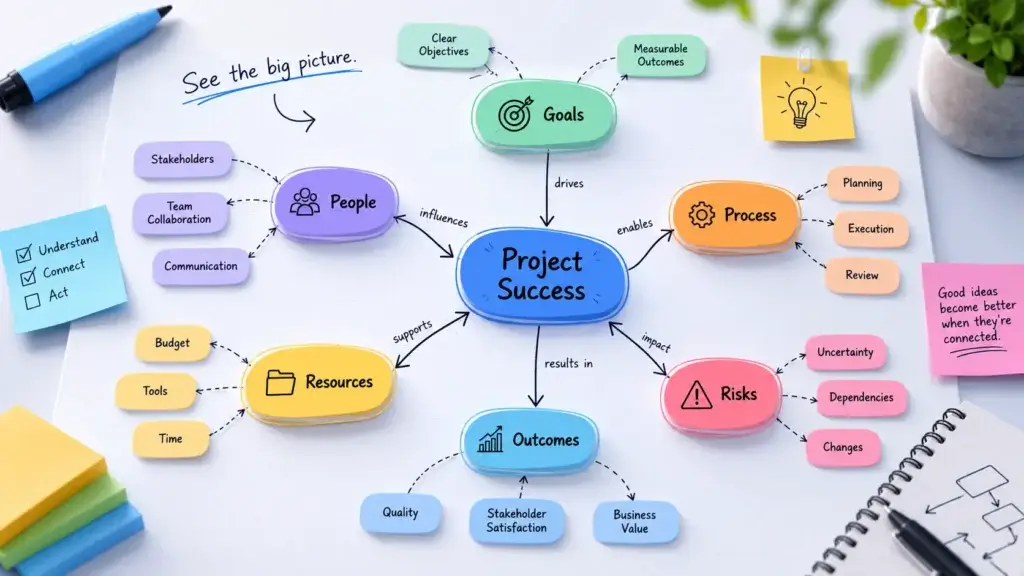
Imagine you are building a concept map for “remote project management.” Your main topic sits in the center or near the top. Around it, you add major supporting concepts such as communication, task ownership, collaboration tools, time zones, documentation, project visibility, and async workflows.
Then you connect the ideas with relationship phrases. For example, “async workflows” can reduce “meeting overload.” “Documentation” supports “project visibility.” “Task ownership” improves “accountability.” “Time zones” affect “communication speed.” By the end, you have more than a collection of ideas. You have a visual model of how remote project management works.
That is the main point of a concept map: it helps you move from information to understanding.
Concept Map vs. Mind Map: What’s the Difference?
Concept maps and mind maps are often confused because both help you organize ideas visually. However, they are not the same tool. A mind map usually starts with one central idea and branches outward in a simple hierarchy. It is excellent for brainstorming, note-taking, idea generation, and organizing thoughts quickly.
A concept map is more focused on relationships. It can include hierarchy, but it also supports cross-links, multiple connection points, and labeled relationships between ideas. In simple terms, a mind map helps you expand ideas. A concept map helps you explain relationships.
| Comparison Point | Concept Map | Mind Map |
| Main purpose | Shows how ideas relate to each other | Expands ideas from one central topic |
| Structure | Networked, relational, and often hierarchical | Radial and branch-based |
| Connections | Uses labeled lines or arrows to explain relationships | Usually uses simple branches without relationship labels |
| Best for | Studying complex topics, mapping systems, explaining dependencies | Brainstorming, note-taking, planning, idea generation |
| Team use case | Aligning people around how a system, project, or topic works | Capturing ideas quickly during a brainstorm |
When a concept map is better
Use a concept map when the relationships between ideas matter as much as the ideas themselves. For example, if you are mapping a product strategy, it is not enough to list customers, features, goals, risks, and metrics. You also need to show how customer needs influence feature priorities, how feature priorities affect roadmap decisions, and how roadmap decisions connect to business outcomes.
That is where a concept map is stronger than a mind map. It gives you more room to explain cause, dependency, influence, ownership, sequence, and impact between different ideas.
When a mind map is better
Use a mind map when your goal is fast idea generation. If you are brainstorming blog topics, planning a meeting agenda, organizing notes from a book, or collecting early ideas for a campaign, a mind map is usually faster and easier.
You do not need to define every relationship at the start. You simply capture ideas and branch them out. Later, if the topic becomes more complex, you can turn the strongest parts of the mind map into a concept map.
Can you use both together?
Yes. In many cases, the best workflow is to start with a mind map and then turn it into a concept map. Start by brainstorming freely. Once you have enough ideas, review the map and ask deeper questions.
Which ideas depend on each other? Which ones cause problems? Which ones support the same goal? Which ones should be grouped together? Which ones need a linking phrase? That second layer is where your mind map becomes a stronger concept map.
When to Use a Concept Map
You should use a concept map when you need to understand, explain, or organize complex information. It is especially useful when a normal list feels too flat and a project board feels too execution-focused.
A concept map sits between thinking and doing. It helps you clarify the structure before you turn ideas into tasks, timelines, or deliverables. That is why it works well for students, educators, consultants, product teams, project managers, and cross-functional business teams.
Use a concept map for studying
Students can use concept maps to prepare for exams, summarize chapters, connect lecture notes, or understand difficult subjects. Instead of memorizing isolated facts, you map how those facts connect, which can make the learning process more active and easier to remember.
For example, in biology, a concept map can show how cells, organs, systems, and functions relate. In history, it can connect people, events, causes, effects, and timelines. In business, it can connect markets, customers, pricing, channels, and competitive positioning.
Use a concept map for project planning
Concept maps are useful at the early stage of project planning, before the team has a final scope or task list. You can map the project goal, stakeholders, constraints, risks, dependencies, deliverables, data sources, approvals, and success metrics.
This helps the team see what needs to be clarified before execution begins. Once the concept map is clear, you can move the work into a project management system such as monday.com, ClickUp, Asana, or another platform.
Use a concept map for team workshops
Concept maps work well in workshops because they turn discussion into visible structure. Instead of leaving a meeting with scattered notes, the team can leave with a shared model of the topic.
This is helpful for product discovery, process improvement, customer journey analysis, onboarding, strategy planning, and cross-functional alignment. For teams, the best concept maps are not only diagrams. They become shared reference points.
Use a concept map for knowledge management
Concept maps can also help teams organize internal knowledge. For example, a support team can map product issues, root causes, help center articles, escalation paths, and customer segments.
A marketing team can map audience personas, pain points, content topics, channels, funnel stages, and campaign goals. A product team can map user needs, product areas, feature requests, technical dependencies, and roadmap themes. When knowledge is visual, it becomes easier to explain, audit, and improve.
How to Build a Concept Map Step by Step
Creating a concept map is not difficult, but it does require structure. The mistake many people make is starting with design too early. Colors, icons, and layout can help later, but the first goal is clarity.
Start with the topic, then build the relationships. A clear concept map should help the reader understand the subject faster than a long document or scattered set of notes.
Step 1: Choose your focus question
A strong concept map starts with a clear question. Your focus question defines what the map should explain and prevents the diagram from becoming too broad.
For example, instead of creating a broad map about “marketing,” create a map around “How does our content strategy generate qualified leads?” Instead of mapping “project management,” ask “What factors affect project delivery speed?”
Step 2: Brainstorm the main concepts
Next, list the key ideas connected to your focus question. Do not worry about the layout yet. Capture the important terms, categories, facts, people, systems, risks, decisions, and outcomes.
For a project planning concept map, your list might include scope, timeline, budget, stakeholders, dependencies, risks, milestones, communication, approvals, and success metrics. For a study session concept map, your list might include chapter headings, key definitions, theories, examples, causes, effects, and comparison points.
Step 3: Group related ideas
Once you have your raw list, group similar ideas together. This step helps you find structure before you start drawing lines, and it usually reveals which concepts belong under broader categories.
You may also find that some ideas connect across multiple groups. For example, “stakeholder approval” might belong under communication, but it may also connect to timeline risk. Those cross-connections are often the most valuable part of a concept map.
Step 4: Add the main concept to the map
Place the main concept near the top or center of the map. There is no single correct layout. Some concept maps flow top-down, while others use a central idea with connected clusters around it.
For learning and academic topics, a top-down hierarchy often works well. For business strategy, product planning, and systems thinking, a network-style layout may feel more natural.
Step 5: Connect concepts with linking words
This is the most important step. Draw lines between related concepts and add short linking phrases that explain the relationship. Good linking phrases include words such as “causes,” “depends on,” “requires,” “supports,” “is measured by,” “leads to,” “is part of,” “increases,” “reduces,” or “is approved by.”
The goal is to make each connection readable as a simple sentence. For example: “Clear ownership reduces handoff delays.” If the sentence makes sense, the relationship is probably clear.
Step 6: Add cross-links
Cross-links connect ideas in different parts of the map. They are useful because real systems rarely move in one straight line.
For example, in a concept map about project delivery, “stakeholder feedback” may connect to “scope changes,” “approval speed,” “timeline risk,” and “quality control.” Those cross-links help the team see why one issue affects several parts of the project.
Step 7: Review and simplify
A good concept map should make the topic clearer, not more confusing. After building the first version, review it carefully. Remove duplicate concepts, merge similar ideas, clarify vague labels, and shorten long text inside nodes.
If the map feels too crowded, create separate maps for subtopics. The best concept maps are not the biggest. They are the clearest.
Step 8: Turn the map into action
If you are using a concept map for a team or project, the final step is action. Ask what the map reveals. Does it show missing information? Does it expose a risk? Does it clarify ownership? Does it identify a decision the team needs to make?
This is where a tool like WorkCanvas by monday.com becomes especially useful, because visual planning can connect back to work execution inside monday.com.
| Step | What You Do | Output |
| 1. Focus question | Define what the map should explain | A clear topic boundary |
| 2. Brainstorm | List all important ideas and terms | A raw concept list |
| 3. Group | Cluster related concepts together | Main categories and subtopics |
| 4. Place | Add the main idea and supporting concepts | A first visual structure |
| 5. Link | Add relationship lines and linking words | Clear connections between ideas |
| 6. Cross-link | Connect related ideas across sections | A more complete knowledge map |
| 7. Simplify | Remove clutter and clarify labels | A cleaner final map |
| 8. Act | Turn insights into tasks, decisions, or next steps | A practical outcome |

Concept Mapping for Teams & Projects
Concept mapping is especially valuable for teams because it creates shared understanding before execution begins. Many project problems happen because people start building, assigning, or approving work before they agree on the structure of the problem.
A concept map helps slow the team down in the right place, before costly work begins. It gives people a shared view of the project logic, not only the project tasks.
Use concept maps before turning ideas into tasks
Project boards are excellent for tracking work, but they are not always the best place to explore early thinking. Before you create tasks, you may need to understand the problem, define the goal, identify dependencies, map stakeholders, and compare possible approaches.
A concept map gives you that discovery layer. Once the map is clear, you can turn the important parts into tasks, owners, timelines, and milestones. This is why concept mapping works well with project management tools. The map helps your team understand the work, while the project management system helps your team execute it.
Use concept maps for project kickoff meetings
A project kickoff can easily become a long discussion with unclear outcomes. A concept map gives the meeting a structure by helping you start with the project goal and then map stakeholders, deliverables, dependencies, risks, decision points, communication rules, and success metrics.
By the end of the meeting, the team can see where the work is clear and where more information is needed. That makes the kickoff more practical and reduces confusion later in the project.
Use concept maps for process improvement
Concept maps are also useful when a process feels messy, but the problem is not obvious. For example, if content production is slow, a concept map can show how briefs, approvals, design, SEO, editing, publishing, and reporting connect.
When the relationships are visible, bottlenecks become easier to identify. You may discover that the real issue is not writing speed. It might be unclear briefs, delayed approvals, missing keyword research, or too many review rounds.
Use concept maps for onboarding
New team members often struggle because internal knowledge is scattered across tools, docs, messages, and people. A concept map can give them a high-level view of how the team works.
For example, you can map the company structure, key workflows, customer journey, tool stack, approval paths, recurring meetings, and important documentation. This helps new employees understand how information, people, and processes connect.
How concept maps improve team alignment
Concept maps improve alignment because they make assumptions visible. When every team member sees the same map, disagreements become easier to discuss.
Someone may notice a missing dependency. Another person may challenge a relationship. A manager may identify a decision that has not been made. A subject matter expert may add context that was not obvious to the rest of the group. This is the real value of collaborative concept mapping. It turns hidden knowledge into shared knowledge.
Best Digital Concept Mapping Tools
You can create a concept map on paper, in a document, or on a whiteboard. However, digital tools are better when you need templates, collaboration, version history, comments, remote access, exports, or a connection to project execution.
The right tool depends on how you plan to use the map. If you are studying alone, Canva, Coggle, Xmind, or MindMeister may be enough. If you are running team workshops, Miro, Lucidspark, Creately, or WorkCanvas may be stronger. If your concept map needs to become tasks, workflows, and project follow-up, monday.com and ClickUp become more relevant.
Miro: best for collaborative concept mapping
Miro is the best choice for most teams that want to create concept maps in a flexible, collaborative, and easy-to-use visual workspace. It is especially useful for remote teams, product teams, educators, consultants, designers, and strategy groups that need to organize complex ideas together in real time.
What makes Miro strong for concept mapping is the balance between structure and flexibility. Teams can start from a concept map template, add sticky notes, shapes, icons, connectors, comments, and voting, then rearrange ideas as the discussion develops. This makes it easier to move from raw brainstorming to a clearer map of relationships, dependencies, and next steps.
In my view, Miro is the strongest option when the main goal is collaborative thinking. It gives teams enough freedom to explore ideas visually, but enough structure to turn those ideas into a clean and useful concept map. If you want a tool that works well for workshops, planning sessions, study maps, product discovery, and team alignment, Miro is the easiest recommendation.
WorkCanvas by monday.com: best for connecting concept maps to project execution
monday.com is a strong option when your concept map needs to connect with real work after the planning stage. WorkCanvas gives teams a digital whiteboard for visual collaboration, while monday.com helps turn ideas into structured work, owners, timelines, dashboards, automations, and workflows.
This combination is valuable because many concept maps lose momentum after the workshop ends. The team may have a useful diagram, but no clear system for turning it into tasks, approvals, deadlines, and project follow-up. With monday.com, you can use concept mapping as part of a broader work management process.
For that reason, I would choose Miro as the better dedicated concept mapping tool, especially for workshops and visual collaboration. I would choose monday.com when the concept map is only the starting point and the team also needs a reliable system to manage execution after the ideas are organized.
Lucidchart and Lucidspark: best for structured diagrams
Lucidchart is a strong choice when you need a formal, polished diagram. It works well for business processes, systems, technical documentation, organizational structures, and professional visual documentation.
Lucidspark, from the same ecosystem, is better for brainstorming and collaborative whiteboarding. If your concept map needs to look clean, structured, and presentation-ready, Lucidchart is a strong fit.
ClickUp: best for teams already managing work in ClickUp
ClickUp can be useful for concept mapping when your team already uses ClickUp for tasks, docs, goals, and planning. Its whiteboards and mind mapping capabilities can help you visually organize project ideas and connect them to execution.
The main benefit is consolidation. If your team already works inside ClickUp, creating visual maps there can reduce tool switching. The trade-off is that ClickUp can feel heavy if you only need a simple concept map.
Creately: best for visual collaboration and diagramming flexibility
Creately is a useful option for teams that want diagramming, whiteboarding, templates, and visual collaboration in one place. It is relevant for concept maps, flowcharts, org charts, process maps, and knowledge mapping.
Creately is a good middle ground between flexible whiteboarding and more structured diagramming, which makes it useful for teams that need more structure than a simple brainstorm but more flexibility than a static diagram.
Canva: best for simple concept map templates
Canva is one of the easiest tools for beginners who want a simple, visually polished concept map. It is especially useful for students, teachers, creators, and business users who want to start from a template and customize the design quickly.
Canva is not the most advanced option for complex team workflows or technical diagramming, but it is excellent for simple concept maps, presentations, classroom materials, and visual handouts.
Other tools worth considering
Depending on your needs, you may also consider MindMeister, Xmind, and Coggle. MindMeister is strong for classic mind mapping and simple collaboration. Xmind is useful for structured thinking and personal visual planning. Coggle is simple, browser-based, and easy for quick maps.
You can also review related options in our guide to the best mind map software.
| Tool | Best For | Why It Works for Concept Maps |
| Miro | Collaborative workshops and remote teams | Flexible canvas, templates, comments, sticky notes, and real-time collaboration |
| WorkCanvas by monday.com | Teams turning visual ideas into project execution | Connects visual collaboration with boards, tasks, workflows, and follow-up |
| Lucidchart | Formal diagrams and professional documentation | Strong diagramming controls for structured visual maps |
| ClickUp | Teams already using ClickUp for work management | Connects visual planning with tasks, docs, and project workflows |
| Creately | Diagramming and visual collaboration | Useful for concept maps, process maps, flowcharts, and team diagrams |
| Canva | Simple templates and polished visuals | Easy to use, design-friendly, and good for students or presentations |
| MindMeister, Xmind, Coggle | Personal mapping and lightweight visual thinking | Good for quick maps, study sessions, brainstorming, and early-stage planning |

Free Templates to Download
The easiest way to start concept mapping is to use a template. A template gives you structure without forcing you into a rigid format, which is useful when you want to move quickly but still create a map that looks organized.
You can copy the templates below into a digital whiteboard, project management tool, document, slide deck, or design platform. Once you update the nodes and relationships, export the map as a PDF, PNG, image, or shareable board link.
Template 1: Study session concept map
Use this template when you need to understand a chapter, lecture, course topic, or research subject. It is especially useful when you want to connect definitions, examples, causes, effects, and key ideas before an exam or presentation.
| Map Area | What to Add | Example Linking Phrases |
| Main topic | Course chapter, theory, process, or subject | explains, includes, is based on |
| Key concepts | Definitions, terms, models, formulas, people, events | is part of, relates to, depends on |
| Examples | Case studies, exercises, lecture examples | shows, demonstrates, applies to |
| Relationships | Causes, effects, comparisons, categories | causes, leads to, differs from |
| Knowledge gaps | Ideas you still do not understand | needs review, is unclear, requires practice |
Template 2: Project kickoff concept map
Use this template before building a project plan. It helps your team understand the project structure before creating tasks and timelines, which can reduce confusion once execution begins.
| Map Area | What to Add | Example Linking Phrases |
| Project goal | The main outcome the project should achieve | is measured by, supports, depends on |
| Stakeholders | Decision-makers, contributors, reviewers, customers | approves, contributes to, is informed by |
| Deliverables | Assets, outputs, milestones, reports, launches | requires, produces, is delivered by |
| Risks | Dependencies, blockers, budget issues, approval delays | can delay, increases, affects |
| Next steps | Tasks, owners, decisions, follow-up actions | becomes, is assigned to, must happen before |
Template 3: Product feature concept map
Use this template when evaluating a new feature, product idea, or roadmap theme. It helps connect user needs, technical requirements, dependencies, business value, and success metrics before the team commits to development work.
| Map Area | What to Add | Example Linking Phrases |
| User problem | The customer pain point or need | creates, leads to, is solved by |
| Feature idea | The proposed feature or product change | addresses, includes, requires |
| User segments | Personas, account types, roles, or industries | uses, benefits from, is affected by |
| Technical dependencies | Systems, APIs, data, infrastructure, integrations | depends on, connects to, limits |
| Success metrics | Adoption, retention, activation, revenue, satisfaction | is measured by, improves, validates |
Template 4: Team process concept map
Use this template when a workflow is unclear, slow, or difficult to explain. It can help you see where work starts, who owns each step, which tools are involved, and where bottlenecks or unclear handoffs are slowing the process down.
| Map Area | What to Add | Example Linking Phrases |
| Workflow goal | The reason the process exists | supports, enables, is completed when |
| Inputs | Requests, data, files, briefs, approvals | starts with, requires, is submitted by |
| People and roles | Owners, reviewers, approvers, contributors | owns, reviews, approves |
| Tools | Software, boards, docs, forms, dashboards | stores, triggers, updates |
| Bottlenecks | Delays, unclear decisions, missing context, rework | slows, blocks, creates |
How to choose the right template
Choose the template based on the outcome you want. If your goal is learning, use the study session template. If your goal is execution, use the project kickoff template. If your goal is product thinking, use the product feature template. If your goal is operational improvement, use the team process template.
You can also combine templates. For example, a product team might start with the product feature template, then use the project kickoff template once the feature is approved for delivery.
Final Thoughts
A Concept Map Helps You See the System Behind the Ideas
A concept map is useful because it forces you to think beyond individual ideas. It asks you to define how those ideas connect, why those connections matter, and what the structure tells you.
That is valuable for students, but it is just as valuable for teams. When you use concept mapping in a business setting, you can clarify complex projects, improve onboarding, explain workflows, map product decisions, and align stakeholders before execution begins.
For simple visual templates, Canva is a good starting point. For collaborative workshops, Miro is one of the strongest tools. For formal diagrams, Lucidchart is a reliable option.
For teams that want concept maps to lead into actual execution, monday.com and WorkCanvas offer the strongest direction because they connect visual thinking with tasks, boards, timelines, dashboards, and workflows.
In 2026, the best teams will not only manage tasks better. They will also get better at structuring the thinking that happens before the tasks are created. That is where concept maps are most useful.
FAQs
What is a concept map used for?
A concept map is used to organize complex information visually and show how ideas relate to each other. You can use it for studying, teaching, project planning, product discovery, onboarding, strategy workshops, process improvement, and knowledge management.
What’s the difference between a concept map and a mind map?
A mind map usually starts with one central idea and branches outward. A concept map focuses more on relationships between ideas, often using labeled lines, arrows, hierarchy, and cross-links to explain how concepts connect.
How do I create a concept map for a study session?
Start with the main topic or study question, list the important terms from your notes, group related ideas, place the broad concepts first, connect them with linking phrases, and add examples or knowledge gaps you need to review before the exam.
Which concept map tools work best for teams?
Miro, WorkCanvas by monday.com, Lucidspark, Lucidchart, Creately, and ClickUp are strong concept map tools for teams. Miro is excellent for workshops, Lucidchart is strong for structured diagrams, and monday.com is best when the map needs to turn into project execution.
Can I use Canva or Miro to make concept maps?
Yes. Canva is a good option for simple, polished concept map templates, especially for students, teachers, and presentations. Miro is better for collaborative concept mapping, remote workshops, comments, sticky notes, and team brainstorming.
What should a concept map include?
A concept map should include a main topic, key concepts, relationship lines, linking words, cross-links, and a clear hierarchy or structure. The most important part is the relationship between ideas, not only the visual layout.
Are concept maps useful for project management?
Yes. Concept maps are useful in project management because they help teams clarify goals, stakeholders, dependencies, risks, deliverables, and success metrics before turning the work into tasks and timelines.
What is the best free concept map template?
The best free concept map template depends on your goal. For studying, use a topic-and-relationship template. For teams, use a project kickoff template with goals, stakeholders, deliverables, risks, decisions, and next steps.
What are linking words in a concept map?
Linking words are short phrases placed on the lines between concepts. They explain the relationship between two ideas. Examples include causes, supports, depends on, leads to, is measured by, reduces, requires, and is part of.
Can AI help create a concept map?
Yes. AI can help generate an initial list of concepts, summarize source material, suggest relationships, cluster ideas, and turn notes into a draft map. However, you should still review the map manually to confirm accuracy and improve the linking phrases.