
Introduction
Coggle is one of the simplest mind mapping tools to recommend in 2026 if your priority is speed, clarity, and easy collaboration. It does not try to be an all-in-one whiteboard or an AI brainstorming suite. Instead, it focuses on helping you turn ideas, notes, processes, and project flows into clean visual diagrams that are quick to build and easy to share.
In this Coggle review, you will get a practical look at what the software does well, where it feels limited, how its pricing works, and which users are most likely to get real value from it. If you want a lightweight online tool for mind maps and flowcharts, Coggle still deserves attention. If you need advanced diagram libraries, deep enterprise controls, or AI-assisted ideation, some alternatives will be stronger.
What is Coggle?
Coggle is a browser-based mind mapping and flowchart tool designed for visual thinking, brainstorming, note-taking, and collaborative diagramming. You can use it to build classic mind maps, concept maps, simple process flows, and connected visual notes without installing desktop software.
Its core appeal is that it keeps the experience lightweight. You can create diagrams quickly, invite others to collaborate in real time, upload images, use multiple starting points, and follow your diagram’s change history over time. For many users, that is enough. Coggle is at its best when you want to think visually without dealing with a bulky interface.
Why Coggle still matters in 2026
The mind mapping category has become more crowded, and many tools now try to combine diagrams, whiteboards, documents, meetings, and AI in one workspace. Coggle takes the opposite route. It stays focused on mind maps and visual structure, which is exactly why it still works well.
That focus matters if you are a student, marketer, consultant, teacher, project planner, or small team that wants a fast way to organize ideas. In my view, Coggle remains most compelling for users who care more about speed and collaboration than about feature overload.
Software Specification
Core Features of Coggle
Real-time collaboration and easy sharing
Coggle’s strongest feature is still collaboration. You can invite other people to edit diagrams in real time, and changes show up instantly in the browser. This keeps it practical for brainstorming sessions, note-taking, workshops, class projects, and shared planning.
The tool also supports sharing by email, link, and QR code, which makes access easier in meetings and classroom settings. That is one of the reasons Coggle feels more approachable than many diagram tools. You do not need a heavy setup process to get people working together.
Mind maps, flowcharts, and flexible diagram structures
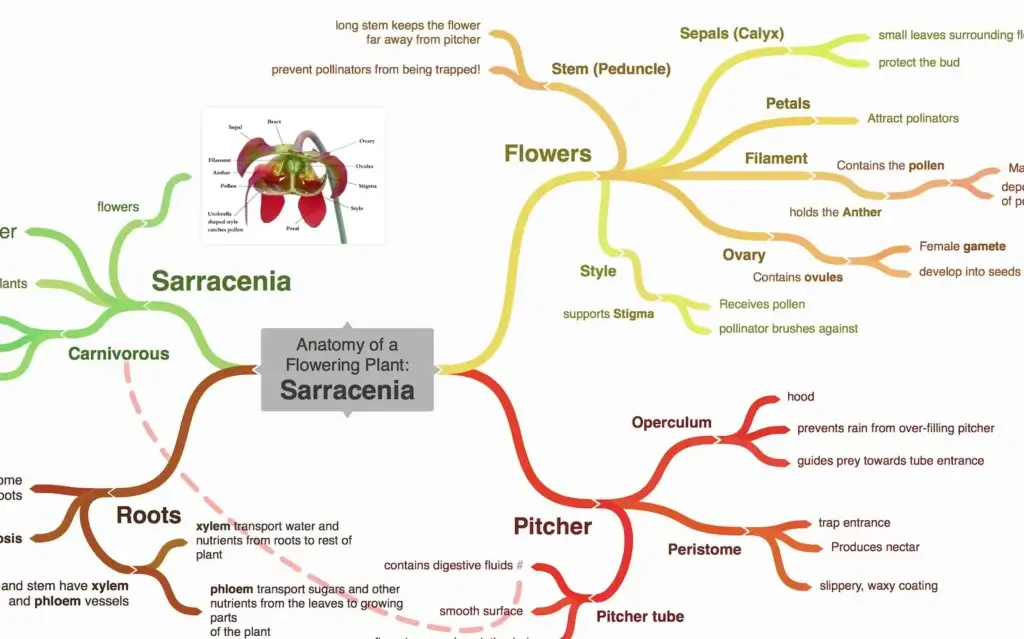
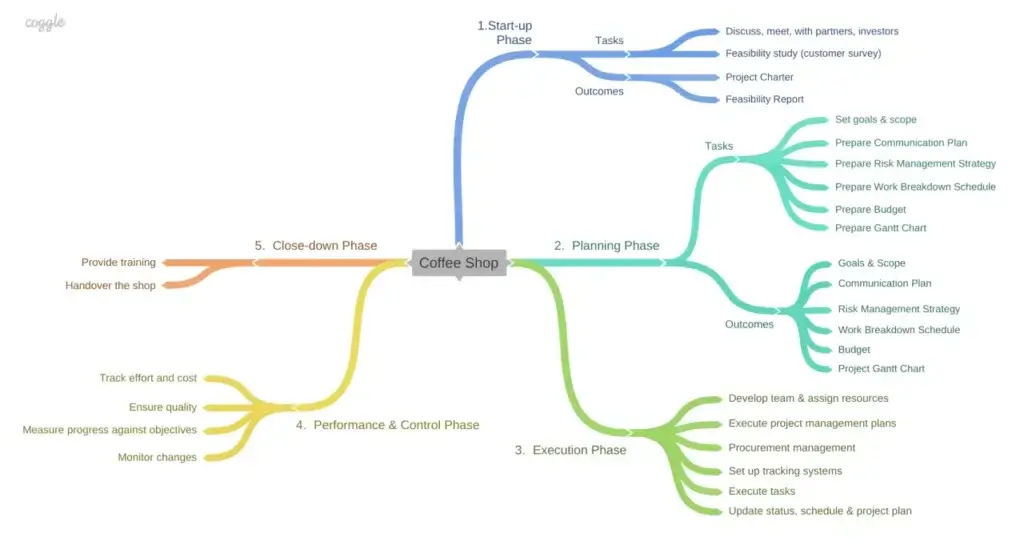
Coggle is not limited to traditional radial mind maps. It also supports flowcharting with shapes and connected items, along with loops, joined branches, cross-links, and multiple starting points. That gives it more flexibility than a basic brainstorming-only app.
This matters because many real workflows are not purely hierarchical. Project outlines, process diagrams, study notes, and concept maps often need linked ideas instead of a perfect tree structure. Coggle handles that better than its simple interface suggests.
Image uploads, floating items, and visual annotation
Another advantage is how easy it is to enrich diagrams visually. Coggle supports image uploads, floating text, and floating images that are not tied to the main branch structure. That gives you room to annotate or explain parts of a map without forcing everything into the same hierarchy.
For content planning, teaching, workshops, and knowledge capture, this makes diagrams easier to read and present. It is a small feature set on paper, but it improves usability in practice.
Version history and change tracking
Coggle saves every change to a diagram and lets you review earlier versions. That is more useful than it sounds, especially if several people are editing the same map or if you want to revisit a previous structure.
For collaborative work, this adds confidence. Lightweight tools often ignore version control, but Coggle includes enough history to make ongoing edits much safer.
Formatting, export, and workflow support
Coggle includes useful workflow features such as Markdown formatting, shared folders, embedding, import and export options, PDF and image download, text export, and even export for Microsoft Visio. It also supports checkboxes, comments, notes, keyboard shortcuts, and presentation-style viewing tools.
That means it can fit into more workflows than a casual first impression suggests. It is still a focused tool, but it is not bare-bones.
Pros and Cons
Advantages and Disadvantages
Positive
✅ Very easy to learn and use
✅ Strong real-time collaboration
✅ Good free plan for light use
✅ Supports both mind maps and flowcharts
Negative
❌ Limited compared with broader whiteboard platforms
❌ Not built around AI-assisted ideation
❌ Free plan privacy limits matter for some users
❌ Advanced enterprise needs may require a different tool
Pros
✅ Very easy to learn and use
Coggle’s biggest practical advantage is simplicity. You can start building a diagram quickly, and the interface does not feel crowded. That makes it a strong fit for solo users, students, and teams that want fast adoption with little training.
✅ Strong real-time collaboration
Coggle supports live collaborative editing, and it has continued improving access and sharing. That makes it useful for meetings, workshops, teaching, brainstorming, and remote planning sessions.
✅ Good free plan for light use
The free plan is more generous than many people expect. You get three private diagrams, unlimited public diagrams, collaboration, image uploads, history, and several export options. For occasional use, that may be enough.
✅ Supports both mind maps and flowcharts
Coggle is not only a classic mind map tool. Its support for shapes, loops, joined branches, and multiple roots gives it more flexibility for process mapping and structured planning.
Cons
❌ Limited compared with broader visual collaboration platforms
Coggle is intentionally focused. That is part of its appeal, but it also means it is not the best tool for teams that want whiteboards, sticky-note workshops, complex frameworks, and broader visual collaboration in one place.
❌ Not built around AI-assisted ideation
If you want AI to generate maps, summarize ideas, or turn documents into diagrams automatically, Coggle is not playing in that category. Many newer mind mapping tools now market AI heavily, and Coggle does not.
❌ Free plan privacy limits matter
The free plan only includes three private diagrams. If privacy matters and you plan to create a lot of working documents, you may need to upgrade sooner than expected.
❌ Advanced enterprise needs may require a different tool
Coggle does offer organization plans, SAML SSO, and enterprise options, but teams with stricter governance, richer admin tooling, or broader use cases may prefer a more enterprise-oriented platform.
Hands-On Experience
User Experience and Performance
Ease of use and onboarding
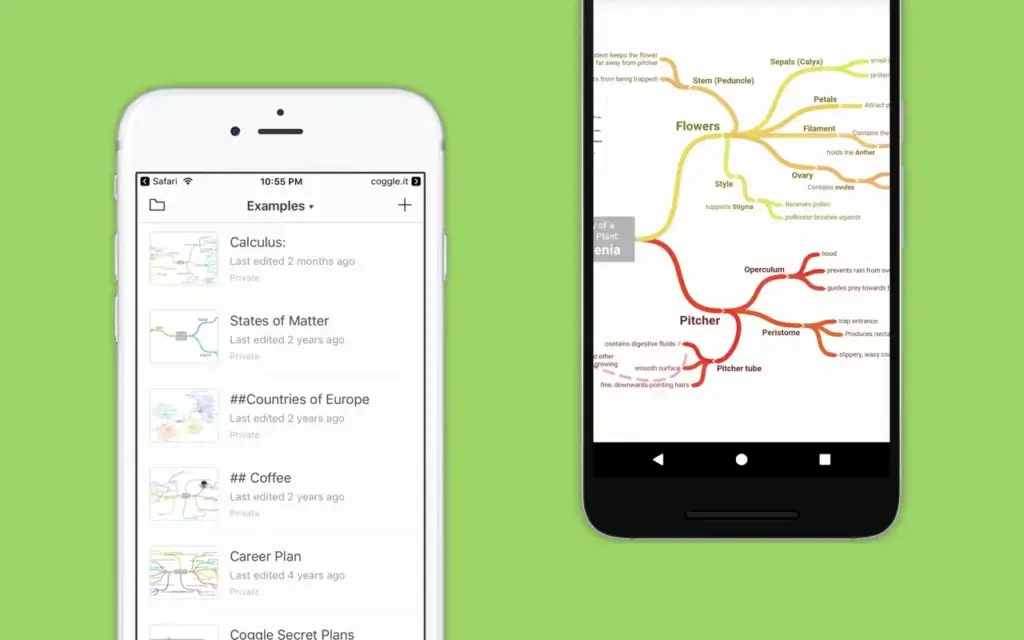
Coggle is one of the easier mind mapping tools to pick up. The interface is visual, fast, and focused on the canvas rather than on side panels and menus. That makes it good for users who want to map ideas immediately instead of learning a large workspace.
Its browser-based setup also helps. There is no complicated install process, and access is designed to be friction-light. Coggle recently added email sign-in and passkey support, which improves both accessibility and login security.
Who the product feels best for 🎯
Coggle feels best for students, teachers, marketers, consultants, project planners, and small teams that want to brainstorm, visualize ideas, and share structured thinking quickly. It is especially strong for note-heavy or planning-heavy work where speed matters.
It is less ideal for teams that want a giant collaborative canvas for product workshops, UX flows, sticky notes, and multipurpose whiteboarding. In that case, broader visual collaboration tools will usually feel more complete.
Pricing
Pricing and Plan Options
| Plan | Price | Best For | What Stands Out |
| Free Forever | $0 | Occasional or personal use | 3 private diagrams, unlimited public diagrams, collaboration, history, image uploads |
| Awesome | $5/month | Individuals who need privacy and more control | Unlimited private diagrams, more shapes, line controls, full chat history, high-res image uploads |
| Organisation | $8/member/month | Teams and managed workspaces | SAML SSO, billing controls, user and data management, bulk export, branded diagrams |
Is Coggle pricing competitive? 💰
Coggle’s pricing is one of its most appealing strengths. At $5 per month for the Awesome plan, it stays relatively affordable for individual professionals who want unlimited private diagrams and a few meaningful upgrades. That makes it easier to justify than many diagram or whiteboard tools that start much higher.
The Organization plan is also straightforward. It adds access control and admin-oriented features without forcing users into a much larger product ecosystem. For teams that mainly need diagramming and mind maps, that simplicity is valuable.
Free vs paid: when should you upgrade?
If you mainly create occasional public or classroom-style diagrams, the free plan may genuinely be enough. But if you work with client materials, internal planning documents, or anything you do not want exposed publicly, the paid plan becomes much more important because of the private diagram limit.
For most professional users, that is the real upgrade trigger. Not more complexity, just more privacy and control.
Security and Compliance
Security and Privacy
Privacy positioning and data handling
Coggle’s privacy messaging is refreshingly direct. The company says it will never share private diagrams or make them public unless you choose to do that. It also states that personal information is private and will not be sold to anyone else.
The main detail users need to understand is that free accounts only include three private diagrams, and later diagrams may be public unless you upgrade. That is clearly explained, and it is one of the most important points to mention honestly in any Coggle review.
Security features and recent improvements
Coggle says its infrastructure is hosted on AWS, with data encrypted at rest and in transit, and disaster recovery data stored in a separate AWS region with separate keys. In January 2026, the company also announced email sign-in and passkey support, which is a meaningful improvement for account access security.
For larger teams, the Organization plan adds SAML single sign-on, and Coggle also mentions enterprise options such as on-premise instances and Active Directory authentication. That said, I would still verify compliance and procurement requirements directly before rolling it out widely in a larger organization.
Compare with Others
Coggle vs Alternatives
Coggle vs Xmind
Xmind is usually stronger if you want a more polished mind mapping specialist with richer visual outputs and a more presentation-oriented experience. Coggle is better if you want browser-based simplicity, fast collaboration, and an easier ramp-up for shared diagrams.
Coggle vs Miro
Miro is the stronger choice for broader visual collaboration, workshops, whiteboarding, sticky notes, and product planning. Coggle is the better fit when you do not want a giant workspace and mainly need mind maps and lightweight flowcharts.
Coggle vs MindMeister
MindMeister is also a good fit for collaborative mind mapping, but Coggle often feels faster and more stripped back. If you value simplicity, Coggle has an advantage. If you want a slightly more structured business-facing mind map platform, MindMeister may appeal more.
Coggle vs AI-first mind mapping tools
Against newer AI-first tools, Coggle looks intentionally traditional. It does not try to generate entire idea structures for you. That will be a weakness for some buyers, but it is also part of the product’s clarity. If you prefer doing your own thinking and just want a fast visual workspace, Coggle still makes a lot of sense.
Conclusion
Final Thoughts: Is Coggle Worth It?
Who should use Coggle?
Coggle is worth considering if you want a simple and collaborative tool for mind maps, concept maps, and lightweight flowcharts. It is especially useful for students, educators, consultants, marketers, and teams that want a fast browser-based way to organize thinking visually.
It is not trying to be the most advanced diagram platform on the market, and that is part of its strength. Coggle works best when you want less friction, not more power for its own sake.
My final take on Coggle in 2026
Coggle remains a strong option because it understands its lane. It is fast, easy to adopt, well-priced, collaborative, and flexible enough for both mind maps and straightforward flowcharts. For many users, that is more useful than a much larger platform with a steeper learning curve.
If your priority is visual note-taking, brainstorming, teaching, shared planning, or structured idea development, Coggle is still easy to recommend. If you need AI, broader whiteboarding, or more advanced enterprise governance, compare it closely with Xmind, MindMeister, Miro, or other modern alternatives before deciding.
Have more questions?
Frequently Asked Questions (FAQs)
What is Coggle used for?
Coggle is used for mind mapping, brainstorming, visual note-taking, concept mapping, flowcharting, and collaborative planning.
Does Coggle have a free plan?
Yes. Coggle offers a free plan with three private diagrams and unlimited public diagrams.
Is Coggle good for team collaboration?
Yes. Real-time collaboration is one of Coggle’s strongest features, and it supports sharing by email, link, and QR code.
Can Coggle create flowcharts?
Yes. Coggle supports flowchart shapes, connected items, loops, and joined branches, so it works for more than traditional mind maps.
Is Coggle browser-based?
Yes. Coggle works in your browser, so there is no heavy software setup required for most users.
Does Coggle support private diagrams?
Yes, but the free plan only includes three private diagrams. Paid plans include unlimited private diagrams.
Does Coggle have version history?
Yes. Coggle saves changes and lets you review earlier versions of a diagram.
Is Coggle secure?
Coggle states that data is encrypted at rest and in transit, and that it supports security features such as passkeys and SAML SSO for organization accounts.
Is Coggle better than Miro?
That depends on your use case. Coggle is better for simple mind maps and lightweight flowcharts. Miro is stronger for full whiteboarding and broader visual collaboration.
Is Coggle worth paying for?
For many professional users, yes. The Awesome plan is affordable and mainly becomes worthwhile when you need unlimited private diagrams and more control over visual structure.