
Introduction
Enterprise AI adoption has moved faster than the security controls designed to govern it. Employees now use generative AI assistants, embedded copilots, browser extensions, code-generation tools, and autonomous agents across everyday workflows. This creates a difficult security problem because sensitive data can move into an AI system without following the familiar paths monitored by traditional data loss prevention tools.
Quilr is designed to address this gap. The platform combines AI security guardrails, shadow AI discovery, modern data loss prevention, agent behavior monitoring, and real-time employee coaching. Instead of focusing only on prompts or network traffic, Quilr evaluates the content involved, the surrounding context, and the apparent intent behind an action.
This Quilr review examines how that approach works, which AI risks the platform can address, how it is deployed, and where its limitations become important. You will also learn how Quilr compares with Prompt Security, Cisco AI Defense, Grip Security, and AppOmni.
What Is Quilr?
QuilrAI is an enterprise AI security and data protection platform. It helps organizations discover how employees and applications use AI, control what information can enter or leave AI systems, and monitor what autonomous agents do when they interact with tools, data, and external services.
Quilr is not simply an AI firewall. Its scope spans three connected security layers:
- Data protection: Preventing regulated information, credentials, intellectual property, and confidential files from leaving approved environments.
- AI security: Protecting prompts, responses, model interactions, tool calls, copilots, and autonomous agents.
- Human-centric defense: Helping employees understand risky actions and correct them before an incident occurs.
This combination makes Quilr relevant to security teams that are struggling to manage both sanctioned and unsanctioned AI adoption. It can cover the AI tools your organization officially deploys, as well as shadow AI services that employees begin using without a formal security review.
The platform is most appropriate for businesses that already have meaningful AI adoption or expect autonomous agents to access production systems. Smaller companies with limited AI use may find the platform broader than necessary.
Key Features
AI Security Capabilities
Quilr brings together capabilities that are often divided between DLP, SaaS discovery, browser security, AI gateways, code security, and AI security posture management products. Its main value is not any single control, but the ability to apply related policies across human and machine-driven workflows.
1. Shadow AI and Application Discovery
Shadow AI discovery helps security teams identify AI applications, copilots, browser tools, plugins, agents, and embedded AI functions that are operating outside the approved technology inventory.
This matters because AI functionality is not always introduced as a separate application. It may appear inside an already approved SaaS platform, development environment, browser extension, or automation workflow. A conventional SaaS inventory may recognize the parent application without showing how its AI features interact with company data.
Quilr can map AI activity across browsers, endpoints, integrated applications, IDEs, gateways, and agent infrastructure. Policies can then approve, block, monitor, or coach users based on the application, data involved, user role, destination, and apparent business purpose.
For organizations building an AI governance program, this discovery layer is an important starting point. You cannot enforce meaningful policies until you know which AI systems are being used and what access they have.
2. Unified Data Loss Prevention for AI Workflows
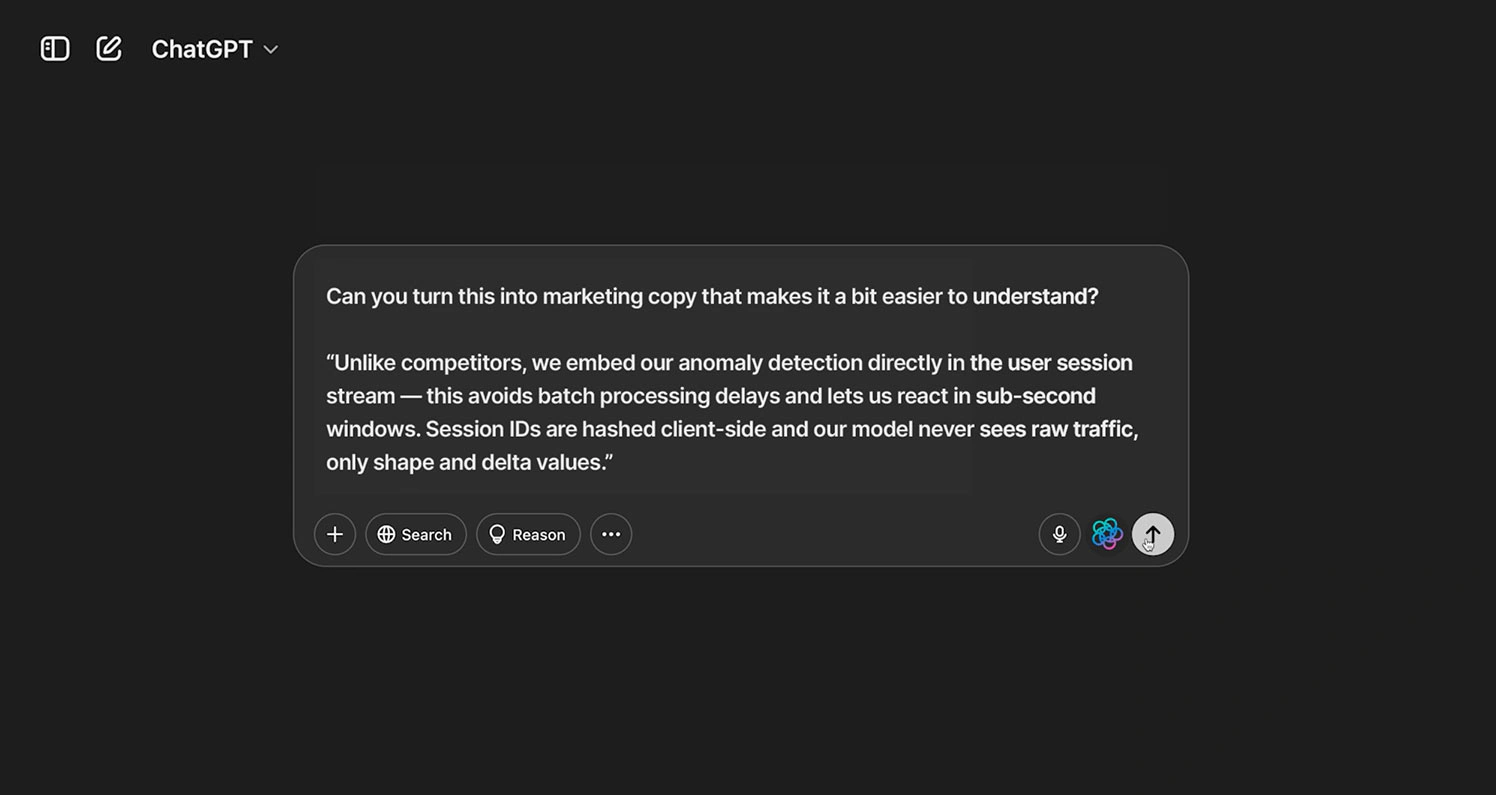
Traditional DLP tools often rely heavily on predefined patterns, labels, dictionaries, and destination rules. Those controls remain useful, but AI workflows create situations where the same data may be appropriate in one context and dangerous in another.
Quilr attempts to improve this decision by evaluating content, context, and intent together. For example, a customer identifier used within an approved internal support assistant may be legitimate, while the same identifier pasted into an unapproved public chatbot may represent a data leak.
The platform can apply controls to personally identifiable information, protected health information, payment data, credentials, source code, intellectual property, financial documents, and other sensitive content. Depending on the policy, Quilr can allow the action, issue a warning, redact the sensitive portion, require approval, or block the interaction.
This unified approach can reduce the gap between conventional data protection and AI security. However, it also increases the importance of policy design. Security teams must establish which data classes, user groups, applications, destinations, and workflows should be treated differently.
3. Prompt Injection and Adversarial Input Protection
Prompt injection occurs when malicious or untrusted content attempts to override the instructions governing an AI system. An attack can appear directly in a user prompt or indirectly inside a document, webpage, email, retrieved record, plugin response, or external data source.
Quilr analyzes AI inputs, outputs, and tool calls for prompt injection, jailbreak attempts, hidden instructions, tool hijacking, and other adversarial patterns. It can sanitize suspicious inputs, restrict the requested action, or stop the workflow before the model or agent proceeds.
The platform maps its controls to resources such as the OWASP Top 10 for LLM Applications. This can help security teams translate recognized AI risks into enforceable technical controls instead of relying only on written acceptable-use policies.
4. Agentic AI Behavior Control
Agent security is one of Quilr’s most strategically important capabilities. A chatbot generally produces an answer, while an autonomous agent may read files, modify records, send messages, execute code, call APIs, or make changes across connected business systems.
Quilr evaluates agent instructions, proposed actions, tool calls, destinations, permissions, and the relationship between an action and the original objective. This creates an additional decision layer before an agent completes a potentially harmful operation.
Security teams can define boundaries around what an agent may access, which tools it may call, which parameters are acceptable, and which irreversible actions require human approval. The platform can also record decisions and actions for investigation, compliance reporting, and accountability.
This is particularly useful when agents connect through Model Context Protocol servers or other tool interfaces. An agent may have a legitimate identity and authorized system access but still attempt an action that does not align with the task it was assigned.
5. LLM and MCP Gateways
Quilr offers gateway-based enforcement for model interactions and agent tool usage. The LLM gateway can inspect prompts and model responses, apply data policies, control model access, and create centralized logs across supported providers.
The MCP gateway focuses more directly on execution. It can govern how agents interact with tools, APIs, databases, file systems, and connected services. This distinction is valuable because securing the conversation with a model is not enough when an agent can take actions after the conversation ends.
Using both gateways gives security teams visibility into the sequence from intent and prompt to decision, tool call, and final action. Organizations should test gateway latency and compatibility carefully, especially for high-volume applications and time-sensitive production workflows.
6. Safe Code Assistants and IDE Protection
Developers frequently use AI assistants to explain code, generate functions, troubleshoot errors, and accelerate software delivery. These workflows can expose proprietary source code, authentication tokens, API keys, customer data, or infrastructure details.
Quilr extends data controls into IDEs and code-assistant workflows. It can detect secrets and sensitive intellectual property before they are submitted to an unapproved model. The platform can also identify insecure code patterns and provide guidance before generated code reaches a repository or production pipeline.
This does not replace static application security testing, software composition analysis, secret scanning, or code review. It adds a preventive layer at the moment a developer interacts with an AI assistant.
7. Microsoft Copilot Security
Microsoft Copilot can access data across Microsoft 365 based on the permissions and information available to the user. This makes identity governance, data classification, oversharing remediation, and connector security essential.
Quilr is designed to preserve sensitivity labels, inspect prompts and outputs, prevent sensitive information from appearing in summaries or responses, and govern plugins and connectors. This can help organizations add contextual AI controls around an existing Microsoft security environment.
Before deployment, you should confirm exactly how Quilr interacts with Microsoft Purview, Microsoft Information Protection, Entra ID, Copilot Studio, and any existing DLP policies. Overlapping controls can create inconsistent enforcement unless policy ownership is clearly defined.
8. AI Security Posture and Compliance Scoring
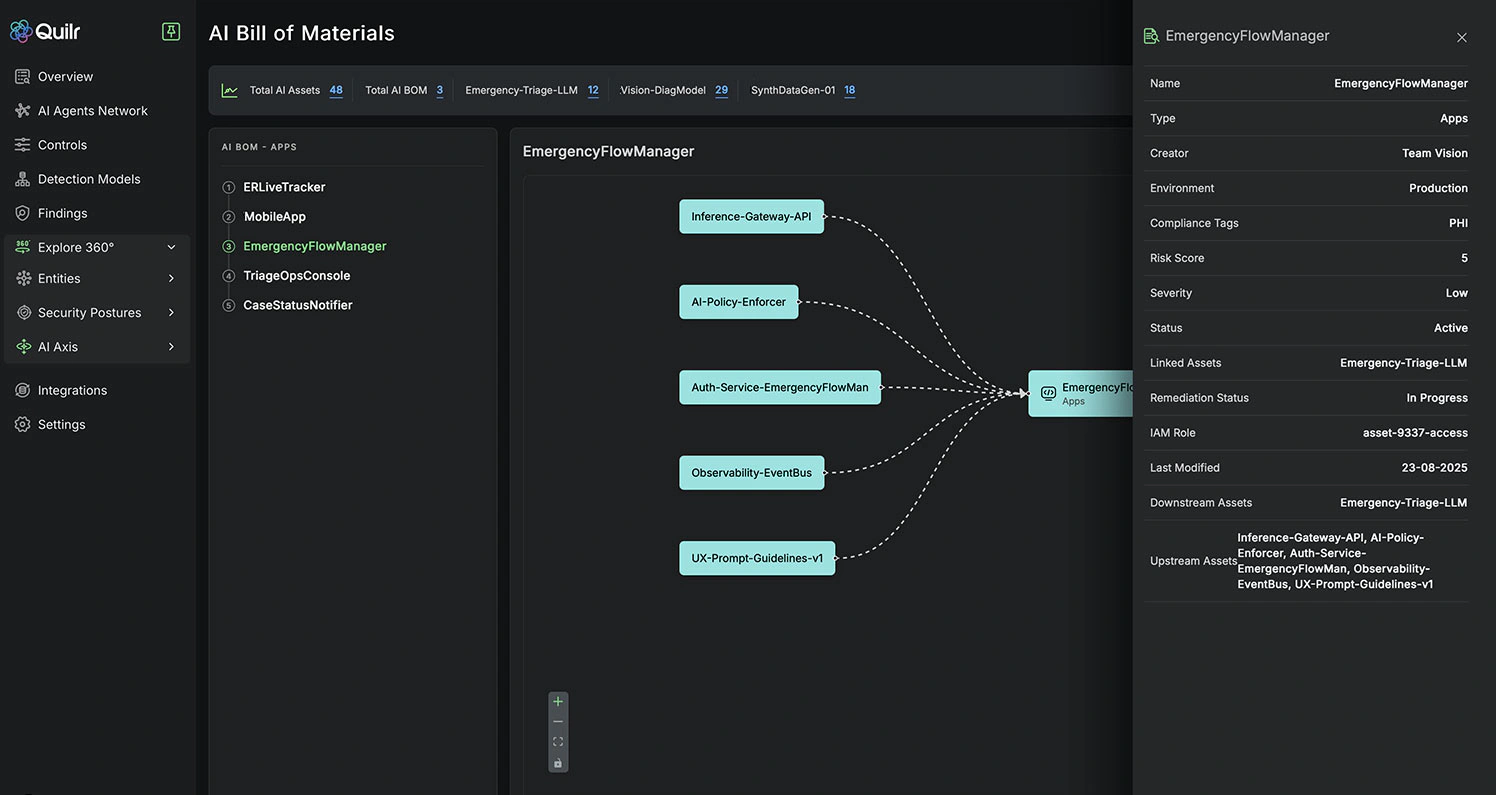
Quilr’s AI Security Posture Management capabilities provide an overview of AI applications, agents, users, data exposure, policy violations, and risk trends. Security teams can use posture scores to identify the areas that require investigation or stronger controls.
The reporting layer can support governance programs aligned with frameworks such as the NIST AI Risk Management Framework, MITRE ATLAS, and the EU AI Act.
Framework mapping should not be confused with automatic compliance. Quilr can provide controls, visibility, and evidence, but your organization remains responsible for governance decisions, risk assessments, documentation, legal obligations, and human oversight.
9. Quilly and Human-Centric Security Coaching
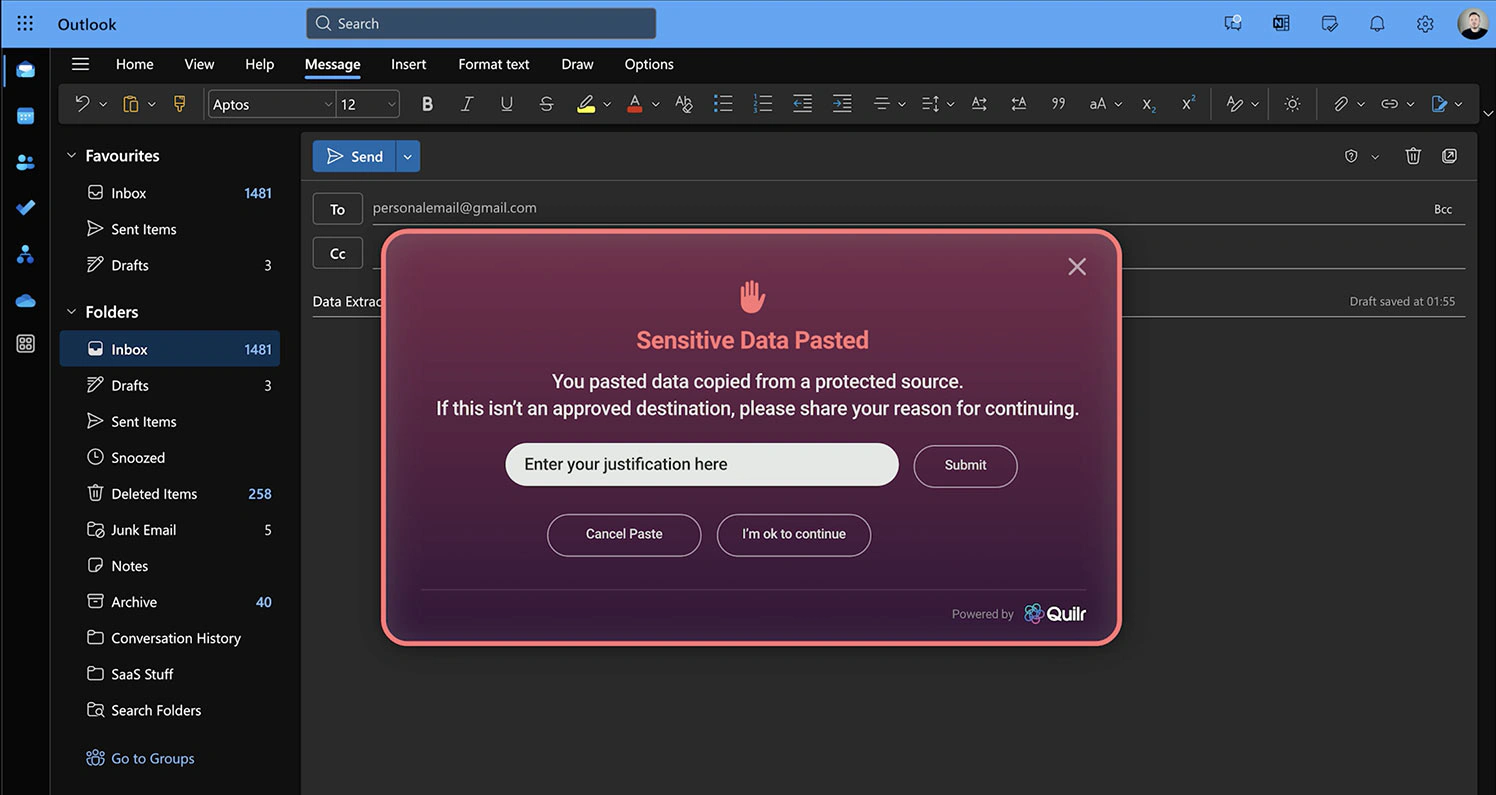
Quilly is Quilr’s employee-facing security assistant. Instead of presenting a generic block message, it can explain why an action appears risky and suggest a safer way to complete the task.
For example, an employee attempting to paste customer data into an unapproved chatbot could be directed toward an authorized internal tool or shown how to remove sensitive fields. A developer exposing a credential could be prompted to revoke the secret and use an approved storage method.
This approach can make security controls less disruptive and reduce repetitive support requests. It also helps employees participate in remediation instead of treating security as an unexplained barrier.
How Quilr Works
Deployment and Administration
Quilr supports several deployment methods because AI activity can occur across multiple surfaces. A browser extension can observe browser-based AI use and deliver user coaching. An endpoint agent extends visibility to local applications, native copilots, and development tools.
APIs and SDKs allow development teams to place Quilr controls inside applications and backend workflows. The LLM gateway governs model inputs and outputs, while the MCP gateway focuses on agent actions and tool execution. Quilr also advertises an enterprise on-premises option for organizations with stricter sovereignty or infrastructure requirements.
A Practical Quilr Deployment Process
A well-managed implementation should normally follow four stages:
- Discovery: Identify AI applications, agents, copilots, plugins, extensions, models, and data flows.
- Observation: Monitor activity before applying aggressive controls, so you can understand legitimate business behavior.
- Policy enforcement: Introduce warnings, redaction, approval requirements, and blocking rules based on measured risk.
- Optimization: Review false positives, exceptions, user feedback, incident outcomes, and newly discovered AI services.
Starting with immediate blanket blocking may encourage employees to find unmonitored alternatives. A gradual rollout gives the security team time to distinguish productive AI adoption from activity that creates unacceptable risk.
What to Test During a Proof of Concept
A Quilr proof of concept should include real workflows rather than only prepared demonstrations. Test how accurately the platform identifies sensitive data, whether it detects indirect prompt injection, how it handles multilingual content, and whether controls remain consistent across browsers, endpoints, gateways, and IDEs.
You should also measure latency, user disruption, administrative workload, reporting quality, policy conflict with existing tools, and the time required to investigate an alert. For agentic workflows, test destructive commands, unexpected destinations, excessive permissions, unusual tool sequences, and actions that drift away from the original objective.
Pros and Cons
Advantages and Disadvantages
Quilr has a compelling architecture for organizations that need to secure both employee AI use and autonomous agent activity. Its broad scope can also make evaluation and implementation more demanding than adopting a narrowly focused AI gateway.
Positive
✅ Covers human and autonomous AI activity
✅ Unifies AI security with data protection
✅ Supports several deployment methods
✅ Provides real-time employee coaching
✅ Includes agent and tool-call governance
Negative
❌ Pricing is not publicly listed
❌ Broad scope can increase implementation complexity
❌ Requires careful policy tuning and ownership
❌ Newer vendor than established security platforms
❌ Independent performance evidence is still developing
👍 Quilr Pros
✅ Covers human and autonomous AI activity
Many AI security tools concentrate on either employee prompts or applications built with large language models. Quilr’s architecture extends from browser and endpoint activity to LLM interactions, MCP tool calls, and autonomous agent execution. This gives security teams a more complete view of how AI risk travels through the organization.
✅ Unifies AI security with data protection
Quilr can apply related data policies across files, email, SaaS applications, prompts, responses, code assistants, and agents. This can reduce the policy gaps that appear when separate products govern conventional data movement and AI activity.
✅ Supports several deployment methods
The combination of browser extension, endpoint agent, APIs, SDKs, gateways, and on-premises deployment gives businesses flexibility. You can place controls close to the user, application, model, or tool execution layer rather than relying on one inspection point.
✅ Provides real-time employee coaching
Quilly can explain risks and recommend a safer action while the user is still working. This is more constructive than issuing a generic block notification and leaving the employee to contact the security team.
✅ Includes agent and tool-call governance
Monitoring prompts alone is insufficient when an AI agent can modify systems. Quilr’s focus on agent intent, permissions, tool calls, and execution boundaries addresses one of the most important emerging AI security requirements.
👎 Quilr Cons
❌ Pricing is not publicly listed
Quilr requires potential customers to contact its sales team. The absence of transparent packages makes early budgeting and independent value comparison more difficult, particularly for smaller organizations.
❌ Broad scope can increase implementation complexity
A platform spanning DLP, shadow AI discovery, browser controls, endpoint monitoring, AI gateways, code security, and agent governance needs structured implementation. Security, privacy, legal, HR, development, and AI governance teams may all require input.
❌ Requires careful policy tuning and ownership
Context-aware controls are only useful when the platform understands approved applications, data classifications, user roles, and legitimate workflows. Poorly designed policies can still create excessive warnings or inconsistent enforcement.
❌ Newer vendor than established security platforms
Quilr was established relatively recently compared with major enterprise security providers. Buyers should examine product maturity, roadmap execution, support capacity, integration depth, financial stability, and long-term data portability during procurement.
❌ Independent performance evidence is still developing
The vendor publishes substantial product information, but buyers should avoid relying only on marketing claims. Detection accuracy, false-positive rates, agent-control effectiveness, and deployment speed should be tested against your own applications and data.
User Experience
Managing Quilr
Quilr’s user experience has two sides. Security administrators work with discovery data, risk activity, policies, posture information, alerts, and audit records. Employees interact more directly with browser or endpoint controls and Quilly’s contextual guidance.
The employee experience is one of Quilr’s more distinctive elements. A warning that explains the data involved and provides a safe alternative is more useful than an unexplained rejection. It can also help users learn approved AI practices through everyday work instead of relying exclusively on periodic security training.
For administrators, the main challenge is likely to be scope rather than basic navigation. A unified platform can generate data about applications, prompts, files, users, agents, plugins, models, and tool calls. Dashboards must be configured around meaningful risks so analysts are not simply presented with another large event stream.
Before purchase, request a demonstration that follows an alert from initial discovery through investigation, user interaction, policy decision, remediation, and reporting. This is more revealing than viewing isolated dashboard screens.
Business Fit
Who Should Use Quilr?
Quilr is best suited to organizations where AI has become part of operational work rather than a limited experiment. Its value increases as the number of AI tools, users, agents, data sources, and connected systems grows.
| Organization Type | Quilr Fit | Why |
| Large Enterprises | Strong | Broad visibility and policy enforcement across users, applications, agents, and data |
| Regulated Organizations | Strong | Supports data controls, audit trails, on-premises deployment, and compliance reporting |
| AI-Native Companies | Strong | Protects custom LLM applications, agents, APIs, MCP tools, and development workflows |
| Microsoft 365 Environments | Potentially Strong | Adds AI-focused controls around Copilot, prompts, outputs, plugins, and sensitive data |
| Mid-Sized Businesses | Depends on AI Use | Useful when AI adoption and sensitive data justify a dedicated security platform |
| Small Businesses | Limited | Custom pricing and implementation scope may exceed basic AI governance needs |
Quilr can also complement broader browser and SaaS security strategies. For additional context, read our guide explaining why browser security matters, particularly as employees access AI services through browser-based workflows.
Pricing
Quilr Plans and Purchasing
Quilr does not publish standard subscription prices or clearly defined public plans. You need to contact Quilr to discuss pricing and arrange a demonstration.
The final price may depend on the number of users or endpoints, selected modules, deployment method, volume of AI interactions, gateway traffic, data residency, support requirements, and whether on-premises infrastructure is required.
| Pricing Factor | Public Information | What to Confirm |
| Listed Starting Price | Not publicly available | Minimum annual commitment and contract term |
| Free Plan | Not clearly listed | Whether discovery or evaluation tools remain free after testing |
| Free Trial | Not clearly listed | Proof-of-concept duration, limits, and required services |
| Cloud Deployment | Available | Usage limits, data region, gateway volume, and support |
| On-Premises Deployment | Available | Infrastructure requirements, maintenance, and added fees |
| Professional Services | Not publicly detailed | Implementation, policy design, training, and integration costs |
Ask Quilr to separate the cost of software, implementation, support, and optional services. You should also confirm whether pricing changes when you add endpoints, AI models, MCP servers, gateways, data sources, or additional geographic regions.
Security, Privacy and Compliance
How Secure Is Quilr?
Quilr processes security-sensitive information, including user activity, AI interactions, policy decisions, and potentially confidential data. Its own security architecture therefore deserves the same level of review as any other product with visibility into employee and application workflows.
According to the Quilr Trust Center, the company is SOC 2 Type II certified and follows GDPR principles. Quilr also states that sensitive data is encrypted in transit and at rest, access follows least-privilege practices, and a Data Processing Agreement is available on request.
Security Strengths
- SOC 2 Type II: A current report is available to qualified customers for security review.
- Encryption: Quilr states that sensitive data is encrypted in transit and at rest.
- Least-privilege access: Internal and AI-agent access is described as scoped and restricted.
- On-premises option: Organizations can request deployment within their own infrastructure.
- Data residency options: The platform advertises options for organizations with regional requirements.
Security Questions to Ask Before Deployment
Request the complete SOC 2 report, architecture documentation, penetration-test summary, subprocessor list, incident-response policy, retention schedule, disaster-recovery objectives, and secure development documentation.
You should also establish whether prompts, responses, files, and tool-call content are stored, how long logs are retained, where customer data is processed, and whether customer information is used to train or improve any model. Confirm which controls remain within your environment when using the on-premises deployment option.
Employee monitoring must be implemented carefully. Browser and endpoint visibility can raise privacy, labor, and proportionality concerns. Organizations should document the purpose of monitoring, minimize collected data, restrict access, establish retention limits, and involve legal and employee-relations stakeholders where appropriate.
Alternatives
AI and SaaS Security Competitors
The best Quilr alternative depends on whether your priority is AI interaction security, agent runtime control, SaaS discovery, application posture, or alignment with an existing enterprise security platform.
Prompt Security
Prompt Security is one of the closest alternatives for organizations focused on employee generative AI use, shadow AI discovery, prompt inspection, and data protection. It may be a better fit when your immediate requirement centers on controlling AI applications rather than unifying AI security with broader human-risk and data-protection workflows.
Choose Prompt Security when: You want a focused AI security control layer with strong emphasis on generative AI adoption and prompt-level governance.
Cisco AI Defense
Cisco AI Defense provides AI application discovery, model validation, runtime protection, and security controls for AI development and use. It is particularly relevant to organizations already investing in Cisco security products and seeking a platform backed by a large enterprise vendor.
Choose Cisco AI Defense when: Vendor scale, global support, and integration with the Cisco ecosystem are more important than Quilr’s human-centric coaching approach.
Grip Security
Grip Security focuses on SaaS security, shadow SaaS discovery, identity risk, application access, and governance. It overlaps with Quilr in discovery and control, but its foundation is broader SaaS security rather than agentic AI behavior governance.
Grip may be the stronger option when your primary problem is discovering unmanaged SaaS applications, reducing identity-related exposure, and governing user access across a large SaaS estate. Read our Grip Security review for a more detailed analysis.
Choose Grip Security when: Your priority is SaaS discovery and identity-based application risk, with AI security as one part of a wider SaaS program.
AppOmni
AppOmni is primarily a SaaS Security Posture Management platform. It helps organizations detect application misconfigurations, excessive access, connected-app risk, data exposure, and unsafe AI functionality across enterprise SaaS environments.
AppOmni is generally more appropriate when security teams need deep posture management for major SaaS applications. Quilr is more differentiated around prompts, AI agents, MCP actions, employee coaching, and unified AI-aware DLP. Read our AppOmni review to compare its approach.
Choose AppOmni when: SaaS configuration, permissions, connected applications, and posture management are your main security priorities.
| Platform | Best For | Main Difference From Quilr |
| Quilr | Unified data, AI, human, and agent security | Combines AI guardrails, DLP, agent control, and employee coaching |
| Prompt Security | Focused generative AI usage security | More concentrated on AI application and prompt governance |
| Cisco AI Defense | Large enterprises using Cisco security | Broader vendor ecosystem and enterprise support structure |
| Grip Security | SaaS discovery and identity risk | Stronger emphasis on SaaS access and shadow application governance |
| AppOmni | SaaS security posture management | Deeper focus on SaaS configuration, permissions, and data exposure |
Conclusion
Is Quilr Worth It?
Quilr is worth evaluating if your organization needs to secure both the AI employees use and the autonomous systems your developers build. Its combination of shadow AI discovery, context-aware data protection, prompt-injection defense, agent behavior control, AI posture management, and employee coaching gives it a broader scope than many single-purpose AI gateways.
The platform is especially compelling for enterprises with sensitive data, regulated operations, Microsoft Copilot adoption, developer copilots, or agents connected to production systems. The ability to deploy through browsers, endpoints, APIs, SDKs, gateways, and on-premises infrastructure also gives security teams several enforcement options.
However, Quilr should not be purchased solely on the strength of its architecture. Custom pricing, wide product scope, and the relative maturity of the AI security category make a structured proof of concept essential. Test real prompts, sensitive data, indirect injection attempts, code workflows, agent tool calls, and employee remediation experiences.
The strongest reason to choose Quilr is its attempt to connect data, AI, agents, and people within one policy system. If the platform performs accurately in your environment without creating excessive friction, it can become an important control layer for secure enterprise AI adoption.
Frequently Asked Questions
Have more questions?
What is Quilr?
Quilr is an enterprise AI security and data protection platform. It helps organizations discover AI usage, protect sensitive data, inspect prompts and responses, govern autonomous agents, and coach employees during risky actions.
What does Quilr protect?
Quilr protects data moving through browsers, endpoints, SaaS applications, email, AI prompts, model responses, code assistants, APIs, LLM gateways, MCP tools, and autonomous agent workflows.
Can Quilr discover shadow AI?
Yes. Quilr is designed to identify unsanctioned AI applications, copilots, plugins, browser extensions, models, agents, and embedded AI tools that may operate outside the approved technology inventory.
Does Quilr stop prompt injection attacks?
Quilr includes controls for detecting and responding to prompt injection, jailbreaks, hidden instructions, adversarial inputs, and tool hijacking. Effectiveness should be validated against your own applications and attack scenarios.
What is Quilly?
Quilly is Quilr’s employee-facing security assistant. It explains why an action is risky, recommends safer alternatives, and helps users correct policy violations without immediately abandoning their workflow.
Can Quilr secure autonomous AI agents?
Yes. Quilr can monitor agent intent, permissions, proposed actions, external calls, and tool usage. Policies can block risky actions, limit access, create approval gates, and maintain audit records.
Does Quilr have an on-premises deployment option?
Yes. Quilr advertises an enterprise on-premises deployment option for organizations that require greater infrastructure control, data sovereignty, or alignment with internal compliance requirements.
How much does Quilr cost?
Quilr does not publish standard pricing. Organizations must contact the company for a custom quote based on deployment requirements, users, endpoints, modules, integrations, support, and AI activity volume.
Is Quilr SOC 2 certified?
Quilr’s Trust Center states that the company is SOC 2 Type II certified. Prospective customers can request the latest report and supporting security documentation during their vendor assessment.
What are the best Quilr alternatives?
Leading alternatives include Prompt Security for focused AI usage security, Cisco AI Defense for Cisco-aligned enterprises, Grip Security for SaaS discovery and identity risk, and AppOmni for SaaS security posture management.