
Introduction
Grip Security addresses a growing problem: employees can adopt SaaS and AI applications faster than IT can discover, review, and secure them. An app may use a corporate identity, receive OAuth access, and remain outside the approved inventory.
Grip approaches the problem from the identity layer, mapping apps, accounts, authentication, integrations, activity, and configuration risk so your team can see who uses each service and what action should happen next.
This Grip Security review examines discovery, identity risk, SSPM, browser controls, ITDR, automation, pricing, integrations, security, and alternatives to help you judge whether the platform fits your SaaS environment.
What Is Grip Security?
Grip Security is an enterprise SaaS and AI security platform for application discovery, identity risk, posture management, access governance, and automated remediation. It covers managed SaaS, shadow SaaS, shadow AI, user-created accounts, OAuth grants, and selected cloud tenants.
The platform combines capabilities that normally sit across several categories:
- SaaS and shadow AI discovery
- SaaS identity risk management
- SaaS Security Posture Management, or SSPM
- Identity Threat Detection and Response, or ITDR
- OAuth and third-party integration governance
- User lifecycle management and offboarding
- Browser-based credential and access controls
Its main value is connecting SaaS usage with identity context, then turning that context into prioritized action.
Platform Category
Where Grip Security Fits
Grip sits at the intersection of SaaS security, identity security, and AI governance. Understanding that position matters because it prevents an inaccurate comparison with tools that secure a different layer of the technology stack.
Grip Security vs Traditional SSPM
Traditional SSPM products focus on connected business applications, identifying weak settings, excessive privileges, exposed sharing, missing controls, and configuration drift.
Grip adds applications and identities that may not be centrally managed, making it relevant when unknown apps, separate tenants, personal credentials, risky OAuth connections, and AI tools matter as much as core SaaS configuration.
Grip Security vs CASB and SASE
CASB and SASE platforms inspect traffic, apply data policies, govern cloud access, and combine controls such as secure web gateways, firewalls, SD-WAN, and Zero Trust Network Access.
Grip does not replace those functions. It is a complementary layer for identity-based discovery, SaaS account mapping, posture, lifecycle governance, and remediation.
Grip Security vs CNAPP and Cloud Runtime Security
CNAPP products focus on cloud infrastructure, workloads, code, entitlements, vulnerabilities, and runtime threats. Grip may identify rogue cloud tenants, but it does not replace CNAPP or workload protection.
Grip follows identities into SaaS and AI, while CNAPP tools follow code, workloads, cloud resources, and runtime behavior.
Software Specification
Core Features of Grip Security
1. SaaS and Shadow AI Discovery
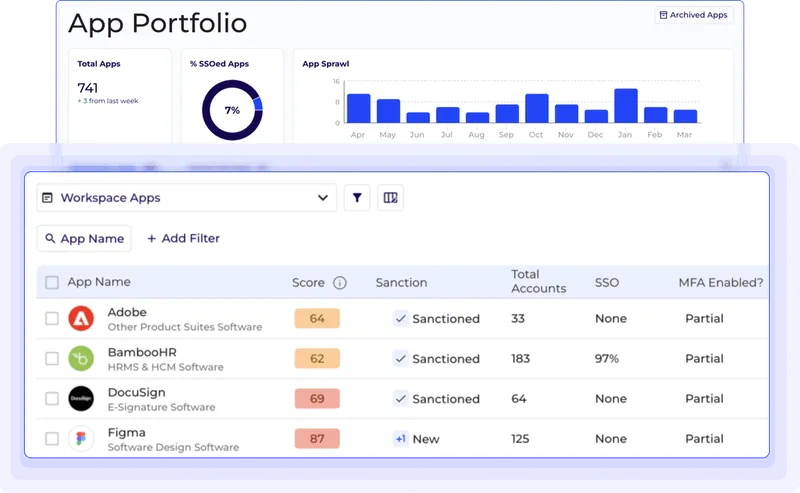
Grip’s discovery layer is the foundation of the platform. It connects to sources such as corporate email and identity systems to build an inventory of applications, accounts, and users. According to the vendor, the initial connection can be completed without agents or proxies, while the optional browser extension adds deeper activity and credential context.
The resulting inventory can reveal:
- Approved and unapproved SaaS applications
- Shadow AI services and AI features inside existing apps
- User-created accounts outside SSO
- Dormant, abandoned, or duplicate accounts
- Separate or rogue cloud tenants
- OAuth connections and app-to-app relationships
Because Grip maps apps to identities and usage, you can see who introduced a service, whether access is active, how users authenticate, and whether it should be sanctioned, tolerated, reviewed, or removed.
2. Identity-Driven SaaS Risk Management
Grip treats identity as the common control point across SaaS. A reputable application can still be risky when an administrator uses a personal account, a password is reused, or a former worker retains unfederated access.
It surfaces stale accounts, shared credentials, weak authentication, missing MFA, non-corporate admins, excessive privileges, and unmanaged access, while helping prioritize SSO and MFA coverage.
3. SaaS Security Posture Management
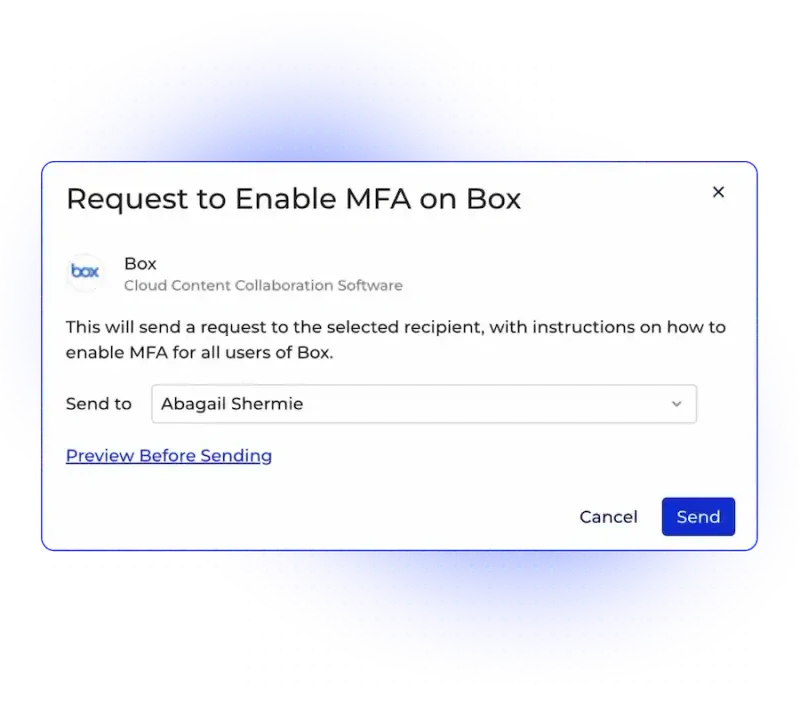
Grip SSPM continuously evaluates configurations in supported business applications. It is designed to identify risky settings, compliance gaps, excessive permissions, unsafe sharing, and configuration drift, then provide remediation guidance or automated actions.
Grip connects each finding to affected identities, authentication methods, integrations, and business usage, helping teams avoid treating every issue as equally urgent.
An external sharing issue, for example, becomes more actionable when the affected users and connected apps are visible.
4. Grip Extend Browser Security
Grip Extend is an optional browser extension that adds visibility and controls at the point where employees access SaaS. It can identify weak, reused, shared, or compromised passwords, flag accounts without MFA, detect hidden portals, and engage users with prompts when risky behavior occurs. For broader credential controls, compare the best password managers.
This covers user-managed identities outside the central identity provider and gives Grip a preventive control surface.
Security and privacy teams should review browser telemetry, policy scope, employee communications, regional requirements, and prompt behavior. See our guide to why browser security matters.
5. Identity Threat Detection and Response
Grip ITDR expands the platform from posture management into active detection and response. It correlates identity signals across managed and unmanaged SaaS, looking for suspicious sign-ins, risky IP activity, password spraying, privilege escalation, malicious OAuth grants, consent phishing, harmful browser extensions, and lateral identity movement. Our anti-phishing software guide explains the wider prevention layer.
Responses can include user quarantine, session termination, OAuth blocking, extension disabling, and custom workflows, supported by identity context and blast-radius mapping.
Grip is most useful when SIEM, SOAR, ticketing, and identity systems already exist but lack visibility beyond centrally managed applications.
6. OAuth and Third-Party Connection Governance
OAuth integrations can quietly expand the attack surface when users grant third-party access to mail, files, calendars, contacts, or administrative functions.
Grip categorizes OAuth scopes by risk, maps them to identities, and helps teams tolerate, restrict, or revoke access across third- and fourth-party relationships.
7. Automated Onboarding, Offboarding, and Remediation
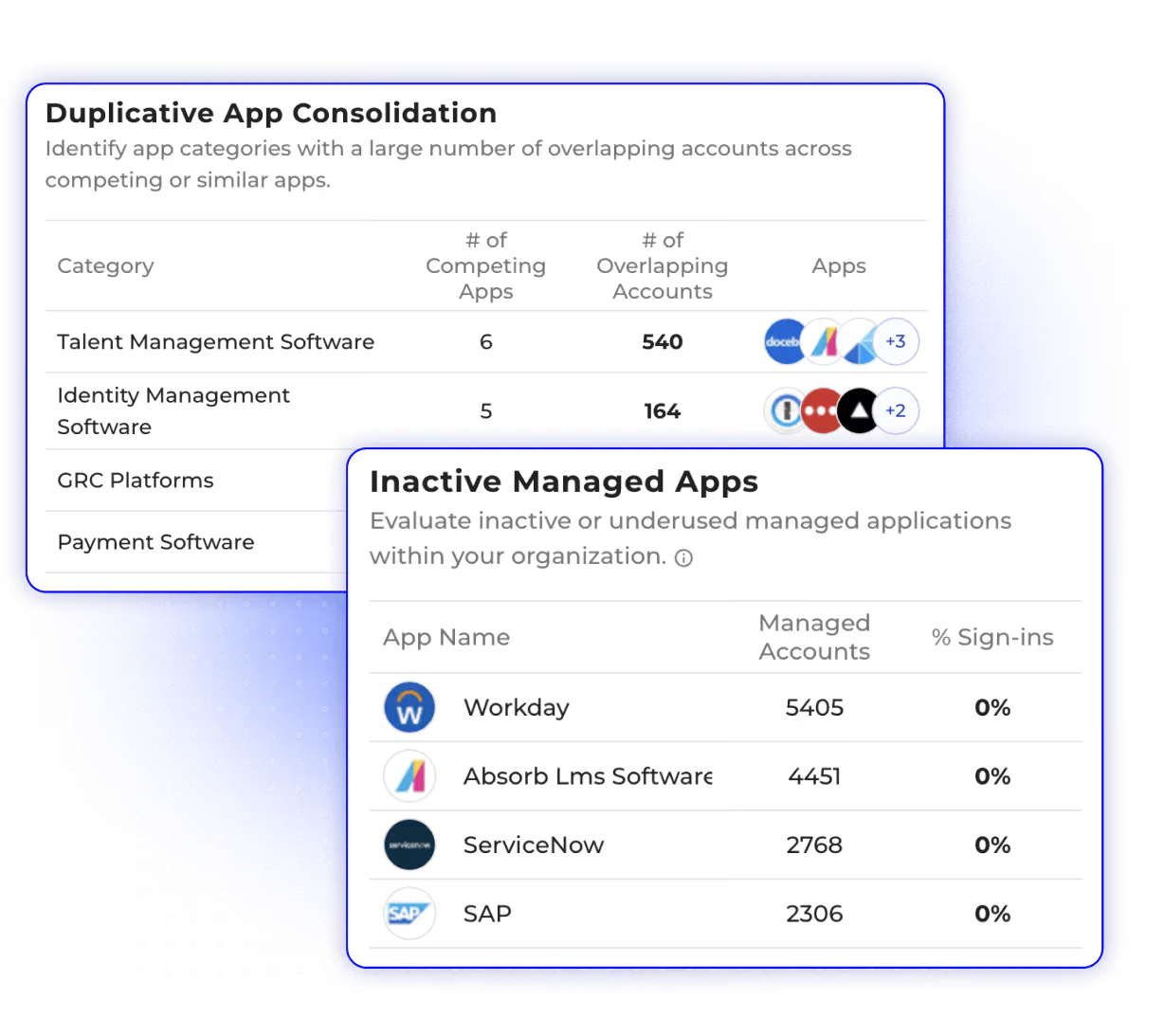
Discovery creates value only when it leads to action. Grip includes policy-driven workflows for app review, business justification, sanctioning, access removal, credential rotation, account cleanup, and offboarding.
A workflow might identify a new AI tool, request justification, evaluate risk, require SSO or MFA, notify the owner, and revoke rejected access. Similar automation can remove dormant or former-employee accounts.
This turns shadow IT from a periodic spreadsheet exercise into a repeatable governance process.
Pros and Cons
Advantages and Disadvantages
Grip Security is strongest when SaaS adoption is decentralized and identity risk extends beyond your approved application portfolio. Its limitations are less about missing core capabilities and more about operational fit, deployment depth, and the maturity required to use the platform effectively.
Positive
✅ Strong discovery of shadow SaaS and AI
✅ Identity context improves risk prioritization
✅ Combines SSPM, ITDR, and lifecycle governance
✅ Supports automated remediation workflows
✅ Transparent starting price for smaller organizations
✅ Broad integrations across security and business tools
Negative
❌ Requires security expertise and process ownership
❌ Enterprise pricing remains customized
❌ Browser extension needs privacy and change review
❌ Does not replace SIEM, SASE, CNAPP, or endpoint security
❌ May be excessive for a small, tightly controlled SaaS stack
👍 Pros
✅ Strong discovery across managed and unmanaged SaaS
Grip uncovers applications and accounts that may not appear in the identity provider or procurement system, helping teams build a more credible SaaS inventory.
✅ Identity context makes findings more actionable
The platform connects apps, users, authentication, integrations, and activity, helping you distinguish a dormant account from a privileged or business-critical identity.
✅ Broad coverage reduces tool fragmentation
Grip combines discovery, SSPM, ITDR, browser controls, OAuth governance, lifecycle workflows, and AI oversight in one platform.
✅ Automation supports measurable risk reduction
Policy-driven actions can request justification, revoke access, rotate credentials, remove stale accounts, and trigger external workflows.
✅ SMB pricing is clearer than many enterprise security vendors
The published starting price makes early budgeting easier, although final cost still depends on scope and contract terms.
✅ Integrations fit existing security operations
Connections with identity, ticketing, SIEM, SOAR, cloud, and SaaS tools help Grip operate as a control plane rather than an isolated console.
👎 Cons
❌ The platform still requires mature ownership
Your organization must define acceptable apps, risk thresholds, owners, escalation paths, and remediation policies. Otherwise, discovery can create more findings than your team can govern.
❌ Enterprise cost is not publicly predictable
Organizations with more than 1,000 people receive custom pricing, so buyers must compare included modules, integrations, support, and automation carefully.
❌ Browser deployment may create internal resistance
Grip Extend adds valuable context, but successful rollout requires privacy review, employee communication, and clear limits on collected browser data.
❌ It does not replace the rest of your security stack
Grip is not a firewall, secure web gateway, endpoint platform, CNAPP, DLP suite, or general-purpose SIEM.
❌ Smaller companies may not need its full depth
A company with a short app list, strong SSO coverage, and limited compliance pressure may gain more value from a simpler tool.
User Experience
Deployment and Daily Use
Grip is designed to deliver initial visibility quickly. The vendor states that teams can connect email and identity sources through APIs in about 10 minutes, while collecting a more complete set of current and historical usage data can take several days depending on organization size.
The early value comes from discovery. The operational challenge begins when your team must validate ownership, prioritize risk, and decide which actions can be automated.
Recommended Rollout Process
A strong implementation should progress in stages:
- Connect core identity, email, and collaboration systems
- Validate discovered apps and account ownership
- Define risk categories and approved application states
- Prioritize stale access, privileged identities, and risky OAuth grants
- Launch business justification and owner-review workflows
- Pilot Grip Extend with a controlled employee group
- Integrate alerts and actions with existing SecOps systems
- Measure reductions in unmanaged accounts, access, and license waste
This staged approach prevents teams from enabling aggressive automation before they understand the quality of the data and the business impact of each policy.
Interface and Learning Curve
The platform uses dashboards, inventories, filters, risk views, identity relationships, and workflows. Experienced teams should understand the model quickly, but consistent value requires more than learning the interface.
You must define high-risk apps, user outreach, exception approval, and automated revocation. A G2 reviewer praised Grip’s proactive controls and compliance support but noted setup complexity, while others highlighted SaaS tracking and password rotation.
The learning curve reflects the product’s scope across identities, applications, browser activity, posture, and incident response.
Security Ecosystem
Integrations and Automation
Grip’s integrations are central to its value. Discovery depends on identity and communication sources, while remediation becomes more useful when actions flow into the systems your teams already operate.
The official integration catalog includes identity platforms, cloud services, collaboration suites, security products, ticketing systems, development tools, and major SaaS applications. Examples include Microsoft Entra ID, Google, Auth0, Duo, AWS, GitHub, Google Drive, Dropbox, ServiceNow, SailPoint, CrowdStrike, SecurityScorecard, Cisco Umbrella, BigQuery, and many application-specific SSPM connections.
These integrations support several workflow patterns:
- Discover apps and identities from email and identity data
- Evaluate posture inside supported SaaS platforms
- Send findings to SIEM, SOAR, or data platforms
- Create tickets and ownership tasks
- Block risky applications through existing security controls
- Trigger offboarding, access revocation, and credential actions
Grip states that it supports more than 70 integrations and can add certain applications quickly. Buyers should still validate exact depth. A logo in an integration directory may represent discovery, data exchange, workflow automation, or deep SSPM configuration coverage, and those are not equivalent.
Pricing
How Much Does Grip Security Cost?
Grip publishes a starting price for smaller organizations, which is helpful in a market where many vendors require a sales call before sharing budget guidance.
| Option | Best For | Published Pricing | Key Notes |
| Free SaaS Identity Risk Assessment | Organizations evaluating exposure | Free | Assessment, customized dashboard, report, and temporary platform access |
| SMB Platform | Organizations under 1,000 people | From $8 per user/month | Annual per-human-user pricing, feature selection and contract terms may affect cost |
| Enterprise | Organizations with 1,000+ people | Custom pricing | Tailored platform scope, integrations, support, and security requirements |
The SMB package lists discovery, identity security, browser prevention, OAuth and authentication insights, threat response, reporting, offboarding, rightsizing, and posture management.
Confirm whether your quote includes Grip Extend, ITDR, priority SSPM integrations, custom workflows, exports, API access, support, and implementation.
Build the cost case around license reclamation, app consolidation, faster offboarding, lower IAM effort, and shorter investigations, not breach prevention alone.
Security and Compliance
How Secure Is Grip Security?
Grip processes sensitive identity, application, configuration, and activity metadata, so its own security controls deserve the same scrutiny as any privileged security platform.
The company states that it is ISO 27001 and SOC 2 Type II certified. These are positive indicators, but they do not replace a customer-specific vendor review.
Security Questions to Ask Before Deployment
- Which data fields are collected from email, identity providers, SaaS APIs, and browsers?
- What API permissions are required, and can they be limited?
- Where is customer data stored and processed?
- What are the retention and deletion options?
- Which subprocessors support the service?
- How is tenant data encrypted and logically isolated?
- How are administrator actions logged and reviewed?
- What telemetry does Grip Extend collect from the browser?
- Can policies exclude personal browsing or sensitive categories?
- What are the incident notification and business continuity commitments?
Also verify console RBAC, SSO, MFA, audit logs, export controls, support access, testing, disclosure processes, and regulated-data terms.
Grip can strengthen inventory, access reviews, posture monitoring, and evidence collection, but compliance still depends on your policies, ownership, legal basis, communications, and response processes.
Business Fit
Who Should Use Grip Security?
Grip is best suited to organizations where SaaS adoption is distributed across business teams and where existing identity tools cover only the approved portion of the environment.
| Organization Type | Fit | Why |
| Mid-market SaaS-heavy company | Excellent | Strong need for shadow SaaS discovery, lifecycle governance, and practical automation |
| Large regulated enterprise | Excellent | Benefits from identity context, SSPM, ITDR, compliance evidence, and workflow integrations |
| Fast-growing company adopting AI tools | Excellent | Can discover shadow AI, assess risk, and apply guardrails without blanket blocking |
| Security team with SIEM and IAM gaps | Strong | Adds SaaS identity context and response actions beyond centrally managed apps |
| Small company with a limited SaaS stack | Moderate | May not need the platform’s full depth or governance overhead |
| Company seeking only SASE or endpoint protection | Poor | Grip secures SaaS identities and posture, not network traffic or endpoint malware |
Grip Security Is a Strong Choice If You Need To:
- Discover unknown SaaS and AI adoption
- Map apps and integrations to real identities
- Extend governance beyond SSO-managed applications
- Reduce stale accounts and incomplete offboarding
- Prioritize and remediate SaaS misconfigurations
- Detect OAuth abuse and post-login identity threats
- Turn SaaS risk findings into automated workflows
Consider a Simpler Option If:
- Your approved SaaS inventory is small and stable
- Nearly every application is already under SSO and lifecycle management
- You need software spend management more than security controls
- You cannot assign owners for application review and remediation
- Your immediate priority is network, endpoint, or cloud workload security
Compare with Others
Grip Security Alternatives
The closest alternative depends on which part of Grip’s platform matters most: posture depth, threat detection, shadow SaaS discovery, AI security, or workflow automation.
Grip Security vs Obsidian Security
Obsidian Security is a strong alternative for enterprises prioritizing deep SaaS threat detection, knowledge-graph context, account takeover analysis, access violations, and continuous protection across major business applications.
Choose Grip when your program begins with broad identity-based discovery, shadow SaaS governance, lifecycle controls, and automated remediation. Choose Obsidian when your primary concern is rich threat context and security analytics across deeply integrated enterprise SaaS.
Grip Security vs AppOmni
AppOmni is one of the most established SSPM platforms and is particularly relevant for configuration security, connected-app visibility, compliance, and deep posture coverage in business-critical SaaS.
Choose Grip when unmanaged apps, user-created accounts, identity governance, and shadow AI are central requirements. Choose AppOmni when your buying process is led by detailed configuration posture, audit readiness, and mature SSPM controls across supported core applications.
Grip Security vs Reco
Reco combines SaaS discovery, identity lifecycle management, posture management, threat detection, compliance monitoring, and AI agent security. Its graph-based approach and rapid integration model make it a credible alternative for teams that want broad SaaS and AI context.
Grip has a particularly clear identity-first story around shadow SaaS, browser controls, and policy-driven governance. Reco may appeal more when agentic AI security, data access relationships, and a unified risk graph are the central evaluation criteria.
Grip Security vs Nudge Security
Nudge Security focuses on shadow SaaS and AI discovery, identity governance, employee engagement, and automated guardrails. It can be attractive to IT and security teams that want fast visibility and collaborative user workflows.
Choose Nudge Security when simplicity, SaaS inventory, employee nudges, and IT-led governance are your priorities. Choose Grip when you need a broader security platform with SSPM, ITDR, OAuth threat response, and deeper remediation coverage.
You can also browse the network security software section for related reviews and guides.
Conclusion
Is Grip Security Worth It?
Grip Security is worth serious consideration if your organization has a large, decentralized SaaS estate and existing IAM or SSPM controls cannot see what employees adopt outside approved channels. Its strongest value comes from connecting applications to identities, authentication, integrations, posture, and business use, then providing workflows that reduce risk rather than only documenting it.
The platform is especially compelling for mid-market and enterprise teams managing shadow SaaS, shadow AI, incomplete SSO coverage, risky OAuth grants, stale access, and fragmented offboarding. Combining discovery, SSPM, ITDR, browser controls, and lifecycle automation gives Grip a broader operational role than a standard posture-management product.
Grip is not the right purchase when your main requirement is endpoint protection, network access, cloud runtime defense, or general log management. It also requires governance maturity. Your team must be ready to define policies, assign application owners, review exceptions, and automate actions responsibly.
Overall, Grip stands out as an identity-driven SaaS security control plane for organizations that have outgrown manual shadow IT reviews and need continuous control across SaaS and AI adoption.
Frequently Asked Questions
Have more questions?
What is Grip Security used for?
Grip Security is used to discover and govern SaaS and AI applications, map accounts to identities, detect risky access and misconfigurations, manage OAuth connections, automate offboarding, and respond to identity threats across managed and unmanaged apps.
Is Grip Security an SSPM platform?
Yes. Grip includes SaaS Security Posture Management capabilities for detecting and remediating misconfigurations. However, it is broader than a traditional SSPM because it also covers shadow SaaS discovery, identity risk, ITDR, browser controls, AI governance, and lifecycle automation.
How does Grip Security discover shadow SaaS?
Grip connects to sources such as corporate email and identity systems to identify applications, accounts, and users. Its optional browser extension can add deeper visibility into SaaS activity, authentication gaps, hidden portals, and credential risks.
Does Grip Security require an agent?
Core discovery is designed to work through API connections without agents or proxies. Grip Extend is an optional browser extension that adds real-time browser and credential context for user-managed SaaS identities.
How much does Grip Security cost?
Grip lists pricing from $8 per human user per month for organizations with fewer than 1,000 people. Pricing is annual and can vary by features, contract length, and user count. Enterprise pricing is customized.
Can Grip Security replace a CASB or SASE platform?
Not completely. Grip focuses on SaaS identity, posture, application discovery, governance, and threat response. CASB and SASE platforms provide broader traffic inspection, network access, secure web gateway, and data-control capabilities, so the products are often complementary.
Does Grip Security support AI governance?
Yes. Grip can discover shadow AI applications and AI features, map usage to identities, assess risk, monitor OAuth relationships, request business justification, and apply policy-driven controls or remediation workflows.
Is Grip Security suitable for small businesses?
It can suit SaaS-heavy small and mid-sized businesses with shadow IT, compliance, or identity-governance challenges. A small company with a limited and fully managed application stack may find a simpler discovery or SaaS management product more economical.
What are the best Grip Security alternatives?
Strong alternatives include Obsidian Security for deep SaaS threat detection, AppOmni for SSPM and configuration posture, Reco for graph-based SaaS and AI security, and Nudge Security for shadow SaaS discovery and employee-driven governance.
Is Grip Security secure?
Grip states that it is ISO 27001 certified and SOC 2 Type II certified. Buyers should still assess API permissions, data retention, regional processing, browser telemetry, encryption, access controls, subprocessors, and incident-response commitments before deployment.