Introduction
Juniper SRX Series firewalls occupy a distinctive position in the next-generation firewall market. Rather than treating security as a separate appliance layered onto the network, Juniper combines firewalling, routing, switching, VPN, SD-WAN, and threat prevention within the Junos operating system.
That approach is especially relevant when you operate complex branches, campuses, data centers, or service-provider networks. You can apply familiar Junos workflows, use routing-grade features, automate configuration changes, and extend a consistent policy model across physical SRX appliances and the vSRX virtual firewall.
The platform is not the easiest firewall for every buyer. Smaller organizations may find the product family, management options, subscription tiers, and command-line depth more demanding than simpler mid-market alternatives. The value becomes clearer when reliability, throughput, routing control, segmentation, and repeatable operations matter more than quick plug-and-play deployment.
This Juniper SRX Series review examines the platform’s security capabilities, Junos administration, management tools, licensing, deployment fit, advantages, limitations, and leading alternatives.
What Is the Juniper SRX Series?
The Juniper SRX Series is a family of next-generation firewalls for branch, campus, data center, service-provider, virtual, and public-cloud deployments. The range includes compact branch devices, enterprise appliances, high-throughput data-center platforms, and vSRX software firewalls.
Core functions include stateful firewalling, network address translation, routing, IPsec VPN, application visibility, intrusion prevention, malware controls, web filtering, security intelligence, and optional cloud-based advanced threat prevention. The exact capabilities and inspected throughput depend on the model, Junos OS release, license, and enabled services.
SRX is a security and networking platform rather than a single appliance. Junos OS provides the foundation, Security Director centralizes policy, Mist supports compatible WAN deployments, and Advanced Threat Prevention adds malware analysis and threat intelligence.
Feature Review
Juniper SRX Series Key Capabilities
The most important SRX advantage is not a single security feature. It is the ability to combine security enforcement with mature networking, automation, and multiple deployment models. The following capabilities determine whether that architecture fits your environment.
1. Junos OS and Routing-Grade Firewall Architecture
SRX firewalls run Junos OS, the same operating system family used across much of Juniper’s routing and switching portfolio. This gives network teams a consistent configuration hierarchy, operational commands, commit process, and automation model.
The commit workflow is a practical strength. You can review candidate changes before applying them, use commit checks to identify errors, schedule commits, confirm changes with automatic rollback protection, and compare configuration versions. These controls reduce the risk of losing access after a remote firewall change.
Junos also makes SRX useful where the firewall must participate deeply in the network. Depending on the platform and design, you can combine dynamic routing, security zones, virtual routers, NAT, IPsec, VLANs, high availability, quality of service, and advanced data-center protocols. This is more flexible than treating the firewall as a basic internet edge box.
The trade-off is complexity. Junos is logical once you understand its hierarchy, but administrators coming from GUI-first firewalls need time to learn security policies, zones, address books, routing instances, application objects, and operational troubleshooting.
2. Application Visibility, IPS, and Content Security
AppSecure adds application identification, application tracking, and application-aware policy controls. Instead of relying only on ports and protocols, you can identify applications, monitor usage, block unwanted services, or apply different treatment based on business relevance and risk.
Intrusion detection and prevention uses updated signatures to identify exploit attempts and suspicious network activity. You can tune policies by attack category, severity, application, source, destination, and action. This flexibility is valuable, but it also means you should avoid enabling the broadest policy without testing performance and false positives.
Additional security services can include antivirus, antispam, web filtering, DNS-related protection, and content controls. Feature inclusion varies across Advanced and Premium license combinations, so your purchase should map each required control to the exact model and SKU rather than relying on a generic SRX feature list.
For sizing, focus on threat-prevention throughput with the services you will actually enable. Headline firewall throughput is not a reliable estimate when IPS, application identification, TLS inspection, logging, and VPN encryption are active simultaneously.
3. Advanced Threat Prevention and Security Intelligence
Juniper Advanced Threat Prevention extends SRX beyond signature-based inspection. It can analyze files and network activity, identify known and unknown malware, use sandboxing, score risk, and return enforcement decisions to the firewall.
SecIntel uses threat intelligence feeds to block malicious IP addresses, domains, command-and-control infrastructure, and infected hosts. You can also incorporate selected third-party or custom intelligence, which is helpful when your security operations team maintains internal indicators or industry-specific feeds.
Encrypted Traffic Insights is designed to detect suspicious patterns in encrypted sessions without decrypting every connection. That does not remove the need for TLS inspection, but it can help you prioritize traffic, preserve privacy for selected categories, and identify risk where decryption is unavailable or inappropriate.
These capabilities are strongest when threat intelligence is connected to an enforcement plan. Define whether high-risk events should block traffic, quarantine a segment, create an alert, or trigger investigation. Otherwise, advanced detection can become another dashboard rather than an operational control.
4. VPN, SD-WAN, and Secure Connectivity
SRX supports site-to-site IPsec VPN, dynamic VPN designs, route-based tunnels, and remote-access options through Juniper Secure Connect. The combination of routing and VPN is particularly useful for complex hub-and-spoke, multihoming, cloud connectivity, and partner-network designs.
Secure SD-WAN capabilities allow compatible SRX devices to combine link steering, application awareness, path selection, security policy, and branch connectivity. This can reduce the number of appliances at a branch, especially when you already use Juniper switching, wireless, or Mist operations.
Evaluate SD-WAN and remote access as separate buying decisions. Confirm management, user licensing, tunnel scale, authentication, endpoint support, high availability, and encrypted performance. An internet-edge firewall may not automatically meet your remote-access or WAN targets.
5. Security Director Cloud, Mist, and Automation
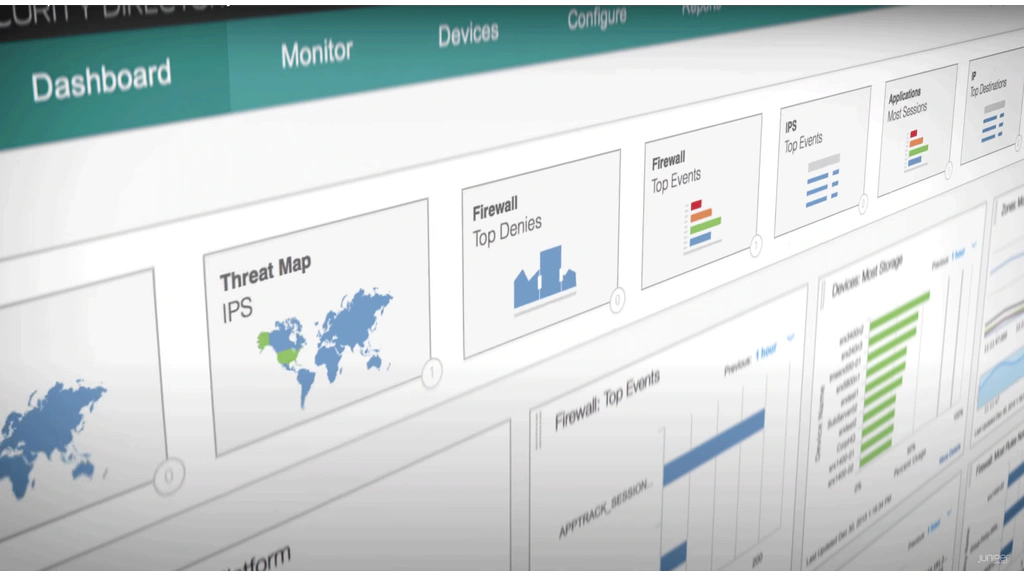
Security Director Cloud provides centralized policy management, visibility, orchestration, and rule analysis for SRX deployments. It is useful when you need to manage multiple firewalls, standardize policy objects, review events, and reduce device-by-device administration.
Juniper also provides on-premises Security Director for organizations that require local management, regulated environments, or air-gapped operations. This choice matters because management architecture affects logging, availability, change control, integrations, and operational ownership.
For compatible WAN deployments, Juniper Mist can add zero-touch provisioning, WAN Assurance, anomaly detection, dynamic packet capture, and experience-focused troubleshooting. Confirm model, Junos release, and feature support before standardizing the workflow.
Automation is another strong area. Junos supports APIs, structured configuration, event scripts, telemetry, and infrastructure-as-code workflows. Experienced teams can integrate SRX changes with Git-based review, templates, validation, and automated deployment. The platform rewards engineering maturity, but it does not create that maturity by itself.
Pros and Cons
Advantages and Disadvantages
Juniper SRX provides a powerful combination of security and networking, but its strengths are most valuable when your team can operate Junos confidently and model the complete licensing and management architecture.
Positive
✅ Combines mature routing and NGFW security
✅ Strong configuration validation and rollback controls
✅ Scales from branch appliances to large data centers
✅ Supports centralized cloud or on-premises management
✅ Offers deep automation and API capabilities
✅ Provides physical and virtual deployment consistency
Negative
❌ Steeper learning curve for GUI-first teams
❌ Licensing and feature mapping can be complex
❌ Quote-based pricing limits quick comparisons
❌ Advanced deployments require skilled network engineers
❌ Management experience varies by chosen platform
👍 Pros
✅ Routing and security are genuinely integrated
You can design dynamic routing, VPN, segmentation, NAT, zones, and policy as one system. This is valuable where the firewall must participate in the network rather than sit outside it.
✅ Junos commit and rollback controls reduce change risk
The candidate configuration model lets you validate and review changes before activation. Confirmed commits and rollback options are particularly useful for remote administration, scheduled maintenance, and environments with strict change-control requirements.
✅ The portfolio covers a broad range of deployment sizes
You can use compact branch SRX devices, enterprise appliances, high-end chassis platforms, and vSRX instances while retaining familiar Junos concepts. This creates a clearer expansion path than maintaining unrelated firewall products for each environment.
✅ Automation capabilities support repeatable operations
Structured configuration, APIs, templates, telemetry, and scripting make SRX suitable for network-as-code practices. You can standardize deployments, validate changes, and reduce manual configuration drift when you have the engineering processes to support automation.
✅ Advanced threat services connect detection with enforcement
ATP Cloud, SecIntel, IPS, application controls, and encrypted traffic analysis can feed decisions back to the SRX enforcement point. This reduces the gap between discovering a threat and blocking related traffic.
👎 Cons
❌ The learning curve is significant for inexperienced teams
Junos offers control, but it expects networking knowledge. Teams without experience in zones, routing, policy order, application signatures, and CLI troubleshooting may need training or implementation assistance before operating SRX safely.
❌ Licensing requires careful line-item validation
Advanced and Premium tiers vary by model and bundle. Remote-access licensing, management subscriptions, security services, hardware support, and term length can affect the total cost. You should not assume that a feature shown on the product page is included in the quoted configuration.
❌ The GUI is not the platform’s only source of truth
Security Director Cloud and Mist simplify many tasks, but experienced administrators still need Junos operational skills for troubleshooting, upgrades, packet flow analysis, and advanced configuration. Buyers seeking a purely GUI-led firewall may prefer a different platform.
❌ Small organizations may not use the platform’s full depth
A simple office that needs basic web filtering, VPN, and low-touch management may gain little from SRX’s routing and automation strengths. A simpler firewall can be easier to buy, deploy, and maintain.
❌ Performance comparisons require disciplined testing
Firewall throughput, IPS throughput, VPN throughput, TLS inspection, session scale, and interface capacity are different metrics. Poor sizing can produce an appliance that looks powerful on paper but lacks headroom once full inspection is enabled.
User Experience
Administration and Deployment
Deployment and Initial Configuration
A basic branch deployment can be straightforward when you use a validated template, zero-touch provisioning, or an experienced Juniper partner. The work becomes more involved when you introduce high availability, multiple routing domains, application-aware policy, SSL inspection, remote access, or integration with existing Juniper infrastructure.
Before installation, document interfaces, zones, routing, NAT, VPN peers, identity sources, logging, DNS, NTP, certificates, management access, and rollback procedures. Build the security policy from required application flows rather than copying broad legacy rules. This gives you a cleaner starting point and makes future auditing easier.
For distributed deployments, templates and secure zero-touch provisioning can reduce manual work. However, you should test onboarding, license activation, firmware compatibility, and remote recovery before shipping appliances to sites without technical staff.
Day-to-Day Policy Management
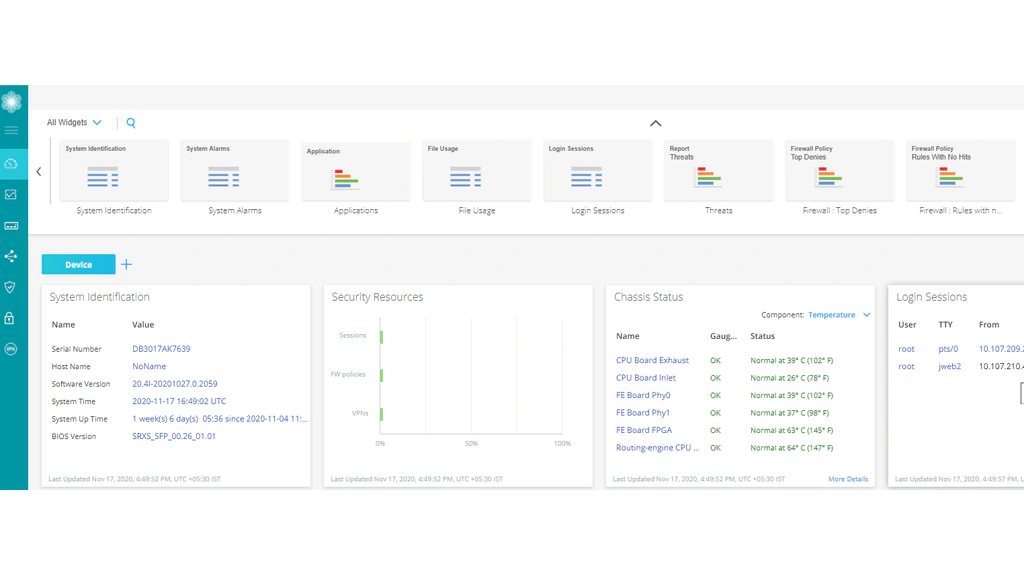
Security Director Cloud improves everyday administration by centralizing policy objects, rule workflows, events, and device management. Rule-placement analysis can help identify where a new rule belongs and reduce shadowed or conflicting policy.
The experience is strongest when you define clear ownership. Network operations may own routing and availability, while security owns inspection profiles, application policy, threat response, and logging. Shared change procedures prevent a routing adjustment from weakening policy or a security change from disrupting critical traffic.
Operational troubleshooting still benefits from CLI expertise. Flow sessions, route lookups, security policies, NAT translations, VPN state, packet captures, and system health often require device-level analysis. This is not necessarily a weakness for experienced teams, but it should influence staffing and training decisions.
Junos Learning Curve and Staffing Needs
Public feedback commonly praises SRX stability, routing depth, and rollback controls while describing a steeper learning curve than GUI-first products. SRX is predictable when designed correctly, but less forgiving when administrators do not understand packet flow.
You should plan for Junos training, lab access, documented upgrade procedures, configuration backups, and a support escalation path. For a small IT team, a managed service provider with Juniper expertise may provide better results than expecting a generalist administrator to learn the platform during an incident.
Business Fit
SRX Models and Deployment Fit
Branch and Distributed Sites
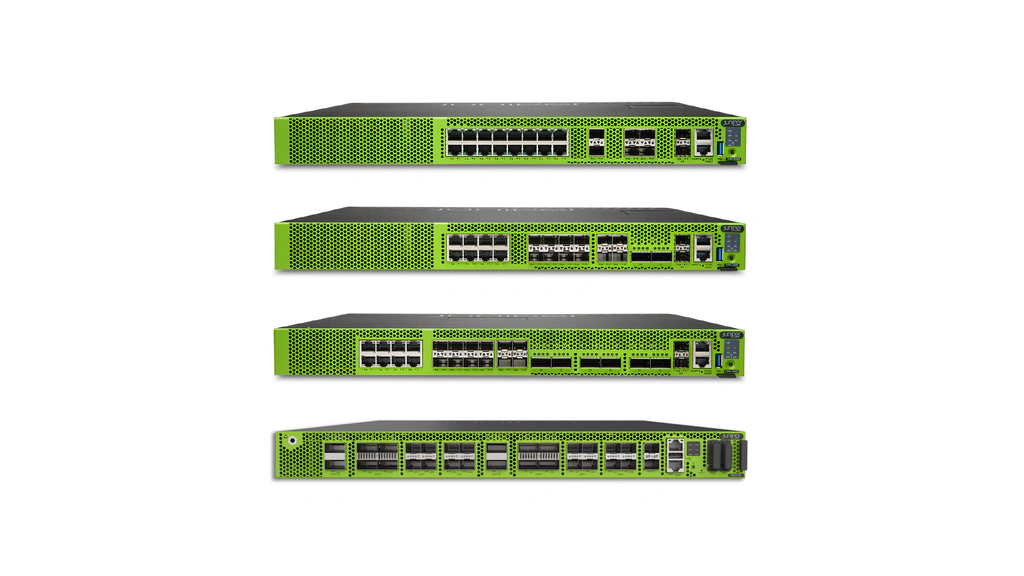
The SRX300 family remains common in branch environments, while newer SRX400-class platforms add modern hardware trust, secure onboarding, and resilient branch features. These devices are suitable when you want firewalling, routing, VPN, switching, and WAN functions in one platform.
Choose the model based on inspected throughput, interfaces, expansion, VPN scale, and growth. A branch using application control, IPS, and extensive logging needs more headroom than one using basic stateful firewalling.
Campus, Data Center, and Service Provider
Mid-range and high-end SRX platforms serve campus edges, regional hubs, data centers, and service-provider networks. Models such as SRX1600, SRX2300, SRX4100, SRX4200, SRX4300, SRX4600, SRX4700, and the SRX5000 line cover increasing throughput, port density, session scale, redundancy, and deployment complexity.
Newer platforms add secure zero-touch provisioning, hardware trust, selected MACsec support, EVPN-VXLAN integration, and distributed services. These matter when the firewall becomes part of the data-center fabric.
Virtual and Public Cloud
vSRX brings Junos security to virtual data centers, public clouds, labs, and hybrid environments. Cloud design still requires careful routing, availability, scaling, and logging.
| Deployment Type | Representative Options | Best Fit | Main Buying Consideration |
| Small branch | SRX300, SRX320, SRX400 | Remote offices and compact sites | Inspected throughput and interface needs |
| Large branch or campus | SRX340, SRX345, SRX380, SRX550, SRX1500 | Regional offices and campus edges | VPN scale, redundancy, and growth |
| Enterprise and data center | SRX1600, SRX2300, SRX4100-SRX4700 | High-performance enterprise security | TLS, IPS, session, and port capacity |
| Carrier and large-scale data center | SRX5400, SRX5600, SRX5800 | Service providers and massive environments | Architecture, chassis scale, and operations |
| Virtual and cloud | vSRX | Private cloud, public cloud, and labs | Licensed throughput and cloud design |
Plans and Cost
Pricing and Licensing
Juniper does not provide one universal public price for the SRX Series. Hardware, virtual capacity, support, management, advanced security services, and term length are normally quoted through Juniper or a channel partner.
How Juniper SRX Licensing Works
According to the official SRX licensing guide, the platform supports subscription and perpetual licensing, with Flex tiers and model-specific bundles. Common next-generation tiers include Advanced 1, Advanced 2, Premium 1, and Premium 2, although supported features vary by device.
Advanced tiers generally add controls such as intrusion prevention, application signatures, antivirus, and selected filtering services. Premium tiers add ATP Cloud and related advanced threat capabilities. Some models or older license structures use different naming, and remote-access VPN capacity may require separate licensing.
| Cost Component | What It Covers | What You Should Confirm |
| Firewall platform | Physical appliance or vSRX capacity | Interfaces, sessions, inspected throughput, and HA |
| Advanced tier | Core NGFW security services | Exact IDP, AppID, antivirus, and filtering features |
| Premium tier | ATP Cloud and advanced threat services | Sandboxing, SecIntel, DNS, IoT, and encrypted traffic features |
| Management | Security Director Cloud, on-premises management, or Mist services | Device count, logging, retention, and orchestration |
| Support and services | Hardware replacement, software support, and partner assistance | Response time, coverage hours, and upgrade support |
What to Include in Total Cost of Ownership
Request a three-year or five-year proposal that separates hardware, licenses, support, management, high availability, remote access, implementation, training, and renewal costs. Include spare units or replacement commitments for critical sites.
Include operational cost. A cheaper appliance may not be economical if it requires extensive consulting, while added capacity can reduce upgrade risk. Compare proposals using the same security services and realistic traffic.
Security and Compliance
Security Architecture and Resilience
Strong Security Foundations
SRX combines zone-based policy, stateful inspection, application control, IPS, malware protection, threat intelligence, VPN, segmentation, and high availability. Newer models may also include secure zero-touch provisioning, hardware root-of-trust elements, signed device identities, TPM 2.0, and MACsec support.
The platform can support Zero Trust network principles by enforcing least-privilege access between users, applications, segments, and environments. However, the firewall does not create Zero Trust by itself. You still need reliable identity, asset classification, endpoint posture, application ownership, and continuous policy review.
Operational Risks and Configuration Responsibilities
The largest security risk is usually not the absence of features. It is incorrect policy, outdated software, weak management access, incomplete logging, broad VPN permissions, or untested inspection settings. SRX provides strong controls, but administrators must configure and maintain them.
Use dedicated management networks, multifactor authentication where supported, role-based access, centralized logging, configuration backups, approved Junos releases, certificate lifecycle management, and tested rollback procedures. Review rule usage and remove obsolete objects rather than allowing the policy base to grow indefinitely.
Compliance and Deployment Considerations
Juniper publishes security advisories and certifications for selected products and software versions. In regulated environments, verify the exact model, cryptographic module, Junos release, license, and deployment mode. Do not generalize one certification to the entire SRX family.
Data handling also depends on your management and threat-prevention architecture. Cloud management and ATP services may process telemetry or submitted objects differently from an on-premises deployment. Review regional availability, retention, privacy terms, encryption, administrator access, and integration with your SIEM before production use.
Compare with Other Next-Generation Firewalls
Juniper SRX Series Alternatives
Juniper SRX Series is particularly strong when advanced routing, Junos automation, VPN connectivity, and firewall security must operate within one architecture. However, competing next-generation firewalls may provide a better fit when you prioritize application-centric policy, integrated SD-WAN, ecosystem compatibility, or simplified administration.
The table below highlights the main differences between Juniper SRX and its closest alternatives. You can also explore our guide to the best next-generation firewalls for a broader market comparison.
| Firewall Platform | Best For | Key Strength | Main Consideration |
| Juniper SRX Series | Routing-intensive enterprises and Juniper environments | Combines Junos routing, security, VPN, and automation | Requires Junos expertise and careful license planning |
| Palo Alto Networks Strata | Application-focused enterprise security | Granular application and identity-aware policy controls | Premium pricing and complex subscription options |
| Fortinet FortiGate | Branches, distributed businesses, and secure SD-WAN | Strong price-performance and integrated networking | Feature availability depends on the appliance and bundle |
| Cisco Secure Firewall | Organizations invested in the Cisco ecosystem | Integration with Cisco networking, identity, and threat intelligence | Management experience can vary across Cisco products |
| Check Point Quantum Force | Prevention-focused enterprises with complex policies | Mature centralized management and security controls | Deployment and policy administration may require specialist skills |
Palo Alto Networks Strata
Palo Alto Networks Strata is the strongest Juniper SRX alternative when granular application identification, identity-aware access rules, and advanced threat prevention are your primary requirements.
Its application-centric policy model can be easier for security teams that want to control traffic according to users, applications, content, and risk rather than relying heavily on network ports and protocols. Palo Alto Networks also provides a broad security ecosystem for cloud security, endpoint protection, threat intelligence, and security operations.
Juniper SRX remains more attractive when routing depth, Junos configuration controls, and integration with Juniper networking are central to your architecture. Palo Alto Networks Strata may be the better option when security policy visibility and application-level control outweigh routing flexibility. Read our complete Palo Alto Networks Strata review.
Fortinet FortiGate
Fortinet FortiGate is a compelling alternative for distributed organizations that want firewalling, secure SD-WAN, VPN, application control, and threat protection within a broad range of appliances.
FortiGate is often easier to justify for branch-heavy deployments because Fortinet provides numerous models across different throughput and price categories. Its purpose-built security processors can also deliver strong performance when multiple inspection services are enabled.
FortiGate may be preferable when price-performance, integrated SD-WAN, and broad appliance selection are your leading priorities. Juniper SRX is generally more compelling when your network team values Junos routing, structured configuration workflows, and operational consistency with Juniper switches or routers. Read our Fortinet FortiGate review.
Cisco Secure Firewall
Cisco Secure Firewall is a logical alternative when your organization already depends on Cisco networking, identity services, endpoint security, Talos threat intelligence, or Splunk.
The platform can provide stronger ecosystem alignment for businesses using Cisco infrastructure across branches, campuses, and data centers. Integrations with other Cisco security products may simplify identity-based policy, threat investigation, and incident response.
Juniper SRX may provide a cleaner experience for Juniper-oriented networks or environments where advanced routing and Junos automation are essential. Cisco Secure Firewall is usually the more natural choice when compatibility with an established Cisco architecture is more valuable than adopting another networking operating model. Read our Cisco Secure Firewall review.
Check Point Quantum Force
Check Point Quantum Force is a strong alternative for enterprises that prioritize prevention-focused security, centralized rule management, detailed policy administration, and multiple security services within a unified platform.
Check Point has a long-established reputation for firewall policy management and provides software blades for capabilities such as intrusion prevention, application control, URL filtering, antivirus, anti-bot protection, and threat emulation.
Quantum Force may suit security teams that place centralized policy governance and layered threat prevention above routing flexibility. Juniper SRX is typically better aligned with organizations that want security enforcement to operate as part of a routing-intensive Junos network. Read our Check Point Quantum Force review.
Conclusion
Is Juniper SRX Series Worth It?
Juniper SRX Series is worth considering when you need a firewall that behaves like part of the network rather than a separate security appliance. Its strongest qualities are Junos reliability, routing depth, configuration control, automation, deployment breadth, and the ability to connect threat intelligence with enforcement.
It suits enterprises, service providers, campuses, data centers, and distributed organizations with Juniper expertise. It also suits hybrid environments needing physical and virtual enforcement under one operational model.
SRX is less compelling for small teams seeking transparent pricing, minimal training, and a GUI-only workflow. Licensing should be mapped carefully, and the proof of concept should test inspected throughput, VPN performance, policy operations, logging, upgrades, and recovery with the exact services you plan to buy.
Our assessment is that Juniper SRX is one of the strongest routing-centric NGFW platforms. You should shortlist it when network engineering and security engineering need to converge, but choose a simpler competitor when ease of administration is the dominant requirement.
Frequently Asked Questions
Have more questions?
What is the Juniper SRX Series?
Juniper SRX Series is a family of next-generation firewalls that combines stateful security, application control, intrusion prevention, VPN, routing, switching, automation, and optional advanced threat services across physical and virtual deployments.
Is Juniper SRX a next-generation firewall?
Yes. SRX supports NGFW capabilities such as application identification, intrusion prevention, malware protection, web filtering, security intelligence, encrypted traffic analysis, and advanced threat prevention. The exact features depend on the model and license.
Who should use Juniper SRX firewalls?
SRX is best for enterprises, service providers, campuses, data centers, and distributed networks that need strong routing, VPN, segmentation, high availability, automation, and consistent operations across multiple deployment sizes.
Is Juniper SRX difficult to manage?
SRX can be more difficult than GUI-first firewalls because advanced operation requires Junos knowledge. Security Director Cloud and Mist simplify many workflows, but skilled administrators are still valuable for troubleshooting and complex configuration.
What is Juniper Security Director Cloud?
Security Director Cloud is Juniper’s centralized security management service for policy orchestration, visibility, device operations, rule analysis, and consistent control across supported SRX deployments.
Does Juniper SRX support SD-WAN?
Yes. Compatible SRX platforms can provide secure SD-WAN functions such as application-aware traffic steering, path selection, WAN security, and centralized operations. Confirm model, license, and Mist support before purchase.
What is the difference between SRX and vSRX?
SRX normally refers to the physical firewall family, while vSRX is the virtual software firewall for hypervisors and public-cloud environments. Both use Junos concepts, but performance, interfaces, deployment, and licensing differ.
How much does Juniper SRX cost?
Juniper SRX pricing is quote-based and depends on the appliance or virtual capacity, security subscriptions, support, management, high availability, remote access, and contract term. Request a complete multi-year proposal.
What should you test in a Juniper SRX proof of concept?
Test inspected throughput, application identification, IPS, TLS inspection, VPN performance, routing convergence, policy management, logging, high-availability failover, upgrades, rollback, SIEM integration, and the exact licenses you plan to buy.
What are the best Juniper SRX alternatives?
Leading alternatives include Palo Alto Networks Strata for application-focused enterprise security, Fortinet FortiGate for price-performance and SD-WAN, Cisco Secure Firewall for Cisco environments, and Check Point Quantum Force for prevention and centralized policy.