Introduction
Sophos Firewall is a next-generation firewall platform designed to combine network protection, encrypted traffic inspection, SD-WAN, VPN, application control, and automated threat response in one system. It is available through Sophos XGS hardware appliances, virtual and software deployments, and public cloud marketplaces.
Its strongest differentiator is not a single inspection engine. The real value appears when Sophos Firewall works with Sophos Endpoint, XDR, or MDR. Security Heartbeat, Synchronized Application Control, and Active Threat Response allow endpoint and network controls to share context and restrict compromised systems faster than a traditional firewall workflow.
That integration makes Sophos especially attractive to mid-sized businesses, distributed organizations, schools, retailers, and managed service providers that want broad protection without building a highly fragmented security stack. However, it also creates an important buying question: is Sophos Firewall still the right choice when you do not use the wider Sophos ecosystem?
This Sophos Firewall review examines protection depth, XGS performance, Sophos Central management, SD-WAN, VPN, licensing, deployment, user experience, security architecture, and alternatives. The goal is to help you judge operational fit, not simply compare feature lists.
What Is Sophos Firewall?
Sophos Firewall is a next-generation firewall and unified threat management platform. It combines stateful firewalling with intrusion prevention, malware scanning, web filtering, application control, TLS inspection, sandboxing, DNS protection, VPN, SD-WAN, reporting, and centralized administration.
The platform runs on Sophos Firewall OS, often shortened to SFOS. The current generation is built around XGS Series appliances, ranging from compact desktop devices for small offices to 2U enterprise models. Virtual editions can run on common hypervisors, while cloud versions can be deployed in environments such as AWS and Microsoft Azure.
Sophos positions the Xstream Protection bundle as the complete security package. It combines Network Protection, Web Protection, Zero-Day Protection, Central Orchestration, DNS Protection, support, and selected detection and response capabilities. Individual modules are available, but the bundle is easier to evaluate because several newer features are bundle-only.
Protection and Networking
Sophos Firewall Key Capabilities
Sophos Firewall covers the expected NGFW functions, but several capabilities deserve closer attention because they affect real deployment value. The platform is strongest when protection, networking, endpoint context, and cloud management are evaluated together.
1. Xstream DPI and TLS Inspection
The Xstream DPI Engine scans traffic for intrusion attempts, malware, risky applications, and web threats in a single streaming architecture. It supports TLS 1.3 inspection, next-generation IPS, antivirus scanning, application control, web policies, country blocking, and zero-day protection.
Encrypted traffic inspection is essential because a large share of business traffic now uses HTTPS. Sophos provides policy tools and exceptions so you can decide which traffic should be decrypted. You should still test certificate deployment, privacy requirements, unsupported applications, and throughput before enabling broad inspection.
The Xstream FastPath architecture can accelerate trusted and approved traffic after classification. On many XGS appliances, dedicated processors offload eligible flows, while newer desktop models also use virtual FastPath acceleration. This helps Sophos maintain better performance when security services are active, but sizing should always use the threat protection and TLS figures for your chosen model.
2. Intrusion Prevention and Zero-Day Protection
Sophos Firewall includes an intrusion prevention system that identifies exploit patterns and suspicious network activity. Policies can be tuned by workload, operating system, server type, and exposure, which helps reduce unnecessary signatures and false positives.
Zero-Day Protection adds machine learning, sandboxing, and file analysis. Suspicious files can be analyzed away from the production environment before the firewall allows them to continue. This is particularly valuable for email, web downloads, and environments where unknown payloads represent a meaningful risk.
Sophos also includes NDR Essentials in the Xstream Protection bundle. This cloud-hosted capability analyzes selected network activity for suspicious encrypted payloads, domain generation algorithms, and other indicators without forcing all detection work onto the appliance. It is useful as an additional signal, but it should not be treated as a replacement for a complete NDR platform in a large security operations program.
3. Synchronized Security and Security Heartbeat
Synchronized Security is the feature that most clearly separates Sophos from competitors. Sophos-managed endpoints can share health, user, process, and application information with the firewall through Security Heartbeat.
You can use this context to create policies that restrict or isolate unhealthy devices. For example, a system marked red by Sophos Endpoint can lose access to sensitive network zones while retaining access to remediation services. This reduces the delay between endpoint detection and network containment.
Synchronized Application Control can also identify applications that would otherwise appear as generic encrypted traffic. In SFOS v22 MR2, Sophos expanded categorization for generative AI applications by using endpoint context to improve visibility and policy control. The benefit is strongest when Sophos Endpoint is deployed broadly and properly maintained.
4. Active Threat Response, XDR, and MDR Integration
Active Threat Response allows Sophos Firewall to consume threat feeds and automatically block identified hosts, IP addresses, domains, or other indicators. Feeds can come from Sophos X-Ops, Sophos MDR and XDR workflows, or supported third-party sources.
This capability changes the firewall from a passive telemetry source into an enforcement point. When Sophos MDR analysts or XDR detections identify a threat, the firewall can restrict related communications without waiting for an administrator to build and publish a manual rule.
The design is useful for lean security teams because it shortens response time. However, automated blocking should be monitored carefully. You need clear ownership, exception handling, feed quality controls, and a recovery process for false positives.
5. SD-WAN, VPN, and Branch Connectivity
Sophos Firewall includes SD-WAN capabilities for multiple WAN links, policy-based routing, application-aware path selection, load balancing, and failover. It measures latency, jitter, and packet loss so traffic can move to a healthier connection when service quality declines.
Sophos Central can orchestrate full-mesh, hub-and-spoke, and other VPN topologies across multiple firewalls. This reduces repetitive tunnel configuration and is valuable for organizations with several offices, stores, schools, clinics, or temporary sites.
SD-RED devices extend this model to smaller remote locations. A device can be shipped to a branch and automatically establish a secure tunnel when connected. This is a practical strength for businesses that cannot place experienced network staff at every location.
6. Sophos Central Management and Reporting
Sophos Central provides cloud-based inventory, policy management, templates, alerts, firmware scheduling, backups, reporting, and multi-firewall administration. Partners and MSPs can use Sophos Central Partner to manage separate customer environments.
Central management is simpler than operating an additional on-premises management server, especially for smaller teams. Zero-touch deployment and shared templates can reduce configuration effort across standardized branches.
Reporting is useful for operational visibility, but it is not the platform’s strongest area. Retention and advanced reporting depend on the license package, and some administrators may want more flexible customization. Large security operations teams will usually export logs to a SIEM or data platform for deeper correlation and long-term retention.
7. Firewall Health Check and Secure-by-Design Improvements
SFOS v22 introduced Firewall Health Check, which evaluates configuration settings against CIS benchmarks and other security practices. It highlights high-risk settings and links administrators to the relevant configuration areas.
The same release introduced a re-architected control plane, stronger service isolation, a hardened Linux kernel, improved high-availability self-healing, remote integrity monitoring, and a newer anti-malware engine. These changes matter because the firewall itself is an internet-facing security appliance and must be protected as carefully as the network behind it.
SFOS v22 MR1 expanded NDR detections and monitoring for interactive or reverse-shell compromise. MR2 added controls for post-quantum cryptography negotiation, improved generative AI application classification, and updated Chromebook identity support. These updates show active product development, but they also make disciplined firmware management essential.
Pros and Cons
Advantages and Disadvantages
Sophos Firewall offers broad protection with comparatively approachable management, but its value depends on your environment. The strongest benefits appear when you use Sophos Endpoint, XDR, MDR, or Central across the same organization.
Positive
✅ Strong firewall and endpoint coordination
✅ Broad NGFW, VPN, and SD-WAN coverage
✅ Accessible cloud management for lean teams
✅ Useful automated threat response
✅ Wide hardware and deployment range
✅ Health Check improves configuration hygiene
Negative
❌ Best value depends on Sophos ecosystem adoption
❌ Public pricing is limited
❌ Reporting may need external tools
❌ Licensing modules require careful review
❌ Advanced environments still need skilled administration
❌ Firmware and migration planning can be demanding
👍 Pros
✅ Strong firewall and endpoint coordination
Sophos can combine endpoint health, user context, application discovery, firewall policy, and automated containment. This reduces the gap between detection and enforcement, especially for teams already using Sophos Endpoint, XDR, or MDR.
✅ Broad NGFW, VPN, and SD-WAN coverage
The platform includes the core functions most mid-sized organizations need: IPS, malware protection, TLS inspection, application control, web filtering, site-to-site VPN, remote access, link monitoring, SD-WAN, and branch orchestration.
✅ Accessible cloud management for lean teams
Sophos Central makes multi-firewall administration easier without requiring a separate management appliance. Templates, scheduled firmware, backups, alerts, and partner management are useful for distributed organizations and MSPs.
✅ Useful automated threat response
Active Threat Response can turn Sophos and third-party threat intelligence into network enforcement. This is valuable when your security team needs faster containment but cannot manually translate every detection into firewall rules.
✅ Wide hardware and deployment range
XGS models cover small offices, branches, distributed enterprises, and campus edges. Virtual and cloud editions extend the same operating model into data centers and public cloud environments.
✅ Health Check improves configuration hygiene
The Health Check feature gives administrators a practical way to identify high-risk settings. It does not replace an audit, but it helps teams catch avoidable exposure before it becomes an incident.
👎 Cons
❌ Best value depends on Sophos ecosystem adoption
Sophos Firewall works as a standalone NGFW, but its clearest advantages come from Security Heartbeat, endpoint context, XDR, and MDR integration. Organizations using another endpoint platform may receive less differentiation.
❌ Public pricing is limited
Sophos generally uses partner quotes instead of transparent list pricing. You need to compare hardware, support, subscriptions, reporting, renewal terms, and optional modules to understand total cost.
❌ Reporting may need external tools
Built-in and Central reporting cover common operational needs, but larger teams may require a SIEM for custom dashboards, longer retention, complex correlation, and compliance evidence.
❌ Licensing modules require careful review
The Xstream bundle simplifies purchasing, but buyers still need to understand which features are bundle-only, which modules can be purchased separately, and what happens when support or subscriptions expire.
❌ Advanced environments still need skilled administration
The interface is approachable, but firewall design remains complex. Identity, TLS decryption, high availability, SD-WAN, segmentation, NAT, VPN, and incident response policies require experienced ownership.
❌ Firmware and migration planning can be demanding
SFOS upgrades may introduce hardware support changes, retired features, disk requirements, or VPN behavior changes. For example, SFOS v22 no longer supports older XG and SG appliances, so lifecycle planning is important.
User Experience
Management and Daily Operations
Local Interface and Control Center
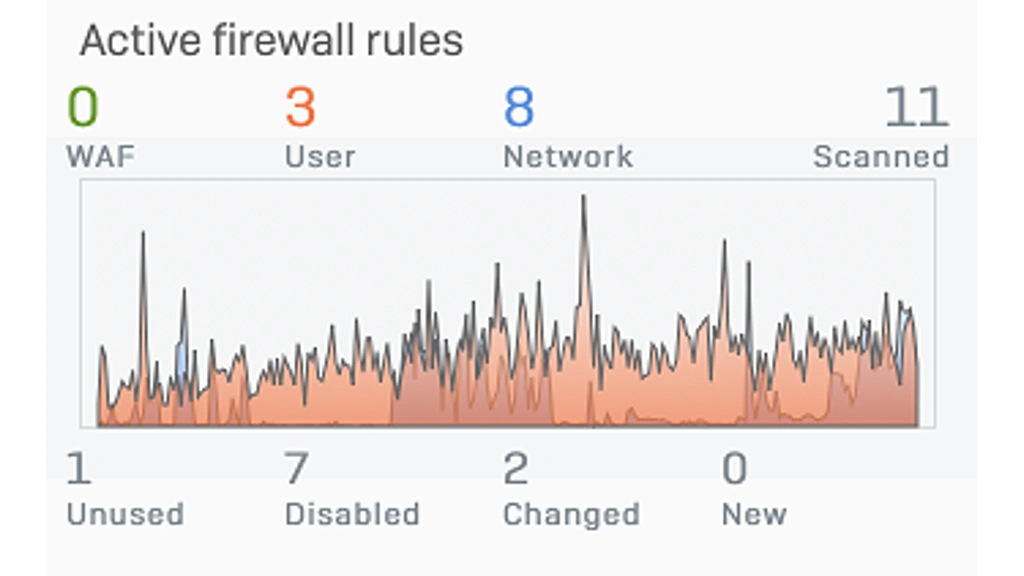
The local web interface organizes network, protection, routing, VPN, authentication, system, and logging functions into clear sections. The Control Center summarizes system health, security events, traffic, applications, users, and connected services.
For common branch and mid-market deployments, the interface is easier to learn than several enterprise firewall platforms. Rule creation still requires care because firewall rules can reference web policies, application controls, IPS profiles, malware scanning, TLS inspection, traffic shaping, NAT, and identity conditions.
Sophos Central and Multi-Firewall Management
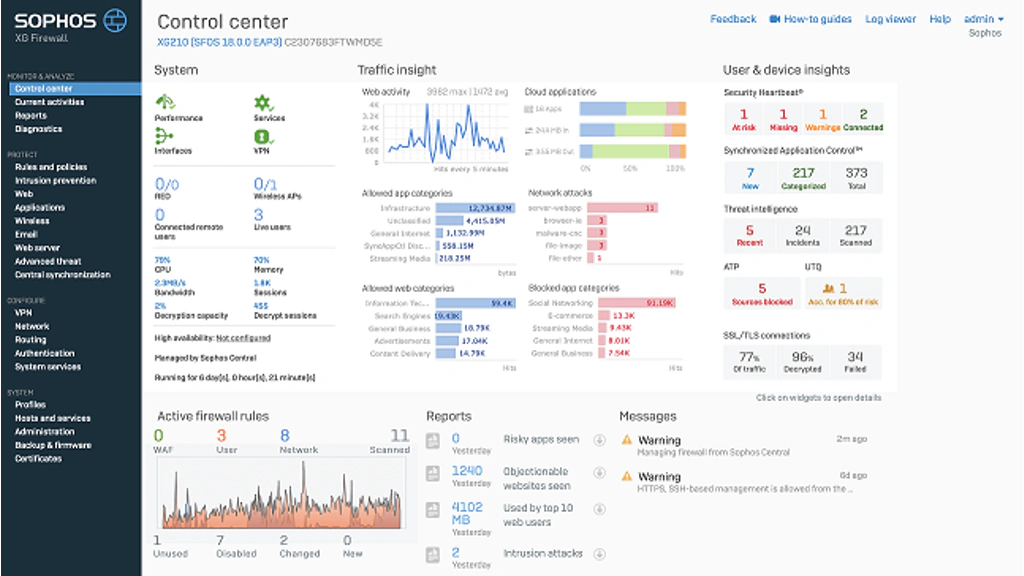
Sophos Central is one of the platform’s practical advantages. You can manage inventory, monitor alerts, push group policies, schedule firmware, store backups, review reports, and orchestrate VPN connections from the cloud.
Configuration Studio and Migration
Sophos Firewall Config Studio is a browser-based tool for viewing, comparing, editing, and converting configurations. It can help you audit a firewall, identify differences between backups, and prepare configuration data for migration.
Hardware, Virtual, and Cloud
Deployment Options and Performance
Sophos Firewall can support small offices, branches, larger distributed environments, data centers, and public cloud workloads. The correct form factor depends on inspected traffic, connection count, VPN use, interface requirements, redundancy, and growth.
XGS Hardware Appliances
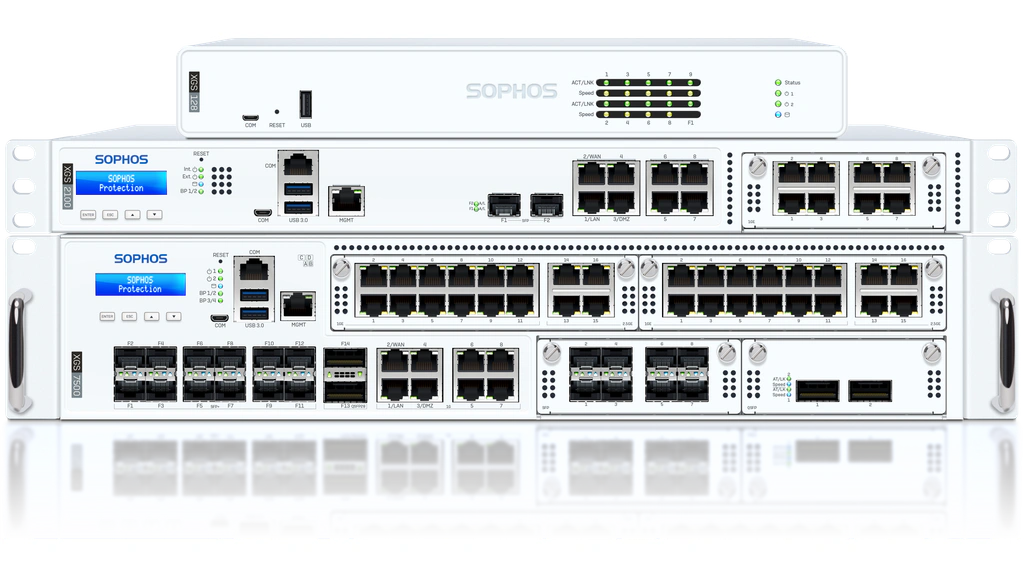
Second-generation XGS desktop appliances include 2.5 GbE connectivity, optional Wi-Fi on several models, and optional 5G on selected units. Models range from XGS 88 and 108 for smaller offices to XGS 138 for higher-throughput branches.
The 1U XGS 2100 through 4500 range targets larger SMB and distributed edge deployments. XGS 5500 through 8500 appliances address enterprise and campus requirements with higher throughput, modular connectivity, and redundancy.
Virtual and Public Cloud Deployments
Virtual editions are suitable for software-defined data centers, lab environments, and private cloud infrastructure. Public cloud versions can protect workloads and network segments in AWS and Azure.
How to Size Sophos Firewall Correctly
Do not select an appliance based on the headline firewall throughput. Use the threat protection, IPS, NGFW, and TLS inspection figures that match the services you plan to enable. Sophos publishes separate results because each security layer changes performance.
Your proof of concept should include real application traffic, encrypted sessions, VPN tunnels, voice and video, file transfers, peak concurrency, and high-availability failover. Leave capacity for growth, firmware changes, and emergency inspection policies.
Plans and Total Cost
Sophos Firewall Pricing and Licensing
Sophos does not publish a universal price list for Firewall. Pricing depends on the appliance or virtual capacity, subscription bundle, support tier, term length, region, partner, and optional products. A 30-day trial is available for evaluation.
The Xstream Protection bundle is the simplest package for most buyers because it combines core protection and management capabilities. Individual modules may reduce cost in narrower deployments, but you need to verify support and bundle-only features.
| License Component | What It Covers | Buying Consideration |
| Base License | Core firewall, VPN, routing, and basic services | Hardware includes base functionality; virtual and cloud editions vary |
| Network Protection | IPS, TLS/DPI engine, Security Heartbeat, threat response, reporting | Important for NGFW protection and endpoint coordination |
| Web Protection | Web filtering, application control, TLS/DPI engine, reporting | Needed for user and application policy enforcement |
| Zero-Day Protection | Machine learning, sandboxing, file analysis | Relevant for unknown file and payload analysis |
| Central Orchestration | VPN and SD-WAN orchestration, advanced reporting, XDR connector | Useful for multiple sites and centralized operations |
| Xstream Protection | Combined modules, DNS Protection, NDR Essentials, support | Usually the most complete and easiest package to compare |
| Optional Add-ons | Email Protection, Web Server Protection, Enhanced Plus Support | Confirm whether separate products are needed for your use case |
Questions to Ask Before You Buy
- Which security functions remain active if a subscription expires?
- How much report retention is included for the selected model?
- Are DNS Protection and NDR Essentials included in the quoted bundle?
- Does the quote include hardware replacement and 24/7 support?
- What are the three-year and five-year renewal costs?
- Is Sophos Central management included for every firewall?
Request a line-item proposal rather than a single total. This makes it easier to compare Sophos with Fortinet, Palo Alto Networks, Check Point, and Cisco on equivalent protection and support.
Operational Security
Security, Privacy, and Administration
A firewall is both a security control and a high-value target. Sophos has invested heavily in hardening SFOS v22 with stronger isolation, integrity monitoring, certificate-pinned updates, health checks, and a hardened kernel.
Recommended Security Practices
- Keep SFOS and security patterns on supported, current versions.
- Restrict management access to trusted networks and administrators.
- Use multi-factor authentication and role-based administration.
- Review Health Check findings and document accepted exceptions.
- Back up configurations and test restore procedures regularly.
- Forward important logs to a SIEM or protected central repository.
- Use TLS inspection selectively with privacy and certificate controls.
- Test high availability, WAN failover, and emergency access.
SFOS v22 does not support older XG and SG hardware appliances. If you are migrating from legacy Sophos UTM or XG hardware, verify model support, backup compatibility, disk requirements, interface mapping, VPN behavior, and retired authentication methods before scheduling an upgrade.
Business Fit
Who Should Use Sophos Firewall?
Sophos Firewall is best suited to organizations that value broad protection, simpler cloud operations, and coordinated response more than highly specialized network customization.
| Organization Type | Fit | Why |
| Mid-sized business | Excellent | Strong balance of protection, management, and cost control |
| Existing Sophos Endpoint customer | Excellent | Security Heartbeat and automated containment add clear value |
| Distributed branches or retail | Very good | SD-WAN, Central orchestration, and SD-RED simplify deployment |
| School or education network | Very good | Web controls, user identity, reporting, and branch coverage |
| MSP-managed customer base | Very good | Partner management and repeatable templates support scale |
| Large complex enterprise | Conditional | Capable hardware exists, but compare policy, reporting, and ecosystem depth |
| Carrier or highly customized network | Limited | Routing and automation needs may favor more specialized platforms |
Sophos is less compelling when your organization is deeply standardized on another endpoint and security operations platform. It may also be a weaker fit for teams that require carrier-grade routing, highly customized automation, or the deepest enterprise application policy model.
Compare Leading NGFW Platforms
Sophos Firewall Alternatives
Fortinet FortiGate
Choose Fortinet FortiGate when price-performance, secure SD-WAN, branch consolidation, and a very broad appliance portfolio are priorities. FortiGate is often stronger for network-centric distributed environments, while Sophos is easier to justify when endpoint coordination and MDR integration matter more. Read our Fortinet FortiGate review.
Palo Alto Networks Strata
Choose Palo Alto Networks Strata when granular application control, enterprise policy, threat prevention, and consistent hybrid deployment justify a higher budget. Sophos is generally easier for mid-market teams, while Strata is stronger for complex enterprise environments. Read our Palo Alto Networks Strata review.
Check Point Quantum Force
Choose Check Point Quantum Force when prevention, centralized rule governance, and large multi-gateway policy environments are the main requirements. Sophos is more approachable for leaner teams, while Check Point offers deeper enterprise policy administration. Read our Check Point Quantum Force review.
Cisco Secure Firewall
Choose Cisco Secure Firewall when your organization already relies on Cisco networking, ISE, Secure Client, Talos, or Splunk. Sophos offers a more unified mid-market security experience, while Cisco can provide stronger ecosystem alignment in Cisco-centric enterprises. Read our Cisco Secure Firewall review.
Conclusion
Is Sophos Firewall Worth It?
Sophos Firewall is worth serious consideration for mid-sized organizations, distributed businesses, schools, MSP customers, and existing Sophos users. It combines credible NGFW protection, SD-WAN, VPN, cloud management, and automated response without forcing you into the operational complexity of some enterprise-first platforms.
Its strongest advantage is coordinated security. Security Heartbeat, Synchronized Application Control, Active Threat Response, XDR, and MDR integration allow network enforcement to respond to endpoint and threat intelligence context. That can produce more practical value than another isolated firewall feature.
The main limitations are licensing transparency, reporting depth, and ecosystem dependence. Sophos remains capable as a standalone firewall, but it becomes substantially more compelling when the rest of your security stack also uses Sophos.
Before buying, run a proof of concept with TLS inspection, IPS, application control, VPN, SD-WAN, Sophos Central, endpoint integration, logging, and failover enabled. Compare protected throughput and total lifecycle cost rather than headline firewall speed. For the right mid-market environment, Sophos Firewall provides one of the best balances of usability, protection, and coordinated response.
Frequently Asked Questions
Have more questions?
What is Sophos Firewall used for?
Sophos Firewall protects networks, users, applications, branches, VPN connections, and cloud workloads. It combines firewalling, intrusion prevention, TLS inspection, malware protection, web filtering, application control, SD-WAN, VPN, and automated response.
Is Sophos Firewall a next-generation firewall?
Yes. Sophos Firewall is an NGFW with application awareness, identity controls, intrusion prevention, encrypted traffic inspection, zero-day protection, threat intelligence, SD-WAN, VPN, and centralized management.
What is Sophos XGS?
Sophos XGS is the current hardware appliance family for Sophos Firewall. It includes desktop, 1U, and 2U models for small offices, branches, distributed organizations, data centers, and campus networks.
Does Sophos Firewall work without Sophos Endpoint?
Yes. Sophos Firewall can operate as a standalone NGFW. However, Security Heartbeat, Synchronized Application Control, endpoint health policies, and some automated response workflows provide more value when Sophos Endpoint is also deployed.
How much does Sophos Firewall cost?
Sophos uses quote-based pricing. Cost depends on appliance size or virtual capacity, subscriptions, support, contract term, region, and optional modules. Request three-year and five-year line-item quotes for a fair comparison.
What is included in Sophos Xstream Protection?
Xstream Protection combines Network Protection, Web Protection, Zero-Day Protection, Central Orchestration, DNS Protection, selected NDR and threat-response capabilities, reporting, and Enhanced Support.
Is Sophos Firewall good for small businesses?
Yes. Compact XGS appliances, cloud management, web filtering, VPN, SD-WAN, and integrated protection make Sophos a strong small and mid-sized business option. Businesses still need an administrator or qualified managed provider.
Does Sophos Firewall include SD-WAN?
Yes. Sophos Firewall supports application-aware routing, link monitoring, load balancing, failover, SLA-based path selection, VPN orchestration, and SD-RED connectivity for remote sites.
Can Sophos Firewall inspect encrypted traffic?
Yes. Sophos supports TLS 1.3 inspection and policy-based decryption. You should test performance, certificate deployment, privacy requirements, and application exceptions before enabling inspection broadly.
What are the best Sophos Firewall alternatives?
Leading alternatives include Fortinet FortiGate for price-performance and SD-WAN, Palo Alto Networks Strata for enterprise application control, Check Point Quantum Force for policy governance, and Cisco Secure Firewall for Cisco-centric environments.