Introduction
Check Point Quantum Force is an enterprise next-generation firewall platform built for organizations that need strong threat prevention, centralized policy control, and a clear path from branch deployments to high-capacity data centers. It combines physical security gateways, Check Point Firewall Software, ThreatCloud AI intelligence, SandBlast zero-day protection, VPN, segmentation, and optional hyperscale clustering through Maestro.
The platform’s biggest strength is prevention depth. Check Point layers intrusion prevention, anti-bot, antivirus, URL filtering, DNS security, phishing protection, file emulation, and content disarm technologies around a single policy model. This can reduce the number of disconnected controls your security team must maintain.
However, Quantum Force is not the easiest firewall platform to purchase, size, or operate. Throughput varies depending on whether you compare ideal firewall tests, enterprise threat prevention, or encrypted web traffic. Licensing also depends on the appliance, bundle, support term, management architecture, and optional services.
This Check Point Quantum Force review explains the practical differences between the product’s security blades, appliance families, performance measurements, management tools, pricing structure, and leading alternatives. The goal is to help you decide whether its prevention-first architecture justifies the operational and financial commitment.
What Is Check Point Quantum Force?
Check Point Quantum Force is a family of AI-assisted network security gateways for branch offices, enterprise perimeters, campuses, data centers, and service provider environments. The appliances run Check Point Firewall Software and are managed through Check Point’s security management architecture, including SmartConsole and connected Infinity services.
You can deploy Quantum Force as a traditional perimeter firewall, a VPN gateway, an internal segmentation firewall, an east-west data center control point, or part of a larger hybrid mesh security design. Maestro can combine compatible gateways into a scalable security group when a single appliance is not enough.
Quantum Force and Check Point Force Naming
Check Point now uses the shorter name “Check Point Force” on parts of its current website, while product documentation, appliance charts, reseller listings, and customer searches still widely use “Quantum Force.” They refer to the same modern enterprise gateway family rather than two separate firewall platforms. For clarity and search consistency, this review uses Quantum Force.
Key Features
Core Security Capabilities
1. ThreatCloud AI and Prevention-First Inspection
Quantum Force uses Check Point ThreatCloud AI to distribute threat intelligence and detection updates across the firewall’s security blades. Check Point states that its current gateways use dozens of AI engines to identify malware, phishing, malicious domains, command-and-control activity, and previously unseen attack patterns.
The meaningful benefit is not the AI label by itself. It is the coordination between inspection layers. A suspicious connection can be evaluated through identity, application, URL, DNS, IPS, anti-bot, antivirus, and file analysis controls rather than relying on a single signature. This helps you block an attack earlier and gives analysts more context when investigating an event.
2. SandBlast Threat Emulation and Threat Extraction
The SandBlast bundle extends standard threat prevention with sandboxing and file sanitization. Threat Emulation opens suspicious files in isolated environments to observe malicious behavior. Threat Extraction uses content disarm and reconstruction to remove active elements from documents and deliver a cleaned version to the user.
This combination is valuable for organizations that receive large volumes of documents through email, web downloads, file-sharing platforms, and partner portals. It can reduce exposure while analysis continues, but you should test business-critical file types because aggressive sanitization may affect macros, embedded objects, or formatting that employees genuinely need.
3. Application, Identity, URL, and DNS Controls
Application Control identifies traffic by application rather than trusting ports alone. Identity Awareness connects policy enforcement with users and groups, while URL Filtering and DNS Security help control risky destinations. Together, these features let you build rules such as allowing a sanctioned collaboration platform for one department while blocking unsanctioned file transfer tools or newly registered domains.
The strongest policies combine these signals instead of creating hundreds of isolated rules. Your team should define business roles, application categories, data sensitivity, and approved destinations first, then use Check Point objects and policy layers to express that model consistently.
4. HTTPS Inspection and Encrypted Traffic Security
Encrypted traffic inspection is essential because malware, phishing pages, and command channels commonly use TLS. Quantum Force can decrypt, inspect, and re-encrypt eligible sessions so that IPS, antivirus, anti-bot, URL filtering, and file protections can evaluate the content.
This is also where sizing mistakes happen. A gateway’s headline firewall throughput can be many times higher than its threat prevention performance under realistic HTTP and TLS conditions. Before buying, model the percentage of encrypted traffic, certificate handling, excluded categories, average object size, user concurrency, and the exact blades you will enable.
5. VPN, SD-WAN, Segmentation, and Hybrid Mesh Security

Quantum Force supports site-to-site IPsec VPN, remote access, advanced routing, clustering, segmentation, and optional SD-WAN. This allows the firewall to protect branch connectivity, internet access, internal network zones, partner links, and remote users from one policy ecosystem.
With Firewall Software R82.10, Check Point is also connecting firewall and SASE controls more closely, including shared internet access policy and simplified gateway-to-SASE connectivity. This is useful when you are gradually moving from appliance-centered security to a hybrid model rather than replacing every gateway at once.
Sizing Quantum Force
Hardware and Performance
Branch and Regional Office Gateways
The 3900 series targets branch and regional office deployments. Models such as the 3920 and 3950 use desktop enclosures, while the 3970 and 3980 move into 1U designs. The range is broad enough to support smaller offices, resilient branch hubs, local VPN concentration, and higher-speed regional connectivity.
Do not assume model numbering increases in a perfectly linear performance order. The current appliance comparison chart, for example, lists different threat prevention and interface profiles across the 3920, 3950, 3970, and 3980. Match the appliance to your traffic pattern, port requirements, redundancy design, and expected TLS workload.
Enterprise Perimeter and Data Center Gateways
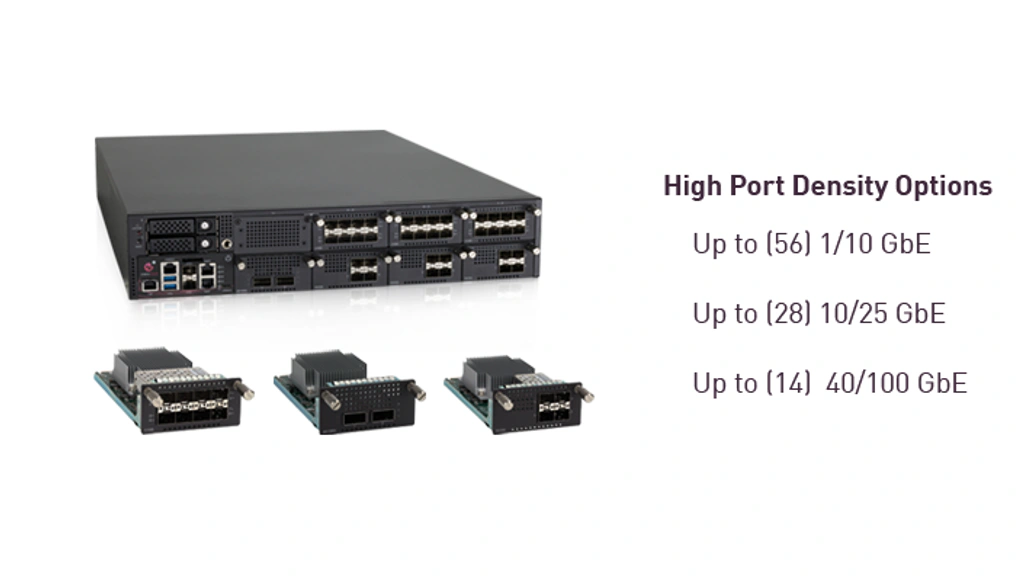
The 9000 series covers larger perimeter and data center use cases, while the 19000 and 29000 families target high-capacity enterprise and data center environments. These appliances add modular network interfaces, higher connection rates, more memory, redundant components, and stronger support for virtual systems.
A 9800, for example, is positioned as a modular 1U platform, while 19000 and 29000 models use larger designs for higher throughput and port density. The right choice depends less on the marketing maximum and more on enterprise-tested threat prevention, HTTP/TLS inspection, concurrent sessions, connection rates, and growth headroom.
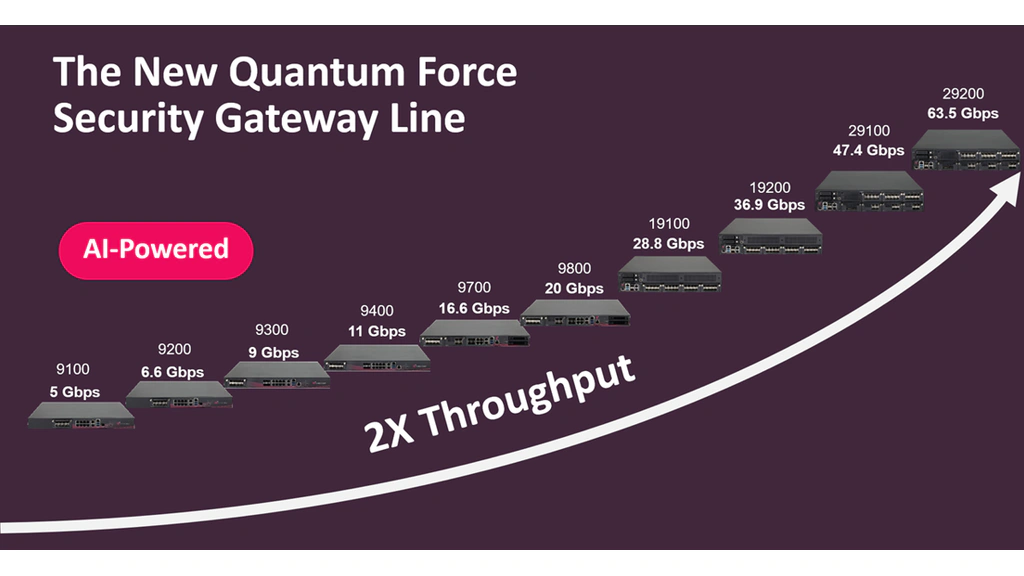
| Representative Model | Primary Deployment | Threat Prevention | NGFW Throughput |
| Quantum Force 3920 | Branch office | 3.2 Gbps | 7.8 Gbps |
| Quantum Force 3980 | Regional office or branch hub | 7 Gbps | 20 Gbps |
| Quantum Force 9800 | Large perimeter or data center | 25 Gbps | 67.7 Gbps |
| Quantum Force 19200 | Large enterprise or data center | 44 Gbps | 100 Gbps |
| Quantum Force 29200 | High-capacity data center | 75 Gbps | 165 Gbps |
Figures reflect Check Point’s enterprise testing conditions in its current appliance comparison chart. Real throughput depends on traffic composition, enabled blades, software release, memory, interfaces, policy design, logging, and encrypted inspection.
Maestro Hyperscale Architecture
Maestro lets you group compatible Check Point gateways behind a hyperscale orchestrator and manage them as a unified security system. Traffic is distributed across gateway members, capacity can be expanded over time, and failures can be absorbed without treating each appliance as an isolated firewall.
This is one of Quantum Force’s clearest differentiators for large environments, especially when capacity growth is unpredictable. Maestro still requires careful architecture, compatibility checks, redundancy planning, and skilled administration.
How to Size Quantum Force Correctly
Use four numbers during evaluation: enterprise threat prevention throughput, HTTP/TLS threat prevention, connections per second, and concurrent sessions. Firewall throughput under ideal packet conditions is useful for comparison, but it is rarely the binding constraint once you enable inspection.
A sensible design also keeps reserve capacity for software upgrades, incident response, traffic spikes, and future blades. For high availability, confirm whether a failure leaves enough capacity on the remaining member rather than sizing the pair only for normal conditions.
Pros and Cons
Advantages and Disadvantages
Quantum Force provides mature controls and excellent scalability, but the same depth that makes it powerful also increases purchase and operating complexity. The following strengths and limitations matter most during a real evaluation.
Positive
✅ Deep multi-layer threat prevention
✅ Strong centralized policy management
✅ Wide hardware range for branch to data center
✅ Maestro provides scale-out firewall capacity
✅ Mature VPN, segmentation, and identity controls
✅ Flexible modular interfaces on larger appliances
Negative
❌ Pricing is quote-based and difficult to compare
❌ Licensing and blade selection can be complex
❌ Requires experienced administrators
❌ Real TLS throughput can be far below headline firewall speed
❌ Reporting customization can require extra effort
❌ Upgrades and large policy changes need careful planning
👍 Pros
✅ Deep multi-layer threat prevention
Quantum Force combines network, application, identity, DNS, web, malware, bot, phishing, and file controls within one enforcement architecture. This reduces gaps between separate point products and supports a prevention-first policy rather than relying only on alerting after compromise.
✅ Strong centralized policy management
SmartConsole gives experienced administrators granular control over objects, rule layers, threat profiles, logs, and multiple gateways. A well-designed policy can remain consistent across branches, campuses, data centers, cloud firewalls, and connected Check Point services.
✅ Broad hardware and scaling options
You can start with a compact branch appliance, move to modular enterprise gateways, or build a Maestro security group. This makes the platform suitable for organizations that want one firewall ecosystem across locations with very different capacity requirements.
✅ Mature segmentation, VPN, and identity controls
Quantum Force supports use cases beyond internet perimeter filtering. It can protect internal zones, remote access, partner networks, east-west data center traffic, and business applications using identity-aware policy and virtual systems.
👎 Cons
❌ Pricing and licensing are difficult to estimate
The final cost can include appliance configuration, NGFW, NGTP or SandBlast subscriptions, support, management capacity, virtual systems, SD-WAN, IoT protection, DLP, professional services, training, and redundancy. A low initial quote may not represent the architecture you actually need.
❌ The platform has a meaningful learning curve
SmartConsole is powerful, but policy layers, NAT, threat profiles, HTTPS inspection, identity sources, logging, clustering, and upgrade processes require dedicated expertise. Small IT teams may struggle to use the full platform safely.
❌ Headline throughput can create sizing confusion
Ideal firewall throughput is not the same as enterprise threat prevention or encrypted web performance. Buying from the largest marketing number can leave you undersized once real security blades and TLS inspection are enabled.
❌ Reporting and operational workflows are not always simple
Some customer reviews praise logging and visibility but report challenges with dashboard responsiveness, duplicate policy views, custom reporting, or locating advanced options. Your proof of concept should test daily administration, not only attack blocking.
User Experience
Management and Deployment
SmartConsole and Centralized Policy
SmartConsole is the core administrative interface for enterprise Quantum Force environments. It brings policy, objects, threat prevention profiles, logs, monitoring, and multi-gateway administration into one workspace. The interface is logical once you understand Check Point’s object model, but it can feel dense to administrators coming from simpler SMB firewalls.
The strongest deployments use reusable objects, clear rule ownership, policy layers, change control, and cleanup rules. Without governance, centralized management can simply centralize complexity. You should define naming standards and review workflows before migrating a large policy base.
R82 and R82.10 Improvements
Firewall Software R82 focuses on operational simplification, threat prevention, data center agility, HTTPS inspection, APIs, clustering, and quantum-safe VPN capabilities. R82.10 extends the platform with GenAI application and MCP server discovery, stronger hybrid mesh policy, additional phishing controls, and integrations with external identity and posture signals.
These features show that Quantum Force is becoming more connected to cloud-delivered services, but you should verify which capabilities require a specific release, subscription, management mode, or Infinity service. Product pages often describe the full platform rather than the exact entitlement in one gateway quote.
Deployment and Upgrade Experience
A small gateway can be deployed quickly by an experienced engineer, but enterprise projects usually involve policy conversion, routing, VPN migration, certificate deployment, identity integration, logging, high availability, and rollback planning. A realistic proof of concept should include representative policy and encrypted traffic.
Upgrades should be treated as controlled infrastructure changes. Review the target release, recommended Jumbo Hotfix Accumulator, hardware compatibility, management-server sequence, cluster behavior, and rollback method. Maestro and multi-domain environments add more dependencies and deserve dedicated testing.
Automation, APIs, and Security Operations
Check Point provides APIs for policy automation, object management, and integrations with SOC tools. Logs can feed incident response and analytics workflows, while Infinity services extend visibility across other Check Point products. This is useful when you want to automate repetitive changes or correlate network events with endpoint, cloud, email, and identity signals.
Automation should not bypass governance. Use role-based access, separate service accounts, change validation, and staged deployment so that a script cannot publish an unsafe rule across every gateway.
Plans and Cost
Quantum Force Pricing
Check Point does not publish one universal Quantum Force price. You normally buy through Check Point or an authorized partner, and the quote is built around the appliance, security software bundle, subscription term, support level, management architecture, and optional capabilities.
Security Software Bundles
| Bundle | Main Coverage | Best Fit |
| NGFW | Firewall, IPsec VPN, mobile access, clustering, identity awareness, application control, content awareness, and IPS | Basic access control and intrusion prevention |
| NGTP | NGFW features plus URL filtering, antivirus, anti-spam, anti-bot, and DNS security | Organizations that need protection from known threats |
| SandBlast | NGTP features plus Threat Emulation, Threat Extraction, and Zero Phishing | Organizations that need stronger zero-day and file protection |
| Optional Add-ons | DLP, IoT protection, enterprise SD-WAN, additional virtual systems, and connected services | Specialized compliance, segmentation, and connectivity requirements |
What Changes the Total Cost?
Hardware is only one part of the investment. Your total cost can increase with redundant appliances, higher-memory configurations, modular interfaces, multi-year subscriptions, premium support, centralized management appliances or virtual machines, logging capacity, professional services, training, and migration work.
Request a bill of materials that separates one-time hardware, recurring subscriptions, support, management, and implementation. Also ask for renewal pricing and the cost of adding blades later. This makes Check Point easier to compare with Fortinet, Palo Alto Networks, Cisco, and firewall-as-a-service alternatives.
How to Evaluate a Quantum Force Quote
The quote should name the exact appliance configuration, software package, subscription duration, support tier, management entitlement, virtual system count, interface cards, spare or redundant components, and professional services. Confirm whether the recommended model still meets your requirements after a cluster member fails and after all planned inspection is enabled.
Security, Privacy and Compliance
Security and Risk Considerations
Security Architecture and Patch Management
Quantum Force is designed to enforce security policy, but the gateway and management plane are also critical infrastructure that must be protected. Use dedicated management networks, multi-factor authentication where supported, least-privilege administrator roles, trusted access paths, configuration backups, and strict control over API credentials.
Monitor Check Point security advisories and maintain a tested patch process. A powerful firewall becomes a risk when software releases, hotfixes, certificates, threat content, or administrator accounts are neglected. High availability reduces downtime, but it does not replace secure lifecycle management.
Segmentation, Zero Trust, and Compliance Use Cases
Identity Awareness, application control, virtual systems, VPN, logging, and internal segmentation can support Zero Trust and regulatory programs. Quantum Force can help you restrict access between business zones, document policy, monitor connections, and retain security evidence.
The product does not make an environment compliant by itself. You still need governance, access reviews, data classification, endpoint controls, secure configuration, incident response, and evidence that policies operate as intended.
Operational Risks to Plan For
The most common risks are misconfigured rules, excessive exceptions, incomplete HTTPS inspection, undersized appliances, stale objects, weak administrator access, and poorly tested upgrades. These are operational problems rather than missing firewall features, which is why skilled ownership matters as much as the product selection.
Business Fit
Who Should Use Quantum Force?
| Organization Type | Fit | Reason |
| Large enterprise or regulated organization | Strong | Granular policy, threat prevention, segmentation, logging, and mature management |
| Data center with unpredictable growth | Strong | Modular appliances, virtual systems, high availability, and Maestro scaling |
| Existing Check Point customer | Strong | Reuses skills, policy objects, management, and ecosystem integrations |
| Mid-sized business with a dedicated security team | Moderate to strong | Good protection, but costs and expertise must be justified |
| Small business with limited IT staff | Limited | Enterprise Quantum Force may be more complex than necessary |
| Cloud-first company seeking simple SASE | Situational | A cloud-delivered platform may align better than appliance-led architecture |
Quantum Force is best when you value prevention quality, detailed policy control, and long-term scalability more than simplicity. Smaller organizations should also compare Check Point’s Spark range or managed security options before committing to the enterprise platform.
Compare with Others
Check Point Quantum Force Alternatives
Palo Alto Networks Strata
Palo Alto Networks Strata is a strong alternative when application visibility, cloud-delivered security services, and a broad platform strategy are priorities. Palo Alto is often easier to position around App-ID and integrated cloud management, while Check Point stands out for prevention depth, mature policy management, and Maestro scale-out architecture. Read our Palo Alto Networks Strata review for a closer comparison.
Fortinet FortiGate
Fortinet FortiGate is often the better fit when price-performance, integrated networking, SD-WAN, and a wide appliance range are central to your decision. Fortinet can be attractive for distributed organizations, although its ecosystem also has extensive licensing and configuration choices. Read our Fortinet FortiGate review to compare the platforms.
Cisco Secure Firewall
Cisco Secure Firewall is relevant when you already use Cisco networking, identity, endpoint, and security operations products. Its ecosystem integration may simplify procurement and telemetry sharing, but organizations should compare day-to-day policy administration, threat prevention subscriptions, and migration effort against Check Point.
Cato Networks
Cato Networks takes a cloud-native SASE approach rather than centering security on physical firewall appliances. It can be a better choice for globally distributed businesses that want networking and security delivered as a service. Quantum Force remains stronger when you require high-capacity on-premises enforcement, detailed data center segmentation, or a gradual hybrid migration.
You can also compare the broader market in our guide to the best next-generation firewalls.
Conclusion
Is Check Point Quantum Force Worth It?
Check Point Quantum Force is a strong choice for enterprises that want prevention-first network security, granular policy, mature centralized management, and a route from branch appliances to hyperscale data center protection. Its combination of ThreatCloud AI, SandBlast, identity-aware controls, segmentation, VPN, R82 software, and Maestro creates a broad platform rather than a basic firewall.
The trade-off is complexity. You need to size against realistic encrypted traffic, understand the software bundles, budget for management and support, and assign trained administrators. If your team can support that operating model, Quantum Force belongs on a serious enterprise NGFW shortlist. If you prioritize simple cloud delivery or transparent pricing, FortiGate, Palo Alto Strata, Cisco Secure Firewall, or Cato may fit better.
Frequently Asked Questions
Have more questions?
What is Check Point Quantum Force?
Check Point Quantum Force is a family of enterprise next-generation firewall appliances. It combines network access control, threat prevention, VPN, segmentation, identity awareness, encrypted traffic inspection, centralized management, and optional Maestro hyperscale clustering.
Is Quantum Force the same as Check Point Force?
Yes. Check Point currently uses the shorter Check Point Force name on parts of its website, while Quantum Force remains common in datasheets, appliance comparisons, reseller catalogs, and customer searches. They refer to the same modern enterprise gateway family.
What is the difference between NGFW, NGTP, and SandBlast bundles?
NGFW provides firewall, VPN, application, identity, content, clustering, and IPS controls. NGTP adds protections such as URL filtering, antivirus, anti-bot, anti-spam, and DNS security. SandBlast adds zero-day sandboxing, file sanitization, and Zero Phishing.
How much does Check Point Quantum Force cost?
Quantum Force uses quote-based pricing. Cost depends on the appliance, hardware configuration, software bundle, subscription term, support level, management capacity, interfaces, virtual systems, optional blades, redundancy, and implementation services.
Is Quantum Force suitable for small businesses?
Enterprise Quantum Force can be excessive for a small business with limited IT staff. Smaller organizations should compare Check Point Spark, managed firewall services, and simpler cloud-delivered alternatives before selecting an enterprise gateway.
What is Check Point Maestro?
Maestro is Check Point’s hyperscale firewall architecture. It uses an orchestrator to distribute traffic across multiple compatible gateways that operate as a unified security group, allowing capacity and resilience to increase without replacing the entire firewall design.
Does Quantum Force inspect encrypted traffic?
Yes. Quantum Force can perform HTTPS inspection so security blades can analyze eligible encrypted sessions. Actual performance depends on TLS versions, traffic mix, certificate handling, bypass rules, appliance model, enabled protections, and policy configuration.
What is the best way to size a Quantum Force gateway?
Prioritize enterprise threat prevention throughput, HTTP and TLS inspection performance, connections per second, concurrent sessions, interface requirements, and failure-state capacity. Do not size the appliance using only ideal firewall throughput.
What are the main Quantum Force alternatives?
Leading alternatives include Palo Alto Networks Strata, Fortinet FortiGate, Cisco Secure Firewall, and Cato Networks. The best option depends on whether you prioritize prevention depth, application visibility, price-performance, ecosystem integration, or cloud-native SASE delivery.
Is Check Point Quantum Force difficult to manage?
SmartConsole is powerful and mature, but the platform has a learning curve. Large policies, threat profiles, VPNs, HTTPS inspection, clustering, upgrades, and reporting are best handled by trained administrators with formal change control.