
Introduction
Fortinet FortiGate is one of the most widely deployed next-generation firewall platforms, but its value goes beyond blocking traffic at the network edge. A FortiGate can combine firewalling, intrusion prevention, application control, malware defense, encrypted traffic inspection, SD-WAN, segmentation, VPN, and zero-trust access within the same FortiOS platform.
That breadth is FortiGate’s biggest advantage and one of its main buying risks. You can consolidate several network and security functions, but the final result depends heavily on selecting the right appliance, subscriptions, management tools, and software release. A low hardware price does not automatically mean a low total cost, and a large firewall-throughput number does not tell you how the system will perform after threat inspection is enabled.
This Fortinet FortiGate review examines the platform from a buyer’s perspective. You will learn where FortiGate performs well, what FortiOS is like to administer, how licensing works, which limitations deserve attention, and how to size a deployment without relying on headline specifications.
What Is Fortinet FortiGate?

Fortinet FortiGate is a family of next-generation firewalls available as physical appliances, virtual machines, cloud firewalls, and managed service options. The platform is powered by FortiOS, Fortinet’s security operating system, and can operate at branch, campus, data center, cloud, and operational technology edges.
FortiGate should not be viewed as one standardized appliance. The portfolio ranges from compact desktop models to high-end systems built for very large session counts and encrypted traffic volumes. Each model has different interfaces, storage, power options, tunnel limits, and inspected throughput.
The strongest use case is secure networking. Instead of purchasing a firewall, separate SD-WAN appliance, separate branch router, and multiple security gateways, you can use FortiGate as a common enforcement point. This approach is particularly attractive when you operate many branches and want consistent policies across them.
Secure Networking Platform
FortiGate Key Capabilities
1. Next-Generation Firewall and Threat Prevention
FortiGate combines stateful firewalling with application identification, intrusion prevention, antivirus, web and DNS filtering, botnet controls, and deep inspection. You can build policies around source, destination, service, application, user, device, schedule, and security profile rather than relying only on ports and IP addresses.
FortiGuard security services supply the signatures, classifications, and threat intelligence behind many advanced controls. This means the appliance can continue routing and enforcing basic firewall policies without every subscription, but current threat detection depends on active services and updates.
The policy model is flexible, but flexibility increases configuration responsibility. Application control, IPS, antivirus, SSL inspection, and web filtering must be placed into appropriate policies and tuned for the traffic you actually handle. Buying an Enterprise or UTP bundle does not automatically create an effective security architecture.
2. Encrypted Traffic Inspection
Encrypted traffic is where firewall comparisons become more realistic. FortiGate can inspect TLS traffic so security profiles can identify malware, prohibited applications, malicious destinations, and data movement that would otherwise remain hidden.
You should size for SSL inspection throughput, not raw firewall throughput, when a large portion of traffic will be decrypted. The difference can be substantial. You also need a certificate deployment plan, bypass rules for sensitive categories, compatibility testing, and enough capacity for session growth.
Fortinet’s purpose-built security processors are a meaningful advantage because inspection tasks can be accelerated in hardware. However, performance still changes by model, cipher, packet size, traffic mix, logging, proxy or flow inspection, and the combination of enabled profiles. A proof of concept using your own traffic is more useful than one headline number.
3. Secure SD-WAN and Branch Connectivity
Secure SD-WAN is one of FortiGate’s strongest differentiators. Core SD-WAN functionality is available in FortiOS without a separate feature license, allowing you to combine multiple WAN links, define performance objectives, steer applications, and fail traffic over when latency, jitter, or packet loss exceeds a threshold.
For a distributed organization, this can reduce appliance sprawl. The same device can terminate IPsec tunnels, apply NGFW inspection, route branch traffic, prioritize business applications, and enforce segmentation. FortiManager can then help standardize templates, overlays, and policies across many locations.
The distinction between included SD-WAN features and the complete Fortinet SD-WAN solution matters. Central orchestration, advanced monitoring, cloud logging, managed services, FortiSASE connectivity, and other operational capabilities may require extra subscriptions or products. Ask the reseller to map each proposed function to a specific SKU.
4. Segmentation, Virtual Domains, and High Availability
FortiGate supports network segmentation through interfaces, VLANs, zones, policies, and virtual domains. VDOMs allow one physical appliance to operate as multiple logical firewalls with separated policies, routing, and administration, subject to model and license limits.
This is useful for managed service providers, shared infrastructure, business-unit isolation, and separating production from administrative or operational technology networks. It can also reduce hardware count, although an overly complex VDOM design may make troubleshooting and change control harder.
High-availability clusters can protect against device failure, but both appliances need aligned licensing and FortiCare coverage. Include duplicate subscriptions, switching design, state synchronization, maintenance behavior, and failure testing in the budget rather than pricing only one firewall.
5. ZTNA, VPN, and Hybrid Access
FortiGate can act as a zero-trust access proxy that evaluates user identity, device identity, certificates, and posture tags from FortiClient EMS before granting application access. Policies can change as endpoint status changes, giving you more context than a traditional network-level VPN rule.
This model is most valuable when FortiGate, FortiClient, EMS, identity services, and application publishing are designed together. It is not a one-click replacement for every remote access workflow. You should test authentication, endpoint enrollment, certificate renewal, user experience, and recovery scenarios.
Model and software support also require attention. Fortinet’s current product matrix notes SSL VPN restrictions for some low-memory models on newer FortiOS releases. Buyers should confirm whether IPsec, agentless access, ZTNA, or FortiSASE is the intended long-term access method before refreshing branch hardware.
6. Security Fabric, FortiManager, and FortiAnalyzer
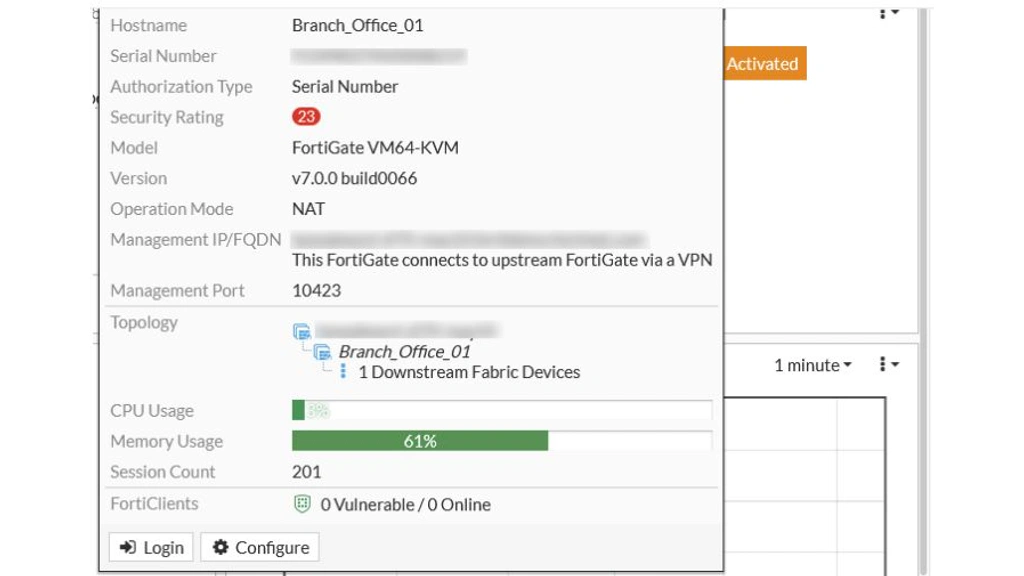
FortiGate becomes more valuable as part of the Fortinet Security Fabric. It can exchange context and coordinate controls with FortiSwitch, FortiAP, FortiClient, FortiAnalyzer, FortiManager, FortiSandbox, FortiNAC, FortiSASE, and other Fortinet products.
FortiManager provides centralized configuration, policy packages, templates, workflows, and automation. FortiAnalyzer adds centralized logs, analytics, reporting, and event investigation. These products are not optional in every small deployment, but they become increasingly important as the number of firewalls and administrators grows.
The platform also supports common third-party outputs and integrations, including APIs, SNMP, syslog, NetFlow or sFlow, identity sources, external threat feeds, SIEM, and SOAR platforms. Even so, the deepest automation generally appears when you remain inside the Fortinet ecosystem.
7. FortiOS 8.0 and AI-Assisted Operations
FortiOS 8.0 adds visibility into AI applications, shadow AI, agent interactions, and Model Context Protocol activity, plus AI-assisted administration, expanded SASE, DLP, SD-WAN, and quantum-safe functions.
Separate product direction from production readiness. Follow Fortinet’s model-specific recommended-release guidance, test firmware on low-risk systems, review known issues, validate routing and VPN behavior, and expand upgrades gradually.
Pros and Cons
Advantages and Disadvantages
FortiGate offers unusually broad networking and security coverage, but that breadth can hide licensing, sizing, and operational complexity. The following strengths and limitations are the most important for a realistic evaluation.
Positive
✅ Strong security-to-performance balance
✅ Secure SD-WAN built into FortiOS
✅ Wide hardware and deployment range
✅ Deep centralized management options
✅ Broad Fortinet Security Fabric integration
✅ Flexible policies, segmentation, and routing
Negative
❌ Licensing and renewals require careful mapping
❌ Advanced deployments have a steep learning curve
❌ Performance varies sharply by inspection profile
❌ Central analytics may require added products
❌ Firmware management demands disciplined patching
❌ Ecosystem value can increase vendor dependence
👍 Pros
✅ Strong security-to-performance balance
Purpose-built acceleration helps FortiGate inspect demanding traffic, provided you size from NGFW, threat protection, and SSL inspection figures rather than raw firewall throughput.
✅ Secure SD-WAN built into FortiOS
The same appliance can handle branch routing, link health, application steering, IPsec, and security enforcement, reducing edge appliance sprawl.
✅ Wide hardware and deployment range
Fortinet covers small offices, branches, campuses, data centers, clouds, and rugged environments through one policy platform.
✅ Deep centralized management options
FortiManager and FortiAnalyzer add policy governance, templates, automation, logs, analytics, and reporting for distributed deployments.
✅ Broad Security Fabric integration
FortiGate can share context with Fortinet networking, endpoint, access, sandboxing, SASE, and security operations products.
✅ Flexible policies and segmentation
FortiOS supports granular application, identity, device, zone, routing, and virtual-domain controls for complex environments.
👎 Cons
❌ Licensing needs careful mapping
Hardware, FortiCare, FortiGuard, logging, management, endpoint, and SASE items can make proposals difficult to compare.
❌ Advanced deployments have a learning curve
VDOMs, overlays, dynamic routing, SSL inspection, ZTNA, and centralized policy packages require experienced administration.
❌ Performance depends on inspection depth
An appliance that looks fast under basic firewall testing may be undersized after decryption and multiple security profiles are enabled.
❌ Central analytics can add cost
Larger environments commonly need FortiAnalyzer, FortiManager, or cloud services for scalable visibility and retention.
❌ Firmware requires disciplined operations
Your team needs asset inventory, staged upgrades, secure management access, and rapid response to relevant advisories.
❌ Ecosystem value can increase dependence
Fortinet integrations simplify operations, but a broader Fortinet footprint can make later migration more difficult.
How to Choose the Right FortiGate
Sizing and Deployment
Start With Inspected Traffic, Not Internet Speed
A 1 Gbps internet circuit does not automatically mean a firewall with 1 Gbps threat protection is sufficient. You need headroom for east-west traffic, inter-VLAN inspection, VPN, bursts, growth, high availability, security logging, and traffic that does not leave through the internet connection.
Document the features that will run concurrently. If you need firewalling, IPS, application control, malware protection, and SSL inspection, compare the relevant combined figures. Fortinet’s own product matrix explains that NGFW and threat protection measurements use different enabled services, so those figures should not be treated as interchangeable.
Check Sessions, Interfaces, and Operational Limits
Throughput is only one sizing dimension. Review concurrent sessions, new sessions per second, IPsec tunnels, remote users, VDOMs, policy limits, interface speeds, transceivers, storage, power supplies, and rack requirements.
A branch with modest bandwidth but thousands of short-lived cloud sessions may need a different model from a site carrying a few predictable data flows. Similarly, a data center firewall may be constrained by port density or SSL inspection before raw packet forwarding becomes the problem.
Run a Representative Proof of Concept
Test the configuration you expect to deploy, not a simplified demonstration. Enable the intended security profiles, logging destination, routing protocols, VPNs, decryption policies, and application controls. Then measure latency, throughput, session stability, failover, and administrative workflow.
Independent testing adds useful context. CyberRatings tested a FortiGate-900G against encrypted and unencrypted traffic, 1,509 exploits, 1,569 evasions, and adverse conditions. However, a test of one model and configuration cannot replace validation against your own requirements.
Daily Operations
User Experience and Administration
FortiOS offers a web interface and CLI with extensive visibility into policies, routes, sessions, interfaces, VPNs, security events, and system health. The interface is reasonably approachable for common tasks, while the CLI remains essential for advanced configuration, diagnostics, and repeatable troubleshooting.
What Feels Efficient
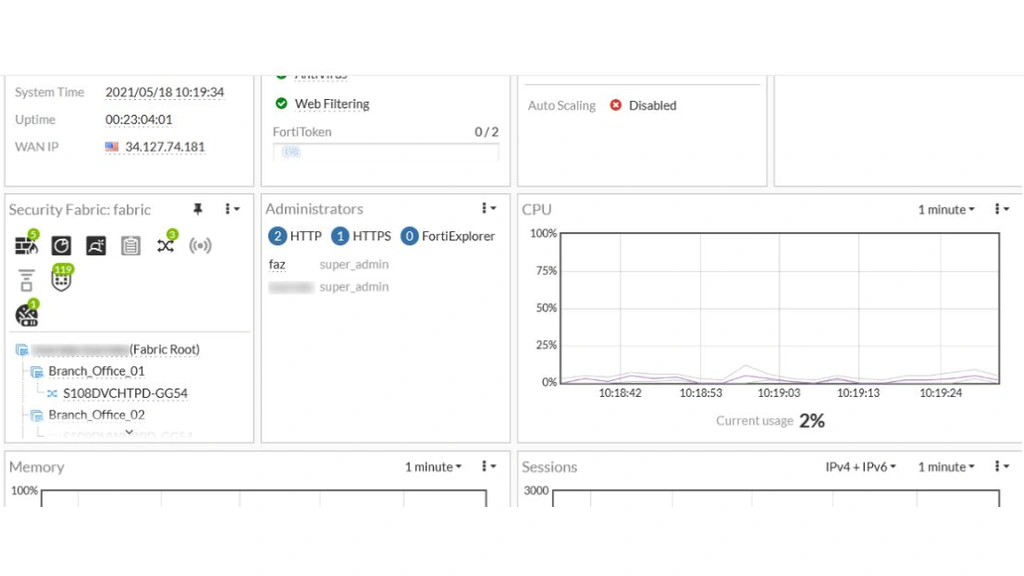
Objects and security profiles can be reused across policies, dashboards can be adapted to operational priorities, and FortiView provides traffic and security summaries. The platform also offers automation stitches that can connect triggers to actions, helping teams respond to defined events without building every workflow externally.
FortiManager improves consistency when you manage many devices. Templates, policy packages, approval workflows, and centralized updates reduce configuration drift, although administrators must understand how local changes and centralized databases interact.
Where Administration Becomes Difficult
The number of features creates a dense interface, and the same outcome may involve firewall policies, central NAT, security profiles, routing, certificates, Fabric connectors, endpoint tags, and separate management platforms. Troubleshooting requires a clear understanding of packet flow and inspection mode.
Upgrades also deserve planning. New firmware can change behavior, remove support from older hardware, introduce new defaults, or affect VPN and inspection features. Fortinet publishes quarterly recommended-release guidance, so production teams should check model-specific advice rather than assuming the newest available build is the safest choice.
Plans and Cost Structure
FortiGate Pricing and Licensing
Fortinet does not publish one universal FortiGate price because cost changes by appliance, term, support level, bundle, quantity, region, partner discount, and optional services. You will normally purchase through a reseller or service provider.
The important distinction is between the hardware, FortiCare support, and FortiGuard security services. Basic firewall and networking functions are part of FortiOS, while current IPS, antivirus, web, DNS, malware, and other intelligence-driven protections rely on subscriptions.
| Bundle | Best For | Main Coverage | Buying Consideration |
| ATP | Core threat prevention | IPS, antivirus, malware and botnet protections | Does not include the broader web, DNS, data, and IoT coverage of higher bundles |
| UTP | Branch and general business security | ATP capabilities plus URL, DNS, video filtering, and anti-botnet services | Often the practical baseline, but validate every required service |
| Enterprise | Complex and regulated environments | UTP plus advanced data, SaaS, inline malware, IoT, and attack-surface services | Broadest coverage, with higher renewal cost and possible model restrictions |
| SD-WAN | Distributed networks needing managed connectivity | Selected SD-WAN, monitoring, orchestration, cloud, and service capabilities | Core SD-WAN works without this bundle, so confirm the added operational value |
FortiCare Support Levels
FortiCare Essential is designed for devices that can tolerate web-only, next-business-day support. Premium targets systems needing 24×7 support with a one-hour response for critical issues. Elite adds faster response, enhanced service levels, proactive device insights, and extended engineering support for selected long-term support releases.
Availability requirements should determine the support tier. A small lab firewall and a revenue-critical data center cluster do not need the same response commitment. Also remember that every appliance in a high-availability cluster needs appropriate licensing and aligned service levels.
Questions to Put in the Quote
- Which features stop updating or operating when each subscription expires?
- Are FortiManager, FortiAnalyzer, cloud logging, and retention included?
- Does the quote cover both nodes in every high-availability pair?
- Which FortiClient, EMS, ZTNA, SASE, and remote access licenses are required?
- What are the one-year, three-year, and five-year renewal totals?
Operational Risk
Security, Privacy, and Patch Management
FortiGate is a security control, but it is also an internet-edge system with privileged access to network traffic. You should therefore evaluate the appliance itself as a high-value asset. Secure deployment depends on firmware maintenance, restricted administration, MFA, trusted management networks, configuration backups, logging, and monitored change control.
Threat Protection and Independent Validation
FortiGuard Labs supplies global threat intelligence and updates for services such as IPS, antivirus, web filtering, DNS filtering, and botnet protection. Independent CyberRatings testing has also examined FortiGate models under exploit, evasion, encrypted traffic, performance, and stability scenarios.
Treat independent results as evidence for a tested model and configuration, not a guarantee for every appliance. Your effectiveness will still depend on enabled profiles, inspection depth, exceptions, certificate deployment, update status, and policy quality.
Vulnerability and Upgrade Discipline
Fortinet maintains a public PSIRT advisory portal, but FortiOS vulnerabilities have also been exploited in the wild. One example is CVE-2026-24858, an administrative FortiCloud SSO authentication bypass that Fortinet reported as actively exploited and that CISA added to its Known Exploited Vulnerabilities catalog.
The lesson is not that FortiGate is uniquely unsafe. Internet-facing firewalls from major vendors are frequent targets. The practical requirement is to inventory every appliance, disable unnecessary administrative exposure, follow PSIRT notices, compare firmware against recommended releases, rotate credentials after suspected compromise, and patch within a defined emergency process.
Privacy and Logging
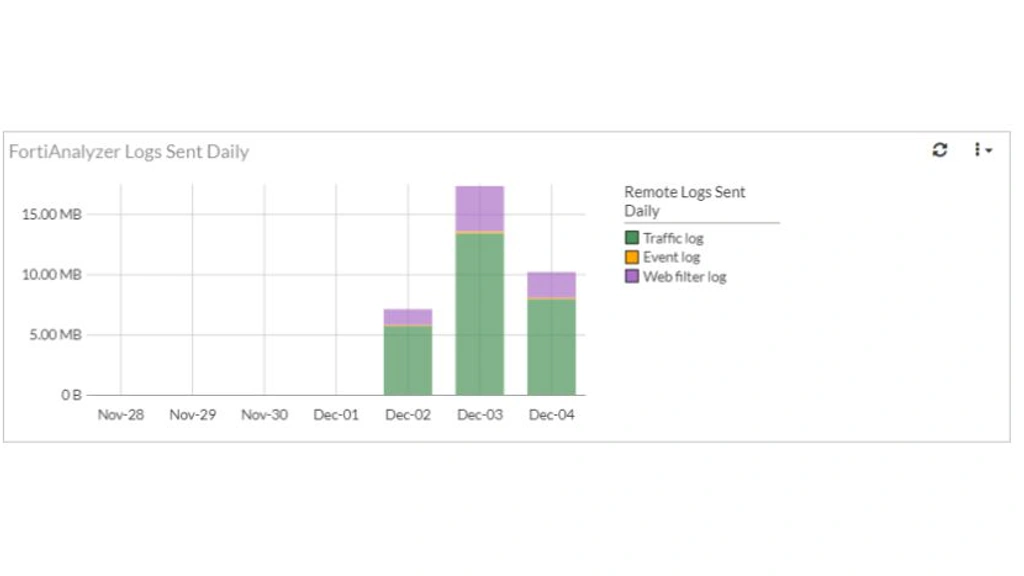
Deep inspection, web controls, DNS filtering, user identification, and centralized analytics can process highly sensitive traffic and identity data. Before deployment, define what will be decrypted, logged, retained, exported, and accessible to administrators.
Regulated organizations should review data residency, cloud management, FortiGuard query behavior, support access, retention, and integrations. Policies for financial, healthcare, personal, and employee traffic may require carefully documented bypasses or alternative monitoring controls.
Business Fit
Where FortiGate Fits Best
| Organization Type | Fit | Why |
| Multi-branch business | Excellent | Combines NGFW, routing, IPsec, and SD-WAN with centralized templates |
| Mid-sized enterprise | Strong | Broad security coverage and a large appliance range without requiring a data-center-only platform |
| Large enterprise or service provider | Strong | High-end models, VDOMs, automation, centralized management, and large session capacity |
| Small business without IT expertise | Mixed | Capable entry models, but configuration, subscriptions, and patching may justify an MSP |
| Cloud-native organization | Good | Virtual and cloud options are available, although a cloud-native firewall service may be simpler |
| Best-of-breed multivendor security team | Mixed | Open integrations exist, but the strongest workflows remain inside the Fortinet ecosystem |
FortiGate is especially compelling when networking and security teams want one branch platform. It is less compelling when your only goal is a simple cloud policy service, when you lack staff or an MSP to maintain perimeter devices, or when procurement wants every security layer from a different specialist vendor.
Leading Competitors
FortiGate Alternatives
Palo Alto Networks Strata
Palo Alto Networks Strata is a strong alternative when application-aware policy, threat prevention depth, and cloud-delivered security services matter more than FortiGate’s price-to-performance and branch networking.
FortiGate is generally stronger for secure SD-WAN consolidation. Strata may suit security-led enterprises prioritizing policy precision and the broader Palo Alto platform. Read our Palo Alto Networks Strata review.
Check Point Quantum
Check Point Quantum suits organizations prioritizing centralized policy governance and established enterprise threat prevention. FortiGate has a clearer branch routing, SD-WAN, switching, and wireless consolidation story.
Cisco Secure Firewall
Cisco Secure Firewall is a logical candidate for organizations with major Cisco networking, identity, and security investments. FortiGate is often easier to justify when one branch appliance must provide both firewalling and SD-WAN.
Sophos Firewall
Sophos Firewall can suit small and mid-sized organizations seeking simpler management and tight endpoint integration. FortiGate offers a broader high-end portfolio and deeper routing, segmentation, and secure-networking capabilities.
Conclusion
Is Fortinet FortiGate Worth It?
Fortinet FortiGate is worth serious consideration if you need to secure branches, campuses, data centers, hybrid environments, or operational networks while reducing the number of separate networking appliances. Its strongest combination is hardware-accelerated inspection, broad model choice, integrated SD-WAN, flexible FortiOS policies, and a mature centralized management ecosystem.
The platform is not automatically simple or inexpensive. Your outcome depends on sizing against inspected traffic, purchasing the correct FortiGuard and FortiCare services, planning FortiManager and FortiAnalyzer where needed, and operating a disciplined firmware process.
For most buyers, the best next step is a structured proof of concept and a five-year bill of materials. Test your real security profiles, encrypted traffic, failover, routing, logging, and administrative workflows. FortiGate earns its place when it consolidates the edge without hiding unacceptable renewal costs or operational complexity.
Frequently Asked Questions
Have more questions?
What is Fortinet FortiGate?
Fortinet FortiGate is a family of next-generation firewalls powered by FortiOS. It combines firewalling, application control, intrusion prevention, malware defense, VPN, SD-WAN, segmentation, and other secure networking functions across physical, virtual, and cloud deployments.
Is FortiGate suitable for small businesses?
Yes. Fortinet offers compact FortiGate models for small offices and growing businesses. However, organizations without network security expertise should consider a qualified managed service provider because subscriptions, configuration, monitoring, and firmware maintenance still require active management.
Does FortiGate include SD-WAN?
Core Secure SD-WAN functionality is built into FortiOS and does not require a separate feature license. Central orchestration, advanced monitoring, managed services, cloud logging, and FortiSASE connectivity may require additional products or subscriptions.
How much does FortiGate cost?
FortiGate pricing is quote-based and varies by appliance, subscription bundle, FortiCare tier, contract length, region, partner discount, and optional management services. Compare the full three-year or five-year cost rather than hardware price alone.
What is the difference between FortiGate ATP, UTP, and Enterprise bundles?
ATP focuses on core intrusion and malware protection. UTP adds broader web, DNS, video, and botnet controls. Enterprise extends coverage with more advanced data, SaaS, inline malware, IoT, and attack-surface services. Exact inclusions can change, so validate the current ordering guide.
Does FortiGate work without a subscription?
Basic firewalling, routing, and several FortiOS functions can continue without FortiGuard subscriptions, but advanced threat services lose access to current signatures, classifications, and updates. Running an internet-edge firewall without current security services creates significant protection gaps.
What is FortiManager used for?
FortiManager centralizes FortiGate configuration, policy packages, templates, workflows, automation, and software management. It is most valuable when you operate multiple devices and need consistent controls across branches, data centers, or managed customer environments.
What is FortiAnalyzer used for?
FortiAnalyzer collects and analyzes logs from FortiGate and other Fortinet products. It supports centralized visibility, reporting, event investigation, analytics, and security operations workflows that exceed the local logging capabilities of an individual firewall.
Is FortiGate secure?
FortiGate provides strong network security capabilities, but it must be configured and maintained correctly. Restrict administrative access, use MFA, follow Fortinet PSIRT advisories, run supported firmware, centralize logs, test backups, and patch rapidly when vulnerabilities affect your deployment.
What are the best FortiGate alternatives?
Leading FortiGate alternatives include Palo Alto Networks Strata for security-led enterprises, Check Point Quantum for centralized policy and threat prevention, Cisco Secure Firewall for Cisco-focused environments, and Sophos Firewall for smaller organizations seeking endpoint integration and simpler administration.