
Introduction
Jira Service Management is Atlassian’s service management platform for IT, operations, support, and business service teams that need a structured way to manage requests, incidents, changes, assets, knowledge, and service delivery.
At its core, it is built for teams that want more than a basic help desk. It combines ITSM workflows, automation, AI-powered support, asset and configuration management, knowledge management, and tight collaboration with development teams.
The biggest reason to consider Jira Service Management is its connection to the wider Atlassian ecosystem. If your company already uses Jira, Confluence, Bitbucket, Opsgenie capabilities, or Atlassian Marketplace apps, this platform can help you connect IT support with engineering, DevOps, and business operations in a more natural way.
That said, this is not always the simplest ITSM tool for every organization. It is powerful, flexible, and scalable, but it can also require careful setup if you want clean workflows, useful automations, well-managed permissions, and accurate reporting.
In this Jira Service Management review, we will look at its core features, pricing, user experience, security, pros and cons, and best-fit use cases. If you are still comparing it against other platforms, you can also review our full guide to the best ITSM software to see how it compares with tools like Freshservice, ManageEngine ServiceDesk Plus, Zendesk, SolarWinds Service Desk, and ServiceNow.
Jira Service Management Review: Quick Overview
Jira Service Management is best for IT and service teams that want a highly configurable ITSM platform with strong incident management, change management, AI support, and deep integration with development workflows.
It is especially strong for organizations that already work inside Atlassian products. If your support agents, developers, and operations teams need to collaborate on the same tickets, incidents, deployments, and service dependencies, Jira Service Management has a clear advantage over many traditional ticketing tools.
However, teams that want a very simple, out-of-the-box help desk may find it more complex than alternatives like Freshservice or Zendesk. The platform is very capable, but you need to invest time in configuration to get the best results.
| Review Criteria | Jira Service Management |
| Best For | IT, DevOps, operations, and Atlassian-based teams |
| Free Plan | Available for up to 3 agents |
| Starting Paid Price | Standard plan starts at $20 per agent/month |
| Strongest Feature | ITSM workflows connected with development and operations |
| Main Limitation | Configuration can feel complex for smaller teams |
| Recommended Plan | Standard for growing teams, Premium for advanced ITSM and AI needs |
Software Specification
Core Features of Jira Service Management
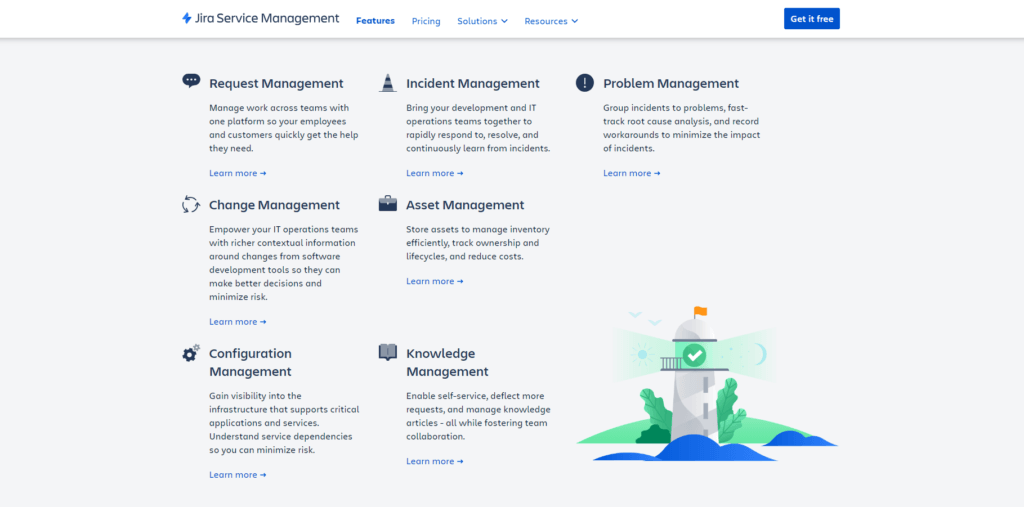
Jira Service Management includes a broad set of ITSM and enterprise service management features. The platform can support simple request intake, but its real value appears when you use it to connect requests, incidents, changes, assets, knowledge, automation, and engineering collaboration in one workflow.
Service Request Management
Service request management is one of the most important parts of the platform. It allows employees, customers, or internal stakeholders to submit requests through a help center, email, chat, Microsoft Teams, Slack, embedded widgets, or custom forms.
For IT teams, this creates a single place to receive and organize requests instead of managing scattered messages across inboxes, chat tools, and spreadsheets.
You can create request types for common needs such as password resets, hardware access, software approvals, onboarding tasks, access requests, and internal service questions. Each request can be routed to the right queue, assigned to the right agent, and tracked with SLA rules.
The key benefit is structure. Instead of treating every incoming request as a generic ticket, you can design forms that collect the right information from the beginning. This reduces back-and-forth communication and helps agents resolve issues faster.
Incident Management
Incident management is one of the strongest areas of Jira Service Management. It helps IT and operations teams identify, prioritize, escalate, and resolve service disruptions with greater speed and transparency.
Teams can connect alerts, create incidents, assign responders, communicate status updates, and track resolution activity. For organizations that rely on digital services, this is essential because downtime affects employees, customers, revenue, and operational trust.
The platform is particularly useful when incident response requires collaboration between support, IT operations, and software engineering teams. Instead of manually transferring information between tools, teams can connect incidents to related work items, affected services, and development tasks.
Premium and Enterprise plans provide stronger incident management capabilities, including advanced AIOps, real-time incident monitoring, incident escalation, post-incident reviews, and deeper service health visibility.
Problem Management
Problem management helps teams move beyond temporary fixes and investigate the root cause of recurring incidents. This is where Jira Service Management becomes more valuable than a basic ticketing system.
Instead of only closing the same type of ticket again and again, you can identify patterns, link related incidents, document known errors, and create long-term corrective actions.
For mature IT teams, this is important because recurring issues often create hidden costs. They consume agent time, frustrate users, and reduce confidence in IT services. A strong problem management process helps you reduce repeated disruptions and improve service reliability over time.
Change Management
Change management allows teams to control how IT changes are reviewed, approved, scheduled, and deployed. This includes infrastructure updates, software releases, system configuration changes, security updates, and other operational changes that may affect services.
Jira Service Management supports change workflows, approval processes, change calendars, risk assessments, deployment tracking, and change advisory board procedures.
One of the most valuable capabilities is the connection between change management and software delivery. If your teams use CI/CD tools and development workflows, the platform can help create stronger visibility between engineering activity and service risk.
This makes it a strong option for organizations practicing DevOps or modern IT operations. You can move faster without losing governance, which is one of the hardest balances in ITSM.
Asset and Configuration Management
Asset and configuration management help teams track the technology, services, hardware, software, and dependencies that support the organization.
With Assets, teams can create a structured view of business services, devices, applications, owners, relationships, and dependencies. This is especially useful when troubleshooting incidents or evaluating the impact of a planned change.
For example, when an incident affects a business-critical application, your team can see related infrastructure, services, owners, and dependencies. This can reduce investigation time and help the right people respond faster.
This feature is more valuable for teams that have moved beyond simple ticket management and need better visibility into the environment they support.
Knowledge Management
Knowledge management helps teams document answers, troubleshooting steps, service procedures, and internal guidance. Jira Service Management connects closely with Confluence, which allows teams to build a searchable knowledge base for agents and end users.
This is useful for both self-service and agent productivity. Employees can find answers before opening tickets, while agents can reuse approved documentation instead of writing the same response repeatedly.
A well-maintained knowledge base can reduce ticket volume, improve first-contact resolution, and create more consistent service delivery. This is especially important for growing IT teams where tribal knowledge often becomes a bottleneck.
AI, Rovo, and Virtual Service Agent
AI is now a major part of Jira Service Management’s value proposition. Atlassian has been expanding AI-powered capabilities through Rovo, virtual service agent functionality, AI incident support, and automation assistance.
Depending on your plan, these capabilities can help with conversational support, request summaries, incident triage, alert grouping, post-incident review generation, and AI-powered employee support.
The virtual service agent is especially useful for teams that receive repetitive internal service requests. It can help answer common questions, guide users to knowledge base content, and reduce the number of tickets that need direct agent involvement.
AI should not be seen as a replacement for IT expertise. The better way to think about it is as a layer that reduces manual work, improves response speed, and helps agents focus on more complex issues.
Reporting and Analytics
Jira Service Management includes reports that help you track service performance, SLA success, request trends, incident resolution, workload, and team productivity.
For IT leaders, this is important because service management should not be managed only by intuition. You need data to understand where requests are coming from, which services create the most friction, how quickly teams respond, and whether your processes are improving.
Enterprise customers also gain access to more advanced cross-product insights through Atlassian Analytics and Atlassian Data Lake, which can help larger organizations analyze performance across multiple Atlassian products.
For small teams, the default reports may be enough. For larger teams, reporting becomes more valuable when workflows, request types, SLAs, and service ownership are configured properly.
Pros and Cons
Benefits of Using Jira Service Management
Positive
✅ Strong Atlassian Ecosystem
✅ Advanced ITSM Workflows
✅ AI and Automation Features
✅ Strong Security Controls
Negative
❌ Learning Curve
❌ Setup Can Take Time
❌ Premium Features Cost More
❌ Not Ideal for Simple Help Desks
Pros
- Strong Atlassian Ecosystem: Jira Service Management works especially well with Jira, Confluence, Assets, Rovo, Bitbucket, and Atlassian Marketplace apps, making it a strong fit for companies already using Atlassian tools.
- Advanced ITSM Workflows: The platform supports request, incident, problem, change, asset, and knowledge management, giving IT teams a complete service management foundation.
- AI and Automation Features: Rovo, virtual service agent capabilities, automation rules, AI-powered incident support, and alert grouping can help teams reduce repetitive work and improve response speed.
- Strong Security Controls: The platform includes encryption, audit logs, permissions, data residency options, and additional identity controls through Atlassian Guard.
Cons
- Learning Curve: New users may need time to understand workflows, queues, automation, permissions, request types, and reporting.
- Setup Can Take Time: Teams with complex ITSM requirements should plan the implementation carefully to avoid messy workflows and over-customization.
- Premium Features Cost More: Advanced AIOps, virtual service agent, deeper incident management, and some enterprise controls are available in higher-tier plans.
- Not Ideal for Simple Help Desks: Small teams that only need basic ticketing may find lighter tools easier to manage.
User Experience
User Interface and Operational Simplicity
The user experience is clean, modern, and highly configurable, but it is not always simple for first-time admins. This is one of the most important things to understand before choosing the platform.
For agents, the workspace is designed around queues, tickets, SLAs, request details, comments, approvals, and related work. Once the environment is configured well, agents can manage work efficiently and see the context they need without constantly switching tools.
For requesters, the experience usually starts in the help center. Users can search knowledge base content, submit forms, check request status, and communicate with service teams. The quality of this experience depends heavily on how well your team designs request types, categories, forms, and help center content.
Agent Experience
Agents can work from organized queues that show incoming requests, assigned work, SLA status, priority, and ticket details. This makes it easier to manage workload and avoid missing urgent issues.
The experience is strongest when your team uses clear queues and workflows. Poor configuration can make the interface feel crowded, while thoughtful configuration can make daily work much faster.
Admin Experience
Admins have a high level of control over workflows, automation, permissions, request types, fields, SLAs, notifications, portals, and integrations.
This flexibility is one of the platform’s biggest strengths, but it also creates a responsibility. If your team creates too many custom fields, workflows, and automation rules without governance, the system can become difficult to maintain.
For this reason, I recommend starting with simple workflows, then expanding only when there is a clear operational need.
Requester Experience
For employees and customers, the platform can feel straightforward when the help center is well organized. Users can browse service categories, submit forms, track requests, and use knowledge base articles for self-service.
The best experience comes when service teams write clear request names, avoid unnecessary form fields, and keep the knowledge base updated.
Mobile Experience
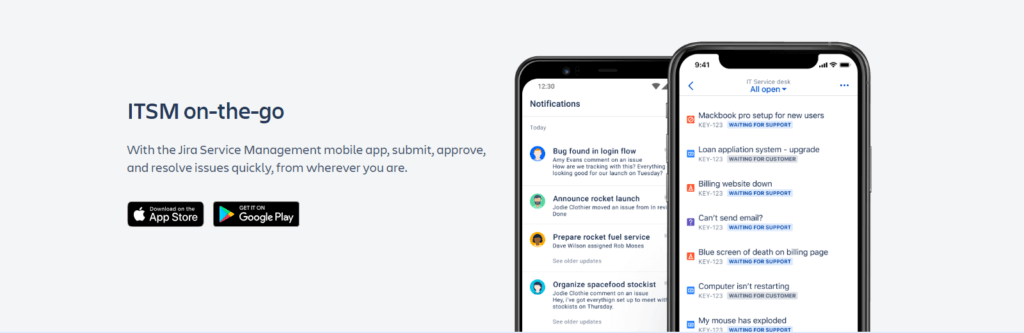
The mobile experience is useful for agents and managers who need to review requests, approve changes, follow incidents, or respond while away from their desks.
This is especially helpful for IT operations teams, on-call staff, and managers who need visibility into urgent service issues outside regular working hours.
Overall Usability Opinion
Jira Service Management is not the easiest ITSM tool for a team with no prior service management experience. However, it is one of the most flexible platforms once configured properly.
The user experience is best for organizations that are willing to define clear processes. If your workflows are mature, the platform can support them well. If your workflows are unclear, the tool will not fix that by itself.
Pricing and Plans
Jira Service Management Pricing and Plans
Jira Service Management pricing is based mainly on the number of agents. Agents are licensed users who work on requests, manage queues, communicate with customers, and resolve tickets. Customers and requesters are typically unlicensed, which is an important advantage for organizations with a large employee or customer base.
Atlassian currently lists Jira Service Management within its Service Collection pricing. Pricing can change, so you should always confirm the latest details on the official Atlassian pricing page before making a buying decision.
| Plan | Current Listed Price | Best For | Main Difference |
| Free | $0 | Small teams testing service management | Limited to 3 agents |
| Standard | $20 per agent/month | Growing IT and business service teams | Adds Rovo, Assets, branded help center, audit logs, and data residency |
| Premium | $51.42 per agent/month | Scaling ITSM and operations teams | Adds virtual service agent, advanced AIOps, incident monitoring, change management, and deployment gating |
| Enterprise | Annual custom pricing | Large enterprises with advanced governance needs | Adds analytics, Data Lake, advanced security, IAM, unlimited automations, and multiple sites |
Free Plan
The Free plan is best for very small teams, testing environments, or companies that want to understand the platform before committing to a paid plan.
It includes essential service management capabilities such as request intake, forms, workflows, queues, incident templates, alerts, and an embedded knowledge base. It is useful for experimentation, but the 3-agent limit makes it unsuitable for most growing IT teams.
Choose the Free plan if you are evaluating the product, building a small internal support process, or testing whether Atlassian-style service management fits your team.
Standard Plan
The Standard plan is the best starting point for most growing teams. It includes the core functionality needed to run a professional service desk, plus important upgrades such as Rovo Agents, asset and configuration management, a custom-branded help center, unlimited email notifications, audit logs, and multi-region data residency.
This plan is a good fit for IT teams that need structure, visibility, and better request management but do not yet need advanced AIOps or virtual service agent capabilities.
For many organizations, Standard will be the most practical balance between capability and cost.
Premium Plan
The Premium plan is designed for teams that need more advanced service operations. It adds virtual service agent, advanced AIOps, real-time incident monitoring, advanced incident and problem management, change management, and deployment gating with CI/CD tools.
This plan is the better choice if incidents are business-critical, if you need stronger automation, or if your IT operations are closely tied to software delivery.
Premium is also more suitable for distributed teams and organizations that want stronger operational resilience. The cost is higher, but the added features can be valuable if they reduce manual work, improve uptime, and help teams resolve incidents faster.
Enterprise Plan
The Enterprise plan is built for large organizations that need advanced analytics, centralized governance, identity and access management, multiple sites, status pages, and unlimited automations.
This plan is best for companies with complex security requirements, large service teams, multiple business units, or strict administrative controls.
Enterprise pricing is billed annually and generally requires contacting Atlassian sales. It is not the right fit for most small or mid-sized teams, but it can make sense for large organizations already invested in Atlassian at scale.
Which Plan Should You Choose?
If you are testing the platform, start with Free. If you are a growing IT team, Standard is likely the most sensible first paid plan. If you need virtual service agent, advanced incident management, AIOps, or deployment controls, Premium is the better option.
Enterprise should only be considered if your organization needs multi-site administration, advanced governance, cross-product analytics, or enterprise-grade identity controls.
Security and Compliance
Jira Service Management Security and Compliance
Security is one of the most important evaluation criteria for any ITSM platform. Service desks often handle sensitive employee data, customer information, access requests, internal systems, incident details, and operational records.
Jira Service Management benefits from Atlassian’s cloud security framework, which includes encryption, access controls, audit capabilities, compliance resources, and optional identity management through Atlassian Guard.
Encryption and Data Protection
Atlassian states that data is encrypted in transit using TLS 1.2+ with perfect forward secrecy, and that servers holding user data use industry-standard AES-256 encryption at rest.
For IT and security teams, this is a necessary baseline. It helps protect data as it moves between users and Atlassian services, and while it is stored in the cloud.
Permissions and Access Controls
Admins can configure roles and permissions to control who can view, edit, assign, approve, and manage requests. This is important because not every service desk user should have access to every request or project.
For example, HR service requests, legal requests, security incidents, and IT access tickets may require different visibility rules. Strong permission design helps reduce unnecessary exposure and supports internal governance.
Atlassian Guard, SSO, and SCIM
Organizations that need advanced identity and access management can use Atlassian Guard. This can add capabilities such as SAML SSO, SCIM provisioning, Active Directory sync, and centralized security policies.
This is particularly useful for larger companies that want to automate user lifecycle management. When employees join, change roles, or leave the organization, access can be managed more consistently.
Audit Logs and Data Residency
Audit logs help administrators monitor important activity, such as changes to global permissions or product configuration. This supports internal reviews, troubleshooting, and compliance processes.
Data residency options allow organizations to choose where certain product data is hosted. This can matter for companies with regional privacy requirements or internal data governance policies.
Compliance Programs
Atlassian lists compliance programs and resources that include SOC 2, PCI DSS, ISO/IEC 27001, ISO/IEC 27018, and GDPR. These certifications and compliance resources can help organizations evaluate whether the platform fits their regulatory requirements.
Atlassian also provides privacy and security protections designed to support customers that operate products in compliance with HIPAA, though eligible customers need to use an applicable plan and enter into the required Business Associate Agreement.
It is important to understand that compliance is not only about the software vendor. Your organization must still configure permissions, workflows, retention practices, user access, integrations, and data handling correctly.
Security Recommendation
For most growing teams, the built-in controls are strong enough for standard ITSM use cases. For enterprise, healthcare, finance, government, or regulated environments, you should review Atlassian’s Trust Center, confirm plan-specific controls, and involve your security and legal teams before implementation.
Software Comparison
Jira Service Management Alternatives
Jira Service Management is a strong ITSM platform, but it is not the only option. The best choice depends on your existing tool stack, team maturity, budget, and the complexity of your service workflows.
Jira Service Management vs Freshservice
Freshservice is often easier for traditional IT teams that want a cleaner, more guided ITSM experience out of the box. It is a strong alternative if your priority is fast setup, intuitive service desk workflows, and a less technical admin experience.
Jira Service Management is stronger when support needs to connect deeply with software development, DevOps, and Atlassian workflows. If your organization already uses Jira and Confluence, it may offer better long-term alignment.
Jira Service Management vs ServiceNow
ServiceNow is a more enterprise-heavy platform with deep ITSM, ITOM, workflow automation, and enterprise service management capabilities. It is often better for very large organizations with mature ITIL processes and large implementation budgets.
Jira Service Management is usually more accessible and more flexible for agile IT teams, especially those that want a modern Atlassian-connected service model without the complexity of a large ServiceNow deployment.
Jira Service Management vs ManageEngine ServiceDesk Plus
ManageEngine ServiceDesk Plus is a strong option for IT teams that want ITSM, asset management, and service desk functionality with flexible deployment options. It can be especially appealing for IT departments that prefer a more traditional IT operations approach.
Jira Service Management is better for teams that need stronger collaboration with development, change workflows connected to software delivery, and a broader Atlassian ecosystem.
Jira Service Management vs Zendesk
Zendesk is very strong for customer support and external service experiences. It is often easier for support teams focused on customer communication, omnichannel support, and service quality.
Jira Service Management is more specialized for internal ITSM, incident management, change management, assets, and DevOps collaboration. If your main need is IT service management, it is usually the better fit.
For a broader comparison of ITSM tools, you can review our guide to the best ITSM software, or explore related reviews such as Freshservice, ManageEngine ServiceDesk Plus, Zendesk ITSM, and SolarWinds Service Desk.
Conclusion
Final Thoughts
⭐ Overall Rating: 8.4/10
Jira Service Management is one of the strongest ITSM platforms for teams that want service management connected with development, operations, automation, AI, and enterprise collaboration.
Its biggest strength is not only ticket management. The real value comes from connecting requests, incidents, problems, changes, assets, knowledge, and engineering workflows in one ecosystem.
This makes it especially compelling for organizations already using Atlassian tools. If your developers work in Jira, your documentation lives in Confluence, and your operations team needs better service visibility, Jira Service Management can become a natural extension of how your company already works.
At the same time, it is not the simplest option on the market. The platform requires thoughtful configuration, especially for larger teams with complex workflows. Smaller teams that only need simple ticketing may find Freshservice, Zendesk, or another lightweight help desk easier to adopt.
Our Recommendation
I would recommend Jira Service Management for IT, DevOps, and operations teams that want a scalable ITSM platform and are willing to invest in proper setup. It is a very strong choice if your company already uses Atlassian products or wants to connect IT support with software delivery.
I would be more cautious if your team wants the fastest possible setup with minimal configuration. In that case, you may want to compare other options in our best ITSM software guide before making a decision.
Overall, Jira Service Management is a flexible, modern, and highly capable ITSM solution. For the right team, it can improve service delivery, reduce manual work, strengthen incident response, and bring IT and development teams closer together. You can also visit the official Jira Service Management page for the latest product details.
Have more questions?
Frequently Asked Questions
What is Jira Service Management used for?
Jira Service Management is used to manage IT service requests, incidents, problems, changes, assets, and knowledge. It helps IT, operations, and business service teams organize support work, automate workflows, track SLAs, and collaborate with development teams.
Is Jira Service Management only for IT teams?
No. While Jira Service Management is built strongly around ITSM, it can also support HR, facilities, legal, finance, marketing, and other internal service teams. Its templates and request workflows make it suitable for enterprise service management beyond IT.
What is the difference between Jira and Jira Service Management?
Jira is mainly used for project tracking, software development, and work management. Jira Service Management is built for service management, including request portals, queues, SLAs, incident management, change management, asset management, and customer communication.
Is Jira Service Management good for small businesses?
Jira Service Management can work for small businesses, especially if they already use Atlassian tools. However, very small teams that only need simple ticketing may find the platform more advanced than necessary. The Free plan is useful for testing with up to 3 agents.
Does Jira Service Management include AI features?
Yes. Jira Service Management includes AI-related capabilities through Atlassian Rovo, virtual service agent features, AI-powered support, alert grouping, incident assistance, and work summarization depending on the plan and configuration.
Does Jira Service Management include asset management?
Yes. Jira Service Management includes asset and configuration management capabilities through Assets. This helps teams track services, devices, applications, dependencies, ownership, and relationships between assets and service requests.
Can Jira Service Management replace a help desk?
Yes. Jira Service Management can replace a traditional help desk by providing request intake, ticket queues, SLA tracking, knowledge base support, automation, approvals, and customer communication. It is best suited for teams that want ITSM depth rather than basic ticketing only.
Is Jira Service Management ITIL aligned?
Yes. Jira Service Management supports ITIL-aligned practices such as incident management, problem management, change management, service request management, knowledge management, and asset management. Teams can configure workflows to match their ITIL maturity level.
Is Jira Service Management available on-premise?
Jira Service Management is available as a cloud product and as a self-managed Data Center deployment. Atlassian Server is no longer sold or supported, so organizations that need self-managed infrastructure should evaluate the Data Center option.
What are the main limitations of Jira Service Management?
The main limitations are its learning curve, setup complexity, and higher cost for advanced features. It is powerful, but teams need to configure workflows, permissions, automations, SLAs, and request types carefully to get the best results.