
Introduction
If you manage an IT team or run a Managed Service Provider (MSP), you already know that disconnected tools can slow down service delivery. You need clear endpoint visibility, reliable automation, fast remote support, accurate billing, and stronger security controls without forcing your technicians to work across too many systems.
ConnectWise is one of the most recognized software ecosystems in the MSP and IT operations market. Instead of offering only a single IT service management tool, it provides a wider platform that covers professional services automation (PSA), remote monitoring and management (RMM), remote access, cybersecurity, backup monitoring, quoting, automation, and reporting.
That makes this ConnectWise review especially important if you are comparing ITSM software, MSP software, RMM tools, or PSA platforms. The platform can be powerful, but it is not the simplest option on the market. Its real value depends on your team size, technical maturity, service model, and willingness to invest in setup.
In this review, you’ll learn how ConnectWise works, what its strongest features are, where it may fall short, how pricing is structured, and how it compares with alternatives like NinjaOne, Freshservice, SuperOps, N-able, and monday service.
Quick Summary
ConnectWise is best suited for established MSPs and IT teams that need a connected operating system for service delivery, endpoint management, automation, remote support, quoting, and security. It is less ideal if your main priority is a simple help desk tool that can be deployed with minimal configuration.
| Category | ConnectWise Review Summary |
| Best for | MSPs, IT service providers, and mature IT teams |
| Main strengths | PSA, RMM, automation, remote access, integrations, and reporting |
| Main drawbacks | Learning curve, quote-based pricing, complex setup, and dense interface |
| Pricing model | Custom quote-based pricing by product, users, endpoints, and modules |
| Free trial | Available for selected products, including a 30-day trial for ConnectWise RMM |
| Best alternatives | NinjaOne, Freshservice, SuperOps, N-able, Atera, and monday service |
Software Specification
Core Features of ConnectWise
ConnectWise is not one standalone ITSM product. It is a modular platform built around the needs of MSPs and IT teams that manage service requests, endpoints, technicians, customer environments, security events, and business operations at scale.
This is where the platform becomes different from simpler IT help desk systems. You can use it for ticketing, but its real strength appears when PSA, RMM, automation, remote support, documentation, quoting, and cybersecurity workflows are connected.
1. ConnectWise PSA for service delivery and business operations
ConnectWise PSA, formerly widely known as ConnectWise Manage, is the business management layer of the platform. It is designed to help MSPs manage tickets, projects, time tracking, agreements, invoicing, procurement, reporting, and client communication from one environment.
For an MSP, this is critical because service delivery and profitability are closely connected. A ticket is not just a support request. It can affect technician utilization, SLA performance, customer satisfaction, contract profitability, and future renewal value.
Key PSA capabilities include:
- Ticketing, SLA tracking, and service board management
- Time tracking, expense tracking, billing, and invoicing
- Project management and resource management
- Customer portal and email connector functionality
- Reporting for service performance and profitability
The strongest use case is for MSPs that want to connect service work with business outcomes. Instead of measuring only ticket volume, you can track how service delivery affects revenue, workload, margins, and client experience.
2. ConnectWise RMM for endpoint monitoring and management
ConnectWise RMM gives your team centralized visibility across endpoints, servers, and client environments. It is built for proactive IT management, where technicians identify issues before they become outages or support escalations.
You can use ConnectWise RMM to monitor endpoint health, configure alerts, deploy agents, manage patches, automate common tasks, and support devices remotely. For MSPs, the multi-tenant structure is especially important because you may need to manage many client environments without losing control or visibility.
ConnectWise RMM is also positioned as the more cloud-native direction of the company’s RMM offering. Compared with legacy-heavy tools, it is designed to reduce time-to-value through predefined monitors, automation, and platform-level intelligence.
Key RMM capabilities include:
- Endpoint, workstation, server, and network visibility
- Automated patching and third-party application patch support
- Alerting, monitoring, and technician workflows
- Remote access and troubleshooting workflows
- Automation and AI-assisted scripting capabilities
This makes it a strong fit if your team needs endpoint-first control, but still wants the option to connect RMM data with PSA, billing, and reporting workflows.
3. ConnectWise Automate for deeper scripting and customization
ConnectWise Automate is still relevant for teams that need advanced automation, custom scripting, and deep control over endpoint workflows. It is more technical than ConnectWise RMM, but that extra complexity can be useful for mature MSPs with experienced engineers.
The important distinction is that ConnectWise RMM and ConnectWise Automate are not exactly the same product. RMM is more cloud-native and designed for faster platform-managed deployment. Automate is often better for teams that want granular customization, advanced scripting, and more control over how automation is built.
ConnectWise Automate can help with:
- Custom scripts and scheduled automation
- Automated remediation for recurring issues
- Software deployment and patch management
- Advanced monitoring rules and technician workflows
- Endpoint management at larger scale
If your team has strong technical resources, Automate can become a powerful operational engine. If you want a more guided and modern RMM experience, ConnectWise RMM may be the better starting point.
4. ScreenConnect remote support
ScreenConnect, formerly known as ConnectWise Control, is the remote support and remote access product within the ConnectWise ecosystem. This is one of the platform’s most practical tools because technicians often need to move from monitoring to hands-on troubleshooting quickly.
With ScreenConnect, your technicians can access remote devices, support users, troubleshoot endpoints, and resolve issues without needing to be physically present. For MSPs, this can reduce travel time, shorten resolution windows, and improve customer experience.
ScreenConnect is especially useful when combined with RMM. Alerts can identify the problem, while remote access helps the technician fix the problem faster.
5. Cybersecurity, SOC, and risk management
Security is a major part of the ConnectWise ecosystem. The platform includes cybersecurity options for risk assessment, monitoring, SOC support, endpoint protection integrations, and managed detection workflows.
This matters because MSPs are no longer judged only on uptime and ticket resolution. Clients increasingly expect stronger security posture, documented controls, patch visibility, and faster incident response.
ConnectWise can support security-focused operations through:
- Cybersecurity risk assessment tools
- SOC and managed detection services
- Security event monitoring and alerting
- Endpoint security integrations
- Compliance reporting and risk visibility
The biggest benefit is consolidation. Instead of treating cybersecurity as a separate layer that sits outside service operations, ConnectWise helps bring risk, endpoint visibility, tickets, and response workflows closer together.
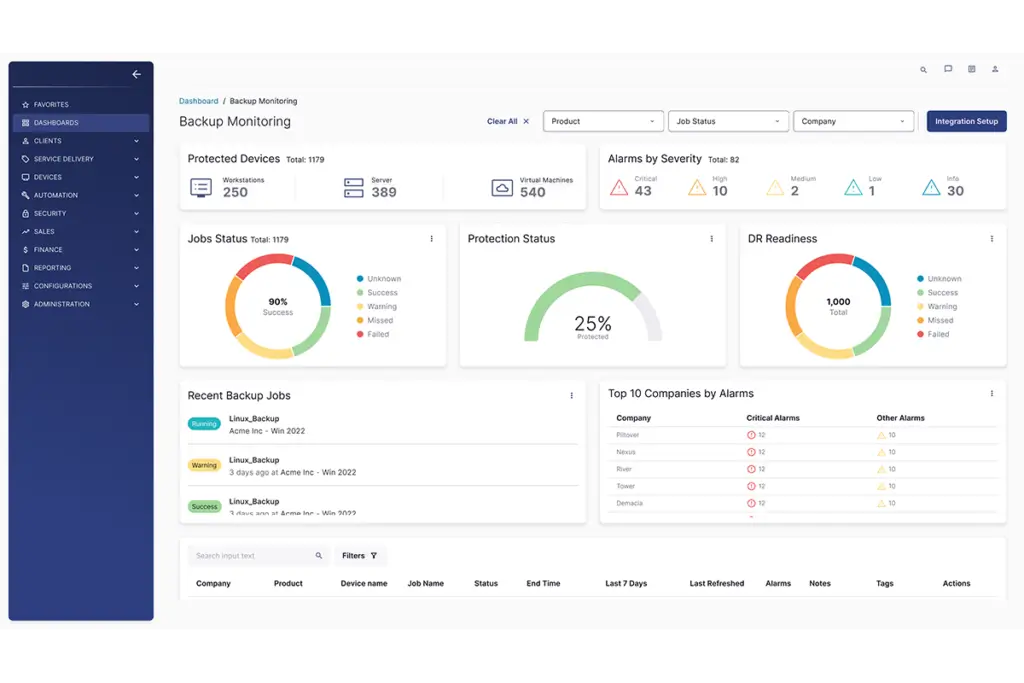
6. Backup monitoring and disaster recovery visibility
Backup monitoring is another important area for MSPs and IT teams because a backup is only valuable if it is working when you need it. ConnectWise supports backup and disaster recovery workflows that help teams monitor protected devices, backup job status, alerts, and recovery readiness.
This is valuable for MSPs that manage several client environments because backup failures can be difficult to track manually. A centralized backup monitoring view helps technicians identify failed jobs, prioritize critical alerts, and reduce the risk of recovery gaps.
7. ConnectWise CPQ for quoting and sales workflows
ConnectWise CPQ helps MSPs manage quoting, pricing, proposals, and sales-to-service handoffs. This is useful when your business sells managed services, hardware, software, renewals, or project-based work.
For many MSPs, quoting is not only a sales process. It affects procurement, service delivery, billing, profitability, and customer expectations. CPQ helps standardize this workflow so quotes are more consistent and easier to move into delivery.
Key CPQ benefits include:
- Faster quote and proposal creation
- More standardized pricing workflows
- Clearer sales pipeline visibility
- Better handoff from opportunity to project delivery
This makes ConnectWise more complete as an MSP business platform, not just an IT operations tool.
8. ConnectWise Asio platform and AI automation
ConnectWise Asio is the company’s strategic platform layer. It is designed to connect data across PSA, RMM, automation, quoting, security, and other products. The goal is to reduce disconnected workflows and support more intelligent automation across the MSP operating model.
This matters because many MSPs struggle with fragmented systems. When service tickets, endpoint alerts, billing data, and client information live in different tools, technicians waste time switching systems and leaders lose visibility.
Asio is intended to create a more unified foundation for ConnectWise products, including PSA powered by Asio. For buyers, this means ConnectWise is not only maintaining older product categories, it is also moving toward a more modern, AI-assisted, shared-data experience.
You should still evaluate which Asio-powered features are available for your specific product plan and region, but this direction is important if you are choosing a platform for long-term MSP growth.
9. Reporting and business intelligence
ConnectWise includes reporting tools that help you measure service delivery, technician utilization, SLA performance, client profitability, recurring revenue, and operational trends.
This is one of the areas where ConnectWise can deliver real business value. A basic help desk can show how many tickets were closed. A mature PSA and RMM ecosystem can help you understand which clients are profitable, which services consume too much technician time, and where automation can improve margins.
For MSP leaders, this data can support better decisions around staffing, pricing, service packages, customer renewals, and process improvement.
Pros and Cons
Benefits of Using ConnectWise
Positive
✅ Strong PSA and RMM ecosystem
✅ Built for MSP scalability
✅ Advanced automation capabilities
✅ Deep integration marketplace
✅ Strong reporting for service operations
Negative
❌ Steep learning curve for new users
❌ Quote-based pricing limits transparency
❌ Setup can require technical expertise
❌ Support responsiveness can vary
❌ Interface can feel dense in some areas
Choosing ConnectWise is not only about features. It is about whether your team can use those features to improve service quality, technician productivity, client visibility, and operational control.
Pros
1. Strong end-to-end MSP operating system
The biggest advantage of ConnectWise is its breadth. You can manage service tickets, endpoint alerts, remote access, projects, quoting, billing, cybersecurity workflows, and reporting across a connected ecosystem.
This helps reduce tool sprawl. Instead of forcing technicians, managers, and finance teams to work from disconnected systems, ConnectWise gives you a more centralized structure for running an MSP or mature IT department.
2. Built for multi-client scalability
ConnectWise is well suited for MSPs that manage multiple customer environments. Its PSA and RMM structure supports multi-tenant operations, service boards, agreements, endpoint groups, role-based access, and reporting across client accounts.
That makes it more scalable than lightweight help desk tools that work well for small internal teams but struggle with MSP complexity.
3. Strong automation potential
Automation is one of ConnectWise’s most important strengths. With RMM and Automate, your team can reduce repetitive manual work through scripting, patch automation, alerts, remediation tasks, and predefined workflows.
This matters because technician time is one of the highest-cost resources in an MSP. Every repetitive task you automate can improve margins, reduce human error, and create more capacity for higher-value work.
4. Deep integration ecosystem
ConnectWise connects with many tools across security, backup, accounting, communication, CRM, and IT operations. This gives you flexibility if you already have a preferred technology stack.
The marketplace and API ecosystem are especially important for MSPs because few providers run their entire business on one vendor. ConnectWise gives you a strong foundation while still allowing integrations with other platforms.
5. Better business visibility
ConnectWise PSA helps connect operational work with business performance. You can track tickets, time, SLAs, utilization, agreements, billing, projects, and profitability.
For MSP owners and service leaders, this is a major benefit. It helps you move beyond reactive ticket management and understand whether your services are profitable, efficient, and scalable.
Cons
1. Learning curve for new users
ConnectWise can feel overwhelming at first. The platform includes many modules, settings, workflows, permissions, and configuration options. If your team is moving from a simpler help desk or RMM tool, expect a meaningful onboarding period.
The learning curve is not necessarily a dealbreaker, but it should be part of your decision. ConnectWise works best when you have the time and internal ownership needed to configure it properly.
2. Pricing is not fully transparent
ConnectWise uses a quote-based pricing model for many products. This means you usually need to speak with sales to understand your exact cost based on users, endpoints, selected modules, contract terms, and implementation needs.
That makes it harder to compare against tools with public pricing. For small teams, this can slow down the buying process.
3. Setup can be complex
The platform’s flexibility is a strength, but it also creates implementation complexity. Workflows, integrations, automations, service boards, agreements, and reporting structures often need careful setup.
If your team does not configure the system well, you may not get the full value from it. This is why training, onboarding, and process design are important parts of the total investment.
4. Support responsiveness can vary
ConnectWise offers support resources, documentation, training, and community access. However, user feedback across the market often points to mixed support experiences, especially during complex onboarding or urgent technical issues.
This does not mean support will be poor, but you should clarify support availability, onboarding scope, and escalation options before signing a contract.
5. Interface can feel dense in some areas
ConnectWise has improved its product direction with the Asio platform, but parts of the broader ecosystem can still feel dense compared with newer tools. If your team values a highly modern, minimal interface, this may affect adoption.
For experienced technicians, the depth can be useful. For new users, it can feel like too much too quickly.
User Experience
User Interface and Operational Simplicity
ConnectWise is built for operational depth, not lightweight simplicity. If you want a basic ticketing system that your team can configure in a few hours, it may feel too advanced. If you need a full MSP operating platform, the depth becomes much more valuable.
Designed for experienced IT and MSP teams
The interface gives technicians, service managers, finance teams, and business leaders access to many different operational areas. This is useful when you need control over tickets, endpoints, agreements, projects, reports, and billing.
The trade-off is that new users may need time to understand the structure. ConnectWise works best when your team defines clear workflows before rollout, including service boards, escalation rules, naming conventions, automations, and reporting goals.
Customizable dashboards and workflows
ConnectWise allows teams to create role-based views and dashboards. Technicians can focus on alerts, devices, and tickets, while service managers can monitor SLA performance, workload, and client satisfaction.
This role-based flexibility helps reduce noise, but it also requires careful configuration. Without good setup, dashboards can become cluttered and workflows can feel harder than they need to be.
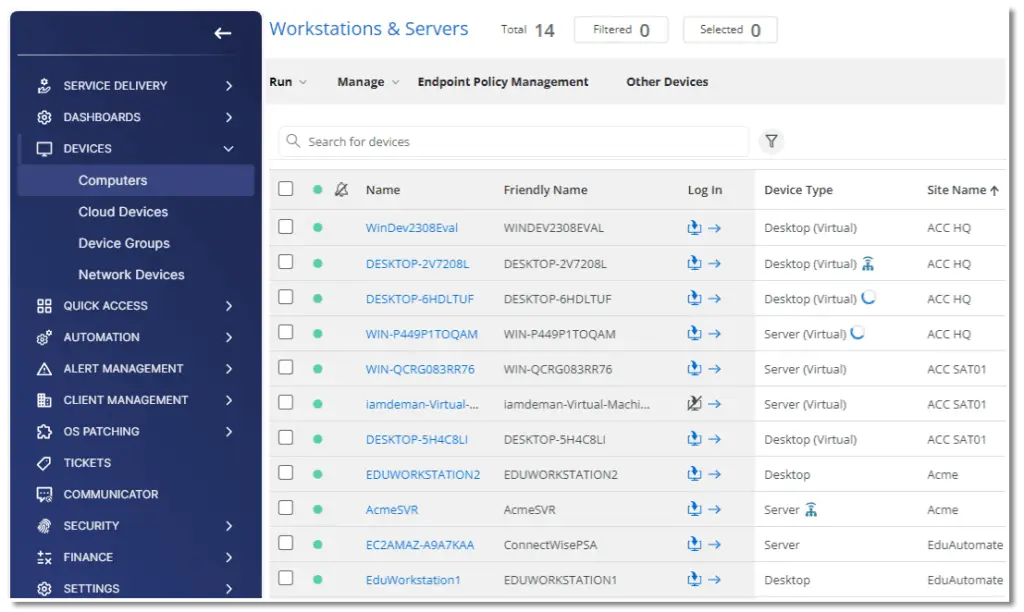
Remote endpoint visibility
In RMM, technicians can view endpoint information, device status, site details, and remote access options from a centralized interface. This makes it easier to manage workstations, servers, virtual machines, and client environments across locations.
Training and onboarding are important
ConnectWise provides documentation, training resources, community access, and onboarding options. For complex deployments, professional onboarding can be helpful because configuration decisions made early can affect long-term usability.
If your team invests in training, ConnectWise can become highly efficient. If you skip training, the platform may feel heavy and underused.
Mobile and remote work support
ConnectWise supports web-based access and remote support workflows. This allows technicians to respond to issues without always being physically present at the client site.
Mobile and remote workflows are useful, but the full desktop experience remains more practical for complex service management, reporting, and configuration tasks.
Pricing and Plans
How much does ConnectWise cost?
ConnectWise does not publish simple fixed pricing for most products. Pricing is usually quote-based and depends on your selected modules, number of technicians, endpoint volume, support requirements, contract terms, and implementation scope.
This makes ConnectWise harder to compare against tools with public per-user pricing. However, it also reflects the modular nature of the platform. An MSP that needs PSA, RMM, ScreenConnect, CPQ, cybersecurity, and backup workflows will have a different cost profile than a team that only needs one or two products.
ConnectWise does offer free trials for selected products. ConnectWise RMM, for example, is promoted with a 30-day free trial. Other products may require a demo, quote request, or product-specific trial path.
| Pricing Factor | Details |
| Pricing Model | Custom quote-based pricing by product and business requirements |
| Core Products | ConnectWise PSA, ConnectWise RMM, Automate, ScreenConnect, CPQ, cybersecurity, backup, and documentation products |
| Pricing Variables | Number of users, endpoints, modules, support needs, contract length, and implementation scope |
| Free Trial Available? | Yes, selected products offer trials, including a 30-day trial for ConnectWise RMM |
| Implementation Costs | May apply depending on setup complexity, onboarding, training, and integrations |
| Best Fit | MSPs and IT teams that need a broader operating platform, not only a basic help desk |
| Overall Cost Level | Medium to high, depending on modules and scale |
ConnectWise PSA package considerations
ConnectWise PSA is generally evaluated through feature packages rather than a public flat-rate plan. The package you need depends on how much project management, ticketing, resource management, procurement, finance, reporting, and support functionality your team requires.
| PSA Area | Why It Matters |
| Ticketing and SLA management | Helps manage service delivery, response times, and accountability |
| Project and resource management | Supports larger service engagements, onboarding projects, and technician planning |
| Time and expense tracking | Improves billing accuracy and technician utilization visibility |
| Procurement and finance | Connects quoting, purchasing, invoicing, and revenue workflows |
| Reporting | Helps leadership measure service performance, profitability, and client trends |
Before choosing a plan, map your required workflows first. If you only need ticketing, ConnectWise may be more platform than you need. If you need to run an MSP operation from sales through support and billing, the pricing can be easier to justify.
ConnectWise vs. Alternatives
How It Compares to Competitors
ConnectWise competes across several categories at once, including PSA software, RMM software, ITSM software, remote access, cybersecurity, and MSP business management. That makes comparison more nuanced than a simple feature checklist.
In most cases, ConnectWise is strongest when you need depth, scale, and MSP-specific operations. Alternatives may be better if you prioritize faster onboarding, simpler pricing, a more modern interface, or internal ITSM workflows.
ConnectWise vs. NinjaOne
NinjaOne is a strong alternative if your main priority is endpoint management, ease of use, and fast deployment. It is often easier for lean IT teams and MSPs that want a cleaner RMM experience without the same level of PSA complexity.
ConnectWise is stronger if you need a broader MSP operating system that connects PSA, RMM, service delivery, quoting, billing, and reporting.
ConnectWise vs. Freshservice
Freshservice is better suited for internal IT teams that want ITIL-aligned service management, employee service workflows, asset management, and a modern ITSM experience.
ConnectWise is more MSP-oriented. It is better if you manage multiple client environments and need PSA plus RMM functionality. Freshservice is often easier for internal IT departments that do not need MSP billing, agreements, or multi-client operations.
ConnectWise vs. SuperOps
SuperOps is a modern PSA and RMM platform built for MSPs that want a simpler and more unified experience. It may be easier to adopt for smaller or growing MSPs that want modern usability without the heavier configuration requirements of ConnectWise.
ConnectWise remains stronger for larger MSPs that need a more mature ecosystem, deeper integrations, and broader operational control.
ConnectWise vs. N-able
N-able is another mature MSP software provider with strong RMM, endpoint management, backup, and security capabilities. It is often a strong fit for MSPs that want endpoint and security depth.
ConnectWise has an advantage when PSA-led business operations are central to the buying decision. N-able can be very strong technically, while ConnectWise may provide broader alignment between service, billing, reporting, and business management.
ConnectWise vs. monday service
monday service is better for teams that want visual workflows, fast setup, no-code customization, and an approachable service management experience. It can work well for internal IT, operations, HR, and cross-functional service teams.
ConnectWise is more technical and MSP-focused. If you need advanced RMM, PSA, remote access, and multi-client service delivery, ConnectWise is the more suitable choice.
Comparison table
| Software | Best For | Where It Beats ConnectWise | Where ConnectWise Is Stronger |
| ConnectWise | Established MSPs and complex IT service teams | Not applicable | Deep PSA, RMM, automation, remote access, and MSP workflows |
| NinjaOne | Endpoint-first IT teams and MSPs | Easier setup and cleaner RMM experience | Broader MSP business management through PSA and operations tools |
| Freshservice | Internal IT teams needing ITIL workflows | Modern ITSM and employee service management | More MSP-specific workflows, RMM, and PSA depth |
| SuperOps | MSPs wanting a simpler PSA and RMM platform | Modern UI and easier adoption for smaller MSPs | Larger ecosystem and deeper enterprise MSP maturity |
| N-able | MSPs needing mature RMM and security tools | Strong endpoint and security stack | Broader PSA-led business operations |
| monday service | Teams needing flexible visual service workflows | No-code workflows and easier team adoption | More advanced MSP, RMM, and remote support functionality |
Which platform should you choose?
- Choose ConnectWise if you run an MSP or complex IT service operation.
- Choose NinjaOne if endpoint management and usability matter most.
- Choose Freshservice if you need internal ITSM and ITIL workflows.
- Choose SuperOps if you want a modern MSP platform with simpler adoption.
- Choose N-able if endpoint management and security depth are priorities.
- Choose monday service if you want visual, flexible workflows for service teams.
Conclusion
Final thoughts
⭐ Overall Rating: 7.5/10
ConnectWise is a strong platform for MSPs and mature IT teams that need more than a basic help desk. Its biggest value is the way it connects PSA, RMM, automation, remote access, cybersecurity, backup visibility, quoting, and reporting into a broader operating model.
If your team manages multiple client environments, tracks technician time, handles agreements, delivers remote support, monitors endpoints, and needs accurate operational reporting, ConnectWise can be a strong long-term investment.
However, it is not the easiest or cheapest solution to adopt. The platform has a learning curve, pricing is quote-based, and setup can require careful planning. Smaller teams that want a simple service desk or lightweight RMM may find alternatives easier to deploy.
You should choose ConnectWise if you:
- Run an MSP or mature IT service organization
- Need PSA and RMM functionality in one ecosystem
- Manage multiple client environments or large endpoint volumes
- Want deeper automation, reporting, and business visibility
- Have the resources to invest in onboarding and process design
You might prefer an alternative if you:
- Need a simple IT help desk with fast setup
- Prefer public and transparent pricing
- Have a small team with limited technical resources
- Want a lighter, more modern interface from day one
- Do not need MSP-focused billing, agreements, or RMM workflows
Our recommendation
ConnectWise is best for teams that need operational depth. It is not the most lightweight option, but it can become a powerful command center for MSPs that want to standardize service delivery, improve endpoint visibility, automate repetitive work, and connect technical operations with business performance.
If your team is ready for that level of structure, ConnectWise is worth serious consideration. If simplicity, transparent pricing, or faster adoption matters more, compare it with NinjaOne, Freshservice, SuperOps, N-able, or monday service before making your final choice.
Have more questions?
Frequently Asked Questions
What is ConnectWise used for?
It is used by MSPs and IT teams to manage service tickets, endpoints, remote support, automation, cybersecurity workflows, quoting, billing, and reporting from a connected software ecosystem.
Is ConnectWise an RMM or PSA platform?
It offers both. ConnectWise PSA supports service delivery, billing, projects, and business operations, while ConnectWise RMM focuses on endpoint monitoring, patching, alerts, automation, and remote management.
What is the difference between ConnectWise RMM and Automate?
The RMM is the more cloud-native monitoring and management option built for faster deployment, while Automate is better suited for teams that need deeper scripting, customization, and advanced automation control.
Does ConnectWise offer a free trial?
Yes, selected products offer free trials. ConnectWise RMM is promoted with a 30-day free trial, while other products may require a demo, product tour, or custom quote request.
How much does ConnectWise cost?
Pricing is usually quote-based. Your cost depends on selected products, users, endpoint volume, implementation scope, support needs, and contract terms.
Is ConnectWise good for small MSPs?
It can work for small MSPs that plan to scale, but it may feel complex for very lean teams. Smaller providers may prefer simpler alternatives like NinjaOne, SuperOps, Atera, or monday service.
What is ConnectWise Asio?
Asio is the unified platform layer designed to connect ConnectWise products through shared data, automation, AI-assisted workflows, and a more consistent product experience for MSPs.
Does ConnectWise include remote access?
Yes. ScreenConnect provides remote support and remote access capabilities that help technicians troubleshoot devices and support users remotely.
What are the best ConnectWise alternatives?
Top alternatives include NinjaOne for endpoint management, Freshservice for internal ITSM, SuperOps for modern MSP workflows, N-able for RMM and security depth, and monday service for visual service management.
Is ConnectWise worth it for MSPs?
It is worth considering if you need a scalable MSP operating platform with PSA, RMM, automation, remote access, billing, and reporting. It may not be ideal if you need a lightweight tool with simple setup.