
Introduction
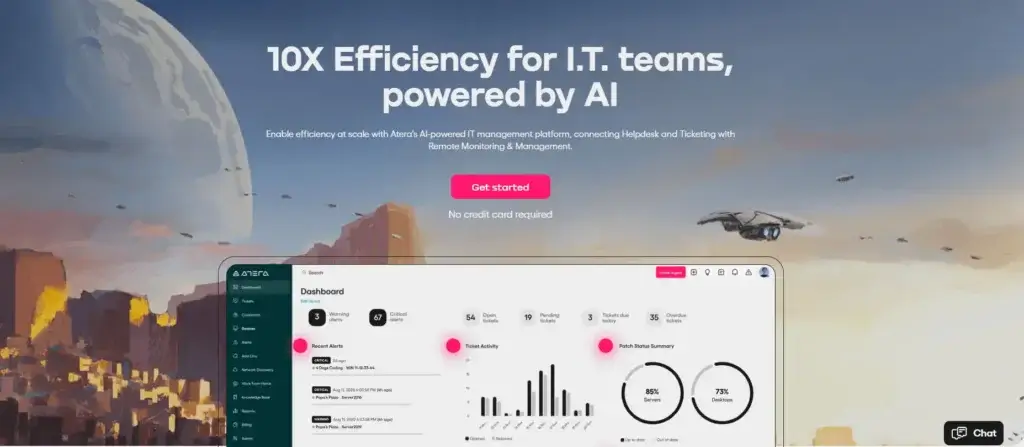
Atera is an all-in-one IT management platform built for IT departments and managed service providers that need remote monitoring, helpdesk ticketing, patch management, automation, reporting, and AI-powered support in one workspace.
What makes the platform especially interesting is its pricing model. Instead of charging per endpoint, it uses per-technician pricing. That can make it attractive for lean IT teams that manage a growing number of devices but do not want costs to rise every time they add another workstation, laptop, server, or endpoint.
In this Atera review, you will see where the platform performs well, where it has limitations, how its pricing works, and whether it is the right fit for your IT operation. If you are still comparing broader ITSM and IT management platforms, you can also review our full guide to the best IT management software.
What Is Atera?
Atera is a cloud-based IT management solution that combines RMM, PSA, service desk, patching, remote access, reporting, and AI features. It is designed to help IT teams monitor infrastructure, respond to support requests, automate repetitive tasks, and maintain endpoint security from one centralized system.
The platform is not only a ticketing tool and not only an RMM platform. Its strongest value is the way it connects endpoint management with service delivery. That means your technicians can monitor device health, open a remote session, apply patches, manage tickets, and use AI assistance without constantly switching between separate systems.
Who Is Atera Best For?
Atera is best for IT teams that want one operational hub for support, monitoring, automation, and endpoint maintenance. It is especially strong when your team is small compared with the number of devices you manage.
Small to Mid-Size Businesses
For small and mid-sized businesses, the platform can reduce tool sprawl. Instead of buying separate systems for ticketing, remote access, patching, monitoring, and reporting, you can manage most daily IT operations from one place.
This is valuable when your IT team needs structure but does not want the complexity of a large enterprise ITSM suite. Atera gives you enough operational depth to manage users, tickets, endpoints, alerts, and automations without making the setup feel unnecessarily heavy.
IT Service Providers and MSPs
Managed service providers can benefit from the combination of RMM, PSA, ticketing, remote access, time tracking, reporting, and billing-related workflows. If you serve multiple clients, having monitoring and service management in one environment can improve technician productivity and client visibility.
The per-technician pricing model can also be useful for MSPs that manage many endpoints across client environments. However, MSPs with highly advanced billing, contract, and project management needs should still compare it with dedicated PSA-first platforms.
In-House IT Teams
Internal IT departments can use the platform to manage support tickets, monitor endpoint health, automate maintenance, deploy patches, and support remote employees. It is a good fit for organizations that want to move from reactive IT support to more proactive IT operations.
For larger IT departments, the main question is whether your needs are centered on endpoint operations or deep ITIL-style workflows. If you need advanced change management, a highly detailed CMDB, or complex enterprise service management, you may want to compare Atera with Freshservice, Jira Service Management, ManageEngine ServiceDesk Plus, or ServiceNow.
Quick Software Snapshot
Before going deeper into the features, here is a quick overview of how the platform fits into the IT management software market.
| Review Factor | Details |
| Software Type | IT management, RMM, PSA, helpdesk, patch management, automation |
| Best For | IT departments, MSPs, and lean IT teams managing many endpoints |
| Pricing Model | Per technician, with plans for IT departments and MSPs |
| Main Strength | Combines endpoint monitoring, ticketing, patching, remote access, and AI support |
| Main Limitation | Advanced reporting, security, and enterprise controls may require higher plans |
| Best Alternative To Compare | NinjaOne, Freshservice, Jira Service Management, ManageEngine ServiceDesk Plus |
Core Features
RMM, Ticketing, AI, and Automation
The core value of Atera comes from the way it brings IT operations into one platform. Instead of working across separate monitoring, ticketing, patching, remote access, and reporting tools, your team can manage most daily IT workflows from a unified interface.
Remote Monitoring and Management
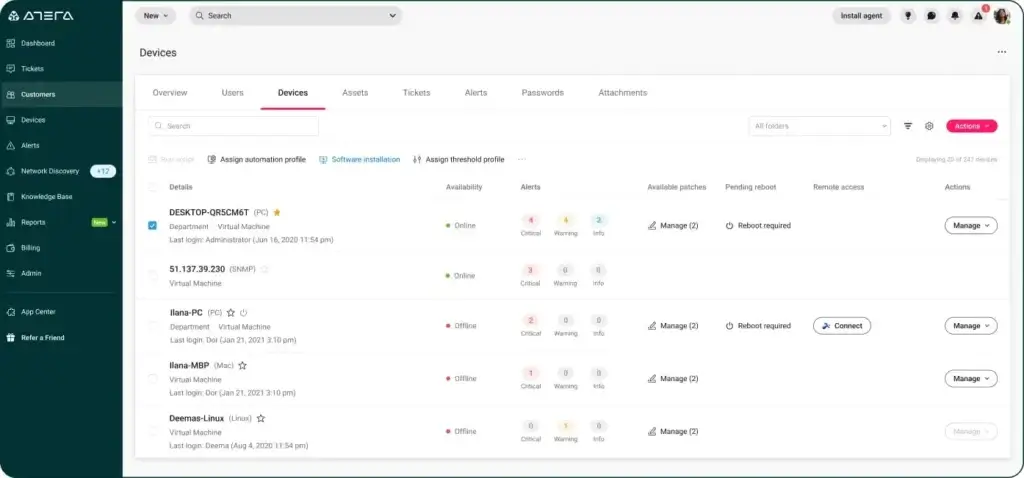
Remote Monitoring and Management is one of the platform’s strongest areas. It allows your technicians to monitor endpoints, servers, and workstations, view device health, receive alerts, and respond to problems before they turn into larger incidents.
For IT teams, this is important because many support issues start as small signals. A device may show high CPU usage, low disk space, poor memory performance, or recurring application errors before a user submits a ticket. With proper monitoring, your team can become more proactive and less dependent on users reporting every issue manually.
Device Monitoring and Endpoint Visibility
The platform gives technicians visibility into managed devices, including system health, availability, hardware details, software inventory, and performance indicators. This is useful for troubleshooting, asset visibility, and long-term planning.
Device monitoring is especially valuable for distributed teams. If your employees work across offices, home environments, and remote locations, your IT team needs a reliable way to understand what is happening across the environment without physically accessing each device.
Remote Access
Remote access is essential for modern IT support. Atera supports remote sessions through tools such as Splashtop and AnyDesk, helping technicians troubleshoot devices without being onsite.
This can reduce ticket resolution time because technicians can move from alert or ticket to live troubleshooting more quickly. For MSPs, it also creates a smoother client support experience because technicians can resolve issues directly instead of relying on long back-and-forth instructions with end users.
Helpdesk and Ticketing
The helpdesk and ticketing system helps your team capture, prioritize, assign, and resolve support requests. Users can submit issues, technicians can track progress, and managers can monitor ticket status across the team.
The strongest part of the ticketing experience is that it connects naturally with endpoint context. When a user reports a problem, your technician can review device details, remote into the machine, check alerts, and document the resolution from the same operational environment.
Patch Management
Patch management is one of the most important features for reducing security risk and maintaining system stability. Atera can help IT teams automate and manage software updates, operating system patches, approvals, and exclusions.
This matters because manual patching is both time-consuming and risky. If your team delays updates, endpoints may remain exposed to known vulnerabilities. If you patch without control, you can create compatibility issues. Atera gives your team a more structured approach to patch deployment.
IT Automation
Automation is another major benefit. Your team can automate recurring maintenance tasks, create scripts, standardize common processes, and reduce repetitive technician work.
This can include routine maintenance, scheduled checks, software deployment actions, and recurring operational tasks. For smaller IT teams, automation is not just a convenience. It is often the difference between staying ahead of the workload and constantly reacting to support requests.
AI Copilot and IT Autopilot
Atera has increasingly positioned itself around AI-powered IT operations. AI Copilot is designed to support technicians, while IT Autopilot is designed to help end users resolve common IT issues more independently.
For technicians, AI assistance can support ticket summaries, troubleshooting, diagnostics, script generation, and knowledge base creation. This can help reduce time spent on repetitive support steps and improve consistency across the team.
For end users, IT Autopilot can help answer common IT questions and guide users through routine tasks. This is especially useful for repetitive requests such as access issues, basic troubleshooting, app-related questions, and common helpdesk problems.
The value of AI will depend on how mature your IT processes are. If your documentation, workflows, and ticket categories are organized, AI features can become much more useful. If your internal knowledge base is weak, you may need to invest time in setup before getting the full benefit.
Network Discovery
Network Discovery helps IT teams identify devices and assets across the environment. This gives your team a better understanding of what is connected, what needs attention, and where visibility gaps may exist.
This feature is useful for onboarding new clients, auditing internal infrastructure, and improving asset management. It can also help uncover unmanaged devices that may create operational or security risks.
Reports and Analytics
The reporting tools help managers understand team performance, endpoint health, ticket volume, and operational trends. You can use reports to identify recurring problems, measure technician workload, and improve service quality over time.
This is important for both internal IT teams and MSPs. Internal teams need reporting to justify resources and improve service delivery. MSPs need reporting to communicate value to clients and prove that work is being completed consistently.
Customizable Dashboards
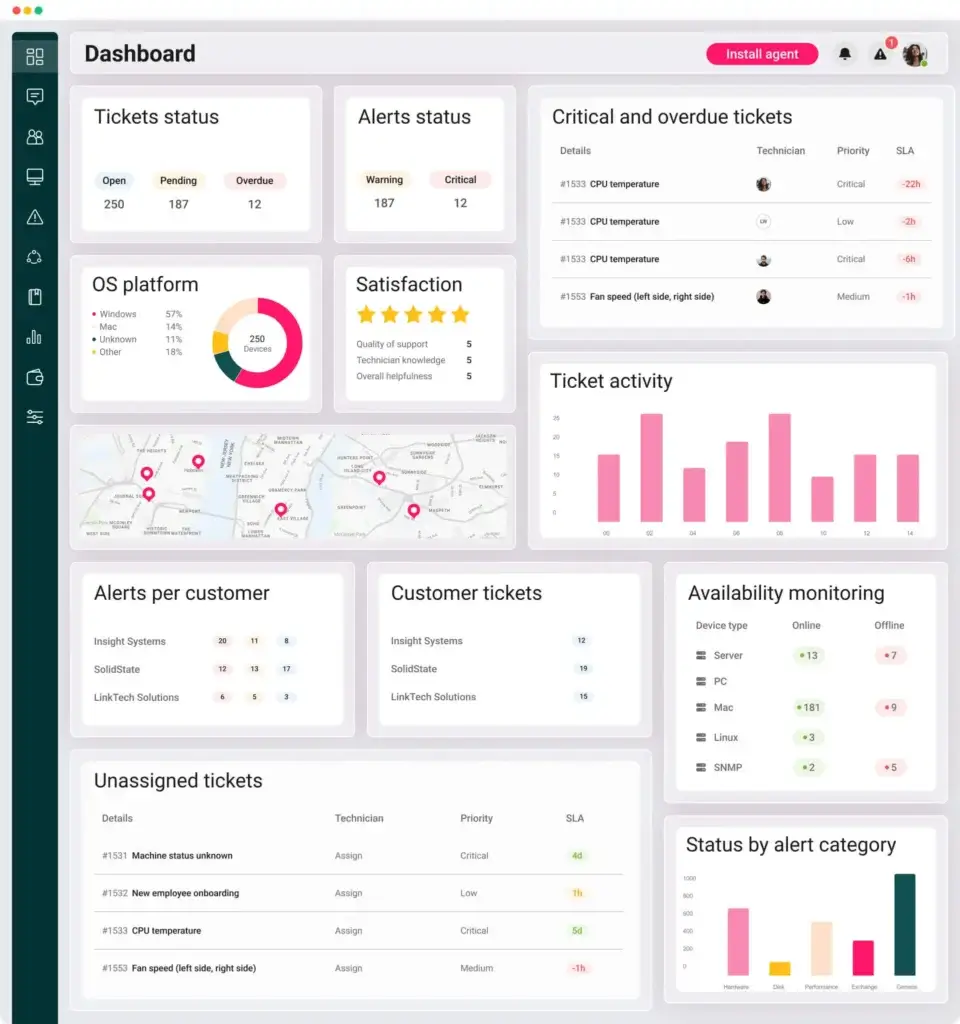
Dashboards allow users to focus on the information that matters most to their role. A technician may care about alerts and open tickets, while an IT manager may care more about SLA performance, endpoint status, patch compliance, and team workload.
A clean dashboard can help your team work faster. Instead of digging through multiple menus, users can quickly see what needs attention and move into action.
Pros and Cons
Benefits of Using Atera
The biggest benefit of Atera is operational consolidation. If your team currently uses separate tools for monitoring, remote access, ticketing, patching, scripts, and reports, this platform can simplify your stack and reduce the amount of context switching required from technicians.
Positive
✅ Strong all-in-one IT management platform
✅ Per-technician pricing can be cost-effective
✅ Useful AI features for support workflows
✅ Good fit for lean IT teams and MSPs
Negative
❌ Advanced features may require higher plans
❌ Less focused on deep ITIL workflows
❌ AI value depends on process maturity
❌ Not ideal for non-IT service teams
Pros
- Strong all-in-one IT management platform
The platform combines RMM, helpdesk, patch management, remote access, reporting, and automation. This helps reduce tool sprawl and gives technicians a more connected workflow. - Per-technician pricing can be cost-effective
Because pricing is based on technicians rather than endpoints, it can be attractive for teams managing many devices with a relatively small IT staff. - Useful AI features for support workflows
AI Copilot and IT Autopilot can help with diagnostics, ticket summaries, script generation, common support questions, and technician productivity. - Good fit for lean IT teams and MSPs
The platform is especially useful when your team needs broad IT functionality without the complexity of an enterprise ITSM suite.
Cons
- Advanced features may require higher plans
Capabilities such as deeper reporting, extended audit logs, stronger customization, and enterprise-grade controls may require upper-tier plans. - Less focused on deep ITIL workflows
If your organization needs advanced change management, a detailed CMDB, and highly structured ITIL processes, you may need to compare it with more traditional ITSM platforms. - AI value depends on process maturity
AI features are more useful when your team already has organized knowledge, clean ticket categories, and consistent support processes. - Not ideal for non-IT service teams
The product is built mainly for IT operations. If you want a broader employee service management tool for HR, finance, facilities, and legal teams, Freshservice or Jira Service Management may be better comparisons.
User Experience
User Interface and Operational Simplicity
User experience matters in IT management software because technicians need speed, clarity, and reliable workflows. A feature-rich platform becomes less valuable if your team cannot find alerts, resolve tickets, open remote sessions, or locate device details quickly.
Dashboard Experience
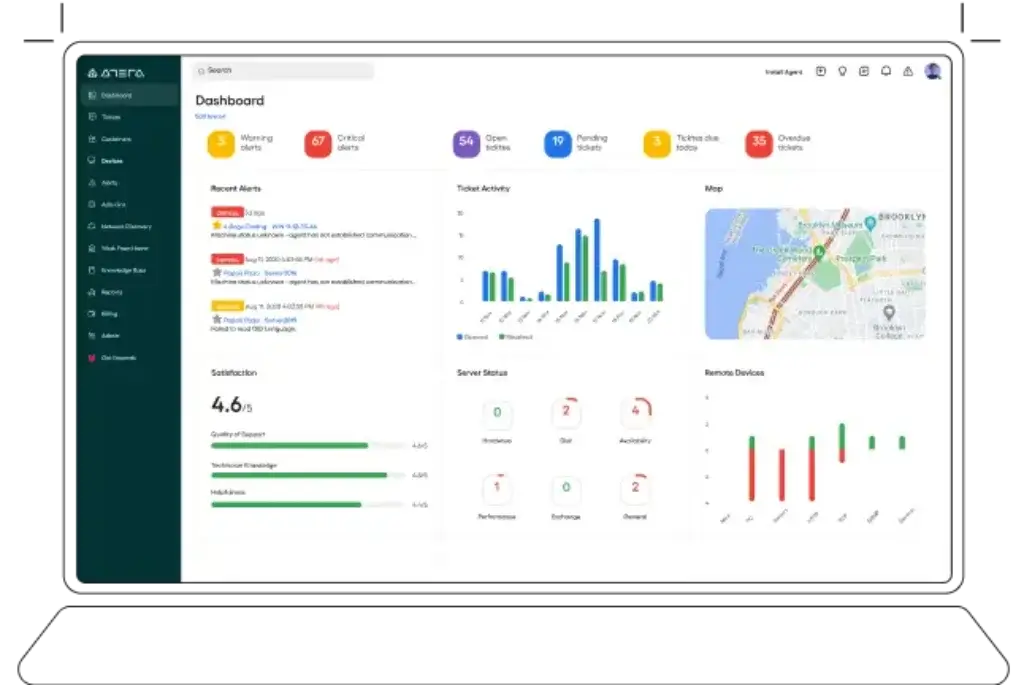
The dashboard is designed to give technicians and managers a fast overview of what needs attention. You can review tickets, alerts, device health, patch status, and performance information from a centralized view.
The interface feels more practical than decorative. That is a positive for IT teams because the goal is not to create a visually impressive dashboard. The goal is to help technicians identify issues, prioritize work, and move quickly from visibility to action.
Ease of Use and Learning Curve
The learning curve is reasonable for IT professionals who already understand support tickets, endpoints, alerts, and patch management. New users may still need time to configure automations, reporting, integrations, and client or department-specific workflows.
Compared with enterprise ITSM tools, Atera is easier to approach. Compared with simple ticketing tools, it has more operational depth. That balance makes it a strong option for teams that need power without unnecessary complexity.
Onboarding Process
The onboarding process will depend on the size of your IT environment. A small internal IT team may be able to get value quickly by setting up agents, tickets, patching, and basic alerts. A larger team or MSP will need more time to configure templates, automations, reporting, client structures, and permission models.
My recommendation is to start with your highest-value workflows first. For most teams, that means endpoint monitoring, ticket intake, remote access, and patching. Once those are stable, you can expand into automation, custom reports, AI workflows, and more advanced service delivery processes.
Support Resources
Atera provides support documentation, help center resources, and product guidance to help users learn the system. The quality of your internal rollout will still depend on how clearly you define ownership, ticket categories, patching policies, and escalation rules.
Like most IT management software, the tool performs best when your process is already structured. The platform can help improve operations, but it cannot fully replace the need for clear internal standards.
Pricing and Plans
How Much Does Atera Cost?
Atera uses per-technician pricing, which is one of the most important factors to understand before choosing the software. This pricing model can be attractive if your team manages many endpoints because your cost is tied to the number of technicians, not the number of devices.
Pricing can change, so you should always confirm the latest numbers on the official Atera pricing page. At the time of this update, the IT department pricing structure includes Professional, Expert, Master, and Enterprise plans.
| Plan | Starting Price | Best For | Main Difference |
| Professional | $149/month per technician, billed annually | Small IT teams that need essential IT management | Core RMM, helpdesk, patching, and automation capabilities |
| Expert | $189/month per technician, billed annually | Growing IT teams that need stronger operational flexibility | Adds more advanced access, reporting, and customization options |
| Master | $219/month per technician, billed annually | Mature IT teams with more complex environments | Better fit for deeper reporting, custom controls, and larger operations |
| Enterprise | Custom quote | Large departments with enterprise-grade requirements | Adds advanced security, onboarding, support, and custom needs |
Professional Plan
The Professional plan is best for small IT teams that need the essentials: remote monitoring, ticketing, patch management, automation, reports, and support for Windows, Mac, and Linux environments.
This plan is a strong starting point if you want to replace a scattered stack of basic IT tools with one platform. However, it may feel limited if you need advanced reporting, deeper customization, or enterprise security controls.
Expert Plan
The Expert plan is better for growing teams that need more flexibility. It is often the better choice when your IT operation is no longer basic, but you are not yet ready for enterprise-level requirements.
This plan makes sense if your team needs more remote support options, stronger reporting, more customization, and a better foundation for scaling IT operations. For many mid-sized IT teams, this is likely the most balanced plan.
Master Plan
The Master plan is best for larger or more mature IT teams that need deeper operational control. It is a better fit when reporting, audit visibility, data recovery, custom asset types, and support flexibility become more important.
You should consider this plan if your IT team manages a more complex environment or if you need more detailed oversight into technician activity, support performance, endpoint management, and service delivery quality.
Enterprise Plan
The Enterprise plan is designed for organizations with advanced security, onboarding, support, and integration requirements. This is where features such as single sign-on, dedicated account management, premium support, tailored onboarding, and enterprise-grade controls become more relevant.
This plan is most appropriate for larger IT departments, regulated organizations, and companies that need vendor support beyond standard self-service onboarding.
Which Plan Should You Choose?
If you are a small IT team, start with Professional and upgrade only when you clearly need deeper control. If you are a growing IT team with multiple technicians, Expert is likely the better long-term fit. If you need stronger reporting, audit visibility, and customization, Master is the safer option.
Enterprise is worth considering if you have strict security requirements, complex onboarding needs, or compliance-driven procurement processes. For many organizations, the main buying decision will be whether Expert gives you enough flexibility or whether Master is required for stronger control.
Pricing Recommendation
Atera is most cost-effective when your endpoint count is high relative to your technician count. For example, a small IT team managing hundreds or thousands of devices may benefit more from per-technician pricing than from tools that charge per endpoint.
However, if you have many technicians but a relatively small number of endpoints, you should calculate the total cost carefully. In that case, a per-endpoint pricing model from another RMM or ITSM provider may be more competitive.
Data Protection and Governance
Security and Compliance
Security is a major buying factor for any IT management platform because these tools often have access to endpoints, user support data, scripts, alerts, and administrative workflows. Atera provides several security and compliance measures that help support organizations with stronger governance requirements.
Data Security Measures
The platform uses security controls designed to protect customer environments and operational data. This includes access controls, infrastructure safeguards, encryption practices, monitoring, and internal security processes.
For IT teams, the most important point is that this type of platform should be reviewed not only as helpdesk software, but as a privileged IT operations tool. Before purchasing, your team should review user permissions, authentication options, audit logs, vendor documentation, and data processing terms.
SOC 2 Type 2
Atera states that it is accredited with SOC 2 Type 2. This is important because SOC 2 Type 2 focuses on the operational effectiveness of security controls over a period of time, not only a one-time review.
For decision-makers, this provides stronger assurance that the vendor has documented processes around security, availability, confidentiality, and operational controls.
HIPAA and BAA Considerations
The platform also references HIPAA-related compliance resources. This can be important for healthcare organizations, MSPs serving healthcare clients, and companies that need stricter handling of sensitive information.
If your organization requires a Business Associate Agreement, you should confirm availability directly with the vendor before purchasing. This is especially important for regulated environments where legal and compliance requirements must be reviewed before implementation.
GDPR and Privacy
For organizations operating in or serving the European market, GDPR readiness and data privacy practices should be reviewed as part of procurement. You should examine data processing terms, subprocessors, retention policies, and user access controls.
This is especially relevant if your support tickets may include personal data, employee information, screenshots, device details, or user activity records.
TX-RAMP Level 2
Atera also states that it has TX-RAMP Level 2 certification. This is relevant for organizations that work with Texas state agencies or need cloud security assurance aligned with TX-RAMP requirements.
Even if your organization is not in the public sector, this type of certification can strengthen vendor trust because it shows investment in cloud security validation.
Security Recommendation
From a security perspective, Atera is a credible option for many IT departments and MSPs. The platform offers important compliance signals, but you should still evaluate plan-specific security features before purchasing.
If you need SSO, longer audit retention, custom domain controls, advanced onboarding, or premium support, you may need a higher-tier plan or the Enterprise package.
How It Compares With Other IT Management Tools
Atera Alternatives
Atera is a strong option, but it is not the right fit for every IT team. Your best alternative depends on whether you prioritize endpoint management, ITIL workflows, DevOps support, asset management, or MSP operations.
| Alternative | Best For | Why Compare It With Atera? |
| NinjaOne | Endpoint management and RMM-focused teams | Strong option if your priority is device management, patching, monitoring, and endpoint visibility |
| Freshservice | ITSM and employee service management | Better fit if you need service desk workflows, ITIL processes, and broader employee support |
| Jira Service Management | DevOps and technical teams | Strong fit for teams already using Atlassian tools and software development workflows |
| ManageEngine ServiceDesk Plus | ITSM, asset management, and traditional service desk teams | Worth comparing if you need mature ITSM structure and deployment flexibility |
| Syncro | MSPs looking for RMM and PSA simplicity | Useful comparison for service providers that want technician-based pricing and MSP workflows |
Atera vs NinjaOne
NinjaOne is one of the closest comparisons if your main focus is RMM, endpoint visibility, patching, and remote device management. Atera may be more appealing if you want stronger helpdesk and PSA-style workflows included in the same platform.
Atera vs Freshservice
Freshservice is more focused on ITSM, service desk maturity, employee service workflows, and ITIL-aligned processes. Atera is better suited for endpoint-heavy IT operations where RMM, remote access, and patch management are central.
Atera vs Jira Service Management
Jira Service Management is a strong fit for software, DevOps, and technical teams already using Atlassian tools. Atera is a better fit when the primary need is IT operations, device management, monitoring, and technician productivity.
Atera vs ManageEngine ServiceDesk Plus
ManageEngine ServiceDesk Plus may be better for organizations that want traditional ITSM depth, asset management, and more structured service management workflows. Atera is often easier to position for teams that want an integrated RMM and helpdesk experience without heavy setup complexity.
Conclusion
Final Thoughts
⭐ Overall Rating: 8.5/10
Atera is a strong IT management platform for teams that want to centralize RMM, helpdesk ticketing, patch management, remote access, automation, reporting, and AI-powered support. Its biggest advantage is not one single feature. It is the way these capabilities work together in one system.
Recap of Key Points
The platform is especially compelling for small and mid-sized IT teams, MSPs, and internal IT departments that manage many endpoints with a limited number of technicians. Per-technician pricing can be a major advantage in that situation.
Its core strengths include remote monitoring, ticketing, patching, automation, remote access, AI Copilot, IT Autopilot, reporting, and integrations. It is also moving strongly toward autonomous IT workflows, which makes it more relevant for teams that want to reduce repetitive support work.
The main limitations are worth noting. It may not be the best choice if you need deep ITIL workflow customization, a complex CMDB, enterprise service management across many departments, or a pricing model based on endpoints rather than technicians.
Should You Buy Atera?
You should consider Atera if your IT team is growing, your endpoint count is increasing, and your current stack is becoming too fragmented. It is a particularly good fit if your technicians need one place to monitor devices, manage tickets, patch systems, open remote sessions, and use automation to reduce manual work.
You should be more cautious if your organization has very advanced ITSM requirements. If your priority is change management, service catalog depth, CMDB structure, multi-department service workflows, or enterprise-level ITIL governance, you should compare it with platforms like Freshservice, Jira Service Management, and ManageEngine ServiceDesk Plus before making a decision.
Ideal Use Cases for Atera
Atera is best for lean IT teams that need to do more with fewer technicians. It is also a strong fit for MSPs that want an integrated environment for monitoring, remote support, ticketing, time tracking, billing workflows, and client reporting.
It is also a good option for organizations that want to move from reactive support to proactive IT management. If you want to catch issues before they become user-facing problems, the combination of monitoring, alerts, patching, automation, and AI assistance is valuable.
Our Recommendation
My recommendation is simple: Atera is worth shortlisting if your main challenge is operational efficiency. It is not just a helpdesk tool, and it is not only an RMM tool. It is a practical IT operations platform for teams that want fewer disconnected systems and faster technician workflows.
For small and mid-sized IT teams, I would start by testing the Professional or Expert plan. For larger teams, the Master or Enterprise plan will likely make more sense because advanced reporting, audit visibility, support, and security controls become more important as complexity increases.
To compare it with other leading IT management platforms, review our full guide to the best ITSM software. You can also visit the official Atera website to review the latest product details, pricing, and trial options.
Frequently Asked Questions
Have More Questions?
What is Atera used for?
Atera is used for IT management, remote monitoring, helpdesk ticketing, patch management, remote access, automation, reporting, and AI-assisted support. It helps IT teams manage endpoints and service requests from one platform instead of relying on multiple disconnected tools.
Is Atera an RMM tool or an ITSM platform?
It is best described as an all-in-one IT management platform with strong RMM capabilities. It includes remote monitoring, endpoint management, ticketing, PSA-style workflows, patching, reporting, and automation. It is not as ITIL-heavy as some traditional ITSM suites, but it covers many daily IT operations needs.
Does Atera charge per device?
No. The platform is known for per-technician pricing rather than per-device pricing. This can be cost-effective for IT teams and MSPs that manage a large number of endpoints with a smaller number of technicians.
Who is Atera best for?
It is best for small and mid-sized IT teams, internal IT departments, and managed service providers that want to centralize monitoring, tickets, patching, remote access, automation, and reporting. It is especially useful when the team needs to manage many endpoints efficiently.
Is Atera good for MSPs?
Yes. MSPs can use the platform to manage client endpoints, monitor alerts, handle tickets, track work, run automations, and provide remote support. However, service providers with very advanced contract, billing, and project management needs should compare it with PSA-first platforms as well.
Is Atera good for internal IT departments?
Yes. Internal IT teams can use it to manage employee support requests, monitor devices, automate maintenance, deploy patches, and support remote users. It is a strong fit for teams that want to become more proactive without adopting a complex enterprise ITSM system.
What is the difference between AI Copilot and IT Autopilot?
AI Copilot is designed to assist technicians with diagnostics, ticket work, scripts, summaries, and troubleshooting. IT Autopilot is designed to help end users resolve common IT issues more independently, reducing repetitive tickets and freeing technicians for more complex work.
Does Atera include patch management?
Yes. Patch management is one of its core features. IT teams can use it to manage updates, automate patch deployment, apply approvals and exclusions, and improve endpoint security across supported systems.
Is Atera secure?
The platform includes several security and compliance signals, including SOC 2 Type 2 accreditation, HIPAA-related resources, GDPR considerations, and TX-RAMP Level 2 certification. As with any IT management tool, buyers should review plan-specific security features, access controls, audit logs, and compliance requirements before purchasing.
What are the best Atera alternatives?
Common alternatives include NinjaOne for endpoint management, Freshservice for ITSM workflows, Jira Service Management for DevOps-connected teams, ManageEngine ServiceDesk Plus for traditional ITSM and asset management, and Syncro for MSP-focused RMM and PSA needs.