Introduction
If you are evaluating Console.com, you are probably looking for a more modern way to manage internal IT support.
You may already have a ticketing system, a knowledge base, an identity provider, an HRIS, endpoint tools, and a growing list of SaaS applications. The challenge is that employees still ask for help in Slack or Microsoft Teams, and your IT team still spends too much time on repetitive requests.
Console.com is an AI-native ITSM and internal support automation platform designed to solve that problem. Instead of acting only as a traditional ticket queue, Console uses AI Agents, Playbooks, integrations, and policy-based automation to resolve employee requests directly inside Slack and Teams.
That makes Console different from many classic ITSM tools. It is not only trying to organize tickets after they arrive. It is trying to prevent many routine tickets from reaching a human in the first place.
Why Console.com Matters for IT Teams in 2026
Internal IT support has changed. Employees expect quick answers, consumer-like experiences, and fewer forms. At the same time, IT teams need stronger governance, cleaner access control, better audit trails, and less manual work.
Console.com fits this shift because it combines AI service desk automation, access management, employee onboarding, offboarding, ticket routing, knowledge support, and workflow automation in one platform.
The strongest use case is high-volume internal support. If your IT team handles frequent requests for app access, password resets, group membership changes, laptop support, onboarding tasks, or SaaS administration, Console can help reduce repetitive work.
However, Console is not the right fit for every organization. It is more relevant for growing mid-market and enterprise teams than very small businesses that only need a basic help desk.
This Console.com review will help you understand where the platform performs well, where it may feel limited, and whether it should replace or complement your existing ITSM stack.
Quick Overview
| Category | Console.com Review Summary |
| Best For | IT teams that want to automate internal support requests in Slack and Microsoft Teams |
| Strongest Area | AI service desk automation and workflow execution |
| Main Limitation | Quote-based pricing and a stronger fit for larger internal support teams |
| Top Alternatives | Moveworks, ServiceNow, Freshservice, Jira Service Management, Zendesk, Aisera |
| Recommendation | Best for teams that want AI-powered ticket resolution, access automation, and employee support workflows |
Software Specification
Core Features of Console.com
Console.com is best understood as an AI service desk and workflow automation layer for internal support.
It connects to the systems your IT team already uses, then uses AI Agents and Playbooks to answer questions, execute common tasks, route exceptions, and keep human technicians focused on work that actually needs judgment.
AI Service Desk for Slack and Microsoft Teams
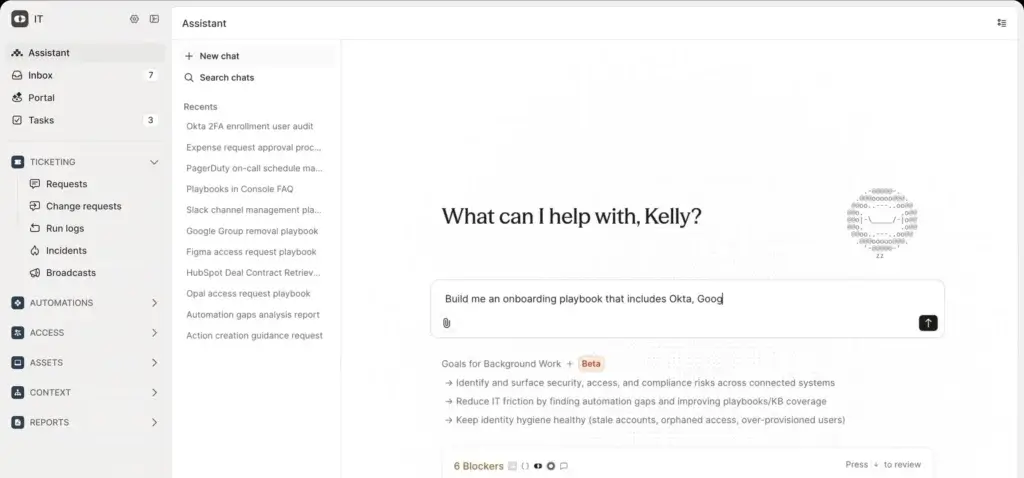
Console’s most important feature is its AI service desk experience inside Slack and Microsoft Teams.
Employees can ask for help where they already work, rather than opening a separate portal, filling out long forms, or searching a knowledge base manually.
For IT teams, this is valuable because many support requests start as simple messages anyway. Console turns that behavior into a structured support workflow.
- Slack and Teams support: Employees can request help from familiar collaboration tools.
- AI-assisted answers: Console can respond using connected knowledge and context.
- Ticket deflection: Routine requests can be resolved before they reach the queue.
- Escalation paths: Complex issues can still be routed to human IT staff.
Why it matters: If employees already prefer asking for help in chat, Console lets you meet them there without losing control, visibility, or governance.
Console Inbox for Human Escalations
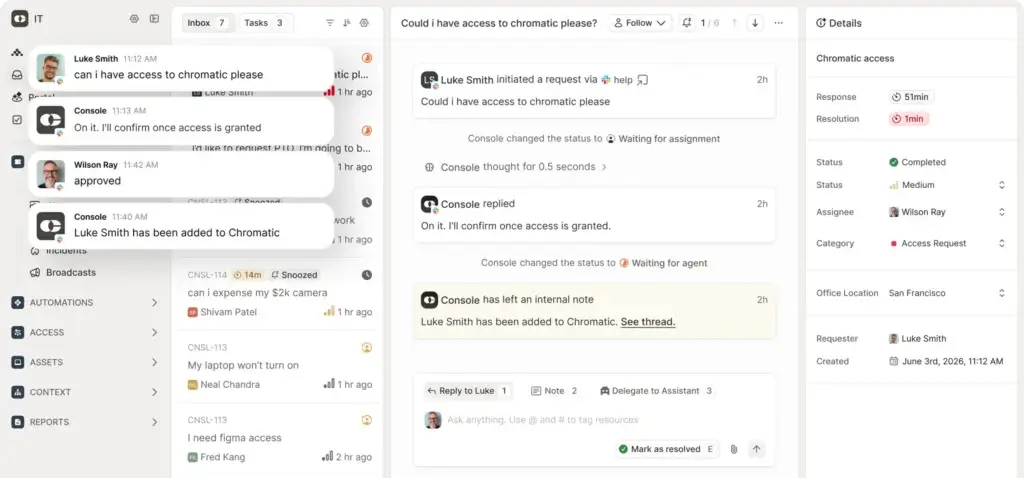
AI should not handle every request. Some issues require technician review, business context, approval, or deeper troubleshooting.
Console Inbox is designed for these cases. When a request cannot be fully resolved by AI, it can be categorized, prioritized, enriched with context, and routed to the right person.
This matters because many service desks fail at the handoff point. Automation may answer simple questions, but when it escalates poorly, the technician still has to investigate everything from scratch.
Console tries to reduce that friction by giving IT teams more context at the moment of escalation.
AI Agents and Playbooks
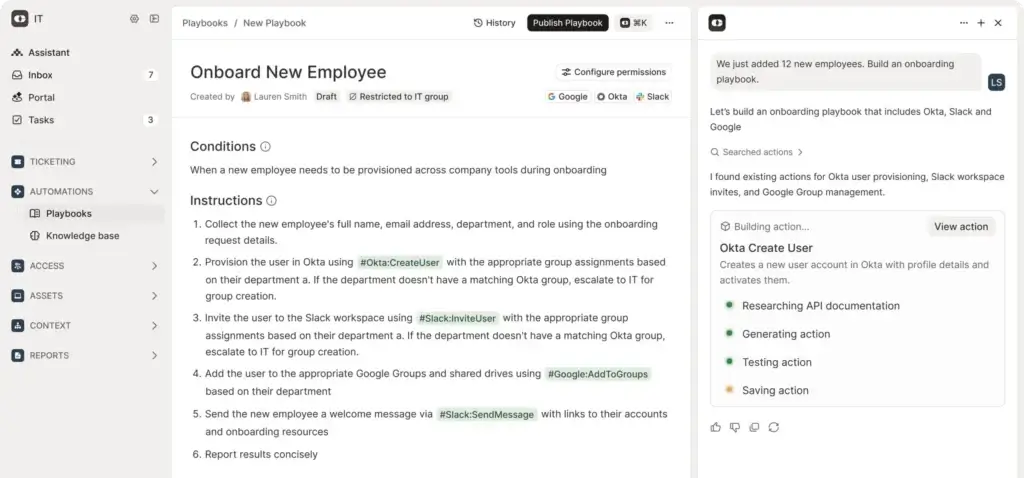
Console uses Playbooks to turn repeatable IT processes into automated workflows.
These Playbooks can support common scenarios such as access requests, password resets, group membership updates, onboarding, offboarding, hardware requests, and channel operations.
The important distinction is that Console is not limited to answering questions. It can also execute work across connected systems when policies allow it.
- Access requests: Approve and provision SaaS access based on policy.
- Password and MFA resets: Support identity-related recovery workflows.
- Onboarding: Create accounts and assign access for new employees.
- Offboarding: Revoke access, suspend accounts, and support license cleanup.
Why it matters: The biggest productivity gain comes when AI can complete safe, repeatable work, not only suggest an answer.
Access Management and Approval Workflows
Access management is one of Console’s strongest use cases.
Employees frequently need access to apps, groups, channels, files, repositories, or business systems. Without automation, these requests create delays, repeated approvals, and unnecessary tickets.
Console can support policy-based access workflows, approvals, time-bound access, and auto-revocation. This is especially useful for IT and security teams that want faster service without weakening governance.
For example, an employee might request access to a SaaS tool in Slack. Console can check the user’s role, policy rules, manager approval requirements, and connected identity systems before provisioning access.
Employee Onboarding and Offboarding Automation
Onboarding and offboarding are high-risk IT workflows because they involve identity, devices, licenses, documents, permissions, and business systems.
Console can automate parts of these processes by connecting to HR, identity, collaboration, and SaaS tools.
For onboarding, that may include account creation, group assignment, app access, device coordination, and welcome materials. For offboarding, that may include suspending accounts, revoking app access, transferring files, reclaiming licenses, and locking devices.
Why it matters: Better onboarding helps new employees become productive faster. Better offboarding reduces access risk when someone leaves the company.
Knowledge Base and Snippet Suggestions
Console can connect to an existing knowledge base and use it to support employee questions.
This is useful because many internal support requests are not technical incidents. They are repeat questions about policies, access, tools, devices, accounts, or internal processes.
Console also promotes knowledge improvement through snippet suggestions. This can help IT teams identify missing documentation and improve self-service over time.
Reporting and Operational Insights
Traditional ITSM reporting often focuses on ticket counts, SLA performance, and backlog size. Console’s reporting is more useful when you want to understand automation performance.
Important metrics may include auto-resolution rate, request categories, escalation volume, repeated employee issues, time saved, and workflow gaps.
For IT leaders, this can help answer a more important question: where should your team automate next?
Console.com Feature Summary
| Feature | What It Does | Best Use Case |
| AI Service Desk | Automates employee support in Slack and Teams | Reducing repetitive internal IT tickets |
| Console Inbox | Routes escalated requests with context | Managing issues that need human review |
| Playbooks | Automates repeatable IT workflows | Access requests, resets, onboarding, and offboarding |
| Access Management | Supports policy-based approvals and provisioning | Controlling SaaS and group access |
| Knowledge Support | Uses connected knowledge to answer questions | Improving employee self-service |
| Reporting | Tracks automation, ticket volume, and workflow performance | Improving IT operations over time |
Pros and Cons
Benefits of Using Console.com
Positive
✅ Strong AI IT Automation
✅ Slack and Teams Native Experience
✅ Powerful Access Workflows
✅ Strong Enterprise Security Controls
Negative
❌ Quote-Based Pricing
❌ Best for Larger IT Teams
❌ Depends on Integration Quality
❌ Not a Full Legacy ITSM Replacement for Every Team
Console.com is most valuable when your IT team is overloaded with repetitive internal support requests.
It is less useful if your main need is traditional ITIL-heavy process management, public pricing, or a simple help desk for a small team.
Pros
Strong AI IT Automation
Console’s biggest advantage is its ability to automate internal IT support work, not only manage tickets.
Instead of forcing every request into a queue, Console can answer questions, run Playbooks, check policies, and complete workflows across connected systems.
Why it matters: This helps IT teams reduce manual workload, improve response speed, and focus on strategic projects instead of repetitive support tasks.
Slack and Teams Native Experience
Console works where employees already ask for help: Slack and Microsoft Teams.
This improves adoption because employees do not need to learn a separate IT portal for every request. They can ask naturally, while Console structures the request behind the scenes.
Why it matters: Better employee adoption usually leads to cleaner request intake, faster support, and less shadow IT communication.
Powerful Access Workflows
Console is especially strong for access-related requests.
App access, group membership, SaaS permissions, MFA resets, and identity-related support are common pain points for IT teams. Console can automate many of these workflows while still supporting approvals and policy controls.
Why it matters: Access requests are frequent, sensitive, and time-consuming. Automating them safely can create a clear operational benefit.
Strong Enterprise Security Controls
Console includes controls that matter for enterprise IT environments, including SSO, SCIM, role-based access control, audit logs, step-up MFA, deterministic approvals, and least-privilege design.
Why it matters: AI automation in IT support must be governed. Console is more compelling because it treats security and access control as core workflow requirements.
Cons
Quote-Based Pricing
Console does not provide simple public pricing for self-service purchase.
This makes it harder to compare against ITSM platforms that publish clear per-agent or per-user pricing.
What to consider: Before choosing Console, ask for pricing based on employee count, integration scope, automation volume, onboarding support, and contract terms.
Best for Larger IT Teams
Console is most useful when you have enough internal support volume to justify AI automation.
If your company only receives a small number of IT requests each week, the platform may be more advanced than you need.
What to consider: Smaller businesses may prefer a simpler help desk such as Freshdesk, Zendesk, Jira Service Management, or Freshservice.
Depends on Integration Quality
Console’s value depends heavily on how well it connects to your existing tools.
If your identity provider, HRIS, ticketing system, knowledge base, SaaS tools, and device management platform are connected properly, Console can become very powerful. If those integrations are incomplete, automation may be more limited.
What to consider: Map your most common IT workflows before buying. Then confirm which systems Console can connect to and which actions it can safely execute.
Not a Full Legacy ITSM Replacement for Every Team
Console can modernize service desk operations, but it may not replace every traditional ITSM use case.
Large organizations with complex change management, asset lifecycle governance, CMDB requirements, procurement workflows, and strict ITIL processes may still need a platform such as ServiceNow, Freshservice, or Jira Service Management.
What to consider: Console may work best as your AI automation layer, either replacing lightweight ticketing or sitting alongside a more established ITSM system.
User Experience
User Interface and Employee Experience
Console’s user experience is built around a practical idea: employees should not need to understand the support system to get help.
They should be able to ask for what they need in natural language, from the tools they already use.
Employee Request Experience
For employees, Console can feel more like messaging an internal IT assistant than submitting a traditional ticket.
They can ask for software access, account help, device support, group changes, or policy information in Slack or Teams.
If Console can resolve the issue, the employee gets help quickly. If not, the request can be escalated to a human with context attached.
IT Technician Experience
For IT teams, the experience depends on Console Inbox, Playbooks, integrations, and reporting.
The goal is not only to make requests easier for employees. It is also to reduce manual triage for technicians.
Console can categorize requests, enrich them with user and system context, automate low-risk actions, and route edge cases to the right person.
Admin and Workflow Configuration
Console setup requires thoughtful configuration.
You need to connect systems, define policies, import or create Playbooks, link knowledge sources, configure approvals, and decide which actions should be automated.
This is not a weakness by itself. Any AI automation platform needs governance. However, it means you should treat Console implementation as an operational project, not only a software rollout.
User Experience Considerations
| Area | Console.com Experience | What to Watch |
| Employee Requests | Natural language support inside Slack and Teams | Requires employees to trust the AI support flow |
| Ticket Handling | AI can resolve, categorize, prioritize, and route requests | Human escalation rules must be clear |
| Automation | Playbooks can execute repeatable IT workflows | Policies and permissions need careful setup |
| Knowledge Support | Can answer questions using connected knowledge sources | Output quality depends on documentation quality |
| Reporting | Useful for tracking request volume and automation performance | Teams should define success metrics early |
Overall: Console offers a strong experience for organizations that want support to happen inside collaboration tools. It is not the most traditional ITSM interface, but that is part of its value.
Pricing and Plans
How Much Does Console.com Cost?
Console.com pricing is quote-based.
The company does not present a simple public pricing table with fixed monthly plans. This is common for AI ITSM and enterprise internal support automation platforms because pricing often depends on organization size, integrations, automation scope, implementation requirements, and support needs.
What Affects Console.com Pricing?
- Company size: Employee count can affect pricing and implementation scope.
- Integration needs: More connected systems may require more planning.
- Automation depth: Advanced Playbooks may increase setup complexity.
- Support channels: Slack, Teams, and ticketing integrations may affect rollout.
- Security requirements: SSO, SCIM, audit logs, and compliance needs matter.
Is Console.com Expensive?
Console is not positioned as a low-cost help desk. It is better evaluated as an AI automation platform for internal IT operations.
If you only need a shared inbox or simple ticket tracking, Console may be more than you need. If you handle a high volume of repetitive internal IT requests, the ROI can come from reduced manual work, faster response times, better access governance, and fewer escalated tickets.
Pricing tip: Ask Console for a pricing breakdown based on your employee count, IT request volume, integration list, onboarding requirements, and expected automation use cases.
Trust and Data Protection
Console.com Security and Compliance
Security is especially important in a Console.com review because the platform can interact with identity systems, SaaS tools, approvals, access requests, and employee data.
Any AI platform that can execute IT workflows must be governed carefully. The question is not only whether it can automate work. The question is whether it can automate work safely.
Key Security Capabilities
- SSO and SCIM: Supports centralized identity and user lifecycle management.
- Role-based access control: Helps restrict administrative access by role.
- Step-up MFA: Adds verification before high-risk actions.
- Deterministic approvals: Routes sensitive actions to defined approvers.
- Audit logs: Supports visibility into actions and workflow activity.
- Least-privilege design: Helps limit permissions to what workflows require.
Console also references enterprise security and compliance standards such as SOC 2 Type II, HIPAA, and GDPR.
For compliance-sensitive environments, confirm the current scope of these controls directly with Console before purchase. You should also review data retention, model usage, subprocessors, encryption, audit log exports, and SIEM integration requirements.
AI Governance Considerations
Console’s value depends on giving AI enough access to be useful. That also means governance must be strict.
Before rollout, define which actions AI can complete automatically, which require approval, which require identity verification, and which should always escalate to a human.
This is especially important for access provisioning, device recovery keys, offboarding, finance workflows, legal requests, and security-related tasks.
Console.com vs. Alternatives
How Console.com Compares to Competitors
Console.com competes with several types of tools.
You can compare it to AI employee support platforms, traditional ITSM tools, help desk systems, and enterprise workflow automation platforms.
Console.com vs. Moveworks
Moveworks is one of the best-known AI employee support platforms for large enterprises.
It is strong for conversational self-service, enterprise search, and AI-powered employee support across multiple business functions.
Console.com is more focused on AI-native ITSM execution, internal IT workflows, and automation inside Slack and Teams. It may appeal to IT teams that want more direct control over Playbooks, access requests, and operational workflows.
Console.com vs. Freshservice
Freshservice is a strong ITSM platform for teams that want ticketing, service catalog, asset management, change management, automation, and a more traditional IT service desk experience.
Console.com is more compelling if your main goal is to resolve requests inside Slack and Teams with AI Agents.
Freshservice may be the better fit if you need a complete ITSM suite with clearer public pricing and more standard service desk modules.
Console.com vs. Jira Service Management
Jira Service Management is especially strong for engineering-driven IT and DevOps teams.
It works well when IT support, development work, incidents, changes, and operations need to connect with Jira Software.
Console.com is stronger for AI-first employee support and chat-native automation. Jira Service Management is stronger when you need a mature Atlassian workflow, issue management, and service desk structure.
Console.com vs. Zendesk
Zendesk is a flexible support platform used across customer service and internal support.
It offers strong ticketing, help center tools, messaging, automations, and broad support operations features.
Console.com is more specialized for internal IT automation. Zendesk may be better if you need a general support platform across customer and employee support. Console is better if your main pain point is repetitive internal IT work.
Full Comparison Table
| Feature | Console.com | Moveworks | Freshservice | Jira Service Management |
| Best For | AI-native internal IT automation | Enterprise employee support AI | Modern ITSM for growing IT teams | Engineering-driven ITSM and DevOps teams |
| AI Support | Very strong | Very strong | Strong and improving | Strong in Atlassian ecosystem |
| Slack and Teams Experience | Very strong | Strong | Good | Good |
| Traditional ITSM Depth | Moderate to strong | Moderate | Strong | Strong |
| Access Request Automation | Very strong | Strong | Good | Good |
| Pricing Transparency | Quote-based | Quote-based | Public plans available | Public plans available |
| Main Advantage | AI workflow execution inside collaboration tools | Enterprise conversational AI maturity | Balanced ITSM features and usability | Strong Atlassian connection |
| Main Limitation | Best suited to larger support volumes | Enterprise cost and implementation needs | Less AI-native than Console | Best value inside Atlassian environments |
Integrations
Connected IT Workflows
Console’s integration strategy is central to the product.
The platform becomes more useful when it can connect to identity, HR, SaaS, collaboration, ticketing, security, finance, and device management systems.
Common Console.com Integration Categories
- Identity providers: Okta, Microsoft Entra ID, Google Workspace, and related systems.
- Collaboration tools: Slack, Microsoft Teams, channels, user groups, and messaging workflows.
- HR systems: Employee onboarding, offboarding, role changes, and lifecycle events.
- SaaS applications: App access, license assignment, and permission workflows.
- Device management: Laptop recovery, device assignment, and endpoint-related actions.
- Ticketing and ITSM: Existing systems used for escalation and service management.
The main advantage is operational continuity. Employees can ask for help in chat, while Console coordinates the workflow across back-end systems.
The tradeoff is that implementation quality matters. If your systems are fragmented, poorly documented, or inconsistently managed, you may need cleanup work before Console can deliver its full value.
Best Fit
Who Should Use Console.com?
Console.com is best for IT teams that want to move beyond traditional ticket handling and automate more of the support lifecycle.
Console.com Is a Strong Fit If You:
- Handle a high volume of internal IT support requests.
- Use Slack or Microsoft Teams as a primary employee workspace.
- Want to automate app access, resets, onboarding, and offboarding.
- Need AI support with governance, approvals, RBAC, and audit logs.
- Want to reduce repetitive work without removing human oversight.
Consider a Console.com Alternative If You:
- Need fully transparent public pricing before contacting sales.
- Only need a basic help desk or shared inbox.
- Require a full ITIL-heavy enterprise ITSM suite.
- Do not use Slack or Microsoft Teams heavily.
- Have low ticket volume and limited automation needs.
Conclusion
Final Thoughts
⭐ Overall Rating: 8.6/10
Console.com is one of the more interesting AI-native ITSM platforms for internal IT teams that want to automate support, reduce ticket volume, and improve employee experience.
Its strongest value is the combination of Slack and Teams support, AI Agents, Playbooks, access workflows, onboarding automation, knowledge support, and enterprise security controls.
Unlike traditional service desk tools, Console is not only built around managing tickets. It is built around resolving work before it becomes a human task.
That makes it a strong choice for companies where IT teams are overwhelmed by repeatable requests.
However, Console is not the best fit for every buyer. Pricing is quote-based, implementation depends on integrations, and smaller teams may not have enough request volume to justify the platform.
Choose Console.com if:
✅ You want to automate repetitive internal IT requests.
✅ Your employees already ask for help in Slack or Teams.
✅ You need access workflows, approvals, and identity-related automation.
✅ You want AI support with enterprise security controls.
Consider alternatives if:
⛔ You need simple public pricing and quick self-service setup.
⛔ You only need basic ticket tracking.
⛔ You require a full legacy ITSM suite with deep ITIL modules.
⛔ You do not have enough support volume to justify AI automation.
Overall, Console.com is a strong option for IT teams that want a modern, AI-first service desk experience. It is especially compelling when your goal is to resolve more employee requests automatically while keeping access, approvals, and auditability under control.
Frequently Asked Questions
Have more questions?
What is Console.com used for?
Console.com is used to automate internal IT support requests, resolve employee questions in Slack and Microsoft Teams, route complex tickets, manage access workflows, and execute repeatable IT tasks through AI Agents and Playbooks.
Is Console.com an ITSM tool?
Yes. Console.com is best described as an AI-native ITSM and internal support automation platform. It focuses more on AI-powered request resolution and workflow execution than traditional ticket queue management alone.
Does Console.com work with Slack and Microsoft Teams?
Yes. Console.com is designed to support internal IT requests directly inside Slack and Microsoft Teams. This lets employees ask for help in familiar communication tools while IT teams maintain structured workflows and escalation paths.
What types of requests can Console.com automate?
Console.com can help automate common IT requests such as app access, password and MFA resets, group membership changes, onboarding tasks, offboarding actions, hardware requests, channel operations, and knowledge-based employee questions.
Does Console.com replace a ticketing system?
Console.com can replace lightweight ticketing for some teams, but it may also work alongside an existing ITSM or ticketing platform. The best setup depends on your current tools, workflow complexity, and how much of your support process you want to automate.
How much does Console.com cost?
Console.com uses quote-based pricing. Costs usually depend on company size, integrations, workflow automation scope, onboarding requirements, and support needs. You need to contact Console for a custom quote.
Is Console.com secure?
Console.com includes enterprise security controls such as SSO, SCIM, role-based access control, step-up MFA, deterministic approvals, audit logs, and least-privilege permissions. Buyers should still verify current compliance scope and data protection terms before purchase.
Who is Console.com best for?
Console.com is best for mid-market and enterprise IT teams that handle high volumes of internal support requests and want to automate repetitive work across Slack, Microsoft Teams, identity systems, HR tools, SaaS apps, and ticketing platforms.
What are the best Console.com alternatives?
The best Console.com alternatives include Moveworks for enterprise employee support AI, ServiceNow for deep enterprise ITSM, Freshservice for modern ITSM, Jira Service Management for Atlassian-based teams, Zendesk for general support, and Aisera for AI service desk automation.
Is Console.com good for small businesses?
Console.com can work for smaller companies with meaningful internal IT request volume, but it is usually better suited to growing teams and larger organizations. Very small teams may prefer simpler help desk tools with public pricing and faster self-service setup.