Introduction
Choosing the best free CRM software can help you organize leads, track customer conversations, and manage your sales pipeline without adding another monthly cost to your business.
But “free” does not always mean the same thing. Some CRM platforms offer a free forever plan with strict limits, some give you only one free app, and others use free trials that expire after a short period.
In this guide, you’ll compare the best free CRM platforms for small businesses, startups, freelancers, and growing sales teams. You’ll see what each free plan actually includes, where each CRM performs best, and when it makes sense to upgrade.
If you are still comparing free and paid CRM tools more broadly, you can also review our full guide to the best CRM software.
Quick Comparison
The table below gives you a fast overview of the top free CRM options. Use it to shortlist the tools that match your team size, sales process, and growth plans.
| CRM Platform | Best For | Free Plan Highlights | Main Limitation |
| HubSpot CRM | Beginners and very small teams | Up to 2 users, 1,000 contacts, deals, tasks, email tracking, live chat | Advanced automation and reporting require paid plans |
| Zoho CRM | Small teams moving from spreadsheets | Free for 3 users, leads, deals, workflows, reports, mobile app | Customization and storage limits can appear as you scale |
| Freshsales | Sales teams needing phone, email, and chat | Free for 3 users, Kanban views, email templates, built-in phone, live chat | Advanced AI, multiple pipelines, and custom reports require paid plans |
| Bitrix24 | Teams needing CRM plus collaboration | Free forever with unlimited users and core CRM workspace tools | Some tools, marketplace apps, and telephony features require paid plans |
| Odoo CRM | Custom workflows and modular business apps | One App Free plan with unlimited users if you only use one Odoo app | Adding more Odoo apps moves you into a paid plan |
What Is a Free CRM?
A free CRM is customer relationship management software you can use without paying for a subscription. It helps you store contacts, track leads, manage deals, record customer interactions, and organize follow-ups.
The main benefit is simple: you can replace scattered spreadsheets, inbox notes, and manual reminders with one shared customer database.
Free CRM vs Free Trial
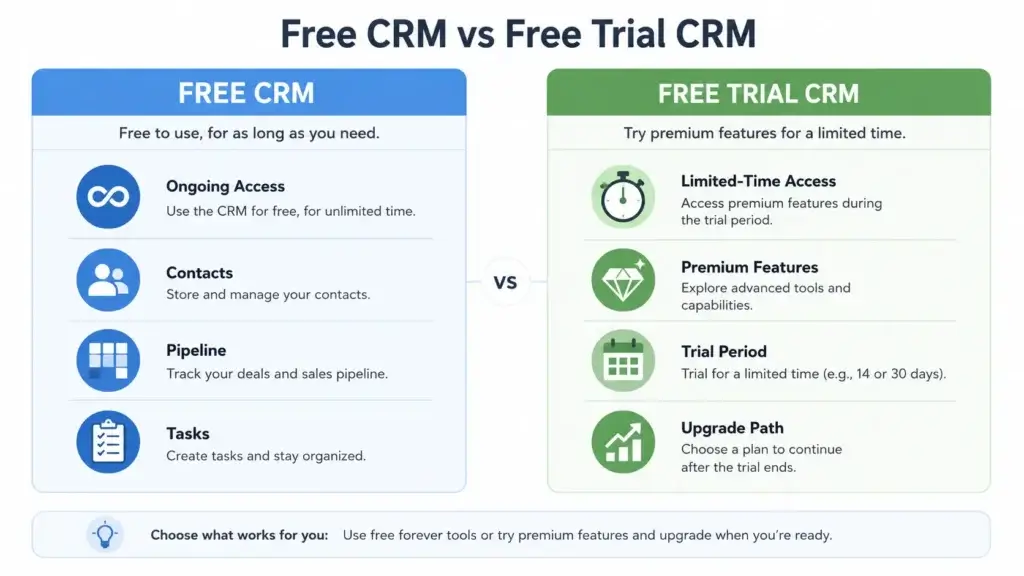
A free CRM is not the same as a free trial.
A free CRM gives you access to selected features for an unlimited time. A free trial gives you temporary access to a paid product, usually for 14 to 30 days.
That difference matters because a free trial may look attractive at first, but it does not solve your long-term need for a no-cost CRM. For this reason, this guide focuses on tools with true free options rather than trial-only CRMs.
Understanding CRM Systems
A Customer Relationship Management system helps you manage the relationships behind your revenue. It connects customer data, sales activity, follow-up tasks, and pipeline visibility in one place.
From a work management perspective, a CRM is not just a sales database. It becomes the operational system your team uses to assign ownership, manage deadlines, track customer handoffs, and prevent missed follow-ups.
Why CRM Matters for Small Businesses
When your business is small, it is easy to rely on memory, email folders, or spreadsheets. That usually works until leads increase, multiple people handle customer conversations, or follow-ups start slipping.
A CRM gives you a structured way to manage that growth.
- Sales teams can see which deals need attention.
- Managers can track pipeline value and team activity.
- Support teams can view customer history before replying.
- Project teams can understand client context before onboarding starts.
Must-Have CRM Features in 2026
Even if you choose a free CRM, you should still expect the core tools needed to manage customer relationships properly.
- Contact management: Store customer details, notes, and communication history.
- Lead and deal tracking: Follow opportunities from first contact to closed sale.
- Task management: Assign follow-ups, calls, reminders, and next steps.
- Pipeline visibility: See where every deal stands in your sales process.
- Reporting: Track basic performance, activity, and conversion trends.
- Integrations: Connect your CRM with email, calendar, forms, and business apps.
How We Chose the Best Free CRM Platforms
To make this comparison useful, we focused on CRM platforms that provide real value without requiring immediate payment.
We looked beyond the word “free” and evaluated how practical each plan is for real business use.
Evaluation Criteria
- Free plan depth: How much can you actually do without upgrading?
- User and contact limits: Can a small team use it comfortably?
- Pipeline management: Does it support real sales tracking?
- Ease of use: Can non-technical users adopt it quickly?
- Work management value: Does it support tasks, handoffs, and collaboration?
- Scalability: Can you upgrade without rebuilding your entire CRM?
- Pricing transparency: Are the upgrade costs clear enough to plan around?
Best Free CRM Software Reviews
Below are the top free CRM platforms worth considering in 2026. Each review explains who the tool is best for, what you get for free, where it stands out, and what to watch before you commit.
HubSpot CRM
HubSpot CRM: Best Free CRM for Beginners
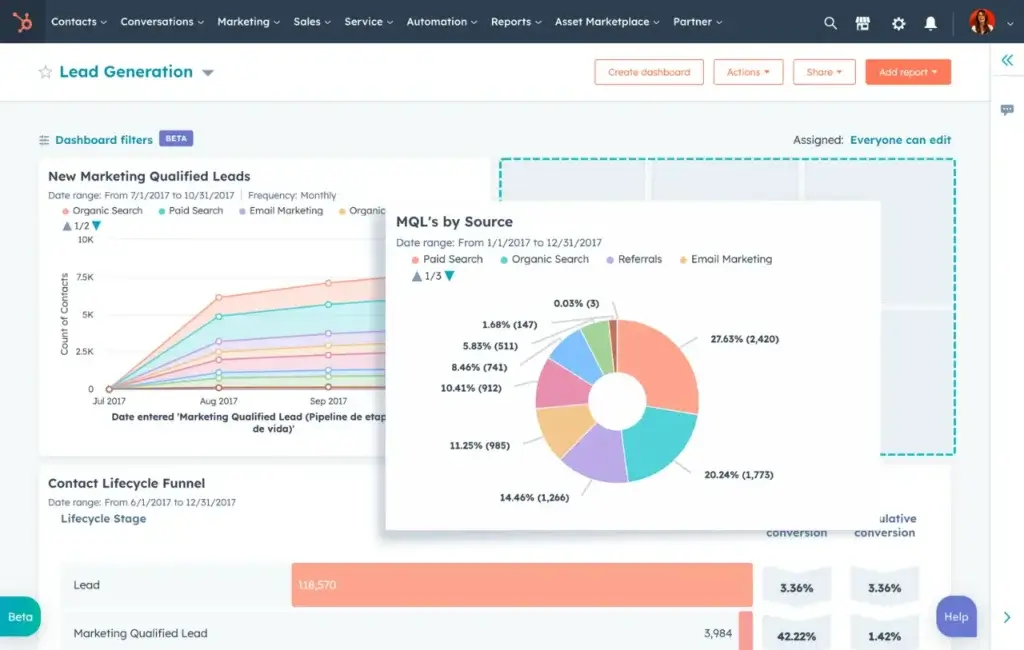
HubSpot CRM is one of the easiest free CRM tools to start with, especially if you want a clean interface, simple setup, and built-in tools for sales, marketing, and customer service.
The free CRM is best for solo founders, early-stage startups, and very small teams that want to manage contacts, deals, emails, tasks, and conversations in one place.
What You Get for Free
- Up to 2 users and 1,000 contacts
- Contact and company management
- Deal tracking and sales pipeline tools
- Email tracking, templates, and meeting scheduling
- Live chat and basic customer communication tools
- Simple dashboards and task management
Where HubSpot CRM Stands Out
HubSpot’s biggest advantage is usability. If your team has never used CRM software before, HubSpot reduces the learning curve with a polished interface and strong onboarding experience.
It is also a smart choice if you plan to connect your CRM with marketing pages, forms, email campaigns, or service tools later. The ecosystem is deep, so you can expand without replacing the core CRM.
Where HubSpot CRM Falls Short
HubSpot’s free plan is no longer as generous as it used to be for larger teams. The current free limits make it better for very small businesses than for growing sales departments.
Advanced automation, deeper reporting, custom objects, lead scoring, and many marketing features require paid plans.
Who Should Choose HubSpot CRM?
Choose HubSpot CRM if you want the easiest path from spreadsheet-based customer tracking to a real CRM system.
Skip it if you need many free users, advanced customization, or complex automation from day one.
Zoho CRM
Zoho CRM: Best Free CRM for Small Teams
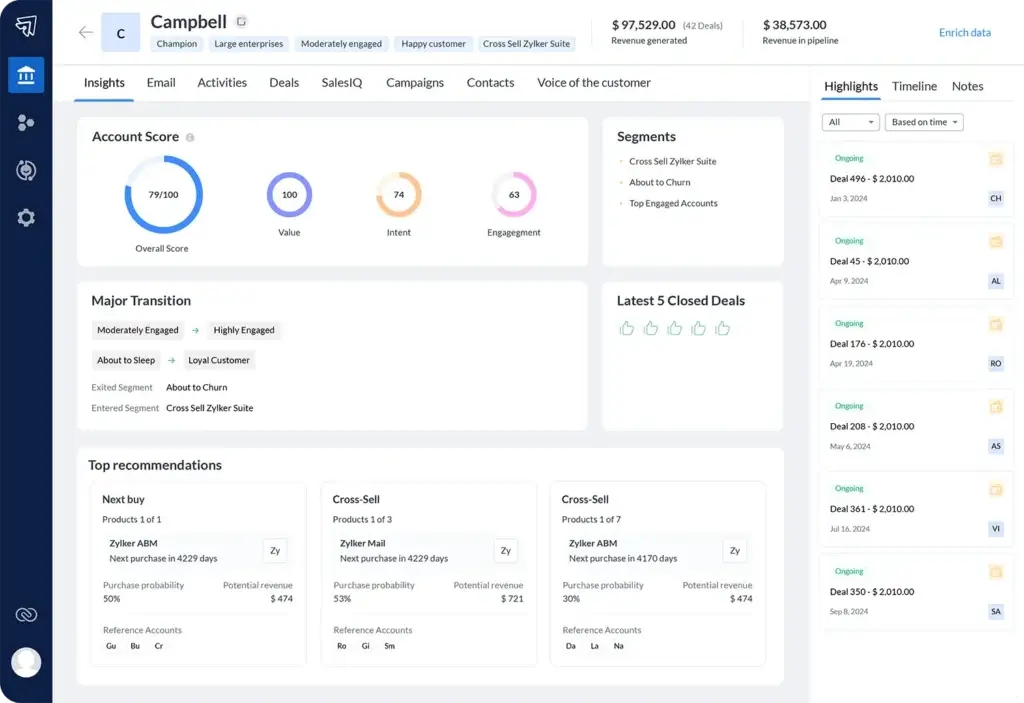
Zoho CRM is a strong free CRM for small teams that want more structure than a spreadsheet but do not want to pay for CRM software yet.
Its free edition supports up to 3 users and includes practical sales tools such as leads, deals, workflows, reports, and mobile access.
What You Get for Free
- Free forever for up to 3 users
- Lead, contact, account, and deal management
- Workflow rules for basic process automation
- Reports and mobile CRM access
- Tasks, events, and sales activity tracking
- 5,000-record data storage limit across modules
Where Zoho CRM Stands Out
Zoho CRM is one of the best free CRMs if you want a serious sales system from the start. It gives you a structured way to manage leads, qualify opportunities, and track deals without making your team learn an overly complex platform.
It also fits well if you already use or plan to use other Zoho apps, such as Zoho Books, Zoho Campaigns, Zoho Projects, or Zoho Desk.
Where Zoho CRM Falls Short
The free edition is strong, but it has limits around users, storage, customization, and advanced automation.
If you need custom modules, advanced analytics, forecasting, scoring rules, or deeper workflow automation, you will likely need a paid Zoho CRM plan.
Who Should Choose Zoho CRM?
Choose Zoho CRM if you have a small team and want a free CRM that feels structured, sales-ready, and scalable.
Skip it if you want the simplest possible CRM interface or need more than 3 free users.
Freshsales

Freshsales: Best Free CRM for Sales Communication
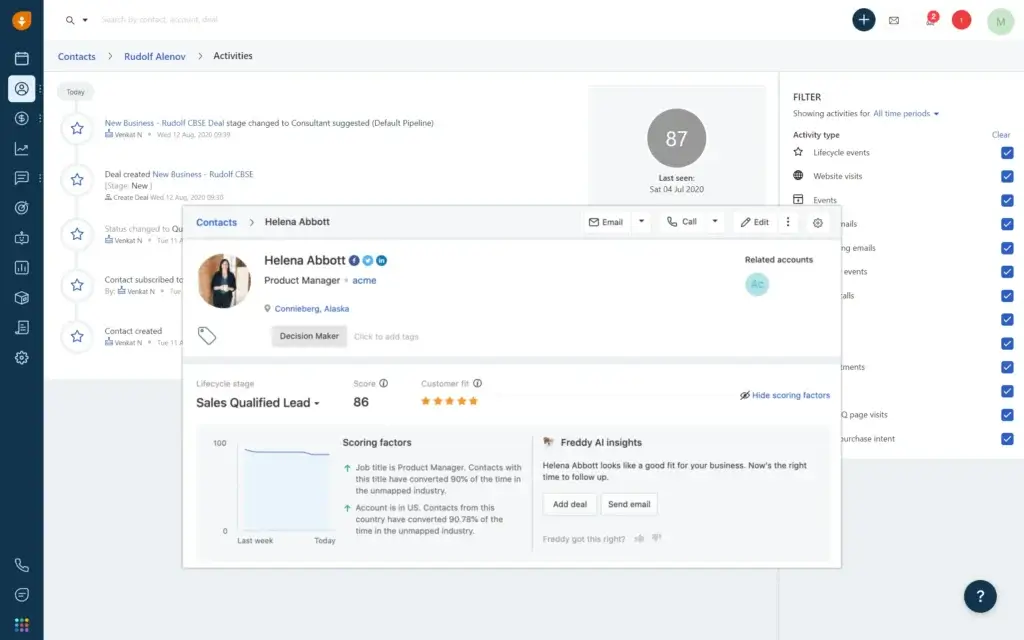
Freshsales is a practical free CRM for small sales teams that want built-in communication tools instead of connecting several separate apps.
Its free plan supports up to 3 users and includes useful tools for managing contacts, visualizing deals, sending emails, making calls, and chatting with customers.
What You Get for Free
- Free plan for up to 3 users
- Contact and account management
- Kanban views for deal tracking
- Email templates
- Built-in phone
- Live chat
- 24×5 support
Where Freshsales Stands Out
Freshsales is especially useful when your sales process depends on quick outreach. Instead of switching between your CRM, phone tool, inbox, and chat widget, you can manage more customer communication inside one platform.
This makes it a good fit for small sales teams that need speed, activity tracking, and visibility into conversations.
Where Freshsales Falls Short
Freshsales becomes more powerful on paid plans. Advanced AI features, custom reports, multiple pipelines, advanced workflows, and deeper sales automation are not the main strength of the free tier.
If your team needs complex analytics or a highly customized sales process, you may outgrow the free plan quickly.
Who Should Choose Freshsales?
Choose Freshsales if your team needs a free CRM with built-in phone, email, and live chat tools.
Skip it if you mainly need broad marketing automation or deep third-party integrations.
Bitrix24


Bitrix24: Best Free CRM for Unlimited Users
Bitrix24 is one of the most generous free CRM platforms if user count is your main concern. Its free plan lets you add unlimited users and gives your team access to a broader workspace that combines CRM, tasks, collaboration, and communication.
That makes it a strong option for teams that want CRM and work management in the same system.
What You Get for Free
- Unlimited users on the free plan
- Lead, contact, and deal management
- Sales pipeline tools
- Tasks and project collaboration
- Calendars, file sharing, and internal communication
- Basic CRM activity tracking
Where Bitrix24 Stands Out
Bitrix24 is not just a CRM. It is closer to a digital workspace where your sales team can manage customers, tasks, internal messages, files, calendars, and projects.
This is useful for agencies, service businesses, and hybrid teams that need to connect customer management with day-to-day execution.
Where Bitrix24 Falls Short
Bitrix24 can feel overwhelming because it includes many tools in one interface. If your team only needs a simple CRM, the platform may feel heavier than HubSpot or Zoho CRM.
Some features, including telephony and apps from the Bitrix24 Market, are available only on paid plans.
Who Should Choose Bitrix24?
Choose Bitrix24 if you need a free CRM for many users and want customer management connected with tasks, projects, and collaboration.
Skip it if you prefer a cleaner, lightweight CRM with a shorter learning curve.
Odoo CRM


Odoo CRM: Best Free CRM for Custom Workflows
Odoo CRM is a strong option if you want a modular business system rather than a standalone CRM. Its One App Free plan lets you use one Odoo app with unlimited users, which can make CRM very attractive for teams that only need that one module.
Odoo is especially useful if you want CRM to become part of a broader operational system later, including accounting, project management, inventory, helpdesk, or marketing apps.
What You Get for Free
- One App Free plan
- Unlimited users when using one Odoo app
- CRM pipeline management
- Lead and opportunity tracking
- Custom stages and sales activities
- Reporting and team visibility
Where Odoo CRM Stands Out
Odoo stands out for flexibility. You can start with CRM and later expand into other business apps if your operational needs grow.
For teams with specific workflows, this modular structure is valuable because it lets you build a business system around your process rather than forcing your process into a rigid CRM.
Where Odoo CRM Falls Short
The free plan works best when you only need one Odoo app. If you add more apps, such as Accounting, Project, Inventory, or Helpdesk, you move into a paid plan.
Odoo can also require more setup planning than simpler CRM tools. If you want something extremely beginner-friendly, HubSpot may be easier.
Who Should Choose Odoo CRM?
Choose Odoo CRM if you want a flexible CRM that can later connect with broader business operations.
Skip it if you want a simple plug-and-play CRM with minimal configuration.
Best Free CRM by Use Case
The best free CRM depends on what you need to manage first. A solo consultant, a growing sales team, and an agency with multiple collaborators will not need the same system.
| Use Case | Best Free CRM | Why It Fits |
| Best free CRM for beginners | HubSpot CRM | Clean interface, easy setup, and strong basic CRM tools |
| Best free CRM for small teams | Zoho CRM | Free for 3 users with leads, deals, workflows, reports, and mobile access |
| Best free CRM for sales communication | Freshsales | Built-in phone, email templates, live chat, and Kanban views |
| Best free CRM for unlimited users | Bitrix24 | Free plan supports unlimited users and combines CRM with collaboration tools |
| Best free CRM for custom workflows | Odoo CRM | One App Free plan with unlimited users and modular expansion options |
Essential Features to Look for in a Free CRM
Choosing a free CRM does not mean settling for a weak system. The right platform should still give you enough structure to manage contacts, deals, tasks, and customer communication properly.
Contact Management
Contact management is the foundation of every CRM. Your CRM should let you create a complete customer profile that includes details, notes, activities, files, and communication history.
This prevents your team from searching across spreadsheets, inboxes, and chat messages to understand what happened with a lead or customer.
- Customer profiles: Store names, companies, emails, phone numbers, and custom details.
- Interaction history: Track calls, meetings, emails, notes, and follow-ups.
- Relationship context: Connect contacts to deals, tasks, documents, and companies.
Sales Pipeline and Lead Tracking
A good free CRM should help you see where every opportunity stands. This is especially important if you manage multiple leads at the same time.
Look for a visual pipeline that lets you move deals through stages such as new lead, qualified, proposal, negotiation, and won.
- Pipeline stages: Organize deals by sales progress.
- Lead ownership: Assign each lead to the right person.
- Next steps: Track calls, emails, demos, and deadlines.
Task and Follow-Up Management
Many sales opportunities are lost because no one follows up at the right time. Your CRM should help you assign tasks and remind your team what needs to happen next.
This is where CRM connects directly to work management. A deal is not just a record, it is a set of actions that must be completed.
Reporting and Analytics
Free CRM reporting is usually basic, but it should still give you enough visibility to make better decisions.
At minimum, look for reports that show deal progress, sales activity, conversion rates, and pipeline value.
- Pipeline value: See how much potential revenue is open.
- Activity tracking: Understand how your team is following up.
- Conversion insights: Identify where leads are getting stuck.
Integrations
A CRM is more useful when it connects with tools your team already uses. Email and calendar integrations are especially important because much of your customer communication happens there.
Look for integrations with Gmail, Outlook, calendars, forms, marketing tools, accounting systems, and project management platforms.
Limitations and Drawbacks of Free CRM Software
Free CRM software can be a smart starting point, but every free plan comes with trade-offs. Understanding those limits upfront helps you avoid choosing a system that creates friction later.
Common Free CRM Limitations
- User limits: Some free plans support only 2 or 3 users.
- Contact or record limits: Your database may be capped.
- Limited automation: Advanced workflows often require paid plans.
- Basic reporting: Custom dashboards and forecasting may be restricted.
- Support limits: Free users may receive slower or limited support.
Scaling Challenges
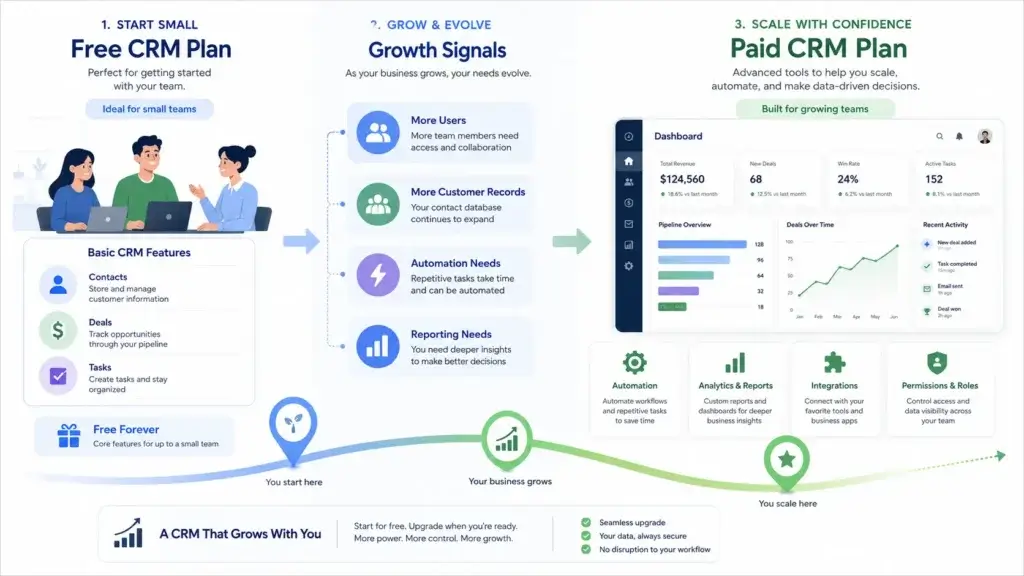
A free CRM may work perfectly when your team is small. As your sales process becomes more complex, you may need advanced reporting, custom fields, role permissions, workflow automation, or multiple pipelines.
If you choose a CRM only because it is free, you may end up migrating again when your business grows. That is why scalability should be part of the decision from the beginning.
Security and Data Control
Security matters even when the software is free. Your CRM stores sensitive customer information, including names, emails, phone numbers, deal values, and communication history.
Before choosing a free CRM, check whether the provider offers basic access controls, export options, privacy documentation, and security practices that match your business needs.
When Should You Upgrade From a Free CRM?
You should upgrade when your CRM starts limiting your team instead of supporting it.
The right time is not always based on company size. It is based on whether your current CRM can still support your sales process, reporting needs, and customer experience.
Signs You Have Outgrown a Free CRM
- You reached the user, contact, or storage limit.
- You need automation to reduce manual follow-up work.
- Your team needs custom reports or revenue forecasting.
- You need better permissions, admin controls, or security features.
- You want deeper integrations with marketing, accounting, or project tools.
How to Upgrade Without Disrupting Your Team
Before upgrading, review how your team uses the CRM today. Identify what works, what creates friction, and which paid features will actually improve performance.
- Audit your current CRM usage: Review contacts, deals, fields, pipelines, and reports.
- Define what you need next: Prioritize automation, reporting, integrations, and permissions.
- Compare plan limits: Avoid paying for a tier that adds features you will not use.
- Back up your data: Export your records before changing plans or migrating.
- Train your team: Make sure new features improve adoption instead of adding confusion.
Final Recommendation
Which Free CRM Should You Choose?
If you want the simplest free CRM for getting started, choose HubSpot CRM. It is clean, beginner-friendly, and strong for very small teams that want an easy setup.
If you want the best balance of free CRM features for a small sales team, choose Zoho CRM. It gives you leads, deals, workflows, reports, and mobile access for up to 3 users.
If your team depends heavily on calls, emails, and live chat, choose Freshsales. It is practical for sales communication and fast follow-up.
If you need a free CRM for many users and want collaboration tools included, choose Bitrix24. It is broader than a normal CRM and works well for teams that want sales and work management together.
If you want a modular CRM that can become part of a larger business system, choose Odoo CRM. Its One App Free plan is especially attractive if CRM is the only Odoo app you need at first.
Still comparing your options? Visit our full comparison of the best CRM software to compare features, pricing, and use cases across more CRM platforms.
FAQ
What is the best free CRM software?
The best free CRM depends on your needs. HubSpot CRM is best for beginners, Zoho CRM is strong for small teams, Freshsales is useful for sales communication, Bitrix24 is best for unlimited users, and Odoo CRM is best for modular workflows.
Are free CRM tools really free?
Yes, many CRM platforms offer free forever plans. However, free plans usually include limits on users, contacts, storage, automation, reporting, or support. Always review the plan limits before building your sales process around a free CRM.
What is the best free CRM for small businesses?
Zoho CRM is one of the best free CRM options for small businesses because its free edition supports up to 3 users and includes leads, deals, workflows, reports, and mobile access. HubSpot CRM is also a good choice for very small teams that want an easier setup.
Which free CRM has the fewest limitations?
Bitrix24 is one of the most generous free CRM tools if you need unlimited users. Zoho CRM is strong for small teams that want structured sales features. Odoo CRM is useful if you only need one free Odoo app with unlimited users.
Can a free CRM grow with my business?
A free CRM can support your business in the early stages, but most teams eventually need paid features such as advanced automation, custom reporting, more storage, stronger permissions, or deeper integrations. Choose a free CRM that offers a clear upgrade path.
What features should I look for in a free CRM?
Look for contact management, deal tracking, task management, pipeline views, reporting, email integration, mobile access, and data export options. These features give your team the foundation needed to manage customer relationships properly.
Is HubSpot CRM still free?
Yes, HubSpot CRM still offers free CRM tools. Its free CRM is best for very small teams that want a simple system for contacts, deals, tasks, emails, and customer communication. Larger teams should review the current user and contact limits before choosing it.
Is Zoho CRM free forever?
Yes, Zoho CRM offers a free forever edition for up to 3 users. It includes core CRM features such as leads, deals, workflows, reports, and mobile access, making it a strong option for small teams moving away from spreadsheets.
What is the difference between free CRM and free trial CRM?
A free CRM gives you access to selected features for an unlimited time. A free trial gives you temporary access to a paid CRM for a limited period, usually 14 to 30 days. If you need a no-cost long-term tool, choose a free forever CRM instead of a trial-only CRM.
When should I upgrade from a free CRM to a paid plan?
Upgrade when you reach user or storage limits, need automation, require custom reports, want better integrations, or need stronger security and admin controls. If the free CRM starts slowing your team down, a paid plan may deliver a better return.