Introduction
Managing sales relationships can become messy fast when your contacts, conversations, notes, and follow-ups are spread across spreadsheets, inboxes, LinkedIn, and messaging apps. Folk CRM positions itself as a modern, lightweight CRM designed to bring all of that relationship data into one place. In this review, you’ll get a detailed look at Folk CRM’s features, pricing, strengths, limitations, and ideal use cases, so you can decide whether it is the right fit for your team.
What Is Folk CRM?
Folk CRM is a relationship-focused customer relationship management platform built for teams that want a flexible, collaborative way to manage contacts, companies, outreach, and pipelines without the complexity of a traditional enterprise CRM. It combines contact management, enrichment, email outreach, AI-assisted workflows, and browser-based lead capture in a streamlined interface that feels more intuitive than many legacy CRM systems.
Background and Positioning
Unlike older CRM platforms that were built around rigid sales operations, Folk CRM is positioned as a more modern and adaptable solution. Its interface is closer to a spreadsheet-style workspace, but with automation, AI, outreach tools, and multi-channel sync layered on top. This makes it especially appealing if you want structure and visibility without introducing a system that feels too heavy for your team.
Who Is Folk CRM Best For?
Folk CRM works particularly well for teams that manage relationships across several channels and need a practical way to stay organized. Common use cases include:
- Startups and founders – Centralize leads, investors, partners, and early sales conversations in one place.
- Sales teams – Manage contacts, pipelines, enrichment, and outreach with less manual admin work.
- Agencies and consultancies – Track clients, prospects, referral partners, and follow-ups in a clean shared workspace.
- Recruiting, partnerships, and investing teams – Organize relationship-driven workflows that do not fit neatly into a classic sales CRM model.
That said, Folk CRM is not the strongest option for enterprise organizations that need advanced forecasting, deeply layered automation, or highly complex reporting structures.
Key Features
How Does Folk CRM Work?
Folk CRM’s appeal comes from combining flexible contact management with outreach and enrichment tools in one system. Below are the core capabilities that matter most when evaluating the platform.
Contact Management and Flexible Views
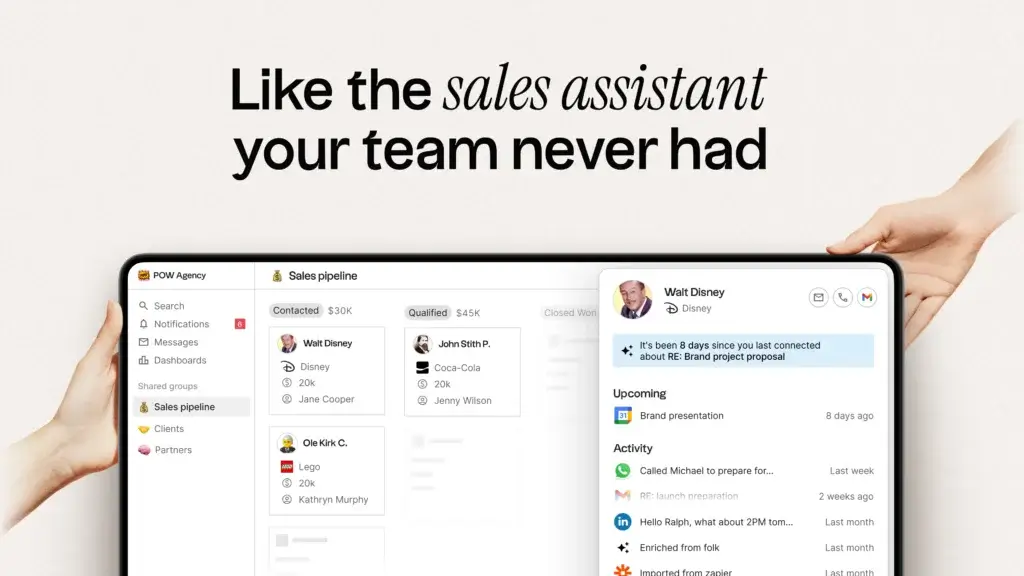
At its core, Folk CRM is built to help you organize people and companies in a way that feels more flexible than a traditional CRM database. You can group contacts, create custom views, import CSV files, and structure records around the way your team actually works. This makes it easier to track leads, clients, partners, candidates, or investors without forcing every workflow into the same rigid structure.
folkX Chrome Extension and Contact Capture
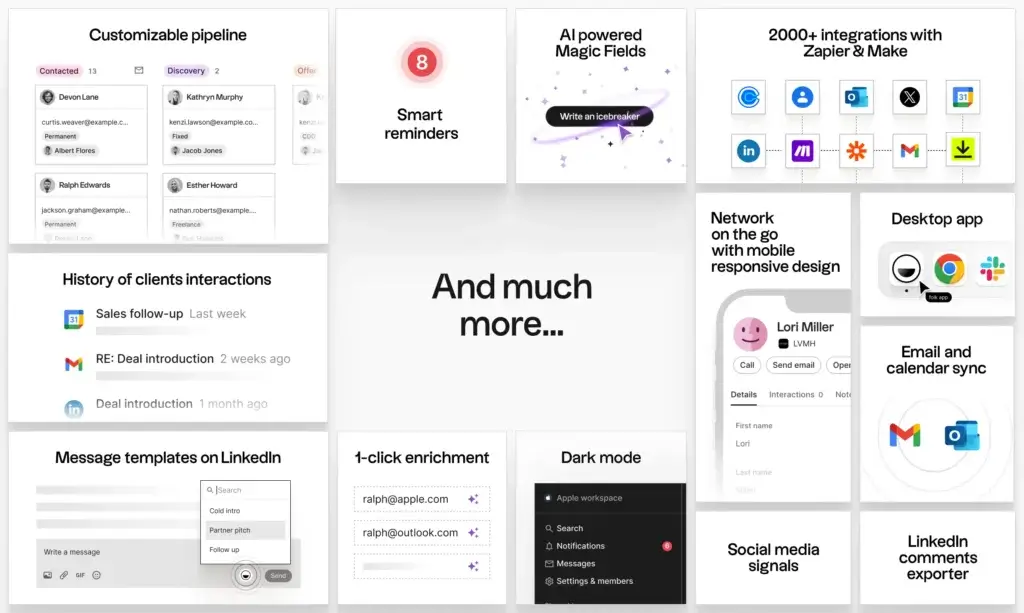
One of Folk CRM’s strongest features is folkX, its Chrome extension. This lets you capture contacts directly from LinkedIn, LinkedIn Sales Navigator, Gmail, Google Meet, WhatsApp, and other websites. If your current process relies on switching between tabs and copying details by hand, this feature can save a significant amount of time.
Email Campaigns, Templates, and Sequences
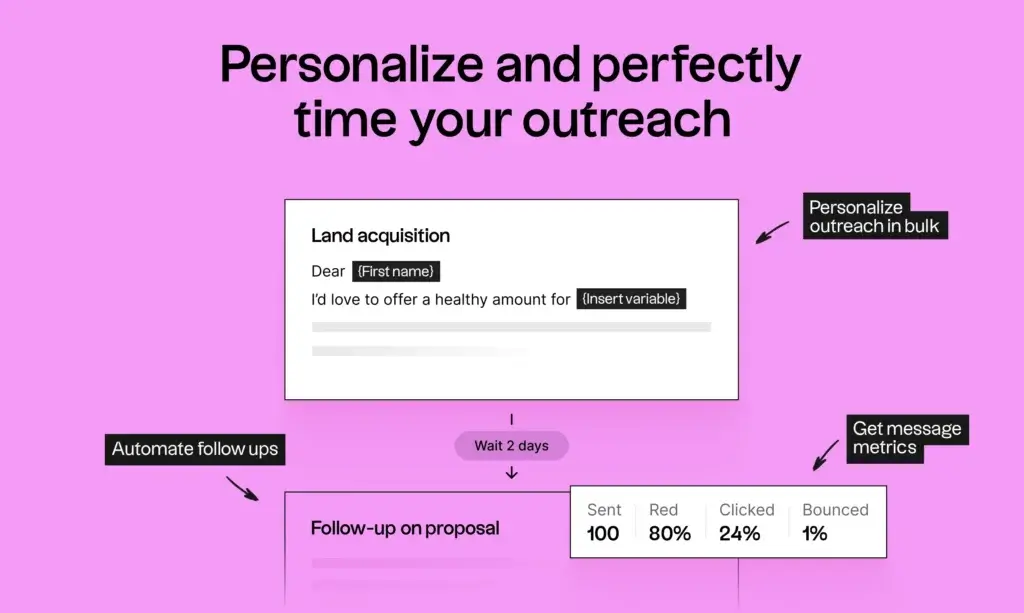
Folk CRM includes email campaigns in its Standard plan, which already makes it more outreach-friendly than many lightweight CRMs. On Premium, you also get email sequences, which are much more useful for structured prospecting and follow-up workflows. Templates and variables help you personalize messages while keeping your process scalable.
AI Assistants, Enrichment, and Magic Fields
Folk CRM leans heavily into AI-supported productivity. Its AI assistants and Magic Fields help enrich contact records, generate context, and reduce the amount of manual research your team needs to do. This is one of the platform’s clearest differentiators, especially for small teams that want to move faster without adding more software complexity.
Pipeline Management, Deals, and Dashboards
Pipeline management is included in Standard, but Premium is where the product becomes much stronger for structured sales teams. Premium adds custom objects and deals, dashboards, fuller history, and better collaboration controls. If your review is aimed at sales teams, this distinction is important because it affects both usability and value for money.
Integrations and Multi-Channel Sync
Folk CRM supports email, calendar, and WhatsApp sync, plus thousands of integrations through tools like Zapier and Make. The platform is designed to collect relationship context from different channels so your team can see the bigger picture around every contact, not just isolated deal stages.
Pros and Cons
Benefits and Limitations of Using Folk CRM
Positive
✅ Fast to learn
✅ Excellent contact capture
✅ Helpful AI layer
✅ Modern communication sync
Negative
❌ Feature gating
❌ Limited for complex enterprise sales ops
❌ Mobile positioning is less clear
❌ Pricing can rise fast
Strengths and Benefits
Folk CRM stands out because it feels modern, approachable, and practical. If your team has been trying to manage sales or business relationships in spreadsheets, Airtable, or Notion, Folk offers a meaningful step up without creating the administrative burden that often comes with larger CRM systems.
- Fast to learn – The interface is clean and less intimidating than traditional CRM platforms.
- Excellent contact capture – The Chrome extension makes LinkedIn and web-based prospecting much easier.
- Helpful AI layer – Enrichment and Magic Fields reduce repetitive work.
- Modern communication sync – Email, calendar, and WhatsApp context are valuable in one place.
Limitations and Drawbacks
Folk CRM is not a perfect fit for every business. Its biggest limitation is that while the entry plan looks accessible, many teams will want features that sit higher in the pricing structure. It is also less suitable if your sales process depends on sophisticated analytics, large-scale automation, or enterprise-grade forecasting.
- Feature gating – Important capabilities such as sequences, dashboards, API access, and advanced permissions require Premium.
- Limited for complex enterprise sales ops – It is not as operationally deep as larger CRM ecosystems.
- Mobile positioning is less clear – It is safer to describe Folk as mobile-browser friendly than as a full native mobile CRM.
- Pricing can rise fast – Costs become more noticeable once your team grows beyond a few seats.
Use Cases
Who Should Use Folk CRM?
Folk CRM is not a one-size-fits-all CRM. It is strongest when relationship management and lightweight collaboration matter more than enterprise sales complexity.
Startups and Small Sales Teams
If you want a CRM that is easier to adopt than HubSpot or Salesforce, Folk CRM is a compelling option. It gives early-stage teams a practical way to centralize leads, track interactions, manage outreach, and build a repeatable process without needing a dedicated CRM administrator.
Agencies, Partnerships, Recruiting, and Investing
Folk is especially strong for workflows that are more relationship-driven than pipeline-driven. Agencies can track prospects and clients, partnerships teams can manage introductions and follow-ups, recruiters can organize candidate relationships, and investors can manage deal flow in a more flexible workspace.
When Folk CRM Is Not the Right Fit
Folk may not be the best choice if you need heavy sales forecasting, layered workflow automation across several departments, highly advanced reporting, or a mature enterprise ecosystem. In those cases, a more structured CRM such as monday CRM, HubSpot, or Pipedrive may be the smarter long-term investment.
Competitors
Folk CRM Alternatives
Folk CRM competes with several popular CRM tools, but the best alternative depends on how much structure, automation, and scalability you need.
| Feature Type | Folk CRM | monday CRM | HubSpot | Pipedrive |
| Best for | Relationship-first workflows | Customizable sales operations | All-in-one growth teams | Sales-focused pipeline teams |
| Interface style | Lightweight and flexible | Visual and highly customizable | Structured and scalable | Pipeline-centric |
| LinkedIn capture | Strong | Moderate | Moderate | Moderate |
| AI and enrichment | Strong for its segment | Strong | Strong | Growing |
| Advanced reporting | Moderate | Strong | Strong | Moderate |
| Best use case | Startups, agencies, partnerships | Teams needing flexibility at scale | Sales, marketing, service alignment | Structured sales pipelines |
If you want a more scalable and customizable CRM, monday CRM is the strongest alternative because it combines visual ease of use with deeper process control. HubSpot is a strong choice if you want a broader sales, marketing, and service ecosystem. Pipedrive is a better fit if your main focus is pure pipeline execution rather than relationship intelligence.
Pricing
Folk CRM Pricing and Plans
Folk CRM currently offers three main plans, plus a 2-week Premium free trial. The product is easy to enter, but the real value depends on whether Standard is enough for your workflow or whether you will quickly need Premium features.
Standard Plan
The Standard plan starts at $24 per member per month when billed yearly, or $30 per member per month when billed monthly. It includes pipeline management, email campaigns, contact enrichment, AI assistants, Magic Fields, the LinkedIn extension, email and calendar sync, WhatsApp sync, and broad integrations.
Premium Plan
Premium starts at $48 per member per month when billed yearly, or $60 per member per month when billed monthly. This plan adds custom objects and deals, email sequences, advanced roles and permissions, dashboards, API access, more usage credits, and full interaction history. For many serious sales teams, this is the plan where Folk becomes substantially more capable.
Custom Plan
Custom starts from $80 per member per month when billed yearly, or $100 per member per month when billed monthly. It is designed for businesses that need custom limits, dedicated support, custom billing, and more scalability.
Pricing Table
| Plan | Standard | Premium | Custom |
| Annual price | $24/member/month | $48/member/month | From $80/member/month |
| Monthly price | $30/member/month | $60/member/month | From $100/member/month |
| Pipeline management | ✔ | ✔ | ✔ |
| Email campaigns | ✔ | ✔ | ✔ |
| Email sequences | ✖ | ✔ | ✔ |
| Contact enrichment | ✔ | ✔ | Custom limits |
| Dashboards | ✖ | ✔ | ✔ |
| API access | ✖ | ✔ | ✔ |
| Advanced permissions | ✖ | ✔ | ✔ |
From a value perspective, Folk CRM is attractive if you want a lighter CRM with modern workflows. Still, Premium is where many of the features that serious teams care about actually appear, so the upgrade path is worth highlighting honestly in your review.
Best Practices
Getting Started with Folk CRM
To get the most out of Folk CRM, it helps to approach setup with a clear use case and a clean data structure.
Connect Your Core Accounts First
Start by connecting Google or Microsoft accounts so Folk can sync contacts and interactions. Installing the folkX Chrome extension early is also important because it unlocks one of the platform’s best time-saving features.
Build Clean Views Before Scaling Outreach
Before launching campaigns, organize your contacts into useful groups and views. This will make segmentation, outreach, follow-ups, and reporting much more manageable as your database grows.
Use AI and Enrichment Selectively
Folk’s AI and enrichment tools can reduce manual work, but they are most effective when applied to the right segments. Focus them on higher-value prospects or active pipelines rather than trying to enrich everything at once.
Upgrade Only When Your Workflow Requires It
If your team mainly needs contact management and campaigns, Standard may be enough. If you need structured outbound workflows, dashboards, or API access, Premium will likely be the better long-term plan.
Conclusion
Final Thoughts
Folk CRM is one of the more interesting lightweight CRM platforms on the market right now. It does a strong job of bridging the gap between spreadsheet-based relationship tracking and a more capable modern CRM. Its clean design, browser-based lead capture, enrichment tools, and flexible relationship workflows make it especially attractive for startups, agencies, partnerships teams, recruiters, and lean sales teams.
At the same time, Folk CRM is not the most complete option for every business. If your team needs advanced forecasting, deep reporting, or a highly structured enterprise CRM setup, you may outgrow it. For users who want more flexibility and scale, monday CRM is the better overall choice. If you want a wider all-in-one ecosystem, HubSpot is a strong alternative. If your focus is pipeline execution, Pipedrive remains a reliable option. Folk CRM is best when you want a modern, relationship-first system that helps you move faster without overwhelming your team.
Frequently Asked Questions
Have more questions?
What is Folk CRM best for?
Folk CRM is best for startups, agencies, partnerships teams, recruiters, investors, and small sales teams that need a flexible, relationship-focused CRM without the complexity of a traditional enterprise platform.
Does Folk CRM have a free plan?
Folk CRM does not appear to offer a permanent free plan, but it does offer a 2-week free trial of its Premium plan.
How much does Folk CRM cost?
Folk CRM starts at $24 per member per month when billed yearly for Standard, $48 for Premium, and from $80 for Custom. Monthly billing is higher.
What features are included in Folk CRM Standard?
Standard includes pipeline management, email campaigns, contact enrichment, AI assistants, Magic Fields, LinkedIn extension access, and email, calendar, and WhatsApp sync.
What do you get with Folk CRM Premium?
Premium adds email sequences, custom objects and deals, dashboards, API access, advanced permissions, and more usage credits.
Does Folk CRM work with LinkedIn?
Yes. Folk CRM’s Chrome extension supports capturing contacts from LinkedIn and LinkedIn Sales Navigator, which is one of the product’s strongest features.
Does Folk CRM support WhatsApp?
Yes. Folk CRM supports WhatsApp connection and sync, which can be especially useful for teams that manage sales or relationship workflows across messaging channels.
Is Folk CRM good for small businesses?
Yes, especially if you want something lighter and more intuitive than a traditional CRM. It is a strong fit for small teams that want structure without too much complexity.
What are the main drawbacks of Folk CRM?
The main drawbacks are that some important features require Premium, the platform is less suited to complex enterprise sales operations, and its mobile story is less mature than some competitors.
What are the best alternatives to Folk CRM?
The strongest alternatives depend on your needs, but monday CRM is the best overall option for flexibility and scale, followed by HubSpot for broader business use and Pipedrive for pipeline-focused sales teams.