
Introduction
Managing customers should not feel like managing chaos.
That is where Keap CRM comes in. It is a small business CRM and automation platform designed to help you organize contacts, follow up faster, automate sales activity, and manage customer communication from one place.
My honest opinion: Keap is a strong choice if you run a service-based business and want CRM, email marketing, appointments, payments, and automation in one system. It is less ideal if you only need a simple contact database or a low-cost CRM for a very small list.
In this Keap CRM review, you will see where the platform performs well, where it can become expensive, and whether it is the right CRM for your stage of growth.
Quick Overview
Keap CRM Review Summary
If you want the fast answer, Keap is best for small businesses that need automation more than enterprise-level sales management. It is built for teams that rely on follow-ups, appointments, invoices, email campaigns, lead capture, and repeat customer relationships.
The platform is especially useful when your sales process is not just “track a deal,” but also “capture the lead, nurture the relationship, book the call, send the invoice, collect payment, and follow up automatically.”
| Category | Keap CRM Review Summary |
| Best For | Service-based small businesses, consultants, coaches, agencies, local businesses, and solo entrepreneurs |
| Starting Price | Starts at $299/month when billed annually, based on Keap’s current pricing page |
| Free Plan | No free plan, but a free trial is available with limitations |
| Main Strength | CRM, automation, email marketing, appointments, invoices, payments, and text marketing in one platform |
| Main Weakness | Higher starting price than many small business CRM tools |
| Best Alternative | HubSpot for a free CRM, Pipedrive for pipeline simplicity, Zoho CRM for lower-cost flexibility |
| Expert Rating | 8.3/10 for small business automation and client management |
Buyer Fit
Who Is Keap Best For?
Keap is not trying to be every CRM for every business. Its strongest value is for small businesses that need to turn messy manual follow-ups into repeatable sales and marketing workflows.
If your business depends on calls, consultations, quotes, appointments, payments, and long-term client relationships, Keap can become a serious operational advantage.
Keap is a strong fit if you:
- Run a service-based business with repeat customer follow-ups
- Need CRM and email automation in the same platform
- Want to automate lead nurturing after forms, calls, or appointments
- Send invoices, quotes, or payment links to customers
- Prefer one system instead of separate tools for CRM, scheduling, payments, and email
- Need onboarding support because your team is new to automation
Keap may not be the best fit if you:
- Need a free CRM or a very low-cost starter tool
- Have a large sales team that needs advanced forecasting
- Want deep project management features inside your CRM
- Only need basic contact storage without automation
- Have a high-volume contact list but low revenue per customer
Key Features
Keap’s Software Specification
Keap works best when you use it as more than a contact database. Its real strength is the way it connects CRM, automation, marketing, scheduling, payments, and follow-up workflows.
Here are the most important Keap features to understand before choosing it.
Contact and Lead Management
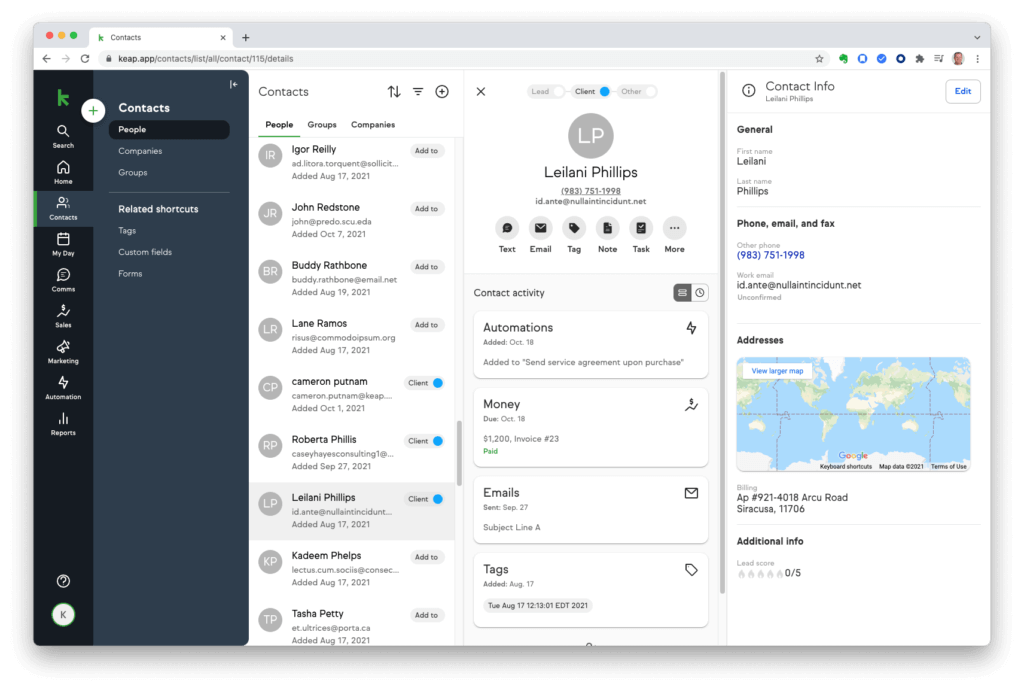
Keap gives you a central place to manage leads, customers, tags, notes, activity history, appointments, forms, invoices, and communication records.
This is valuable because your customer data is not scattered across inboxes, spreadsheets, scheduling tools, and payment platforms. You can see who the customer is, what they did, what they bought, and what should happen next.
Why it matters: You get a more complete view of the customer journey, which makes follow-ups more relevant and less manual.
Marketing and Sales Automation
Automation is Keap’s biggest strength. You can create workflows that respond to customer actions, such as form submissions, booked appointments, purchases, missed follow-ups, or lead stage changes.
You can use automation to:
- Send a welcome email after a form is submitted
- Assign a task when a new lead enters the pipeline
- Follow up after a quote is sent
- Trigger reminders before appointments
- Start a nurture campaign after someone downloads a lead magnet
- Request a review after a service is completed
Why it matters: You reduce the risk of missed opportunities and build a more consistent customer experience.
Keap AI and Proven Automation Templates
Keap now includes AI-assisted tools and pre-built automation templates that help you move faster when creating campaigns and workflows.
This is useful if you know what you want to automate but do not want to build every workflow from scratch. You can use templates for lead nurturing, online reviews, referrals, billing automation, webinar follow-up, and other common small business scenarios.
Why it matters: Keap AI can speed up campaign creation, but you should still review every message for accuracy, brand voice, compliance, and customer relevance.
Email Marketing
Keap includes email broadcasts, one-to-one emails, templates, and automated email sequences. You can send messages based on contact activity, tags, segmentation, and lifecycle stage.
This gives you more control than a basic newsletter tool because email activity connects directly to the CRM record. You can see who opened, clicked, booked, purchased, or ignored a campaign.
Why it matters: Your email marketing becomes tied to real customer behavior, not just a standalone mailing list.
Text Marketing and Business Line
Keap also supports text marketing and a dedicated business phone line in eligible regions. This is useful for businesses that depend on fast customer responses, appointment reminders, and quick follow-ups.
Text messaging can be added to automations, which means you can combine email, SMS, tasks, and pipeline updates in the same customer journey.
Why it matters: For service-based businesses, SMS can improve response speed and reduce missed appointments.
Appointments and Scheduling
Keap includes appointment scheduling, so customers can book time without long email threads. You can connect your calendar, reduce scheduling friction, and automate reminders.
This is especially helpful for consultants, coaches, agencies, home service providers, and sales teams that rely on discovery calls.
Why it matters: You spend less time coordinating meetings and more time moving qualified leads forward.
Quotes, Invoices, and Payments
Keap includes built-in tools for quotes, invoices, checkout forms, recurring payments, promo codes, and payment follow-ups.
This is one of the biggest reasons Keap stands out from many traditional CRMs. Instead of tracking a deal in one platform and collecting payment in another, you can connect sales activity to revenue collection.
Why it matters: You can manage the full path from lead to payment without forcing your customer journey across too many disconnected tools.
Sales Pipeline and Task Management
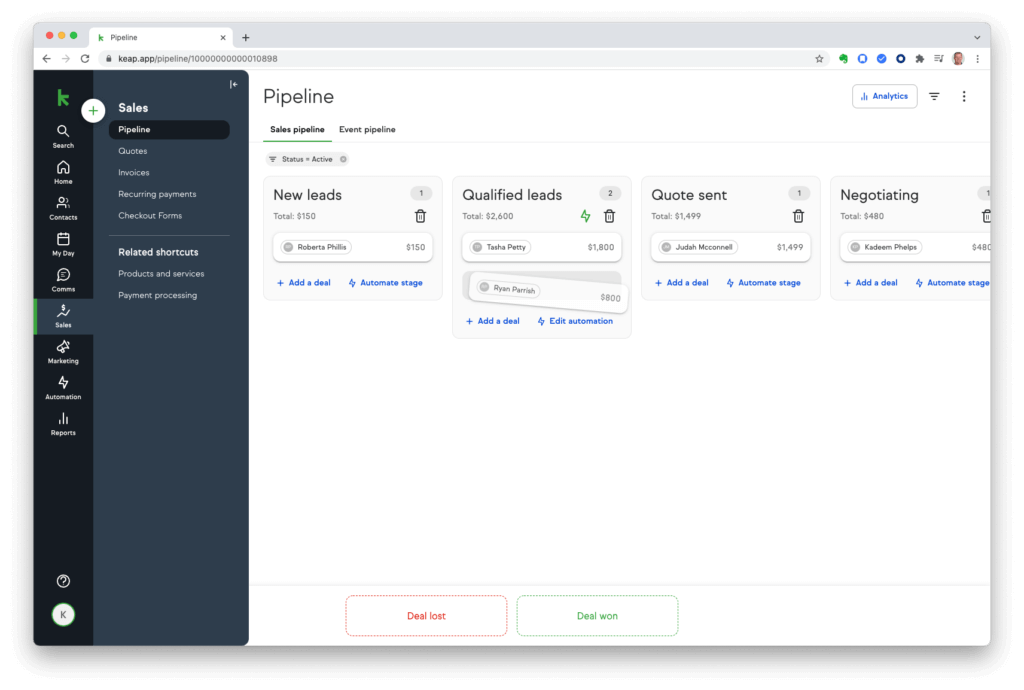
Keap’s sales pipeline helps you track deals visually. You can move opportunities through stages, assign tasks, add notes, and use automation to trigger the next step.
It is not as advanced as Salesforce for enterprise forecasting, but it is practical for small teams that need clarity and consistency.
Why it matters: Your sales process becomes easier to monitor, repeat, and improve.
Integrations and Keap Marketplace
Keap connects with thousands of business tools, including apps for accounting, e-commerce, scheduling, email, forms, and operations. You can also expand functionality through the Keap Marketplace.
Common integration categories include:
- Accounting and payments
- Calendars and scheduling
- Landing pages and forms
- E-commerce platforms
- Email and communication tools
- Reporting and analytics tools
Why it matters: Keap can sit at the center of your small business tech stack instead of becoming another disconnected tool.
Key Benefits
Benefits of Using Keap CRM
The main benefit of Keap is not just “better contact management.” The bigger value is that you can create a system where your business follows up consistently, even when your team is busy.
You can nurture leads automatically
Keap helps you respond quickly when someone fills out a form, books a call, requests information, or shows interest in your service.
This keeps leads warm without relying on memory or manual reminders.
You can replace several small business tools
Many businesses use separate tools for email marketing, scheduling, payments, invoices, forms, and CRM. Keap brings many of these functions together.
That means fewer logins, fewer disconnected records, and less manual data entry.
You can create a more consistent client experience
Customers notice when your business follows up on time, sends clear reminders, and keeps communication organized.
Keap helps you make those touchpoints consistent, which can improve trust and reduce missed opportunities.
You can connect sales activity to revenue
Because Keap includes quotes, invoices, checkout forms, and payments, you can connect marketing and sales workflows to actual revenue actions.
That is a major advantage for businesses that sell services, packages, consultations, or digital products.
Pros and Cons
Advantages and Limitations of Using Keap CRM
Positive
✅ Excellent automation for small businesses
✅ CRM, email, appointments, and payments in one system
✅ Strong fit for service-based businesses
✅ Helpful onboarding and support resources
Negative
❌ Higher starting price than many SMB CRMs
❌ Advanced setup takes planning
❌ Not ideal for enterprise sales forecasting
❌ Contact growth and add-ons can increase costs
No CRM is perfect, and Keap is no exception. It solves a very specific problem well: helping small businesses turn customer follow-up into a repeatable, automated process.
That said, you should understand both the strengths and limitations before choosing it.
Pros
1. Excellent automation for small businesses
Keap makes automation accessible without making it feel overly technical. You can automate follow-ups, reminders, lead nurturing, sales tasks, and customer communication with a visual workflow builder.
2. Strong all-in-one functionality
You get CRM, email marketing, text messaging, appointments, quotes, invoices, payments, landing pages, and automation in one platform. This can reduce tool overload for small teams.
3. Great for service-based businesses
If your business relies on consultations, calls, bookings, proposals, invoices, or repeat follow-ups, Keap fits the workflow naturally.
4. Support and onboarding are stronger than many CRM tools
Keap offers customer success resources, support, education, community access, and implementation help, which matters when automation is a core part of your setup.
Cons
1. Pricing is not beginner-friendly
Keap can be expensive compared with tools like Zoho CRM, Pipedrive, or HubSpot’s free CRM. It makes more sense when automation saves enough time or helps you close more revenue.
2. Setup requires strategy
You can start quickly, but the best results come when you map your customer journey first. Without a clear process, automation can become messy.
3. Not built for complex enterprise sales teams
Keap is practical for small business pipelines, but larger sales organizations may need deeper forecasting, territory management, advanced permissions, and more detailed revenue analytics.
4. Costs can rise as your business grows
More contacts, users, messaging, services, or implementation needs can increase your total cost. Always check the current quote before committing.
User Experience
User Interface and Experience
CRM features only matter if your team actually uses them. Keap does a good job balancing automation power with a small business-friendly interface.
It is not the simplest CRM on the market, but it is easier to understand than many enterprise systems.
Clean dashboard and contact records
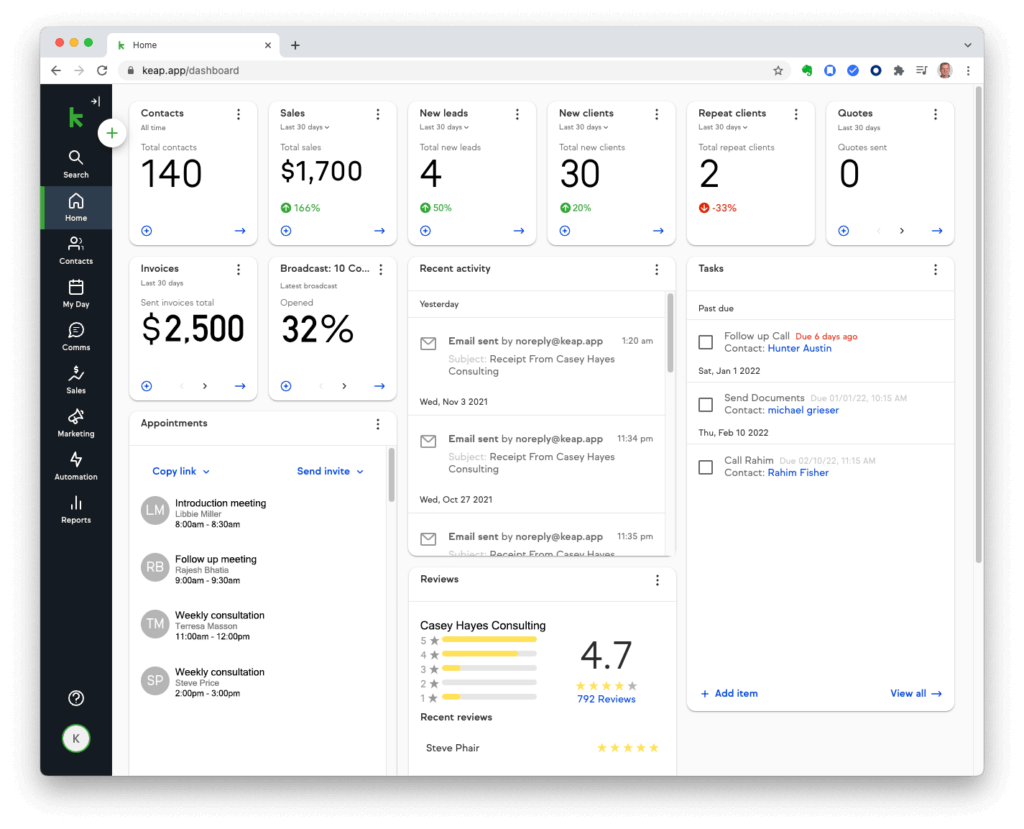
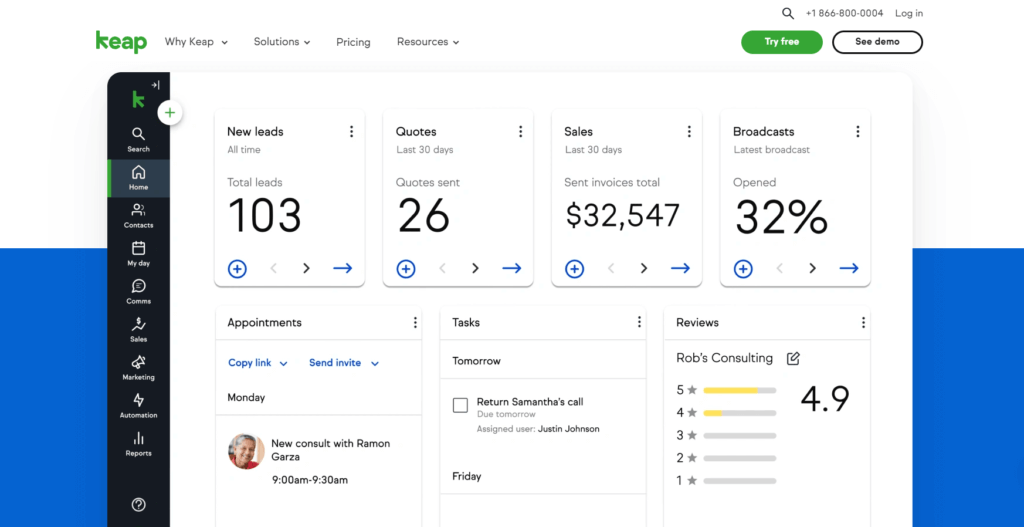
Keap’s dashboard gives you a practical overview of tasks, leads, appointments, sales activity, invoices, and customer records.
The contact record is one of the most important areas. From there, you can review notes, tags, communication history, payments, appointments, and automation activity.
Expert take: This is what a small business CRM should do well. You should not need five tools to understand where a customer stands.
Automation takes time to master
Basic automation is approachable, especially when you use templates. But advanced workflows still require planning.
If you want conditional paths, segmented follow-ups, payment-based triggers, and multi-step campaigns, you should map the process before building it inside Keap.
Best practice: Start with one workflow, such as new lead follow-up, then expand gradually.
Mobile app usability
Keap’s mobile experience is useful for checking contacts, managing tasks, sending messages, reviewing appointments, and staying responsive while away from your desk.
However, you should expect most serious automation building and campaign setup to happen on desktop.
Support and onboarding
Keap provides support resources, education, customer success guidance, and onboarding services. This is important because the platform’s value depends heavily on setup quality.
If you are new to CRM automation, the support ecosystem can shorten the learning curve. If you already understand funnels and customer lifecycle automation, you will likely move faster.
Where the experience falls short
- Reporting is useful but not enterprise-level for complex sales forecasting.
- Project management is limited compared with ClickUp, Asana, or monday.com.
- Email design is solid but not best-in-class compared with dedicated email platforms.
- Setup can feel heavy if you only need basic CRM functionality.
Bottom line: Keap is easy enough to use, but it becomes much more valuable when you treat it as a business automation system rather than a simple CRM.
Business Size Fit
Keap for Different Business Sizes
Keap is strongest for solo entrepreneurs, small teams, and growing service-based businesses. It can support larger operations, but it is not designed to replace enterprise CRMs for complex sales departments.
Here is a simple breakdown of where it fits best.
| Business Size | How Keap Fits | My Recommendation |
| Solo Entrepreneurs | Useful for automating follow-ups, booking calls, sending invoices, and managing contacts without hiring admin help. | Good fit if revenue per client justifies the price. |
| Small Teams | Strong fit for service teams that need shared customer records, sales tasks, email campaigns, and payment workflows. | Best overall fit. |
| Growing SMBs | Works well when automation, segmentation, and customer lifecycle workflows become more important. | Good fit with proper setup and training. |
| Larger Companies | Can support customer management and automation, but may lack the depth required for complex enterprise sales operations. | Consider Salesforce, HubSpot Enterprise, or Zoho CRM Enterprise if forecasting and permissions are critical. |
Pricing and Plans
How Much Does Keap CRM Cost?
Keap’s pricing has changed from the older Pro, Max, and Ultimate style plan structure. The current pricing page positions Keap as a full software platform that starts at $299/month when billed annually.
This makes Keap more expensive than many entry-level CRMs, but the comparison is not always direct. You are not only paying for contact management. You are paying for automation, email marketing, payments, scheduling, text messaging options, support, and implementation resources.
| Pricing Item | Current Keap Details | What It Means for You |
| Starting Price | Starts at $299/month when billed annually | Higher entry cost than many SMB CRMs |
| Feature-Based Plans | Keap currently positions the software as one platform rather than traditional feature-gated tiers | You should confirm exactly what is included in your quote |
| Contacts and Users | Pricing may depend on users, contacts, services, and business needs | Costs can increase as your database grows |
| Text Marketing | Tier 1 includes 500 messages and 100 voice minutes, with upgrades available | Useful for appointment reminders and fast follow-up |
| Free Trial | Available, but email sending is limited during the trial | Good for testing interface, not full-scale campaigns |
| Implementation | Keap emphasizes strategy, services, and support for better implementation | Budget time and possibly money for setup |
Is Keap worth the price?
Keap is worth the price if automation saves your team meaningful time or helps you convert more leads into paying customers.
For example, if one missed follow-up can cost you hundreds or thousands of dollars, Keap’s automation can pay for itself quickly. But if you only need a place to store contacts, it will likely feel too expensive.
Hidden costs to consider
- Implementation or migration support
- Contact and user growth
- Text marketing upgrades
- Payment processing fees from payment providers
- Third-party integrations or marketplace add-ons
- Time required to build and maintain automations
My pricing opinion: Keap is not a budget CRM. It is a premium small business automation platform. The value is strongest when you actively use automation, payments, and lifecycle follow-ups.
CRM Comparisons
Keap vs Other CRM Software
Keap is not the only strong CRM option. The better question is not “Is Keap good?” but “Is Keap the best fit for the way you sell?”
Here is how it compares with other popular CRM platforms.
| Comparison | Where Keap Wins | Where the Alternative Wins |
| Keap vs HubSpot | Better fit for small businesses that want automation, payments, scheduling, and follow-up workflows in one system. | HubSpot is stronger if you want a free CRM, broader marketing tools, and enterprise scalability. |
| Keap vs Pipedrive | Stronger for automated nurturing, invoicing, payments, and lifecycle communication. | Pipedrive is simpler and often better for pure sales pipeline management. |
| Keap vs Zoho CRM | Easier for service businesses that want automation and payments without building a large custom system. | Zoho CRM is usually more affordable and broader across departments. |
| Keap vs ActiveCampaign | Better if you want CRM, payments, appointments, and client management in one platform. | ActiveCampaign is stronger for advanced email marketing and campaign testing. |
| Keap vs monday CRM | Better for automated lead nurturing, payments, and service-business workflows. | monday CRM is stronger for visual customization and team workflow management. |
Security and Compliance
Protection for Your Data
When choosing a CRM, security is not optional. You are storing names, emails, phone numbers, purchase history, payment-related workflows, and customer communication.
Keap provides security and compliance-related controls, but you should still treat compliance as a shared responsibility. Your business must configure the system correctly and follow the laws that apply to your customers and industry.
Security features to consider
- Account access controls: Manage who can access sensitive CRM and customer information.
- Two-factor authentication: Add another layer of login protection.
- Payment security: Keap works with payment processors, so payment compliance also depends on the provider used.
- Data management: Keep contact records organized, updated, and properly segmented.
- User training: Most CRM security problems come from weak passwords, poor permissions, or bad internal processes.
GDPR, email consent, and privacy
Keap can support privacy-conscious processes, but it does not make your business compliant automatically. You still need proper consent, clear opt-in practices, unsubscribe options, and data handling policies.
This matters most if you market to customers in regions with stronger privacy rules, such as the EU, UK, or Canada.
HIPAA considerations
Keap has HIPAA Security Controls and offers a Business Associate Agreement Addendum process, but enabling controls does not automatically make your business HIPAA compliant.
If you handle protected health information, you should review Keap’s HIPAA documentation, configure the account correctly, sign the required BAA, and speak with a qualified compliance professional.
Bottom line: Keap provides useful security and compliance tools, but you should not treat any CRM as a “set it and forget it” compliance solution.
Conclusion
Final Thoughts
⭐ Overall Rating: 8.3/10
If you’ve made it this far, you’re clearly serious about choosing the right CRM for your business, and that is a smart move.
Choosing a platform like Keap is not just about organizing contacts. It is about building a system that helps you capture leads, follow up faster, send better messages, collect payments, and reduce the manual work that slows down small teams.
What You’re Really Getting
Here’s a quick recap of what Keap offers:
- A centralized CRM for contacts, leads, tasks, and customer history
- Automation tools for follow-ups, reminders, nurturing, and sales workflows
- Email marketing and text marketing capabilities
- Built-in appointments, quotes, invoices, and payments
- AI-assisted campaign creation and proven automation templates
- Integrations that help connect your existing business tools
If you configure it properly, Keap becomes more than a CRM. It becomes the operating system for your customer journey.
Is It the Right Fit?
If you are a solo entrepreneur, consultant, coach, agency, local service provider, or small team that depends on follow-ups and appointments, Keap is one of the better CRM options to consider.
But if you only need basic contact storage, a free CRM, or enterprise-level sales forecasting, I would compare it carefully with HubSpot, Zoho CRM, Pipedrive, Salesforce, or monday CRM before committing.
Still deciding? Explore our full best CRM software comparison to see how Keap compares with other leading platforms.
Final Word from a CRM Expert
After working with many CRM platforms, my opinion is clear: Keap is one of the best CRM choices for small businesses that want automation and client management in one place.
It is not the cheapest CRM, and it is not the best enterprise sales platform. But for the right business, especially one that values follow-up, automation, payments, and customer consistency, Keap can be a very practical growth system.
My recommendation: Choose Keap if you are ready to build a real customer follow-up engine. Choose a simpler CRM if you only need a digital address book.
Frequently Asked Questions
Have more questions?
Is Keap CRM worth it?
Keap CRM is worth it if your business will actively use automation, email marketing, appointments, invoices, payments, and follow-up workflows. It is less cost-effective if you only need basic contact management.
Who is Keap best for?
Keap is best for service-based small businesses, consultants, coaches, agencies, local businesses, and solo entrepreneurs that need stronger lead follow-up and customer lifecycle automation.
Does Keap have a free plan?
No. Keap does not offer a permanent free plan. It offers a free trial, but trial accounts have limitations, especially around email sending and full campaign testing.
How much does Keap cost?
Keap currently starts at $299 per month when billed annually, based on its pricing page. Final costs may vary depending on contacts, users, implementation needs, messaging, and add-ons.
What is the biggest downside of Keap?
The biggest downside is price. Keap can deliver strong value, but it is expensive if you only need simple CRM features or have a large contact list with low revenue per customer.
Can Keap replace Mailchimp?
Keap can replace Mailchimp for many small businesses because it combines email marketing with CRM data and automation. However, Mailchimp may still offer more design flexibility for newsletter-heavy use cases.
Can Keap replace Calendly?
Keap can replace Calendly for basic appointment scheduling because it includes booking tools and reminders. However, businesses with advanced scheduling needs may still prefer a dedicated scheduling platform.
Does Keap include SMS marketing?
Yes. Keap supports text marketing in eligible regions, including automated texts and messaging tiers. This is useful for appointment reminders, lead follow-up, and customer communication.
Is Keap better than HubSpot?
Keap is better for small businesses that need automation, payments, appointments, and follow-up workflows in one place. HubSpot is better if you want a free CRM, larger ecosystem, and more enterprise scalability.
Is Keap good for e-commerce?
Keap can support e-commerce workflows with checkout forms, payments, abandoned cart follow-ups, invoices, and integrations. It is strongest for small businesses selling services, packages, and digital products rather than large retail catalogs.









