

Introduction
If you are looking for a CRM that feels approachable from day one, LeadHeed is one of the more interesting newer options to consider. It is positioned as a simple, all-in-one CRM built for beginners, small businesses, and growing teams that want to replace spreadsheets and scattered follow-up processes with one organized workspace.
Instead of trying to compete purely on enterprise depth, LeadHeed focuses on the basics that many smaller teams actually need most, such as lead capture, contact management, sales pipelines, tasks, email integration, and lightweight automation. That focus gives it a clear identity in a crowded CRM market.
In this LeadHeed review, you will get a detailed look at its core features, pricing, usability, strengths, limitations, and the types of businesses that are most likely to benefit from it. You will also see where it falls short compared with more advanced CRM platforms if your team needs deeper reporting, mature ecosystem breadth, or enterprise-grade sophistication.
Key Features
LeadHeed’s Software Specification
If you are considering LeadHeed, you are probably not searching for the most complex CRM on the market. You are likely looking for something that helps you capture more leads, organize your pipeline, improve follow-up consistency, and keep your team on the same page without a steep learning curve. That is where LeadHeed aims to stand out.
Here is a closer look at the most important features in the platform.
1. Lead Capture and Form Builder
LeadHeed puts a strong emphasis on helping you bring leads into the CRM instead of only managing them after they arrive. That is important for small businesses that need one place to collect and act on inquiries.
- Build custom forms with structured fields for lead capture.
- Use ready-made form templates for common use cases.
- Share forms through links, QR codes, or embedded website forms.
- Track where leads come from with source tracking.
This is one of LeadHeed’s more practical strengths because it connects lead generation with CRM follow-up in the same system, which can reduce manual handoffs and lost inquiries.
2. Lead and Contact Management
LeadHeed is built to centralize customer data in a way that stays easy to understand. You can import contacts in bulk, create leads manually, segment records, and keep interactions tied to each contact or company.
- Import bulk contacts from CSV files.
- Create and qualify leads inside the system.
- Customize fields to match your sales process.
- Keep lead and contact records organized for follow-ups.
For teams moving away from spreadsheets, this should feel like a meaningful upgrade without becoming overwhelming.
3. Visual Pipeline Management
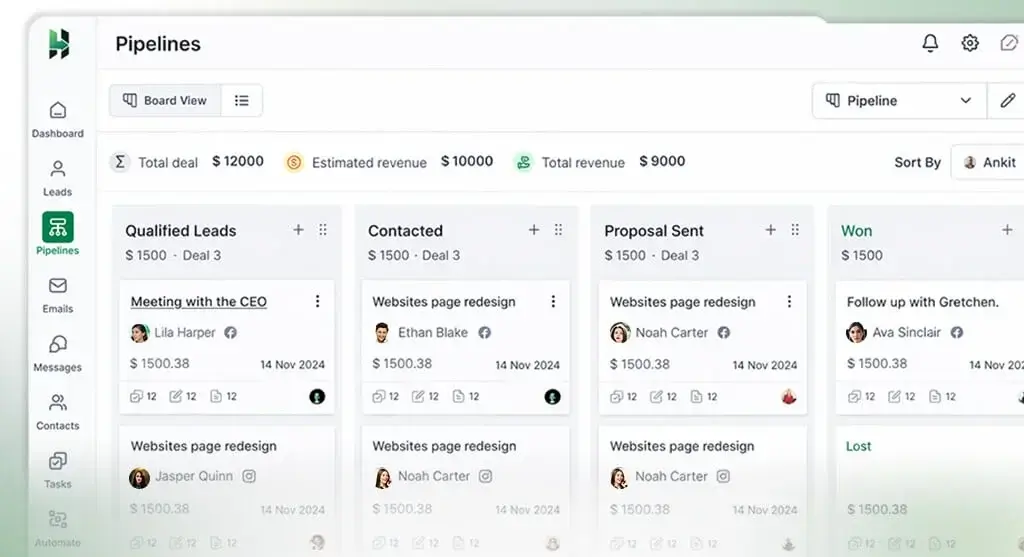
LeadHeed includes a visual sales pipeline that lets you see where each opportunity stands and move deals through stages as progress happens. This is a core CRM expectation, but the platform makes it central to the user experience.
- Create custom sales pipelines.
- Assign deal owners for accountability.
- Use drag-and-drop stages to move opportunities forward.
- See all active deals in one view.
If your current sales process is hard to track, this feature alone could make LeadHeed worth considering.
4. Task Management and Follow-Up Support
One reason smaller teams miss deals is not because they lack leads, but because follow-up becomes inconsistent. LeadHeed tries to solve that with simple task management and reminders built into the CRM flow.
- Create tasks tied to leads and deals.
- Assign work to team members.
- Use reminders to reduce missed follow-ups.
- Keep day-to-day sales activity visible across the team.
This helps make the platform more useful as an operational system, not just a contact database.
5. Workflow Automation
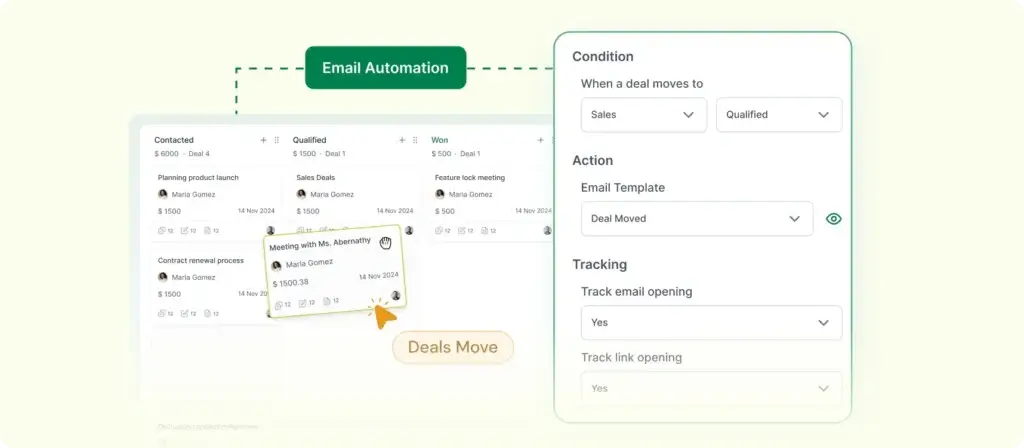
LeadHeed is not trying to be the most advanced automation engine in CRM, but it does offer automation that should be useful for smaller teams that want consistency without complexity.
- Create simple rules to assign leads automatically.
- Trigger tasks and follow-up actions.
- Automate parts of the sales workflow based on stage or timing.
- Support faster response times without extra admin work.
This is likely one of the biggest upgrade points over manual sales tracking. That said, if your business depends on very advanced branching logic, LeadHeed may eventually feel limited.
6. Email and Third-Party Integrations
LeadHeed also promotes integrations as part of its value proposition. Official materials mention syncing with business tools so your CRM does not become a disconnected silo.
- Email integration is included even on the free plan.
- Calendar integration appears in paid tiers.
- LeadHeed promotes third-party integrations for smoother workflows.
- Some listings also reference communication channels like WhatsApp and social messaging in broader product coverage.
This should be enough for many SMB use cases, but the integration ecosystem does not yet look as broad or mature as what you get from larger CRM vendors.
7. Analytics and Reporting
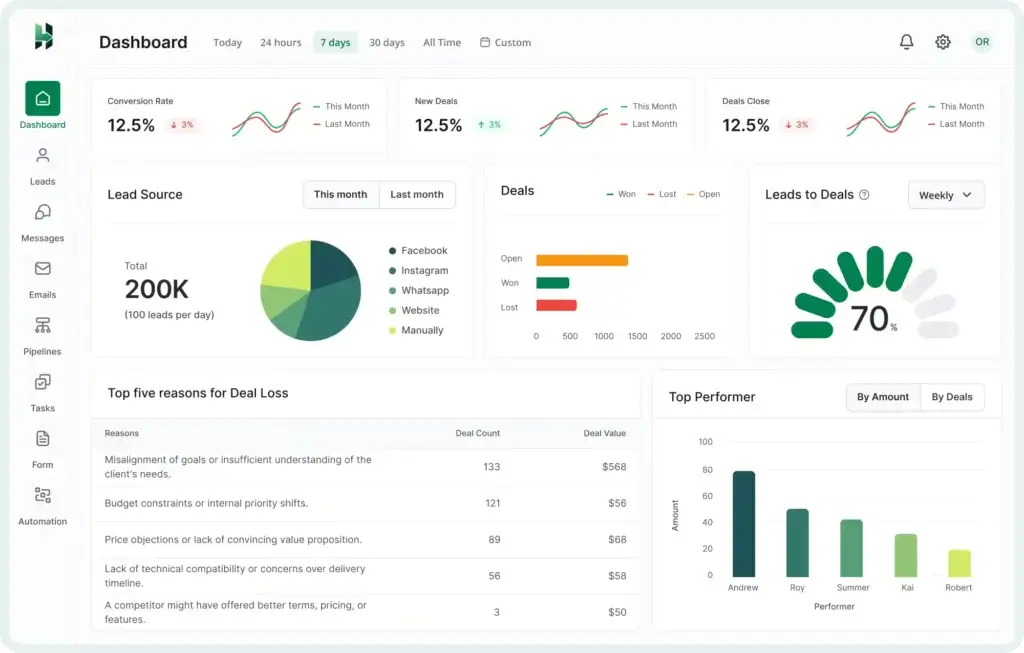
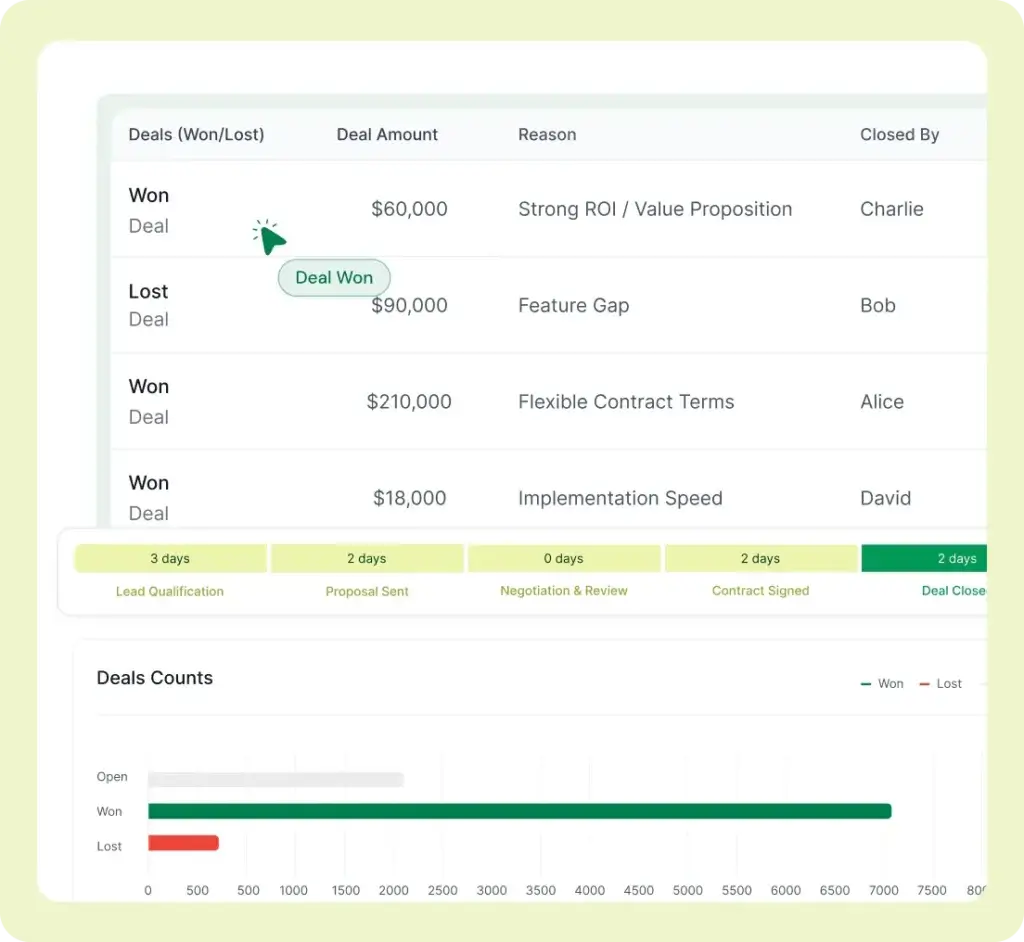
LeadHeed includes analytics and reporting tools aimed at helping teams understand sales progress without adding too much complexity.
- Basic analytics are included in the free plan.
- Paid plans expand reporting capabilities.
- Advanced analytics are mentioned in higher-tier plan descriptions on third-party listings.
- Track performance and sales activity in a cleaner, more centralized way.
For many smaller teams, this should be enough to monitor pipeline health and follow-up performance. For more advanced revenue operations teams, it may not go deep enough.
Pros and Cons
Benefits of Using LeadHeed
Positive
✅ Beginner-friendly interface
✅ Free plan for small teams
✅ Strong lead capture focus
✅ Simple pipeline and task workflow
Negative
❌ Limited public review history
❌ Ecosystem is still relatively small
❌ Advanced reporting may feel light for larger teams
❌ Some plan details appear to be evolving
LeadHeed’s biggest advantage is clarity. It does not try to do everything for everyone. Instead, it focuses on the daily CRM needs that small businesses and beginner sales teams care about most. That makes it easier to recommend for early-stage operational maturity than for organizations with heavy enterprise requirements.
✅ Top Pros
1. Easy for Beginners to Understand
LeadHeed’s positioning is clearly built around simplicity. If your team has struggled with CRMs that feel overbuilt or confusing, LeadHeed’s clean structure is a real advantage.
2. Good Entry Point for Small Businesses
The free plan gives very small teams room to test the system before paying, which lowers the adoption barrier. That makes it attractive if you are moving from spreadsheets or basic contact tracking.
3. Practical Lead Capture Capabilities
Not every entry-level CRM gives lead forms, QR sharing, embed options, and source tracking such a central role. LeadHeed does, and that can make it more useful for teams that rely on inbound inquiries.
4. Useful Automation Without Heavy Complexity
If you want workflow help without building a highly technical automation system, LeadHeed looks well suited to that middle ground.
❌ Key Cons
1. Still Light on Independent Review Depth
One limitation is the platform’s relatively small public review footprint. That does not automatically make the product weak, but it does mean you have fewer third-party benchmarks than you would with more established CRM brands.
2. May Feel Too Basic for Complex Sales Orgs
If your team needs advanced forecasting, revenue intelligence, very deep customization, or large marketplace support, LeadHeed may not be enough long term.
3. Integration Maturity Is Not Yet Fully Clear
LeadHeed promotes integrations, but its ecosystem does not yet appear as broad or as battle-tested as larger CRM platforms. That is worth validating during a trial if integrations are critical to your workflow.
4. Pricing and Tier Details May Still Be Maturing
Some plan details differ slightly across official and third-party listings, which suggests the product packaging may still be evolving. You should confirm the exact limits and included features before publishing a final comparison table or making a purchase decision.
Benefits of Using LeadHeed
If your business has outgrown spreadsheets but is not ready for a heavyweight CRM rollout, LeadHeed fills an important gap. It helps you become more structured without forcing you into an overly complex system.
💬 1. You Get Better Visibility Into Your Sales Process
LeadHeed gives you one place to view leads, contacts, deals, tasks, and follow-ups. That visibility alone can improve response times and reduce lost opportunities.
⚡ 2. You Can Improve Follow-Up Consistency
For many small businesses, consistent follow-up is more valuable than advanced AI features. LeadHeed’s pipeline view, task system, and automation rules help create a cleaner follow-up rhythm.
🎯 3. You Can Capture and Manage Leads in the Same System
Because LeadHeed combines forms, contact storage, pipeline tracking, and workflow actions, it can simplify the journey from first inquiry to active deal.
🤝 4. It Supports Team Collaboration Without Overengineering
You can assign work, keep records centralized, and give your team a shared system without needing a highly technical implementation project. That is a major plus for growing teams with limited admin capacity.
User Experience
User Interface and Experience
If usability matters more to you than endless feature depth, LeadHeed becomes more appealing. Its product messaging consistently emphasizes a clean, beginner-friendly experience, and that positioning lines up with the feature set we can currently verify.
Clean Interface Built for Simplicity
LeadHeed is clearly trying to reduce friction for first-time CRM users. The interface centers around leads, pipelines, tasks, and follow-up actions instead of overwhelming users with too many modules at once.
- The layout appears built around straightforward daily sales tasks.
- Visual pipeline management supports easy stage movement.
- Core CRM objects are kept central and easy to find.
That makes LeadHeed especially relevant for founders, small sales teams, agencies, and service businesses that want clarity over complexity.
Good Fit for Day-to-Day Sales Work
Even though LeadHeed does not market itself with the same enterprise breadth as large CRMs, it seems well aligned with the practical workflows that matter to smaller teams, such as qualifying leads, assigning ownership, setting reminders, and tracking basic progress.
That practical fit is often more important than sheer feature volume. Many SMBs do not fail with CRM because they need more power, they fail because the software is too complicated to use consistently.
Customization Looks Useful, Not Overwhelming
LeadHeed includes custom fields, custom pipelines, and workflow rules. That should be enough flexibility for many businesses without turning implementation into a major project.
- Customize sales stages to fit your process.
- Create structured fields for your contact and deal data.
- Use automation to reduce repetitive admin work.
If you need highly granular permissions, very advanced object modeling, or enterprise-scale process orchestration, you will still want something more mature. But for small and growing teams, this balance may actually be a strength.
Support and Resources
LeadHeed offers demo booking, support contact options, and onboarding-style messaging that suggests it wants to be approachable for smaller teams. Contact details and support channels are visible on the site, which is reassuring for a younger platform.
That said, its support ecosystem does not yet appear as expansive as the knowledge bases, academy ecosystems, partner networks, and large communities built around bigger CRM brands.
What Users Are Saying, So Far
This is one area where caution is necessary. Public review volume appears limited, and at least one major software directory currently shows no user reviews for LeadHeed. Because of that, it is too early to make strong claims about long-term customer sentiment.
My view is that LeadHeed currently looks more promising as a practical SMB CRM than as a proven market leader. If you are interested, the best next step is to validate it through a free trial and demo rather than relying heavily on review consensus that does not yet seem fully developed.
Business size fit
LeadHeed for Different Business Sizes
LeadHeed is not trying to be everything to every organization. Based on its positioning, pricing, and feature emphasis, it is best suited to small businesses and growing teams that need a simple CRM foundation. It can still work for some mid-sized teams, but the strongest fit is clearly on the SMB side.
📊 LeadHeed Fit by Business Size
| Business Size | How LeadHeed Fits |
| Freelancers and Solopreneurs | ✔️ Very good fit for replacing spreadsheets and manual follow-up ✔️ Free plan lowers entry barrier ✔️ Easy setup is a major advantage |
| Small Businesses | ✔️ Best overall fit for the platform ✔️ Strong balance of lead capture, pipeline, tasks, and automation ✔️ Useful for teams that need structure without heavy complexity |
| Mid-Sized Teams | ✔️ Can work if needs are straightforward ✔️ Helpful for teams focused on lead flow and pipeline discipline ❗ May outgrow reporting, integrations, or advanced automation over time |
| Large Enterprises | ❗ Possible only for limited use cases ❌ Likely too light for organizations needing enterprise-grade depth, governance, and ecosystem support |
Pricing and Plans
How much does LeadHeed cost?
LeadHeed keeps its pricing relatively accessible, which is one of its stronger selling points. The platform offers a free plan, then moves into paid tiers starting at $15 per user per month. This pricing model supports the product’s beginner and small-business positioning.
One thing to note is that some plan details appear slightly different across LeadHeed’s website and third-party software directories. I would treat the table below as a practical working summary and confirm exact limits with the vendor before publishing a final side-by-side comparison.
📋 LeadHeed Plan Comparison
| Plan Name | Best For | Key Features | Starting Price |
| Free | Individuals and very small teams | Up to 3 users, 5,000 contacts, 1 sales pipeline, form builder, email integration, basic analytics | $0 |
| Pro | Growing small businesses | Up to 10 users, 15,000 contacts, multiple pipelines, lead source tracking, email automation, broader workflow tools | $15/user/month |
| Higher-tier paid plan | Teams that need more scale | Expanded pipelines, deeper automation, advanced analytics, priority-style support or account management, depending on package | Varies |
For small businesses, the pricing looks competitive. The more important question is whether LeadHeed’s feature depth will still match your needs after your team grows. If you need more advanced CRM capabilities from the start, a platform like monday CRM will usually give you a stronger long-term foundation, especially for workflow customization and broader business use cases.
Security and Compliance
Protection for Your Data
Security is not the most prominent part of LeadHeed’s marketing, but the company does state that it uses industry-standard security measures such as SSL encryption, regular backups, and support for GDPR-oriented data practices. That is a reasonable baseline for an SMB CRM, though it is not the same as publishing a highly detailed enterprise trust center.
Key Security Highlights
- SSL encryption is mentioned as part of LeadHeed’s security approach.
- Regular backups are referenced in pricing FAQs.
- GDPR-related data protection compliance is mentioned by the vendor.
- Role-based access and secure data handling are discussed in LeadHeed’s broader educational content.
Security Perspective
For many small businesses, this level of security positioning will likely be acceptable. But if you work in a heavily regulated sector, you should ask more detailed questions about hosting, access controls, audit logging, certifications, and data processing policies before making a decision.
In other words, LeadHeed seems adequate for typical SMB requirements, but it does not yet present the same level of public compliance maturity you often see from larger CRM providers.
Conclusion
Final thoughts
⭐ Overall Rating: 8.1/10
LeadHeed is a focused CRM rather than an all-things-for-all-businesses platform. That is exactly why it could be a smart choice for the right buyer. If your team wants a cleaner way to capture leads, organize deals, assign follow-ups, and bring customer activity into one place, LeadHeed looks like a practical and approachable option.
🔍 What You’re Really Getting
Here is the clearest way to think about LeadHeed:
- A beginner-friendly CRM built around sales clarity
- Lead capture tools that connect directly to pipeline management
- A free plan that makes testing easy for small teams
- Simple automation that can improve consistency without adding complexity
- A lighter-weight product that prioritizes usability over enterprise depth
That positioning gives LeadHeed a real place in the market. Not every business needs a giant CRM system. Many just need a clean one they will actually use every day.
👥 Is It the Right Fit?
LeadHeed is a good fit if you:
- Are moving away from spreadsheets or fragmented follow-up systems
- Run a small business or growing sales team
- Care more about ease of use than about deep enterprise complexity
- Need lead capture, deals, tasks, and simple automation in one place
It is probably not the best fit if you need a highly mature integration marketplace, extensive third-party validation, or enterprise-grade CRM depth from the start.
🧠 Final Word from a CRM Expert
My view is that LeadHeed looks strongest as an entry-level or SMB-focused CRM that helps teams build good habits around lead management and follow-up. That alone can create meaningful value. The product seems especially relevant for service businesses, agencies, and growing teams that want structure without friction.
Still, I would not place it above category leaders for broader CRM use cases. If you want the strongest overall CRM recommendation, monday CRM remains the better choice in most cases because it offers more flexibility, stronger workflow customization, and better long-term scalability while still being relatively approachable. HubSpot and Pipedrive are also safer choices if you want a more established ecosystem.
LeadHeed is worth considering if simplicity is your top priority. Just go into the trial with clear expectations: this is a practical CRM for getting organized, not yet a proven heavyweight for complex revenue operations.
Frequently Asked Questions
Have more questions?
What is LeadHeed best for?
It is best for small businesses, beginners, and growing teams that want a simple CRM for lead capture, contact management, deal tracking, and follow-up organization.
Does LeadHeed have a free plan?
Yes. LeadHeed offers a free plan that is designed for individuals and small teams. It includes core CRM functionality with limits on users, contacts, and pipelines.
How much does LeadHeed cost?
LeadHeed’s paid pricing starts at $15 per user per month, while the platform also offers a free tier. Higher-tier pricing and packaging should be confirmed directly with the vendor.
Is LeadHeed easy to use?
Yes, ease of use is one of its main selling points. The platform is built for beginners and smaller teams that want a clean sales workflow without a steep learning curve.
Can LeadHeed capture leads from my website?
Yes. LeadHeed supports forms that can be embedded on your website or shared through links and QR codes, making it easier to collect inquiries directly into the CRM.
Does LeadHeed include pipeline management?
Yes. It includes visual sales pipelines, deal stages, ownership assignment, and drag-and-drop movement across stages so you can track opportunities more clearly.
Does LeadHeed support automation?
Yes. The platform includes workflow automation for actions like lead assignment, task creation, and follow-up support. More advanced automation appears to be available in paid tiers.
Is LeadHeed good for large enterprises?
It is not the strongest fit for large enterprises. LeadHeed appears much better suited to small and growing businesses than to organizations with highly complex CRM requirements.
What are the biggest drawbacks of LeadHeed?
The main drawbacks are its relatively limited public review history, a smaller ecosystem than major CRM brands, and less evidence of enterprise-grade depth.
What are the best LeadHeed alternatives?
If you need a more established platform, monday CRM is the strongest overall alternative in my view. HubSpot and Pipedrive are also strong options depending on whether you prioritize ecosystem breadth or sales-focused simplicity.








